



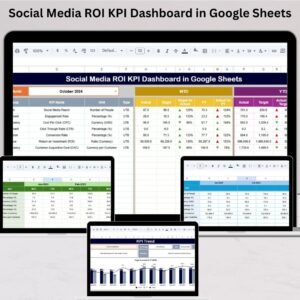
Tracking social media performance is no longer optional—it is essential. Brands today run ads, create content, collaborate with influencers, and post across multiple platforms. But without the right measurement, marketers struggle to understand what works and what doesn’t. The Social Media ROI KPI Dashboard in Google Sheets solves this problem. It gives businesses a simple, cloud-based, and fully automated tracking system to measure engagement, conversions, revenue, and ROI with complete clarity.Social Media ROI KPI Dashboard in Google Sheets
This ready-to-use dashboard transforms Google Sheets into a powerful reporting tool. It shows your MTD metrics, YTD progress, previous year results, targets, and yearly trend charts—all in one place. Whether you manage organic social media, run paid ads, or handle influencer promotions, this dashboard helps you make smarter decisions and maximize your marketing results.Social Media ROI KPI Dashboard in Google Sheets

✨ Key Features of the Social Media ROI KPI Dashboard in Google Sheets
📊 1. Complete KPI Monitoring
Get a real-time view of engagement, reach, impressions, CPC, CTR, conversions, leads, content performance, and ROI. Everything is neatly organized and automatically calculated.
⚡ 2. Auto-Updating Dashboard
Select any month from a dropdown, and the entire dashboard updates instantly. You see actual vs target vs previous year performance within seconds.
⬆️⬇️ 3. Up/Down Arrows for Performance
Green arrows show improvement.
Red arrows show a decline.
This helps you understand results without reading long reports.
📉 4. Dynamic Trend Charts
Track how each KPI performs month by month. Identify patterns, seasonal dips, and growth opportunities easily.
📥 5. Cloud-Based & Collaborative
Your entire team can access, update, and analyze the dashboard anywhere using Google Sheets. No software required.
📦 What’s Inside the Social Media ROI KPI Dashboard in Google Sheets
📍 1. Dashboard Sheet – Main KPI View
This is the heart of your product. It displays MTD and YTD results for all KPIs along with comparisons to targets and previous-year values. One dropdown controls the entire view.
📈 2. KPI Trend Sheet – Deep KPI Analysis
Choose any KPI from a dropdown and instantly see:
KPI Group
Unit
KPI Type (UTB or LTB)
KPI Formula
KPI Definition
Yearly Trend Chart
This sheet helps you monitor long-term performance and optimize strategies.
📝 3. Actual Numbers Sheet
Enter MTD and YTD actual values here. Changing the month selection updates all numbers across the dashboard automatically.
🎯 4. Target Sheet
Store monthly and yearly target values for all KPIs. Comparing actual performance against targets becomes effortless.
📆 5. Previous Year Sheet
Record last year’s data to monitor year-over-year improvement. This helps you measure long-term growth.
📚 6. KPI Definition Sheet
Includes a clean list of all KPIs with formulas, definitions, units, and KPI types. Perfect for training new team members or ensuring reporting accuracy.
🛠️ How to Use the Social Media ROI KPI Dashboard in Google Sheets
1️⃣ Enter Your Monthly Data
Update actual MTD & YTD numbers in the Actual sheet.
2️⃣ Add Yearly & Monthly Targets
Input your expectations in the Target sheet.
3️⃣ Select the Month
Choose the month from the dropdown on the dashboard.
4️⃣ Review Your KPIs
Compare actual vs target vs previous year through arrows and indicators.
5️⃣ Study Trends
Analyze KPI movement across months to optimize campaigns.
6️⃣ Use Definitions for Clarity
Review formulas and definitions anytime in the KPI sheet.
🎯 Who Can Benefit from This Social Media ROI KPI Dashboard in Google Sheets
📱 Social Media Managers
Track engagement, reach, content results, and campaign health.
📈 Digital Marketers
Monitor conversions, leads, traffic, and revenue with clarity.
🏢 Agencies
Manage multiple clients efficiently with a clean reporting structure.
📊 Marketing Teams
Get easy access to real-time performance insights.
💼 Entrepreneurs & Small Businesses
See what brings results and where to improve.
Click here to read the Detailed blog post
Watch the step-by-step video Demo:
Visit our YouTube channel to learn step-by-step video tutorials — Youtube.com/@NeotechNavigators
Compatibility and Requirements
- Works in Google Sheets with a free Google account and a web browser. Nothing to install.
- Months and KPIs are picked from dropdowns. Google explains them in Create an in-cell dropdown list.
Frequently Asked Questions
Which social media KPIs does it cover?
Engagement, reach, impressions, CPC, CTR, conversions, leads, content performance and ROI.
How do I switch months?
Choose the month from the dropdown on the Dashboard sheet. Actual, target and previous year figures update together.
Which sheets are included?
Dashboard, KPI Trend, Actual Numbers, Target, Previous Year and KPI Definition.
Can my team update it together?
Yes. It runs in Google Sheets, so your team can open and update it from anywhere.
Is there an Excel version?
Yes. The Social Media ROI KPI Dashboard in Excel covers the same KPIs.
Related Social Media and Marketing Templates
- Social Media ROI KPI Dashboard in Excel: the same KPIs in Excel
- Social Media Performance Dashboard in Google Sheets: post and channel performance
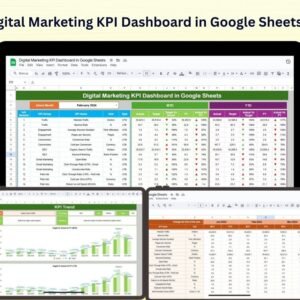
- Digital Marketing KPI Dashboard in Google Sheets: KPIs across all digital channels
- Social Media Posting Calendar in Google Sheets: plan what you post
- Marketing and Social Media Analytics Kit: 7 marketing templates in one download
Browse all Google Sheets KPI dashboards or the Google Sheets sales and marketing templates.





























Reviews
There are no reviews yet.