
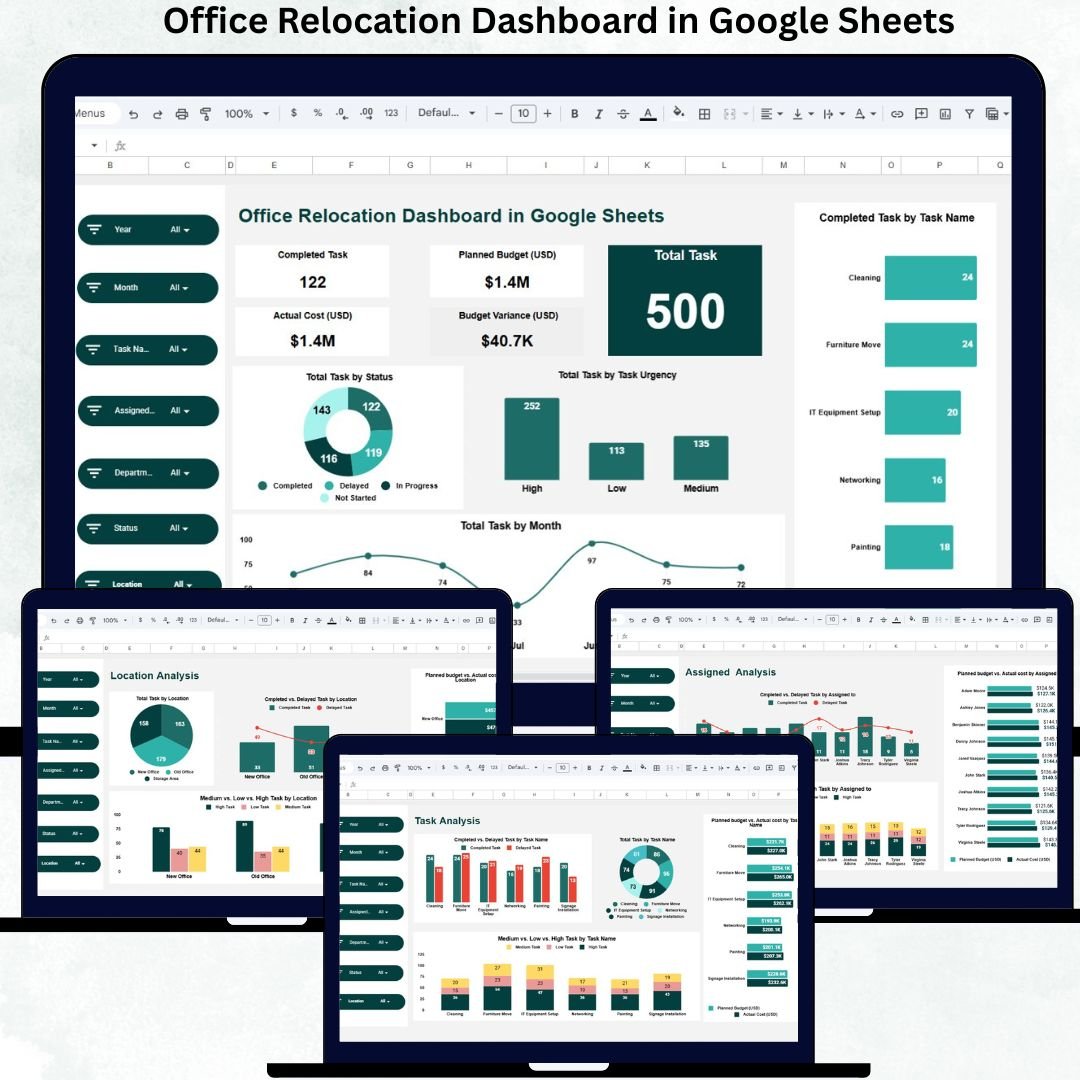
Office relocation is one of the most complex administrative projects for any organization. It involves departments, locations, vendors, budgets, timelines, and dozens of interdependent tasks. Packing, IT setup, furniture movement, lease coordination, approvals, and employee communication must all work perfectly together. However, when data sits across emails or scattered spreadsheets, delays increase, costs escalate, and accountability suffers.
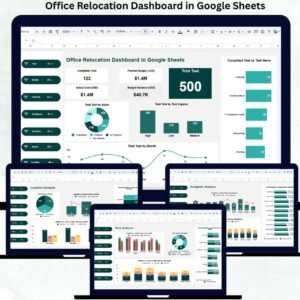
The Office Relocation Dashboard in Google Sheets gives you a single, powerful control center to manage the entire relocation process with clarity and confidence. This ready-to-use dashboard tracks tasks, urgency, budget, cost overrun, department-wise progress, location-wise execution, and individual responsibility—everything in one live dashboard. Because it is built in Google Sheets, it is easy to use, collaborative, and does not require expensive project management software.
🚀 Key Features of the Office Relocation Dashboard
✅ End-to-end relocation task tracking
✅ Budget vs actual cost monitoring
✅ Department & location-wise analysis
✅ Task urgency prioritization
✅ Assigned-to accountability tracking
✅ Smart search functionality
✅ Real-time collaboration in Google Sheets
✅ Ready-to-use, no setup required
This dashboard converts chaotic relocation activities into a well-controlled, data-driven operation.
📊 What’s Inside the Office Relocation Dashboard
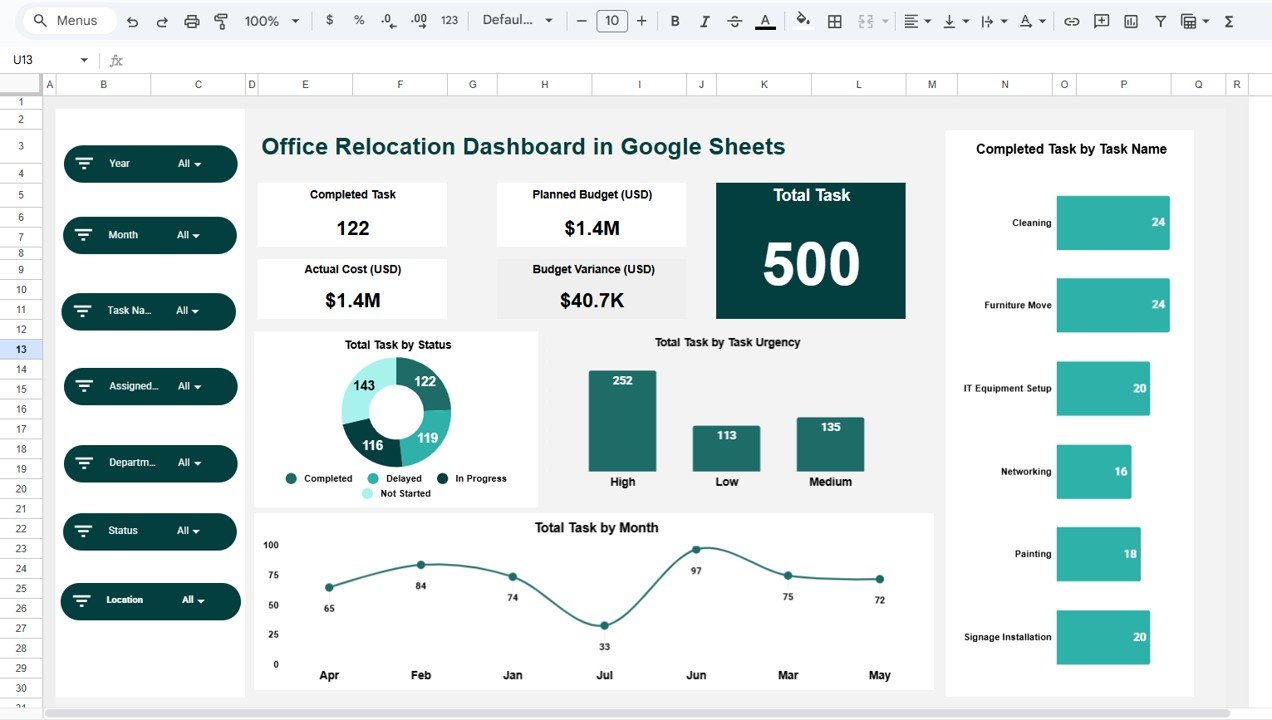
🧭 Dashboard Sheet Tab – Executive Overview
This is the main control panel for relocation leadership.
KPI Cards Included:
-
✅ Completed Task – Total tasks successfully completed
-
✅ Total Task – Total planned relocation tasks
-
✅ Planned Budget (USD) – Approved relocation budget
-
✅ Actual Cost (USD) – Current relocation spend
-
✅ Budget Variance (USD) – Overrun or savings indicator
These cards instantly show whether your relocation project is on track or at risk.
📈 Overall Task Analysis Charts
-
Total Task by Status
Shows Completed, In Progress, Delayed, and Not Started tasks
✅ Identifies execution gaps
✅ Highlights overall risk -
Total Task by Task Urgency
Groups tasks into Low, Medium, and High urgency
✅ Supports priority-based decisions -
Total Task by Month
Tracks workload across the timeline
✅ Identifies peak relocation periods -
Completed Task by Task Name
Shows milestone completion
✅ Confirms progress task-by-task
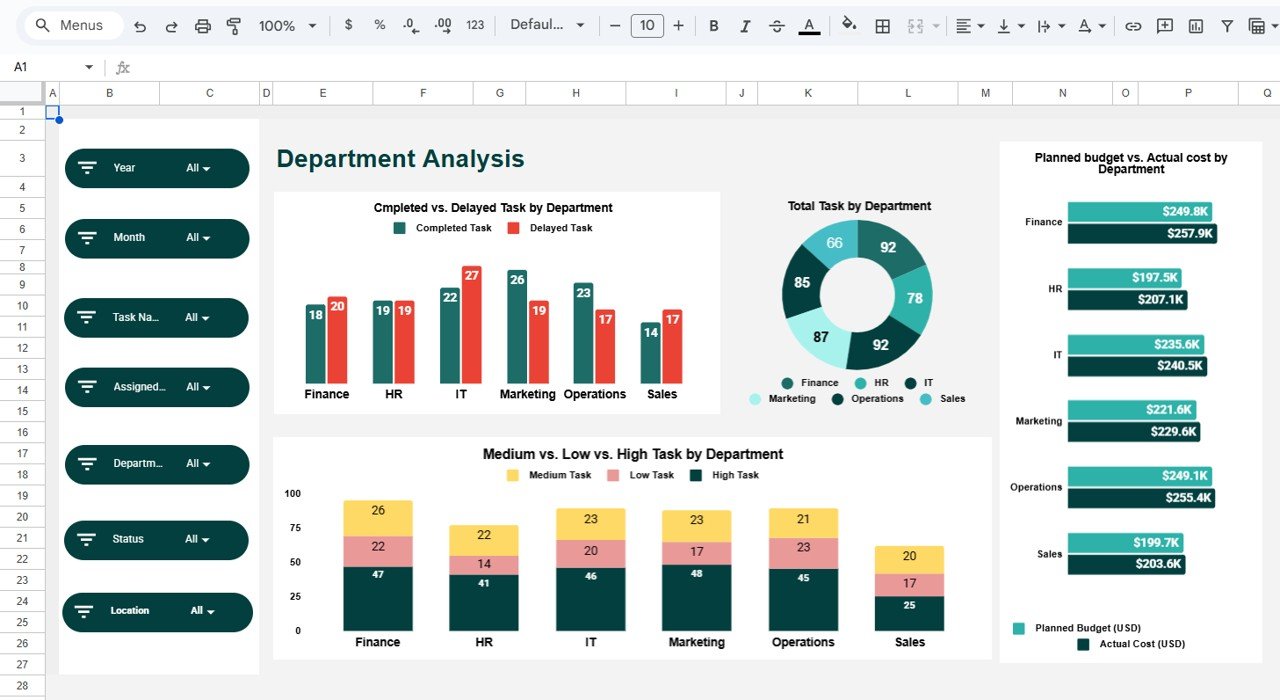
🏢 Department Analysis Section
This section highlights department-level performance.
✅ Completed vs Delayed Task by Department
✅ Total Task by Department
✅ Task Urgency by Department (Low / Medium / High)
✅ Planned Budget vs Actual Cost by Department
This helps management identify delays, cost overruns, and workload imbalance across departments.
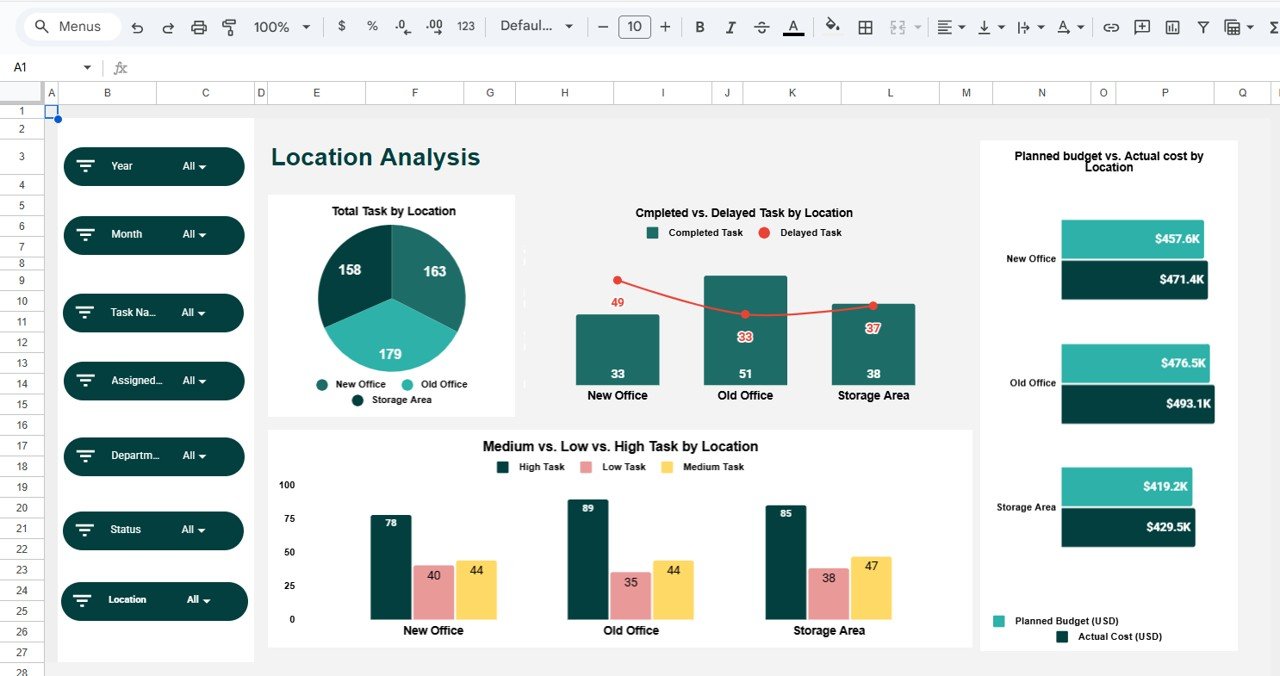
📍 Location Analysis Section
For organizations relocating across multiple offices:
✅ Total Task by Location
✅ Completed vs Delayed Task by Location
✅ Task Urgency by Location
✅ Planned Budget vs Actual Cost by Location
This ensures proper coordination, logistics planning, and location-wise financial control.
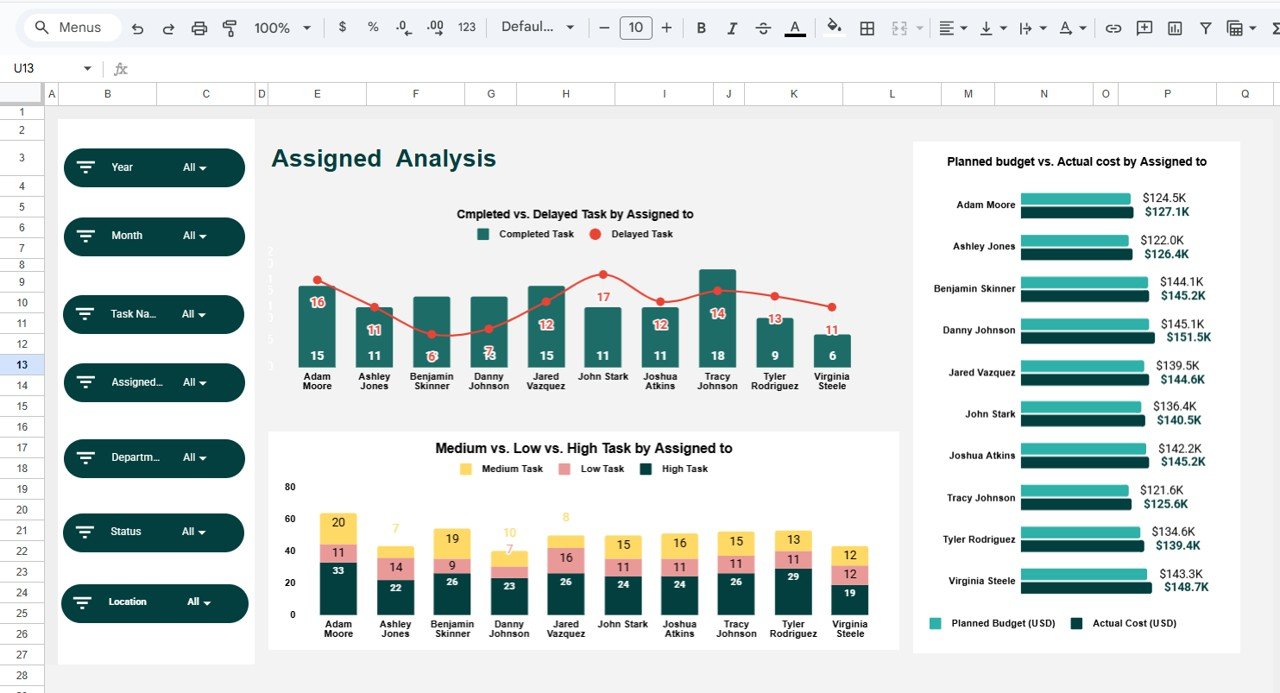
👤 Assigned Analysis Section
This section focuses on accountability.
✅ Completed vs Delayed Tasks by Assigned Person
✅ Task Urgency by Assigned To
✅ Planned Budget vs Actual Cost by Assigned To
Managers can instantly see who owns delays, workload imbalance, and cost responsibility.
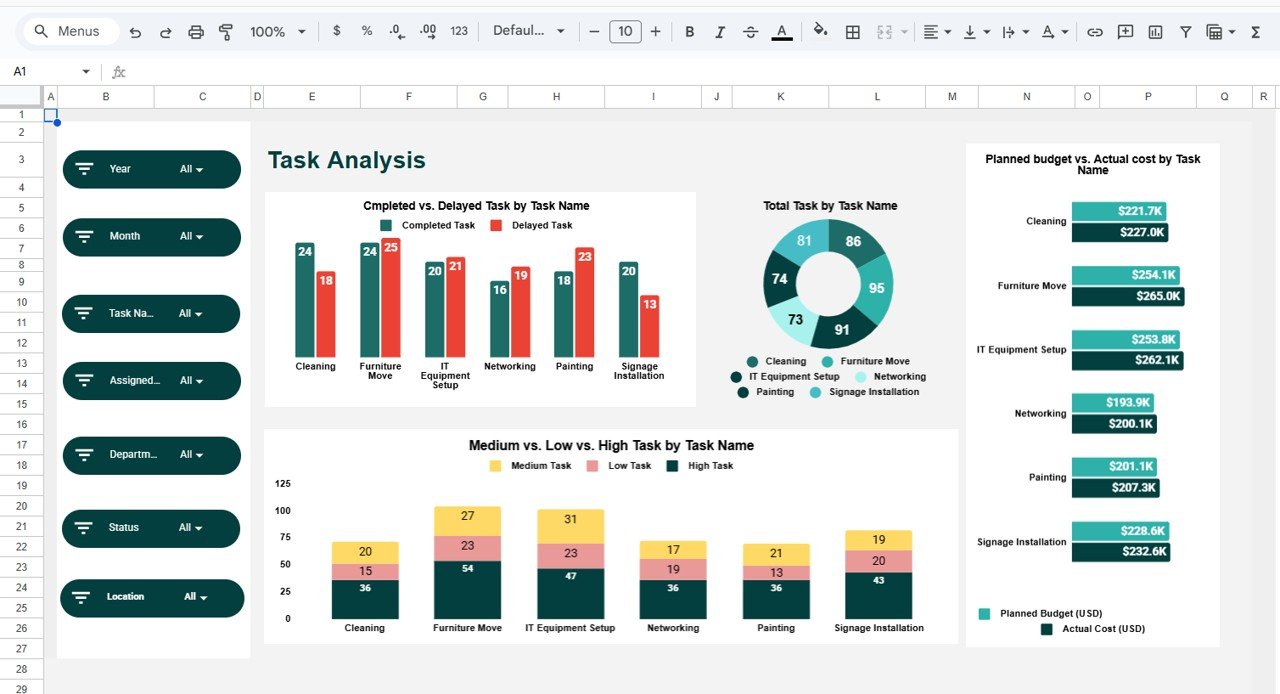
🧩 Task Analysis Section
Deep dive into individual relocation tasks.
✅ Completed vs Delayed Tasks by Task Name
✅ Total Tasks by Task Name
✅ Task Urgency by Task
✅ Planned Budget vs Actual Cost by Task
This helps identify high-risk, delay-prone, and cost-heavy tasks for future optimization.
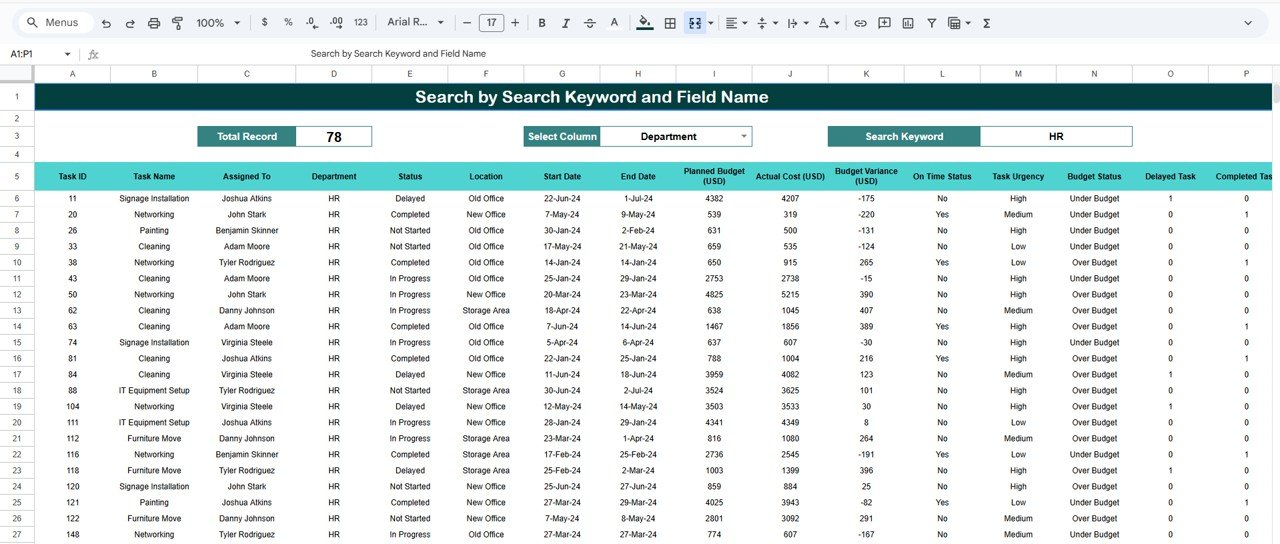
🔍 Search Functionality – Find Anything Instantly
Use the Smart Search Panel by entering:
-
Search Keyword (Task, Department, Location, Assigned To)
-
Field Name
✅ No scrolling
✅ Faster reviews & audits
✅ Perfect for leadership meetings
✅ How to Use the Office Relocation Dashboard
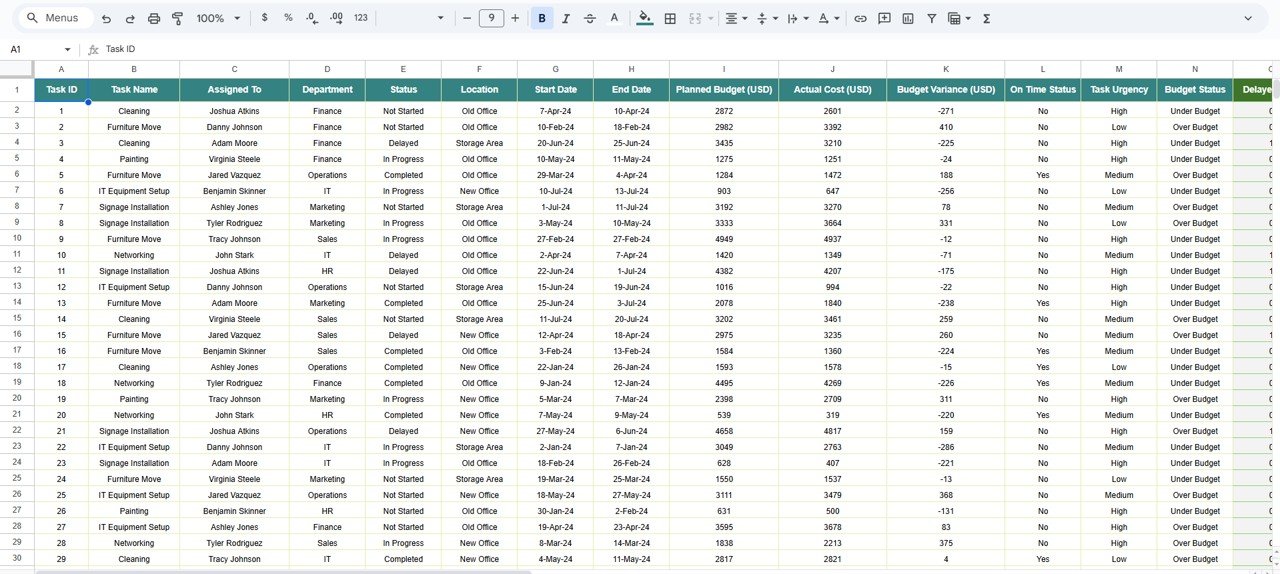
1️⃣ Enter relocation tasks and costs
2️⃣ Assign owners and urgency
3️⃣ Update task status regularly
4️⃣ Monitor charts and budget variance
5️⃣ Use search during reviews and audits
No technical knowledge required.
👥 Who Can Benefit from This Dashboard
-
🏢 Admin & Facility Teams
-
📦 Operations & Logistics Teams
-
📊 Project Managers
-
💰 Finance & Procurement Teams
-
🧑💼 Leadership & Decision-Makers
✅ Advantages of the Office Relocation Dashboard
✔ Centralized relocation planning
✔ Complete budget control
✔ Improved accountability
✔ Faster corrective action
✔ Clear department & location visibility
✔ Real-time collaboration
🔧 Opportunities for Improvement
You can extend the dashboard with:
-
SLA tracking
-
Vendor performance analysis
-
Automated delay alerts
-
Document links
-
Task risk scoring
✅ Best Practices
-
Update task status frequently
-
Review department & location charts weekly
-
Monitor budget variance closely
-
Assign clear task ownership
-
Lock formulas to prevent errors
✅ Conclusion
The Office Relocation Dashboard in Google Sheets turns a complex office move into a controlled, transparent, and measurable process. It brings tasks, costs, urgency, accountability, and progress together in one visual system. Because it is cloud-based and easy to maintain, it is the perfect tool for successful, stress-free office relocations.
Click here to read the Detailed blog post
Watch the step-by-step video tutorial:































Reviews
There are no reviews yet.