

Fire safety is not optional in modern workplaces. Every organization must conduct regular fire drills to protect employees, meet regulatory requirements, and ensure emergency readiness. However, when fire drill records remain scattered across paper registers, emails, or unstructured spreadsheets, safety management becomes inefficient. Audit preparation turns stressful, insights remain unclear, and improvement opportunities get overlooked.
That is exactly why the Office Fire Drill Log Tracker in Google Sheets becomes a powerful and practical solution.
This ready-to-use tracker helps safety officers, HR teams, and facility managers record, monitor, and analyze all fire drill activities in one centralized system. Instead of manually compiling reports, teams gain instant visibility into drill frequency, participation, compliance, and recurring issues through automated charts and a smart search feature. The result is better preparedness, faster corrective action, and confident audit readiness.
Because the tracker runs entirely in Google Sheets, it is cloud-based, collaborative, easy to use, and cost-effective—without the need for specialized safety software.
✨ Key Features of the Office Fire Drill Log Tracker in Google Sheets
📋 1. Centralized Fire Drill Record Management
Log every fire drill in one structured tracker instead of maintaining multiple documents.
📊 2. Automated Safety & Compliance Charts
Built-in visuals highlight drill performance, participation, and compliance gaps instantly.
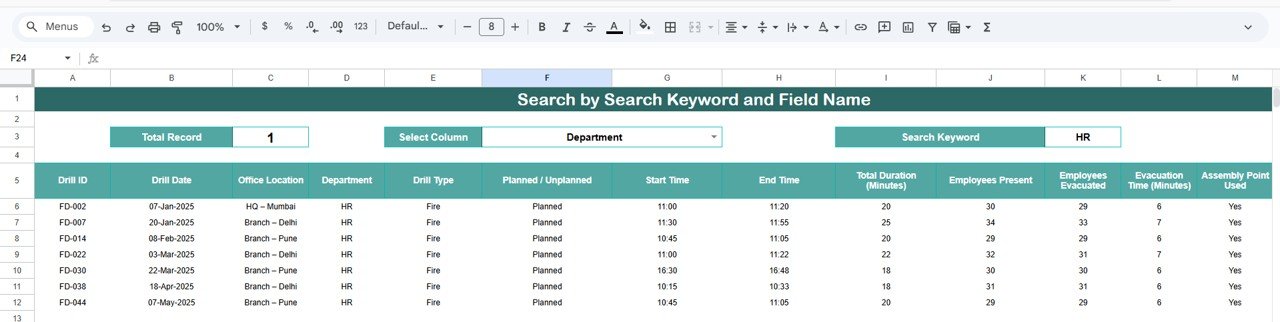
🔍 3. Smart Search Functionality
Find any drill record quickly by department, location, drill type, coordinator, or issue.
🤝 4. Real-Time Collaboration
Safety teams, HR, and facility managers can update and review records together in real time.
🚨 5. Audit-Ready Documentation
Maintain clear, organized, and searchable records for internal reviews and regulatory inspections.
📦 What’s Inside the Office Fire Drill Log Tracker in Google Sheets
🗂️ Tracker Sheet Tab – Central Fire Drill Log
This is the foundation of the tracker where all fire drill information is recorded in a clean and consistent format. Typical fields include:
-
Drill Date
-
Office Location
-
Department
-
Drill Type (Planned / Unplanned)
-
Assembly Point Used (Yes / No)
-
Drill Rating (1–5)
-
Issues Observed
-
Drill Coordinator
-
Remarks
As soon as data is entered or updated, all charts refresh automatically.
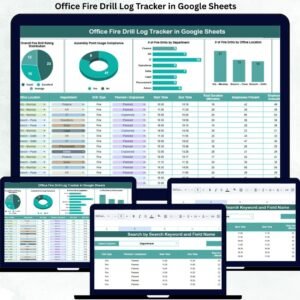
📊 Charts Included in the Office Fire Drill Log Tracker
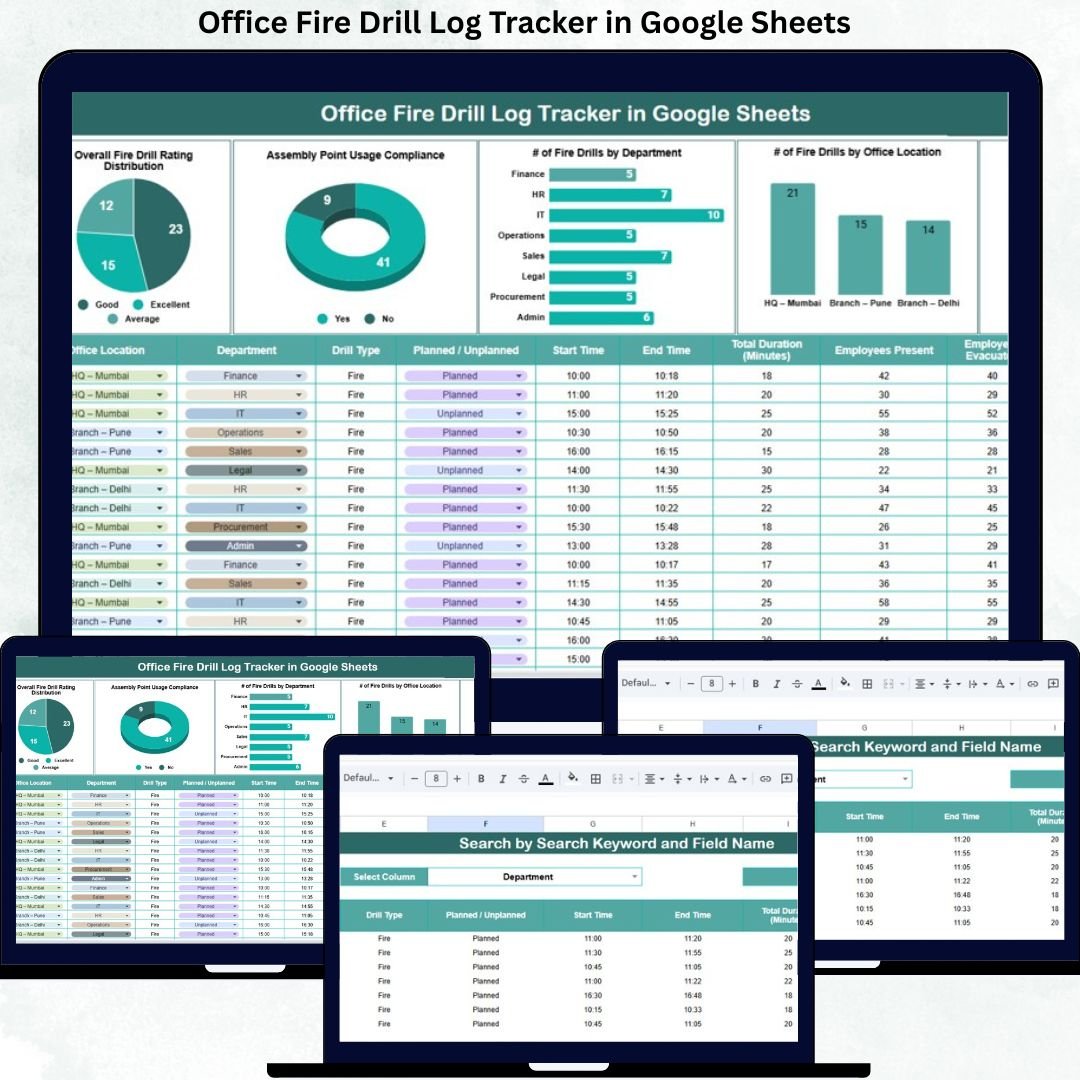
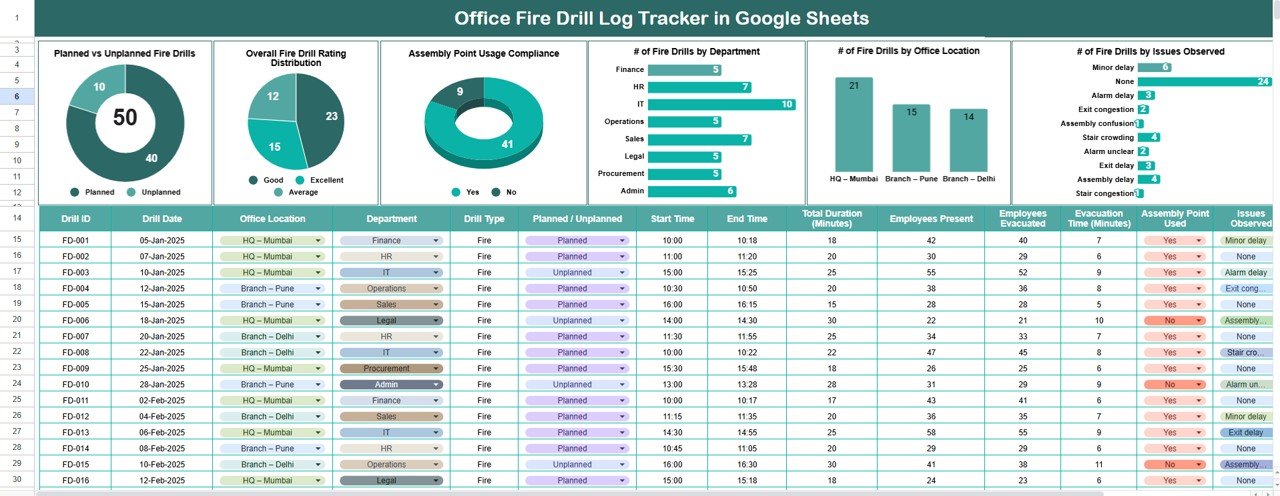
📅 Planned vs Unplanned Fire Drills
This chart compares planned drills against unplanned drills, helping organizations verify compliance with safety schedules.
⭐ Overall Fire Drill Rating Distribution
Visualizes drill quality based on ratings, helping teams identify low-performing drills and track improvement over time.
📍 Assembly Point Usage Compliance
Shows whether employees followed evacuation protocols correctly—critical for real emergency readiness.
🏢 Number of Fire Drills by Department
Ensures all departments participate equally and highlights gaps in drill coverage.
🌍 Number of Fire Drills by Office Location
Compares drill frequency across locations, supporting multi-site safety compliance.
⚠️ Number of Fire Drills by Issues Observed
Highlights recurring issues such as delayed evacuation, blocked exits, or communication gaps—making corrective action easier.
🔍 Search Functionality – Find Any Drill Instantly
The built-in smart search feature allows users to filter fire drill records using:
-
Search keyword
-
Field name (Department, Location, Drill Type, Issue, Coordinator)
This saves time during audits, inspections, and internal reviews.
🎯 Who Can Benefit from This Office Fire Drill Log Tracker
🚒 Safety Officers & EHS Teams
Track compliance, performance, and improvement areas clearly.
🏢 Facility & Admin Teams
Manage drill schedules and location-wise safety readiness.
👥 HR Teams
Support employee safety initiatives and compliance reporting.
📊 Compliance & Audit Teams
Access structured, searchable safety records instantly.
🏭 Organizations with Multiple Locations
Maintain consistent fire safety tracking across sites.
### Click here to read the Detailed blog post
Watch the step-by-step video tutorial:
















Reviews
There are no reviews yet.