
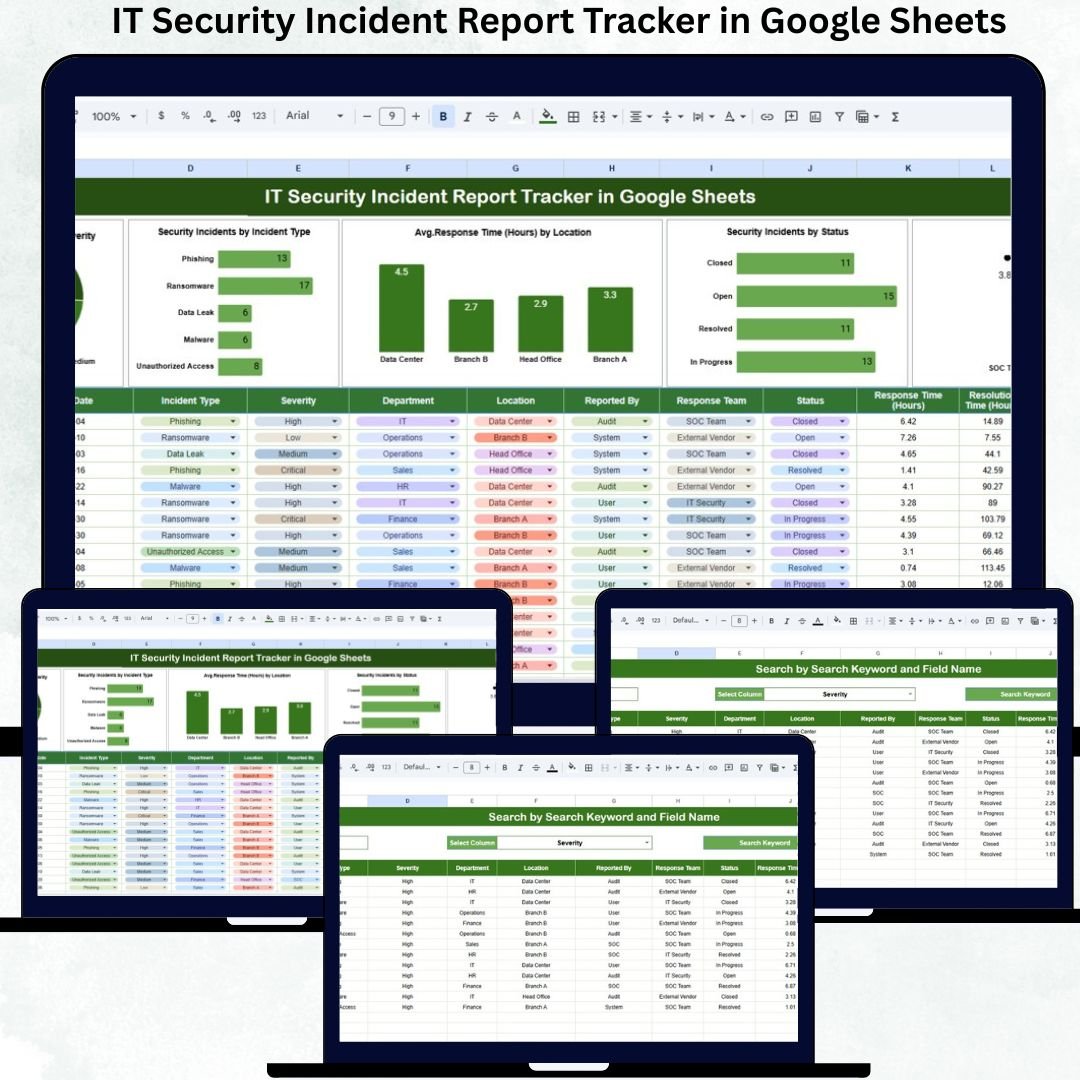
Cybersecurity incidents are no longer rare events—they are part of daily IT operations. Malware infections, phishing attacks, unauthorized access, data breaches, and system vulnerabilities can disrupt business continuity, damage brand trust, and expose organizations to regulatory risk. Yet many companies still rely on emails, shared folders, or unstructured spreadsheets to manage these incidents. As a result, response times increase, accountability weakens, and critical lessons are often missed.
The IT Security Incident Report Tracker in Google Sheets is a powerful, ready-to-use solution designed to bring structure, visibility, and control to security incident management. This tracker enables IT security teams to log incidents, track severity, measure response time, monitor status, analyze trends, and improve overall security posture—without expensive SIEM tools or complex software.
Because it is built entirely in Google Sheets, this tracker supports real-time collaboration, instant updates, and easy access from anywhere, making it ideal for both small organizations and enterprise security teams.
✅ Key Features of IT Security Incident Report Tracker
🔐 Centralized security incident logging
🚨 Severity-based risk classification
⏱️ Automated response time calculation
📊 Built-in visual charts for analysis
🧠 Root cause & corrective action tracking
🌎 Location & response team insights
🔍 Smart search and filtering system
☁️ Built in Google Sheets – no extra software required
📁 What’s Inside the IT Security Incident Report Tracker
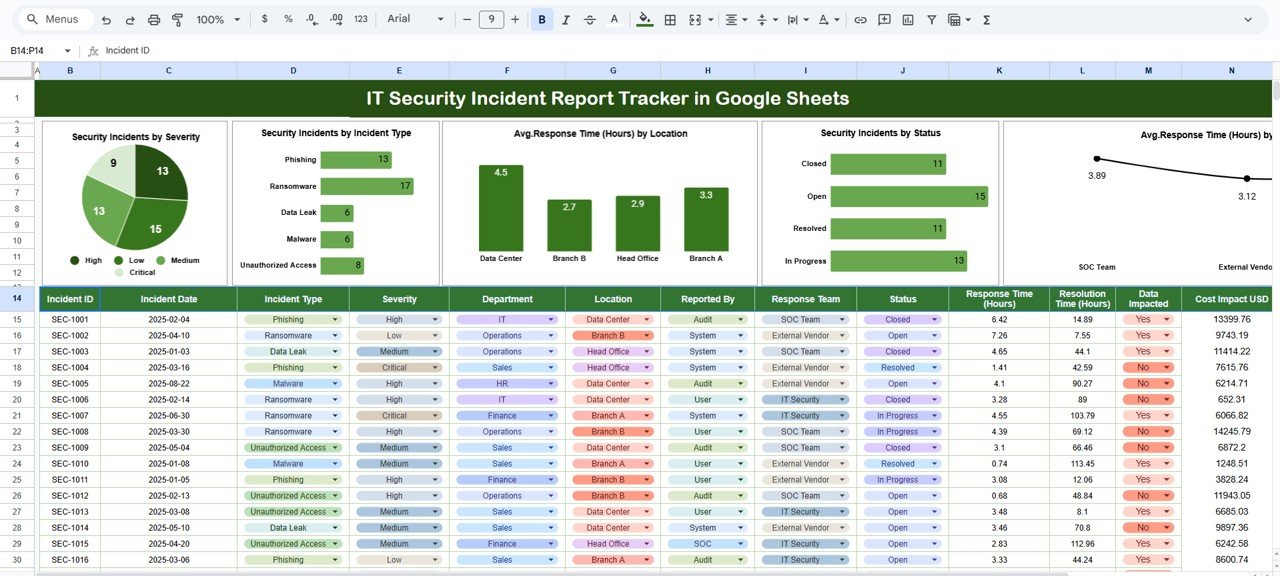
🗂️ Tracker Sheet Tab
This is the core operational sheet where all incidents are recorded. Each incident entry updates reports and charts automatically.
Key fields include:
-
Incident ID
-
Incident Date
-
Incident Type (Malware, Phishing, Data Breach, Access Violation, etc.)
-
Severity Level (Low, Medium, High, Critical)
-
Location
-
Detected By
-
Assigned Response Team
-
Response Start & End Time
-
Response Time (Auto-Calculated in Hours)
-
Incident Status (Open, In Progress, Contained, Closed)
-
Root Cause
-
Corrective Actions & Resolution Notes
This structured design ensures consistent documentation and audit-ready records.
📊 Charts & Visual Analysis
The tracker includes five powerful charts that convert raw incident data into actionable insights:
📌 Security Incidents by Severity
Quickly understand overall risk exposure and prioritize critical incidents.
📌 Security Incidents by Incident Type
Identify the most common attack vectors and strengthen preventive controls.
📌 Average Response Time (Hours) by Location
Pinpoint locations with slower response times and improve readiness.
📌 Security Incidents by Status
Monitor open, ongoing, and closed incidents to avoid backlog.
📌 Average Response Time (Hours) by Response Team
Compare team performance and identify training or capacity gaps.
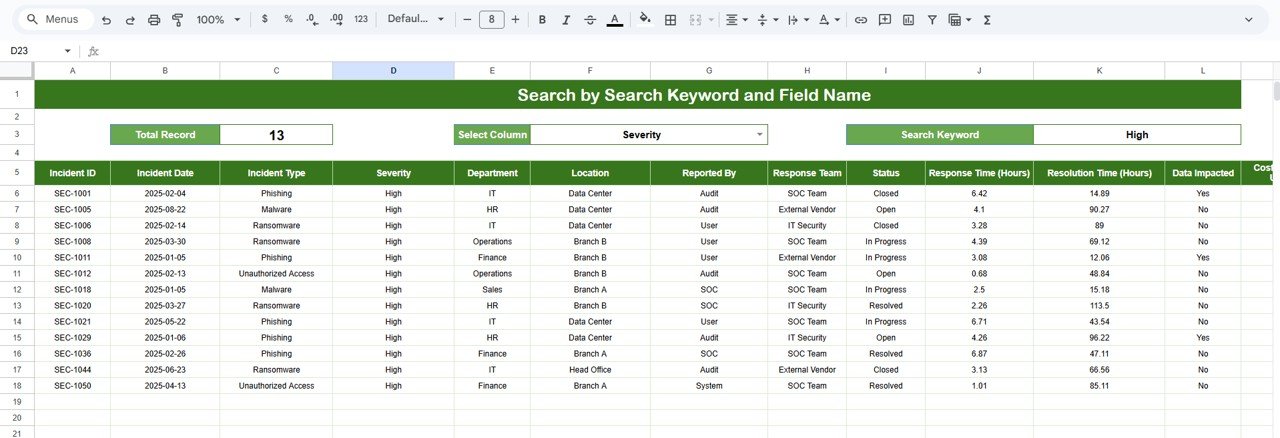
🔍 Search Sheet Tab – Smart Incident Lookup
The tracker includes a dedicated Search Sheet Tab to save investigation time.
Search using:
-
Keyword: Incident ID, Incident Type, Location, Severity, Team Name
-
Field Name: Status, Severity, Type, Response Team, Location
Results appear instantly—no manual filtering or scrolling.
⚙️ How to Use the IT Security Incident Tracker
1️⃣ Log every security incident immediately
2️⃣ Assign severity and response team
3️⃣ Track response time automatically
4️⃣ Monitor incident status via charts
5️⃣ Analyze trends to strengthen controls
No technical skills or scripting required.
👥 Who Can Benefit from This Tracker
-
🔐 IT Security Teams
-
🛡️ SOC Analysts
-
🧑💻 IT Managers & CIOs
-
📋 Risk & Compliance Teams
-
🏢 Internal Audit Teams
Perfect for corporates, startups, healthcare, finance, IT services, and regulated industries.
🌟 Advantages of the IT Security Incident Report Tracker
✔ Faster incident response
✔ Improved accountability
✔ Better risk visibility
✔ Audit-ready documentation
✔ Consistent root-cause analysis
✔ Easy collaboration in Google Sheets
🔧 Opportunities for Improvement
You can enhance the tracker by adding:
-
SLA-based response benchmarks
-
Automated alerts for critical incidents
-
Incident aging analysis
-
Integration with SIEM tools
-
Risk scoring based on impact
✅ Best Practices
✔ Log incidents immediately
✔ Define severity levels clearly
✔ Review response time weekly
✔ Document root causes thoroughly
✔ Restrict edit permissions
✔ Use search during audits
✅ Conclusion
The IT Security Incident Report Tracker in Google Sheets is a practical and effective solution for managing cybersecurity incidents with speed and clarity. It brings structure to incident reporting, visibility to risks, and accountability to response efforts. By transforming incident data into measurable insights, organizations can strengthen security operations and reduce future exposure—without relying on complex tools.
Click here to read the Detailed Blog Post
Watch the step-by-step video tutorial:
































Reviews
There are no reviews yet.