



The Insurance Coverage Checklist Template in Excel is a comprehensive tool designed to help you assess and track your insurance coverage. Whether you’re managing personal insurance policies or business-related coverage, this checklist ensures you have the right protection in place and that you’re not underinsured or overpaying for your premiums.
With an easy-to-use Excel template, this checklist allows you to organize and compare your insurance policies across various categories such as health, life, auto, home, and more. Track coverage limits, premium payments, policy renewal dates, and other key details, ensuring you’re always prepared and financially secure.
Key Features of the Insurance Coverage Checklist Template in Excel
📋 Comprehensive Insurance Tracking
Track all your insurance policies in one place, from health insurance and life insurance to home, auto, and disability coverage. Organize details such as policy numbers, premiums, coverage amounts, and renewal dates.
⚡ Real-Time Insurance Monitoring
Stay up-to-date with your insurance coverage by regularly updating the checklist. Monitor your policy details and track when premiums are due or when policies are up for renewal.
📊 Policy Categorization
Categorize your policies by type—health, life, auto, home, and more. This helps you better understand your coverage and ensure you’re properly protected across all aspects of your life or business.
📈 Coverage Comparison Dashboard
Visualize your coverage limits, premiums, and deductibles with an interactive dashboard. Compare your policies and track changes over time, ensuring you’re getting the best value for your insurance.
🖥️ User-Friendly Interface
The simple and intuitive design makes it easy for anyone to use, whether you’re tracking a few policies or managing multiple coverage types across personal or business insurance.
Why You’ll Love the Insurance Coverage Checklist Template

✅ Stay Organized with All Your Insurance Details
Track every insurance policy you have and store key details in one easy-to-access location, from premium payments to policy renewal dates.
✅ Monitor Your Insurance Coverage
Log changes to your coverage, track premiums, and monitor when each policy is due for renewal, so you never miss an important date.
✅ Ensure You Have the Right Coverage
Categorize your policies by type to make sure you have adequate coverage in every area of your life, whether for personal protection or business-related insurance.
✅ Visualize Your Coverage Status
Use the dashboard to track policy details, premium payments, and deductibles across all your coverage types, helping you make informed decisions about your insurance needs.
✅ Simplify Insurance Management
With this checklist, managing and tracking all your insurance policies becomes quick and simple, giving you peace of mind and financial security.
What’s Inside the Insurance Coverage Checklist Template?
- Insurance Policy Tracker: Track all your insurance policies with detailed information like policy numbers, premiums, and coverage amounts.
- Coverage Comparison Dashboard: A visual dashboard summarizing your insurance coverage across all categories, helping you compare your policies effectively.
- Premium Tracking: Monitor your premium payments and renewal dates, ensuring you never miss a payment or policy renewal.
- Policy Categorization: Organize your insurance policies by type (auto, health, life, home) to make it easier to manage and assess.
- Customizable Sections: Modify the checklist to add new policy types or make adjustments based on your specific insurance needs.
How to Use the Insurance Coverage Checklist Template
1️⃣ Download the Template: Instantly access your insurance coverage checklist.
2️⃣ Input Your Insurance Information: Add your policy details, including premiums, coverage amounts, and renewal dates.
3️⃣ Track Premium Payments & Renewals: Monitor your premium payments and track upcoming policy renewals to stay on top of your insurance obligations.
4️⃣ Review & Adjust Coverage: Use the dashboard to compare your policies and make adjustments as needed to ensure proper coverage.
Who Can Benefit from the Insurance Coverage Checklist Template?
🔹 Individuals Managing Personal Insurance Policies
🔹 Small Business Owners Tracking Employee or Business Insurance
🔹 Financial Advisors Assisting Clients with Insurance Planning
🔹 Families Ensuring Adequate Health, Life, and Property Insurance Coverage
🔹 Anyone Looking to Stay Organized and Protected with Insurance
Stay organized and ensure you have the right insurance coverage with this customizable, easy-to-use Insurance Coverage Checklist Template. Track your policies, monitor premiums, and visualize your coverage status to ensure you’re well-protected.
Click here to read the Detailed blog post
Visit our YouTube channel to learn step-by-step video tutorials
Youtube.com/@PKAnExcelExpert
Compatibility and Requirements
- Works in Microsoft Excel desktop (Excel 2016 or later, or Microsoft 365).
- The charts update from your data. Microsoft’s guide to creating a chart explains how Excel charts work.
Frequently Asked Questions
What policy details can I record?
Policy numbers, policy type, premiums, coverage amounts, deductibles and renewal dates for each insurance policy.
Which types of insurance does it cover?
Health, life, auto, home and disability policies, for personal or business coverage. You can add other policy types too.
What does the dashboard show?
A summary of coverage limits, premiums and deductibles across your policy types, so you can compare policies side by side.
Is there a Google Sheets version?
Yes, the Insurance Coverage Checklist in Google Sheets is available for teams that work in the browser.
Related Insurance Templates
- Insurance Coverage Checklist in Google Sheets: the Google Sheets edition
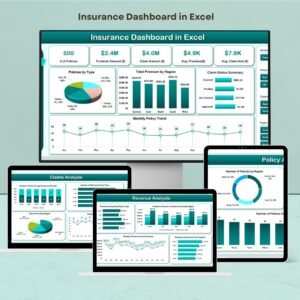
- Insurance Dashboard in Excel: analyze policies and premiums in a full dashboard
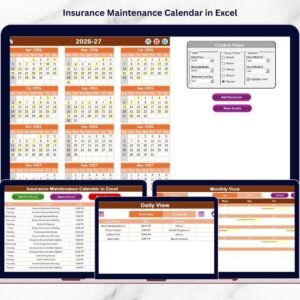
- Insurance Maintenance Calendar in Excel: plan renewals and reviews through the year
- Insurance Scheduling Calendar in Excel: schedule insurance tasks by date
- Insurance KPI Dashboard in Excel: KPIs for insurance businesses
Browse all Excel checklist templates or the Excel financial templates.














Reviews
There are no reviews yet.