



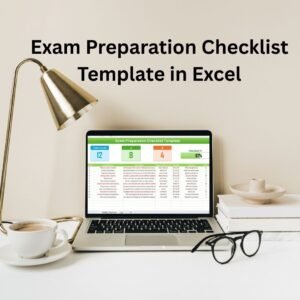
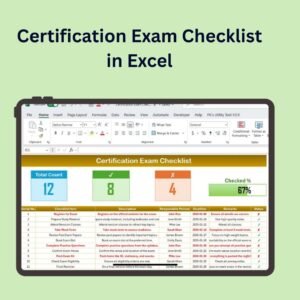
The Certification Exam Checklist in Excel is a comprehensive and easy-to-use tool designed to help students, professionals, and exam candidates stay organized and prepared for their certification exams. Whether you’re preparing for industry certifications, academic exams, or professional qualifications, this checklist ensures that you stay on track and cover all the necessary requirements before your exam day.
This Excel-based checklist helps you manage the entire certification exam process—from registration to exam day, ensuring that you’ve completed all the steps and have all the necessary materials and documents prepared. With customizable fields and real-time tracking, this checklist is your go-to tool for exam preparation.

Key Features of the Certification Exam Checklist in Excel:
📝 Exam Registration and Deadlines Tracking
Track registration dates, payment deadlines, and exam scheduling to ensure you never miss an important step in the certification process.
📑 Document and Material Checklist
Track all required documents and materials needed for the exam, including ID verification, confirmation emails, study materials, and other exam-related documents.
📅 Study Schedule Management
Organize and track your study schedule, setting up specific study times and key milestones to ensure thorough exam preparation.
📊 Progress Tracking
Monitor your preparation progress, checking off completed tasks, study modules, and practice exams to stay on target.
🎯 Exam Day Preparation
Ensure that everything is ready for exam day, from required documents to any last-minute review sessions.
🚀 Why You’ll Love the Certification Exam Checklist in Excel:
✅ Stay Organized – Keep track of exam registration, deadlines, and required documents for a smooth certification process.
✅ Manage Your Study Schedule – Organize your study times and track progress to ensure you cover all the material needed for your exam.
✅ Track Exam Requirements – Ensure that you’ve completed all prerequisites and have all materials ready for exam day.
✅ Avoid Last-Minute Stress – By following the checklist and tracking progress, you can minimize stress and avoid forgetting important steps.
✅ Customizable and Interactive – Tailor the checklist to suit your specific certification exam needs, with real-time tracking for improved preparation.
What’s Inside the Certification Exam Checklist in Excel:
Registration and Deadline Tracking: Monitor important exam registration dates, payments, and deadlines to ensure you stay on schedule.
Required Documents and Materials: Track all required documents, materials, and identification needed for the exam.
Study Schedule: Plan and organize your study schedule, ensuring that you’re covering all necessary topics and practice exams.
Progress Tracker: Check off completed tasks, study materials, and practice exams to track your preparation progress.
Exam Day Preparation: Ensure that you have all the necessary items prepared for exam day, such as IDs and confirmation emails.
Customizable Fields: Add extra tasks, deadlines, or notes specific to your certification exam.
How to Use the Certification Exam Checklist in Excel:
1️⃣ Download the Template – Instantly access your Excel file upon purchase.
2️⃣ Input Exam Details – Enter details such as the exam name, registration dates, and deadlines for personalized tracking.
3️⃣ Manage Your Study Schedule – Add your study sessions and milestones, and track your progress as you prepare.
4️⃣ Monitor Document and Material Checklist – Track which documents and materials you have or still need to gather.
5️⃣ Prepare for Exam Day – Review your checklist and ensure all required documents and materials are ready for exam day.
Who Can Benefit from the Certification Exam Checklist in Excel:
Students Preparing for Certification Exams
Professionals Seeking Industry Certifications
Exam Candidates
Study Groups and Preparation Teams
Career Development Coaches and Advisors
Academic Institutions Offering Certification Exams
Exam Proctors and Administrators
The Certification Exam Checklist in Excel is the ideal tool for anyone preparing for an exam. By helping you stay organized and on top of your study schedule, it ensures you are fully prepared for your certification exam with all the required materials and documents.
Click here to read the Detailed blog post
https://www.pk-anexcelexpert.com/certification-exam-checklist-in-excel/
Visit our YouTube channel to learn step-by-step video tutorials
Youtube.com/@PKAnExcelExpert
Compatibility and Requirements
- Works in Microsoft Excel desktop (Excel 2016 or later, or Microsoft 365).
- New to Excel? Microsoft’s Excel for Windows training covers the basics.
Frequently Asked Questions
What does the checklist cover?
It covers registration dates and deadlines, required documents and materials, your study schedule, a progress tracker and exam day preparation.
How do I track my study progress?
Check off completed tasks, study materials and practice exams in the progress tracker as you go.
Can I use it for any certification?
Yes. It works for industry certifications, academic exams and professional qualifications, and you can add your own tasks, deadlines and notes.
What should I check before exam day?
The exam day section lists the items to have ready, such as your ID and confirmation emails.
Is there a Google Sheets version?
Yes. The Certification Exam Checklist in Google Sheets works in a browser.
Related Exam and Study Templates
- Certification Exam Checklist in Google Sheets: the same checklist in Google Sheets
- Exam Preparation Checklist Template in Excel: prepare for any exam
- Training Completion Certification Tracker in Excel: track completed training and certificates
- Exam Timetable Calendar in Excel: put exam dates on a calendar
- Checklist & SOP Pack: 12 Excel and Google Sheets checklists in one download
Browse all Excel checklists or the Excel education templates.

























Reviews
There are no reviews yet.