

The best free marketing calendar template depends on your tool: HubSpot, Microsoft Create, Vertex42 and the Google Sheets template gallery all give you a usable marketing calendar template at $0. Free files stop working when you need annual, monthly and daily views linked to one events database. NGT’s Marketing Campaign Calendar in Excel costs $4.99.
Last updated: November 2026
Key takeaways
- Eight free marketing calendar options come from four sources (HubSpot, Microsoft Create, Vertex42, Google Sheets gallery) and cost $0.
- A free marketing calendar template is enough for one marketer running fewer than about 10 campaigns a quarter on one channel.
- Free files usually break when several people edit, when you need annual, monthly and daily views of the same data, or when you want KPIs beside the schedule.
- NGT’s Marketing Campaign Calendar in Excel ($4.99) and Marketing Campaign Calendar in Google Sheets ($4.99) are one-time purchases with no subscription.
- For social posting with engagement maths, the Social Media Content Calendar Tracker in Google Sheets ($6.99) tracks 8 platforms and a 5-stage status pipeline.
 Launch offer
SUMIFS, XLOOKUP, FILTER, LAMBDA and checking AI-written formulas, with real business projects. 11h 47m of video by PK, with practice files, quizzes and a capstone.
Marketing calendar templates compared
| Template | Format | Best For | Price |
|---|---|---|---|
| HubSpot marketing calendar templates (best free overall) | Excel / Google Sheets | Small teams planning campaigns by month | $0 |
| HubSpot social media content calendar | Excel / Google Sheets | Social posting schedules | $0 |
| Microsoft Create marketing calendar | Excel | Solo marketers already in Microsoft 365 | $0 |
| Microsoft Create content calendar | Excel / Word | Simple content scheduling | $0 |
| Vertex42 marketing calendar | Excel / Google Sheets | Printable yearly planning | $0 |
| Vertex42 content calendar | Excel / Google Sheets | Bloggers and editors | $0 |
| Google Sheets template gallery calendars | Google Sheets | Free shared planning in a browser | $0 |
| Blank Google Sheets calendar you build yourself | Google Sheets | Custom layouts when you have time | $0 |
| Marketing Campaign Calendar in Excel (best value) | Excel | Campaigns with KPIs and briefs | $4.99 |
| Marketing Campaign Calendar in Google Sheets | Google Sheets | Shared team scheduling | $4.99 |
| Email Marketing Campaign Calendar in Excel | Excel | Newsletters and promotions | $4.99 |
| Multi-Platform Social Media Calendar in Excel | Excel | Social event scheduling | $4.99 |
| Social Media Content Calendar Tracker in Google Sheets | Google Sheets | Post pipeline plus engagement | $6.99 |
| Editorial Calendar in Excel | Excel | Blog and content teams | $4.99 |
How we picked these
We started with the sources people search for when they type “free marketing calendar template”: HubSpot, Microsoft Create, Vertex42 and the Google Sheets template gallery. Every free entry is a source that publishes calendars at no charge. We did not list anything that hides the file behind a paid plan.
Free sources change their template names and layouts, so we describe each by source and use case. Check the current listing before you download.
The paid section comes from NGT’s catalog of calendar, marketing and tracker templates. We kept only products whose descriptions match a marketing calendar job, and we excluded anything loosely related. Prices are the ones shown on the product pages.
What are the 8 best free marketing calendar templates for 2026?
The list is ranked by how much planning you get for $0 and how easy the file is to adapt. Number one earns its spot because it is built by a marketing software company for marketers, so the columns match real campaign work.
1. HubSpot marketing calendar templates: best free overall
What it is: HubSpot publishes free marketing and editorial calendar downloads for Excel and Google Sheets on hubspot.com. They are lead magnets, so you may be asked for an email address.
Who it is for: small teams that want a month-by-month campaign plan with sensible columns already set up.
- Campaign, channel and owner columns in a spreadsheet layout.
- Works in Excel or Google Sheets, so you pick your tool.
- Written with marketers in mind, so little cleanup is needed.
Use case: a team of 3 planning 4 campaigns across 3 channels fills about 12 rows a month, which a flat sheet handles easily.
Price: $0 (contact details usually requested). Best for: teams that want a tested starting layout.
2. HubSpot social media content calendar
HubSpot also offers a social media content calendar download. It lists posts by date, platform and copy, which suits a content owner planning a week or a month at a time.
Who it is for: social managers who post on a few platforms and do not need analytics in the same file.
- Post date, platform and caption fields.
- Easy to copy for a new month.
- Opens in Google Sheets for shared edits.
Use case: 5 posts a week across 2 platforms is 40 rows a month, which is a comfortable size for a flat sheet.
Price: $0. Best for: social schedules with no reporting needs.
3. Microsoft Create marketing calendar
Microsoft Create at create.microsoft.com hosts free Excel calendar templates, including planners you can adapt for marketing. You open them in Excel and edit directly.
Who it is for: solo marketers and small business owners who already pay for Microsoft 365 and want zero setup.
- Opens in desktop Excel or Excel for the web.
- Clean design, usually a one-year or month-grid layout.
- No email gate.
Use case: a freelancer scheduling 6 client campaigns a year can mark launch dates in one grid.
Price: $0 with a Microsoft account. Best for: the simplest possible yearly view.
4. Microsoft Create content calendar
Microsoft Create also lists content and social planners. These are lighter than a full campaign system, which is fine when your whole job is deciding what publishes when.
Who it is for: bloggers and in-house writers who plan content more than campaigns.
- Date and topic grids.
- Editable in Excel or Word depending on the file.
- Printable for planning meetings.
Use case: 8 blog posts a month fits on one page with space for status notes.
Price: $0. Best for: writers who want a printable plan.
Want the free-vs-paid checklist? Get a one-page checklist for deciding when a free marketing calendar template is enough, plus new calendar template alerts. Enter your email below.
5. Vertex42 marketing calendar
Vertex42 at vertex42.com has long been a source of free spreadsheet calendars and planners. Their marketing and yearly calendar downloads are built for Excel and often work in Google Sheets.
Who it is for: planners who want a printable year with room for notes.
- Yearly and monthly calendar layouts.
- Print-ready page setup.
- Free versions with a paid upgrade for some files, so read the page before you download.
Use case: a retail owner marking 4 seasonal promotions and 12 monthly emails can see the whole year on two pages.
Price: $0 for the free version. Best for: a printed wall plan.
6. Vertex42 content calendar
Vertex42 also publishes content and editorial planning sheets. They track topic, date and status in a table you can sort.
Who it is for: content managers who want something familiar and easy to filter.
- Sortable table with status column.
- Works offline in Excel.
- Easy to extend with your own columns.
Use case: 30 content items a quarter sorted by status shows what is late in two clicks.
Price: $0 for free versions. Best for: sortable content lists.
7. Google Sheets template gallery calendars
Google Sheets includes a template gallery with calendar and planning sheets. Open Sheets, choose the template gallery and look for calendar and schedule layouts. Names change over time, so search before you assume a layout exists.
Who it is for: teams that live in Google Workspace and want browser-based sharing at $0.
- Real-time editing with comments.
- Nothing to download or install.
- Version history is built in.
Use case: 4 people editing one sheet during a weekly planning call.
Price: $0. Best for: quick shared plans.
8. A blank Google Sheets calendar you build yourself
If no template fits, a blank sheet with columns for date, campaign, channel, owner, status and budget does the job. It is free, and the cost is your time.
Who it is for: people who know exactly what columns they need.
- Add data validation dropdowns for channel and status.
- Use conditional formatting for overdue dates.
- Freeze the header row.
Use case: 3 hours of setup once, then reused each year.
Price: $0. Best for: people who enjoy building spreadsheets.
Where does a free marketing calendar template stop working?
A free file breaks in predictable places. A flat grid shows one view, so a monthly overview and a daily to-do list need separate tabs that you keep in sync by hand. Add a second editor and you get version clashes. Add KPIs and you are pasting numbers from another file.
Here are the usual signs you have outgrown a free file:
- You maintain the same event in 2 or 3 places.
- You cannot see the whole year and a single day from the same data.
- Nobody trusts which copy is current.
- You need reach, engagement or ROI next to the dates.
- You schedule more than about 100 events a year.
The upgrades below are one-time purchases. None of them is required, and the free options above are a fair choice if none of those signs applies to you.
Best-value pick: the Marketing Campaign Calendar in Excel is $4.99, one payment. See the marketing campaign calendar in Excel.
Marketing Campaign Calendar in Excel: best value upgrade
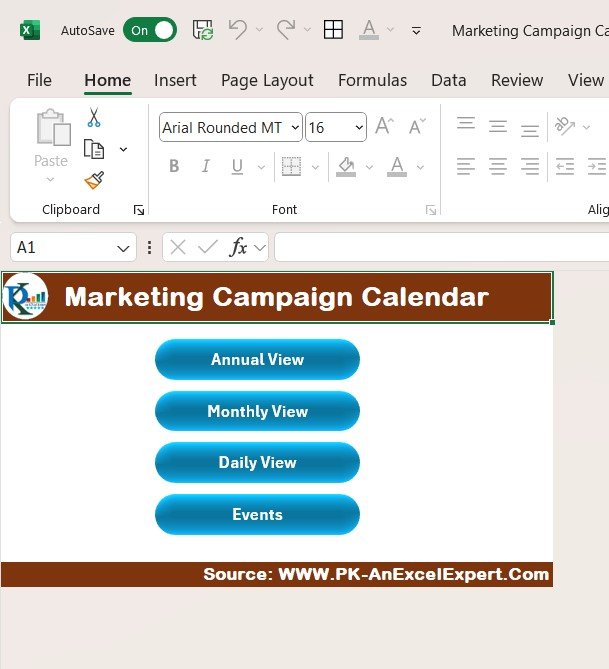
What it is: an Excel calendar to schedule and track marketing activities across the year.
Who it is for: marketers and marketing teams in small businesses and larger companies.
- Scheduling for social media, email and promotions.
- KPI tracking for reach, engagement and ROI.
- Content and creative briefs stored with each campaign.
- Task assignment for team collaboration.
Use cases: a quarter with 4 campaigns, 3 channels and weekly milestones has dozens of dated items. Keeping them with KPIs in one workbook avoids a second file.
Price: $4.99. Get the marketing campaign calendar in Excel. Best for: teams that want campaigns, KPIs and briefs in one Excel file.
Marketing Campaign Calendar in Google Sheets
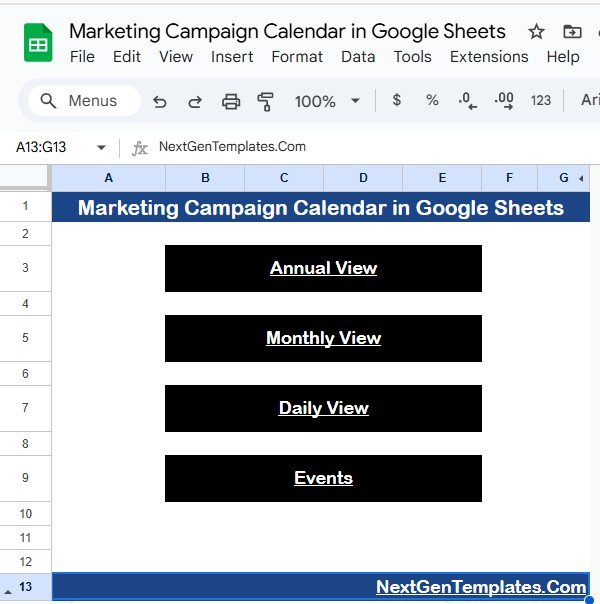
What it is: a Google Sheets version with annual, monthly and daily views plus an events database.
Who it is for: marketing managers, social media teams, small businesses and agencies who share files.
- Home sheet with navigation to every view.
- Annual view with year dropdown, start month and week start day.
- Events sheet with ID, Date, Day, Event Name, Time, Location and Description.
- Edit an event once and the views update.
Use cases: an agency running campaigns for several clients can filter the daily view by start and end date for a weekly check-in.
Price: $4.99. Buy the marketing campaign calendar in Google Sheets. Best for: shared team scheduling in a browser.
Email Marketing Campaign Calendar in Excel
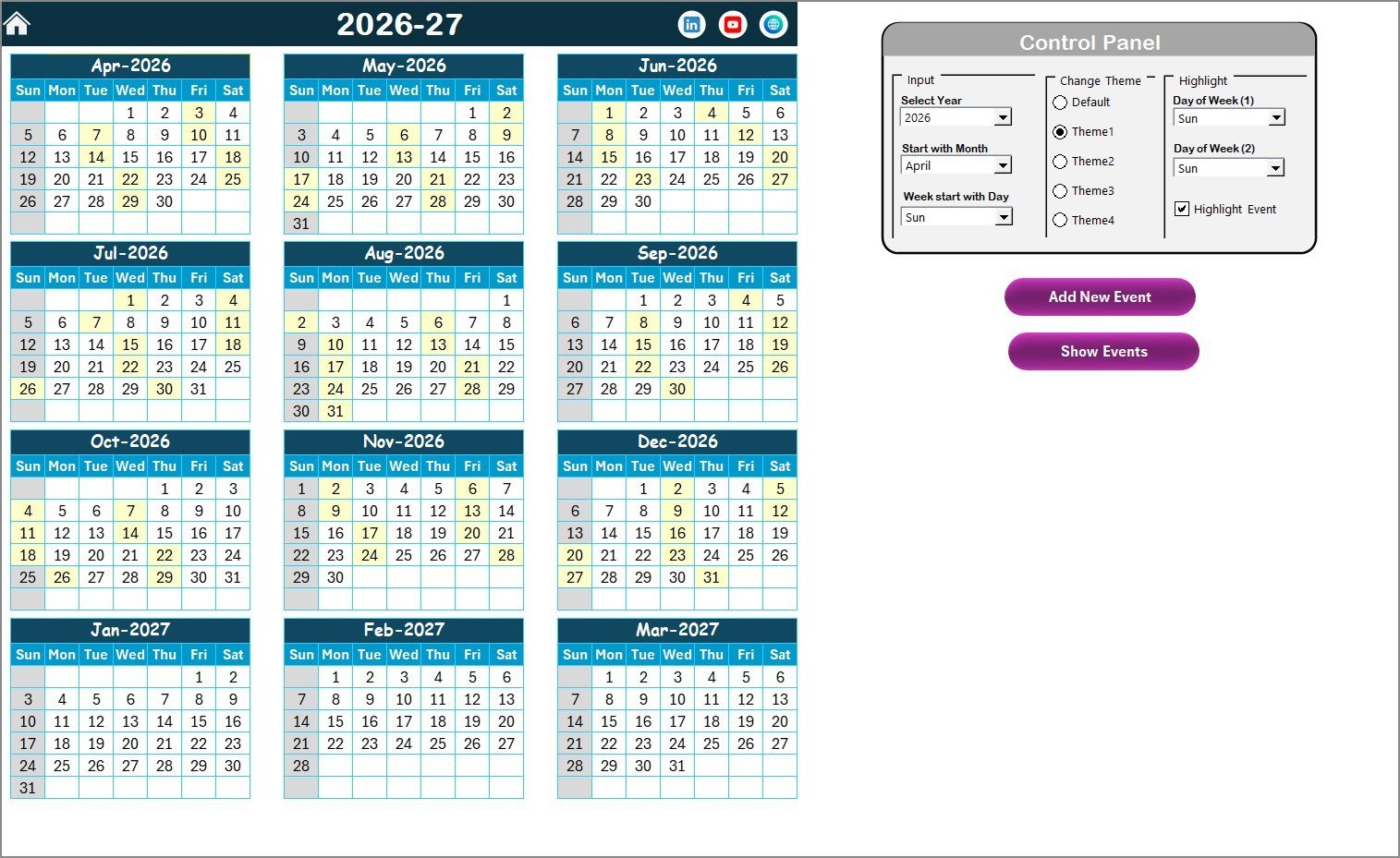
What it is: a 5-worksheet Excel calendar for newsletters, launch emails, promotions, webinar reminders and follow-ups.
Who it is for: email marketers, ecommerce teams, agencies, freelancers and content teams.
- Annual, monthly and daily views plus an Events database.
- Add, show, update and delete buttons for event records.
- 5 color themes and weekday highlighting.
- Control panel for year, start month and week start day.
Use cases: 2 newsletters a month plus 4 promotions and a webinar series is about 30 sends a year, all visible in the annual view.
Price: $4.99. Get the email marketing campaign calendar in Excel. Best for: email-led marketing teams.
Multi-Platform Social Media Calendar in Excel
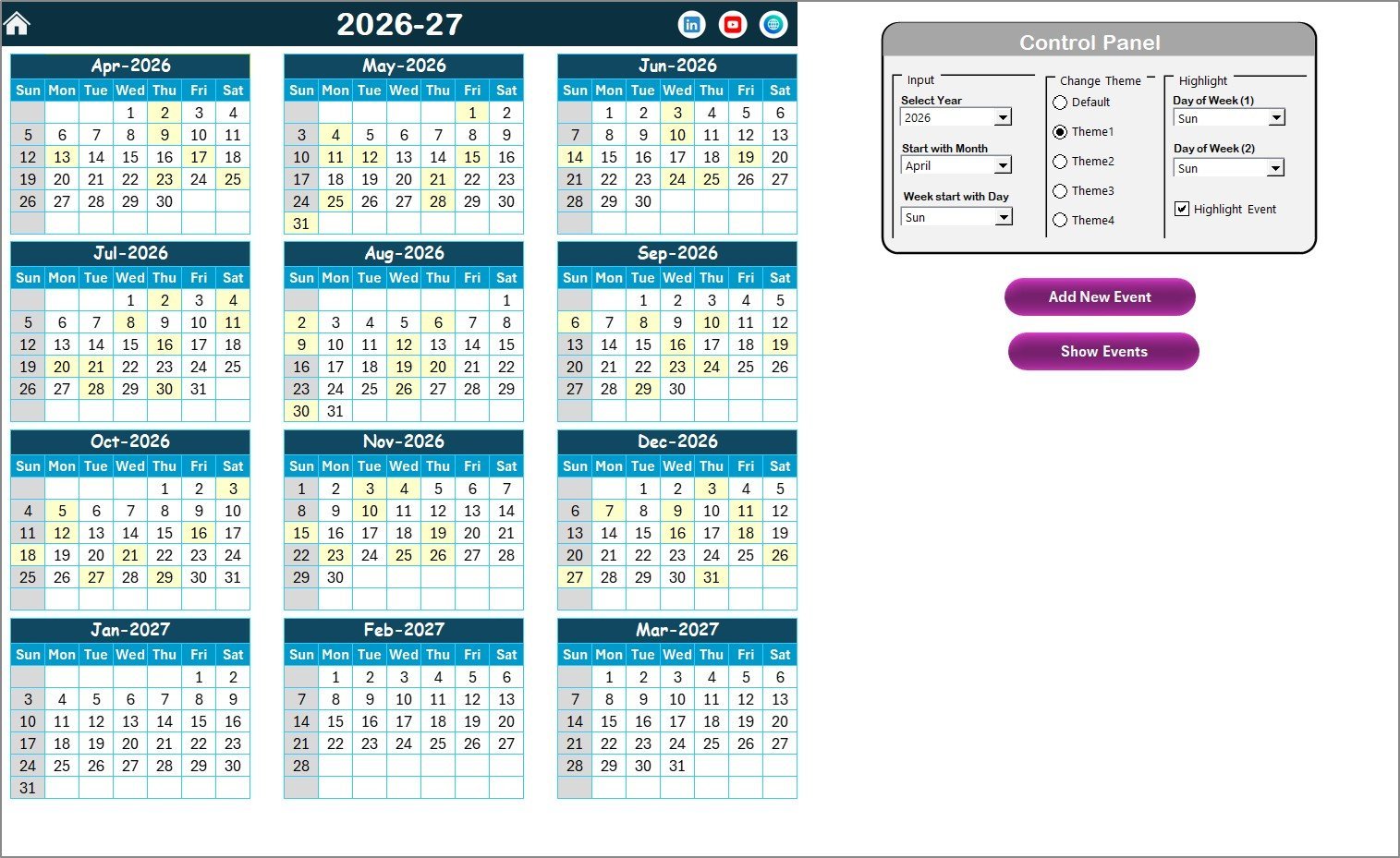
What it is: an Excel calendar with 4 interactive views and 7 data fields per entry.
Who it is for: social media managers who want events in annual, monthly and daily views.
- VBA pop-up forms to add, update and delete events.
- 5 color themes switched with one click.
- Highlighting for up to 2 weekdays and for events.
- Stated setup time of under 10 minutes.
Use cases: a social calendar for a product launch month with daily posts across platforms, reviewed by date range.
Price: $4.99. Buy the multi-platform social media calendar in Excel. Best for: event-style social scheduling in Excel.
Social Media Content Calendar Tracker in Google Sheets
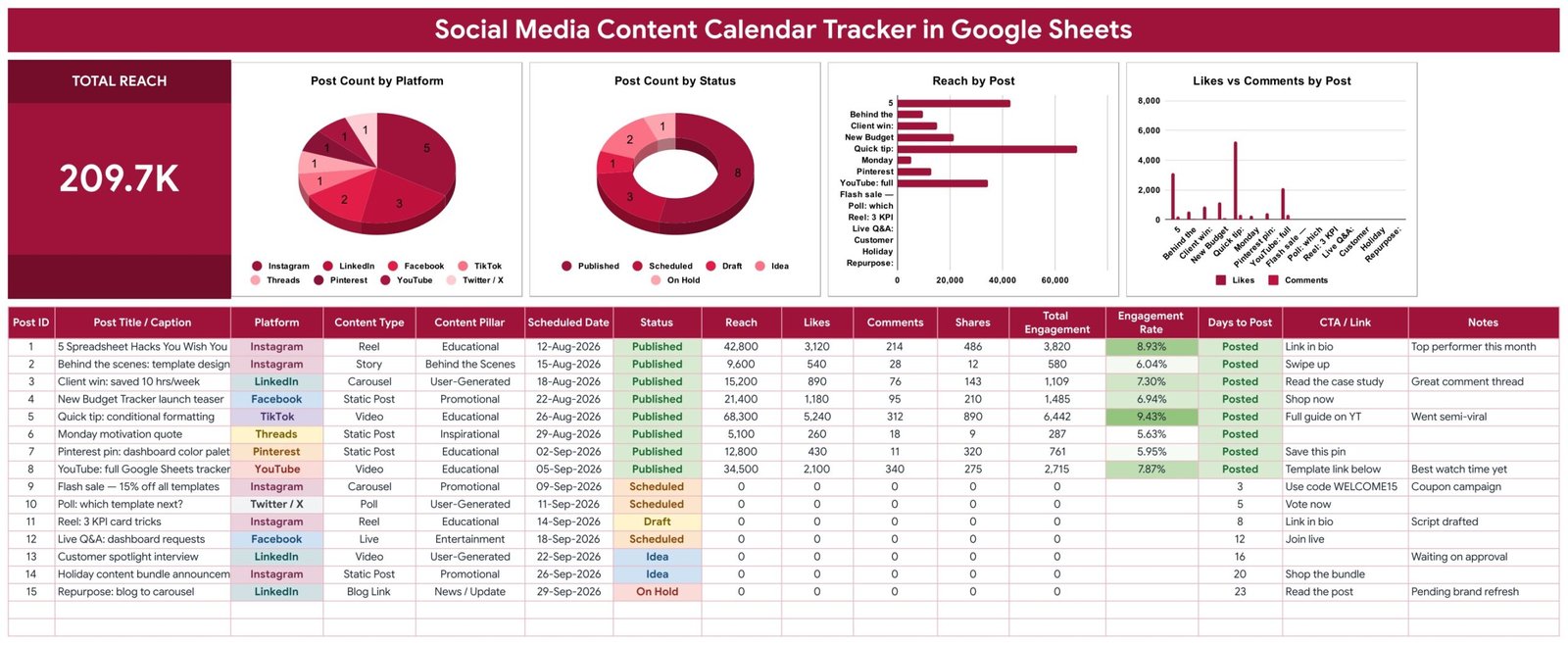
What it is: a post log and tracker with 16 columns across 8 platforms.
Who it is for: social teams that want to plan and measure posts on one page.
- 5-stage pipeline: Idea, Draft, Scheduled, Published, plus On Hold.
- Total Engagement and Engagement Rate (engagement divided by reach) calculate on every row.
- Days to Post countdown showing Overdue, Posted or Set Date.
- Total Reach card and 4 live charts.
Use cases: a post with 200 likes, comments and shares on a reach of 4,000 shows a 5% engagement rate without manual maths. The template includes 15 sample posts to replace.
Price: $6.99. Get the social media content calendar tracker in Google Sheets. Best for: teams that report on social results.
Editorial Calendar in Excel
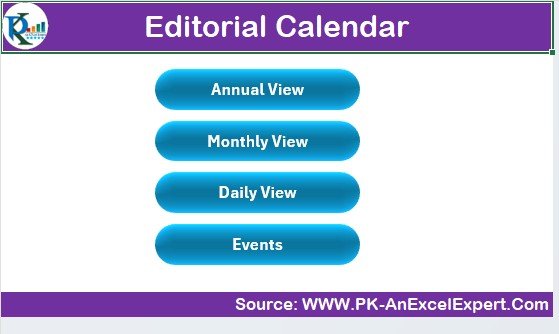
What it is: an Excel calendar to plan, track and manage content from draft to publication.
Who it is for: writers, marketers and content managers.
- Publication date scheduling.
- Status tracking from draft to final approval.
- Category and channel tracking.
- Task assignment and content performance tracking.
Use cases: 12 blog posts and 4 newsletters a month, each with an owner and a status.
Price: $4.99. Get the editorial calendar in Excel. Prefer Google Sheets? The editorial calendar in Google Sheets is also $4.99. Best for: publishing teams.
How do I choose between a free and a paid marketing calendar template?
Use this short decision tree:
- One person, one channel, under about 10 campaigns a quarter: use a free template (HubSpot or Microsoft Create).
- You want a printed yearly plan: use the Vertex42 marketing calendar.
- Several editors in a browser: start with the Google Sheets gallery, then move to the paid Google Sheets calendar when views fall out of sync.
- Campaigns need KPIs and briefs: buy the Marketing Campaign Calendar in Excel for $4.99.
- Posts need engagement tracking: buy the Social Media Content Calendar Tracker for $6.99.
| Your situation | Choose | Cost |
|---|---|---|
| Solo, simple yearly plan | Microsoft Create or Vertex42 | $0 |
| Small team, campaign columns | HubSpot calendar | $0 |
| Campaigns plus KPIs | Marketing Campaign Calendar in Excel | $4.99 |
| Shared browser team | Marketing Campaign Calendar in Google Sheets | $4.99 |
| Email sends | Email Marketing Campaign Calendar in Excel | $4.99 |
| Social with analytics | Social Media Content Calendar Tracker | $6.99 |
What does a marketing calendar need, with a worked example?
Whatever file you use, the calendar needs 6 fields per row: date, campaign, channel, owner, status and goal. The goal field is the one most people skip, and it is what lets you review results later.
Worked example: you run 4 campaigns in a quarter, each across 3 channels (email, social, paid). If each channel has 4 dated touches per campaign, that is 4 x 3 x 4 = 48 events in 13 weeks, or about 3.7 a week. A flat sheet handles that. Scale it to 12 campaigns and you reach 144 events a quarter, where filtering by date range starts to matter.
After the plan, measure it. Our guide to marketing KPIs to track in 2026 covers the formulas, and the marketing manager template stack shows how calendars sit beside dashboards. If your team also plans learning time, see our free training plan template in Excel. Teams comparing CRM and campaign tools can read our HubSpot alternatives built in Excel and Sheets.
When is a spreadsheet marketing calendar NOT the right answer?
A spreadsheet is the wrong tool in some cases. Be honest about these before you buy anything, free or paid.
- Automatic publishing. A spreadsheet does not post for you. Tools such as Buffer, Hootsuite or CoSchedule schedule and publish to social accounts. Check their pricing pages for current plans.
- Task dependencies and approvals. If designers wait on copywriters and legal signs off, a project tool like Asana, Trello or Monday.com handles hand-offs better.
- Large teams with many clients. Past roughly 10 simultaneous editors, a spreadsheet becomes fragile.
- Live ad spend data. A calendar records plans. It does not pull spend from ad platforms.
If you only need a one-off yearly plan, a free file is the better purchase decision. We would rather you spend $0 than $4.99 on something you will not use.
Frequently asked questions
What is the best free marketing calendar template?
HubSpot’s free marketing calendar templates are the best free starting point for most small teams because they come with campaign, channel and owner columns already laid out. Microsoft Create is better if you want a clean Excel grid with no sign-up, and Vertex42 suits printed yearly plans.
Is there a free marketing calendar template for Excel?
Yes. Microsoft Create, Vertex42 and HubSpot all offer free marketing or content calendar downloads that open in Excel. Layouts and names change, so check each site’s current listing. If you outgrow them, NGT’s Marketing Campaign Calendar in Excel costs $4.99, one time.
Is there a free marketing calendar template for Google Sheets?
Yes. The Google Sheets template gallery includes calendar and planning sheets, HubSpot offers Google Sheets versions of its calendars, and Vertex42 files often work in Sheets. You can also build a blank sheet with date, campaign, channel, owner and status columns in about 3 hours.
What should a marketing calendar template include?
At minimum: date, campaign name, channel, owner, status and goal. Better calendars add a budget column, a link to the creative brief and a KPI such as reach, engagement or conversion rate. Annual, monthly and daily views help you plan big and then check the week.
How do I make a marketing calendar in Excel?
Create a table with the 6 core columns, add dropdown lists for channel and status with data validation, and use conditional formatting to flag overdue dates. Then build a month grid that pulls from the table. Or start from a ready file and skip the setup.
When should I pay for a marketing calendar template?
Pay when you maintain the same event in several places, when more than one person edits, or when you need KPIs next to dates. At $4.99 for NGT’s Marketing Campaign Calendar, one avoided missed deadline or an hour of rework usually covers the cost.
Do NGT calendar templates need a subscription?
No. The product pages describe one-time purchases with no subscription for these calendars, for example the Social Media Content Calendar Tracker in Google Sheets at $6.99 and the Marketing Campaign Calendar in Excel at $4.99. Check each product page for the exact terms before buying.
What is the difference between a marketing calendar and an editorial calendar?
A marketing calendar plans campaigns, promotions, channels and goals across the year. An editorial calendar plans individual content pieces, such as blog posts and videos, with authors and statuses. Many teams use both: the marketing calendar sets themes and the editorial calendar fills them.
Can I track marketing KPIs in a calendar template?
Some can. The Marketing Campaign Calendar in Excel includes KPI tracking for reach, engagement and ROI, and the Social Media Content Calendar Tracker calculates engagement rate as engagement divided by reach. Most free calendars only schedule dates, so you track results in a separate file.
Get more marketing calendar templates
Ready to move past the free file? The Marketing Campaign Calendar in Excel is $4.99, and the Google Sheets version is $4.99. For social reporting, the social media content calendar tracker is $6.99.
Watch walkthroughs on the NextGenTemplates YouTube channel.