


The best fleet management dashboard for most operators is the Fleet Management Dashboard in Excel ($17.99). It puts vehicle count, fuel cost, maintenance cost, downtime and active vehicles by region in one workbook with no macros. For trucking revenue per load, pick the Trucking and Logistics Dashboard ($17.99).
Last updated: October 2026
Key takeaways
- The Fleet Management Dashboard in Excel ($17.99) is our #1 pick because it covers fuel, maintenance, downtime and regional performance in a single no-macro file.
- Fleet SaaS such as Samsara, Fleetio and Motive is sold as a per-vehicle monthly subscription, while every template here is a one-time purchase from $4.99 to $17.99.
- Fuel is the cost line worth tracking first: ATRI reported 2024 motor-carrier costs of $2.26 per mile, with fuel at 48.1 cents of that.
- The Fleet Management Dashboard also comes in Power BI ($17.99) and HTML ($12.99), so you can choose the format your team already uses.
- If you only need to schedule service, the Vehicle Fleet Maintenance Calendar in Excel ($4.99) is the cheapest entry point.
 Launch offer
From your first Pivot Table to the Data Model, DAX, Power Query and a one-page KPI dashboard. 11h 51m of video by PK, with practice files, quizzes and a capstone.
Fleet management dashboard templates compared
| Template | Format | Best For | Price |
|---|---|---|---|
| Fleet Management Dashboard (Best overall) | Excel (also HTML $12.99) | Fuel, maintenance, downtime and regions in one view | $17.99 |
| Fleet Management Dashboard | Power BI | Teams already reporting in Power BI | $17.99 |
| Trucking and Logistics Dashboard | Excel (also Power BI $17.99, Google Sheets $9.99, HTML $12.99) | Route profit, driver performance, truck analysis | $17.99 |
| Trucking Companies Dashboard | Excel | Trucking owners tracking revenue, profit and fuel by route | $13.99 |
| Fleet Management KPI Dashboard (Best value) | Excel (also Google Sheets $12.99, Power BI $12.99) | Utilisation, mileage and fleet cost KPIs | $12.99 |
| Office Vehicle Fleet Dashboard | Excel (also Power BI $17.99, Google Sheets $6.99) | Company cars across departments | $13.99 |
| Vehicle Fleet Maintenance Calendar | Excel | Scheduling service events | $4.99 |
| Fleet Fuel and Mileage Tracker | Google Sheets | Shared fuel logs and km/L | $6.99 |
How we picked these
We searched the NextGenTemplates catalog of roughly 6,900 products for fleet, trucking, vehicle and fuel templates. We kept paid products where the name and description show real vehicle operations content: fuel, maintenance, downtime, utilisation, drivers or routes.
We excluded warehouse and inventory tools, which belong in our logistics and transportation dashboard templates roundup. This post covers the vehicles and the trucks, not the parcels inside them.
Where one tool exists in several formats we list the extra formats and prices so you can pick Excel, Power BI, Google Sheets or HTML.
What are the 8 best fleet management dashboard templates for 2026?
1. Fleet Management Dashboard in Excel: best overall
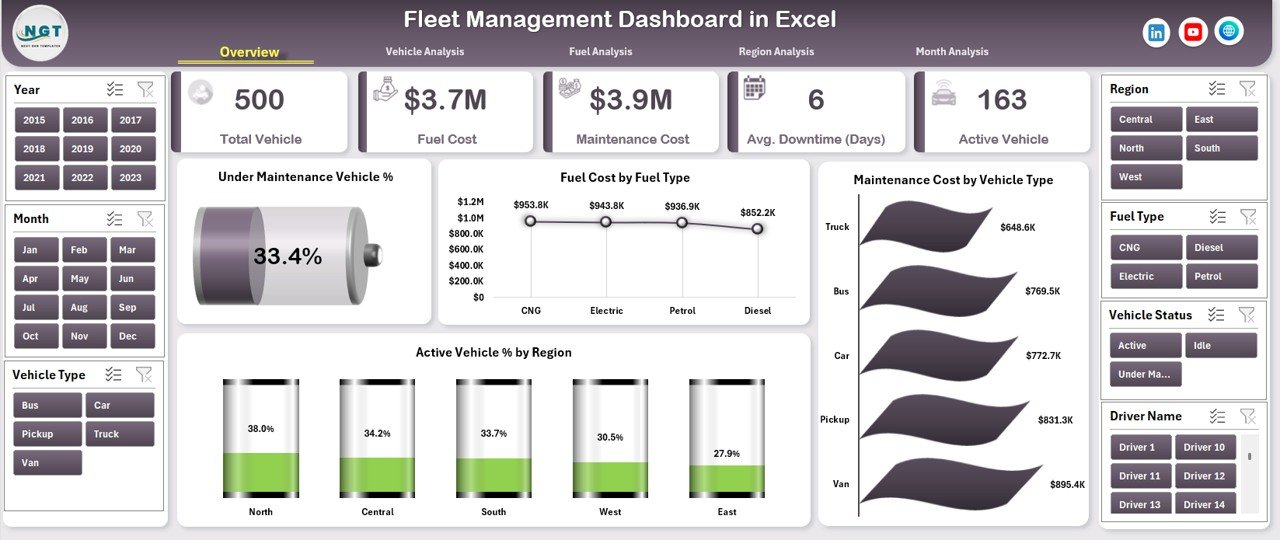
This is the closest match to what a fleet manager means by a fleet management dashboard. It converts raw fleet data into KPIs for fuel cost, maintenance cost, downtime and active vehicles, all inside one Excel file. It ranks first because it covers the widest set of cost lines without macros or add-ins.
Who it is for: fleet managers, operations heads and small business owners who run delivery vans, trucks or mixed vehicles and currently work from scattered sheets.
What is inside:
- Fuel cost and consumption by vehicle type, fuel type, region and month
- Maintenance cost monitoring that shows which vehicles and regions drive spend
- Downtime and availability, including under-maintenance vehicles and active versus inactive percentages
- Interactive slicers and a page navigator for jumping between dashboard pages
- No macros required, so it opens in standard Excel
Use cases: compare fuel spend across regions to find where diesel costs run highest; rank vehicle types by maintenance cost before deciding between repair and replacement; watch monthly trends to place preventive maintenance ahead of seasonal spikes; report the active vehicle percentage to management each month.
Price: $17.99. Get the fleet management dashboard in Excel. An HTML version is available at $12.99 on the Fleet Management Dashboard in HTML page.
Best for: anyone who wants one fleet cost dashboard in Excel and needs to start this week.
2. Fleet Management Dashboard in Power BI: best for Power BI teams
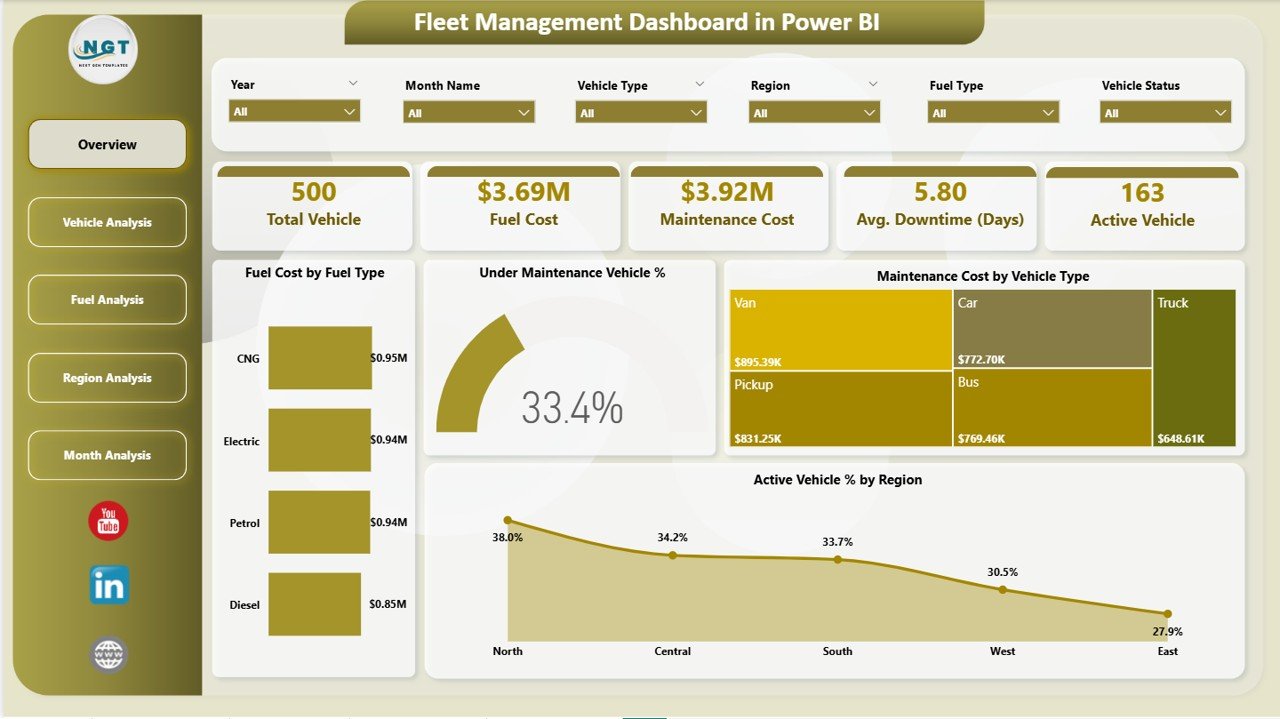
The same fleet logic as #1, built as an interactive Power BI report. It suits teams that already publish reports through Microsoft Power BI and want to refresh from a data source instead of pasting into a workbook.
Who it is for: fleet managers, logistics heads and operations leaders running delivery vans, trucks, construction vehicles or corporate fleets.
What is inside:
- 5 dashboard pages: Overview, Vehicle Analysis, Fuel Analysis, Region Analysis and Monthly Trends
- KPI cards for Total Vehicles, Fuel Cost, Maintenance Cost, Average Downtime (Days) and Active Vehicles
- Fuel cost breakdown by fuel type with consumption efficiency
- Active vehicle percentage tracking for utilisation
Use cases: spot which vehicle types are cost-intensive on the Vehicle Analysis page; compare downtime across regions; check seasonal spikes in fuel and maintenance on the Monthly Trends page; present live, filterable views in a review meeting.
Price: $17.99. Get the fleet management dashboard in Power BI.
Best for: organisations that standardise on Power BI.
3. Trucking and Logistics Dashboard in Excel: best trucking dashboard
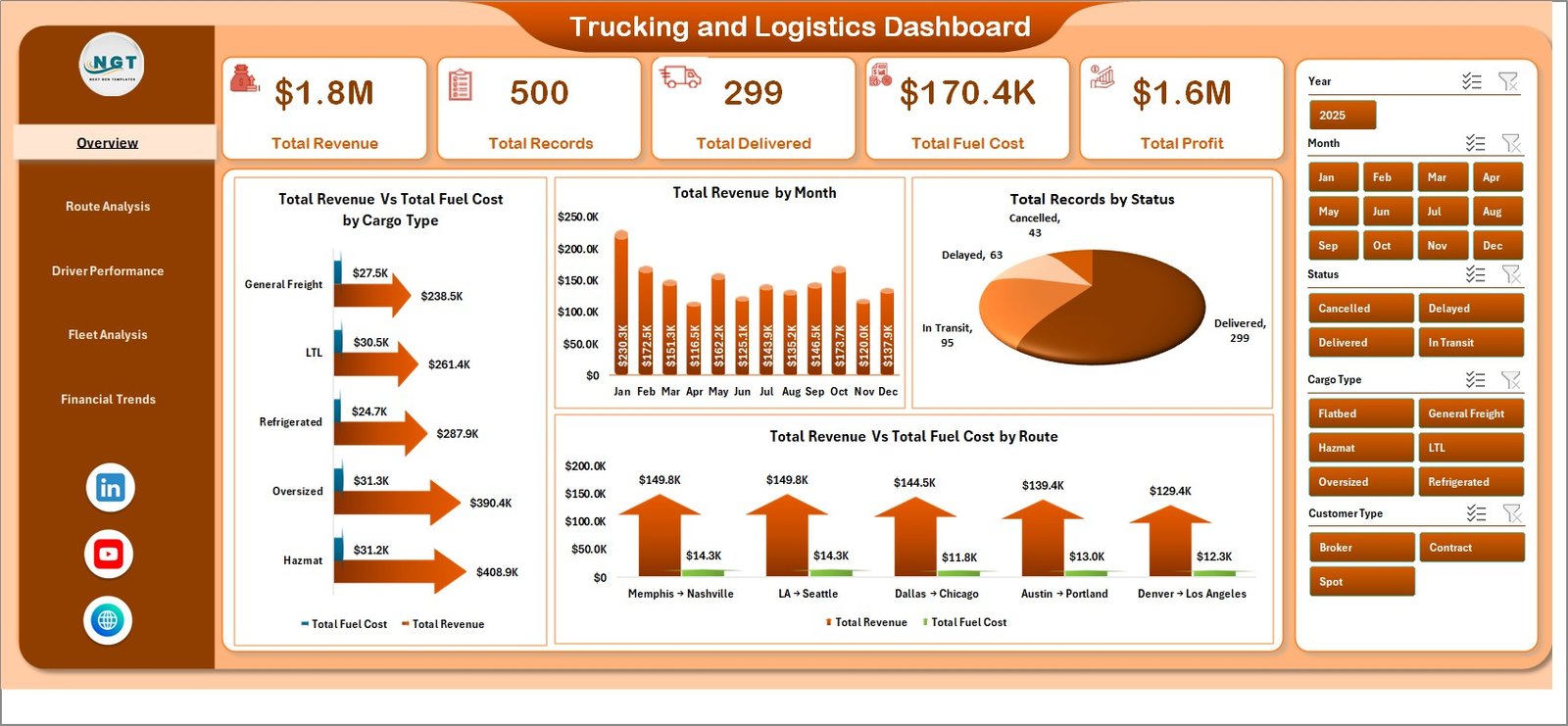
If your question is about revenue and profit per route and driver rather than just vehicle cost, this trucking dashboard is the one. It is pivot-powered, so charts update when you paste new data and click Refresh All.
Who it is for: trucking companies, fleet managers and logistics coordinators. The description covers operations from a small fleet of 10 trucks upward.
What is inside:
- 5 pages: Overview, Route Analysis, Driver Performance, Fleet Analysis and Financial Trends
- KPI cards for Total Revenue, Total Records, Total Delivered, Total Fuel Cost and Total Profit
- Slicers for cargo type, route, driver, truck, month and customer type
- No VBA or macros required
Use cases: find your most profitable origin-destination pairs; compare driver results; see which trucks are best utilised; track fuel cost against profit by month.
Price: $17.99. Get the trucking and logistics dashboard in Excel. Power BI ($17.99), Google Sheets ($9.99) and HTML ($12.99) versions also exist.
Best for: trucking operators who measure profit by route and driver.
4. Trucking Companies Dashboard in Excel: best for trucking owners
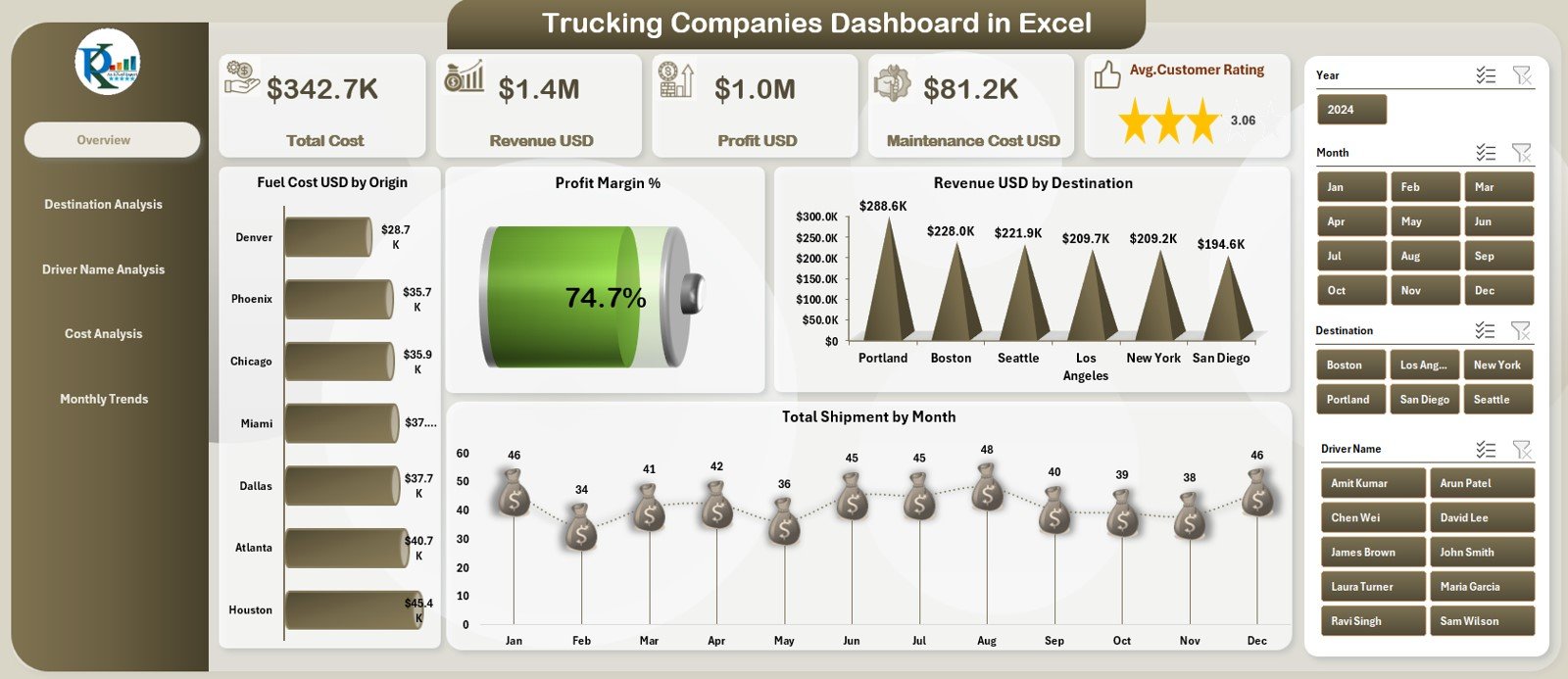
A lower-priced trucking option with an owner’s view of the business. The Overview page carries five KPI cards: Total Revenue, Total Profit, Total Shipments, Average Customer Rating and Fuel Cost.
Who it is for: trucking business owners, dispatchers and fleet managers.
What is inside:
- Overview with Profit Margin %, Revenue USD by Destination, Fuel Cost USD by Origin and Total Shipments by Month
- Destination analysis with route-wise cost, profit and ratings
- Driver performance covering delays, delivery time and maintenance
- Red and green status indicators for positive and negative signals
- Five analytical pages with charts, slicers, pivot tables and navigation buttons
Use cases: detect high fuel-consuming origins; see which destinations earn the most revenue; monitor driver delays; spot seasonal shipment patterns.
Price: $13.99. Get the trucking companies dashboard in Excel.
Best for: owners who want a profit and fuel picture for $4 less than #3.
5. Fleet Management KPI Dashboard in Excel: best value
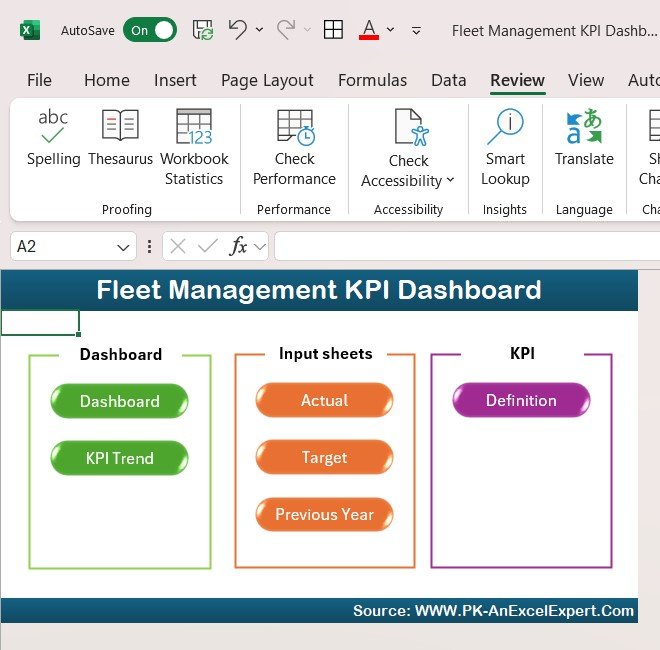
This fleet management Excel template is the lowest-priced full dashboard on the list at $12.99, and it is the only one built around KPI tracking for utilisation, mileage and fuel efficiency. It is also sold in Google Sheets and Power BI, each at $12.99.
Who it is for: fleet managers of small and large fleets who want a customisable KPI view.
What is inside:
- Vehicle performance and utilisation tracking, including underused assets
- Fuel consumption and efficiency per vehicle
- Scheduled and unscheduled maintenance and repair cost tracking
- Fleet costs and budgets covering fuel, maintenance and insurance
Use cases: flag vehicles with low utilisation; compare mileage by vehicle; review maintenance spend against budget; reduce fuel-related cost.
Price: $12.99. Get the fleet management Excel template.
Best for: the lowest-cost route to a complete fleet KPI dashboard.
6. Office Vehicle Fleet Dashboard in Excel: best for company cars
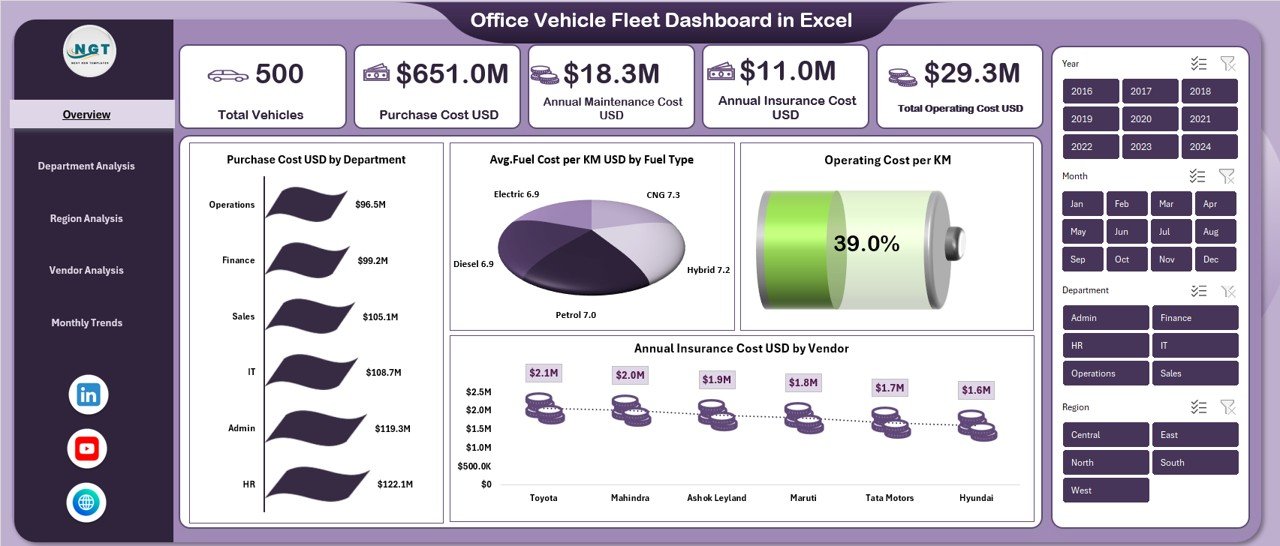
Built for organisations that run vehicles for staff rather than freight. It adds department, vendor and insurance views that the pure trucking tools do not have.
Who it is for: admin, facilities and finance teams that manage company vehicles.
What is inside:
- Vehicle count, purchase cost, fuel spend, insurance, maintenance and operating cost in one file
- Department-wise comparison of usage and cost
- Region and vendor performance analysis
- Average mileage and fuel cost per km by department, region, vendor and fuel type
- Monthly trends, including insurance renewal patterns
Use cases: charge costs back to departments; find expensive vehicle suppliers; identify high-downtime regions; review cost per km.
Price: $13.99. Get the Office Vehicle Fleet Dashboard in Excel. Power BI is $17.99 and Google Sheets $6.99.
Best for: organisations that own cars and vans for staff use.
7. Vehicle Fleet Maintenance Calendar in Excel: best for service scheduling
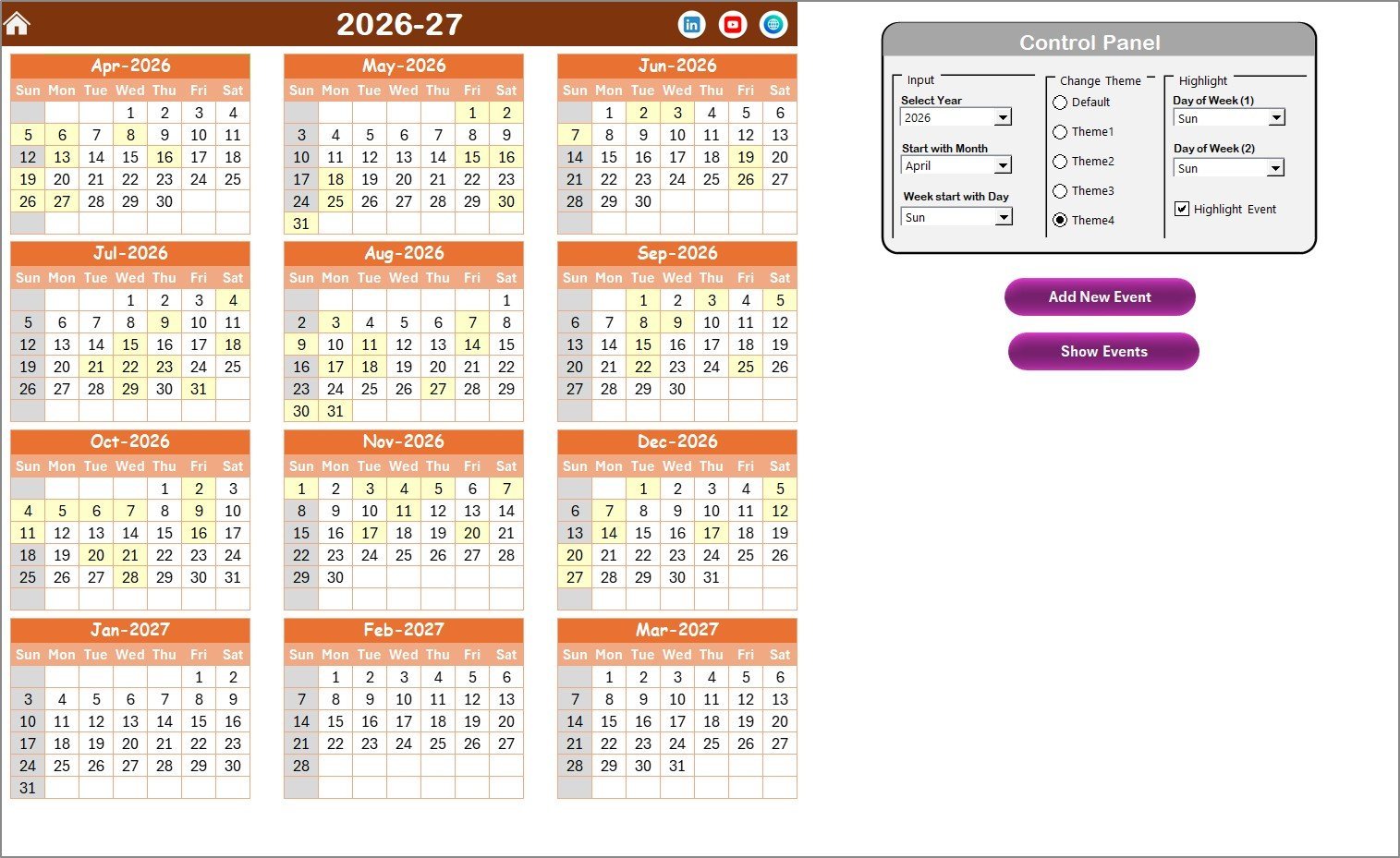
Searchers looking for a vehicle maintenance log template or a fleet maintenance spreadsheet usually need a schedule and a record of events. This calendar provides both, and it costs $4.99.
Who it is for: fleet managers, mechanics and business owners.
What is inside:
- Annual, monthly and daily views
- 5 colour themes and date controls for year, month and start day
- Buttons to add, view, update or delete maintenance events
- An Events sheet storing ID, Date, Day, Event Name, Time, Location and Description
Use cases: plan the year of service across vehicles; see what is due this month; check a date range on the daily view; keep a searchable event database.
Price: $4.99. Get the vehicle fleet maintenance calendar.
Best for: small fleets that need a scheduling tool before an analytics tool.
8. Fleet Fuel and Mileage Tracker in Google Sheets: best for shared fuel logs

Fuel data is only useful if drivers and office staff both enter it. This Google Sheets tracker is shared through normal Drive permissions, so drivers, admin and finance can use the same file.
Who it is for: fleet, logistics and operations teams that want a shared spreadsheet.
What is inside:
- Overview page with a Total Fuel Cost card
- Fill-ups by Vehicle Type and Logs by Fuel Type (petrol, diesel, EV charge, CNG or custom labels)
- Fuel Cost by Entry to catch unusually high transactions
- Efficiency (km/L) by Vehicle
- A List sheet for vehicle type, driver, fuel type and status options, plus slicers
Use cases: compare km/L across vehicles; catch a single expensive fill-up; keep fuel labels consistent; share a live log with finance.
Price: $6.99. Get the Fleet Fuel and Mileage Tracker in Google Sheets.
Best for: teams collecting fuel data from several people.
Which fleet management dashboard is right for you?
| If you need | Choose | Price |
|---|---|---|
| One view of fuel, maintenance and downtime | Fleet Management Dashboard in Excel | $17.99 |
| The same view in Power BI | Fleet Management Dashboard in Power BI | $17.99 |
| Revenue and profit by route and driver | Trucking and Logistics Dashboard | $17.99 |
| A cheaper trucking owner view | Trucking Companies Dashboard | $13.99 |
| Utilisation and mileage KPIs at the lowest price | Fleet Management KPI Dashboard | $12.99 |
| Company cars by department | Office Vehicle Fleet Dashboard | $13.99 |
| A maintenance schedule | Vehicle Fleet Maintenance Calendar | $4.99 |
| A shared fuel log | Fleet Fuel and Mileage Tracker | $6.99 |
A short decision path: if you run freight and track profit per load, start at #3. If you run mixed vehicles and track cost, start at #1. If you run company cars, start at #6. If you have no data yet, start with the $4.99 calendar or the $6.99 tracker and add a dashboard once you have three months of records.
Many fleets end up with two tools: a dashboard for the monthly review and a logging sheet for daily entry. Together, the Excel dashboard and the fuel tracker cost $24.98.
What should a fleet dashboard measure?
A fleet dashboard is only as good as the formulas behind it. These are the core measures and how to calculate them. The figures in the examples are illustrative, not benchmarks.
| Metric | Formula | Example |
|---|---|---|
| Active vehicle % | Active vehicles / total vehicles x 100 | 46 / 50 = 92% |
| Fuel cost per mile | Fuel cost / miles driven | $12,000 / 25,000 = $0.48 |
| Fuel efficiency | Distance / fuel used (km/L) | 600 km / 75 L = 8 km/L |
| Maintenance cost per vehicle | Total maintenance cost / vehicle count | $9,000 / 50 = $180 |
| Average downtime | Total days out of service / vehicles affected | 36 days / 12 vehicles = 3 days |
| Profit margin % | (Revenue – total cost) / revenue x 100 | ($80,000 – $68,000) / $80,000 = 15% |
The Power BI version of the fleet dashboard tracks Average Downtime in days and Active Vehicles directly. The trucking dashboards add Total Revenue, Total Profit and Total Fuel Cost, which you can combine into revenue per load by dividing revenue by loads delivered.
Why does fuel deserve the first chart?
The American Transportation Research Institute (ATRI) reported average motor-carrier costs of $2.26 per mile in 2024, with fuel alone at 48.1 cents per mile. That is about 21% of the per-mile total. You can read the research at the American Transportation Research Institute.
A fleet of 20 trucks driving 100,000 miles each per year burns through a large fuel bill, so a one-cent change per mile moves the annual figure by $20,000. Dashboards that break fuel down by vehicle type, fuel type, region and month show where that cent is going.
Fleet management dashboard or fleet SaaS: how do the costs compare?
Samsara, Fleetio and Motive (formerly KeepTruckin) are the best-known fleet platforms. They are generally sold as per-vehicle monthly subscriptions, often with hardware such as telematics devices, and exact prices depend on the plan and the quote. Check each vendor’s pricing page for current numbers.
A template has no live GPS feed. In return you pay once ($4.99 to $17.99 here), own the file and can change any chart. For a fleet of 5 to 30 vehicles with monthly reporting, that trade often makes sense. Subscription cost scales with each vehicle you add, while a template does not.
For the wider picture of moving goods, see our logistics KPIs guide and the logistics dashboard templates roundup.
When a template is NOT the right answer
Buy fleet software instead in these situations:
- You need live GPS tracking. Templates work from data you enter or import. They do not read vehicle locations. Samsara, Motive and similar platforms use telematics hardware for that.
- You need electronic logging for driver hours. Compliance logging is a regulated function that a spreadsheet does not cover.
- Your fleet is large and changes daily. When hundreds of vehicles generate data every hour, manual entry becomes the bottleneck.
- You need automated work orders and parts inventory. Fleetio-type systems handle that workflow. Our calendar records events but is not a parts system.
- Nobody will enter the data. A dashboard with blank inputs shows nothing. Fix the data habit first.
A common middle path is to use software for tracking and compliance, and a template for management reporting built from exported data.
How do I start with a fleet management dashboard?
- List your vehicles with type, region and fuel type.
- Collect twelve months of fuel, maintenance and downtime records if you have them.
- Paste the data into the template’s data sheet.
- Refresh the pivots and check the totals against your accounting figures.
- Review the dashboard monthly and set a target for one metric, such as active vehicle %.
For warehouse and stock sides of the operation, see our guides to warehouse management templates, inventory management Excel templates and IT asset management dashboards, which use a similar asset-tracking approach.
Frequently asked questions
What is a fleet management dashboard?
A fleet management dashboard is a single report that shows vehicle count, fuel cost, maintenance cost, downtime and active vehicles. It turns raw fleet records into KPI cards and charts so a manager can see where costs rise. The Fleet Management Dashboard in Excel costs $17.99 and needs no macros.
What is the best fleet management dashboard in Excel?
For most fleets, the Fleet Management Dashboard in Excel ($17.99) is the best choice. It covers fuel, maintenance, downtime and regional performance with slicers and a page navigator. If you mainly want KPIs such as utilisation and mileage, the Fleet Management KPI Dashboard costs $12.99.
Is there a trucking dashboard template for Excel?
Yes. The Trucking and Logistics Dashboard in Excel ($17.99) has five pages covering overview, routes, drivers, fleet and financial trends. The Trucking Companies Dashboard in Excel ($13.99) is a cheaper option focused on revenue, profit, shipments and fuel cost by origin and destination.
Can I get a fleet dashboard in Power BI?
Yes. The Fleet Management Dashboard in Power BI costs $17.99 and has five pages: Overview, Vehicle, Fuel, Region and Monthly Trends. The Fleet Management KPI Dashboard, the Trucking and Logistics Dashboard and the Office Vehicle Fleet Dashboard are also available in Power BI.
Is there a free fleet maintenance spreadsheet?
Free sheets exist, but they are usually a bare list with no scheduling views. The Vehicle Fleet Maintenance Calendar in Excel costs $4.99 and adds annual, monthly and daily views, five colour themes and an Events sheet storing ID, date, event name, time, location and description.
What is a vehicle maintenance log template?
A vehicle maintenance log template records each service event for each vehicle: date, work done, and details. The Vehicle Fleet Maintenance Calendar in Excel ($4.99) stores events in a database sheet and displays them by year, month and day. Pair it with a dashboard to see maintenance cost trends.
How do I track fuel costs for a fleet?
Log every fill-up with date, vehicle, driver, fuel type, cost and distance. Then compare cost and km/L by vehicle. The Fleet Fuel and Mileage Tracker in Google Sheets ($6.99) does this with an overview page, km/L by vehicle and slicers, and the Fleet Management Dashboard adds fuel cost by region.
How much does fleet management software cost compared with a template?
Samsara, Fleetio and Motive are generally priced per vehicle per month, so cost grows with fleet size. The templates in this list are one-time purchases between $4.99 and $17.99. Software adds live tracking and compliance, which templates do not provide.
Can I use a fleet dashboard in Google Sheets?
Yes. The Fleet Fuel and Mileage Tracker is a Google Sheets product at $6.99. The Fleet Management KPI Dashboard is available in Google Sheets at $12.99, the Trucking and Logistics Dashboard at $9.99, and the Office Vehicle Fleet Dashboard at $6.99.
Get more fleet management dashboard templates
Start with the Fleet Management Dashboard in Excel for $17.99, or the Fleet Management KPI Dashboard for $12.99 if you want the lowest price. Add the vehicle fleet maintenance calendar for $4.99 to schedule service.
For customer-facing teams in transport businesses, see our customer management and service templates. Watch walkthroughs on the NextGenTemplates YouTube channel.
Running fleets across franchised locations? See the 6 best franchise management dashboard templates for 2026, including royalty billing and KPI tracking for multi-outlet operators.