

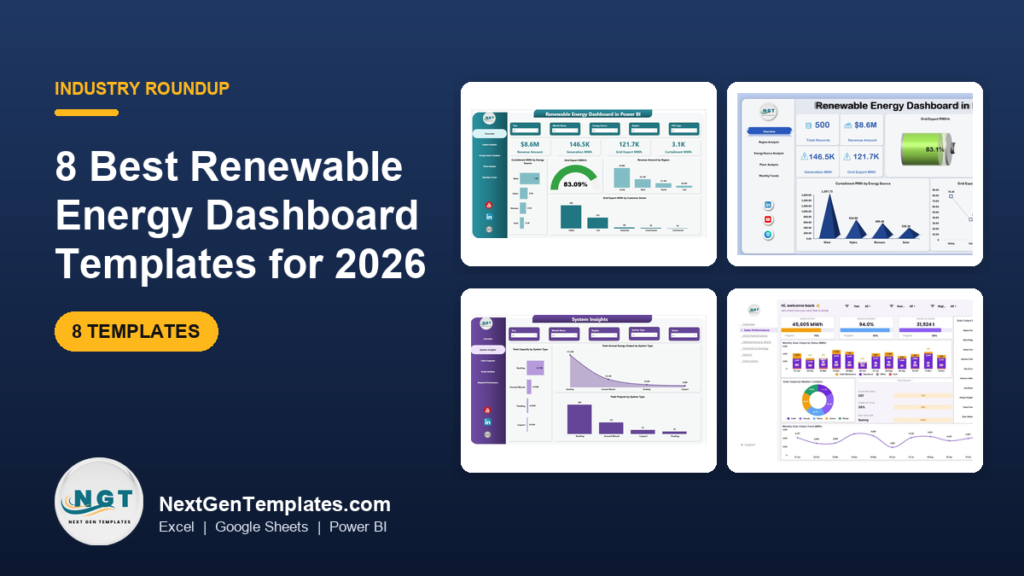
The best renewable energy dashboard for most teams is the Renewable Energy Dashboard in Power BI ($17.99). It has five pages covering overview, region, energy source, plant and monthly trends, and tracks generation, grid export, revenue and curtailment. Excel ($13.99) and Google Sheets ($9.99) versions do the same job outside Power BI.
Last updated: October 2026
Key takeaways
- The Renewable Energy Dashboard in Power BI costs $17.99 and is the only template here with curtailment monitoring across five analysis pages.
- The same renewable energy dashboard exists in Excel ($13.99) and Google Sheets ($9.99), so you can pick the format your team already uses.
- For KPI reporting against targets, the Renewable Energy KPI Dashboard in Excel ($14.99) compares month-to-date and year-to-date results with the previous year.
- Developers and EPC teams should look at the Solar Energy Dashboard in Power BI ($17.99), the Renewable Infrastructure Projects Dashboard in Power BI ($17.99) and the Solar Project Construction Dashboard in Excel ($17.99).
- Every template is a one-time purchase between $9.99 and $17.99, with no per-user fee, so it is a different cost model from monitoring subscriptions.
 Launch offer
From your first Pivot Table to the Data Model, DAX, Power Query and a one-page KPI dashboard. 11h 51m of video by PK, with practice files, quizzes and a capstone.
Renewable energy dashboard templates compared
| Template | Format | Best For | Price |
|---|---|---|---|
| Renewable Energy Dashboard in Power BI (Best overall) | Power BI | Portfolio reporting: generation, export, revenue, curtailment | $17.99 |
| Renewable Energy Dashboard in Excel | Excel | Analysts who want pivot charts and slicers without BI licences | $13.99 |
| Renewable Energy Dashboard in Google Sheets (Best value) | Google Sheets | Small teams sharing one live file | $9.99 |
| Renewable Energy KPI Dashboard in Excel | Excel | Target vs actual vs previous year reporting | $14.99 |
| Solar Energy Dashboard in Power BI | Power BI | Solar EPC and project finance teams | $17.99 |
| Wind Energy Farms KPI Dashboard in Excel | Excel | Wind farm operators tracking KPIs | $14.99 |
| Renewable Infrastructure Projects Dashboard in Power BI | Power BI | Investors and developers tracking ROI and subsidies | $17.99 |
| Solar Project Construction Dashboard in Excel | Excel | Contractors managing budget, stages and delays | $17.99 |
How we picked these renewable energy dashboard templates
We searched the NextGenTemplates catalog of roughly 6,900 products for dashboards and KPI files built for solar, wind, hydro and hybrid operations. We kept paid templates that match a clear job: operating a generating fleet, reporting KPIs, or delivering new projects.
Exact-match renewable energy dashboards in three formats lead the list, followed by specialist files ordered by how many buyers they suit. We left out general energy consumption templates, which belong to a different buyer and are covered in our energy management KPIs guide.
What are the 8 best renewable energy dashboard templates for 2026?
Eight templates, ranked below. The first three are the same renewable energy dashboard in Power BI, Excel and Google Sheets. The rest cover KPI tracking, solar, wind and project delivery.
1. Renewable Energy Dashboard in Power BI: best overall
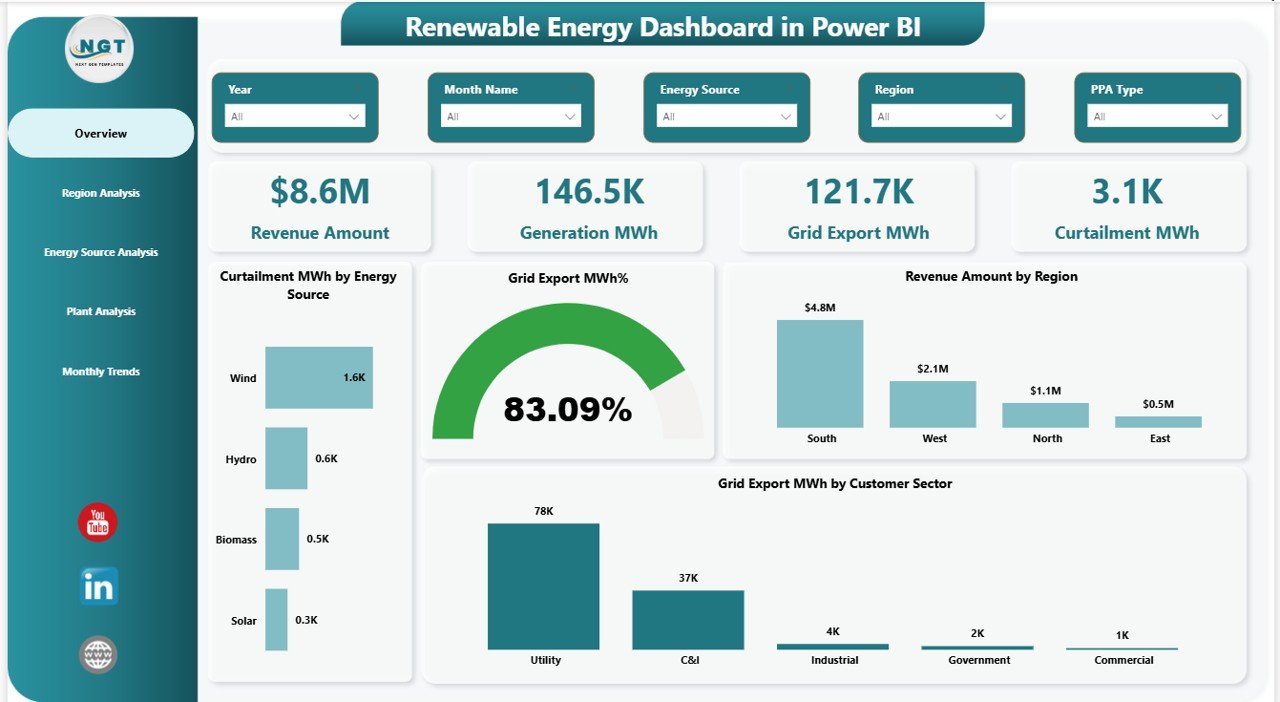
This is the exact-match template and the one we rank first because it covers operations and money on the same pages. It is a ready-to-use Power BI file for monitoring generation, revenue and efficiency across solar, wind, hydro and hybrid plants.
Who it is for: energy asset managers, analysts and finance teams who report across several plants and regions.
- Five analysis pages: Overview, Region, Energy Source, Plant and Monthly Trends
- KPI tracking for generation, grid export, revenue and curtailment
- Region comparison to find high and low performers
- Energy source profitability for solar, wind, hydro and hybrid
- Dynamic slicers and filters on every page
Use cases: compare two regions on export versus generation each month, find the plant losing the most output to curtailment, rank energy sources by profitability before a budget round, and show seasonal swings on the Monthly Trends page in board packs.
Price: $17.99. Get the renewable energy dashboard in Power BI.
Best for: portfolio owners who want one interactive view of generation, export, revenue and curtailment.
2. Renewable Energy Dashboard in Excel
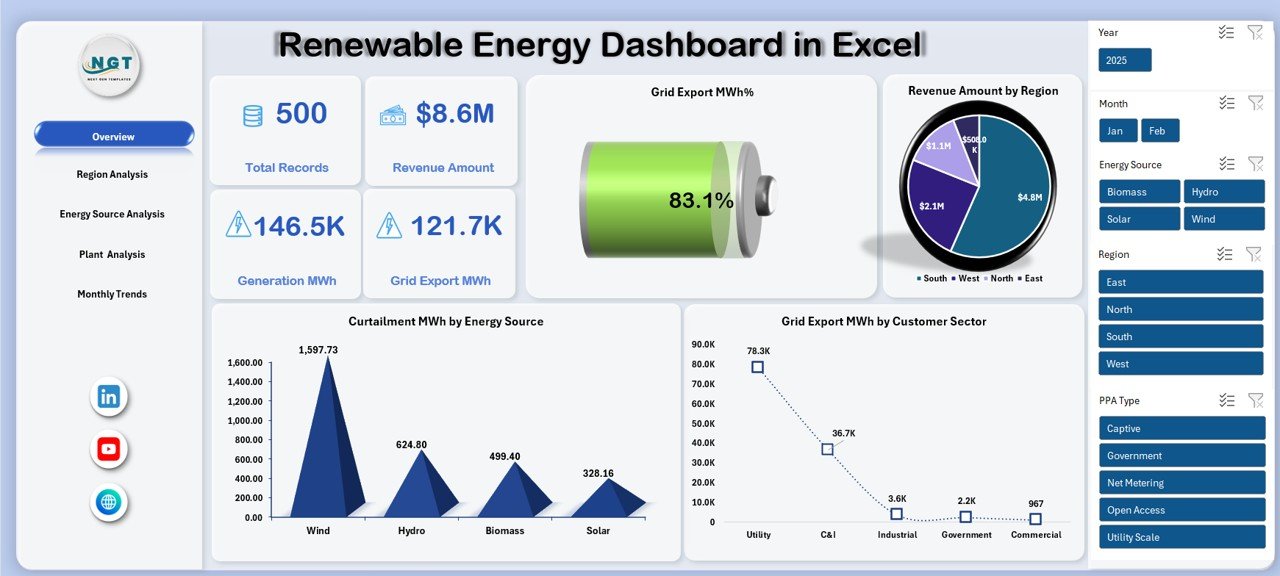
The Excel version is built entirely in Microsoft Excel, with interactive sheets, automated KPIs, pivot charts and slicers. It needs no coding or macros, and no BI licence.
Who it is for: energy companies, analysts and project teams that already live in Excel.
- Executive Overview sheet with total records, revenue, generation MWh, grid export MWh and export efficiency
- Analysis by region, energy source, plant, PPA type and customer sector
- Monthly tracking of revenue, capacity factor and customer contribution
- Plant-level downtime, capacity utilization and revenue
- Slicers for region, energy source, PPA type and time period
Use cases: rank regions by export efficiency and downtime, check which PPA type brings in the most revenue, track capacity factor month by month, and review a single plant before a maintenance decision.
Price: $13.99. Get the renewable energy dashboard in Excel.
Best for: analysts who want the full renewable energy dashboard inside a workbook they control.
3. Renewable Energy Dashboard in Google Sheets: best value
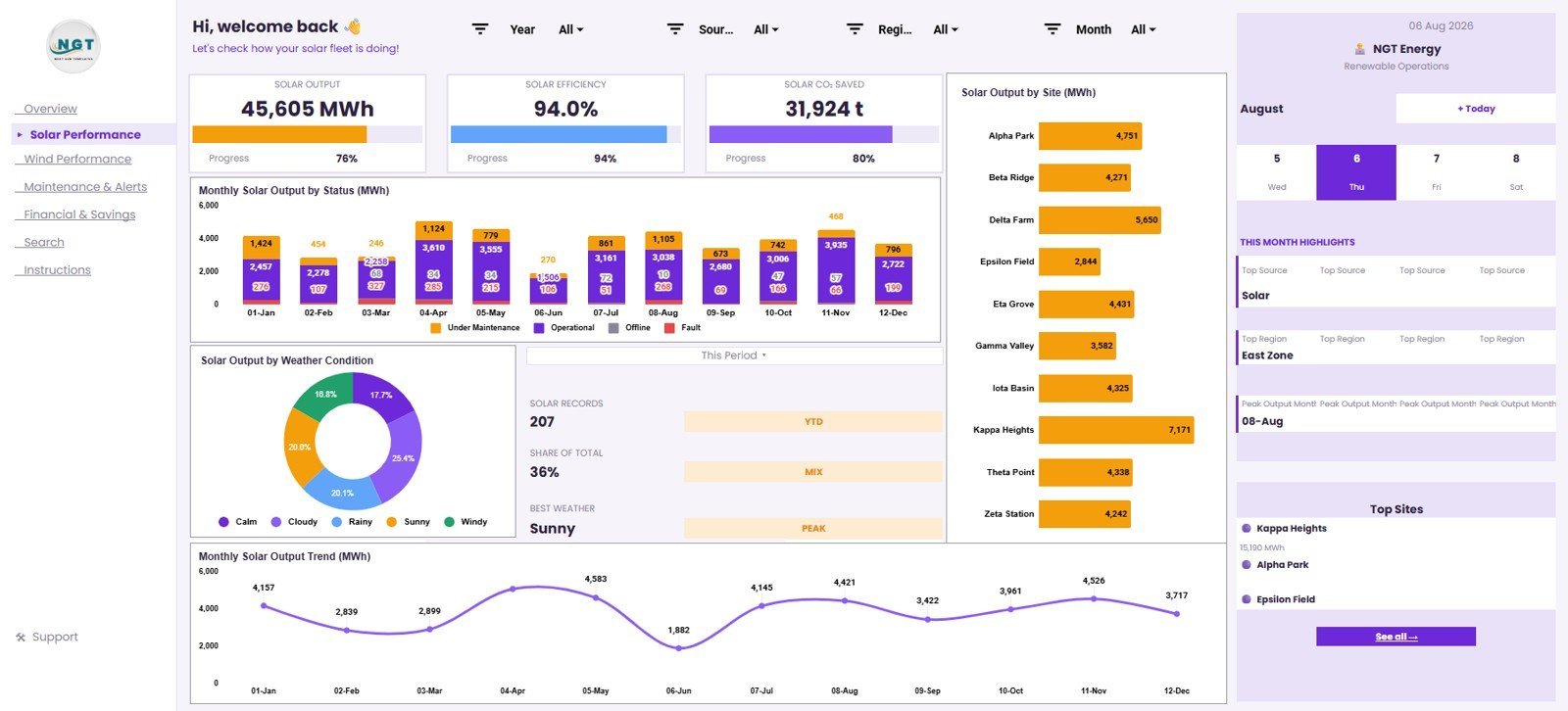
At $9.99 this is the cheapest way to get a working renewable energy dashboard. It lives in one shareable spreadsheet and has seven tabs for overview, solar, wind, maintenance, finance, search and source data.
Who it is for: small developers, community energy groups and consultants who share a file with clients.
- Overview cards for Total Generation, CO2 Saved, Total Revenue, Avg Output / Record, Records Logged and Fleet Efficiency
- Separate Solar Performance and Wind Performance tabs
- Maintenance views for status, maintenance type, asset condition and downtime hours
- Search Sheet that returns a full row from a selected Record ID
- Editable Data Sheet for replacing the sample records
Use cases: compare solar output by weather and site, see downtime hours by maintenance type, report CO2 saved alongside revenue, and look up one record without scrolling a data table.
Price: $9.99. Get the renewable energy dashboard in Google Sheets.
Best for: teams that want a low-cost, shareable energy dashboard template with no software subscription.
4. Renewable Energy KPI Dashboard in Excel

This one is about KPIs rather than plant records. You enter monthly actuals, set targets, and the workbook compares month-to-date and year-to-date results with the previous year. It covers solar, wind, hydro and biomass.
Who it is for: sustainability managers and analysts who report a fixed KPI set every month.
- Dynamic month selection with colour-coded indicators
- Automatic MTD and YTD calculations
- Target versus actual versus previous year for every KPI
- KPI trend charts chosen from a drop-down
- KPI definitions with unit, formula and type (Lower is Better or Upper is Better)
Use cases: present a monthly board pack, check whether a KPI is ahead of last year, and keep a documented definition for each metric so audits are easier.
Price: $14.99. Get the renewable energy KPI dashboard in Excel.
Best for: monthly KPI reporting against targets.
5. Solar Energy Dashboard in Power BI
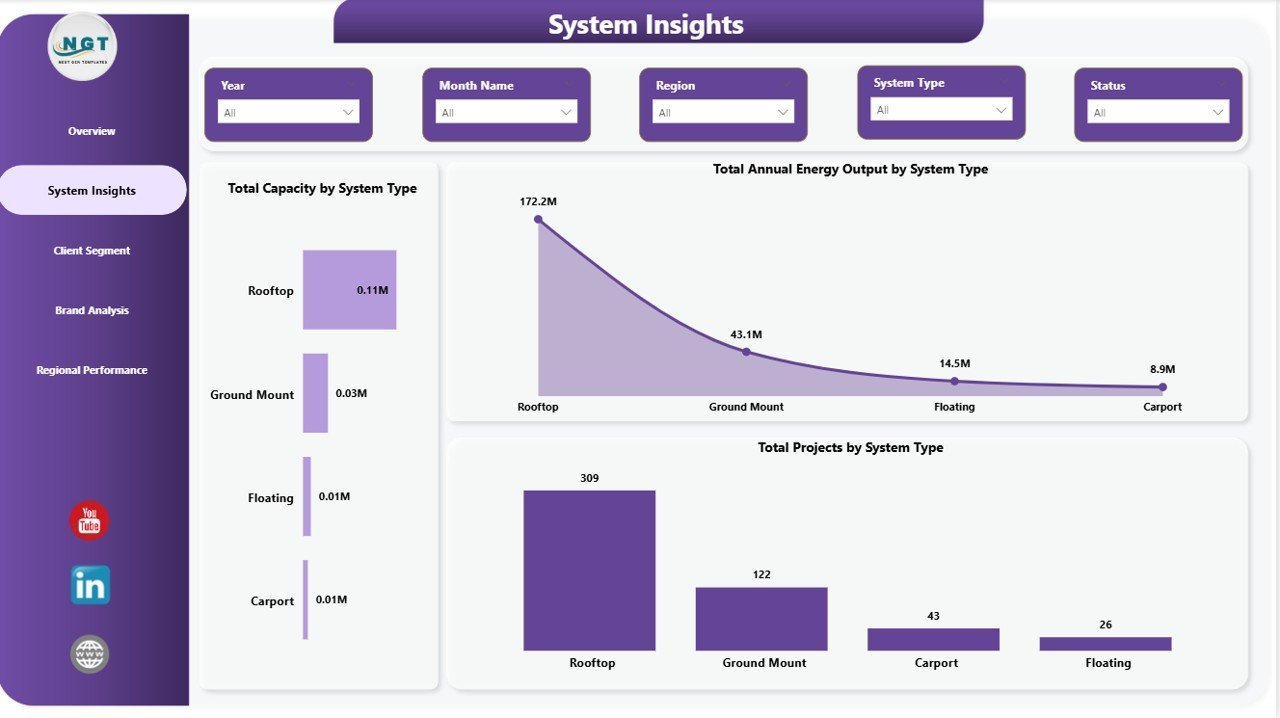
If you searched for a solar dashboard or a solar panel dashboard, start here. It is aimed at the commercial side of solar: revenue, profit, capacity and annual energy output.
Who it is for: solar EPC managers, project finance teams and brand managers.
- Four KPI cards: Total Revenue, Net Profit, Total Capacity and Total Annual Energy Output
- Five pages: Overview, System Insights, Client Segment, Brand Analysis and Regional Performance
- System types compared: rooftop, ground mount, carport and utility-scale
- Client segments: residential, commercial, industrial and utility
- Panel brand benchmarking on the Brand Analysis page
Use cases: see which client segment has the best profit margin, compare capacity by system type, and benchmark panel brands before a purchasing round. Setup is to open the .pbix file in Power BI Desktop and replace the sample data.
Price: $17.99. Get the solar energy dashboard in Power BI.
Best for: solar businesses that sell and install systems.
6. Wind Energy Farms KPI Dashboard in Excel
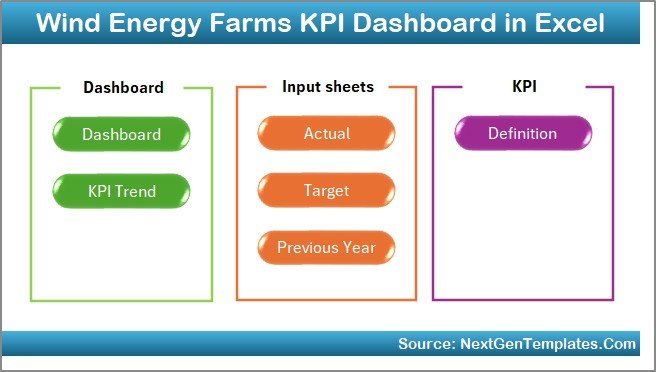
A wind-specific KPI workbook that centralizes turbine performance, operational reliability, maintenance efficiency and financial outcomes in one interactive view.
Who it is for: wind farm managers who now collect numbers from disconnected reports.
- Centralized KPI dashboard for all wind farm metrics
- MTD and YTD tracking
- Target versus actual analysis to spot gaps
- Trend visualization and performance indicators for improvements or declines
- Automatic refresh once data is entered
Use cases: review last month against target in a single meeting, see whether reliability is trending down before it shows up in output, and give owners one workbook instead of several reports.
Price: $14.99. Get the wind energy farms KPI dashboard in Excel.
Best for: wind operators who report KPIs on a monthly cycle.
7. Renewable Infrastructure Projects Dashboard in Power BI
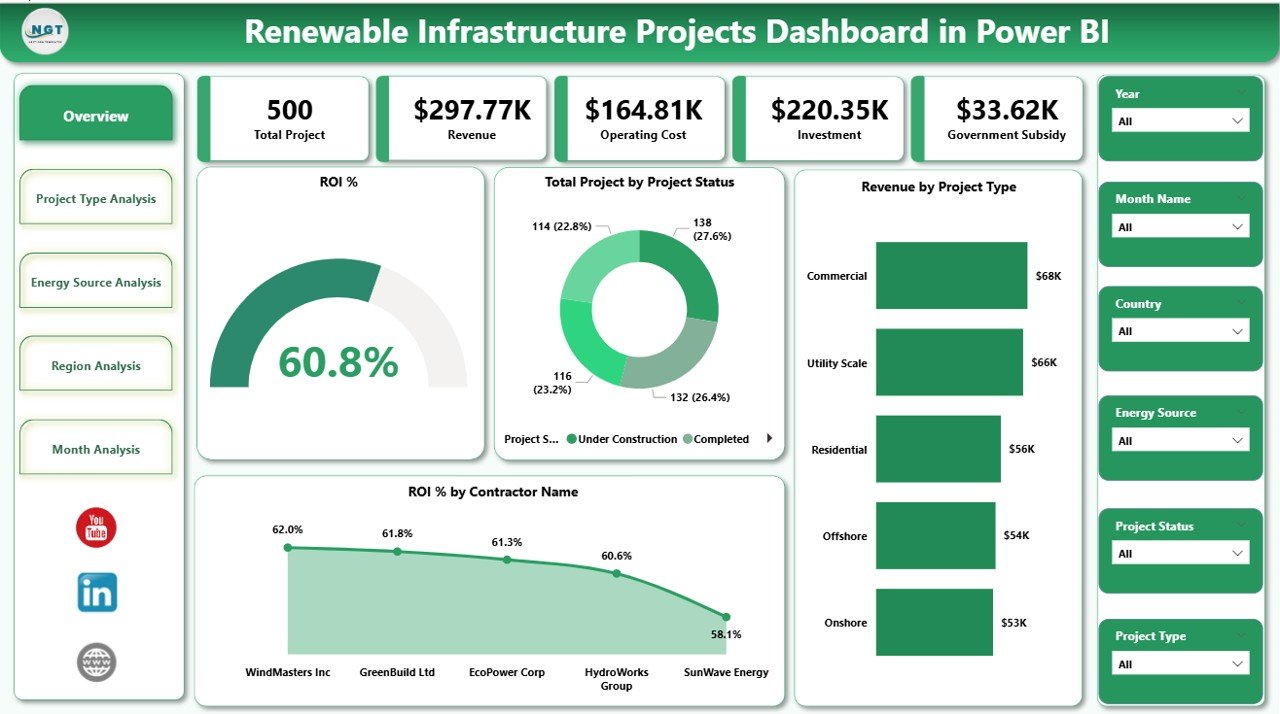
This template sits on the development and investment side. It tracks ROI %, total investment, operating cost, subsidies and project status across solar, wind, hydro, biomass and geothermal.
Who it is for: project managers and investors with several contracts across regions.
- Five pages: Overview, Project Type, Energy Source, Region and Month analysis
- Slicers for Year, Region, Energy Source and Contract Name
- ROI % monitoring and region-wise ROI tracking
- Government subsidy analysis
- Monthly trends in revenue, cost and ROI
Use cases: compare ROI by energy source before committing capital, check how subsidies are spread by region, and spot cost creep on a contract.
Price: $17.99. Get the renewable infrastructure projects dashboard in Power BI.
Best for: capital allocation across a renewable project portfolio.
8. Solar Project Construction Dashboard in Excel
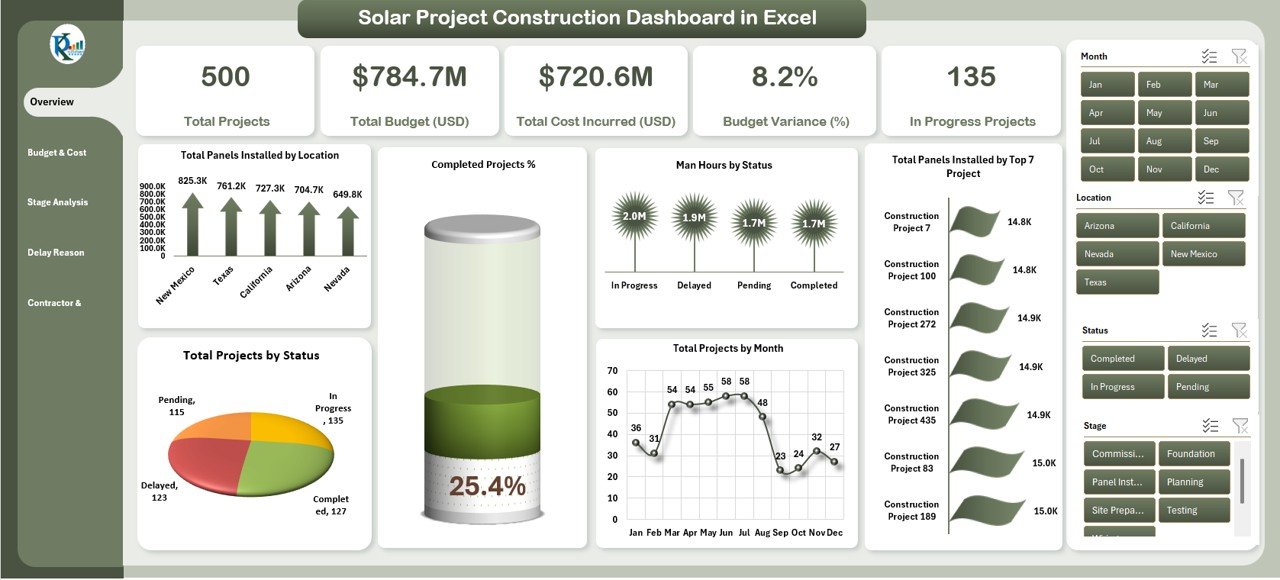
Built for the build phase. It tracks solar projects, costs and timelines with cards and charts for budget, stages, delays and contractors.
Who it is for: project managers, contractors and stakeholders delivering solar installations.
- Overview cards: Total Projects, Total Budget (USD), Total Cost Incurred (USD), Budget Variance (%) and In Progress Projects
- Budget vs cost by location, stage, month and contractor
- Stage analysis across planning, execution and completion
- Delay reason analysis and delayed project % by stage
- Panels installed by location and by top projects
Use cases: find which contractor is over budget, see at which stage delays pile up, and report completed versus delayed projects to a client.
Price: $17.99. Get the solar project construction dashboard in Excel.
Best for: keeping solar construction on budget and on schedule.
Watch the renewable energy dashboard walkthrough
More walkthroughs are on the NextGenTemplates YouTube channel.
Which KPIs should a renewable energy dashboard track?
Whatever template you pick, these are the numbers that matter. Benchmarks depend on technology and site, so use your own history as the reference.
| KPI | Formula | What it tells you |
|---|---|---|
| Capacity factor | Actual generation (MWh) / (installed MW x hours in period) | How hard the asset works |
| Export efficiency | Grid export MWh / generation MWh | Losses between plant and grid |
| Curtailment rate | Curtailed MWh / (exported MWh + curtailed MWh) | Energy you could have sold |
| Downtime | Hours offline / hours in period | Reliability and maintenance quality |
| ROI % | Net return / total investment x 100 | Project profitability |
A worked example: a 50 MW solar plant has 438,000 MWh of theoretical output over 8,760 hours (50 x 8,760). If it generates 98,550 MWh, the capacity factor is 22.5%. If 2,000 MWh of potential output was curtailed out of 100,550 MWh, the curtailment rate is about 2%. These are illustrative figures, not a benchmark.
For the consumption side of the same picture, read our guide to energy management KPIs.
How to choose between them
| If you… | Choose |
|---|---|
| Operate several plants and need curtailment | Power BI renewable energy dashboard ($17.99) |
| Work only in Excel | Excel renewable energy dashboard ($13.99) |
| Share live with clients on a budget | Google Sheets version ($9.99) |
| Report targets and previous year | Renewable Energy KPI Dashboard ($14.99) |
| Sell or install solar | Solar Energy Dashboard ($17.99) |
| Run wind farms | Wind Energy Farms KPI Dashboard ($14.99) |
| Fund or develop projects | Infrastructure Projects Dashboard ($17.99) |
| Build solar sites | Solar Project Construction Dashboard ($17.99) |
If you are unsure about format, our comparison of Excel vs Google Sheets vs Power BI dashboards explains the trade-offs, and the same logic applies here. On a tight budget, try the free Excel dashboard templates or the free Google Sheets dashboard templates first and upgrade when you need renewable-specific views.
Why renewable reporting matters in 2026
The International Energy Agency says in its 2026 electricity update that renewable electricity generation is forecast to overtake coal in 2026, growing by more than 8% and reaching 37% of global electricity generation by 2027. More plants and more investors mean more reporting, and spreadsheets scattered across inboxes do not scale.
A dashboard also cuts argument. When generation, export and revenue sit on one page, the discussion moves from whose numbers are right to what to do about the weakest plant.
How do these compare with monitoring software?
Dedicated platforms such as SolarEdge monitoring, Power Factors and AlsoEnergy connect to inverters and meters and collect data automatically. They are built for live telemetry and alerting. We do not list their prices here because they depend on plant size and contract.
The templates above work from data you load yourself, in Power BI, Excel or Google Sheets. They suit reporting, review meetings and investor packs. Many teams use both: live monitoring for operations, a template for the monthly management view. The energy and utility dashboard guide and the office energy consumption dashboard in Power BI post cover the demand side.
When a template is NOT the right answer
Buy software instead if you need real-time alarms from inverters or turbines. A template will not poll a device, and no spreadsheet should be your fault-detection system.
Software is also the better choice if you manage hundreds of sites with automated data feeds, need contractual performance guarantees reported to a regulator in a fixed format, or require dozens of users with role-based access. In those cases an asset-performance platform earns its subscription.
Templates also need clean data. If your generation and revenue records live in five different systems with no common plant ID, fix that first, or the best dashboard will only display the mess.
Frequently asked questions
What is a renewable energy dashboard?
A renewable energy dashboard is a single report that shows how solar, wind, hydro or hybrid plants perform. It usually covers generation, grid export, revenue, downtime and efficiency, with filters by region, plant and month. It replaces separate spreadsheets with one view for managers and investors.
Which format is best for a renewable energy dashboard: Power BI, Excel or Google Sheets?
Power BI ($17.99) suits multi-plant portfolios and curtailment analysis. Excel ($13.99) suits analysts who want pivot charts and no BI licence. Google Sheets ($9.99) suits small teams sharing one live file. Pick the tool your team already opens every day.
Is there a solar dashboard template I can use?
Yes. The Solar Energy Dashboard in Power BI ($17.99) tracks revenue, net profit, capacity and annual output across five pages, including panel brand and client segment. For construction, the Solar Project Construction Dashboard in Excel ($17.99) tracks budget, stages, delays and contractors.
Can I track solar panel performance by brand?
The Solar Energy Dashboard in Power BI has a Brand Analysis page that benchmarks panel brands, alongside system type, client segment and regional pages. It is a commercial view of revenue and capacity by brand. It is not a live inverter feed, so you load the data yourself.
Does the Power BI renewable energy dashboard track curtailment?
Yes. The Renewable Energy Dashboard in Power BI ($17.99) lists curtailment monitoring among its features, next to generation, grid export and revenue. You can compare curtailment across regions, energy sources and plants using the slicers on its five analysis pages.
Do I need coding or macros to use these templates?
No. The Renewable Energy Dashboard in Excel and the Renewable Energy KPI Dashboard in Excel need no coding. The Power BI files open in Power BI Desktop, where you replace the sample data. The Google Sheets version uses an editable Data Sheet in the same format.
How much does a renewable energy dashboard template cost?
The eight templates here cost between $9.99 and $17.99, each a one-time purchase. Google Sheets is $9.99, Excel is $13.99, and the Power BI renewable energy dashboard is $17.99. Monitoring platforms usually charge on a contract basis, and we do not quote their prices.
Can one dashboard cover solar and wind together?
Yes. The Renewable Energy Dashboard in Power BI and Excel compare energy sources side by side, and the Google Sheets version has separate Solar Performance and Wind Performance tabs. The Renewable Energy KPI Dashboard in Excel covers solar, wind, hydro and biomass in one workbook.
Which template tracks project ROI and subsidies?
The Renewable Infrastructure Projects Dashboard in Power BI ($17.99) tracks ROI %, investment, operating costs and government subsidies across five pages. You can filter by year, region, energy source and contract name, which helps compare solar, wind, hydro, biomass and geothermal projects.
Get more renewable energy dashboard templates
Start with the best overall pick: the Renewable Energy Dashboard in Power BI is $17.99, a one-time purchase. Prefer a spreadsheet? The Excel version is $13.99 and the Google Sheets version is $9.99.
ESG teams may also want the Energy & ESG Sustainability Bundle: $59.99 for 8 ESG and energy templates, mostly ESG with one solar KPI file. It is not part of the ranking above. Watch setup videos on the NextGenTemplates YouTube channel.