

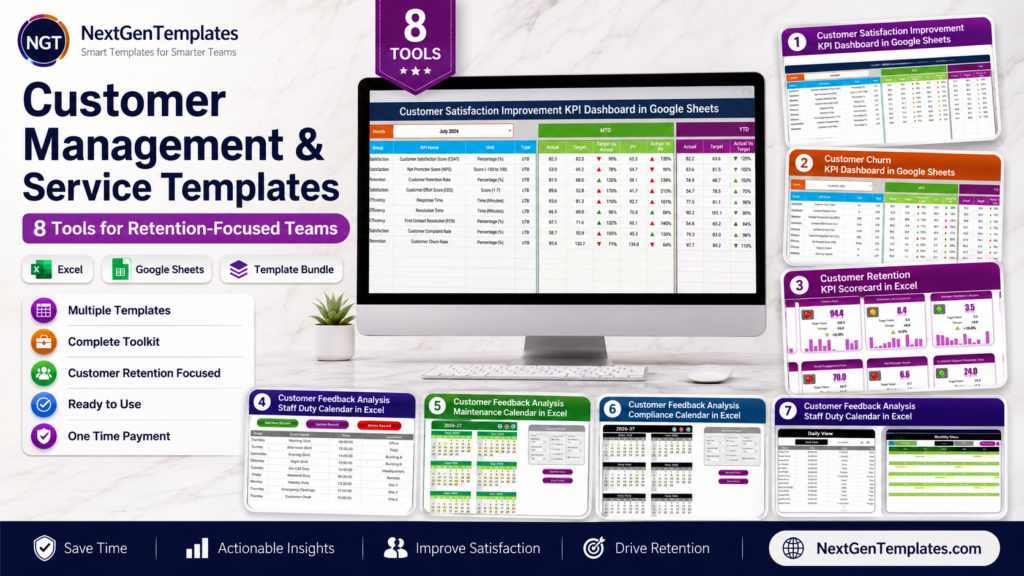
Retention-focused teams do not usually lose customers in one dramatic moment. They lose them through late follow-ups, vague ownership, scattered feedback, weak customer database habits, and service issues that never make it into a weekly review. For US small businesses and lean CX teams, that is a painful gap: leaders need a customer management Excel workflow that can track satisfaction, churn, retention KPIs, NPS signals, and customer feedback actions without forcing every user into another monthly SaaS seat.
That cost gap matters. Zendesk lists Support Team at $19 per agent/month and Suite Team at $55 per agent/month when paid yearly, while Salesforce service pricing shows Starter Suite at $25 per user/month and Pro Suite at $100 per user/month. A five-person service team can quickly move from a spreadsheet problem to a recurring software bill. This post covers 8 retention-focused templates from NextGenTemplates, with individual prices from $4.99 to $14.99 and all eight products totaling $62.92 at current sale prices.
Why Retention-Focused Customer Management Matters
- Retention is cheaper than acquisition. Harvard Business Review notes that acquiring a new customer can cost 5 to 25 times more than keeping an existing one, which is why customer service dashboards and feedback follow-up systems deserve executive attention. Source: Harvard Business Review.
- Small retention improvements can compound. The same HBR article cites Bain research showing that a 5% increase in retention can increase profits by 25% to 95%, depending on the business model and industry.
- Customers expect more personal service. McKinsey found that 71% of consumers expect personalized interactions, 76% get frustrated when that does not happen, and 78% are more likely to repurchase after personalized content. Source: McKinsey.
- Service software costs scale by seat. Zendesk pricing lists Support Team at $19 per agent/month, Suite Team at $55 per agent/month, and Suite Professional at $115 per agent/month when paid yearly. Source: Zendesk pricing.
- CRM and service platforms can be overkill for first reporting needs. Salesforce service pricing lists Starter Suite at $25 per user/month, Pro Suite at $100 per user/month, and Enterprise at $175 per user/month. Source: Salesforce service pricing.
Compare the 8 Customer Management Excel and Service Templates
| Template | Format | Best For | Price |
|---|---|---|---|
| Customer Satisfaction Improvement KPI Dashboard in Google Sheets | Google Sheets KPI dashboard | CSAT, NPS-style KPI tracking, satisfaction improvement reviews | $12.99 |
| Customer Churn KPI Dashboard in Google Sheets | Google Sheets KPI dashboard | Churn analysis, retention risk reviews, lifecycle reporting | $9.99 |
| Customer Retention KPI Scorecard in Excel | Excel KPI scorecard | Retention scorecards, target tracking, MTD/YTD reporting | $14.99 |
| Customer Feedback Analysis Staff Duty Calendar In Excel | Excel calendar | Staff duties, feedback review ownership, service accountability | $4.99 |
| Customer Feedback Analysis Maintenance Calendar in Excel | Excel calendar | Recurring feedback reviews, maintenance tasks, improvement meetings | $4.99 |
| Customer Feedback Analysis Compliance Calendar in Excel | Excel calendar | Complaint deadlines, compliance checks, response follow-through | $4.99 |
| Customer Feedback Analysis Project Calendar in Excel | Excel calendar | Survey projects, CX initiatives, feedback analysis timelines | $4.99 |
| Customer Feedback Analysis Task Calendar in Excel | Excel calendar | Follow-up tasks, complaint reviews, customer feedback action tracking | $4.99 |
The 8 Templates in Detail
1. Customer Satisfaction Improvement KPI Dashboard in Google Sheets
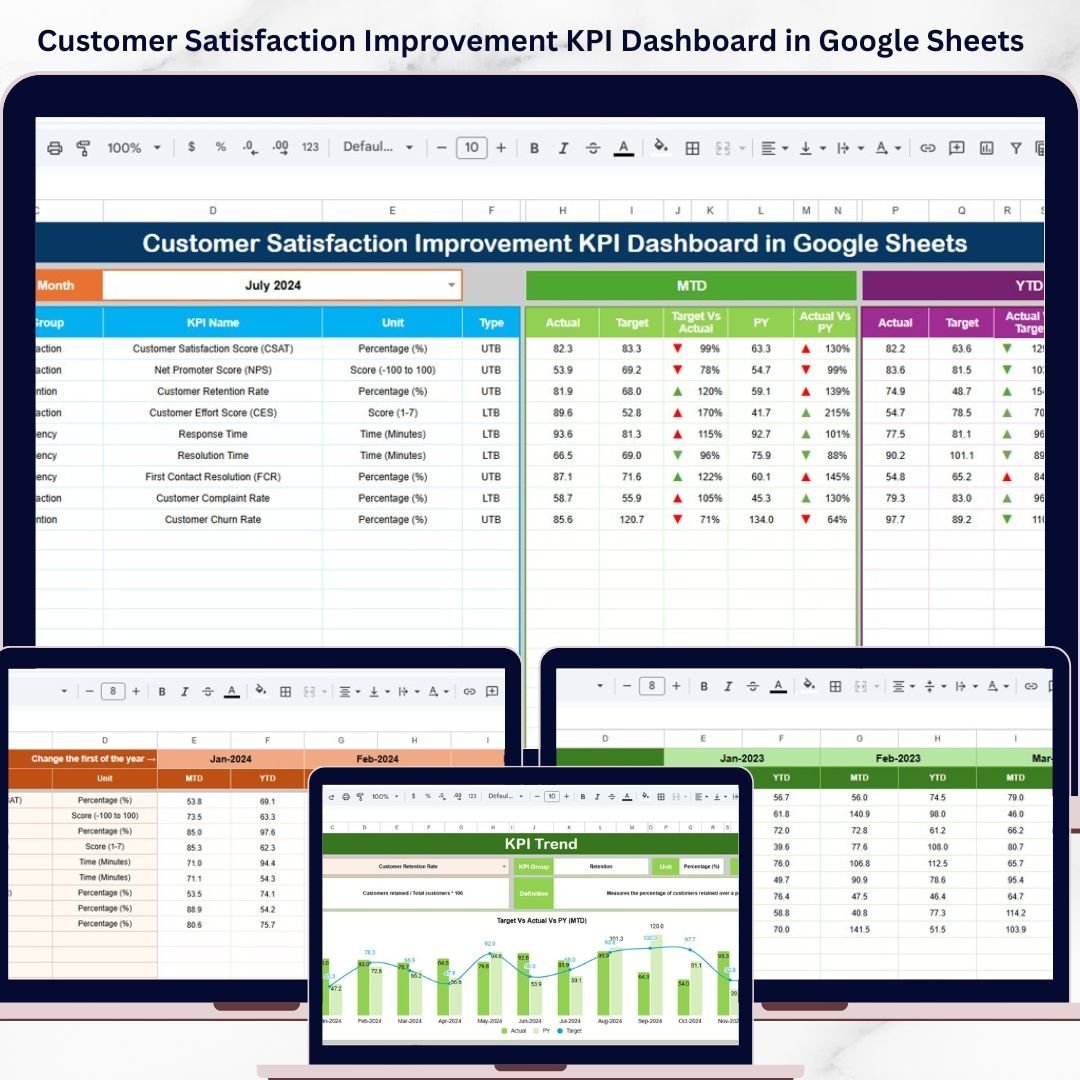
The Customer Satisfaction Improvement KPI Dashboard in Google Sheets is the strongest starting point for teams that want a customer service dashboard centered on satisfaction improvement rather than new-logo sales. It includes a dashboard sheet, KPI trend sheet, actual numbers input, target number input, previous year numbers, and KPI definition sheet. The month dropdown, MTD/YTD comparisons, target vs actual views, previous-year comparisons, conditional formatting, and trend indicators make it useful for weekly or monthly CX reviews.
Screenshot preview: the gallery shows a main KPI dashboard, KPI trend analysis, actual number input, target input, and previous-year number tabs. A retention team can use those sheets to define customer satisfaction KPIs, track movement over time, and compare current service performance against targets.
- Use it to monitor CSAT, NPS-style scores, complaint resolution KPIs, and service quality indicators.
- Use it for monthly CX leadership reviews where actuals, targets, and previous-year performance need to sit in one view.
- Use it to keep a lightweight customer database of KPI definitions and satisfaction metrics before moving to a larger platform.
- Use it for consultants who need a repeatable customer satisfaction reporting template for clients.
Price: $12.99. View the Customer Satisfaction Improvement KPI Dashboard.
2. Customer Churn KPI Dashboard in Google Sheets
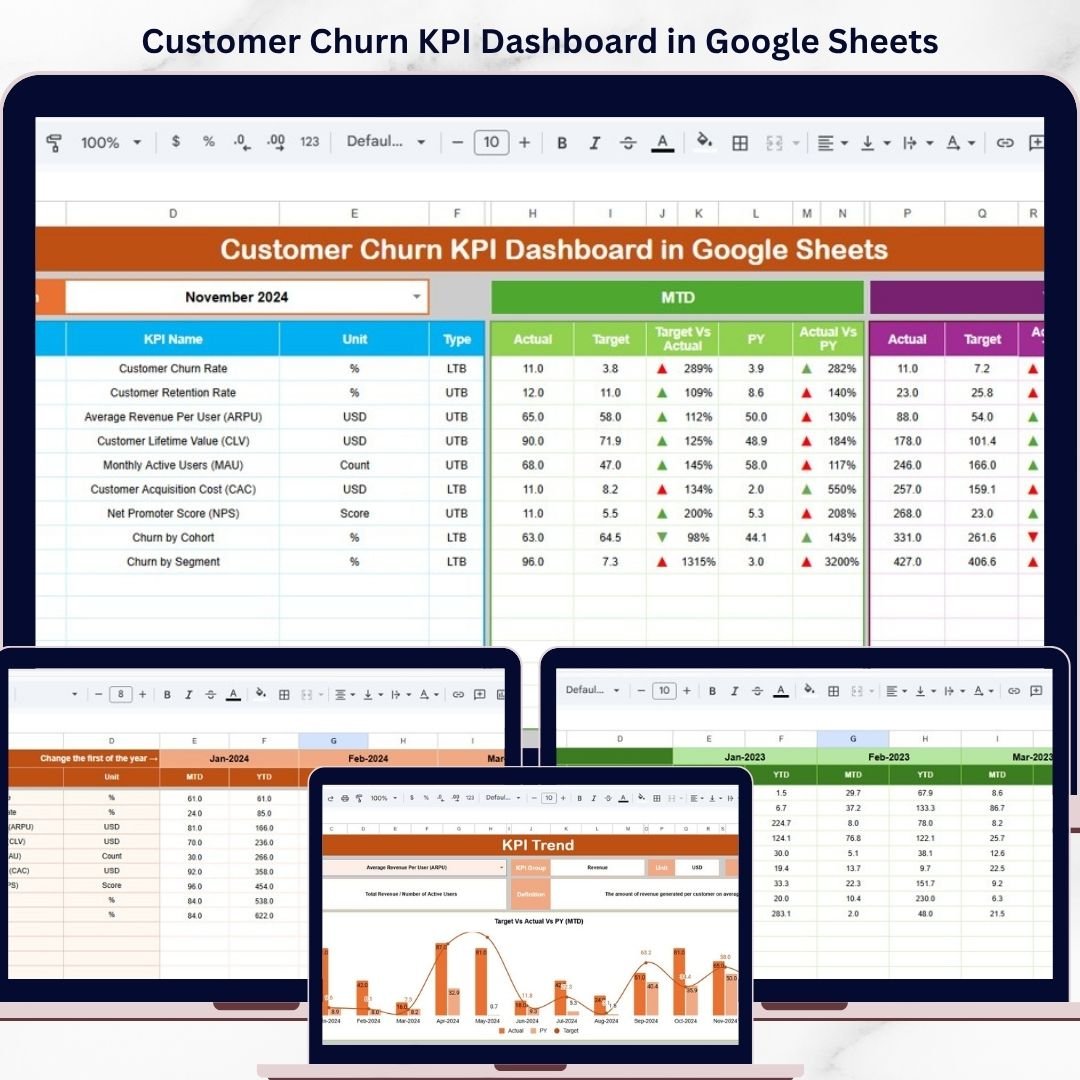
The Customer Churn KPI Dashboard in Google Sheets gives retention teams a dedicated place to review customer churn, retention risk, and lifecycle performance. Instead of only tracking sales pipeline volume, this dashboard focuses on whether existing customers stay, leave, or need intervention. It includes an interactive KPI dashboard, MTD/YTD analysis, trend visualization, conditional formatting indicators, KPI definitions, actual data, target data, and previous-year comparison sheets.
Screenshot preview: the product gallery shows a full churn dashboard, KPI trend views, input sheets, and supporting tabs for actual, target, previous year, and KPI definitions. That structure is useful when churn analysis is currently buried in exports, support notes, or disconnected customer success spreadsheets.
- Use it to monitor churn rate, retention rate, lost customers, at-risk segments, and recovery targets.
- Use it to prepare a recurring customer success meeting around churn drivers and prevention actions.
- Use it to compare current churn with target and previous-year performance.
- Use it beside service ticket tracker exports to connect support volume with churn movement.
Price: $9.99. View the Customer Churn KPI Dashboard.
3. Customer Retention KPI Scorecard in Excel
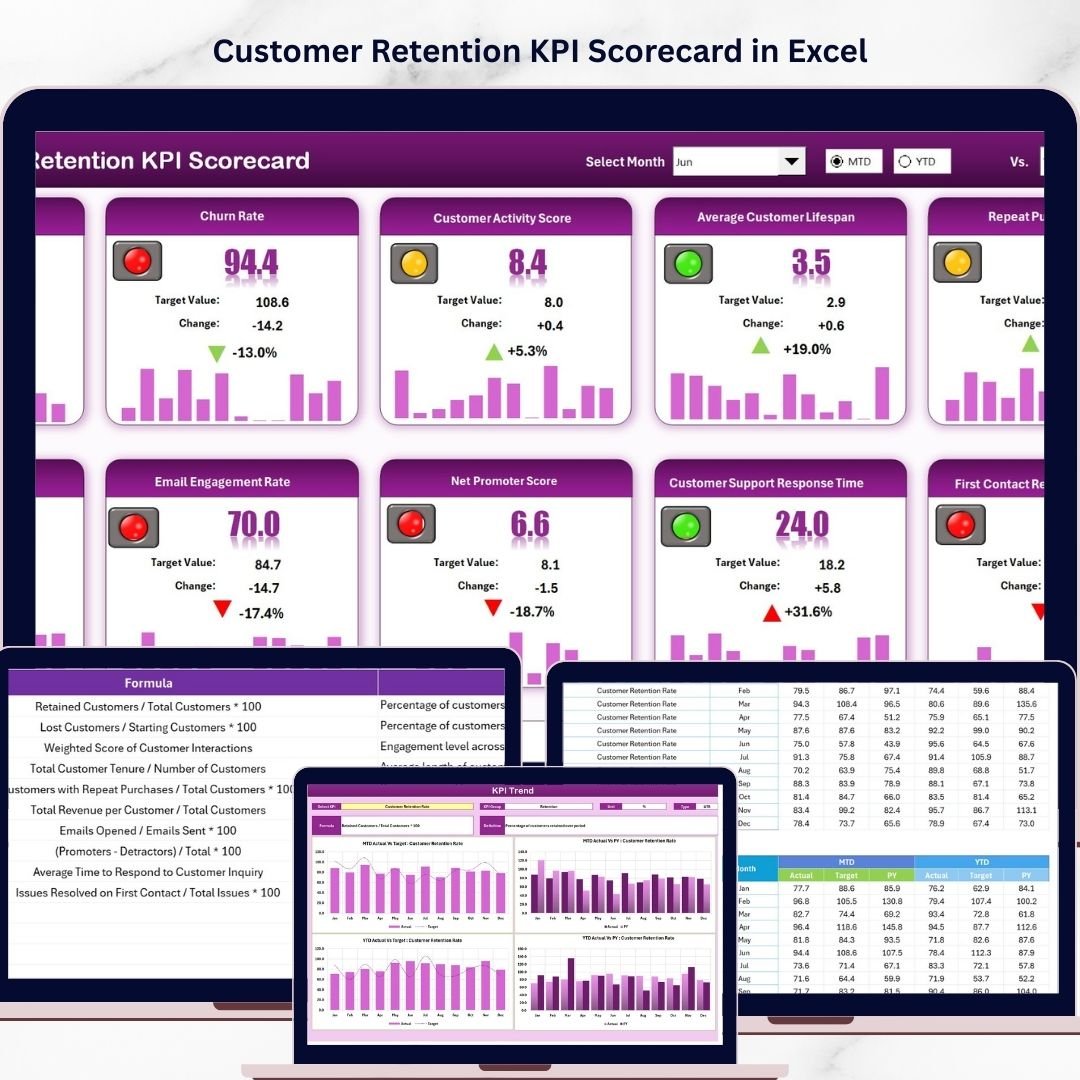
The Customer Retention KPI Scorecard in Excel is best for teams that prefer Excel and want a compact scorecard instead of a broader dashboard workbook. The template includes four worksheets: Scorecard, KPI Trend, Input Data, and KPI Definition. The scorecard view supports month, MTD, and YTD selection, actual vs target comparisons, color-coded performance indicators, and trend charts for retention KPIs.
Screenshot preview: the screenshots show a scorecard sheet, KPI trend sheet, input data sheet, and KPI definition tab. This is a good fit when leadership wants a quick status view, while analysts still need definitions, formulas, units, and trend context behind the score.
- Use it for a monthly retention review with executives, customer success, and operations.
- Use it to track renewal, repeat purchase, retention rate, customer loyalty, or account health KPIs.
- Use it to compare performance against target without building formulas from scratch.
- Use it as an Excel-first alternative before investing in a full CRM analytics stack.
Price: $14.99. View the Customer Retention KPI Scorecard.
4. Customer Feedback Analysis Staff Duty Calendar In Excel
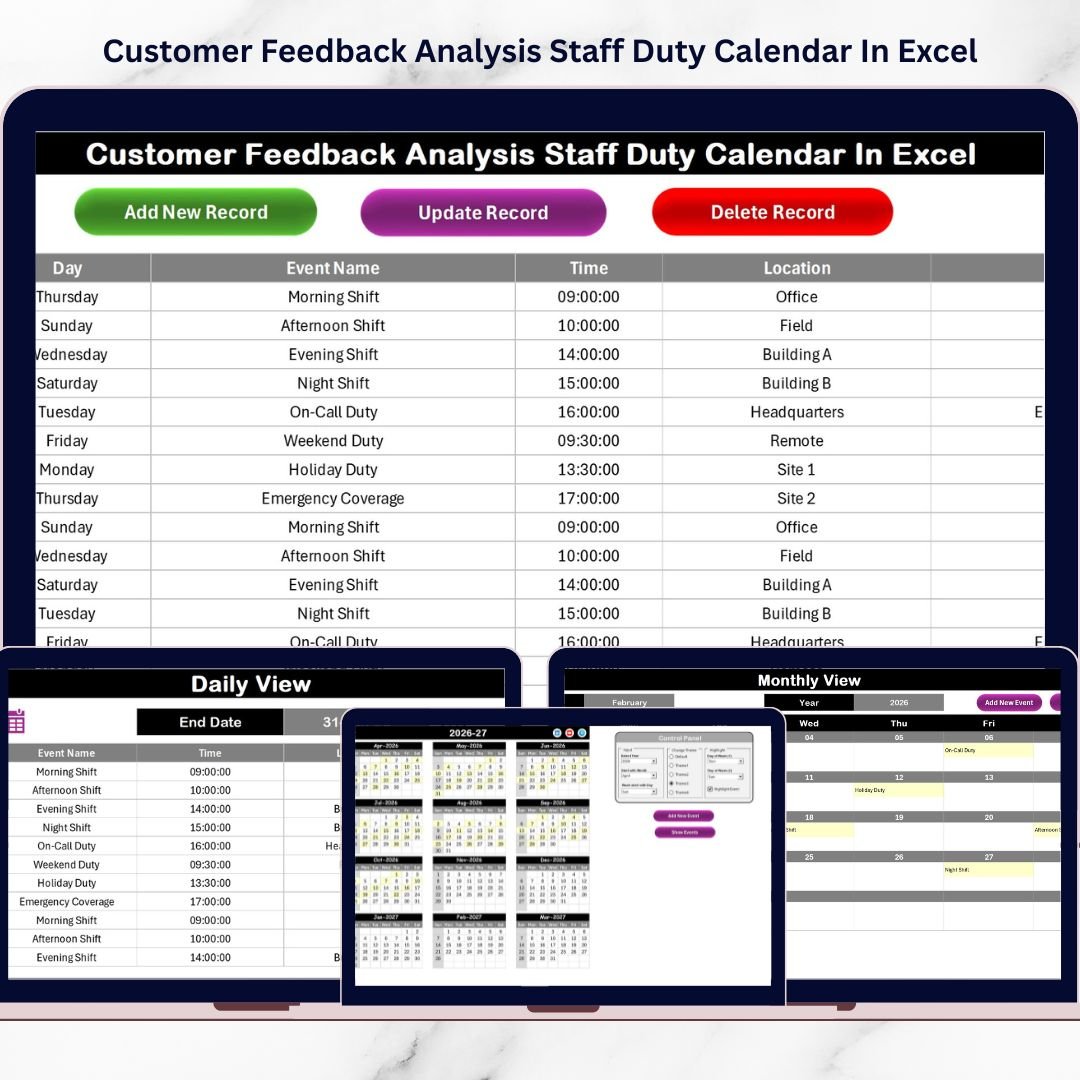
The Customer Feedback Analysis Staff Duty Calendar In Excel helps managers assign and schedule the human work behind customer experience improvement. Dashboards show what happened, but retention improves when someone owns follow-up. This Excel calendar includes Home, Annual View, Monthly View, Daily View, and Events sheets. It also supports calendar controls, theme options, event highlighting, Add New Event, Show Event, and a centralized events database.
Screenshot preview: the gallery shows the calendar layout, annual and monthly planning views, daily view, and events database. That makes it practical for support managers who need to assign staff duties for feedback reviews, complaint investigations, customer interviews, and service recovery meetings.
- Use it to schedule staff responsibility for unresolved customer feedback.
- Use it to plan weekly complaint review sessions and CX improvement standups.
- Use it to coordinate support, QA, product, and operations owners.
- Use it when your customer database shows issues, but ownership is unclear.
Price: $4.99. View the Staff Duty Calendar.
Retention workflow shortcut: pair one KPI tool with one calendar tool. Use the satisfaction or churn dashboard for performance reporting, then use a feedback calendar to assign the review meeting, owner, deadline, and follow-up action. For a low-cost CX stack, start with the Customer Churn KPI Dashboard and the Customer Feedback Analysis Task Calendar.
5. Customer Feedback Analysis Maintenance Calendar in Excel
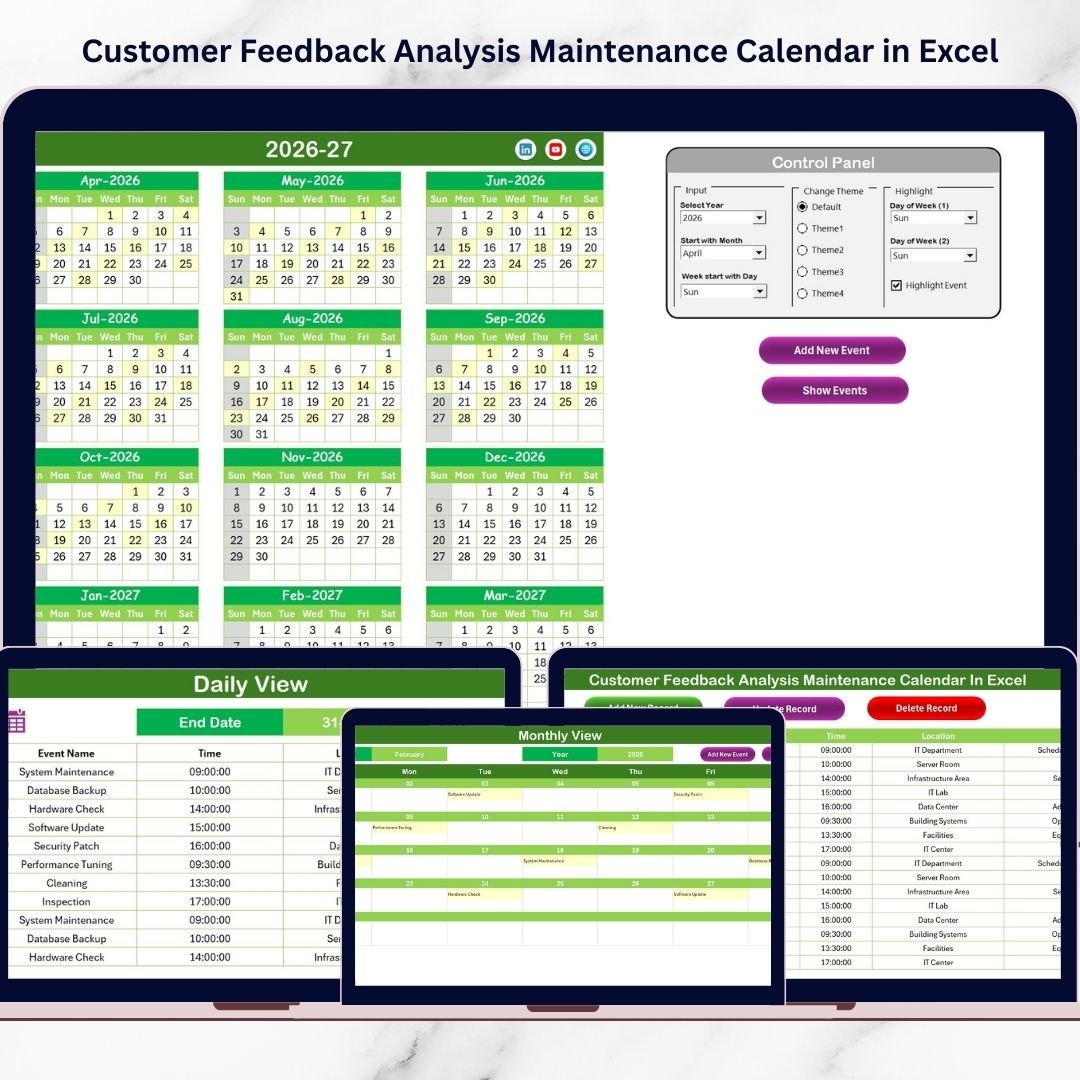
The Customer Feedback Analysis Maintenance Calendar in Excel is for teams that need a recurring cadence for feedback review and service improvement. The word maintenance is useful here: customer experience does not stay healthy because a dashboard exists. It improves when teams keep reviewing feedback, scheduling improvement discussions, and updating action records. This workbook includes Home navigation, Annual View, Monthly View, Daily View, and Events Database sheets.
Screenshot preview: the screenshots show the navigation home page, full-year calendar, monthly calendar, daily event view, and event database. Built-in controls let users choose the year, starting month, starting day of the week, color themes, highlighted days, and scheduled events.
- Use it for recurring customer feedback review meetings.
- Use it to schedule service improvement maintenance tasks after a poor CSAT or NPS result.
- Use it to keep a visible audit trail of feedback analysis sessions.
- Use it for operations teams that need a practical Excel calendar instead of a project management subscription.
Price: $4.99. View the Maintenance Calendar.
6. Customer Feedback Analysis Compliance Calendar in Excel

The Customer Feedback Analysis Compliance Calendar in Excel fits teams that treat feedback follow-up as a process control issue. If a complaint, negative review, or survey response requires a response by a specific date, it should not live only in an email thread. This template uses annual, monthly, and daily calendar views, plus an Events Database sheet, to track feedback reviews, compliance tasks, response deadlines, and improvement activities.
Screenshot preview: the product gallery shows the yearly calendar, monthly planner, daily event tracking, theme controls, event highlight options, quick event creation, and event database. The structure is especially helpful for managers who need visibility into which feedback items are scheduled, which need response, and which have not yet been reviewed.
- Use it for complaint response deadlines and escalation review meetings.
- Use it to schedule compliance checks tied to customer feedback analysis.
- Use it to help QA teams track whether follow-up activities happened on time.
- Use it when service tickets need more governance than a basic inbox can provide.
Price: $4.99. View the Compliance Calendar.
7. Customer Feedback Analysis Project Calendar in Excel
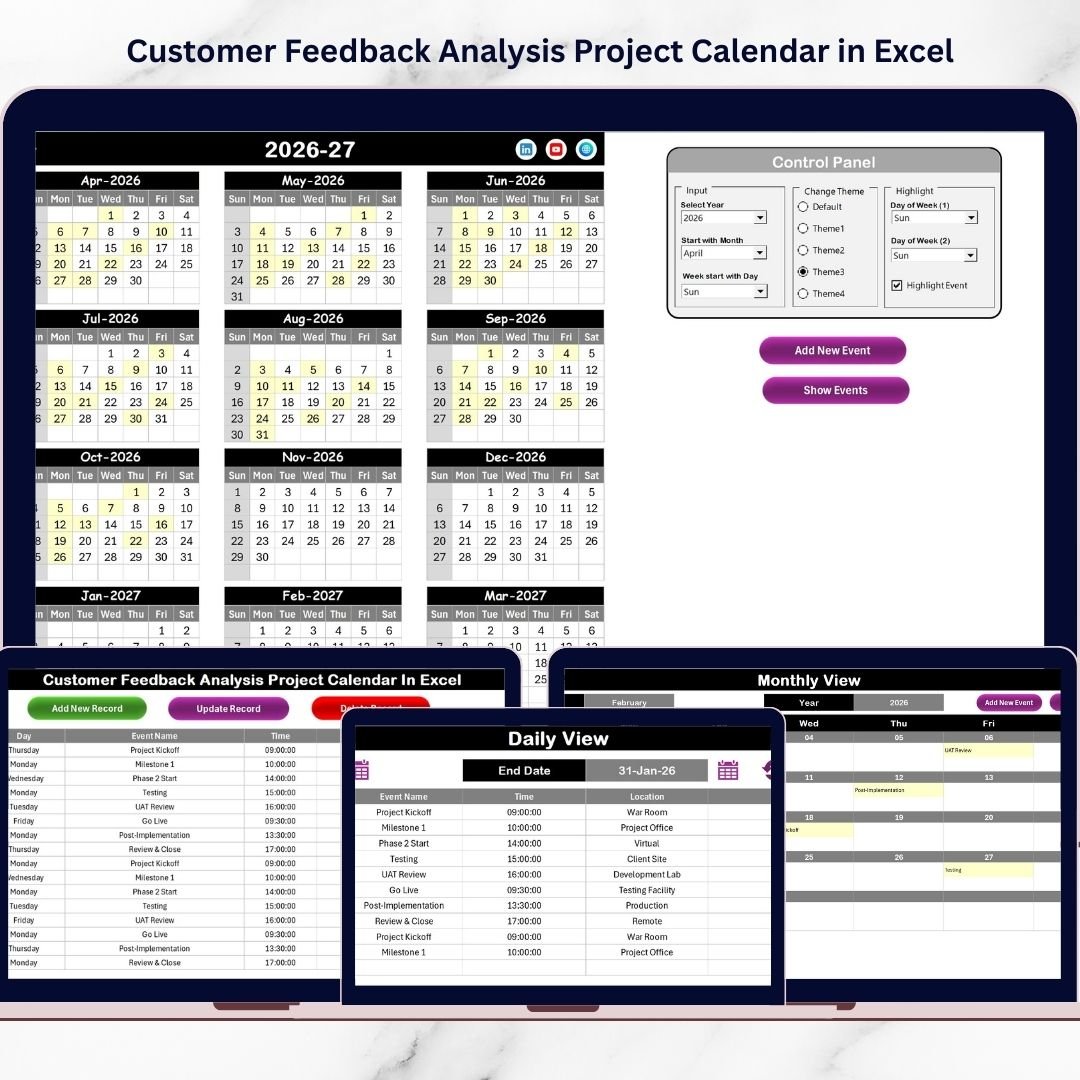
The Customer Feedback Analysis Project Calendar in Excel is the best fit when customer feedback becomes a project, not just a recurring task. Think survey launches, customer interviews, product feedback reviews, service recovery initiatives, and CX improvement sprints. The workbook includes Home, Annual View, Monthly View, Daily View, and Events sheets, with a built-in event management system for adding, updating, and deleting records.
Screenshot preview: the screenshots show a project calendar layout, navigation buttons, annual planning view, monthly scheduling view, daily event monitoring, and an events database. That matters when multiple departments contribute to a feedback project and leadership needs one shared planning view.
- Use it to plan a quarterly customer satisfaction survey project.
- Use it to schedule interviews, analysis meetings, report preparation, and leadership readouts.
- Use it to coordinate marketing, product, customer success, and operations tasks.
- Use it as a lightweight project calendar for customer experience initiatives.
Price: $4.99. View the Project Calendar.
8. Customer Feedback Analysis Task Calendar in Excel
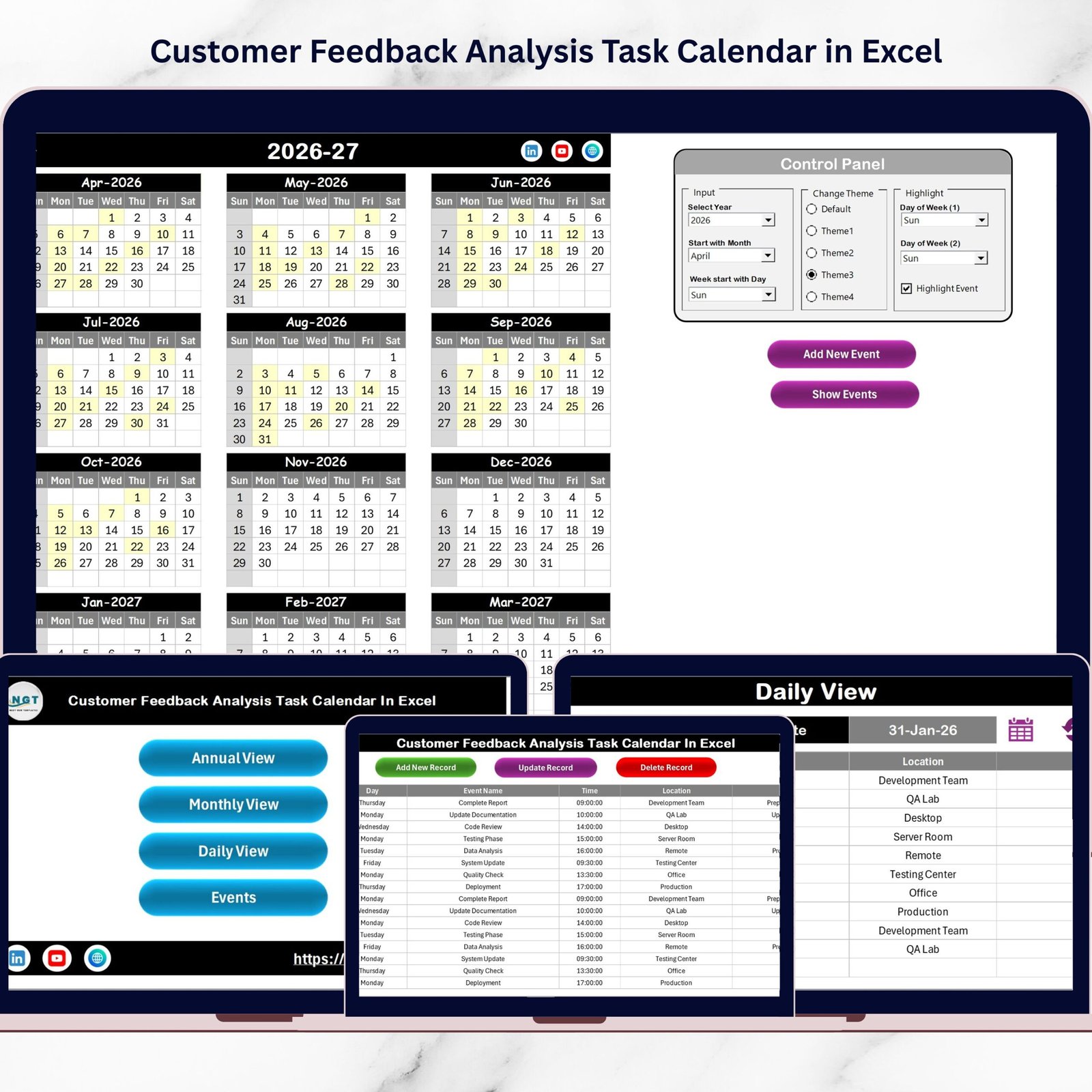
The Customer Feedback Analysis Task Calendar in Excel is the most direct option for teams that need to stop losing follow-ups. It is built around the daily work of tracking feedback tasks, complaint reviews, survey analysis sessions, and customer support follow-up activities. The workbook includes five integrated worksheets: Home, Annual View, Monthly View, Daily View, and Events Database.
Screenshot preview: the screenshots show a dynamic calendar system with annual overview, monthly planning, daily detailed tracking, color themes, highlighted days, one-click navigation, and add/update/delete event controls. The Events sheet stores event details such as ID, date, day, event name, time, location, and description.
- Use it to manage customer feedback follow-up tasks after surveys or support escalations.
- Use it to track complaint review meetings and action deadlines.
- Use it beside a service ticket tracker when tickets need scheduled review and ownership.
- Use it to build a practical customer feedback operating rhythm in Excel.
Price: $4.99. View the Task Calendar.
How to Choose Between These Customer Service Templates
Choose based on the decision you need to make every week. If the question is, Are customers satisfied?, start with the Customer Satisfaction Improvement KPI Dashboard. If the question is, Are customers leaving?, start with the Customer Churn KPI Dashboard. If leadership wants a compact executive view in Excel, use the Customer Retention KPI Scorecard.
If the problem is not reporting but follow-through, choose one of the calendars. The Task Calendar is best for daily follow-up actions. The Staff Duty Calendar is best for assigning owners. The Maintenance Calendar is best for recurring review routines. The Compliance Calendar is best when deadlines or auditability matter. The Project Calendar is best for CX initiatives with milestones.
A simple retention stack would use three layers: a customer database or ticket export as the raw record, a KPI dashboard or scorecard for measurement, and a calendar for ownership. That gives small teams a customer management Excel workflow without committing to a full SaaS rollout before they have defined the process.
Frequently Asked Questions
What is the best customer management Excel template for retention teams?
The best customer management Excel template depends on whether you need reporting or follow-up control. For retention KPIs, start with the Customer Retention KPI Scorecard in Excel. For customer feedback action tracking, start with the Customer Feedback Analysis Task Calendar in Excel.
Can these templates replace a CRM?
These templates are not a full CRM replacement. They are best for lightweight reporting, KPI tracking, feedback scheduling, and action ownership. If you need contact history, email automation, pipeline tracking, or multi-agent ticketing, use them beside a CRM or help desk export.
Which template is best for a customer service dashboard?
The Customer Satisfaction Improvement KPI Dashboard in Google Sheets is best for satisfaction reporting, while the Customer Churn KPI Dashboard in Google Sheets is best for churn and retention risk. Both include dashboard views, trend sheets, input sheets, targets, previous-year data, and KPI definitions.
How should I track NPS with these templates?
Use the KPI Definition sheet in the satisfaction dashboard or retention scorecard to define NPS, CSAT, CES, or other customer experience metrics. Then enter monthly actuals, targets, and previous-year values so the dashboard can show trend and target comparisons.
Which template helps with service ticket follow-up?
For service ticket follow-up, use the Customer Feedback Analysis Task Calendar in Excel. Export high-priority tickets or complaint themes from your help desk, then schedule review tasks, owners, locations, deadlines, and descriptions in the calendar.
Which templates work in Google Sheets?
Two templates in this roundup are built for Google Sheets: the Customer Satisfaction Improvement KPI Dashboard and the Customer Churn KPI Dashboard. They are useful when teams want cloud access, shared KPI review, and easier collaboration.
Which templates work in Microsoft Excel?
The Customer Retention KPI Scorecard and all five customer feedback analysis calendars are Excel templates. They are practical for teams that already use Microsoft Excel for weekly reporting, planning, scheduling, and customer feedback review workflows.
What is the cheapest way to start?
The cheapest single-template start is one of the $4.99 feedback calendars. For a more complete retention setup, pair one $4.99 calendar with either the $9.99 Customer Churn KPI Dashboard or the $12.99 Customer Satisfaction Improvement KPI Dashboard.
How many internal product links should a roundup include?
A helpful roundup should link each listed product with descriptive anchor text, not generic text. This post links every product image and product CTA to the live NextGenTemplates product page so buyers can compare format, use case, and price quickly.
Build a Retention Reporting Rhythm Without Adding Another SaaS
Retention work is part data, part discipline. A dashboard helps you see customer satisfaction, churn, and retention movement. A calendar helps you assign the human follow-up that improves those numbers. Together, these templates give service managers, CX leads, analysts, and small business owners a practical way to review customers before issues turn into churn.
Recommended bundle path: start with the Customer Satisfaction Improvement KPI Dashboard for service health, add the Customer Churn KPI Dashboard for retention risk, and use the Customer Feedback Analysis Task Calendar to assign action owners. That gives you measurement, risk visibility, and follow-through in one affordable retention workflow.
For more walkthroughs and template tutorials, visit the NextGenTemplates YouTube channel.