

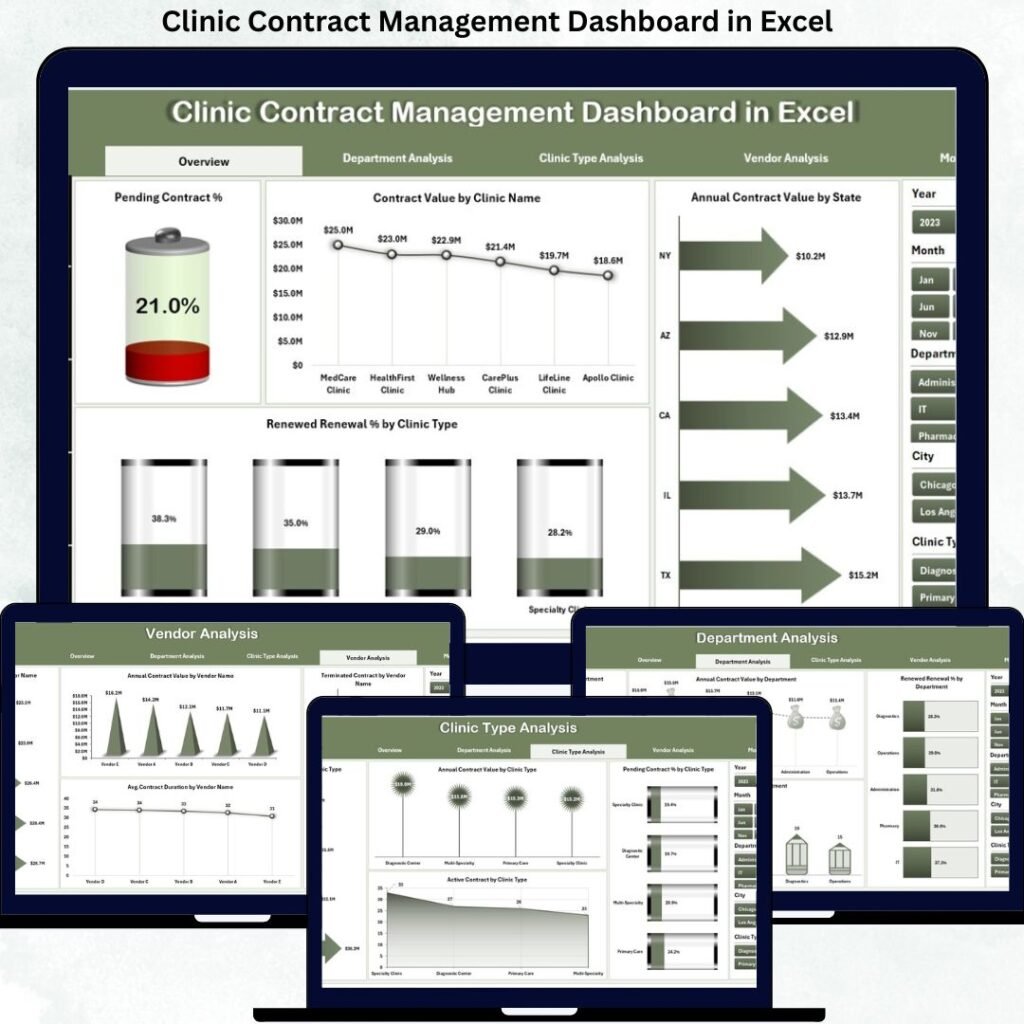
Managing contracts in a clinic environment is not simple. Service agreements, vendor contracts, insurance partnerships, equipment maintenance contracts, and physician agreements all require careful monitoring. However, many clinics still rely on scattered spreadsheets or manual tracking systems. As a result, they miss renewal dates, lose visibility into contract value, and struggle with compliance.Clinic Contract Management Dashboard
Therefore, clinics need a structured and centralized contract monitoring system.Clinic Contract Management Dashboard
That is exactly where the Clinic Contract Management Dashboard in Power BI and Excel becomes essential.
This ready-to-use dashboard solution helps healthcare administrators track contract performance, monitor renewals, analyze financial impact, and improve operational control — all in one place.
In this detailed guide, you will learn:
What a Clinic Contract Management Dashboard is
Why healthcare clinics need it
Key features of both Power BI and Excel versions
Advantages of using the dashboard
Opportunities for improvement
Best practices for implementation
Frequently asked questions
Let us explore everything step by step.
What Is a Clinic Contract Management Dashboard?
A Clinic Contract Management Dashboard is a structured reporting tool designed to monitor and analyze clinic-related contracts.
Instead of tracking agreements manually, this dashboard:
Centralizes contract data
Tracks expiry and renewal dates
Monitors contract value and status
Analyzes responsible person performance
Identifies compliance risks
It transforms raw contract records into meaningful insights.
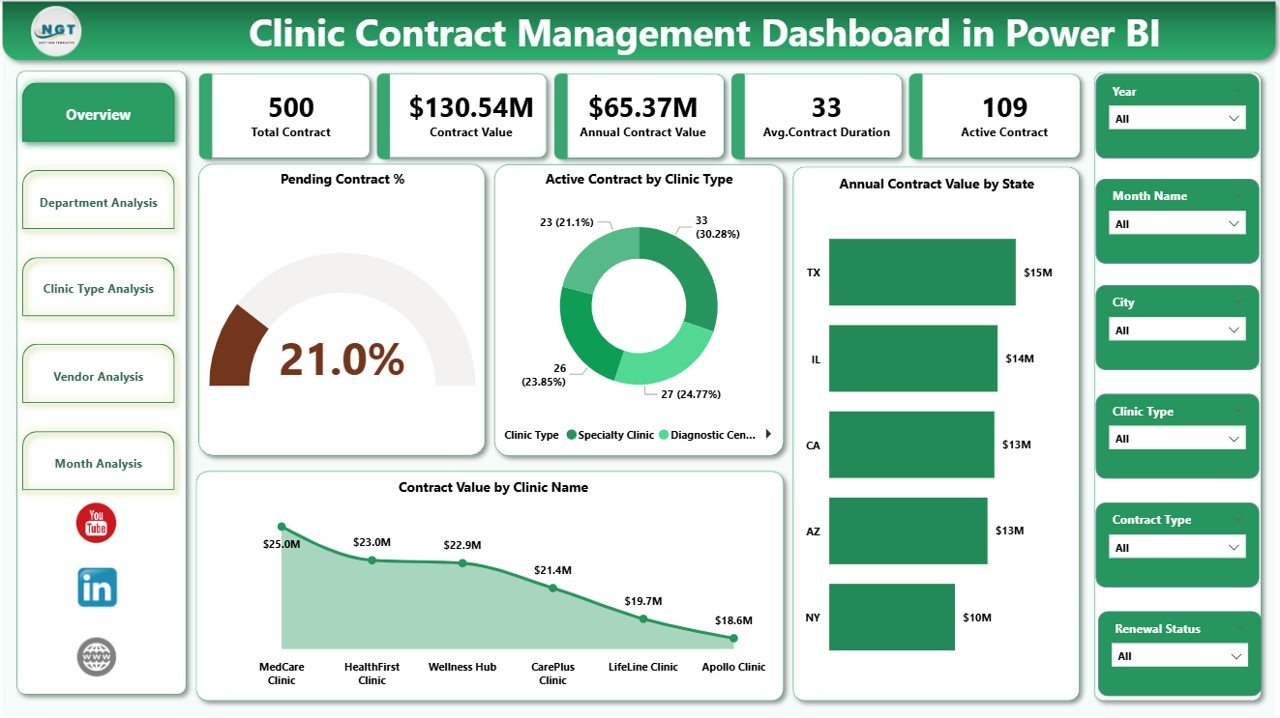
Clinic Contract Management Dashboard in Power BI
The Power BI version is designed for clinics that want advanced analytics and interactive reporting.
Key Features
1️⃣ Overview Page
Total Contracts
Active vs Expired Contracts
Renewal Due Count
Total Contract Value
Status Distribution
2️⃣ Contract Type Analysis
Vendor Contracts
Equipment Maintenance
Insurance Agreements
Physician Contracts
3️⃣ Renewal & Expiry Analysis
Upcoming Expirations
Overdue Renewals
Monthly Expiry Trends
4️⃣ Responsible Person Analysis
Contracts per Manager
Renewal Compliance Rate
Workload Distribution
5️⃣ Monthly Trend Analysis
Contracts Added by Month
Contract Value Trend
Status Changes Over Time
Why Power BI?
Highly interactive slicers
Drill-down capability
Dynamic filtering
Enterprise-ready reporting
Suitable for management meetings
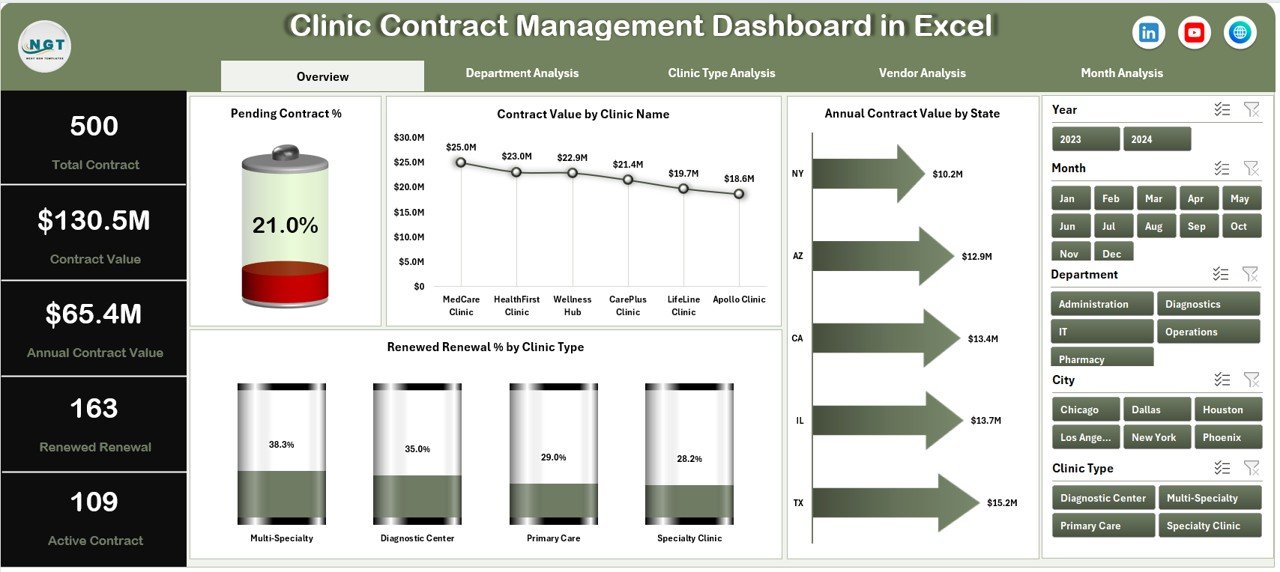
Clinic Contract Management Dashboard in Excel
The Excel version is ideal for clinics that prefer flexibility and simplicity.
Key Features
1️⃣ Overview Dashboard
Active Contracts %
Expired Contracts %
Renewal Due Alerts
Total Contract Value
2️⃣ Contract Category Analysis
Analysis by Contract Type
Value by Category
Status Distribution
3️⃣ Responsible Person Analysis
Contracts per Manager
Expiry by Manager
Compliance Monitoring
4️⃣ Renewal Tracking Page
Upcoming Expirations
Monthly Renewal Calendar
Expiry Risk Alerts
5️⃣ Monthly Trend Analysis
Contracts Created
Contracts Closed
Financial Impact
Why Excel?
No additional software required
Easy data entry
Pivot-based reporting
Suitable for small and mid-sized clinics
Why Clinics Need a Contract Management Dashboard
Healthcare environments are highly regulated and deadline-sensitive.
Without structured monitoring:
Renewals may be missed
Vendor penalties may occur
Compliance risks increase
Financial leakage happens
Audit preparation becomes difficult
However, with a dashboard:
Renewal reminders become visible
Contract performance improves
Financial planning becomes easier
Compliance monitoring strengthens
Advantages of the Clinic Contract Management Dashboard
Improves visibility across all contracts
Reduces missed renewals and penalties
Centralizes contract information
Enhances compliance tracking
Supports financial forecasting
Saves administrative time
Improves accountability of responsible staff
Enables faster management decisions
Opportunities for Improvement
Even a structured dashboard can be enhanced further:
Integrate automated email alerts for renewals
Add contract risk scoring model
Include digital document links
Integrate with ERP or billing systems
Add approval workflow tracking
Implement contract performance KPIs
Add vendor performance ratings
Best Practices for Implementation
To maximize value from the dashboard:
Maintain accurate contract master data
Update contract status regularly
Review renewal tracker monthly
Assign clear contract ownership
Standardize contract categories
Use consistent naming conventions
Conduct quarterly compliance reviews
Back up data securely
Frequently Asked Questions (FAQs)
1️⃣ Who should use this dashboard?
Clinic administrators, operations managers, finance teams, compliance officers, and healthcare executives.
2️⃣ Which version should I choose?
Choose Power BI if you need enterprise analytics and interactive reports.
Choose Excel if you prefer simplicity and quick implementation.
3️⃣ Can the dashboard handle multiple clinic locations?
Yes, both versions can be customized to include location-level analysis.
4️⃣ Does it track contract value?
Yes, it monitors total contract value and financial impact trends.
For financial-services teams, see the 8 best bank & credit union templates for 2026, compared across Excel, Power BI and Google Sheets.
Final Thoughts
Clinic contracts directly impact compliance, operations, and financial performance. Therefore, managing them effectively is not optional — it is essential.
The Clinic Contract Management Dashboard in Power BI and Excel provides structure, clarity, and control. Whether you choose the advanced analytics of Power BI or the flexibility of Excel, you gain a centralized system that improves renewal tracking, compliance, and financial visibility.
Visit our YouTube channel to learn step-by-step video tutorials
Clinic Contract Management Dashboard in Power BI
Clinic Contract Management Dashboard in Excel
Running the same clinic reporting across more than one format? Our multi-format dashboard bundle buyer guide shows when buying Excel, Google Sheets and Power BI together is cheaper than separate templates.