

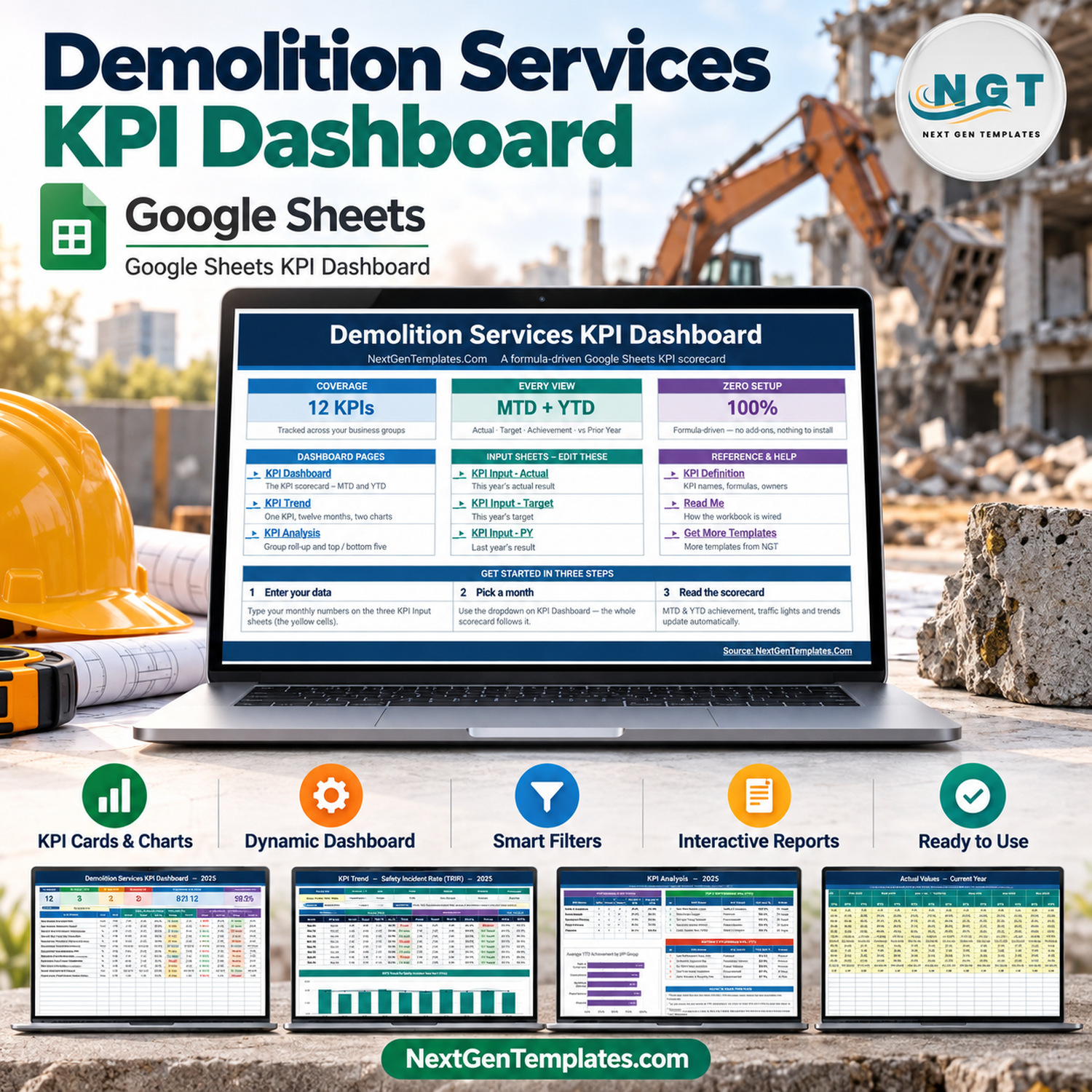

The Demolition Services KPI Dashboard in Google Sheets tracks 12 KPIs in five KPI groups (Safety & Compliance, Environmental, Operational Efficiency, Project Delivery and Financial) on one month-picker scorecard. Every KPI row shows Actual, Target, Achievement %, Status, Prior Year and a vs-PY arrow twice: once month-to-date and once year-to-date. Pick a month and the scorecard, the twelve-month KPI Trend page and the KPI Analysis roll-up all follow, with no add-on, no Apps Script and no refresh step.
This template belongs to our Google Sheets KPI Dashboard family: a month picker, traffic lights, a KPI Trend page and a KPI Analysis page. It is a different product from the Demolition Services KPI Scorecard in Google Sheets and from our analytical dashboards. All figures supplied are fictional sample data for 2025, with September 2025 selected.
✅ Instant download · One-time payment · No subscription · No per-user fees
🔑 Key Features of the Demolition Services KPI Dashboard in Google Sheets
📅 One month picker drives the workbook. The Select Month dropdown on the KPI Dashboard sets the reporting month. The month-to-date block, the year-to-date block (January 2025 to September 2025 in the sample), KPI Trend and KPI Analysis all recalculate from that one choice.
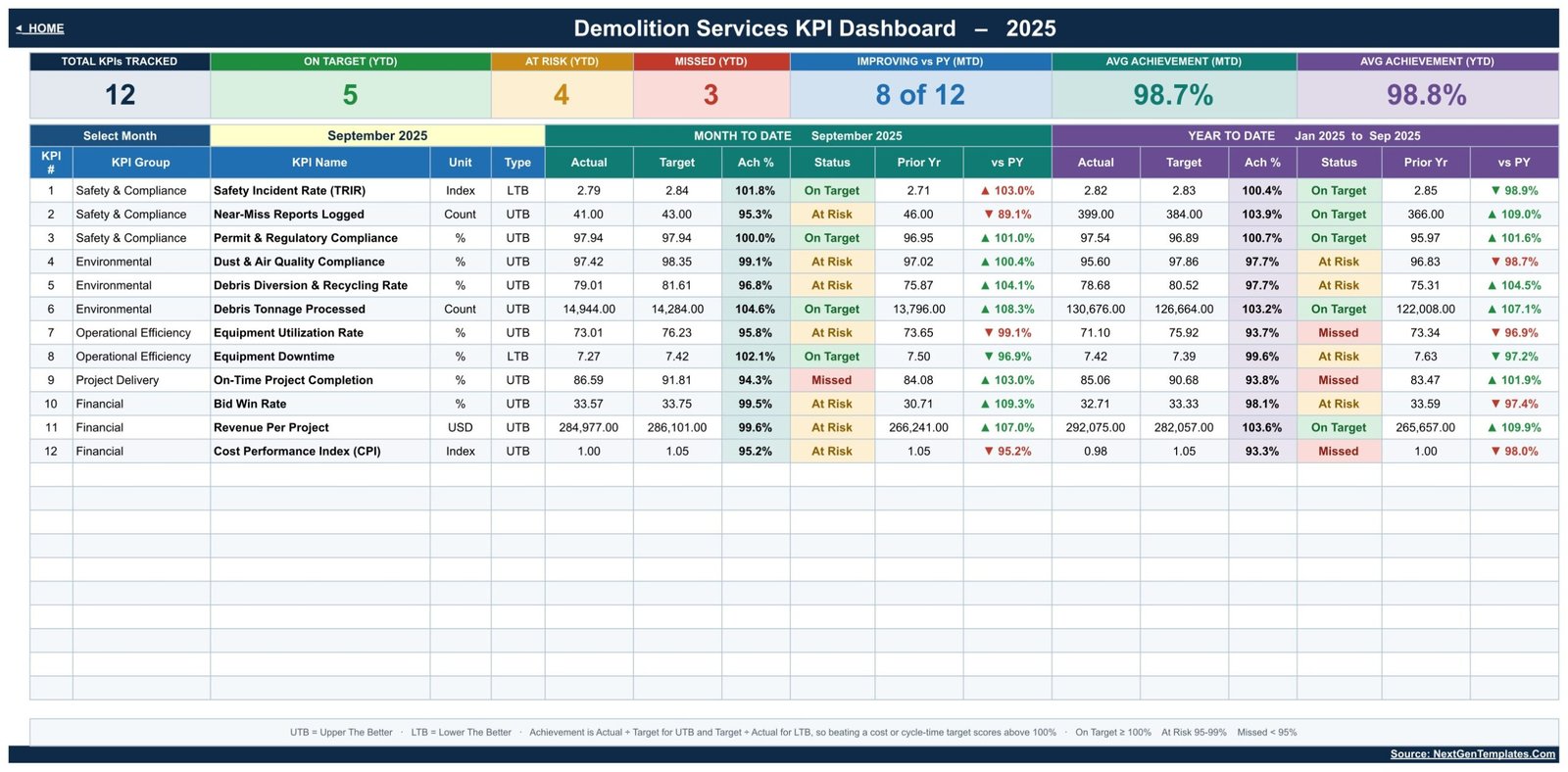
🚦 Traffic-light status for MTD and YTD. Each of the 12 KPIs gets two statuses. On Target means 100% achievement or more, At Risk means 95% to 99%, and Missed means below 95%. The colours use native Google Sheets conditional formatting, so nothing has to be installed.
↕️ Upper-the-better and lower-the-better logic. Ten KPIs are UTB and two are LTB: Safety Incident Rate (TRIR) and Equipment Downtime. For an LTB KPI, achievement is Target ÷ Actual, so an incident rate or downtime figure below target scores above 100%, the same way beating a revenue target does.
📊 Seven header cards. Total KPIs Tracked, On Target (YTD), At Risk (YTD), Missed (YTD), Improving vs PY (MTD), Avg Achievement (MTD) and Avg Achievement (YTD). In the September 2025 sample they read 12, 5, 4, 3, 8 of 12, 98.7% and 98.8%.
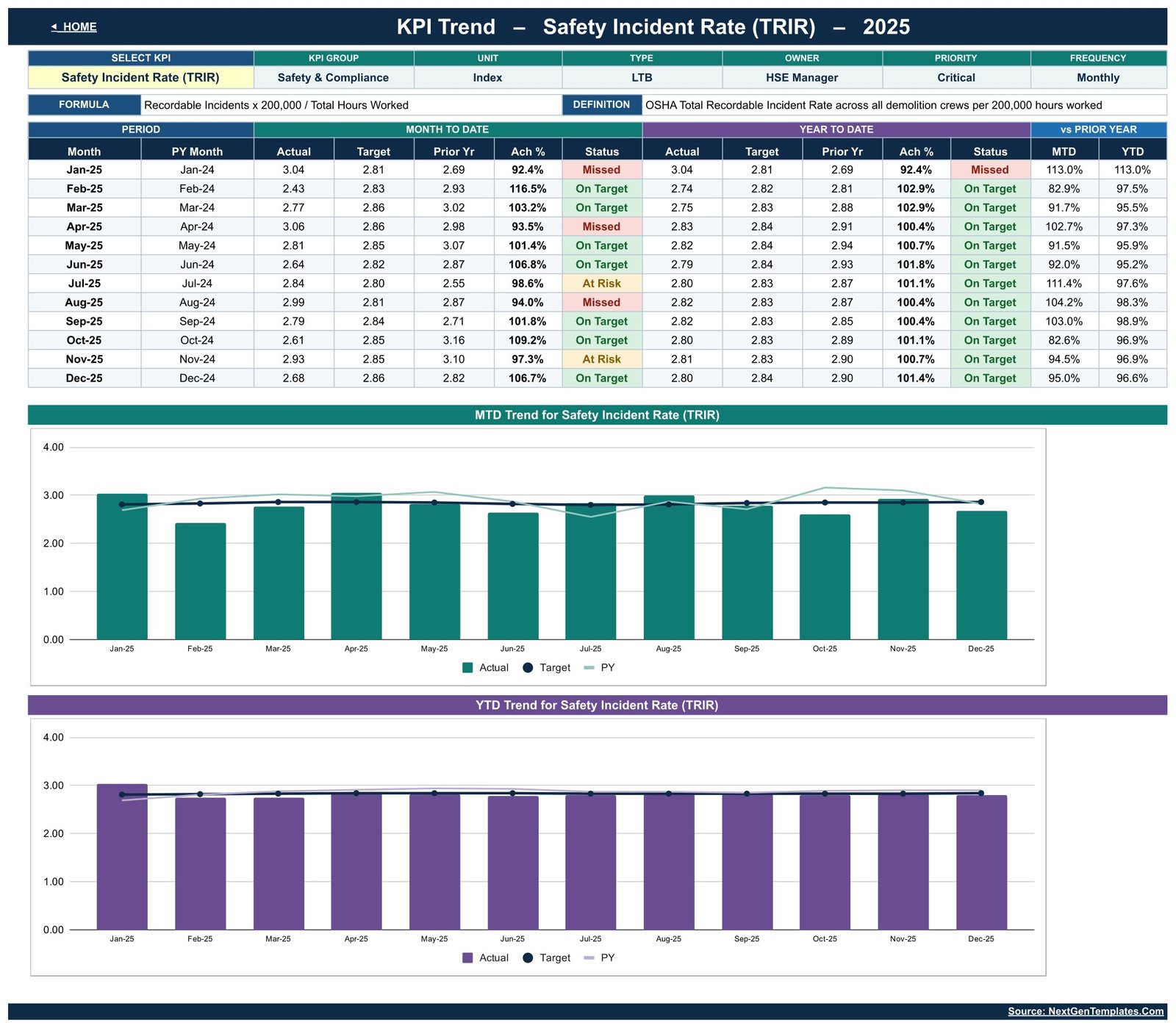
📈 Twelve-month trend for any KPI. Choose a KPI and the trend page shows its group, unit, type, owner, priority, frequency, formula and definition, a January-to-December table and two charts comparing Actual, Target and Prior Year by month.
🏆 Group roll-up with top and bottom five. KPI Analysis counts On Target, At Risk and Missed KPIs per group, averages MTD and YTD achievement, and ranks the five strongest and five weakest KPIs on YTD achievement.
✏️ Change KPIs without editing formulas. The KPI Definition sheet holds the name, group, unit, formula, definition, type, owner, priority and frequency of each KPI. The sheets are wired for 22 KPIs: 12 are filled in and the remaining rows are live, so a new KPI needs no formula work.
📦 What’s Inside the Template
The workbook has ten working tabs (Home, KPI Dashboard, KPI Trend, KPI Analysis, KPI Input – Actual, KPI Input – Target, KPI Input – PY, KPI Definition, Read Me and Get More Templates) plus a Support sheet of helper calculations that never needs editing. The 12 sample KPIs are:
- 🦺 Safety & Compliance (3): Safety Incident Rate (TRIR) (Index, LTB), Near-Miss Reports Logged (Count), Permit & Regulatory Compliance (%)
- ♻️ Environmental (3): Dust & Air Quality Compliance (%), Debris Diversion & Recycling Rate (%), Debris Tonnage Processed (Count)
- 🚜 Operational Efficiency (2): Equipment Utilization Rate (%), Equipment Downtime (%, LTB)
- 🏗️ Project Delivery (1): On-Time Project Completion (%)
- 💰 Financial (3): Bid Win Rate (%), Revenue Per Project (USD), Cost Performance Index (CPI) (Index)
Home
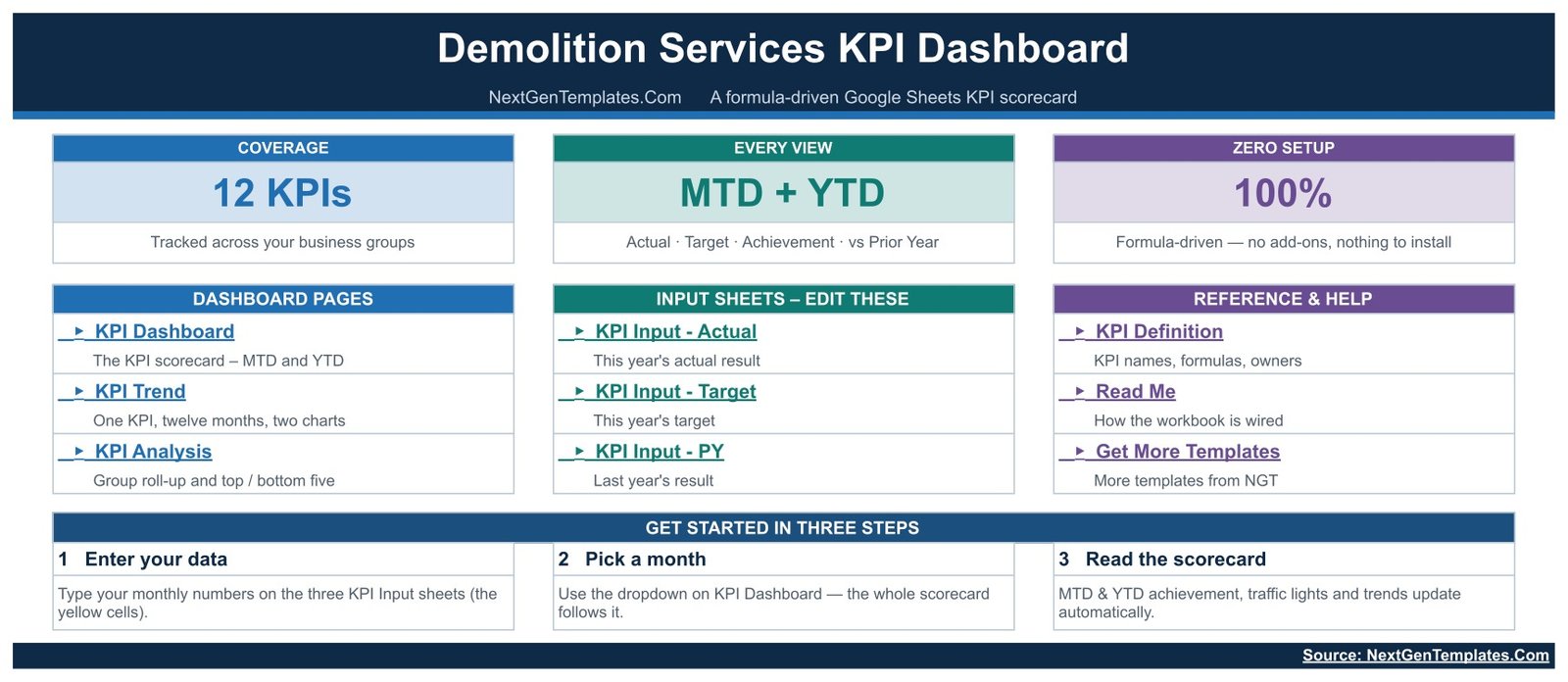
The start page summarises coverage (12 KPIs, MTD + YTD, formula-driven), links to every dashboard, input and reference sheet, and sets out the three steps: enter your data, pick a month, read the scorecard.
KPI Dashboard
The main scorecard lists all 12 KPIs with group, unit and type, then MTD and YTD Actual, Target, Ach %, Status, Prior Yr and vs PY, under the seven header cards and the month picker. In the sample, Debris Tonnage Processed is On Target at 104.6% MTD while On-Time Project Completion is Missed at 94.3%.
KPI Trend
Select one KPI (Safety Incident Rate (TRIR) in the sample) to see its attribute strip, formula and definition, a twelve-month MTD and YTD table with statuses and vs-PY percentages, and two charts: MTD Trend and YTD Trend for the selected KPI, each plotting Actual against Target and Prior Year.
KPI Analysis
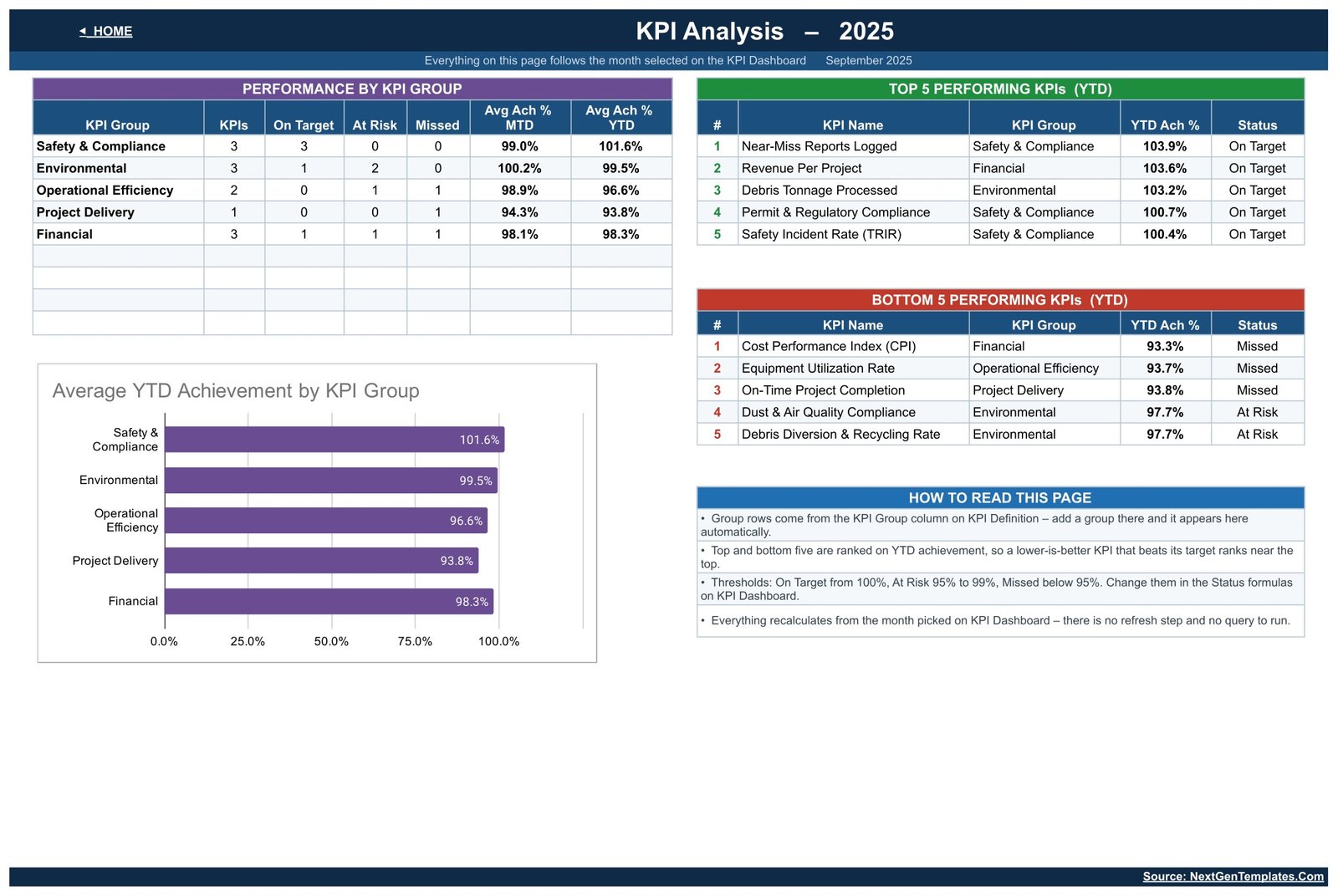
Performance by KPI Group, the Top 5 and Bottom 5 Performing KPIs (YTD), and an Average YTD Achievement by KPI Group chart. In the sample, Safety & Compliance leads at 101.6% YTD, Near-Miss Reports Logged tops the ranking at 103.9% and Cost Performance Index (CPI) trails at 93.3%.
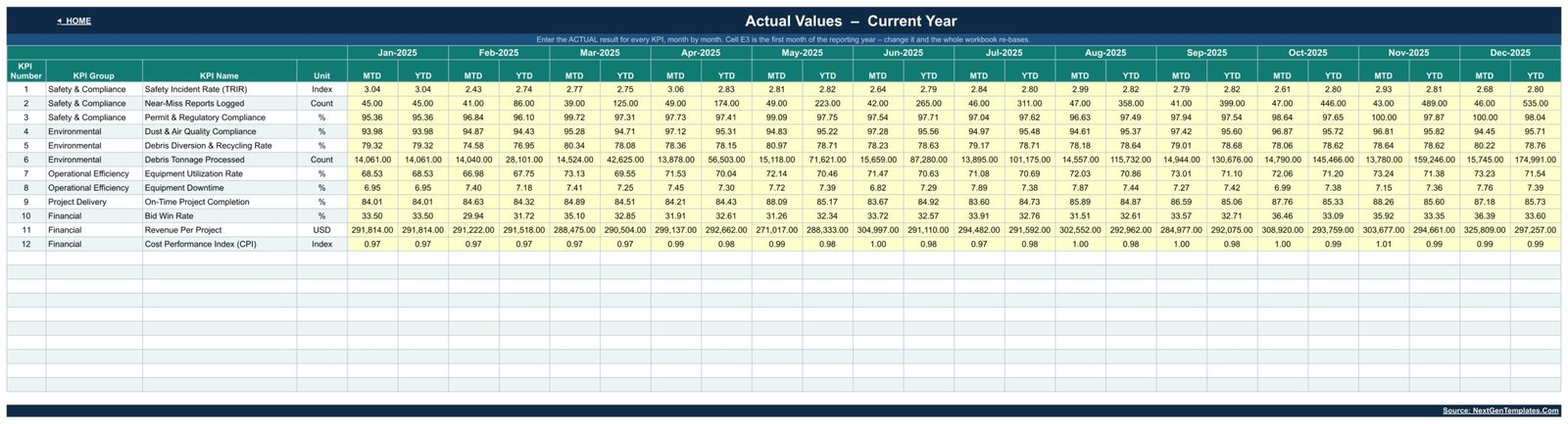
KPI Input Sheets (Actual, Target, PY)
Three input sheets take monthly numbers for the current year’s actuals, the targets and last year’s results in yellow cells. Each month has an MTD and a YTD column, and changing cell E3 on KPI Input – Actual re-bases the whole workbook to a new reporting year.
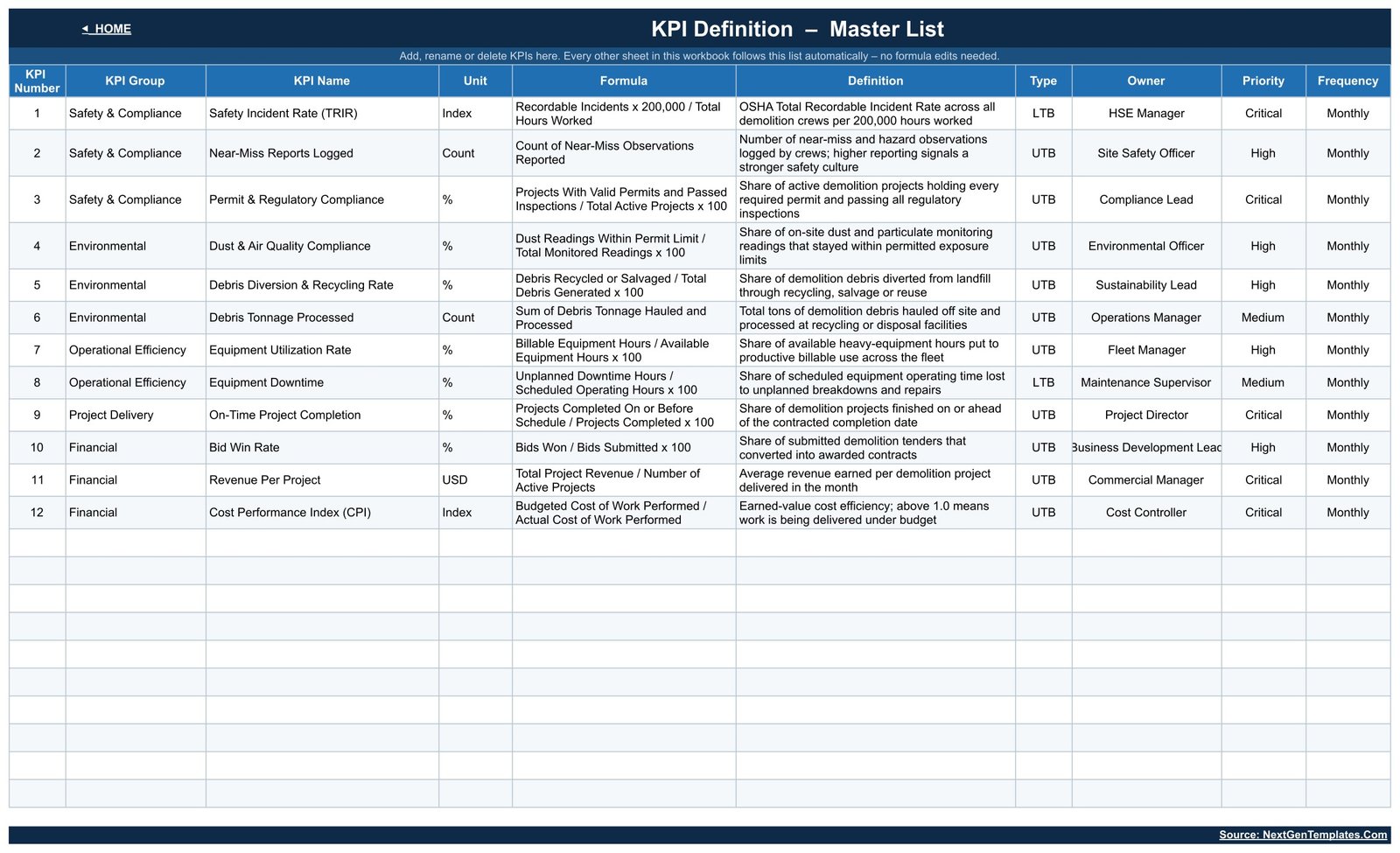
KPI Definition
The master list of KPIs with formula, definition, UTB/LTB type, owner, priority and frequency. Add, rename or delete KPIs here and the rest of the workbook follows. The sample definitions are illustrative, so rewrite them to match how your company measures each result.
📊 Demolition Services KPI Dashboard vs. Excel KPI Workbook vs. Construction Management Software
| Feature | Demolition Services KPI Dashboard in Google Sheets | Microsoft Excel KPI Workbook | Construction Management Software |
|---|---|---|---|
| Cost | ✅ $8.99 one-time (sale price) | Template price plus an Excel licence | Recurring subscription, often per user |
| Platform | ✅ Any browser with a Google account | Excel desktop or Microsoft 365 | Vendor web app |
| Setup | ✅ Make a copy, type monthly numbers | Open the file, type monthly numbers | Account setup and onboarding |
| Real-time team collaboration | ✅ Native Google Sheets co-editing | Needs OneDrive or SharePoint | ✅ Yes |
| Mobile access | ✅ Google Sheets app | Excel mobile app | ✅ Vendor app |
| Customizable KPIs | ✅ Edit the KPI Definition sheet | Depends on the workbook | Limited to vendor reports |
| Share with a link | ✅ Yes | Via cloud storage | User seats required |
| Year-1 cost at 5 users | ✅ One purchase | One purchase plus licences | Five paid seats for twelve months |
| MTD and YTD traffic lights out of the box | ✅ Yes | Only if built in | Varies by vendor |
| Bidding, scheduling, site logs and invoicing | ❌ Not included | ❌ Not included | ✅ Usually included |
For demolition contractors who want a monthly management scorecard without paying for seats in a full construction platform, this Google Sheets KPI dashboard sits in the sweet spot.
👥 Who This Template Is For — and Who It’s Not For
✅ This template is built for:
- Owners of small and mid-sized demolition companies who review the business once a month
- Operations and fleet managers tracking equipment utilization, downtime, debris tonnage and on-time completion
- Commercial and business development leads watching bid win rate, revenue per project and cost performance against target
❌ This template is NOT for:
- Teams needing estimating, project scheduling, invoicing or job costing. It is a scorecard, not construction management software
- Anyone looking for a safety-management system, incident log, permit register or site-compliance record. The template only reports the rates you enter and does not verify permits, air-quality readings or safety performance
⚙️ How to Use the Demolition Services KPI Dashboard
- Open the PDF in your download and click its Google Sheets link to make your own editable copy.
- On KPI Definition, rename, add or delete KPIs and set each one’s group, unit, UTB/LTB type and owner.
- Set the first month of your reporting year in cell E3 on KPI Input – Actual.
- Type monthly actuals, targets and prior-year numbers into the yellow cells of the three KPI Input sheets.
- Pick a month from the dropdown on KPI Dashboard and read the traffic lights.
- Open KPI Trend and KPI Analysis to see the twelve-month pattern and which groups need attention.
💼 Real-World Use Cases
A regional demolition contractor running four crews. The owner types the month’s revenue, bids won and debris tonnage, then checks whether Revenue Per Project and Bid Win Rate are On Target before the monthly review with his estimator.
A fleet manager chasing idle machines. She selects Equipment Utilization Rate on KPI Trend, compares twelve months of MTD results against target and last year, and reads it next to Equipment Downtime to decide whether the problem is scheduling or breakdowns.
A commercial manager preparing a pricing review. He uses the Bottom 5 table on KPI Analysis to show that Cost Performance Index (CPI) and On-Time Project Completion are Missed YTD in the sample, and takes both into the next tender discussion.
❓ Frequently Asked Questions
What KPIs does the Demolition Services KPI Dashboard in Google Sheets track?
It ships with 12 KPIs in five groups: Safety Incident Rate (TRIR), Near-Miss Reports Logged and Permit & Regulatory Compliance; Dust & Air Quality Compliance, Debris Diversion & Recycling Rate and Debris Tonnage Processed; Equipment Utilization Rate and Equipment Downtime; On-Time Project Completion; Bid Win Rate, Revenue Per Project and Cost Performance Index (CPI). You can edit all of them.
Is this the same as the Demolition Services KPI Scorecard?
No. This is the KPI Dashboard family, with a month picker, MTD and YTD traffic lights, a KPI Trend page and a KPI Analysis page. The Demolition Services KPI Scorecard in Google Sheets is a separate template with its own layout, sold as a different product.
How long does setup take?
There is nothing to install. Make a copy from the PDF link, adjust the KPI Definition sheet if needed, and type your monthly numbers into the yellow input cells. The scorecard, trend and analysis pages calculate automatically, so most of the effort is gathering your own figures.
Can I change the status thresholds or add KPIs?
Yes. On Target starts at 100%, At Risk covers 95% to 99% and Missed is below 95%; the thresholds sit in the Status formulas on the KPI Dashboard sheet. The workbook is wired for 22 KPIs, so filling the next empty row on KPI Definition adds a KPI without formula work.
How does it compare to construction management software?
Construction platforms handle bidding, scheduling, site logs and invoicing on a recurring subscription. This template does none of that. It is a one-time-purchase monthly KPI scorecard that reports results you already have, which suits owners who only need the management view.
Is it a safety, permit or environmental compliance record?
No. Safety Incident Rate (TRIR), Permit & Regulatory Compliance and Dust & Air Quality Compliance only report the numbers you type in. The template does not verify permits, monitor air quality, log incidents or certify anything, and the figures supplied are fictional sample data.
👤 About the Author
Built by PK — Microsoft Certified Professional with 15+ years of Excel, Google Sheets and Power BI experience. Founder of NextGenTemplates, sharing tutorials on YouTube (@PKAnExcelExpert, @NextGenTemplates, @NeoTechNavigators). Every template is hand-built and tested before release.
🔗 Explore Related Templates
🧾 Demolition Services KPI Scorecard in Google Sheets — the same trade in our separate KPI Scorecard family.
🏚️ Demolition Contractor Management System Web App — for day-to-day job, crew and client records, which this scorecard does not keep.
🧱 Concrete Contractor KPI Dashboard in Google Sheets and 🏠 Roofing Contractor KPI Dashboard in Google Sheets — the same month-picker KPI Dashboard format for other trades.
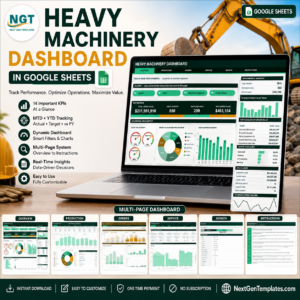
⛏️ Excavation Contractor KPI Scorecard in Google Sheets and 🚜 Heavy Machinery Dashboard in Google Sheets.
Browse every Google Sheets KPI Dashboard template, or learn more about Google Sheets. Excel editions of this demolition dashboard and scorecard are in preparation.
📖 Click here to read the Detailed Blog Post
🎥 Visit our YouTube channel for step-by-step video tutorials
👉 YouTube.com/@NextGenTemplates
Watch the step-by-step video Demo:
📅 Last updated: September 2026

















Reviews
There are no reviews yet.