

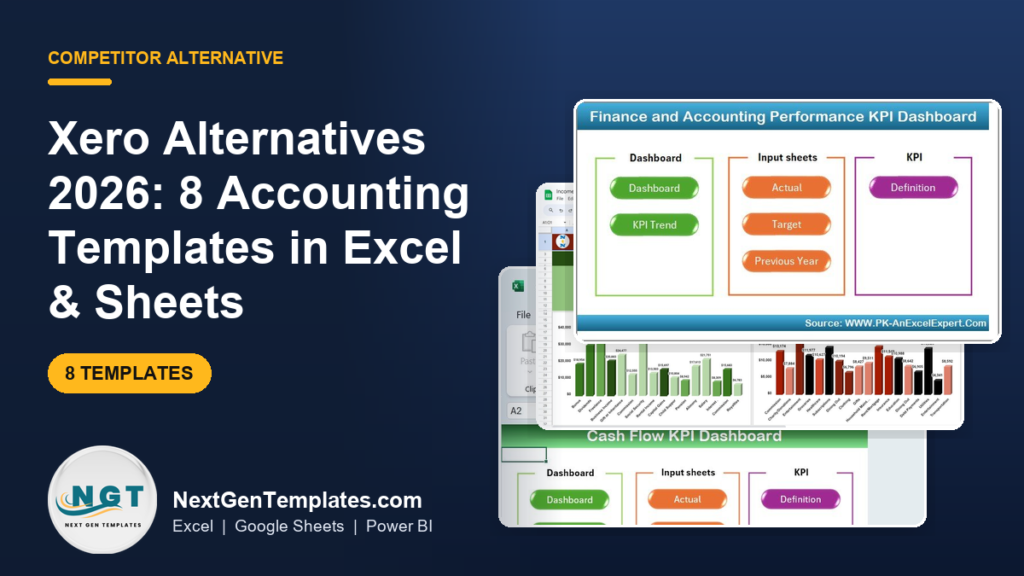
The best Xero alternative Excel template is a one-time accounting workbook that tracks income, expenses, cash flow and reconciliation without a monthly subscription. Our top pick is the Finance and Accounting Performance KPI Dashboard in Excel ($12.99, paid once) — roughly two weeks of a Xero Early plan, owned forever.
Last updated: August 2026
Related guide: Replacing your CRM at the same time? See Salesforce alternatives: 8 CRM templates in Excel & Sheets.
Related guide: Building a full bookkeeping workflow without Xero? See our bookkeeper templates stack for accountants.
Related reading: moving off enterprise software to cut per-seat reporting costs? Compare our Oracle Fusion alternatives: 8 enterprise reporting templates in Excel & Sheets.
Key takeaways
- Xero’s US plans are $25 (Early), $55 (Growing) and $90 (Established) per month, and all three rise on 1 October 2026 to $27, $59 and $97 — so an Established subscriber pays $1,164 a year, every year.
- All 8 templates in this guide are one-time purchases between $1.99 and $12.99. Buying the entire set costs $71.92 once — less than a single month of Xero Established.
- Best overall is the Finance and Accounting Performance KPI Dashboard in Excel ($12.99); best value is the Income and Expense Dashboard in Google Sheets ($9.99).
- Xero’s Early plan caps you at 20 invoices and 5 bills per month — the single most common reason micro-businesses get pushed onto the $55 tier they did not want.
- Spreadsheets win on cost, control and reporting depth but lose on live bank feeds, audit trails and filing integrations — we name the exact situations where you should stay on Xero.
 Launch offer
SUMIFS, XLOOKUP, FILTER, LAMBDA and checking AI-written formulas, with real business projects. 11h 47m of video by PK, with practice files, quizzes and a capstone.
What does Xero actually cost in 2026?
Xero is a well-built accounting platform with a genuinely good bank reconciliation engine. Small businesses still leave it, and when we looked at why, the reasons came down to three things — all of them about cost per unit of value, not about product quality.
1. The subscription never ends, and it is going up. As published on the official Xero US pricing page, the three plans are Early at $25, Growing at $55 and Established at $90 per month. From 1 October 2026 those become $27, $59 and $97. Annualised, that is $324, $708 and $1,164 — and the bill arrives again next year whether or not your business grew. Over three years on Growing you will have spent well over $2,000 on bookkeeping software before you pay a single accountant.
2. The plan limits force upgrades you did not plan for. The Early plan caps invoices at 20 per month and bills at 5 per month. A freelancer who lands a busy quarter, or a shop that pays a dozen suppliers, hits that ceiling and is moved to Growing — a 120% price jump for the same underlying work. Multi-currency, project tracking, expense claims and the deeper analytics sit higher still, on Established.
3. You pay for modules you never open. Xero also has no native US payroll; it hands you off to Gusto, which is billed separately at roughly $40–$50 a month on top. Meanwhile most micro-businesses use four screens: money in, money out, a bank reconciliation and a profit-and-loss report. That is a spreadsheet-shaped problem, and it is what every template below is built for.
Xero vs the NGT template that covers it
Here is the head-to-head. On the left, the job you are paying Xero for. On the right, the template that covers the same job and its one-time price.
| What Xero charges for | NGT template that covers it | One-time price |
|---|---|---|
| Financial performance reporting & KPIs | Finance and Accounting Performance KPI Dashboard in Excel | $12.99 |
| Income vs expense tracking (cloud) | Income and Expense Dashboard in Google Sheets | $9.99 |
| Cash flow forecasting (Established tier only) | Cash Flow KPI Dashboard in Excel | $12.99 |
| Expense claims (Established tier only) | Expense Management KPI Dashboard in Excel | $12.99 |
| Advanced analytics & client reporting | Outsourced Accounting KPI Dashboard in Power BI | $11.99 |
| Profit & loss statement | Profit and Loss (P&L) Template in Excel | $6.99 |
| Bank reconciliation workflow | Bank Account Reconciliation Checklist in Excel | $1.99 |
| Bank reconciliation workflow (cloud) | Bank Account Reconciliation Checklist in Google Sheets | $1.99 |
Xero alternative templates compared
Every template in this guide, side by side. Prices are one-time; there is no seat fee and no renewal.
| # | Template | Format | Best for | Price |
|---|---|---|---|---|
| 1 | Finance and Accounting Performance KPI Dashboard (Best overall) | Excel | The closest all-in-one swap for Xero’s reporting | $12.99 |
| 2 | Income and Expense Dashboard (Best value) | Google Sheets | Cloud, shared, free-to-run bookkeeping | $9.99 |
| 3 | Cash Flow KPI Dashboard | Excel | Forecasting runway without the Established plan | $12.99 |
| 4 | Expense Management KPI Dashboard | Excel | Spend control and expense claims | $12.99 |
| 5 | Outsourced Accounting KPI Dashboard | Power BI | Bookkeeping firms reporting to many clients | $11.99 |
| 6 | Profit and Loss (P&L) Template | Excel | A clean monthly and annual P&L statement | $6.99 |
| 7 | Bank Account Reconciliation Checklist | Excel | Month-end reconciliation discipline | $1.99 |
| 8 | Bank Account Reconciliation Checklist | Google Sheets | Reconciliation for remote or shared teams | $1.99 |
How we picked these
We searched roughly 6,900 published NextGenTemplates products and filtered to the finance and accounting segment, then mapped each candidate against the specific jobs a Xero subscriber actually performs every month: raise and track income, record and categorise expenses, reconcile the bank, forecast cash, and produce a profit-and-loss statement.
Three criteria decided the final eight. First, job coverage — each template had to replace a named Xero screen, not a vague “finance” idea. Second, format spread: five Excel files, two Google Sheets files and one Power BI report, so you can stay in the tool your business already uses. Third, editability — every formula is visible and changeable, because an accounting file you cannot adapt to your chart of accounts is not a replacement.
We deliberately excluded single-chart novelty files, anything without an input-and-output structure, and industry-specific dashboards that only suit one vertical. We also excluded free templates: unsupported files with broken formulas are the most expensive thing in bookkeeping.
The 8 best Xero alternative templates for 2026
1. Finance and Accounting Performance KPI Dashboard in Excel — best overall
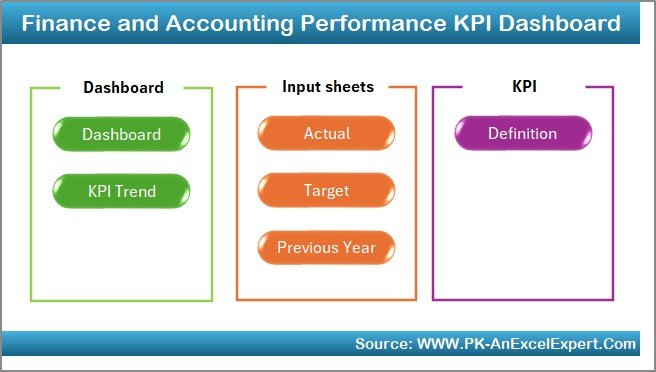
This is the closest single file to what a Xero subscriber opens Xero for: a management view of financial performance. It runs an Actual vs Target vs Previous Year model across the accounting metrics that matter — revenue, cost, margin, receivable days, payable days and close accuracy — and rolls them into a one-page dashboard with traffic lights.
Who it is for: an owner-managed business or in-house finance lead who wants Xero-grade reporting and is happy to key or paste the numbers in monthly.
What is inside:
- Actual, Target and Previous-Year input sheets with MTD and YTD roll-ups
- 10–15 accounting KPIs with RAG status indicators and variance to target
- A KPI Trend page showing twelve months of movement per metric
- A definitions tab so every KPI has one agreed formula across the team
- 100% formula-driven — no macros, no add-ins, no Power Query to break
The reason it is number one is coverage per dollar. Xero puts its deeper analytics and financial-health scorecard behind the Growing and Established tiers; this file gives you the equivalent management layer for $12.99, once. That is roughly 15 days of an Early subscription. A three-person business leaving Growing recovers the purchase price in under a week of avoided subscription and keeps the file forever.
Best for: replacing Xero’s reporting layer in one file. $12.99 — view the template.
2. Income and Expense Dashboard in Google Sheets — best value

Money in, money out, and what is left. That is the core of Xero for most micro-businesses, and this Google Sheets dashboard does exactly it — categorised income and expense entry feeding an automatic summary of net position by month and by category.
Who it is for: freelancers, sole traders and small partnerships who want a shared live link instead of a login, and who do not want to pay for Microsoft 365 either.
What is inside:
- Structured income and expense entry tabs with dropdown categories
- Monthly net-position summary and category breakdown charts
- Running balance so you always know your cash position
- Native Google sharing, comment threads and version history
This is the best-value pick because Google Sheets itself is free, so $9.99 is the entire lifetime cost of your bookkeeping stack. Compare that with Xero Early at $25 a month: the template pays for itself in twelve days and then costs nothing for the next ten years. Give your accountant view-only access at year end and there is no seat to buy, no export to run and no login to revoke when the engagement ends. If you also manage projects in the cloud, it sits nicely alongside our Asana alternative project management templates.
Best for: the cheapest complete switch off Xero. $9.99 — view the template.
3. Cash Flow KPI Dashboard in Excel
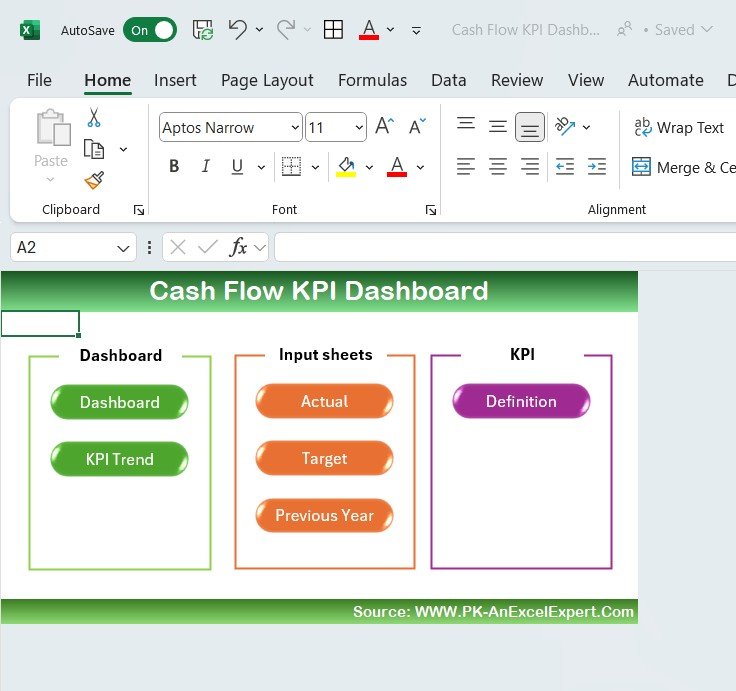
Xero gates its longer-range cash flow forecasting behind the Established plan at $90 a month. This Excel dashboard delivers the same decision — will I have enough cash in ninety days? — for a single $12.99 payment.
Who it is for: any business where timing, not profitability, is the risk: seasonal trade, long payment terms, stock-heavy retail, or a services firm waiting on 60-day invoices.
What is inside:
- Opening balance, inflow and outflow model with closing position per period
- KPIs for operating cash flow, burn rate, cash conversion and runway
- Actual vs Target comparison with variance highlighting
- Trend charts that make a coming shortfall visible months out
The practical value is in the arithmetic it forces. Enter your real receivable and payable timings and the model shows the week your balance dips, which is the number that actually keeps owners awake. One avoided overdraft charge or one renegotiated supplier term pays for the file many times over. Run it beside the P&L template at number six and you have the two statements that matter for under $20 total, one time.
Best for: cash runway forecasting without the $90 Established tier. $12.99 — view the template.
4. Expense Management KPI Dashboard in Excel
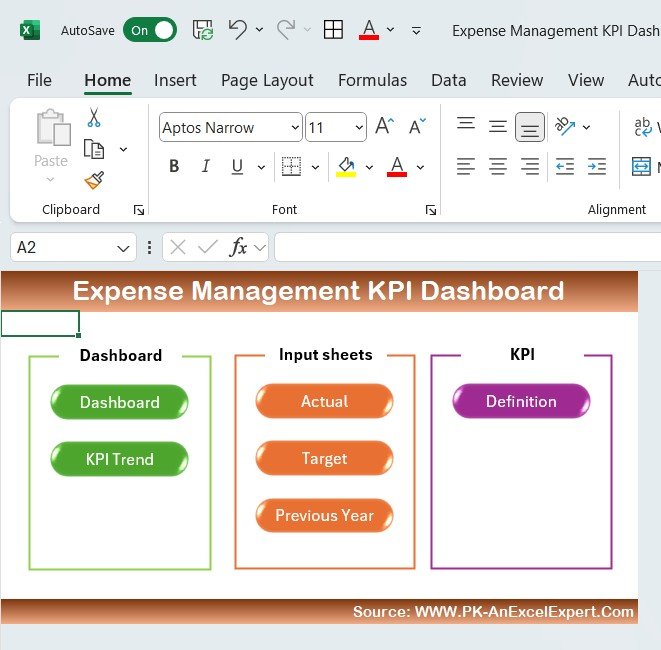
Xero Expenses — claim capture, approval and reimbursement analysis — sits on the Established plan. This dashboard covers the reporting half of that job: where the money goes, which categories are over budget, and which cost centres are drifting.
Who it is for: businesses with several people spending company money who need category control, not just a receipt pile.
What is inside:
- Expense entry by category, department, vendor and cost centre
- Budget vs actual variance with over-spend flags
- KPIs for cost per head, expense ratio, approval turnaround and policy exceptions
- Top-vendor and top-category views for renegotiation targets
Where it earns its keep is the vendor view. Most small businesses have never sorted their suppliers by annual spend; doing it once usually surfaces two or three renewals nobody remembers approving. At $12.99 the file costs less than one month of Xero Early, and unlike the subscription it never expires. Teams that also track people costs often pair it with the reporting in our Power BI dashboard templates ranked by industry.
Best for: spend control and budget variance. $12.99 — view the template.
Not sure where to start? Take the two files that cover 80% of Xero’s daily use for most small businesses — the Finance and Accounting Performance KPI Dashboard in Excel ($12.99) and the Cash Flow KPI Dashboard in Excel ($12.99). That is $25.98 once, the price of a single month on the Xero Early plan.
5. Outsourced Accounting KPI Dashboard in Power BI
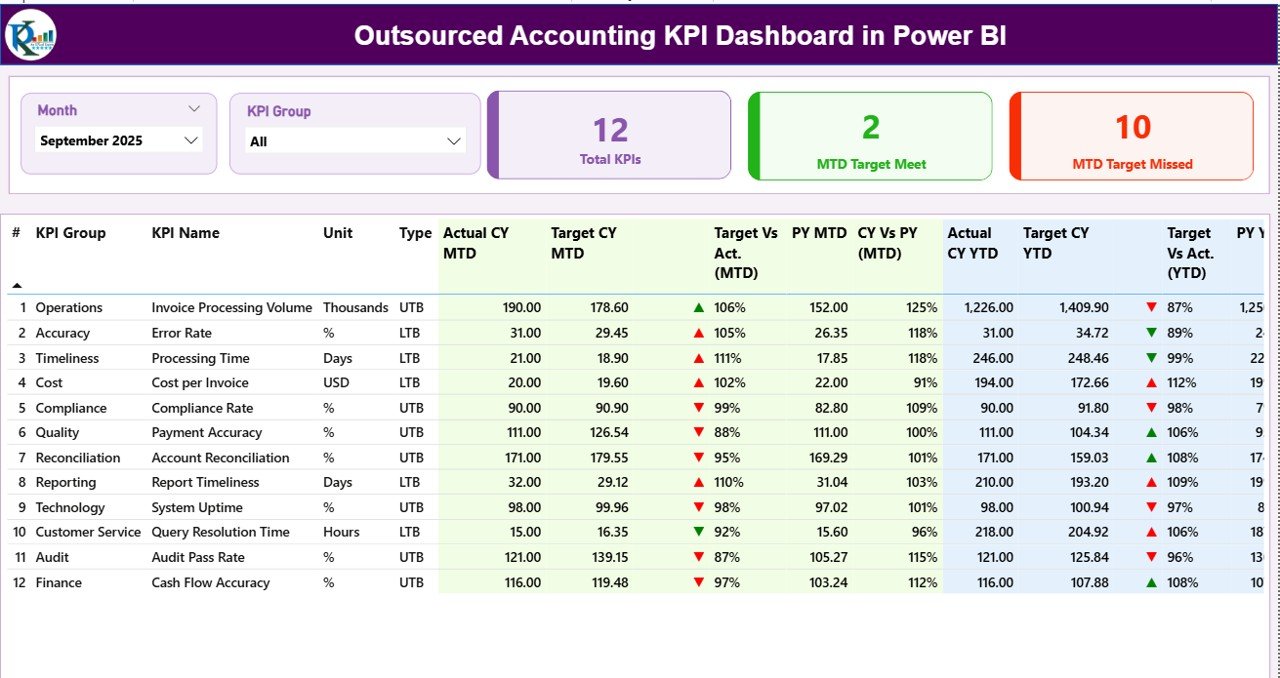
If you are the bookkeeper rather than the business, your problem is not one Xero subscription — it is thirty of them, and the client reporting that sits on top. This Power BI report models outsourced accounting delivery: turnaround, accuracy, utilisation and margin per client.
Who it is for: accounting practices, bookkeeping firms and finance-as-a-service providers reporting across a client portfolio.
What is inside:
- Semantic model with a proper date table and pre-built DAX measures
- Slicers for client, service line, period and account manager
- KPI cards with period-over-period deltas and sparklines
- Drill-through detail pages for any single client or engagement
Power BI Desktop is free, so refreshing this from a monthly export costs nothing beyond the $11.99 file. The report answers the two questions practices most often cannot: which clients are actually profitable after rework, and where the close is slipping. It is the only template here aimed at the firm rather than the business, and it is the one that scales past a handful of entities.
Best for: accounting firms reporting across many clients. $11.99 — view the template.
6. Profit and Loss (P&L) Template in Excel
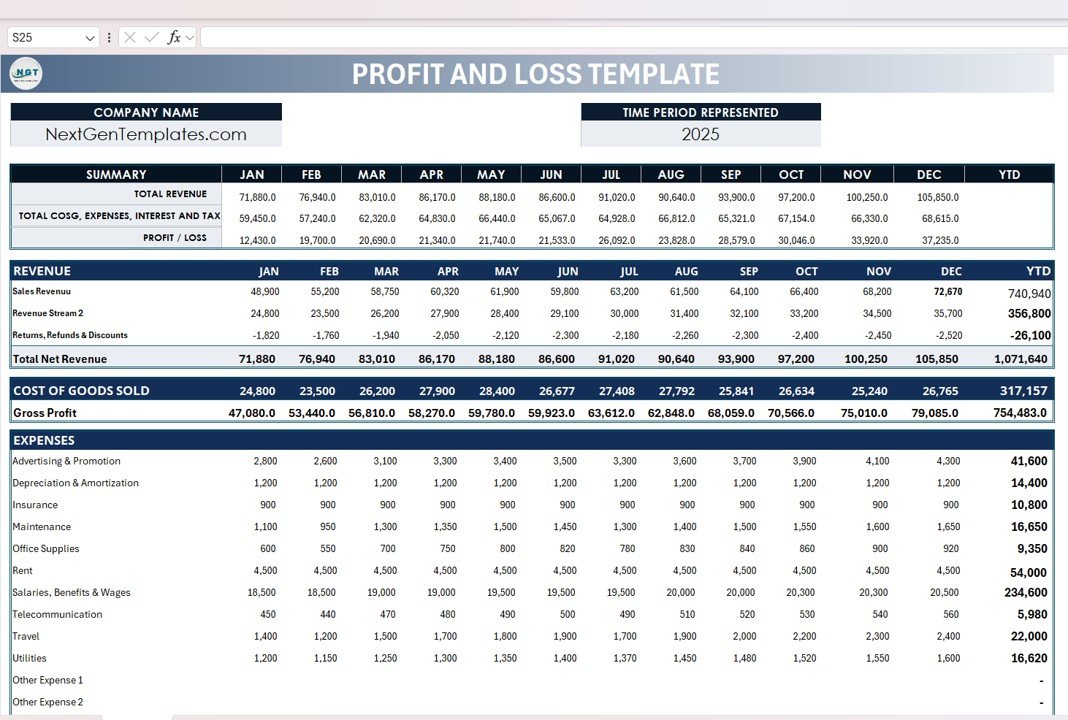
The profit-and-loss statement is the single most-opened report in any accounting package. This template produces it cleanly — revenue, cost of sales, gross profit, operating expenses, net profit — by month and for the year, from a plain transaction list.
Who it is for: anyone who needs a presentable P&L for a lender, an investor, a grant application or their own accountant, and does not want to keep a subscription alive purely to print one report.
What is inside:
- Month-by-month and full-year P&L with automatic subtotals
- Gross margin and net margin percentages calculated per period
- Editable chart of accounts so the line items match your business
- Comparative columns for prior-period and budget
At $6.99 this is the cheapest serious financial statement in the guide — about eight days of a Xero Early plan. It is also the easiest handover: send the workbook to your accountant and every figure is traceable to a row, with no export step and no read-only invitation to manage. A lot of businesses buy this one first and add the KPI dashboard at number one a month later.
Best for: a clean, shareable profit-and-loss statement. $6.99 — view the template.
7. Bank Account Reconciliation Checklist in Excel
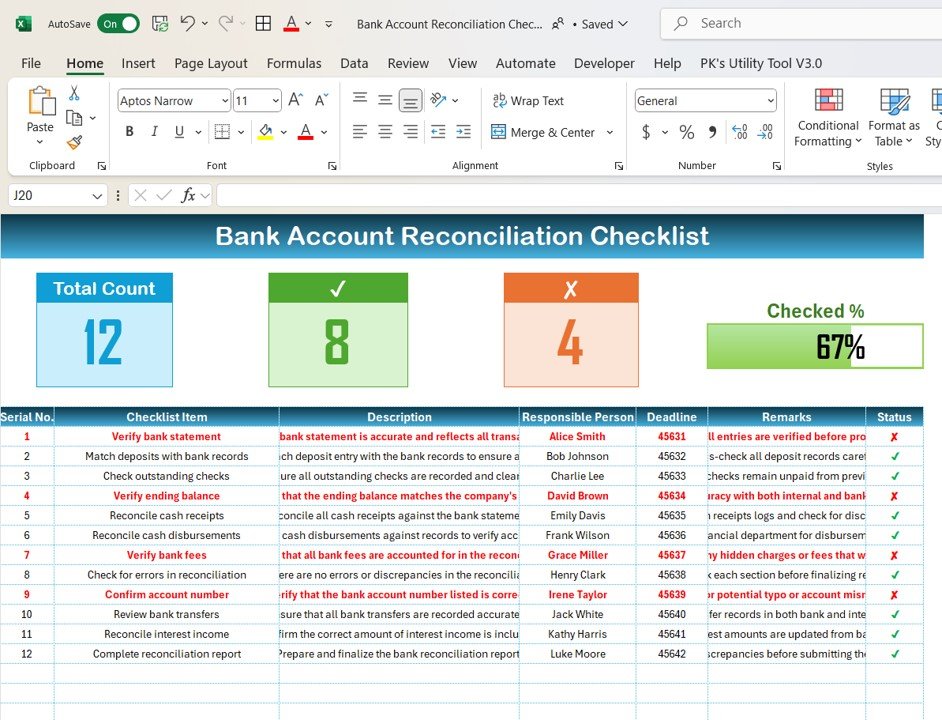
Bank reconciliation is the one thing Xero genuinely automates well, and it is also the one thing that goes wrong quietly when you leave. This checklist replaces the automation with discipline: a structured month-end routine that catches the errors a bank feed would have flagged.
Who it is for: anyone doing their own books who wants a repeatable close, and any owner who wants a paper trail that a reviewer can follow.
What is inside:
- Step-by-step reconciliation sequence with sign-off columns
- Outstanding deposits and uncleared cheques tracking
- Difference calculation with a documented explanation field
- Completion status and reviewer initials per account, per month
At $1.99 it is the least expensive item in this guide by a wide margin — under two and a half days of Xero Early — and it is arguably the highest-leverage. Reconciliation errors are the reason spreadsheet bookkeeping gets a bad reputation, and they are almost always process failures rather than formula failures. A checklist fixes process. Use it alongside any of the dashboards above.
Best for: a disciplined, auditable month-end close. $1.99 — view the template.
8. Bank Account Reconciliation Checklist in Google Sheets
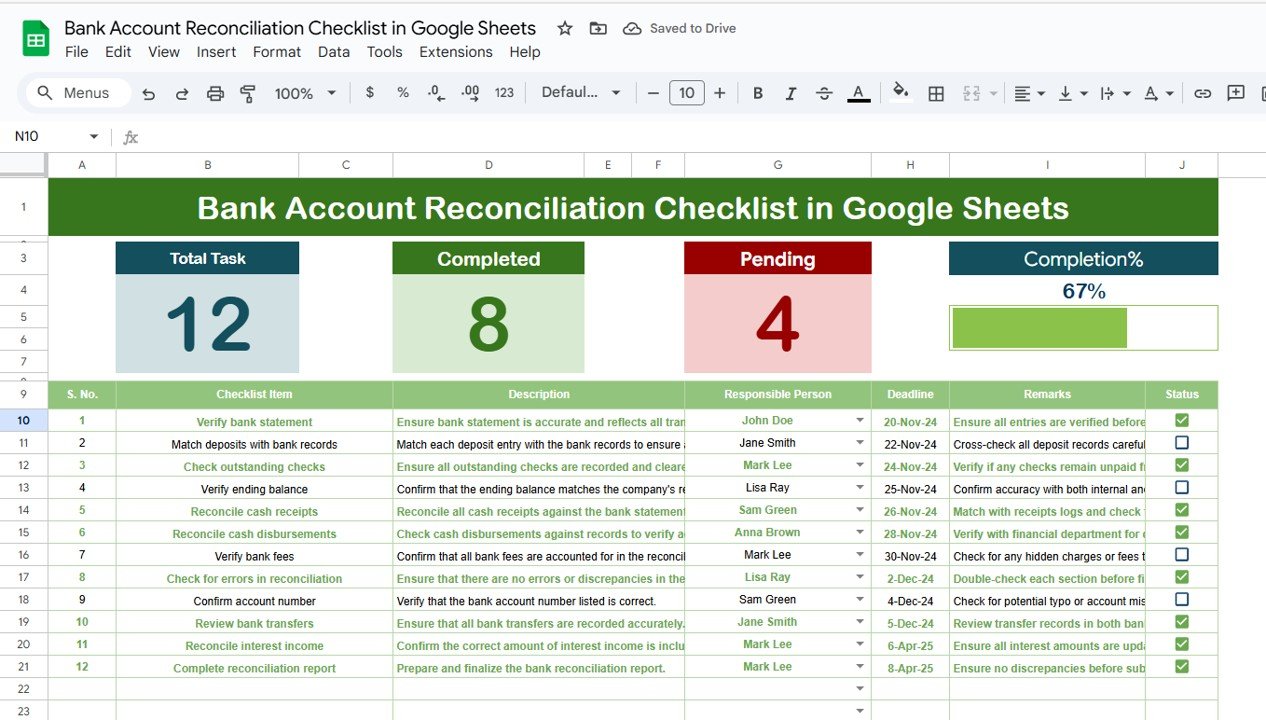
The cloud twin of number seven. Same reconciliation sequence, same sign-off structure, but living in Google Sheets so a bookkeeper, an owner and an external reviewer can work the same checklist without emailing a file back and forth.
Who it is for: remote teams, businesses whose bookkeeper is external, and anyone whose reviewer is in a different time zone.
What is inside:
- Shared month-end checklist with per-step ownership
- Uncleared item tracking and difference reconciliation
- Comment threads on any line for reviewer queries
- Version history — who changed what, and when
Version history is the quiet advantage here. It gives you something close to an audit trail for $1.99, which is the objection most often raised against leaving a cloud accounting platform. Pair it with the Income and Expense Dashboard at number two and you have a complete cloud bookkeeping stack — entry, reporting and reconciliation — for $11.98 once, versus $324 a year for Xero Early after the October increase.
Best for: reconciliation with a shared, timestamped trail. $1.99 — view the template.
How to choose between them
Pick by the job you do most often, not by the longest feature list:
| If you… | Buy this | Price |
|---|---|---|
| Want the single closest replacement for Xero’s reporting | Finance and Accounting Performance KPI Dashboard (Excel) | $12.99 |
| Are a freelancer who just needs money in vs money out | Income and Expense Dashboard (Google Sheets) | $9.99 |
| Worry about running out of cash, not about profit | Cash Flow KPI Dashboard (Excel) | $12.99 |
| Have several people spending company money | Expense Management KPI Dashboard (Excel) | $12.99 |
| Are a bookkeeping firm reporting on many clients | Outsourced Accounting KPI Dashboard (Power BI) | $11.99 |
| Only need a presentable statement for a lender | Profit and Loss (P&L) Template (Excel) | $6.99 |
| Keep getting your month-end close wrong | Bank Account Reconciliation Checklist | $1.99 |
Still undecided? Start with the $6.99 P&L template. It is the cheapest way to find out whether a spreadsheet close suits how you work, and if it does you can add the KPI dashboard and the cash flow model later for the price of one month of Xero.
The switching maths: what you actually save
The comparison people usually get wrong is one-time price versus monthly price. Here is the honest three-year view, using Xero’s published US rates and the post-October figures where they apply.
| Option | Year 1 | Year 3 cumulative |
|---|---|---|
| Xero Early ($27/mo from Oct 2026) | $324 | $972 |
| Xero Growing ($59/mo from Oct 2026) | $708 | $2,124 |
| Xero Established ($97/mo from Oct 2026) | $1,164 | $3,492 |
| All 8 templates in this guide | $71.92 | $71.92 |
Two numbers are worth remembering. The complete eight-template set costs $71.92 — less than one month of Xero Established. And over three years on the Growing plan, the subscription costs roughly 29 times what the entire template library costs, for a business doing broadly the same volume of bookkeeping.
Set against that, add back the honest cost of the switch: a few hours to import history, and your own time each month doing what a bank feed used to do. For a business with under about 40 transactions a month, that is typically 60–90 minutes. Above that, the arithmetic starts to change — which brings us to the section most competitor round-ups leave out.
When Xero is still the right call
We would rather keep a customer than sell them the wrong file. Stay on Xero — or another full accounting platform — when any of these is true:
- You need live bank feeds. Automatic transaction import and match is Xero’s best feature and no spreadsheet replicates it. Past roughly 100 transactions a month, manual entry costs more in hours than the subscription costs in dollars.
- You must file tax or VAT/GST returns directly from your books. Xero connects to filing regimes and keeps the digital record most tax authorities now require. A spreadsheet does not, and a bad filing is far more expensive than a subscription.
- You need a real audit trail with user permissions. Investors, lenders and auditors want to see who changed what and when, with role-based access. Google Sheets version history is a partial answer; a proper ledger with immutable posting is not something a template offers.
- You run payroll, multi-currency or inventory at scale. These are genuinely hard problems with legal consequences. Rebuilding them in a workbook is possible and almost never wise.
- You have an accountant who works exclusively in Xero. If your advisor’s whole process assumes it, the friction of moving may cost more than the licence.
The sweet spot for these templates is a business with fewer than about 100 transactions a month that wants visibility, forecasting and reporting rather than automation and compliance plumbing. If that is you, the maths and the control both point to a one-time file. If it is not, Xero is a fair price for what it does — and you can still buy the $12.99 KPI dashboard to get the management reporting its lower tiers withhold. For businesses replacing several SaaS tools at once, see also our guides to Monday.com alternative work management templates and ClickUp alternative project templates.
Frequently asked questions
What is the best Xero alternative in Excel?
The Finance and Accounting Performance KPI Dashboard in Excel ($12.99) is the best Xero alternative Excel template for most small businesses. It reproduces Xero’s management reporting layer — revenue, margin, receivable days, variance to target — in one file you buy once, with no seat fee and no annual renewal.
How much does Xero cost in 2026?
Xero’s US plans are Early at $25, Growing at $55 and Established at $90 per month. From 1 October 2026 those rise to $27, $59 and $97. Annualised, that is $324 to $1,164. Always confirm current figures on Xero’s official pricing page, as tiers and prices change by region.
Can a spreadsheet really replace Xero?
For a business under roughly 100 transactions a month that needs income and expense tracking, cash flow forecasting and a profit-and-loss statement, yes. What a spreadsheet cannot replace is live bank feeds, direct tax filing, payroll and an immutable audit trail. If those matter, keep a full accounting platform.
Is there a free Xero alternative?
Google Sheets itself is free, so the only cost of the cloud templates here is the one-time file — $9.99 for the Income and Expense Dashboard, $1.99 for the reconciliation checklist. Xero offers a free trial but no permanent free plan, so a paid-once template is usually cheaper within the first month.
Do these templates work in Google Sheets as well as Excel?
Each template is built for a specific platform. This guide includes five Excel workbooks, two Google Sheets files and one Power BI report, so you can match the tool your business already uses. The Bank Account Reconciliation Checklist, for example, exists in both Excel and Google Sheets versions at $1.99 each.
How do I move my Xero data into a spreadsheet template?
Export your transactions, contacts and account balances from Xero to CSV, then paste the columns into the template’s input tab — date, description, category, amount. The dashboards recalculate automatically. For the Power BI report you connect the CSV as a data source and refresh. Budget about two hours for the first import.
Will I lose bank feeds if I leave Xero?
Yes, and this is the main trade-off. No spreadsheet template imports and auto-matches bank transactions. You download a statement and paste it in, typically once a week. That is why we include a reconciliation checklist: the discipline replaces the automation, and it takes most small businesses under an hour a month.
Which Xero alternative is best for a freelancer or sole trader?
The Income and Expense Dashboard in Google Sheets ($9.99). Freelancers rarely need bills, payroll or multi-currency — they need to know what came in, what went out and what is left for tax. It runs free in the cloud and costs less than half a month of Xero Early.
Are one-time templates cheaper than Xero over three years?
Substantially. Three years on Xero Growing is about $2,124 at the post-October 2026 rate. All eight templates in this guide total $71.92, paid once, with no renewal. Even the single best-overall dashboard at $12.99 costs less than three weeks of the Early plan and never expires.
Can I customise these accounting templates?
Yes. Every file is formula-driven with visible logic — rename accounts, add categories, change targets, restyle charts, extend the date range. That was a selection criterion: an accounting template you cannot match to your own chart of accounts is not a real Xero replacement. You own the file outright.
Get more accounting templates
Leaving Xero does not mean losing control of your books — it means owning the file that holds them. For less than one month of the Established plan you can run reporting, cash flow, expenses, P&L and reconciliation on files you paid for once. Start with the Finance and Accounting Performance KPI Dashboard in Excel ($12.99) if you live in Excel, or the Income and Expense Dashboard in Google Sheets ($9.99) for the cheapest cloud switch. Add the Bank Account Reconciliation Checklist at $1.99 and your month-end close is covered too.
Prefer to see a template working before you buy? Watch build walk-throughs and dashboard tutorials on our YouTube channel: youtube.com/@NextGenTemplates.
Related: Replacing more of your SaaS stack? See our Zoho CRM alternatives — 8 CRM templates in Excel & Sheets, Pipedrive alternatives — 8 sales pipeline templates and Trello alternatives — 8 kanban board templates.
Reducing SaaS subscriptions across the business? See our ServiceNow alternatives for ITSM teams.