

The best Airtable alternatives in 2026 are one-time-purchase Excel and Google Sheets tracker and database templates that replace Airtable’s per-seat subscription. Small teams switch to cut recurring seat costs, drop unused modules, and own their data outright. Our top pick is the Employee Database Tracker in Excel at $6.99.
Last updated: August 2026
Airtable’s published pricing starts free, then jumps to $20 per seat per month on the Team plan and $45 per seat per month on Business (billed annually), with Enterprise Scale on custom quotes. For a five-person team, Business runs $2,700 a year, every year. If you use Airtable as a glorified spreadsheet database, that is a lot of money for structured rows you could own once.
Three reasons small teams churn off Airtable: seat cost that scales with headcount instead of value, unused modules (automations, interfaces, sync, AI) that you pay for but never touch, and admin overhead of governing bases, permissions, and API limits. A $6.99 spreadsheet template that you buy once, own forever, and run offline solves all three for the most common Airtable job: tracking records.
Key takeaways
- Airtable Business costs $45 per seat per month (annual) — a 5-seat team pays $2,700 a year versus a one-time $6.99–$14.99 template.
- The Employee Database Tracker in Excel ($6.99) is our best overall Airtable alternative for structured record-keeping with add/update/delete forms.
- Both Excel and Google Sheets versions exist for inventory and office-supply tracking, so cloud-collaboration teams are not forced back to desktop.
- Every template here is a one-time purchase — no per-seat fees, no row limits, no API caps, and your data stays in your own file.
- Airtable still wins for relational databases, external app integrations, and non-technical automations — we say exactly when below.
 Launch offer
SUMIFS, XLOOKUP, FILTER, LAMBDA and checking AI-written formulas, with real business projects. 11h 47m of video by PK, with practice files, quizzes and a capstone.
Airtable alternative templates compared
| Template | Format | Best for | Price |
|---|---|---|---|
| Employee Database Tracker in Excel (Best overall) | Excel VBA | Structured people/record database with CRUD forms | $6.99 |
| Inventory Tracker in Google Sheets (Best value) | Google Sheets | Cloud stock tracking your team edits together | $6.99 |
| Office Supply Inventory Update Tracker in Excel | Excel | Offline supply logging with reorder alerts | $6.99 |
| Office Supply Inventory Update Tracker in Google Sheets | Google Sheets | Shared supply requests across an office | $6.99 |
| Manufacturing Inventory Management KPI Dashboard in Excel | Excel | Inventory database plus KPI reporting | $12.99 |
| Content Creator KPI Dashboard in Excel | Excel | Content pipeline tracking (Airtable’s content-team job) | $14.99 |
| Copywriting & Content Creation KPI Dashboard in Excel | Excel | Editorial workflow and output metrics | $14.99 |
| Meme & Viral Content Creation KPI Dashboard in Excel | Excel | Social content tracking and performance | $14.99 |
How we picked these
We searched the full NextGenTemplates catalog of Excel, Google Sheets, and Power BI products for templates that reproduce Airtable’s three most common real-world jobs: a structured record database, an inventory/asset tracker, and a content-team production pipeline. We kept only paid, ready-to-use tools priced $6.99–$14.99, favored templates that ship in both Excel and Google Sheets so teams can self-select, and excluded generic single-chart files that could not stand in for a working Airtable base. Every price and link below is live at publication.
The 8 best Airtable alternatives for 2026
1. Employee Database Tracker in Excel — best overall
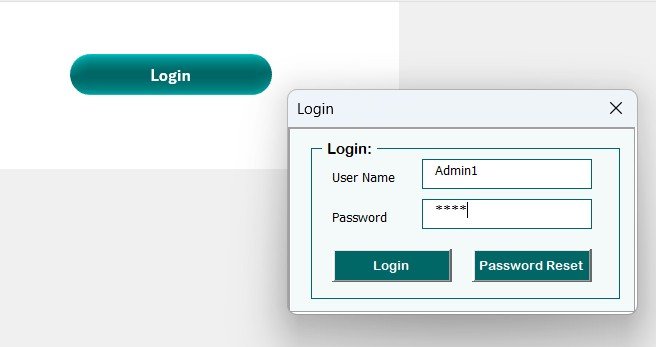
This is the closest single-file replacement for how most teams actually use Airtable: a structured database of records with a proper add, update, and delete form sitting on top. Where Airtable charges per editor, this VBA-powered workbook gives you the same CRUD experience for a one-time $6.99.
Who it is for: HR, ops, and small-team leads who use Airtable as a people or asset database and resent paying $45/seat for it.
What is inside:
- Password-protected login screen with an admin user
- Add / update / delete / reset record buttons (no formula editing)
- Structured fields with dropdown lists, like Airtable’s single-select
- Instant search and filter across the record table
- Summary stats that recalculate as records change
A 12-person startup replacing one Airtable Team base saves roughly $2,880 over the workbook’s first year. A recruiter can log 300 candidate records without hitting a row cap. An ops lead can hand the file to a new hire and they can add records on day one without a subscription seat.
Price: $6.99 — get the Employee Database Tracker in Excel.
Best for: the team that treats Airtable as a shared, structured record database.
2. Inventory Tracker in Google Sheets — best value
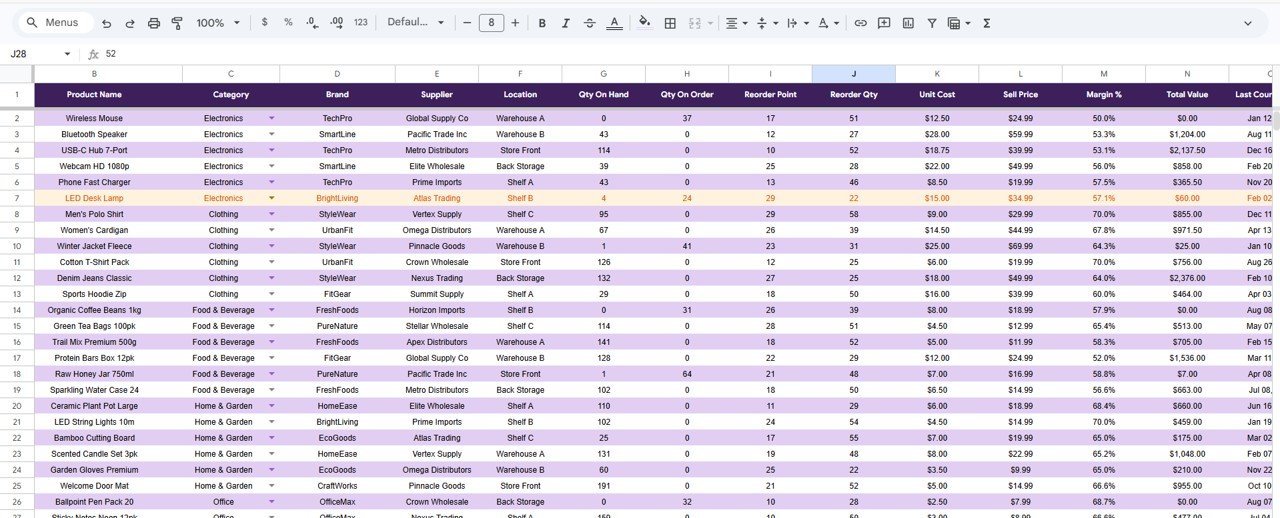
If you chose Airtable mainly because it lives in the cloud and your whole team can edit at once, this Google Sheets tracker gives you the same shared, always-online experience for a single $6.99 payment and no per-seat billing at all — invite the whole team for free.
Who it is for: shops, warehouses, and small businesses tracking stock collaboratively in real time.
What is inside:
- Live stock-in / stock-out entry table with running balances
- Low-stock and reorder-point highlighting
- Category and supplier dropdowns for clean filtering
- KPI card and charts linked directly to the data
Because Google Sheets sharing is free, a 10-person team pays $6.99 total instead of Airtable’s $2,400+ a year for the same number of editors. Stock counts update the moment someone types. There are no row limits to bump into at 1,200 SKUs.
Price: $6.99 — get the Inventory Tracker in Google Sheets.
Best for: teams that want Airtable’s cloud collaboration without the seat bill.
3. Office Supply Inventory Update Tracker in Excel
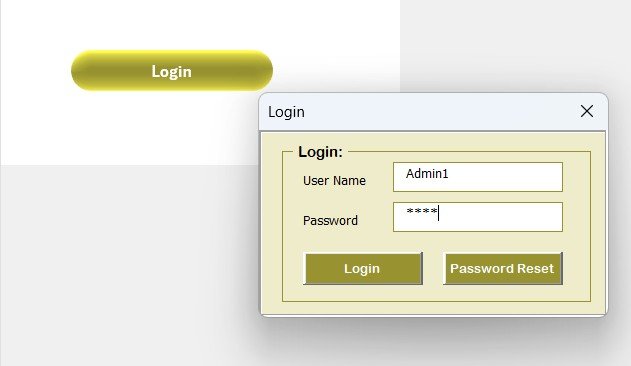
A focused, offline database for office and supply-room stock. If you built an Airtable base just to know when to reorder printer toner and coffee, this $6.99 Excel file does that job without an internet connection or a login seat.
Who it is for: office managers and admin staff logging consumable supplies.
What is inside:
- Item register with current quantity and reorder level
- Update-in and update-out logging
- Automatic reorder flags when stock dips below threshold
- Category dropdowns and quick totals
An office of 40 staff can track 200 supply lines in one file. Reorder flags stop the “we ran out of toner again” scramble. Because it is Excel, it runs on a locked-down corporate laptop with no cloud approval needed.
Price: $6.99 — get the Office Supply Inventory Update Tracker in Excel.
Best for: offline supply tracking on managed devices.
4. Office Supply Inventory Update Tracker in Google Sheets
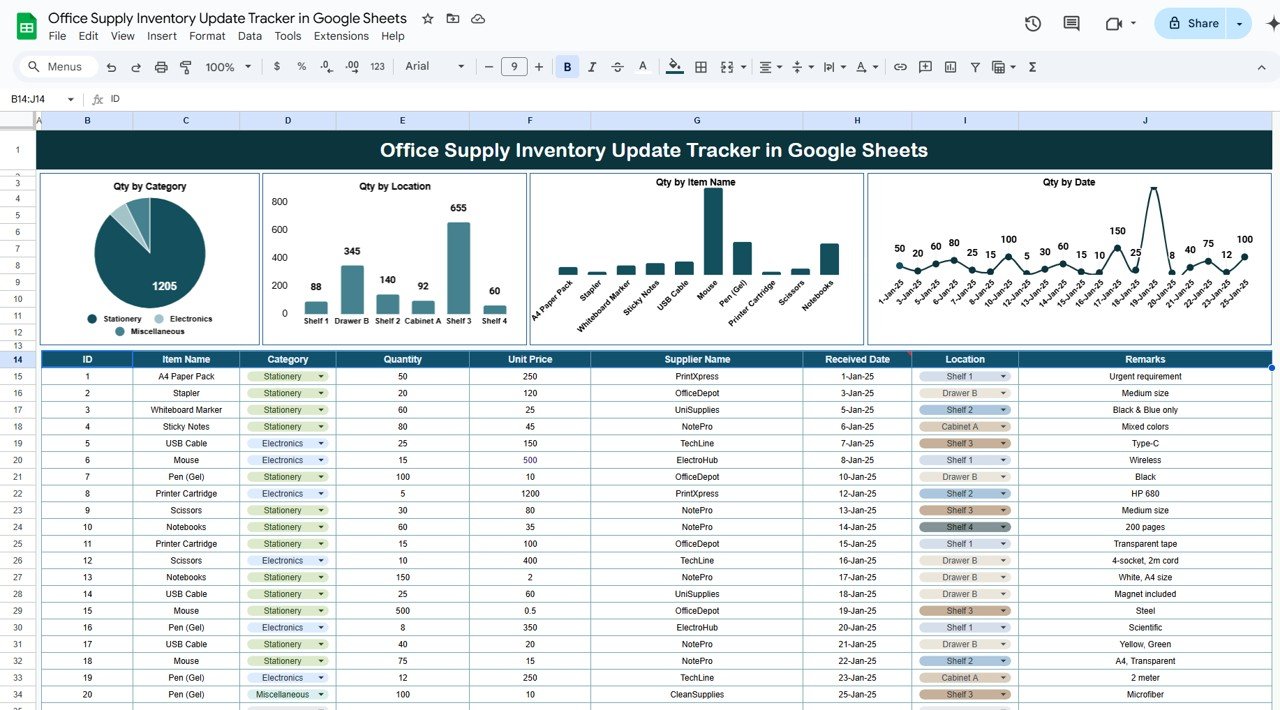
The cloud twin of the tracker above. Multiple people across an office can request and log supplies in the same sheet at once — the collaborative pattern that pulls teams to Airtable — for a one-time $6.99 and unlimited free viewers.
Who it is for: multi-location or hybrid offices where several people update supplies.
What is inside:
- Shared supply register any invited teammate can edit
- Reorder-level highlighting and status column
- Supplier and category dropdowns
- Live totals and low-stock view
Reception, facilities, and remote staff all log requests in one place. Google’s version history replaces Airtable’s revision log for free. A branch office can share the sheet read-only with head office in one click.
Price: $6.99 — get the Office Supply tracker in Google Sheets.
Best for: shared office-supply requests across a team.
5. Manufacturing Inventory Management KPI Dashboard in Excel
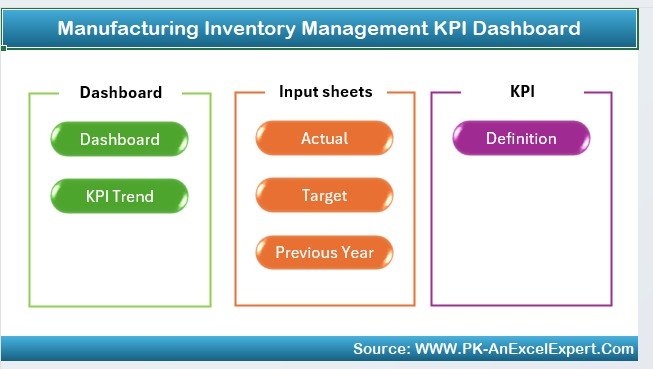
Airtable users who bolt Interface Designer onto an inventory base to get charts are really paying for a dashboard. This $12.99 Excel file is both the inventory database and the reporting layer in one — no add-on tier required.
Who it is for: manufacturers and warehouses that need stock records plus management-ready KPIs.
What is inside:
- Inventory register with SKU, quantity, and value fields
- Turnover, stock-value, and reorder KPI cards
- Charts for stock movement and category mix
- Filterable views by product line and location
A plant tracking 500 SKUs gets turnover and carrying-cost KPIs without exporting to another tool. Managers see stock value at a glance. The whole thing prints to a one-page report for a production meeting.
Price: $12.99 — get the Manufacturing Inventory KPI Dashboard.
Best for: inventory plus reporting in a single file.
6. Content Creator KPI Dashboard in Excel

One of Airtable’s biggest use cases is the content calendar and pipeline. If you run one, this $14.99 dashboard tracks your content database and its performance metrics together, so you drop the seat fee and still see what is working.
Who it is for: creators and content teams who use Airtable to plan and measure output.
What is inside:
- Content log with status, platform, and publish date
- Views, engagement, and output KPI cards
- Channel and format breakdown charts
- Monthly performance trend view
A solo creator tracks 100 pieces a quarter without a paid base. A two-person team shares one file instead of two Airtable seats. Performance metrics sit next to the pipeline, so planning and reporting live in one place.
Price: $14.99 — get the Content Creator KPI Dashboard.
Best for: creators replacing an Airtable content calendar.
7. Copywriting & Content Creation KPI Dashboard in Excel
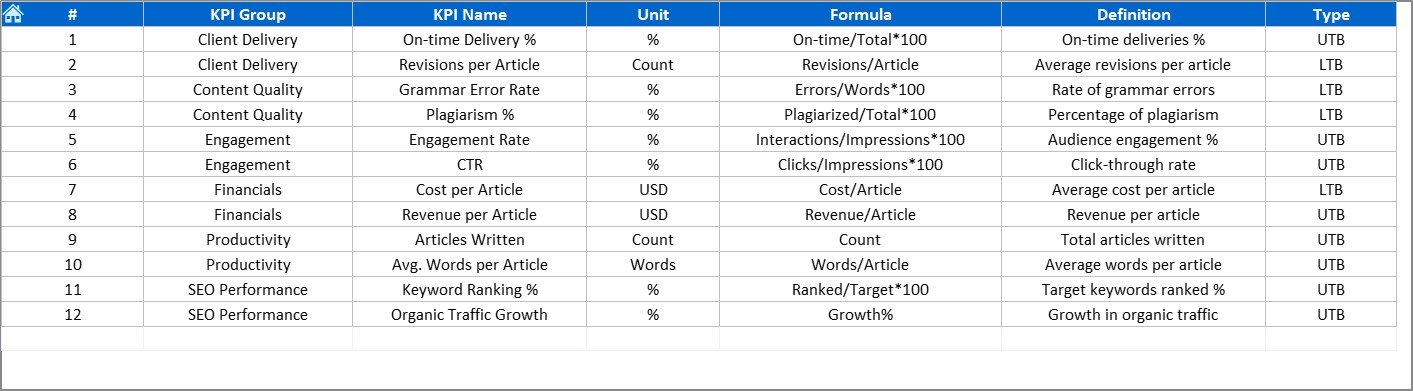
Built for editorial teams that track briefs, drafts, and deliverables through a workflow — the exact kanban-plus-database pattern many agencies build in Airtable. At $14.99 once, it replaces a recurring team base.
Who it is for: copywriting teams, agencies, and editorial managers.
What is inside:
- Assignment log with writer, status, and due date
- Throughput and turnaround KPI cards
- Writer and content-type performance charts
- Workflow status tracking from brief to publish
An agency tracks 50 live briefs across five writers in one shared file. Turnaround KPIs surface bottlenecks Airtable would need an automation to compute. Deliverable status is visible without opening a paid interface.
Price: $14.99 — get the Copywriting KPI Dashboard.
Best for: editorial workflow tracking off Airtable.
8. Meme & Viral Content Creation KPI Dashboard in Excel
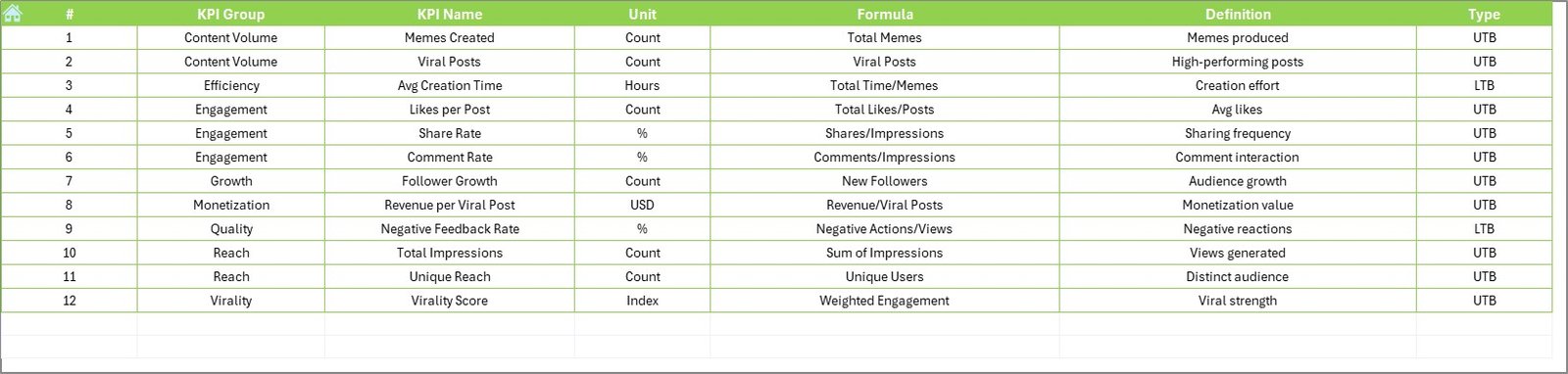
Social and meme teams that live in Airtable to schedule and score posts can move that database into this $14.99 dashboard, which tracks the content and its viral performance side by side without a per-seat cost.
Who it is for: social media managers and meme-marketing teams.
What is inside:
- Post log with platform, format, and publish date
- Reach, shares, and virality KPI cards
- Top-performing post and channel charts
- Trend view for engagement over time
A social team tracks 200 posts a month and instantly sees which format went viral. Reach and share metrics sit beside the content database. One file replaces a shared Airtable base and its editor seats.
Price: $14.99 — get the Meme & Viral Content KPI Dashboard.
Best for: social content teams tracking performance.
Ready to stop paying per seat? The four $6.99 tracker and database templates cover the jobs most teams actually use Airtable for. Buy once, own forever, invite your whole team free.
How to choose between them
Match the template to the Airtable job you are replacing:
- People or record database? Employee Database Tracker in Excel ($6.99).
- Cloud stock tracking your team co-edits? Inventory Tracker in Google Sheets ($6.99).
- Office or supply-room consumables? Office Supply tracker in Excel (offline) or Google Sheets (shared), both $6.99.
- Inventory plus KPIs in one file? Manufacturing Inventory Management KPI Dashboard ($12.99).
- Content, editorial, or social pipeline? The three Content KPI dashboards ($14.99 each).
Rule of thumb: pick Google Sheets when live multi-editor collaboration is the reason you were on Airtable, and Excel when you need offline access or heavier calculation on managed devices.
When Airtable is still the right call
A fair switcher guide has to say where Airtable genuinely wins. Do not move off it if any of these describe you:
- You need a true relational database. Airtable’s linked records across many tables (a base where records reference each other) are hard to reproduce cleanly in a flat spreadsheet. If your data model is genuinely relational, keep Airtable.
- You rely on external integrations. Airtable’s native syncs, webhooks, and 1,000+ automation connectors to Slack, Google, and marketing tools are real work to rebuild. A spreadsheet is an island by comparison.
- Non-technical staff build their own views. Airtable’s Interface Designer lets non-coders spin up filtered apps. If that self-service matters more than the seat cost, stay.
- You are scaling past a spreadsheet. Above roughly 50,000 rows or dozens of simultaneous editors, a real database platform is the right tool, not Excel or Sheets.
For everyone else — teams using Airtable as a shared list, tracker, or content calendar — a one-time template is the cheaper, simpler, more durable choice. If you are also weighing project and CRM tools, our Asana alternatives, Monday.com alternatives, and HubSpot alternatives guides apply the same one-time-purchase logic to those platforms.
Frequently asked questions
What is the best Airtable alternative in Google Sheets?
The Inventory Tracker in Google Sheets ($6.99) is the best Airtable alternative when cloud collaboration is why you were on Airtable. It gives the whole team live, shared editing with running balances and reorder alerts, but as a one-time purchase with unlimited free viewers instead of $20–$45 per seat each month.
How much does Airtable cost in 2026?
Airtable’s published pricing is free for its starter tier, then $20 per seat per month for Team and $45 per seat per month for Business, both billed annually, with Enterprise Scale on custom quotes. A five-person Business team pays about $2,700 a year, which recurs indefinitely for as long as you stay.
Can Excel or Google Sheets really replace Airtable?
Yes, for the most common Airtable jobs — trackers, record databases, and content calendars. A spreadsheet template with forms, dropdowns, and dashboards reproduces that experience. It cannot replace Airtable’s linked relational tables, native integrations, or Interface Designer apps, so match the tool to how you actually use Airtable.
Is a one-time template cheaper than an Airtable subscription?
Almost always. A $6.99–$14.99 template is a single payment you own forever. Airtable bills every seat every month, so even one Team seat ($240 a year) costs more in year one than any template here, and the gap widens every year you keep paying.
Do these templates support multiple users like Airtable?
The Google Sheets templates do — share the file and invite unlimited editors for free, matching Airtable’s live collaboration. The Excel templates are best for single-user or shared-drive use. Pick the Google Sheets version whenever real-time multi-editor access is the feature you need most.
Which Airtable alternative works offline?
The Excel templates — the Employee Database Tracker, Office Supply Inventory Update Tracker, and the KPI dashboards — all run fully offline on your desktop. That suits locked-down corporate laptops and low-connectivity sites where Airtable’s cloud-only model simply will not work.
Can I replace an Airtable content calendar with a spreadsheet?
Yes. The Content Creator, Copywriting, and Meme & Viral KPI dashboards ($14.99 each) track a content pipeline plus its performance metrics in one file. They cover the plan-and-measure workflow most content teams build in Airtable, without the recurring per-seat charge.
Will I lose my data if I stop paying?
No — that is a core reason to switch. Your data lives in your own Excel or Google Sheets file, which you keep forever. With Airtable, access to your bases depends on an active subscription. A downloaded template removes that dependency entirely.
Do the templates come with instructions?
Yes. Each template includes an instructions sheet or setup guide, and NextGenTemplates offers walkthrough videos on the NextGenTemplates YouTube channel. Most trackers are usable within minutes because the forms, dropdowns, and dashboards are already built — you just start entering records.
What if I need a relational database like Airtable’s linked records?
If your data is genuinely relational across many linked tables, keep Airtable or move to a database platform — a flat spreadsheet is the wrong tool. But most teams use Airtable as a single structured list, and for that job the Employee Database Tracker ($6.99) is a clean, cheaper replacement.
Get more Airtable alternative templates
Own your data, drop the seat fees. Start with the Employee Database Tracker in Excel ($6.99) or the Inventory Tracker in Google Sheets ($6.99) — one-time purchases that replace a recurring Airtable base.
Browsing other software switches? See our Salesforce alternatives, Zoho CRM alternatives, Pipedrive alternatives, and task and to-do management templates. For live reporting, browse our sales dashboard templates.
Prefer to watch first? Subscribe to the NextGenTemplates YouTube channel for template walkthroughs.
Comparing analytics platforms? See our guide to the best Tableau alternatives: 8 BI & analytics templates in Excel & Sheets.
Read next: editable vs locked templates — what you should demand from a template vendor.