

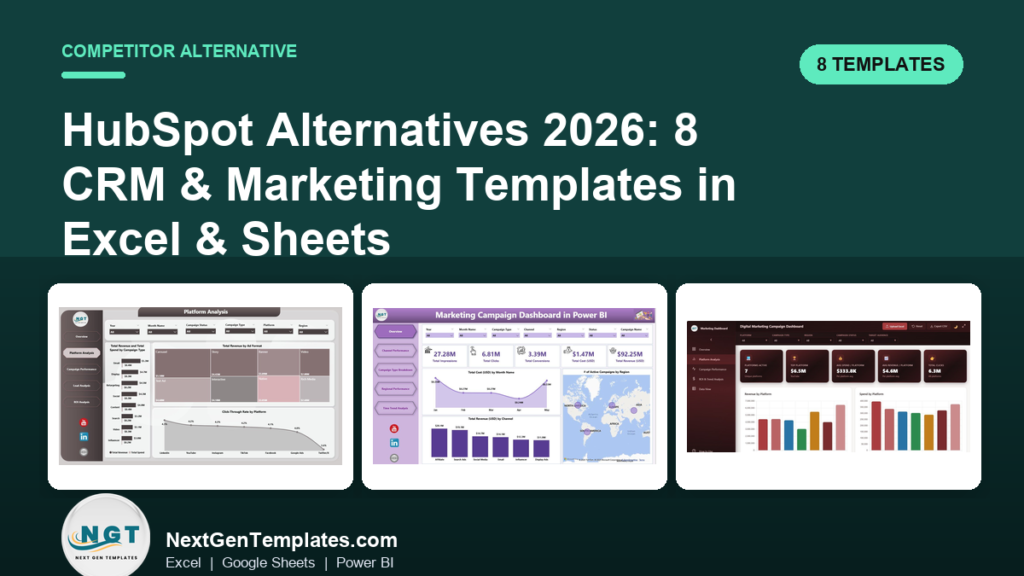
The best HubSpot alternative for a small marketing team is a spreadsheet-based stack: a campaign dashboard plus a marketing calendar you buy once and own forever. NextGenTemplates covers HubSpot’s core marketing jobs with eight Excel, Google Sheets, Power BI and HTML templates priced from $4.99 to $17.99 – no per-seat billing, no onboarding fee.
Tracking campaign performance too? See our companion guide to the 15 marketing KPIs to track in 2026, with formulas, benchmarks and ready-made dashboard templates.
Last updated: August 2026
Key takeaways
- HubSpot Marketing Hub Professional lists at $890/mo plus a mandatory $3,000 one-time onboarding fee; a template stack replaces the campaign-tracking core for a one-time $4.99-$17.99.
- Small teams churn off HubSpot for three reasons: per-seat cost, paying for modules they never open, and admin overhead. A spreadsheet removes all three.
- The Digital Marketing Campaign Dashboard in Power BI ($17.99) is our best overall HubSpot alternative for campaign analytics.
- Best value is the Marketing Campaign Calendar in Google Sheets at $4.99 – collaborative, shareable, and free to run.
- HubSpot still wins when you need native email sending, lead scoring automation, and a connected CRM database at scale – a spreadsheet is a planning and reporting layer, not a sending engine.
 Launch offer
SUMIFS, XLOOKUP, FILTER, LAMBDA and checking AI-written formulas, with real business projects. 11h 47m of video by PK, with practice files, quizzes and a capstone.
HubSpot alternative spreadsheet templates compared
| Template | Format | Best for | Price |
|---|---|---|---|
| Digital Marketing Campaign Dashboard (Best overall) | Power BI | Multi-channel campaign analytics | $17.99 |
| Marketing Campaign Dashboard | Power BI | Deep campaign ROI reporting | $17.99 |
| Digital Marketing Campaign Dashboard | HTML | Browser-based, no software install | $12.99 |
| Marketing Campaign Calendar (Best value) | Google Sheets | Collaborative campaign planning | $4.99 |
| Marketing Customer Experience Calendar | Excel | Customer-journey mapping | $4.99 |
| Technology Marketing Customer Experience Calendar | Excel | SaaS & tech marketing teams | $4.99 |
| Finance Marketing Customer Experience Calendar | Excel | Financial-services marketing | $4.99 |
| Education Marketing Customer Experience Calendar | Excel | Schools, colleges & ed-tech | $4.99 |
How much does HubSpot actually cost in 2026?
Before you can judge an alternative, you need HubSpot’s real, published numbers. These are taken from HubSpot’s own Marketing Hub pricing page (August 2026):
| HubSpot Marketing Hub tier | Monthly price | Seats included | Marketing contacts | Onboarding fee |
|---|---|---|---|---|
| Free Tools | $0 | Up to 2 | Basic | None |
| Starter | $20/seat (monthly) | Per seat | 1,000 | None |
| Professional | $890/mo | 3 (then +$45/seat) | 2,000 | $3,000 one-time |
| Enterprise | $3,600/mo | 5 (then +$75/seat) | 10,000 | $7,000 one-time |
The number that pushes small teams to look elsewhere is the cliff between Starter and Professional. You start on Starter at $20 per seat, then hit a wall the moment you want campaign reporting, custom reporting, or more than 1,000 marketing contacts – and the next step up is $890/mo plus a required $3,000 onboarding payment before you send a single email.
The three reasons small teams churn off HubSpot
1. Per-seat cost scales with your team, not your revenue. Every marketer, designer, and freelancer who needs access adds a seat. On Professional that is +$45/mo each; on Enterprise it is +$75/mo. A five-person team on Professional is closer to $980/mo than the headline $890.
2. You pay for modules you never open. HubSpot bundles email automation, landing pages, ad management, SEO tools, and reporting. Most small teams use two or three of those and still pay for the whole platform – plus the marketing-contact meter that bills you again every time your list grows past the tier cap.
3. Admin overhead is a hidden tax. Someone has to own the portal: managing workflows, cleaning properties, and reconciling reports. That is why the $3,000-$7,000 onboarding fee exists. A spreadsheet has no portal to administer – if you can open Excel or Google Sheets, you can run it.
HubSpot feature vs the NGT template that covers it
You do not replace HubSpot with one file – you replace each job it does. Here is the head-to-head, mapping HubSpot’s marketing functions to the template that covers the same job and what it costs once:
| HubSpot feature | NGT template that covers it | One-time price |
|---|---|---|
| Campaign analytics & ROI reporting | Digital Marketing Campaign Dashboard (Power BI) | $17.99 |
| Multi-channel performance reports | Marketing Campaign Dashboard (Power BI) | $17.99 |
| Shareable web dashboard / portal view | Digital Marketing Campaign Dashboard (HTML) | $12.99 |
| Marketing calendar & campaign planning | Marketing Campaign Calendar (Google Sheets) | $4.99 |
| Customer-journey / lifecycle mapping | Marketing Customer Experience Calendar (Excel) | $4.99 |
| Contact & lead database (CRM) | CRM in Excel + Lead Tracker template | from $4.99 |
| Sales & pipeline KPI reporting | CRM KPI Dashboard | from $4.99 |
Add the full marketing stack together and you are under $50 one-time – roughly what one HubSpot Professional seat costs in a fortnight.
How we picked these
We searched the NextGenTemplates catalogue of roughly 6,900 templates for the tools that map directly onto HubSpot Marketing Hub’s most-used jobs: campaign analytics, multi-channel reporting, marketing calendars, and customer-experience planning. We kept only paid, actively maintained templates that a HubSpot switcher could open and use the same day, across Excel, Google Sheets, Power BI and HTML so the reader can self-select by the tools they already own. We excluded single-metric trackers and anything that needs an add-on to function. Each template below is ranked on how completely it replaces a HubSpot job, its format flexibility, and price-to-value.
The 8 best HubSpot alternative templates for 2026
1. Digital Marketing Campaign Dashboard in Power BI – best overall
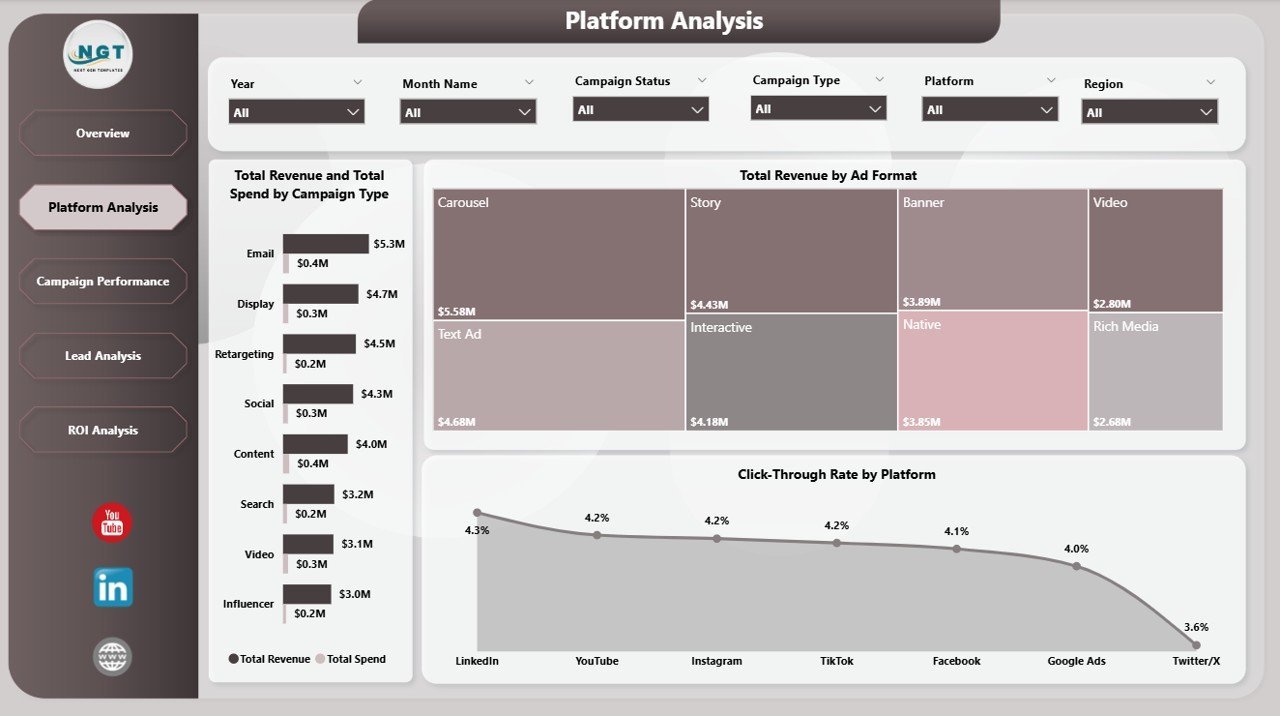
This is the closest single template to HubSpot’s campaign analytics view. It pulls impressions, clicks, spend, conversions and revenue across every channel into one interactive Power BI report – the reporting layer teams jump to HubSpot Professional to get.
Who it is for: marketing managers who report to a founder or board and need a clean multi-channel view without a $890/mo platform.
What is inside:
- Platform-level analysis: revenue and spend by channel and campaign type
- KPI cards for CTR, conversions, cost and total revenue
- Campaign, lead and ROI breakdown pages with slicers
- Fully editable Power BI file – swap in your own data
Use it to see, at a glance, that Google Ads returned $6.35M against a $333.8K spend, or to compare LinkedIn versus TikTok cost-per-conversion for next quarter’s budget. Because it is a file you own, five people can view it without five HubSpot seats. Price: $17.99. View the Digital Marketing Campaign Dashboard.
Best for: the single most HubSpot-like campaign reporting experience, bought once.
2. Marketing Campaign Dashboard in Power BI – best for deep ROI reporting
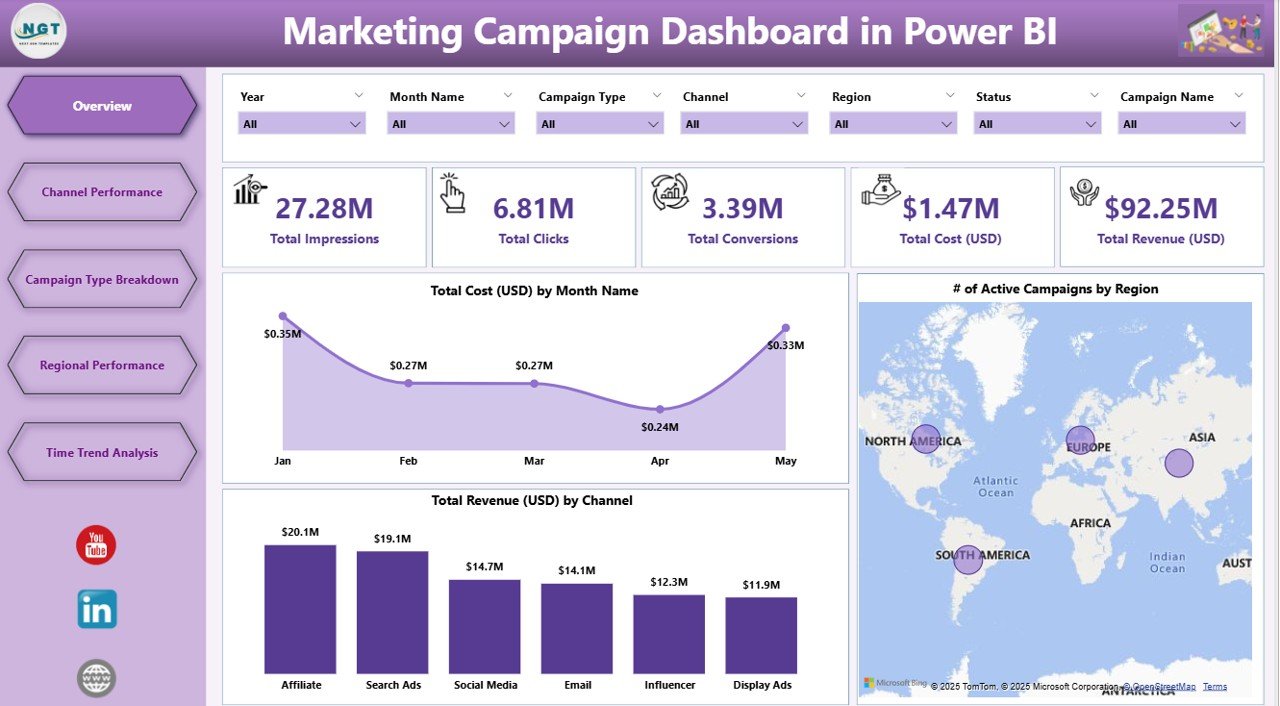
Where template #1 leans digital-first, this dashboard is built for classic campaign ROI reporting: total impressions, clicks, cost and revenue by month, channel and region, with a channel-mix breakdown and an active-campaigns map.
Who it is for: teams running a mix of paid, email and event campaigns who want a monthly board-ready report.
What is inside:
- Total cost, impressions and conversion KPIs with month-over-month trend
- Revenue and cost by channel (affiliate, search, social, email, display)
- Number of active campaigns by region on a map visual
- Overview, channel, regional and time-trend pages
A team spending $1.47M against $92.25M in attributed revenue can prove ROI in one screen – the exact metric a HubSpot Professional upgrade is usually bought to expose. It ships as a native Power BI file, so it slots into an existing Microsoft stack with no new subscription. Price: $17.99. View the Marketing Campaign Dashboard.
Best for: monthly ROI reporting across many channels and regions.
3. Digital Marketing Campaign Dashboard in HTML – best browser-based option
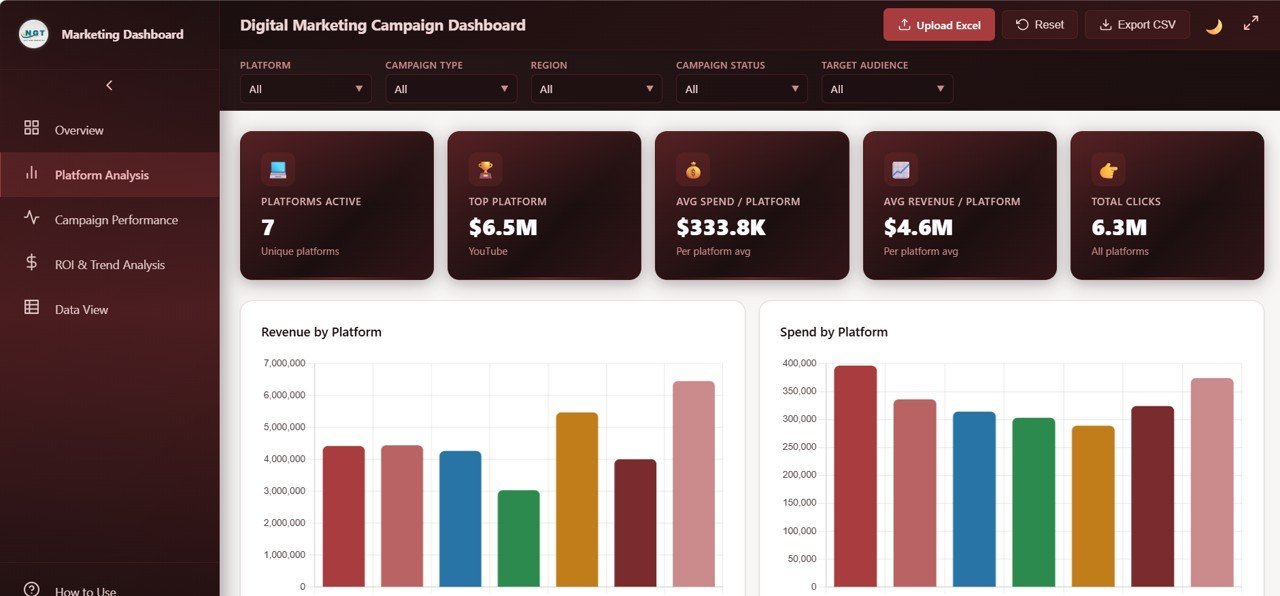
If the thing you miss about HubSpot is the shareable web view – a link you send that just opens – this is the closest match. It is a self-contained HTML dashboard that runs in any browser, no Power BI or Excel required, no login, no seat.
Who it is for: agencies and freelancers who need to hand a client a live-looking dashboard link without provisioning a HubSpot user.
What is inside:
- KPI tiles for active customers, cost-per-acquisition, campaigns and total spend
- Revenue-by-platform and spend-by-platform charts
- Left-nav sections for platform, campaign and lead analysis
- Single HTML file – host it anywhere or open locally
Because it is plain HTML, you can drop it on any web host, behind any password, and every stakeholder sees the same numbers – the collaboration benefit of a HubSpot portal without the per-seat meter. Price: $12.99. View the HTML Marketing Dashboard.
Best for: a shareable, install-free dashboard link for clients and stakeholders.
4. Marketing Campaign Calendar in Google Sheets – best value
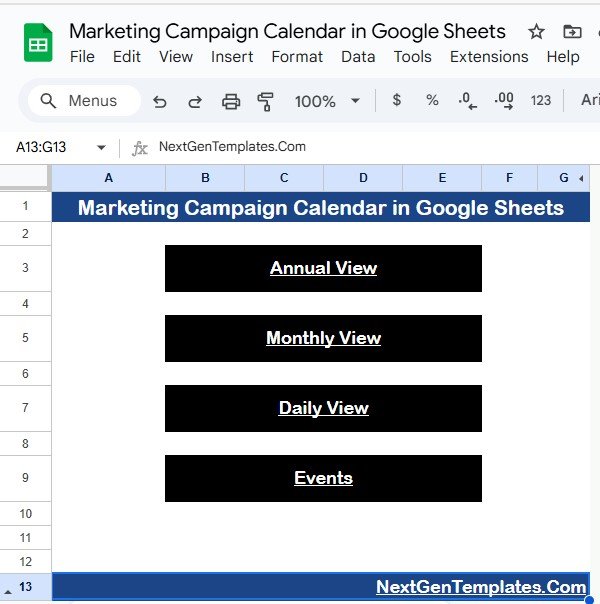
HubSpot’s marketing calendar is a Professional-tier feature. This Google Sheets version does the same planning job for a one-time $4.99 and adds real-time collaboration – the whole team edits the same calendar, no seats to buy.
Who it is for: small teams that plan campaigns together and live in Google Workspace.
What is inside:
- Month and campaign views with channel, owner and status columns
- Colour-coded campaign types and go-live dates
- Dropdown-driven data entry to keep entries consistent
- Shareable with view or edit access via a link
Map a Q1 content push, a product-launch email sequence and a paid-social burst on one grid, then share it read-only with the founder. It is the free-to-run backbone of a HubSpot-alternative stack, and pairs naturally with the campaign dashboards above. Price: $4.99. View the Marketing Campaign Calendar.
Best for: collaborative campaign planning at the lowest possible cost.
5. Marketing Customer Experience Calendar in Excel – best for journey mapping

HubSpot’s lifecycle stages and customer-journey tooling map every touchpoint from awareness to advocacy. This Excel calendar gives you the planning side of that – a structured grid to schedule the right message at the right stage – without the platform.
Who it is for: marketers who want to plan customer touchpoints across the lifecycle in a tool they already own.
What is inside:
- Month-by-month calendar organised by customer-experience stage
- Touchpoint, channel and owner columns
- Editable Excel workbook with clean formatting
- Works offline – no account, no subscription
Plot the welcome email, the day-30 check-in and the renewal nudge on a single lifecycle view so nothing falls through the gaps. It is the planning companion to the CRM and lead-tracking side of your stack. Price: $4.99. View the Customer Experience Calendar.
Best for: mapping lifecycle touchpoints in offline Excel.
6. Technology Marketing Customer Experience Calendar in Excel – best for SaaS teams
A version of the customer-experience calendar tuned for technology and SaaS marketing, where the journey runs trial – activation – expansion rather than a simple purchase. It is a natural fit for teams that would otherwise buy HubSpot for product-led lifecycle marketing.
Who it is for: SaaS and tech marketers planning trial, onboarding and expansion campaigns.
What is inside:
- Lifecycle stages framed for tech/SaaS buyer journeys
- Calendar grid for trials, activation nudges and upsell timing
- Channel and owner tracking columns
- Fully editable Excel file
Schedule the free-trial nurture, the feature-adoption email and the annual-plan upsell on one sheet so your product-led motion has a plan instead of a scramble. At $4.99 it is a rounding error next to a SaaS marketing platform. Price: $4.99. View the Technology Marketing Calendar.
Best for: SaaS lifecycle and product-led marketing planning.
7. Finance Marketing Customer Experience Calendar in Excel – best for financial services
Financial-services marketing carries compliance and long consideration cycles that generic tools ignore. This Excel calendar frames the customer journey for banks, insurers, advisers and fintechs, giving a structured planning grid without a heavyweight platform.
Who it is for: marketing teams in banking, insurance, wealth and fintech.
What is inside:
- Lifecycle stages suited to considered financial purchases
- Calendar for nurture, renewal and cross-sell timing
- Channel, owner and status columns
- Editable, offline Excel workbook
Plan the mortgage-renewal reminder, the policy-review touch and the cross-sell to a savings product across the year, all in a file that never leaves your control – which matters when data governance is on the line. Price: $4.99. View the Finance Marketing Calendar.
Best for: compliance-aware financial-services marketing plans.
8. Education Marketing Customer Experience Calendar in Excel – best for education marketing
Education marketing follows the academic calendar – enrolment windows, open days, term starts – not a generic funnel. This Excel template frames the student and parent journey around those cycles, so schools, colleges and ed-tech teams can plan without a HubSpot licence.
Who it is for: schools, universities, training providers and ed-tech marketers.
What is inside:
- Lifecycle stages aligned to enrolment and retention
- Calendar for open days, application deadlines and term campaigns
- Channel and owner tracking
- Editable Excel file, no subscription
Map the prospectus-request follow-up, the open-day invite and the enrolment-deadline reminder across the academic year on one sheet. At $4.99 it frees budget for the campaigns themselves rather than the software. Price: $4.99. View the Education Marketing Calendar.
Best for: academic-calendar-driven marketing planning.
Build your HubSpot alternative stack for under $50 – once.
Pair the Digital Marketing Campaign Dashboard ($17.99) with the Marketing Campaign Calendar ($4.99) and you have HubSpot’s reporting and planning core – no seats, no onboarding fee, yours forever.
How to choose between them
Match the template to the tools you already run and the job you are replacing:
- You need HubSpot-style reporting and use Microsoft 365 → start with the Power BI campaign dashboard.
- You need to share a dashboard link with clients → the HTML dashboard.
- You plan campaigns as a team → the Google Sheets calendar.
- You map the customer lifecycle → the Excel customer-experience calendar for your industry (tech, finance or education).
- You also need the CRM side → add a CRM in Excel and a CRM KPI dashboard to cover leads and pipeline.
When HubSpot is still the right call
A template stack replaces HubSpot’s planning and reporting layer. It does not replace HubSpot’s engine. Be honest about where the platform still wins:
- You need native email sending at volume. HubSpot sends, tracks opens and clicks, and manages deliverability. A spreadsheet plans the campaign – it does not push the send.
- You rely on marketing automation and lead scoring. Behaviour-triggered workflows, progressive lead scoring and automated hand-offs to sales are genuine platform features a file cannot reproduce.
- You want one connected database where a contact’s every email, page view and deal lives together and updates in real time. Spreadsheets can hold contacts, but they do not auto-capture behaviour.
- You are past ~10 people and the coordination cost of manually updated files outweighs the subscription. At that scale, a platform’s automation earns its price.
The honest rule: if your bottleneck is doing the marketing (sending, automating, capturing), keep HubSpot. If your bottleneck is planning and reporting on it, a template stack does the job for a fraction of the cost. Many teams run both – HubSpot Free for the database and sending, templates for the reporting HubSpot charges $890/mo to unlock.
Frequently asked questions
What is the best HubSpot alternative for a small marketing team?
For most small teams, a spreadsheet stack is the best HubSpot alternative: a campaign dashboard for reporting plus a marketing calendar for planning. NextGenTemplates covers both from $4.99 to $17.99 one-time, with no per-seat billing or onboarding fee, so the whole team can use it for less than one HubSpot seat.
Is there a free HubSpot alternative?
HubSpot’s own Free Tools tier ($0, up to 2 users) covers a basic CRM and limited email. For reporting and planning, a $4.99 Google Sheets calendar plus HubSpot Free gives you a near-complete stack. The templates themselves are paid but one-time, so they cost less over a year than any recurring plan.
How much does HubSpot cost in 2026?
HubSpot Marketing Hub is free for up to 2 users, $20/seat per month on Starter, $890/mo on Professional (with a $3,000 one-time onboarding fee), and $3,600/mo on Enterprise (with a $7,000 onboarding fee). Extra seats and marketing contacts beyond each tier’s cap cost more on top.
Can a spreadsheet really replace HubSpot?
A spreadsheet replaces HubSpot’s planning and reporting layer completely – marketing calendars, campaign dashboards and lifecycle maps. It does not replace native email sending, automation or lead scoring. If your main use of HubSpot is tracking and reporting rather than sending, a template stack covers it for a one-time cost.
What does the Digital Marketing Campaign Dashboard track?
The Digital Marketing Campaign Dashboard in Power BI ($17.99) tracks impressions, clicks, spend, conversions and revenue across every channel, with KPI cards, revenue-by-platform charts and campaign, lead and ROI breakdowns – the core of HubSpot’s campaign analytics, in a file you own.
Do I need Power BI to use these dashboards?
The Power BI dashboards need Microsoft Power BI Desktop, which is free to download. If you would rather not install anything, the HTML dashboard ($12.99) opens in any browser, and the campaign calendar runs in Google Sheets or Excel.
Are these templates one-time or subscription?
Every template is a one-time purchase you download and own – $4.99 to $17.99 each. There is no subscription, no per-seat fee and no onboarding cost. You can share the file across your team, unlike HubSpot’s per-seat model that adds $45-$75 per extra user each month.
What about the CRM side of HubSpot?
For contacts and pipeline, pair these marketing templates with a CRM in Excel, a lead tracker to pipeline template, and a CRM KPI dashboard. Together they cover HubSpot’s CRM database and reporting jobs without the platform fee.
Which HubSpot alternative is the best value?
The Marketing Campaign Calendar in Google Sheets at $4.99 is the best value – it is collaborative, free to run in Google Workspace, and replaces HubSpot’s Professional-tier marketing calendar. Add the Power BI dashboard for reporting and your full stack is still under $25.
Will I lose HubSpot’s automation if I switch?
Yes – templates do not automate sends or score leads. That is the honest trade-off. If automation is central to your work, keep HubSpot. If you mainly plan and report, the templates do that job for a fraction of the cost, and many teams keep HubSpot Free while moving reporting to templates.
Get more marketing and CRM templates
Replace HubSpot’s reporting and planning core for a one-time $4.99-$17.99.
Start with the Digital Marketing Campaign Dashboard ($17.99) and the Marketing Campaign Calendar ($4.99), then add a CRM KPI dashboard for the sales side. Browse more sales dashboard templates and Power BI dashboards ranked by industry.
See the templates in action on our YouTube channel.
Cutting software costs across the board? See our Gusto alternatives: 6 payroll templates in Excel & Sheets for the same buy-once approach applied to payroll and HR.
Cutting HR software costs too? See our BambooHR alternatives in Excel & Sheets — 8 one-time HR templates that replace per-seat HRIS billing.
Related: Replacing the reporting layer rather than the CRM? Looker Studio – renamed Data Studio in April 2026 – is free, but it slows down on large marketing datasets and charges for every non-Google connector. Our Looker Studio alternatives: 8 marketing reporting templates in Excel & Sheets maps each reporting job to a one-time template from $4.99.