

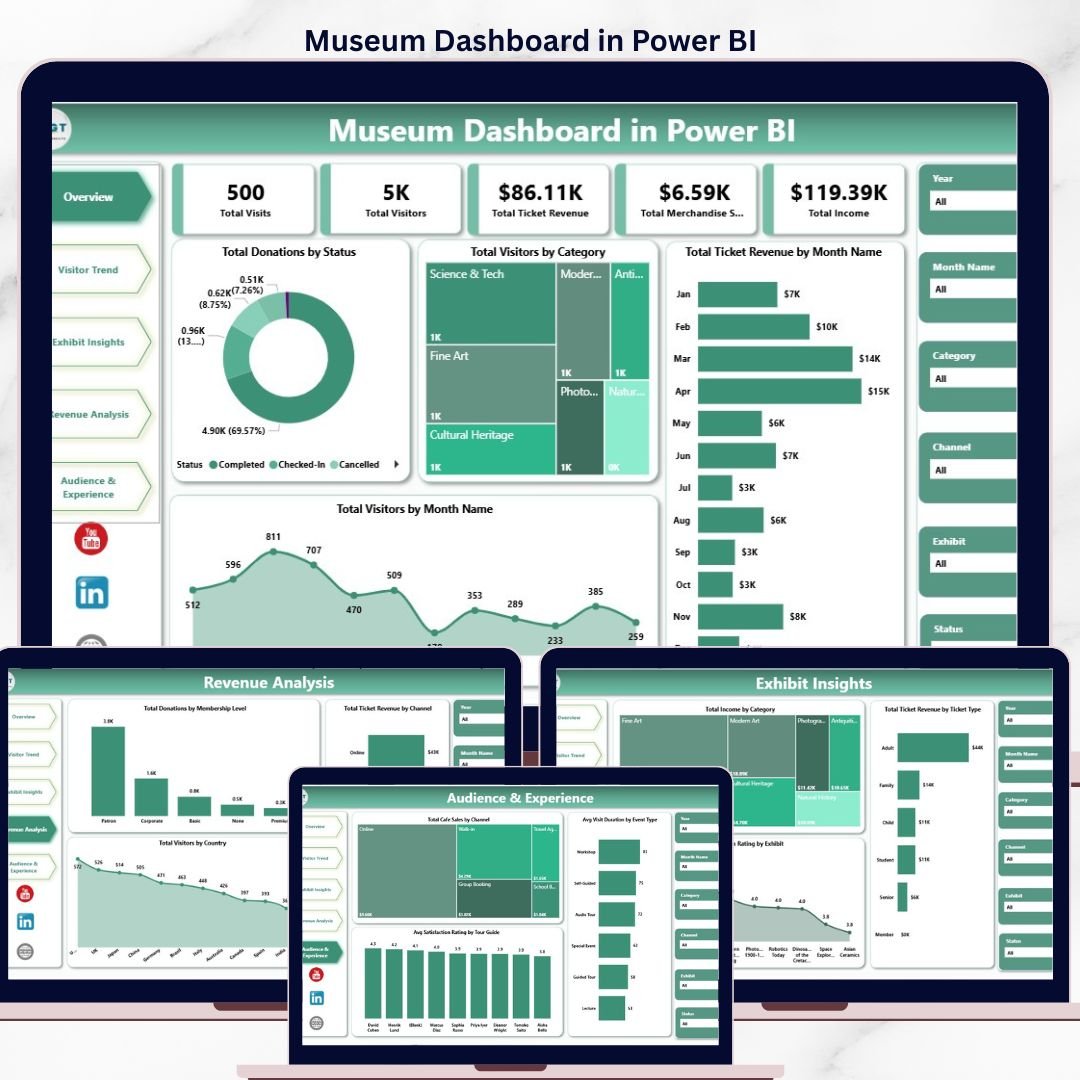
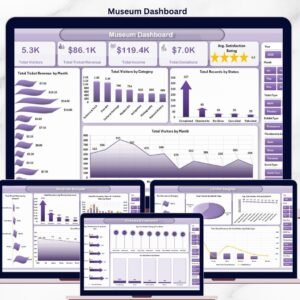
The Museum Dashboard in Power BI tracks 5 headline KPIs across 5 interactive report pages, with 15+ pre-built visuals and slicer-driven filters for visitor type, exhibit, channel, ticket type, and event. Setup takes under 10 minutes — replace the sample dataset with your own ticketing and POS export, click Refresh, and every KPI card and chart rebuilds through the underlying DAX model.
🌍 Join 8,400+ teams in 40+ countries using NextGenTemplates to replace paid SaaS tools with one-time-purchase Excel, Google Sheets, Power BI, and HTML templates.
✅ Instant download · One-time payment · No subscription · No per-user fees · Lifetime access
Museum Dashboard in Power BI
This Power BI Museum Analytics Dashboard is built for museum directors, visitor-experience managers, exhibit curators, and cultural-institution operations leads who need a single .pbix file to track ticket revenue, visitor flow, exhibit performance, donations, merchandise sales, café receipts, and satisfaction scores — without paying $99 to $499 per month for museum-management SaaS like Tessitura, Altru (Blackbaud), or ACME. Every visual is unlocked, every DAX measure is editable, and the report opens in the free Power BI Desktop on Windows.
🔑 Key Features of the Museum Dashboard in Power BI
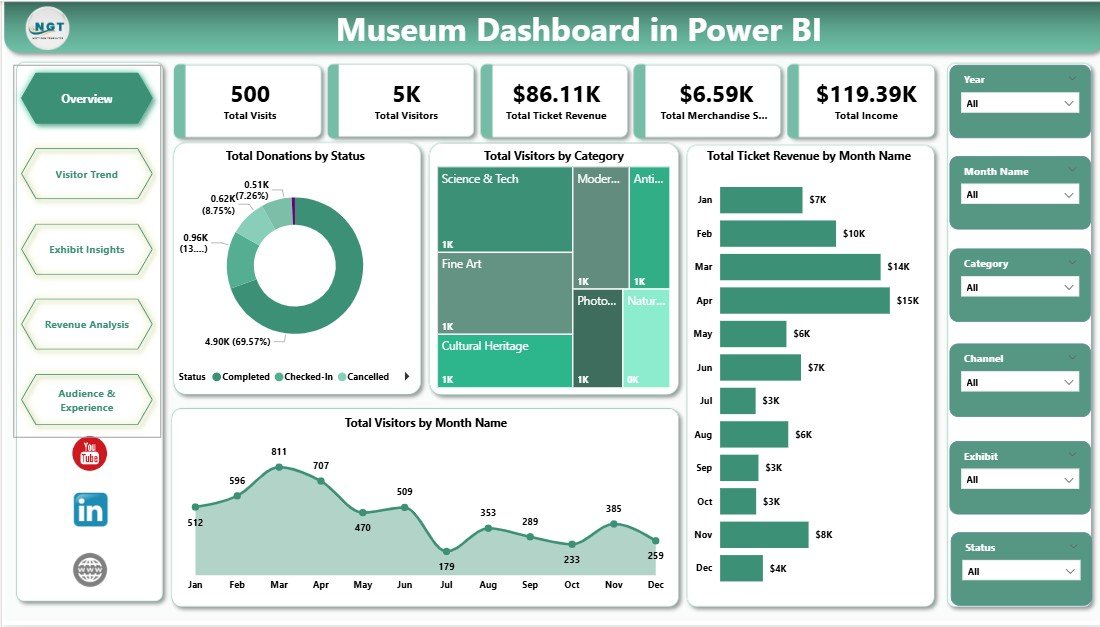
📊 5 KPI cards on the Overview page — Total Visits, Total Visitors, Total Ticket Revenue, Total Merchandise Sales, and Total Income refresh instantly when a slicer is changed or new data is loaded.
🎨 5 interactive report pages with 15+ visuals — Overview, Visitor Trend, Exhibit Insights, Revenue Analysis, and Audience & Experience pages cover ticket revenue patterns, visitor segmentation, exhibit-level satisfaction, channel performance, and tour-guide analytics across the entire museum operation.
🎟️ Slicer-driven filtering across all pages — Drill into specific exhibits, visitor categories, ticket types, channels, countries, and date ranges. Cross-page filters propagate via the data model so your filter context follows you between pages.
💰 Multi-revenue tracking in one model — The dashboard separately tracks Ticket Revenue, Donations, Merchandise Sales, and Café Sales, then rolls them up into Total Income — useful for board reporting, grant submissions, and trustee reviews.
🔄 Pre-built DAX measures, no formulas to break — Every measure (Total Visitors, Avg Satisfaction Rating, Total Donations by Status, etc.) is written, named, and ready to reuse in your own visuals. Open the model view to inspect or extend them.
🏛️ Designed for museums of any size — Whether you run a 5,000-visitor regional history museum, a mid-size science centre, or a national art institution, the Power BI model scales smoothly into the millions of rows.
🖨️ Print-ready and presentation-friendly — Each report page is sized for landscape A4/Letter and exports cleanly to PDF or PowerPoint for monthly board reports, donor updates, and grant submissions.
📦 What’s Inside the Museum Dashboard in Power BI
Page 1 — Overview Page
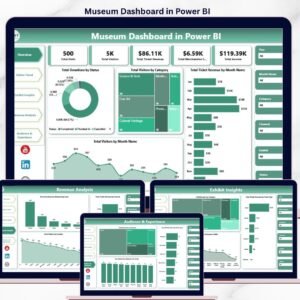
The Overview page presents the museum’s full performance picture in a single screen. Five KPI cards at the top display Total Visits, Total Visitors, Total Ticket Revenue, Total Merchandise Sales, and Total Income. Four charts beneath them visualize Total Donations by Status (received, pledged, cancelled), Total Visitors by Category (adults, students, seniors, families, members), Total Ticket Revenue by Month Name (the year’s revenue cycle including peak holiday and school-trip seasons), and Total Visitors by Month Name (seasonality and footfall trends). Slicers above the cards let you filter the entire page by visitor type, exhibit, channel, or status.
Visitor Trend
Page 2 — Visitor Trend
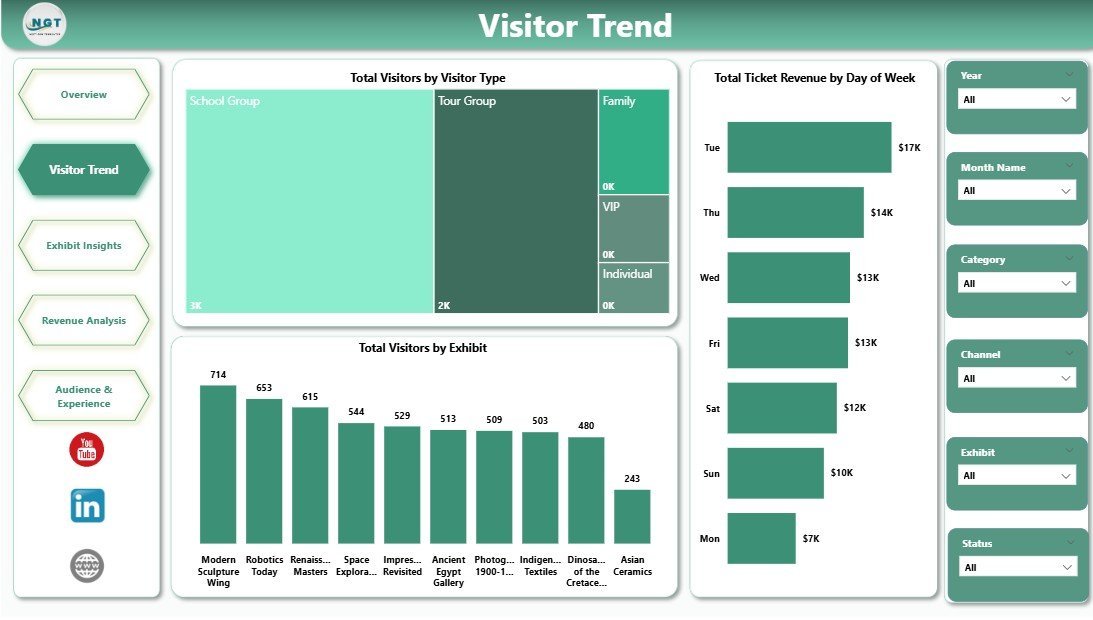
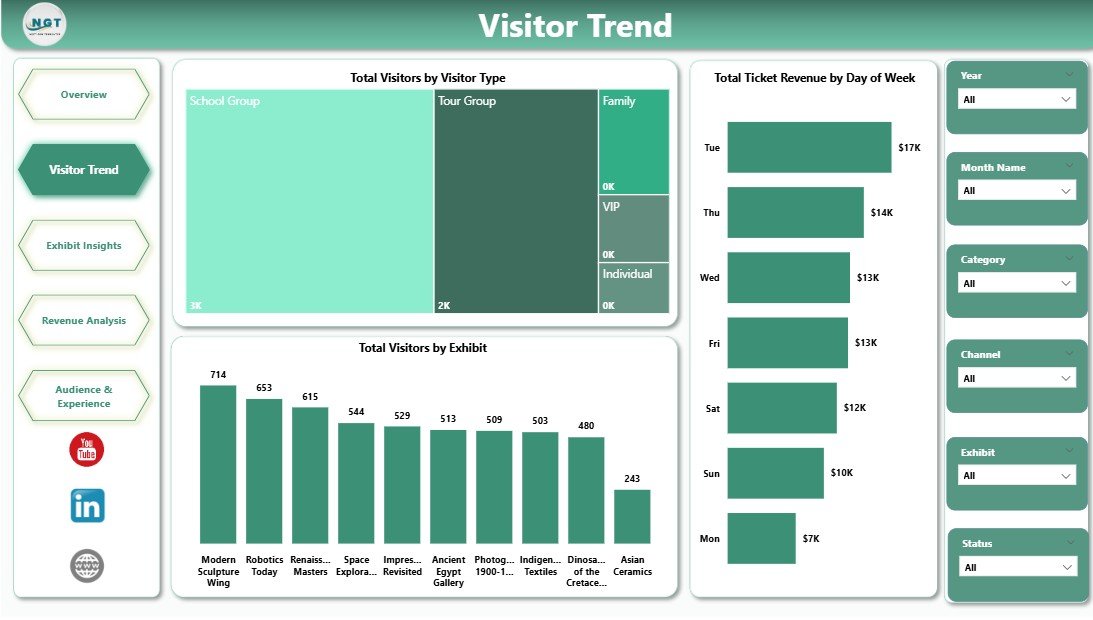
The Visitor Trend page focuses on attendance momentum and demand patterns. It shows Total Visitors by Visitor Type (adult, student, senior, member, school-group mix), Total Ticket Revenue by Day of Week (weekday vs weekend demand), and Total Visitors by Exhibit (which exhibits drive footfall). This page is ideal for marketing planning, capacity forecasting, and staffing decisions.
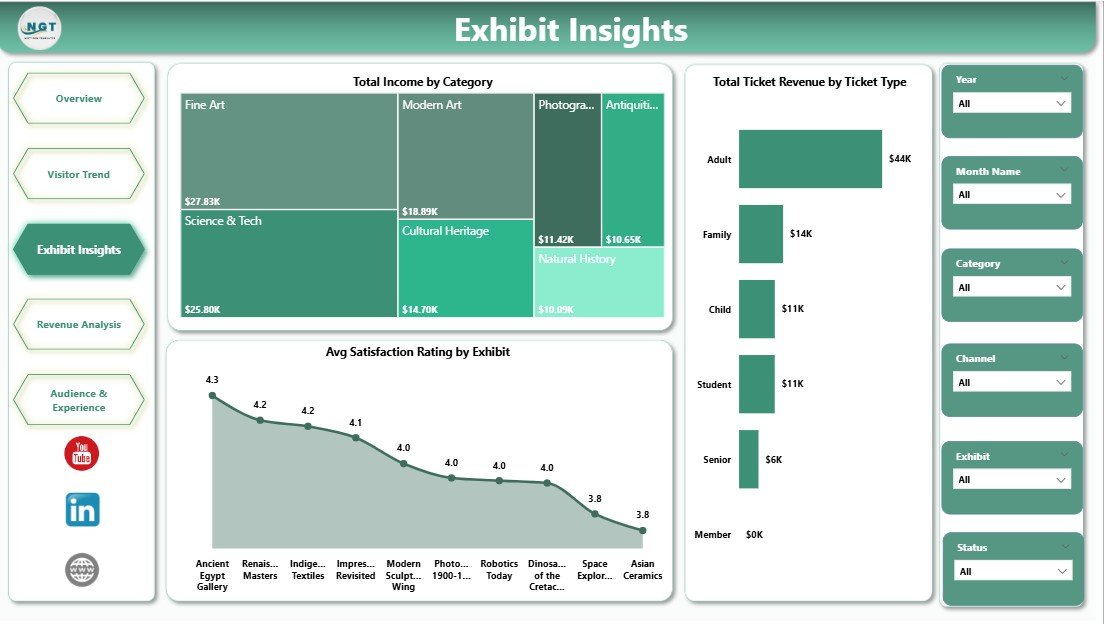
Exhibit Insights
Page 3 — Exhibit Insights
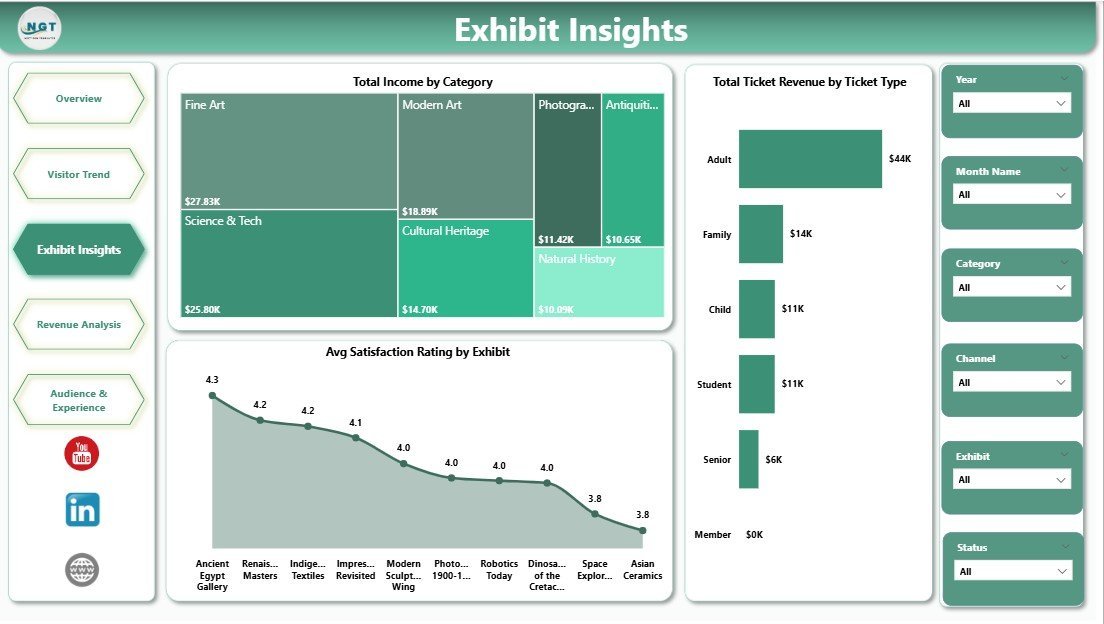
The Exhibit Insights page breaks down performance by exhibit and ticket category. Charts include Total Income by Category, Total Ticket Revenue by Ticket Type (general, concession, family, member, group), and Avg Satisfaction Rating by Exhibit. Use this page to identify which exhibits deliver the highest satisfaction and revenue per visitor — and which deserve extended runs, repositioning, or replacement.
Revenue Analysis
Page 4 — Revenue Analysis
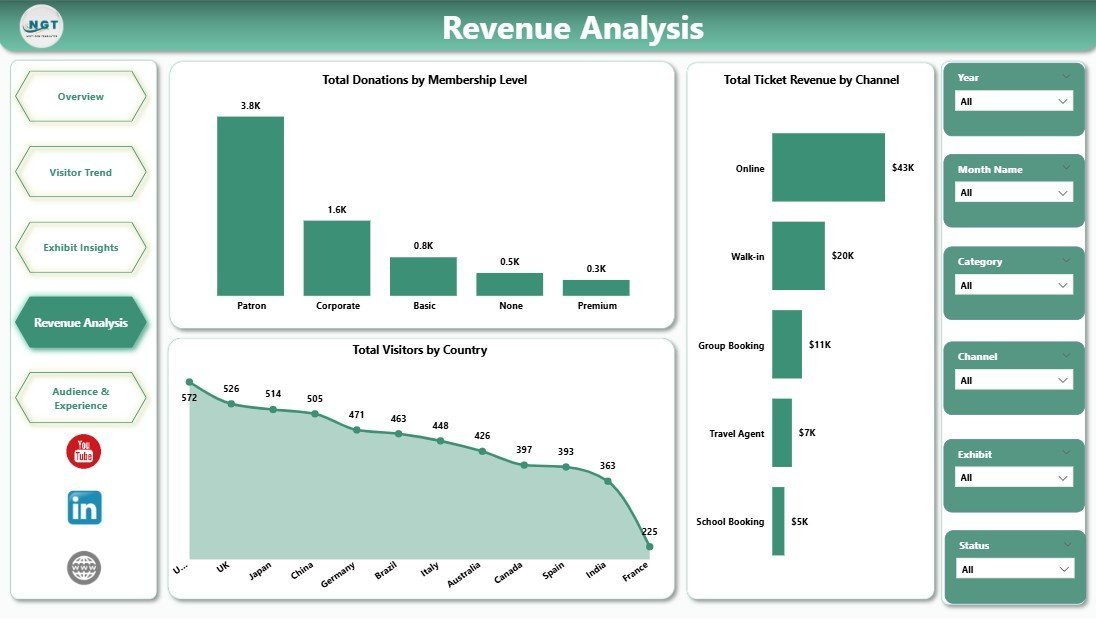
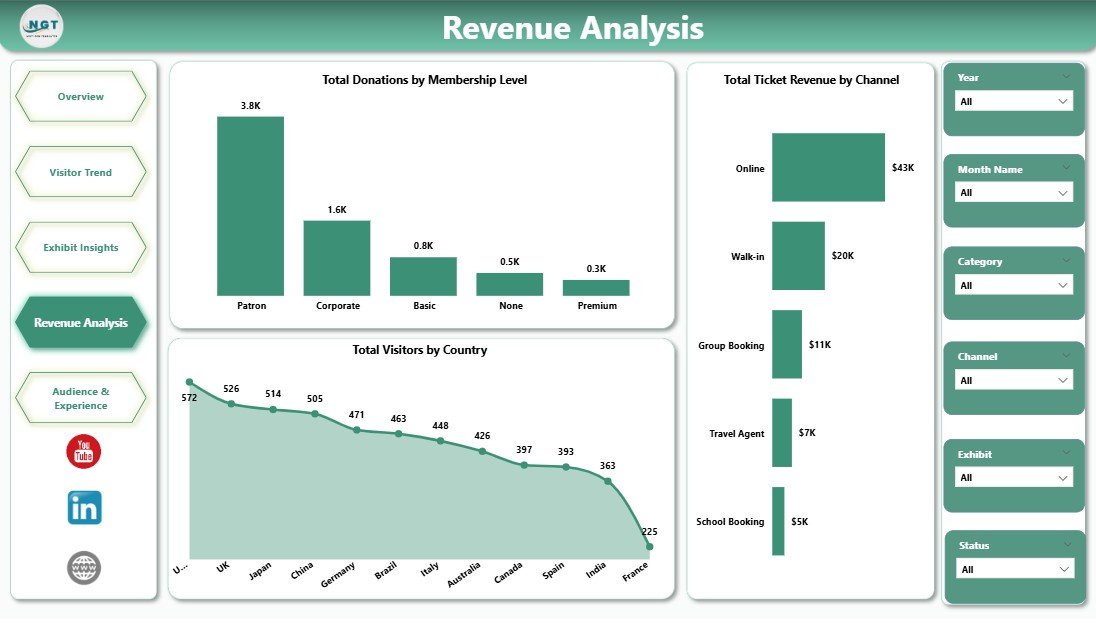
The Revenue Analysis page maps the museum’s full income mix. Charts cover Total Donations by Membership Level (bronze, silver, gold, patron, corporate), Total Ticket Revenue by Channel (online, walk-in, group bookings, partner sites), and Total Visitors by Country (tourist demographics). Compare your direct online channel against third-party platforms, see which membership tiers drive philanthropic revenue, and understand how international tourism feeds attendance.
Audience & Experience
Page 5 — Audience & Experience
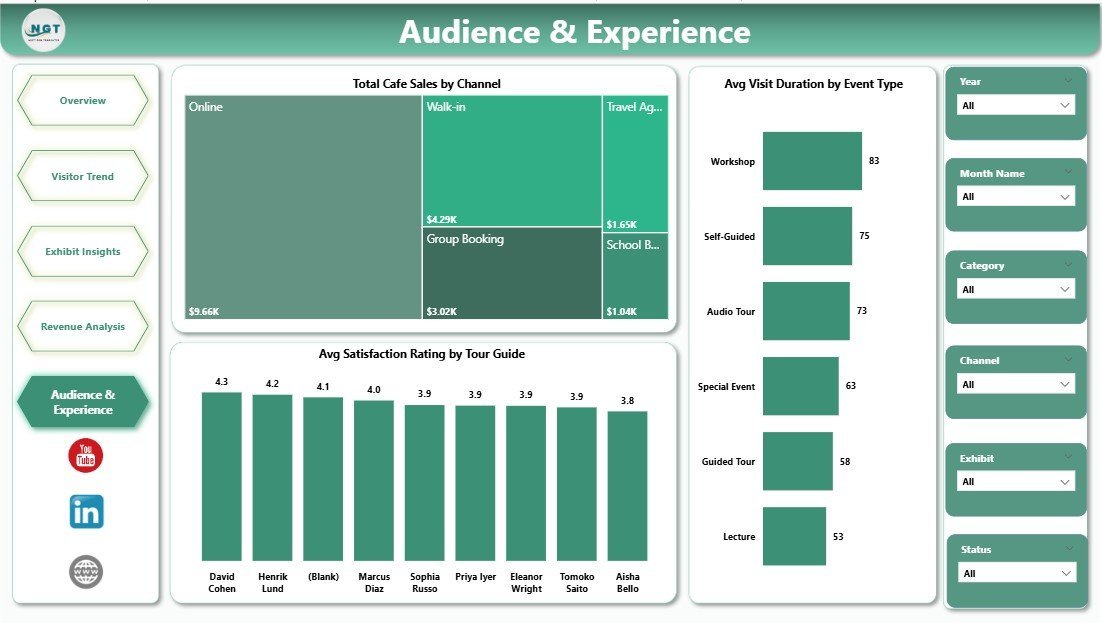
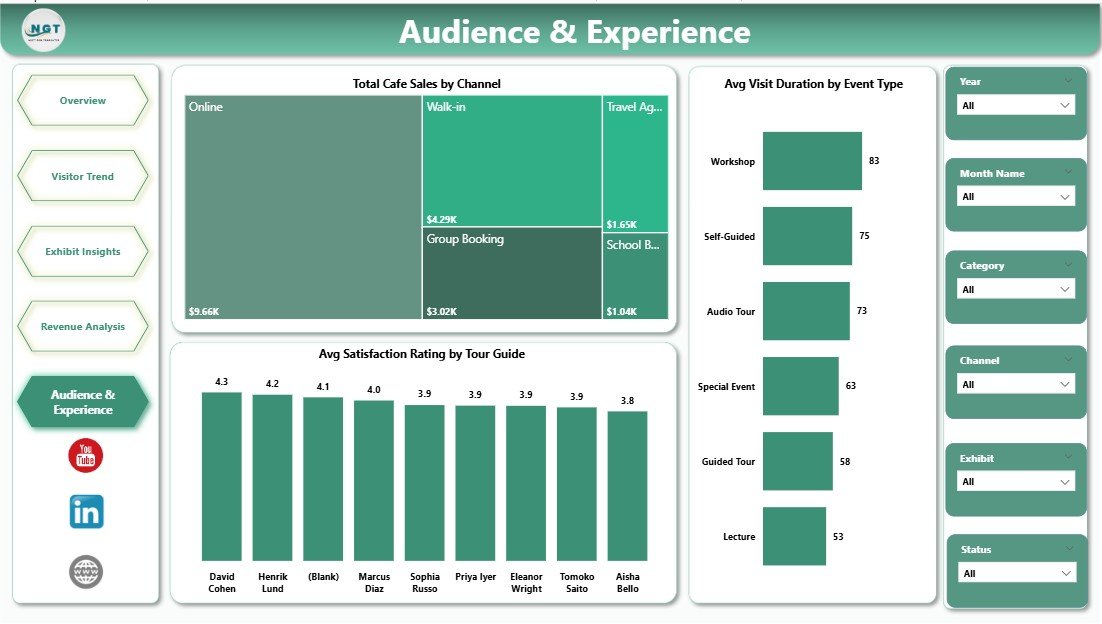
The Audience & Experience page profiles visitor behaviour and satisfaction signals. Charts include Total Cafe Sales by Channel, Avg Visit Duration by Event Type, and Avg Satisfaction Rating by Tour Guide. Spot which guides consistently exceed satisfaction targets, how event types differ in dwell time, and where café revenue is concentrated by booking channel — useful inputs for staffing, training, and channel-mix decisions.
📊 Museum Dashboard in Power BI vs. Tableau / Qlik vs. Tessitura / Altru SaaS — Where This Fits
| Feature | Museum Dashboard in Power BI | Tableau / Qlik equivalent | Tessitura / Altru / ACME SaaS |
|---|---|---|---|
| Cost | $17.99 one-time | $70 – $75 / user / month | $99 – $499 / month + setup |
| Platform | Power BI Desktop (free) + Power BI Service | Tableau Desktop / Qlik Sense | Cloud SaaS (browser + mobile) |
| Setup time | Under 10 minutes | 4–8 hours to recreate from scratch | 2–8 weeks onboarding |
| Slicer filtering (Visitor, Exhibit, Channel, Status, Event) | ✅ Native Power BI slicers + cross-filtering | ✅ Filters and parameters | ✅ Built-in filters |
| Pre-built DAX measures | ✅ 15+ ready-to-edit measures | ❌ Build from scratch | ❌ Vendor-controlled |
| Customizable visuals and pages | ✅ Fully editable | ✅ Editable | ❌ Vendor-controlled |
| Year-1 cost at 5 users | $17.99 total | $4,200 – $4,500 | $1,188 – $5,988 |
| Lifetime ownership | ✅ Yes | ❌ Subscription only | ❌ Subscription only |
| Built-in CRM and donor records | ❌ Analytics layer only | ❌ Analytics layer only | ✅ Full CRM |
For museums and cultural institutions that want fast, customizable performance visibility without paying $4,000+ per year for Tableau or $1,200+ per year for SaaS, the Museum Dashboard in Power BI sits in the sweet spot.
👥 Who This Template Is For — and Who It’s Not For
✅ This template is built for:
- Museum directors and operations managers preparing monthly board and trustee reports
- Visitor-experience managers tracking satisfaction by exhibit and tour guide
- Curators evaluating exhibit performance before extending or replacing temporary shows
- Marketing leads at cultural institutions analysing channel mix and tourist demographics
- Membership and development officers segmenting donations by membership level
- Independent science centres, art galleries, history museums, and heritage sites with 5,000 – 500,000 annual visitors
- Power BI users who want a vetted starter model instead of building from a blank canvas
❌ This template is NOT for:
- Large national museums needing real-time live-feed integration with their CRM and ticketing
- Teams requiring built-in donor-management or fundraising-CRM features (use Altru or Salesforce NPSP)
- Operators wanting mobile-first ticket-scanning apps for entry staff (use ACME or Tessitura)
- Mac-only teams without access to a Windows machine — Power BI Desktop is Windows-only
⚙️ How to Use the Museum Dashboard in Power BI
- Download and unzip the Museum Dashboard in Power BI file from your purchase confirmation email.
- Install Power BI Desktop — the free Microsoft client — from the Microsoft Store or powerbi.microsoft.com if you don’t already have it.
- Open the .pbix file in Power BI Desktop. The sample dataset and all 5 report pages load instantly.
- Replace the sample data by going to Home → Transform Data, repointing the data source to your ticketing-system or POS export, and matching the column structure.
- Click Home → Refresh to rebuild every visual with your live data.
- Use the slicers on each page to filter by visitor type, exhibit, ticket type, channel, or event type and instantly see segmented performance.
- Publish to Power BI Service (optional) to share the dashboard with your team or embed it in your trustee portal.
💼 Real-World Use Cases
Marina is the operations director at a 60,000-visitor regional history museum. She refreshes the report every Monday morning with the previous week’s ticketing export, then exports the Overview and Revenue Analysis pages to PDF for her trustee pack. She used to wrestle with three separate paid consultancy reports — now she owns the model and a 5-minute refresh.
Daniel curates temporary exhibits at a mid-size science centre. He uses the Exhibit Insights page to compare visitor counts and Avg Satisfaction Rating across permanent, temporary, and travelling exhibits. The data justified extending one temporary show by 6 weeks and helped him negotiate a higher fee for the next travelling exhibition booking — both decisions paid for the template thousands of times over.
Priya leads marketing and partnerships at an art museum group with three locations. She publishes the dashboard to Power BI Service and shares each location’s filtered view with the local manager. She uses the Total Visitors by Country chart and Total Ticket Revenue by Channel breakdown when pitching tourist-board partnerships and negotiating commission rates with online ticketing platforms.
❓ Frequently Asked Questions
What KPIs does the Museum Dashboard in Power BI track?
The Museum Dashboard in Power BI tracks 5 headline KPIs — Total Visits, Total Visitors, Total Ticket Revenue, Total Merchandise Sales, and Total Income — plus 15+ supporting visuals across Visitor Trend, Exhibit Insights, Revenue Analysis, and Audience & Experience pages. All KPIs update automatically when the underlying dataset is refreshed.
How does the Museum Dashboard in Power BI compare to Tessitura or Altru?
Tessitura and Altru are full museum-management CRMs costing $1,000 – $5,000+ per year with built-in ticketing, membership, and fundraising modules. The Museum Dashboard in Power BI is a $17.99 one-time analytics layer — ideal for institutions that already handle ticketing elsewhere and just need a customizable Power BI report without committing to a multi-year SaaS contract.
How long does setup take?
Setup takes under 10 minutes for most museums. Open the .pbix in Power BI Desktop, repoint the data source to your own ticketing export keeping the same column structure, click Home → Refresh, and the report is live. No DAX to write, no model relationships to rebuild — everything is pre-configured.
Do I need a paid Power BI license?
No — the Museum Dashboard in Power BI works entirely in Power BI Desktop, which is free from Microsoft. A paid Power BI Pro or Premium license is only needed if you want to publish the report to Power BI Service for online sharing. Microsoft’s official Power BI Desktop documentation confirms Desktop usage is free for individual reporting.
Can I add my own KPIs and visuals?
Yes — the report is fully unlocked. You can add new DAX measures, modify slicer fields, drag new visuals onto any page, or restyle the colour theme to match your museum’s brand. Any new fields you add to the dataset automatically become available in the model after a refresh.
Does the template include sample museum data?
Yes — the file ships with a 12-month sample dataset covering ticket revenue, exhibit visits, donations, merchandise sales, café sales, satisfaction ratings, tour guides, channels, and visitor countries — so the report is fully populated the moment you open it.
Is this template a one-time purchase?
Yes — $17.99 one-time, no subscription, no per-user fees, no recurring charges. You receive instant download access, lifetime use rights, and free updates to the same template version.
👤 About the Author
Built by PK — Microsoft Certified Professional with 15+ years of Excel, Google Sheets, and Power BI experience. Founder of NextGenTemplates, reaching 300K+ subscribers across YouTube channels (@PK-AnExcelExpert, @NextGenTemplates, @NeoTechNavigators). Every template is hand-built and tested before release.
🔗 Explore Related Templates
If the Museum Dashboard in Power BI fits your workflow, you may also like these culture-and-heritage templates from our Power BI Dashboards library:
- Museums & Cultural Centers Dashboard in Power BI — broader cultural-centre KPI coverage with similar visitor-and-revenue logic.
- Arts and Culture Dashboard in Power BI — adjacent template covering galleries, performance arts, and cultural festivals.
- Heritage Tourism KPI Dashboard in Power BI — purpose-built KPI scorecard for heritage sites and tourist boards.
- Academic Publishing Dashboard in Power BI — useful for museum research and academic-publication arms.
- Also available as: Need the same logic in Excel? Get the Museum Dashboard in Excel — same KPIs, slicer filters, and pages built natively in Microsoft Excel for teams without Power BI access.
📖 Click here to read the Detailed Blog Post
🎥 Visit our YouTube channel for step-by-step video tutorials
👉 YouTube.com/@NextGenTemplates
Watch the step-by-step video tutorial:































Reviews
There are no reviews yet.