



Planning a wedding is both exciting and complex. Wedding planners must manage budgets, vendors, timelines, guest counts, service quality, and multiple deliverables simultaneously. However, when planning data remains scattered across notebooks, emails, and multiple Excel files, mistakes increase and stress levels rise.
That is exactly why the Wedding Planning KPI Dashboard in Excel becomes an essential performance management tool for professional wedding planners and event management teams.
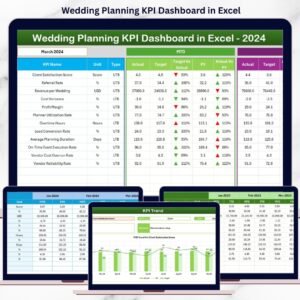
This ready-to-use Excel dashboard converts wedding planning data into clear KPIs, performance indicators, and trend insights. Instead of manually tracking costs, schedules, and performance, planners gain a single, structured view of wedding progress, financial control, and service execution—all in one Excel file.
Whether you manage individual weddings, destination events, or large-scale event portfolios, this dashboard helps you stay organized, control budgets, meet timelines, and deliver exceptional client experiences.
🚀 Key Features of Wedding Planning KPI Dashboard in Excel
💍 Centralized Wedding KPI Tracking
Track all wedding planning KPIs in one structured Excel dashboard.
📅 MTD & YTD Performance Monitoring
Analyze short-term progress and overall planning performance.
🎯 Target vs Actual Analysis
Compare planned vs actual performance for budgets, timelines, and services.
📈 KPI Trend Analysis
Identify performance patterns and planning risks over time.
🚦 Visual Performance Indicators
Green ▲ and Red ▼ arrows highlight issues instantly.
⚙️ 100% Excel-Based Solution
No additional software required—simple, flexible, and cost-effective.
🧠 Clear KPI Definitions
Standardized KPI formulas and definitions ensure clarity across teams.
📂 What’s Inside the Wedding Planning KPI Dashboard in Excel
🏠 Home Sheet – Easy Navigation
The Home Sheet works as the dashboard’s navigation hub.

🔘 Key Highlights
Six clearly labeled navigation buttons
One-click access to all worksheets
Clean, planner-friendly layout
As a result, users move through the dashboard quickly without searching through tabs.
📊 Dashboard Sheet – Complete KPI Overview
The Dashboard Sheet is the core analytical page of the workbook.
📅 Month Selection
On cell D3, users select the reporting month. Once selected, all KPIs update automatically for that month.
📈 KPI Metrics Displayed
The dashboard shows both MTD (Month-to-Date) and YTD (Year-to-Date) metrics.
MTD Analysis
Actual
Target
Previous Year
Target vs Actual (%)
Previous Year vs Actual (%)
YTD Analysis
Actual
Target
Previous Year
Target vs Actual (%)
Previous Year vs Actual (%)
🚦 Visual Indicators
Green ▲ → On track
Red ▼ → Needs attention
Therefore, planners can spot issues immediately without deep number analysis.
📈 KPI Trend Sheet – Detailed Planning Insights
The KPI Trend Sheet allows planners to analyze individual KPIs deeply.
🎯 KPI Selection
Select a KPI from the drop-down on cell C3.
📋 KPI Details Displayed
KPI Group
Unit of Measurement
KPI Type (UTB / LTB)
KPI Formula
KPI Definition
📊 Trend Charts
MTD Trend Chart – Actual vs Target vs Previous Year
YTD Trend Chart – Actual vs Target vs Previous Year
These charts help planners identify seasonality, delays, and recurring planning issues.
📝 Supporting Input Sheets
📌 Actual Numbers Input Sheet
Enter real wedding performance data (costs, completion, delivery).
🎯 Target Sheet
Store planned MTD and YTD targets for each KPI.
📆 Previous Year Number Sheet
Enable year-over-year performance comparison.
📘 KPI Definition Sheet
Maintain KPI names, groups, units, formulas, and definitions.
This structure ensures accuracy, transparency, and consistency.
👥 Who Should Use This Dashboard
💍 Wedding planners
🎉 Event management agencies
🏝 Destination wedding planners
📋 Freelance coordinators
🏨 Hospitality & event teams
🔎 Click here to read the detailed blog post
📺 Visit our YouTube channel for step-by-step tutorials
👉 https://youtube.com/@PKAnExcelExpert
Watch the step-by-step video tutorial:
Compatibility and Requirements
- Works in Microsoft Excel desktop (Excel 2016 or later, or Microsoft 365).
- You pick the reporting month and the KPI from dropdown lists. Microsoft explains them in Create a drop-down list.
Frequently Asked Questions
Which sheets are included?
Six sheets: Home, Dashboard, KPI Trend, Actual Numbers Input, Target and Previous Year Number, plus a KPI Definition sheet for names, groups, units, formulas and definitions.
How do I update the dashboard?
Enter your wedding performance data in the Actual Numbers Input sheet and your planned MTD and YTD targets in the Target sheet. Then select the month in cell D3 of the Dashboard sheet and every KPI updates.
Can I compare this year with last year?
Yes. Add last year’s figures to the Previous Year Number sheet. The Dashboard then shows Previous Year vs Actual (%) for both MTD and YTD.
How do I see the trend for a single KPI?
Open the KPI Trend sheet and choose a KPI from the dropdown in cell C3. It shows the KPI group, unit, type (UTB or LTB), formula and definition, with MTD and YTD charts of Actual, Target and Previous Year.
How do I know which KPIs need attention?
The Dashboard marks each KPI with a green up arrow when it is on track and a red down arrow when it needs attention.
Is there a similar dashboard for other events?
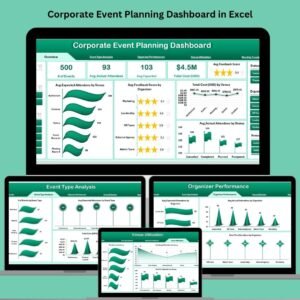
Yes. See the Event Planning KPI Dashboard in Excel and the Corporate Event Planning Dashboard in Excel.
Related Wedding and Event Planning Templates
- Event Planning KPI Dashboard in Excel: the same KPI layout for general events
- Corporate Event Planning Dashboard in Excel: a dashboard for corporate events
- Wedding Checklist Template in Excel: a task checklist for wedding preparation
- Event Planning Calendar in Excel: a calendar for event dates
- Wedding Checklist in Google Sheets: the wedding checklist in Google Sheets
Browse all Excel KPI dashboards.





Reviews
There are no reviews yet.