



Managing a supply chain involves multiple moving parts, from sourcing raw materials to delivering the final product. A well-structured Supply Chain Management Checklist can help businesses streamline their operations, ensuring every task is completed on time. This Excel template simplifies supply chain management, helping you track, assign, and monitor critical processes in real-time.
Why Use a Supply Chain Management Checklist?

A structured checklist template ensures that every aspect of the supply chain—procurement, inventory, order fulfillment, logistics, and quality control—is systematically managed. With this Excel-based checklist, you can:
✅ Organize supply chain activities in a structured format.
✅ Assign tasks to responsible team members.
✅ Track progress using real-time updates.
✅ Improve supply chain efficiency and accountability.
Key Features of the Supply Chain Management Checklist Template
This Excel template is designed with user-friendly features that allow supply chain professionals to manage tasks effortlessly.
1. Two Well-Structured Worksheets for Seamless Management
The template consists of two dedicated worksheets that cover every aspect of the supply chain process:
📌 Supply Chain Management Checklist Sheet
- This is the primary worksheet where all supply chain tasks are managed.
- Includes a structured checklist table for easy tracking.
- Progress indicators provide real-time visibility into completed and pending tasks.
📌 List Sheet (For Responsible Persons)
- Stores a unique list of responsible team members to create a drop-down menu in the checklist.
- Prevents manual errors and ensures tasks are assigned to the right people.
2. Comprehensive Checklist Table for Supply Chain Tracking
The checklist table serves as the core of this template, helping businesses track every step of their supply chain process.
🔍 Fields Included in the Checklist Table:
📌 Serial No. – A unique identifier for each task.
📌 Checklist Item – The specific supply chain task to be completed.
📌 Description – A brief summary of the task.
📌 Responsible Person – The team member accountable for the task.
📌 Deadline – The due date for task completion.
📌 Remarks – Additional notes or updates.
📌 Status – Indicates whether the task is ✔ (completed) or ✘ (pending).
3. At-a-Glance Progress Indicators for Real-Time Tracking
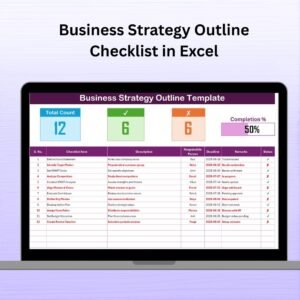
At the top section of the checklist sheet, you’ll find a progress tracking system that provides a quick snapshot of your supply chain status:
📊 Total Count – Total number of checklist items.
✅ Checked Count – Number of completed tasks.
❌ Crossed Count – Number of pending tasks.
📈 Progress Bar – A visual tracker showing task completion percentage.
This real-time tracking feature allows supply chain managers to immediately identify bottlenecks and improve efficiency in their workflow.
4. Simple and Efficient Task Assignment with Drop-Down Menus
The List Sheet eliminates manual data entry errors by allowing you to select team members from a predefined drop-down list. This:
✔ Ensures accuracy in task assignment.
✔ Speeds up the process of assigning tasks.
✔ Helps avoid confusion on responsibilities.
5. How to Use the Supply Chain Management Checklist Template
Step 1: Enter Supply Chain Tasks
- Fill out the Checklist Table with relevant supply chain tasks.
Step 2: Assign Tasks
- Use the drop-down list to assign responsibilities.
Step 3: Monitor Task Progress
- Update task statuses (✔ or ✘) as they are completed.
Step 4: Track Overall Progress
- Use the progress bar and summary cards for real-time tracking.
Advantages of Using the Supply Chain Management Checklist Template
📌 Boosts Efficiency – Ensures supply chain tasks are well-organized.
📌 Enhances Accountability – Clear task assignments minimize confusion.
📌 Reduces Errors – Predefined drop-down lists eliminate manual mistakes.
📌 Provides Real-Time Insights – Instant visibility into pending and completed tasks.
📌 Improves Workflow Management – Helps supply chain professionals stay ahead of deadlines.
Who Can Benefit from This Template?
This Excel checklist is ideal for:
✔ Supply Chain Managers – Streamline procurement and logistics.
✔ Warehouse Supervisors – Ensure stock levels are monitored effectively.
✔ Manufacturing Teams – Keep production schedules on track.
✔ E-commerce Businesses – Track order fulfillment processes.
✔ Operations Managers – Maintain smooth supply chain flow.
Visit our YouTube channel to learn step-by-step video tutorials
Click hare to read the Detailed blog post
Compatibility and Requirements
- Works in Microsoft Excel desktop (Excel 2016 or later, or Microsoft 365).
- The Responsible Person column is a drop-down list. Microsoft explains drop-downs in Create a drop-down list.
Frequently Asked Questions
How many worksheets does the template have?
Two: the Supply Chain Management Checklist sheet, where you track every task, and the List sheet, which holds the names for the Responsible Person drop-down.
What do the progress indicators show?
Total Count, Checked Count, Crossed Count and a progress bar that shows the share of completed tasks.
How do I mark a task as done?
Set its Status to ✔. Tasks marked ✘ count as pending.
Which supply chain areas can I cover?
Any task you list, such as procurement, inventory, order fulfillment, logistics and quality control.
Related Supply Chain Templates
- Supply Chain Management Checklist in Google Sheets: the same checklist for Google Sheets users
- Supply Chain Action Plan in Excel: plan supply chain actions with owners and dates
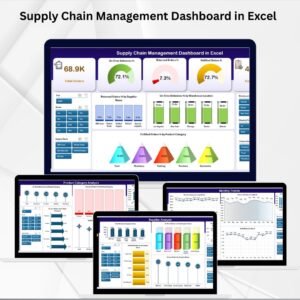
- Supply Chain Management Dashboard in Excel: report on supply chain performance
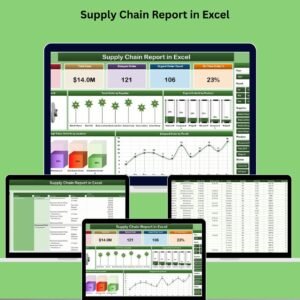
- Supply Chain Report in Excel: a report view of supply chain data
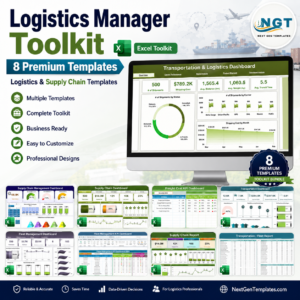
- Logistics Manager Toolkit: a bundle of Excel logistics templates
Browse all Excel checklists or the Excel logistics templates.



























Reviews
There are no reviews yet.