

Managing equipment requests across departments can quickly become complicated — especially when multiple teams are borrowing and returning shared assets. The Equipment Borrowing Request Tracker in Google Sheets provides a simple, automated way to log, monitor, and analyze equipment usage in real time. 🧰📊
This ready-to-use Google Sheets template eliminates the chaos of manual tracking. It allows you to record every borrowing request, view approval statuses instantly, and analyze trends by department or asset type — all in one organized, cloud-based dashboard. Whether your organization lends laptops, cameras, tools, or lab devices, this tracker ensures complete visibility and accountability.

🔑 Key Features of the Equipment Borrowing Request Tracker in Google Sheets
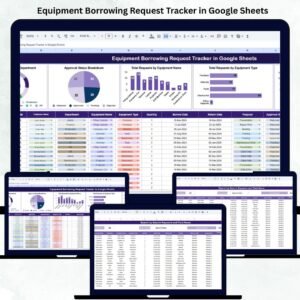
📋 Tracker Sheet Tab (Main Dashboard)
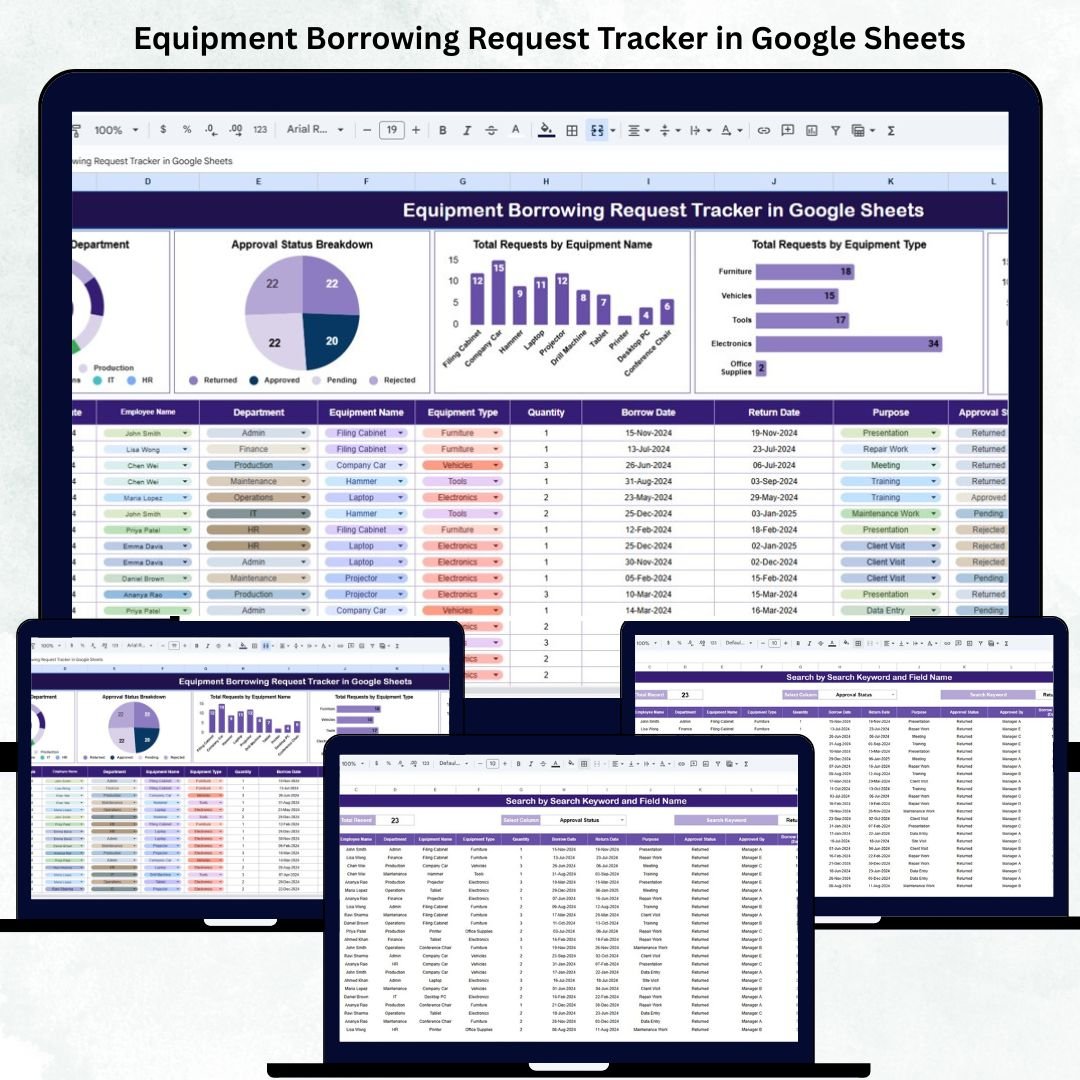
The Tracker Sheet is your control center — displaying all borrowing activities and analytics at a glance.
Charts Included:
🏢 Total Requests by Department: Identify which teams borrow the most equipment.
✅ Approval Status Breakdown: Visualize approved, pending, and rejected requests for better decision-making.
🔧 Total Requests by Equipment Name: Discover which specific assets (e.g., Laptop, Camera, Drone) are most frequently borrowed.
🧩 Total Requests by Equipment Type: Analyze borrowing patterns by category such as Electronics, Tools, or Lab Equipment.
🎯 Total Requests by Purpose: Understand why items are borrowed — for training, events, client demos, or maintenance.
All charts update automatically as you add new data, giving you real-time insights into utilization and demand trends.
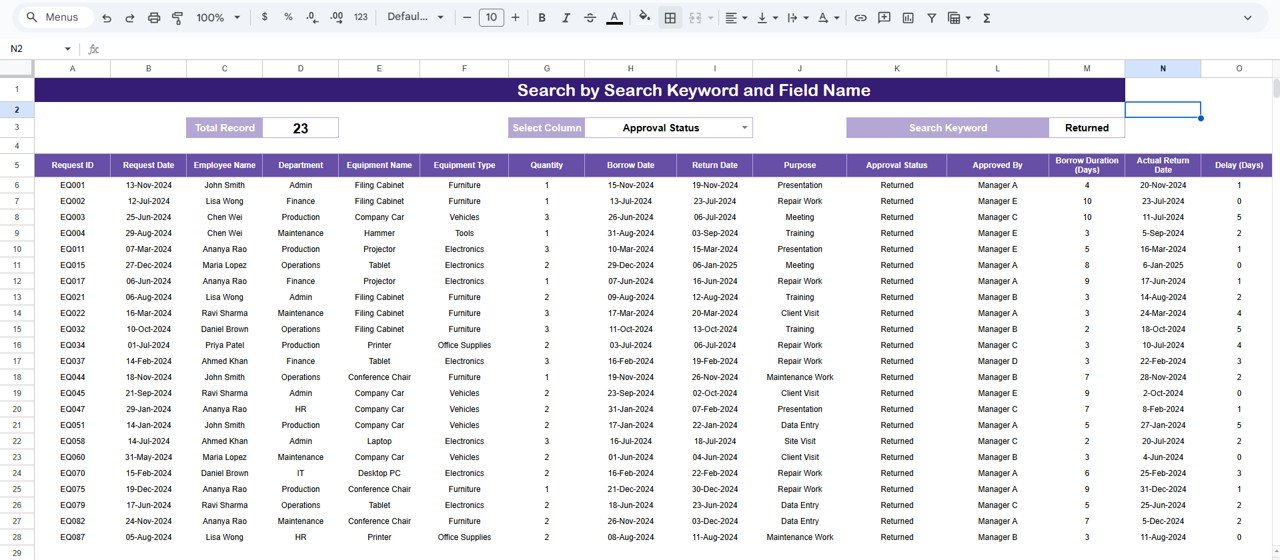
🔍 Search Sheet Tab (Smart Filtering System)
Finding records manually is a thing of the past. The Search Sheet makes it easy to locate specific requests using keyword-based searches.
Examples:
“Status = Approved” → Displays all completed requests.
“Department = IT” → Lists all IT department borrowings.
“Equipment Type = Audio” → Filters all sound-related gear.
“Requested By = John Doe” → Shows all requests made by a specific employee.
This feature helps managers quickly find, audit, or review borrowing activity without scrolling through hundreds of entries.
📘 Data Sheet Tab (Core Database)
This is where all equipment borrowing records are stored. Each new entry automatically updates the dashboard’s charts and KPIs.
Columns Include:
Request ID
Department
Requested By
Equipment Name
Equipment Type
Purpose
Request Date
Return Date
Status (Approved/Pending/Rejected)
Approver Name
This structure ensures data accuracy and reporting efficiency across teams.
💡 Support Sheet Tab (Dropdown & Reference Data)
This tab maintains lookup lists for dropdown menus such as departments, equipment types, statuses, and purposes — ensuring consistent data entry and minimizing human errors.
📦 What’s Inside the Tracker
✅ Pre-built automated dashboard
✅ Dynamic charts and KPIs
✅ Search and filter functionality
✅ Data validation with dropdowns
✅ Department and equipment analytics
✅ Google Sheets sharing for multi-user access
✅ Fully editable and scalable layout
🧑💼 Who Can Benefit from This Tracker
🏢 IT & Facilities Teams: Track laptops, projectors, or office tools.
🎥 Media Departments: Manage camera and production equipment efficiently.
⚙️ Engineering Units: Oversee borrowing of testing or lab instruments.
🏫 Educational Institutions: Monitor student or faculty use of classroom resources.
🚀 Corporate Offices: Maintain accountability for borrowed devices and gadgets.
It’s perfect for organizations that share assets frequently and value real-time visibility in equipment usage.
⚙️ Opportunities for Improvement
Enhance your tracker further by adding:
📩 Google Forms Integration: Let employees submit borrowing requests directly.
⚡ Automated Email Alerts: Notify approvers of new or overdue requests.
🧾 Condition & Maintenance Tracking: Record asset condition upon return.
💲 Cost Fields: Track depreciation or asset value.
⏰ Overdue Highlighting: Use conditional formatting for late returns.
🧠 Best Practices
✅ Update request status as soon as items are approved or returned.
✅ Use consistent department and asset names for clean analytics.
✅ Lock formulas and chart cells to prevent editing errors.
✅ Review charts weekly to identify usage spikes.
✅ Backup your file monthly to retain historical data.
🌟 Why Choose the Equipment Borrowing Request Tracker
📊 Complete visibility over equipment borrowing
☁️ 100% cloud-based, accessible anywhere
🔄 Auto-updating charts and metrics
🧰 Customizable fields for any type of equipment
🤝 Ideal for IT, media, or operations teams
🚀 Saves hours of manual tracking and follow-ups
The Equipment Borrowing Request Tracker in Google Sheets gives your organization an efficient, transparent, and automated system for managing asset requests — ensuring accountability and smarter resource utilization.
🔗 Click here to read the Detailed blog post
Watch the step-by-step video Demo:






















Reviews
There are no reviews yet.