

The best free maintenance log template is a simple Excel or Google Sheets table with eight columns: asset, date, task, technician, cost, status, next due date and notes. Microsoft Create and Vertex42 are free sources to start from. When you need dashboards, reminders or logins, paid options start at $3.49.
Last updated: November 2026
Key takeaways
- A free maintenance log template is enough for fewer than about 20 assets and one person entering data.
- Six free routes are covered below: Microsoft Create, Vertex42, a DIY Excel table, a DIY Google Sheets log, a dropdown-controlled Excel log and a printed log sheet.
- Free logs stop working when you need cost-by-asset charts, overdue alerts, user logins or technician workload views.
- The Equipment Maintenance Log Tracker in Excel costs $6.99 once and adds a login, an entry form and a dashboard.
- A full CMMS typically runs $20 to $120 per user per month, so a $24.99 one-time web app is the cheaper step up for small teams.
 Launch offer
SUMIFS, XLOOKUP, FILTER, LAMBDA and checking AI-written formulas, with real business projects. 11h 47m of video by PK, with practice files, quizzes and a capstone.
Maintenance log templates compared: free and paid
| Template | Format | Best For | Price |
|---|---|---|---|
| Microsoft Create templates | Excel | Starting from a ready layout | Free |
| Vertex42 templates | Excel | Printable, spreadsheet-style logs | Free (check each template) |
| DIY Excel table log | Excel | Fully custom columns | Free |
| DIY Google Sheets log | Google Sheets | Shared logs from phones | Free |
| Dropdown-controlled Excel log | Excel | Clean, consistent data | Free |
| Printed log sheet | Paper | Shop floor clipboards | Free |
| Equipment Maintenance Log Tracker in Excel (Best overall) | Excel | Logs, costs and a dashboard | $6.99 |
| Equipment Maintenance Log Tracker in Google Sheets | Google Sheets | Cloud-based team logging | $6.99 |
| Maintenance Work Order Data Entry System in Excel (Best value) | Excel (VBA) | Work orders with live KPI cards | $5.99 |
| Preventive Maintenance Dashboard in Excel | Excel | Scheduled vs completed analysis | $17.99 |
| Equipment Maintenance Management System Web App | Google Sheets web app | Multi-user maintenance operations | $24.99 |
| Vehicle Maintenance Checklist in Excel | Excel | Cars, vans and small fleets | $3.49 |
How we picked these
The free section covers the routes people actually use: two general free template sources and four ways to build a log yourself. We did not invent specific template names or links for those sources, because their libraries change. Check the current catalogue on each site.
The paid section comes from the NextGenTemplates catalog. We kept only products about maintenance logging, work orders, preventive scheduling and vehicle upkeep. Every price below is the real one-time USD price, and bundles or loosely related products were left out.
What are the best free maintenance log template options?
A maintenance log records what was done to which asset, when, by whom, at what cost and when it is due again. Free options all do that job. They differ in how much setup you do and how clean your data stays after a year of entries.
1. Microsoft Create templates
Microsoft Create is Microsoft’s free template site. It is a sensible first stop if you want a layout you can open in Excel and edit. Search it for maintenance log, equipment log or service record and see what is currently listed at Microsoft Create.
Who it is for: a single person who wants a starting layout in minutes.
Watch for: most free templates are static tables. You can type in them, but nothing summarizes cost by machine or flags overdue work for you.
Best for: getting a first maintenance log template running today.
2. Vertex42 templates
Vertex42 is a long-running source of spreadsheet templates, and it is the site many people reach when they search for a maintenance log template in Excel. Browse its maintenance and log categories at Vertex42 and check the licence and download terms on each template before you use it at work.
Who it is for: people who want a printable, spreadsheet-style log with a familiar look.
Watch for: layouts are general. You may spend an hour removing columns that do not match your equipment.
Best for: a printable maintenance log sheet with minimal setup.
3. Build a basic maintenance log in Excel (DIY)
This is the most flexible free option, and it takes about 15 minutes. Open a blank workbook and type these headers in row 1: Asset ID, Asset Name, Date, Task, Technician, Cost, Status, Interval (days) and Next Due. Then press Ctrl+T to turn the range into an Excel table so formulas and filters expand with each new row.
Add two formulas:
- Next Due: =C2+H2 (service date plus interval in days)
- Overdue flag: =IF(I2<TODAY(),”Overdue”,”OK”)
Add a second sheet with a SUMIFS formula such as =SUMIFS(Log[Cost],Log[Asset Name],A2) to total spend per machine. That gives you cost by equipment without any paid tool.
Best for: anyone who wants a maintenance log template in Excel shaped around their own assets.
4. Build a basic maintenance log in Google Sheets (DIY)
Use the same nine columns in a new Google Sheet. The advantages are sharing and phone access: your technician can open the link on a phone and add a row on site. Use Data, then Data validation to create dropdowns for Status and Technician, and Format, then Conditional formatting to turn a row red when Next Due is before today.
The limit is structure. Anyone with edit access can overwrite a formula or delete a row, and a plain sheet has no login or role control.
Best for: a small team that needs a free, shared equipment maintenance log.
5. A dropdown-controlled Excel log (DIY, tidier)
The most common failure in a free log is inconsistent naming. One person types “Air Compressor”, another types “Compressor 1”, and your cost totals split in two. Fix that by keeping a Lists sheet with every asset, technician and status, then applying Data Validation to the log columns so entries must come from those lists.
Three rules keep it clean: one row per job, no merged cells, and dates always entered as real dates. A year of tidy data is worth more than a pretty layout. If you later move to a paid tracker, clean data imports with far less rework.
Best for: people who plan to keep the log for years and may upgrade later.
6. A printed log sheet for the shop floor
Some jobs happen where there is no laptop. A one-page printed table kept with the machine, with columns for date, task, initials, hours and parts used, still works. Build it in Word, Docs or Excel and print it.
The catch is double handling. Someone has to type the paper entries into a spreadsheet, or the paper log becomes the only record and cannot be searched or totalled.
Best for: field and workshop use, paired with a spreadsheet as the master record.
Free maintenance log: a worked example of where it breaks
Take a small workshop with 25 assets, four technicians and about 60 jobs a month. After six months the log holds around 360 rows. Totalling repair cost by machine needs a SUMIFS you built yourself, spotting overdue services means scrolling or filtering, and nobody can tell which technician is overloaded.
None of that is impossible in a free sheet, but each answer costs you maintenance time. That is the point where a cheap, purpose-built tracker pays for itself.
Where does a free maintenance log stop working?
The six paid options below are NextGenTemplates products, shown here as the upgrade path. They are one-time purchases, not subscriptions. Context for the price comparison: the Google Sheets tracker’s product page cites 2024 MaintainX and ABB reports putting average US unplanned downtime at about $25,000 per hour and notes that 57% of facilities still use some form of run-to-failure maintenance. You can read more about the industry at MaintainX.
Free logs usually stop working at one of these points:
- You need a dashboard of cost by equipment, maintenance type and status.
- More than one person enters data and you want logins or role control.
- You want due dates to drive the work rather than a person remembering them.
- You want work orders, not just a history.
The 6 paid maintenance log upgrades
1. Equipment Maintenance Log Tracker in Excel: best overall
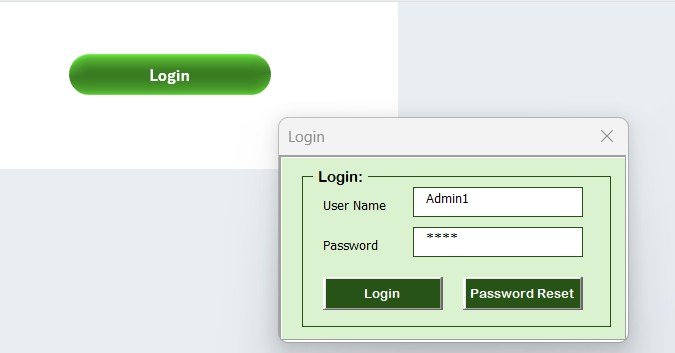
This is the direct paid upgrade from a DIY Excel log. It is an Excel tool with a secure login, a button-driven data entry form and a real-time dashboard. We rank it first because it keeps the familiar log structure and adds the parts a free sheet lacks, at $6.99.
Who it is for: businesses managing machines, IT systems, factory equipment or HVAC units.
What is inside:
- Login form with admin and user access, plus a user management panel
- Data entry sheet with Equipment Name, Technician, Maintenance Date, Cost, Next Due Date and more
- Form to add, edit and delete records
- Dashboard with doughnut charts by maintenance type, pie charts by status and bar charts of total cost by equipment, with slicers
- Manage List sheet for equipment, technician and status dropdowns
Use cases: find which machine has the highest repair cost, filter by status to see pending jobs, keep a service history per asset, and restrict who can change records.
Price: $6.99. Get the equipment maintenance log tracker in Excel.
Best for: an Excel-based team that has outgrown a plain table.
2. Equipment Maintenance Log Tracker in Google Sheets

The cloud version of the same idea. It gives facility managers, maintenance supervisors and in-house technicians structured logging, cost visibility and technician workload tracking in one shared Google Sheet, with no installs. The product page positions it against the $20 to $120 per user per month cost of a full CMMS.
Who it is for: teams that work from phones, tablets and browsers rather than a single PC.
What is inside: a dashboard view with maintenance type, status, technician workload and cost-by-equipment charts, plus a record of who did what, when, at what cost and when it is due again.
Use cases: HVAC systems, production line machinery, IT hardware or commercial property assets, all logged to one sheet.
Price: $6.99. See the Google Sheets maintenance log tracker.
Best for: shared logging across several people and devices.
3. Maintenance Work Order Data Entry System in Excel: best value
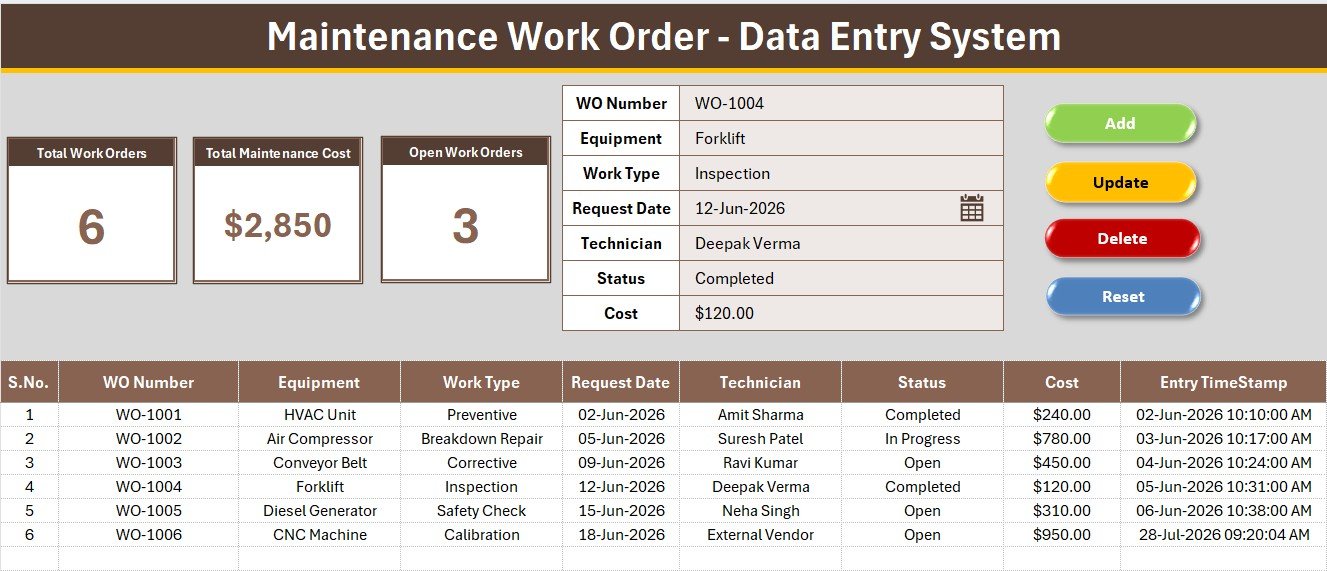
At $5.99 this is the lowest-cost route to structured work orders. It captures 7 fields per job (WO Number, Equipment, Work Type, Request Date, Technician, Status and Cost) and drives 3 live KPI cards from those rows.
Who it is for: teams that think in work orders rather than log entries and want no CMMS subscription.
What is inside:
- 7-field VBA form with four dropdowns
- Total Work Orders, Total Maintenance Cost and Open Work Orders cards
- Four macros: Add_Record, Update_Record, Delete_Record and Reset_Form
- 33 pre-loaded dropdown options across equipment, work types, technicians and statuses
- 6 sample work orders so the cards show numbers on first open
Use cases: setup takes under 10 minutes, and the dropdowns stop the same machine being spelled two ways across a year of records.
Price: $5.99. Get the maintenance work order system in Excel.
Best for: the lowest-cost structured work order log.
4. Preventive Maintenance Dashboard in Excel
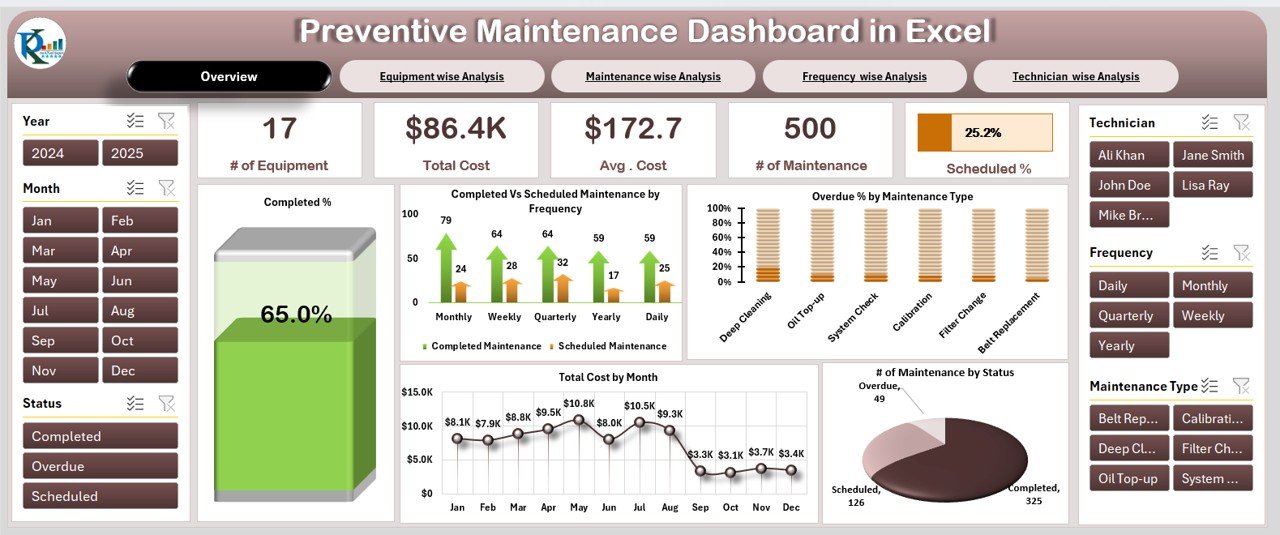
This one reads your maintenance records rather than replacing the log. It tracks equipment maintenance, costs and technician performance, with an overview of all maintenance KPIs, scheduled vs completed tasks, and overdue task alerts and cost tracking.
Who it is for: maintenance managers, technician supervisors and business leaders who report on upkeep.
What is inside: an Overview sheet with cost cards and charts of completed vs scheduled maintenance, overdue percentage by maintenance type and total cost by month, plus equipment-wise and maintenance-wise analysis pages.
Use cases: identify high-cost equipment, see which maintenance types run overdue, and show costs by month in a review meeting. For the metrics behind it, see our guide to maintenance KPIs such as MTBF and MTTR.
Price: $17.99. View the preventive maintenance dashboard in Excel.
Best for: reporting and spotting overdue work.
5. Equipment Maintenance Management System Web App
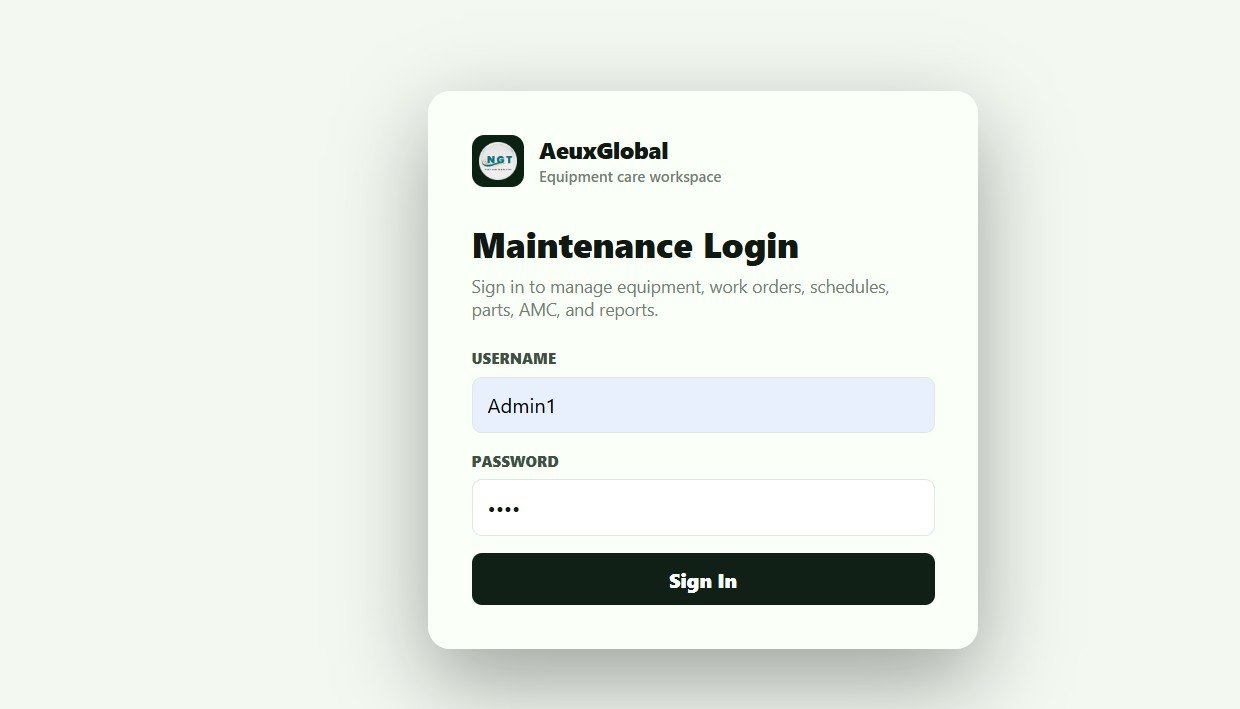
The largest step up, at $24.99 one time. It is a Google Sheets and Apps Script web app with secure multi-user login and role-based access, 21 connected screens and 12 live dashboard KPIs. Preventive maintenance schedules create due work orders automatically on a daily trigger.
Who it is for: teams that would otherwise look at a CMMS subscription.
What is inside:
- Dashboard KPIs including open and overdue work orders, PM due, downtime hours, MTTR, MTBF and low-stock parts
- Technician task view usable from a phone
- Equipment master, work orders, spare parts, vendors, AMC and reports screens
- Spare-part issues linked to work orders so cost per asset stays accurate
Use cases: setup takes under 15 minutes: copy the sheet, deploy the script, add your equipment.
Price: $24.99. Open the equipment maintenance management system.
Best for: multi-user teams that need automation, not just a log.
6. Vehicle Maintenance Checklist in Excel

The cheapest option at $3.49, aimed at vehicles rather than plant equipment. It tracks routine tasks such as oil changes, tire rotations and brake inspections, records costs, and shows completed and pending tasks with color-coded indicators.
Who it is for: vehicle owners, fleet managers and automotive service providers.
What is inside: routine task tracking, custom schedules based on usage and mileage, component condition tracking and cost recording for budgeting.
Use cases: one personal car, a small van fleet, or a service provider keeping a record per customer vehicle.
Price: $3.49. Get the vehicle maintenance checklist in Excel.
Best for: vehicle upkeep on a small budget.
How do you choose between a free and a paid maintenance log?
| Your situation | Pick |
|---|---|
| Fewer than about 20 assets, one person entering data | Free DIY Excel or Google Sheets log |
| Excel shop that wants charts and a login | Equipment Maintenance Log Tracker in Excel, $6.99 |
| Team that works from phones | Equipment Maintenance Log Tracker in Google Sheets, $6.99 |
| Work orders with cost totals | Maintenance Work Order Data Entry System, $5.99 |
| Need to report overdue and scheduled work | Preventive Maintenance Dashboard, $17.99 |
| Automatic PM work orders and spare parts | Equipment Maintenance Management System Web App, $24.99 |
| Cars and vans | Vehicle Maintenance Checklist, $3.49 |
A simple rule: if you have to ask someone for a number from the log, you probably need the paid version. If you can answer from a filter in ten seconds, stay free.
When is a maintenance log template NOT the right answer?
A spreadsheet is a record, not a system. Buy dedicated software instead if you have any of these:
- Regulated equipment where auditors need signed inspection trails and permanent audit logs.
- Hundreds of assets, or several sites, where inventory and purchasing need to connect to work.
- Teams that need push notifications, barcode scanning or deep integrations with other systems.
- Safety-critical assets where a missed entry has serious consequences.
A template also does not fix a habit problem. If technicians do not log jobs, even the best tracker stays empty. Start with the free log, prove the habit, and upgrade once it is being used.
Frequently asked questions
What should a maintenance log template include?
At minimum: asset name or ID, service date, task performed, technician, cost, status and next due date. Add a notes column for parts used and a maintenance type column such as preventive or corrective. Those fields let you filter history and total cost by machine.
Is there a free maintenance log template for Excel?
Yes. Microsoft Create and Vertex42 are free sources worth searching, and you can build your own in about 15 minutes with an Excel table, dropdown lists and a next-due formula. Check each source’s current library and terms, because available templates change.
How do I make a maintenance log in Google Sheets?
Create a new sheet with columns for asset, date, task, technician, cost, status, interval and next due date. Add dropdowns with data validation, a formula that adds the interval to the service date, and conditional formatting for overdue rows. Share the link so technicians can log from phones.
What is the difference between a maintenance log and a work order?
A maintenance log is the history of work done on equipment. A work order is a request or instruction for a specific job, usually with a number, status and assignee. Many teams need both: work orders drive the job, and the log keeps the record.
How often should equipment maintenance be logged?
Log every job at the time it is done, including small checks, so the history is complete. How often each asset is serviced depends on the manufacturer’s recommendations and usage. Record that interval in the log so the next due date calculates automatically.
When should I upgrade from a free maintenance log?
Upgrade when you need cost-by-equipment charts, several users with logins, overdue alerts, or work orders. A common sign is spending time building summaries by hand. The paid trackers above start at $3.49 and run from $5.99 to $24.99 for maintenance logging tools.
Is a spreadsheet maintenance log cheaper than a CMMS?
Usually yes for small teams. A free sheet costs nothing, and the paid NextGenTemplates trackers are one-time purchases of $6.99 to $24.99. The Google Sheets tracker’s product page cites $20 to $120 per user per month for a full CMMS. Larger operations may still need that software.
Can I track vehicle maintenance in Excel?
Yes. Log the vehicle, date, mileage, task such as an oil change or brake inspection, cost and next service. The Vehicle Maintenance Checklist in Excel costs $3.49 and adds scheduling by usage and mileage, condition tracking and color-coded task status.
Can a maintenance log help reduce downtime?
It helps by showing which assets fail often, which services are overdue and where money goes. The 2024 MaintainX and ABB figures cited on our Google Sheets tracker page put average US unplanned downtime at about $25,000 per hour, so missed preventive work is expensive.
Get more maintenance and free template guides
Ready to move past a plain sheet? The Equipment Maintenance Log Tracker in Excel is $6.99 one time, and the Equipment Maintenance Management System Web App is $24.99 one time for full multi-user maintenance management.
Watch walkthroughs on the NextGenTemplates YouTube channel.
More free guides: free attendance sheet templates, free training plan templates, free task list and to-do templates, free invoice templates, free expense report templates and free Excel dashboard templates.