

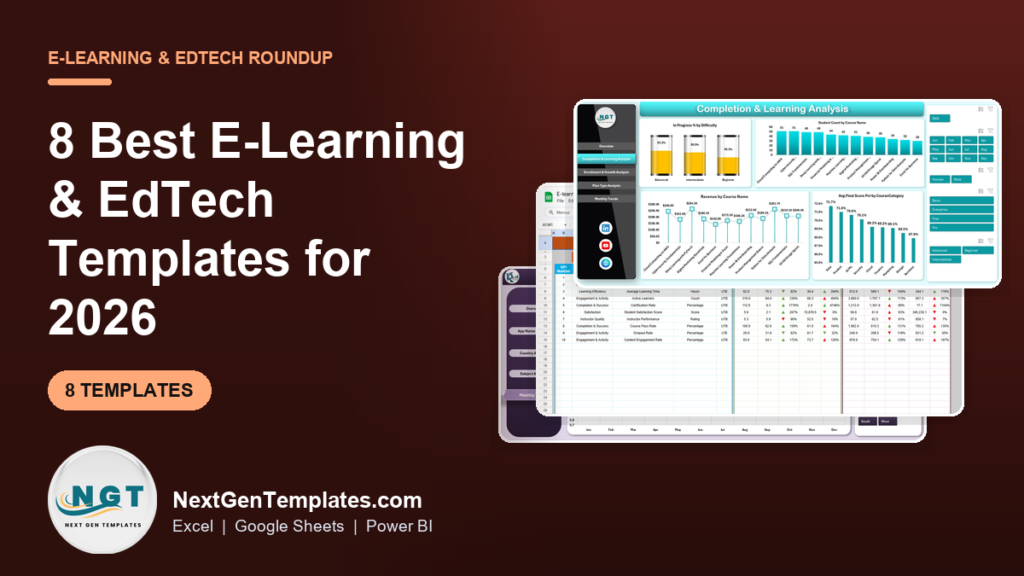
The best e-learning dashboard template for most EdTech teams in 2026 is the EdTech Dashboard in Excel ($13.99). It shows revenue, enrollments, completions, dropouts and in-progress learners on one overview page, then breaks them down by course, instructor, plan type and month. The Google Sheets version costs $9.99.
Last updated: October 2026
Key takeaways
- Our top pick is the EdTech Dashboard ($13.99 in Excel, $17.99 in Power BI, $9.99 in Google Sheets), because it is the only one that puts course revenue and learning outcomes in the same file.
- If you run an LMS and report KPIs monthly, the E-learning Platform KPI Dashboard tracks 10 KPIs, each with a written formula, against target and last year.
- App-based learning businesses should look at the E-Learning Apps Dashboard, which compares users, study hours, revenue and app ratings by app, country and subject.
- All eight picks cost $4.99 to $17.99 once. Learning analytics add-ons and BI seats usually bill every month, per user.
- Solo course creators do not need a full dashboard: the Online Course Sales & Student Tracker ($6.99) and the E-learning Course Calendar ($4.99) cover sales, students and schedules.
 Launch offer
SUMIFS, XLOOKUP, FILTER, LAMBDA and checking AI-written formulas, with real business projects. 11h 47m of video by PK, with practice files, quizzes and a capstone.
E-learning and EdTech templates compared
| Template | Format | Best For | Price |
|---|---|---|---|
| EdTech Dashboard (Best overall) | Excel, Power BI, Google Sheets | Course businesses tracking revenue and completions together | $9.99 to $17.99 |
| E-learning Platform KPI Dashboard | Excel, Power BI, Google Sheets | LMS admins reporting 10 KPIs vs target and last year | $12.99 to $14.99 |
| E-Learning Apps Dashboard | Excel, Power BI | Learning apps comparing users, revenue and ratings | $13.99 to $17.99 |
| EdTech KPI Dashboard | Excel, Power BI, Google Sheets | Monthly MTD and YTD KPI reviews for EdTech leaders | $9.99 to $12.99 |
| Digital Learning KPI Dashboard | Excel, Power BI, Google Sheets | L&D and blended programs that also track platform uptime | $9.99 to $14.99 |
| Student Enrollment KPI Dashboard | Excel, Google Sheets | Admissions teams tracking applications, acceptance and aid | $9.99 to $14.99 |
| Online Course Sales & Student Tracker | Google Sheets | Solo creators and coaches logging sales and progress | $6.99 |
| E-learning Course Calendar (Best value) | Excel, Google Sheets | Scheduling lessons, tests and live sessions | $4.99 |
E-learning teams collect more data than almost any other kind of business, and still struggle to answer simple questions. Enrollments sit in the checkout tool. Progress and quiz scores sit in the LMS. Ratings sit in the app store, refunds sit in the payment processor, and the live session schedule sits in someone’s calendar. When the founder asks which course loses the most learners after week two, somebody spends a day exporting CSV files.
The paid fix is a learning analytics module, a BI tool with per-user licences, or the reporting tier of your LMS. Those work, and they connect to your data automatically. But they bill every month, and the price usually grows with your learner count or seat count (check each vendor’s current pricing page). An e-learning dashboard template costs $4.99 to $17.99 once. It will not sync with your LMS on its own, but a monthly export gives you the same core views, and the file is yours.
How we picked these
We searched the NextGenTemplates catalog for products built for educational technology and online learning businesses, and kept the ones that model learners, courses, completions, enrollments or course revenue. We dropped an AI and machine learning KPI dashboard that the first shortlist carried, because it tracks model metrics rather than learning, and an “e-learning content services” dashboard whose fields are maintenance costs and downtime.
Every pick has a live product page, a one-time price and a documented list of sheets or KPIs. Where a tool exists in several formats we list it once and give every price. We ranked on three things, in order: how many core e-learning questions the template answers, how well it fits one specific job, and price.
The 8 best e-learning dashboard templates for 2026
1. EdTech Dashboard: best overall
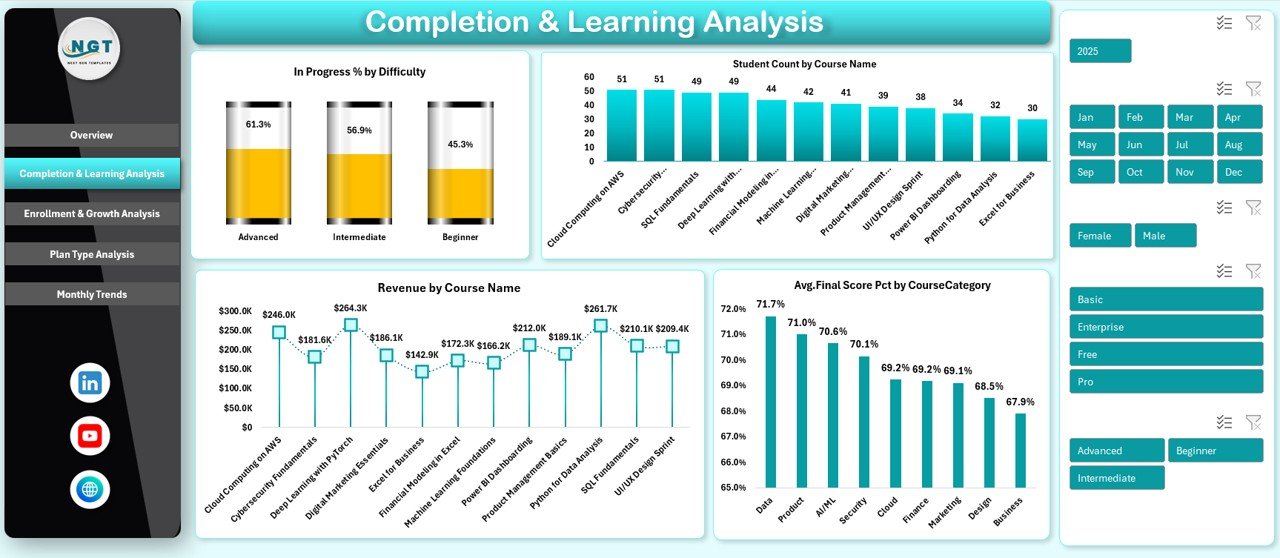
This is the e-learning dashboard template we would give an EdTech founder first. Most learning dashboards stop at completions and scores. This one also follows the money, so you can see whether the courses learners finish are the same courses that pay the bills.
Who it is for: online course platforms, training and certification institutes, EdTech startups and the consultants who report to them.
What is inside:
- An Overview sheet with revenue, enrollments, completions, dropouts and in-progress percentage
- Completion and Learning Analysis: student count by course, revenue by course, in-progress percentage by difficulty and average final score by category
- Enrollment and Growth Analysis: revenue by plan type, dropouts by segment, discounts by country and quiz engagement trends
- Plan Type Analysis: instructor performance, satisfaction by acquisition channel and session engagement by completion status
- Monthly Trends for support tickets and in-progress learners, plus slicers for course, difficulty, segment, plan type and month
Use it to find the advanced course where learners stall, check which acquisition channel brings the happiest students, or see whether discounts in one country are eating your margin. It comes in Excel ($13.99), Power BI ($17.99) and Google Sheets ($9.99).
Best for: any course business that wants revenue and learning outcomes in one file.
2. E-learning Platform KPI Dashboard: best for LMS administrators

If your job is to report platform health every month, this is the cleaner choice. It tracks 10 KPIs, and the KPI Definition sheet writes out the formula for each one, which saves an argument in every review meeting about what “completion rate” means.
Who it is for: e-learning administrators, online course providers and university or corporate teams that run an LMS.
What is inside:
- 10 KPIs: Enrollment Rate, Course Completion Rate, Average Learning Time, Active Learners, Certification Rate, Student Satisfaction Score, Instructor Performance, Course Pass Rate, Dropout Rate and Content Engagement Rate
- Formulas such as Course Completion Rate = Completed Courses / Enrolled Courses x 100 and Dropout Rate = Dropouts / Enrolled Students x 100
- A month selector with MTD and YTD actuals against target and previous year, with up and down arrows
- Six tabs: Dashboard, KPI Trend, Actual, Target, Previous Year and KPI Definition
Typical use: set a 70% completion target, enter each month’s actuals, and see straight away whether the year is ahead of last year. Buy it in Excel ($14.99), Power BI ($12.99) or Google Sheets ($12.99). A printable E-learning Platform KPI Scorecard ($14.99) is also available.
Best for: monthly KPI reporting on an LMS.
3. E-Learning Apps Dashboard: best for app-based learning
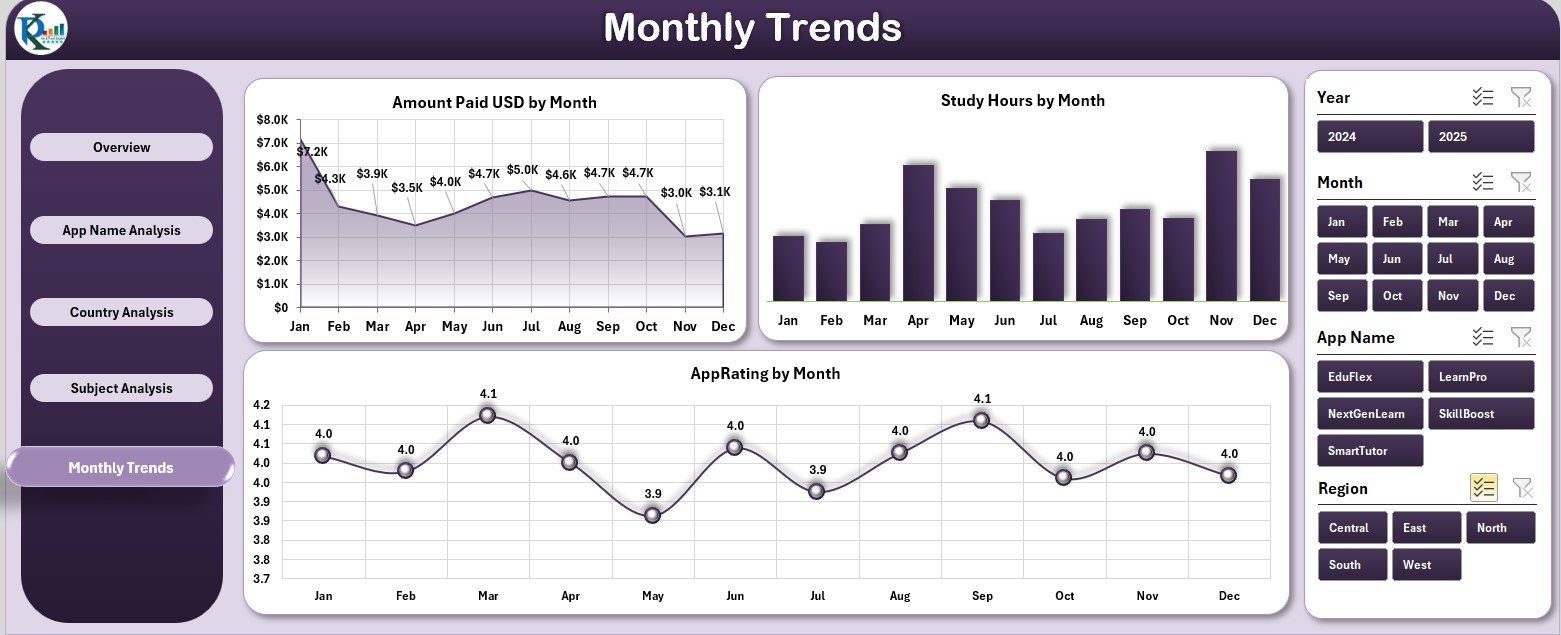
Language apps, test-prep apps and kids’ learning apps care about different numbers than a university LMS: paying users, study hours, store ratings and which markets pay. This dashboard is built around those.
Who it is for: e-learning app developers, product managers and owners of several learning apps.
What is inside:
- KPI cards for total users, lessons completed, study hours, total revenue and average app rating
- Five pages: Overview, App Name Analysis, Country Analysis, Subject Analysis and Monthly Trends
- Charts such as amount paid by user type, pending vs paid payments by app, score percentage by country and support tickets by subject
- Slicers for month, subscription type, region and app name
Use it to compare two apps side by side, spot a country where ratings are falling, or see which subjects create the most support tickets. It costs $13.99 in Excel and $17.99 in Power BI. For target-based reporting there is a separate E-learning Apps KPI Dashboard in Excel ($14.99).
Best for: teams running one or more learning apps.
4. EdTech KPI Dashboard: best for monthly leadership reviews
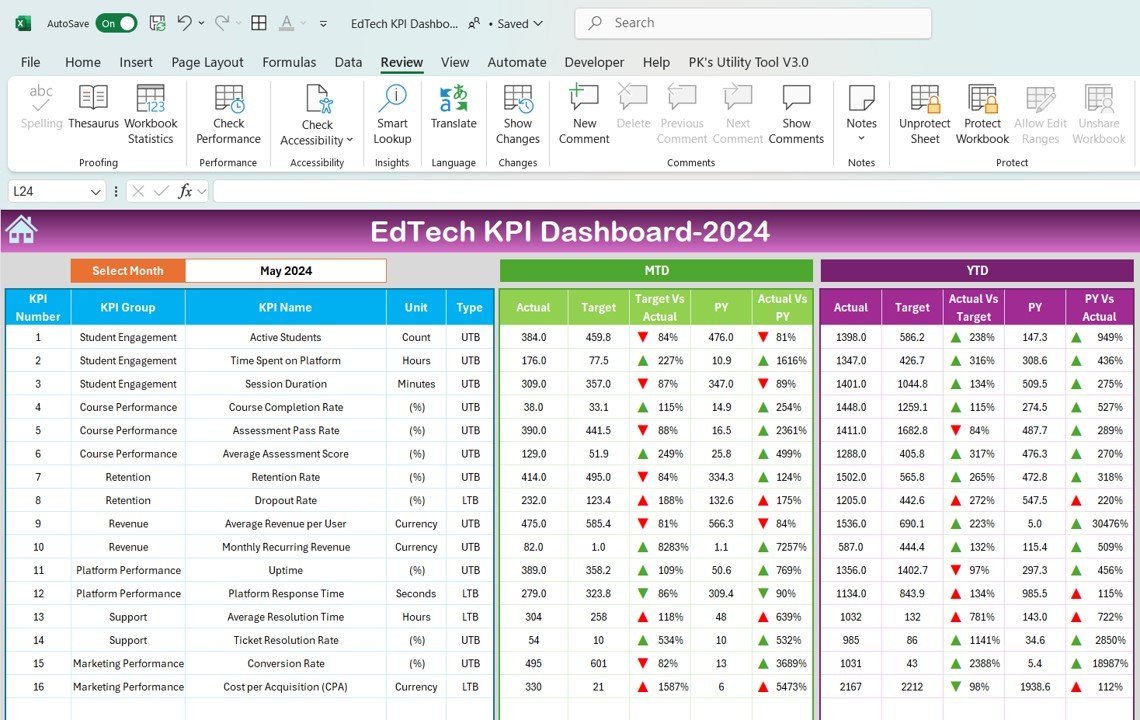
The EdTech Dashboard at #1 explores raw records. This one is for the monthly review: pick a month, and every KPI shows actual, target and last year side by side for the month and the year to date.
Who it is for: EdTech leaders, heads of learning and analysts who present a monthly KPI pack.
What is inside:
- KPIs for student engagement, course completion, drop-off, assessment results, enrollments and revenue
- A Dashboard sheet with a month dropdown and MTD and YTD comparisons
- A KPI Trend sheet showing each KPI’s group, unit, formula and whether higher or lower is better
- Separate input sheets for actuals, targets and previous-year numbers
It is the cheapest full KPI dashboard on this list: Excel $12.99, Power BI $11.99 and Google Sheets $9.99. A one-page EdTech KPI Scorecard ($14.99) suits board packs.
Best for: leadership teams who want the same KPI page every month.
5. Digital Learning KPI Dashboard: best for L&D and blended programs

This is the only pick that tracks the platform as well as the learners. Corporate learning teams often get blamed for low completion when the real cause is a slow or broken platform, and this dashboard puts both on the same page.
Who it is for: training managers, HR and corporate L&D teams, and instructional designers.
What is inside:
- 12 KPIs: Engagement Rate, Average Learning Time, Course Completion Rate, Dropout Rate, Content Completion Rate, Assessment Pass Rate, Knowledge Retention Rate, Platform Downtime, Technical Issue Rate, Average Response Time, Cost Per Learner and Learner Satisfaction Rate
- KPI groups for learner engagement, course performance, assessment, platform reliability, financial efficiency and satisfaction
- MTD and YTD actual vs target vs previous year, with tabs for trends, inputs and KPI definitions
Use Cost Per Learner next to Knowledge Retention Rate to defend a training budget. Prices: Excel $14.99, Power BI $11.99 and Google Sheets $9.99, plus a Digital Learning KPI Scorecard at $14.99. If your main question is training payback, see also the Training ROI KPI Dashboard in Excel ($14.99).
Best for: corporate and blended learning programs.
6. Student Enrollment KPI Dashboard: best for admissions teams

Online universities, bootcamps and certificate programs run an admissions funnel before anyone opens a lesson. This dashboard covers that funnel, from application to graduation, including the financial aid side.
Who it is for: admissions and enrollment managers at online schools, colleges and bootcamps.
What is inside:
- 10 KPIs: Enrollment Rate, Acceptance Rate, Outreach Engagement, Application Completion Rate, Retention Rate, Graduation Rate, Total Financial Aid Distributed, Average Aid per Student, Processing Time per Application and Application Rejection Rate
- MTD and YTD actual vs target and previous year, with green and red arrows
- Input tabs for actuals, targets and last year, plus a KPI definition sheet
Use Processing Time per Application to find the admissions step that loses applicants. Prices: Excel $14.99 and Google Sheets $9.99, with a Student Enrollment KPI Scorecard at $12.99.
Best for: the admissions funnel of any online program.
7. Online Course Sales & Student Tracker: best for solo course creators
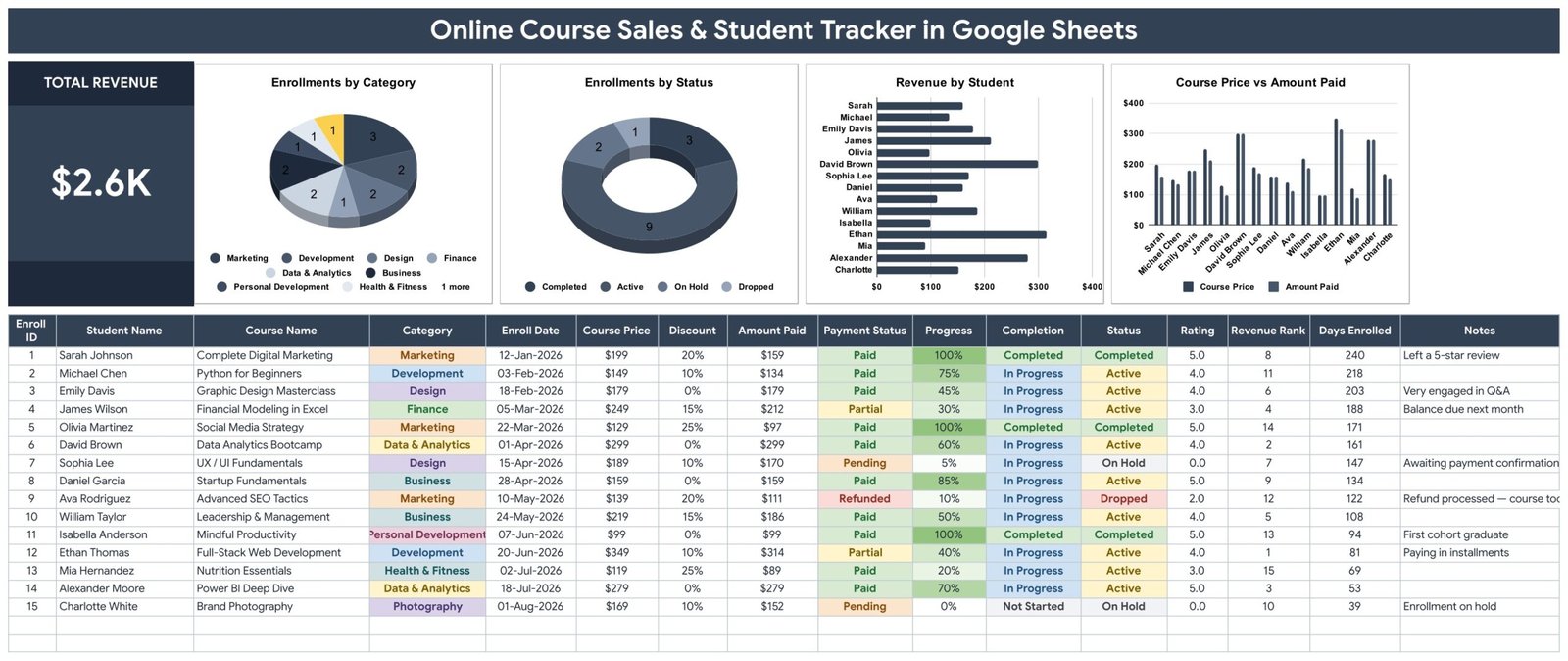
A creator selling three courses on Teachable or Gumroad does not need MTD and YTD targets. They need to know who bought what, what they paid after the coupon, and who stopped halfway. This tracker does that in one tab.
Who it is for: course creators, coaches and small academies.
What is inside:
- A 16-column enrollment table that works out amount paid, completion, revenue rank and days enrolled
- A Total Revenue card and four charts: enrollments by category, enrollments by status, revenue by student, and course price vs amount paid
- Payment status (Paid, Partial, Pending or Refunded) with colour-coded cells, plus rating and notes columns
- 15 sample enrollments across 9 course categories, so every chart works before you type
The price vs amount paid chart shows what your launch discounts really cost. It is $6.99 in Google Sheets.
Best for: one-person course businesses.
8. E-learning Course Calendar: best value
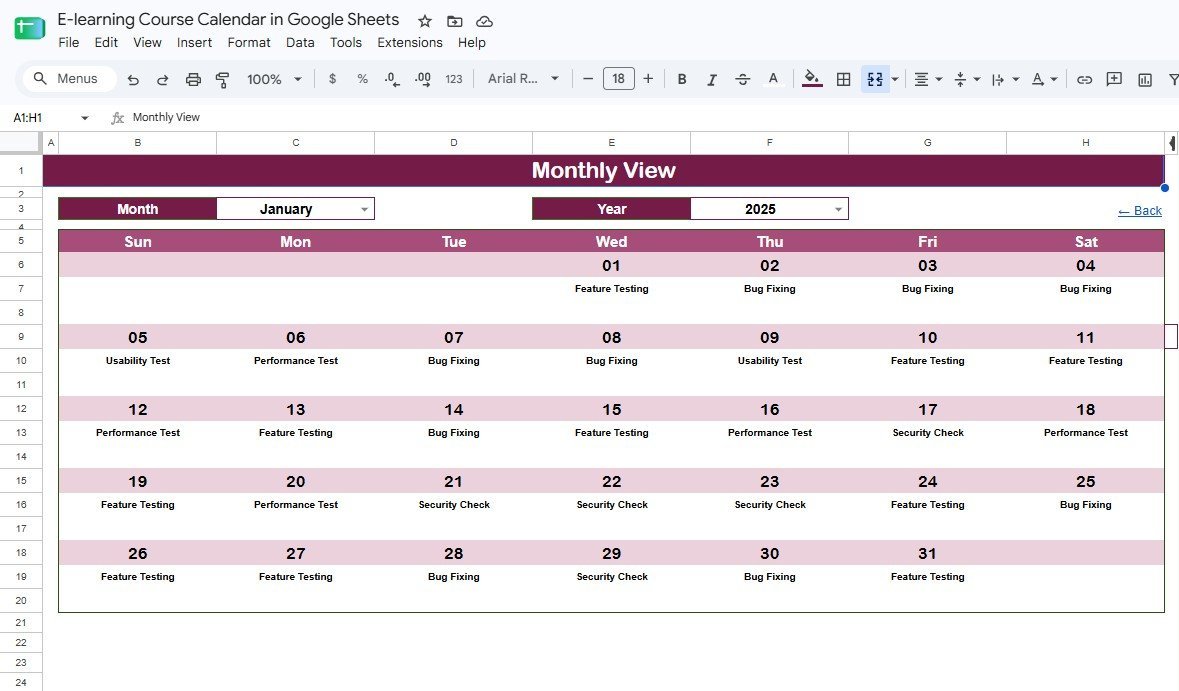
Schedules break in e-learning more often than reports do: a live session moves, the tutor has an old version, and learners miss it. This calendar keeps Annual, Monthly and Daily views linked to one Events sheet, so you change a date once.
Who it is for: course coordinators, instructors and teaching assistants.
What is inside:
- Five connected sheets: Home, Annual View, Monthly View, Daily View and Events
- A 7-field Events database (ID, Date, Day, Event Name, Time, Location, Description)
- A Daily View that lists every event between two dates, ready to print as a weekly schedule
At $4.99 in Google Sheets or $4.99 in Excel, it is the cheapest way to fix the schedule side of an online program, and it pairs well with any dashboard above.
Best for: planning lessons, tests and live sessions.
How to choose between them
| If your main question is… | Choose |
|---|---|
| Which courses make money and which lose learners? | EdTech Dashboard |
| Are we hitting our monthly LMS targets? | E-learning Platform KPI Dashboard |
| How do our apps compare by users, revenue and ratings? | E-Learning Apps Dashboard |
| What goes in this month’s leadership KPI pack? | EdTech KPI Dashboard |
| Is low completion a content problem or a platform problem? | Digital Learning KPI Dashboard |
| Where do applicants drop out before enrolling? | Student Enrollment KPI Dashboard |
| Who bought my course and what did they pay? | Online Course Sales & Student Tracker |
| When is every lesson, test and live session? | E-learning Course Calendar |
Format is the second decision. Pick Excel if your team works in Microsoft 365 and wants pivot-based exploration, Google Sheets if several people update the file together, and Power BI if you already publish reports in the Power BI service. Corporate learning teams that need more L&D-specific views can also read our guide to training and learning dashboard templates for L&D teams and the list of 12 training KPIs to track. Schools rather than course businesses should start with our K-12 school administration templates.
When a template is NOT the right answer
A template is a reporting layer, not a learning platform. Be honest with yourself about these cases:
- You need live, per-learner tracking. If instructors must see a learner’s quiz score the minute it is submitted, use your LMS’s own reports. A template refreshes when you paste new data.
- You have hundreds of thousands of learner records. Excel and Google Sheets slow down at that size. Power BI copes better, but a database with a BI tool is the right setup.
- You need xAPI or SCORM statement data. Detailed activity streams belong in a learning record store, not a spreadsheet.
- Nobody owns the monthly update. A dashboard with three-month-old data is worse than none. If no one will paste the export each month, an automated tool is worth its subscription.
For most small and mid-sized course businesses, though, a monthly export into a well-built template answers most of the questions a subscription tool would, for the price of one month of that tool.
Frequently asked questions
What is an e-learning dashboard template?
An e-learning dashboard template is a ready-made Excel, Google Sheets or Power BI file that turns your course, learner and revenue data into charts and KPI cards. You paste in an export from your LMS or checkout tool, refresh, and see completions, dropouts, enrollments and revenue without building the dashboard yourself.
Which KPIs should an e-learning business track?
Start with enrollments, course completion rate, dropout rate, active learners, average learning time, assessment pass rate and learner satisfaction. Add revenue per course and cost per learner if you sell courses or run a training budget. The E-learning Platform KPI Dashboard documents the formula behind each of these.
How do you calculate course completion rate?
Course completion rate is completed courses divided by enrolled courses, multiplied by 100. If 340 learners enrolled and 221 finished, the completion rate is 65%. Use the same date window for both numbers, and decide upfront whether learners still in progress count as enrolled.
Can I connect these templates to my LMS?
Not automatically. Export your enrollments, progress or sales as CSV from your LMS, app backend or checkout tool, paste them into the data sheet, and refresh. Power BI users can point the data source at a shared file so the refresh takes one click each month.
Is Excel, Google Sheets or Power BI better for an EdTech dashboard?
Excel suits analysts who explore data with pivot tables and slicers. Google Sheets suits teams who update one shared file. Power BI suits companies that already share reports through the Power BI service. Most picks here come in two or three formats, so choose the tool your team already uses.
Do these templates work for corporate training teams?
Yes. The Digital Learning KPI Dashboard is built for training managers and L&D teams, and it tracks cost per learner and knowledge retention alongside completion. For payback questions, the Training ROI KPI Dashboard in Excel compares training costs with performance gains.
Are these one-time purchases or subscriptions?
Every template on this list is a one-time purchase between $4.99 and $17.99. You download an editable file and keep it, with no per-user or monthly fees. That is the main difference from learning analytics tools, which usually bill per seat or per learner every month.
What is the best e-learning template for a solo course creator?
The Online Course Sales & Student Tracker in Google Sheets at $6.99. It logs every enrollment, works out the amount paid after discounts, tracks payment status and progress, and charts revenue by student and course category. Add the $4.99 E-learning Course Calendar if you run live sessions.
Get more e-learning and EdTech templates
If you only buy one file, make it the EdTech Dashboard in Excel ($13.99) or its Google Sheets version ($9.99). It covers revenue, enrollments, completions and dropouts in one place. Pair it with the E-learning Platform KPI Dashboard ($14.99) when you also need a monthly target report.
Watch how our dashboards work, step by step, on the NextGenTemplates YouTube channel.
Run a sports organisation instead of a course business? See the 6 best sports club & athletics templates for 2026, ranked by use case from league standings to athletic training.