


The best free quotation template in 2026 is Vertex42’s Price Quote Template. It downloads with no sign-up for Excel, Google Sheets and OpenOffice, gives you two designs, and adds a discount line plus a signature box for the customer to accept. If you can’t promise a fixed price, use Vertex42’s free Job Estimate Template instead.
Last updated: October 2026
This guide is for freelancers, contractors, agencies and small businesses who need to send a customer a price before the job starts, without paying for quoting software. First come the 6 free quote and estimate sources worth your time. We opened every page in October 2026 and downloaded the Excel files to check they are really free. Then comes an honest section on when a free quote form stops being enough, with 6 paid upgrades from NextGenTemplates. Once a quote is accepted, it turns into a bill, so you may also want our list of free invoice templates.
Key takeaways
- All 6 free quote and estimate sources in this list cost nothing: two from Vertex42, plus FreshBooks, Invoice Simple, Smartsheet and TemplateLab. We loaded each page and downloaded the Excel files in October 2026.
- Best overall free quotation template: Vertex42’s Price Quote Template, with two designs, a discount line, terms and conditions, and a customer signature box.
- A quote is a fixed price the customer can accept. An estimate is your best guess and can change. Pick the form that matches the promise you can keep.
- A free quote form makes one document. It does not tell you which quotes are still open, which expire this week, or how much of your pipeline you actually win. Those gaps are why sellers upgrade.
- The 6 paid NextGenTemplates upgrades below cost $6.99 to $39.99, paid once with no subscription. The Proposal and Quote Tracker in Google Sheets costs $6.99.
 Launch offer
SUMIFS, XLOOKUP, FILTER, LAMBDA and checking AI-written formulas, with real business projects. 11h 47m of video by PK, with practice files, quizzes and a capstone.
Free quotation templates compared
Every free source in this guide, side by side. One row is flagged best overall. All six are free to download.
| # | Template | Source | Format | Best For | Price |
|---|---|---|---|---|---|
| 1 | Price Quote Template (Best overall) | Vertex42 | Excel, Google Sheets, OpenOffice | A fixed-price quote the customer signs to accept | Free |
| 2 | Job Estimate Template | Vertex42 | Excel, Google Sheets, Word | Service jobs where the final cost can change | Free |
| 3 | Estimate Templates | FreshBooks | Excel, Word, Google Docs, Google Sheets, PDF | Freelancers and service businesses | Free |
| 4 | Quote and Estimate Templates | Invoice Simple | Excel, Word | Simple quotes in several clean designs | Free |
| 5 | Construction Estimate Templates | Smartsheet | Excel, Word, PDF, Google Sheets | Contractors, builders and trades | Free |
| 6 | 27 Professional Quote Templates | TemplateLab | Excel, Word, PDF | Industry layouts, from catering to roofing | Free |
Here are the paid upgrades we recommend once a free quote template runs out of road. One row is best overall and one is best value.
| Upgrade | Format | Best For | Price |
|---|---|---|---|
| Proposal and Quote Tracker in Google Sheets (Best overall) | Google Sheets | Every open quote, its value, win chance and expiry date | $6.99 |
| CRM and Sales Pipeline Management System in Excel VBA | Excel VBA | Multi-line quotations that print, linked to deals | $29.00 |
| Professional Invoice Template in Google Sheets (Best value) | Google Sheets | Turning accepted quotes into tracked invoices | $6.99 |
| Automatic Invoice Creator V1.0 in Excel VBA | Excel VBA | Saving each document as Excel and PDF in one click | $6.99 |
| Daily RFQ and Quote Comparison Management System | Web app (Google Sheets) | Buyers comparing supplier quotes side by side | $24.99 |
| CRM and Sales Pipeline Management System Web App | Web app (Google Sheets) | A multi-user sales team with quotes, deals and roles | $39.99 |
How we picked these free quotation templates
We started where people actually look for a free quotation template: the big template libraries (Vertex42, Smartsheet and TemplateLab), the invoicing companies that give templates away (FreshBooks, Invoice Simple, Zoho, Wave and Xero), Microsoft’s own template site, and our own catalogue. We loaded every page in October 2026 and downloaded the Excel files where a page offered a direct link. FreshBooks’ estimate workbook came down as a 127 KB Excel file, Invoice Simple’s first quote template as a 24 KB file, and Smartsheet’s contractor estimate as a 490 KB file, all without an email address.
A source made the list only if the form downloads at no cost and helps with the job: it totals line items and tax, separates labour from materials, or gives the customer a way to accept. We left out Microsoft Create this year, because its quote templates page now sends you into the Microsoft 365 sign-in flow, so we could not check the files without an account. Several older quote pages from Zoho, Wave and Smartsheet now return “page not found”, so they are out too.
Search data shaped the list. In the US, “quotation template” and “quote template” are each searched about 3,600 times a month, “estimate template” about 2,400 times and “free estimate template” about 1,900 times. “Contractor estimate template” gets about 1,000 searches, “job estimate template” about 880 and “quotation template excel” about 590. So the list covers fixed-price quotes and flexible estimates, Excel and Word, and the trades. We took the paid upgrades from the NextGenTemplates sales and billing range and matched each one to a gap that free files leave open.
The 6 best free quotation templates for 2026
1. Price Quote Template (Vertex42) – best overall free quotation template
Vertex42 built this quote template from its popular free invoice, so it looks professional and the formulas are tested. The workbook has two designs on separate sheets; the second lets you enter unit costs and quantities and totals the quote for you. Compared with the invoice, the labels say “quote”, there is an example “New client discount” line (you enter the discount as a negative price), and the comments box becomes a Terms and Conditions section with a line for the customer to sign and accept.
A second file on the same page, the Quotation Template, is a more general design for service businesses. The Price Quote Template works in Excel 2010 or later, Google Sheets and OpenOffice; the Quotation Template in Excel 2007 or later and Google Sheets. Both are free under Vertex42’s private-use licence, and the page was last updated on 1 May 2025. Vertex42 also gives good advice: add a “Valid Until” date, and send the customer a PDF, never the Excel file itself.
Best for: a fixed-price quote you can send as a PDF today. Free – get the Vertex42 price quote template.
2. Job Estimate Template (Vertex42)
Use this one when you cannot guarantee the final price. It is built for service providers who want to give the customer an honest first figure without entering into a binding contract. The note at the bottom says the estimate is not a contract, that the price may change, and that the customer will be contacted before extra work goes ahead. You edit that note to suit your trade, add your logo and contact details, and save a master copy.
Vertex42’s tips are worth following: include sales tax so nobody is surprised, and for risky jobs send two estimates, one for the likely cost and one for a worst case with extra parts and labour. It matches Vertex42’s billing invoice, so your estimate and your invoice look the same. It comes in Excel 2007 or later, Google Sheets and Word.
Best for: repairs and service work where the cost can move. Free – get the Vertex42 job estimate template.
3. Estimate Templates (FreshBooks)
FreshBooks offers one clean estimate design in five formats: Microsoft Excel, Microsoft Word, Google Docs, Google Sheets and PDF. You add your branding, the service description, product and labour costs, and the payment details. The Excel version uses formulas to total the line items, and the Download buttons link straight to the files, so you don’t have to sign up or enter an email.
The page leans towards FreshBooks’ paid software, which can turn an estimate into an invoice for you. You don’t need it: the downloaded files work on their own.
Best for: freelancers who want the same layout in Excel, Word and Google Docs. Free – get FreshBooks’ free estimate templates.
4. Quote and Estimate Templates (Invoice Simple)
Invoice Simple has two free pages. The quote page offers three quote templates, each in Excel and Word. The estimate page offers five estimate designs in Excel and Word, plus more than 40 trade-specific pages, from plumbing, roofing and HVAC to cleaning, landscaping and tree service. The files use formulas that work out totals and tax, and they download directly.
The FAQ on the quote page makes a useful point: once a customer accepts a quote, it is normally turned into an invoice, so most businesses keep the two documents in the same design.
Best for: trades that want a simple, ready-made layout. Free – get Invoice Simple’s free quote templates or the free estimate templates.
5. Construction Estimate Templates (Smartsheet)
Smartsheet’s page is the best free source for building work. It offers nine estimate templates: simple, residential, commercial, contractor, remodeling, construction bid, roofing, painting and electrical. The simple version has sections for client details, scope, materials, labour and other costs, with quantity, hours, rate and tax fields. The residential version shows base price, contingency, gross profit and total estimated expense, and the commercial version splits sitework from building costs and works out cost per square foot.
Most templates come in Excel, and many also in Word, PDF or Google Sheets. The page was published on 20 June 2025, and the download links go straight to the files.
Best for: contractors and builders pricing jobs line by line. Free – get Smartsheet’s free construction estimate templates.
6. 27 Professional Quote Templates (TemplateLab)
TemplateLab collects 27 quote templates on one page, many of them for a specific industry: catering, cleaning, construction, electrical, freelance, landscaping, lawn care, painting, photography and roofing. Each design has “Download for Excel”, “Download for Word” and “Download in PDF” buttons. Below them, the page explains how to build a quote in seven steps, from client details and quote number to terms and notes.
The page carries a lot of adverts, and the designs vary in quality. Open two or three files and keep the one that suits your business, then add your logo and terms.
Best for: finding a quote layout made for your industry. Free – browse TemplateLab’s free quote templates.
Also free: Invoice Home lets you fill in a price quote online in about 100 styles and download it as a PDF. Xero’s free quote template is also available, but you fill in a short form first.
Want a free expense tracker by email?
Quotes bring money in; costs take it out. To see your spending each week, we will send you our free Weekly Expense Tracker in Excel. It has a dashboard with 5 KPI cards, budget tracking by category with traffic-light status, a spending pie chart, a 7-day trend line and a top-5 expenses table, all fed from one simple entry sheet. No payment, no card, and you can unsubscribe at any time.
When does it pay to upgrade from a free quotation template?
A free quotation template is fine when you send a few quotes a month. Once you send ten or more, or more than one person quotes for the business, the same five problems push sellers towards a paid tool:
- No list of open quotes. Each quote is a separate file or PDF in your sent mail. Nobody can see at a glance which quotes are waiting for an answer.
- Quotes expire unnoticed. A “Valid Until” date on the form does nothing if no one checks it. Prices change, and old quotes get accepted at rates you can no longer offer.
- No follow-up. Most quotes are won by the follow-up call, not the PDF. A file cannot remind you who to call or record what was said.
- Retyping into the invoice. When a customer says yes, the line items get typed again into an invoice, and mistakes creep in.
- No win rate. You can’t see how much you quoted, how much you won, or what discount you gave away. To track that without a CRM subscription, see our guide to Salesforce alternatives in Excel and Google Sheets.
If two or more of these apply, the time spent chasing quotes by hand costs more than a one-time template. The 6 upgrades below map onto those gaps.
6 paid quotation template upgrades for when free stops working
1. Proposal and Quote Tracker in Google Sheets – best overall upgrade

The direct fix for “no list of open quotes” and “quotes expire unnoticed”. Every quote gets one row with 16 columns: quote ID, client, proposal title, service type, quote amount, discount, net value, win %, weighted value, date sent, valid until, days left, status, owner, follow-up action and notes. Statuses run from Draft and Sent through Under Review to Accepted, Rejected and Expired. Above the register, a Total Pipeline Value card and four charts show quotes by service type, quotes by status, net value by client, and quote value against weighted value.
What it adds over free: one live register of every quote, with days left before each one expires and a weighted forecast.
Best for: consultants, agencies and contractors with several quotes out at once. $6.99 – view the Proposal and Quote Tracker in Google Sheets.
2. CRM and Sales Pipeline Management System V1.0 in Excel VBA
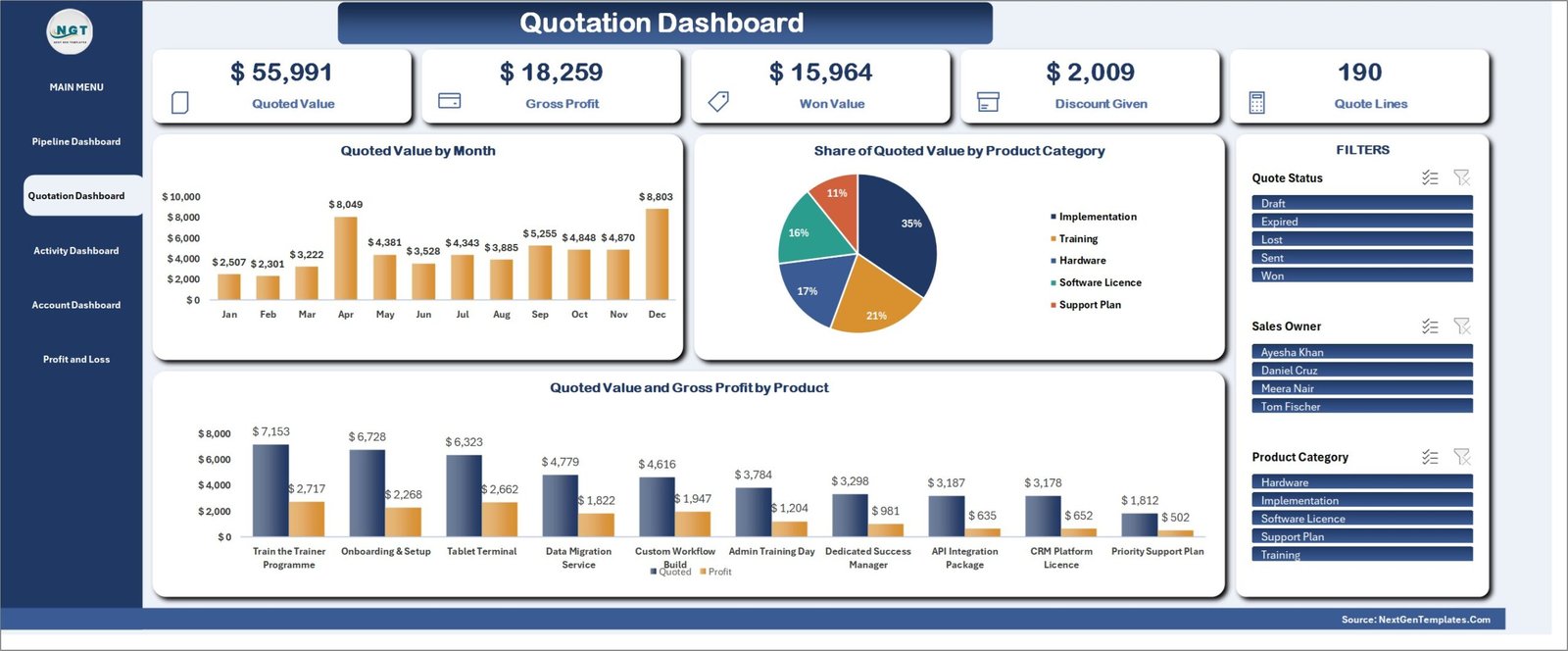
The fix for “no win rate” and for building quotes by hand. The quotation form works like a basket: you enter the company, contact and deal once, then add as many product or service lines as you need, all under one quote number. A product master holds cost price and markup, and the form looks up the selling price for you. The Print Centre prints the Quotation (and a Sales Order Confirmation) at A4, 4 inch or 3 inch. The Quotation Dashboard shows quoted value, gross profit, won value, discount given and quote lines, filtered by status, sales owner or product category.
What it adds over free: quotes linked to deals and a six-stage pipeline, with profit and discounts measured. There is a free 7-day trial.
Best for: small sales teams that quote products with a markup. $29.00 – view the CRM and Sales Pipeline Management System in Excel.
3. Professional Invoice Template in Google Sheets – best value
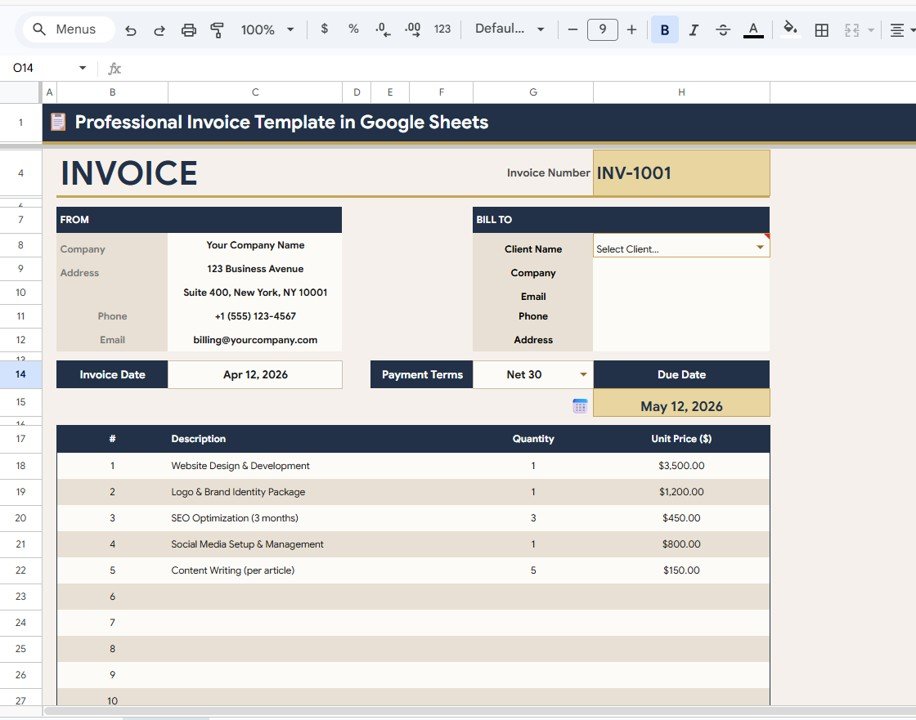
The fix for “retyping into the invoice”. Once a quote is accepted, you pick the client from a drop-down and their details fill in, add the line items, and the totals and tax calculate themselves. Four linked sheets do the work: the Invoice, a Client Database, an Invoice Log with summary cards for total invoices, billed, paid, outstanding and overdue, and a Settings page for tax, currency, invoice prefix and payment terms.
What it adds over free: a client list and an invoice log, so accepted quotes become tracked bills, not loose files.
Best for: freelancers and small businesses billing from Google Drive. $6.99 – view the Professional Invoice Template in Google Sheets.
4. Automatic Invoice Creator V1.0 in Excel VBA

For Excel users who send a lot of documents. You set the tax rate and an output folder once; the tool then creates each invoice from a few inputs and saves it as an Excel file or a PDF with one button. It supports custom branding, several currencies, automatic due dates and tax, and keeps track of the invoices you have issued and their payment status.
What it adds over free: no more “Save As” and manual PDF export for every customer.
Best for: small businesses that bill in Excel every week. $6.99 – view the Automatic Invoice Creator in Excel.
5. Daily RFQ and Quote Comparison Management System Web App

This one is for the other side of the table: when you receive quotes from suppliers. You log each request for quotation (RFQ), then line up the supplier quotes for the same item. The comparison highlights the lowest price, the shortest lead time and the best minimum order quantity, and a currency module converts USD, EUR, GBP, INR or any other currency so quotes compare fairly. It has 16 modules, 18 reports and a 12-KPI overview, with Admin and Sourcing User logins.
What it adds over free: a fair, side-by-side quote comparison for buyers, in any currency.
Best for: purchasing teams collecting several supplier quotes a day. $24.99 – view the RFQ and Quote Comparison System.
6. CRM and Sales Pipeline Management System Web App
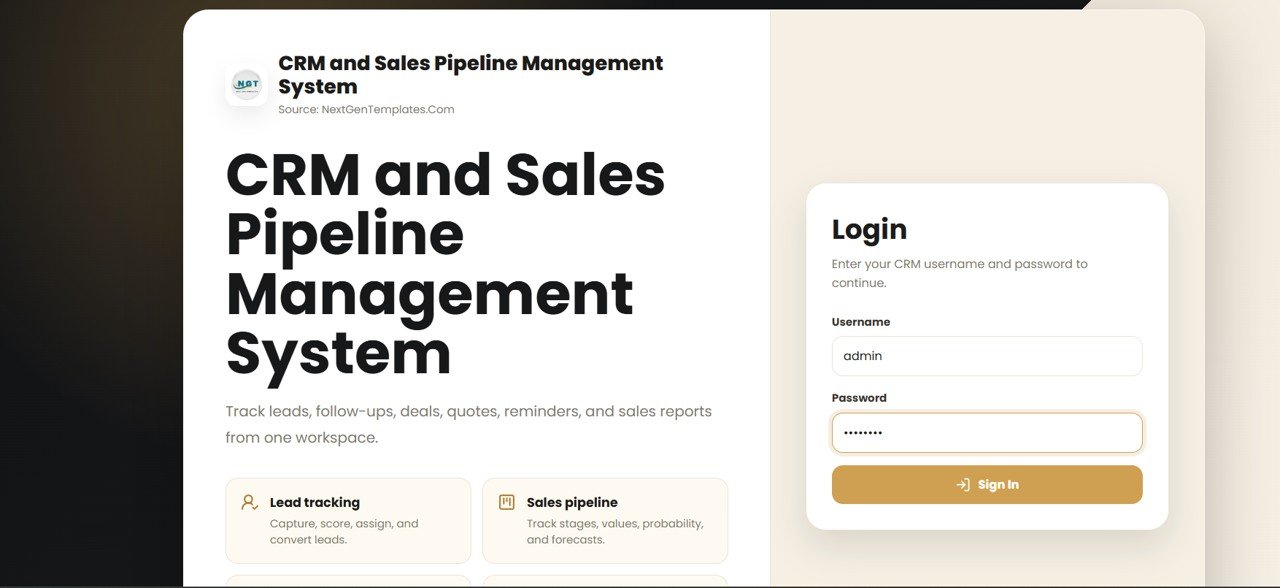
The answer for a whole sales team. Version 2.0 has 28 connected screens, including Leads, Contacts, Accounts, Deals, a Pipeline Board, Activities, Reminders, Products and Quotes, where a deal becomes a printable proposal. Twelve live KPI tiles include win rate, weighted forecast and quotes awaiting a decision. Seven roles control who sees what, every record keeps a change log, and the data stays in your own Google Drive.
What it adds over free: quotes, follow-ups and deals shared by the whole team, with security and an audit trail.
Best for: sales teams that have outgrown spreadsheets but not their budget. $39.99 – view the CRM and Sales Pipeline Web App.
Also worth a look: the Client Proposal Checklist Template in Excel ($3.49) makes sure nothing is missed before a big proposal goes out. The Client Billing and Invoice Management Dashboard in Google Sheets ($6.99) tracks payment delays once quotes turn into invoices, and the Client Invoice Tracker Data Entry System in Excel ($5.99) keeps a one-click register of what each client owes.
How to choose between a free and a paid quotation template
| Your situation | Pick | Cost |
|---|---|---|
| A few fixed-price quotes a month | Vertex42 Price Quote Template (free #1) | Free |
| Service jobs where the price may change | Vertex42 Job Estimate Template (free #2) | Free |
| Building, remodeling or trade jobs | Smartsheet construction estimates (free #5) | Free |
| Ten or more open quotes to follow up | Proposal and Quote Tracker in Google Sheets | $6.99 |
| Accepted quotes need to become invoices | Professional Invoice Template in Google Sheets | $6.99 |
| Multi-line product quotes with markup and profit | CRM and Sales Pipeline Management System in Excel | $29.00 |
| A sales team sharing quotes and deals | CRM and Sales Pipeline Management System Web App | $39.99 |
A simple rule: if one person sends fewer than ten quotes a month, stay free and keep a short list of open quotes. Once you need to know which quotes are about to expire, who to call next, and how much you win, a tracker pays for itself the first time it saves a deal from going cold.
Quote vs estimate: what is the difference?
A quote (or quotation) is a fixed price for a defined job. If the customer accepts it before it expires, you are expected to do the work at that price. That is why a good quotation template has a quote number, a “Valid Until” date, terms and conditions and a place for the customer to sign.
An estimate is your best guess at the cost. It is not a binding price, and the final bill can go up or down, so it should say so clearly and explain how the customer will be told before extra work starts. Use an estimate for repairs, renovation and any job where you cannot see everything up front. For larger projects, many businesses send an estimate first and a firm quote once the scope is agreed. A proposal goes further still, adding the approach, timeline and reasons to choose you, and often includes a quote.
Quotation template formulas that matter in Excel
Most quote errors come from small formula slips. If you build or edit a free quotation template in Excel or Google Sheets, these six formulas cover almost every case:
- Line total: =ROUND(Qty*UnitPrice,2) rounds each line to cents, so the quote matches the invoice later.
- Selling price from cost: =ROUND(Cost*(1+Markup),2) prices each item from its cost and your markup, the idea behind the Excel CRM’s product master.
- Discount, tax and total: =Subtotal-Discount, then =ROUND((Subtotal-Discount)*TaxRate,2) and add them. Keep the rate in a settings cell, not inside the formula.
- Next quote number: =”Q-“&TEXT(MAX(Log[No])+1,”0000”) gives Q-0042 style numbers from your quote log, so none are skipped or reused.
- Days until the quote expires: =ValidUntil-TODAY() shows how long the customer has left; format negatives in red.
- Weighted value: =NetValue*WinPct gives the realistic value of each open quote, and SUM of that column is your forecast.
Want to see formulas like these in action? Our YouTube channel has Excel and Google Sheets walk-throughs: youtube.com/@NextGenTemplates. If you buy as well as sell, our list of free purchase order templates covers the other side of the deal.
When a free quotation template is NOT the right answer
- You need online acceptance and e-signatures. A spreadsheet produces a PDF; it cannot let a customer click “accept” or take a deposit. If that matters, quoting software is worth a look. Our QuickBooks alternatives guide compares the spreadsheet route with the software route.
- You price large building jobs from plans. Takeoff and estimating software measures quantities from drawings. For project-led trades, see our Procore alternatives and Buildertrend alternatives.
- You must keep records for years. The IRS says most US businesses should keep records for 3 years, and longer in some cases. Signed quotes back up your invoices, and a folder of loose files is hard to search later; a log is not.
- You send hundreds of quotes a month. At that volume, a CRM with quote approval rules and price books is worth the subscription.
Frequently asked questions
Where can I download a free quotation template?
Vertex42’s Price Quote Template is the best-built free file, for Excel, Google Sheets and OpenOffice, and Vertex42 also has a free Job Estimate Template. FreshBooks, Invoice Simple, Smartsheet and TemplateLab give away free quote and estimate templates in Excel, Word and PDF. None of them asks for a card.
Is there a free quotation template for Excel?
Yes. Both Vertex42 files, FreshBooks’ estimate template, Invoice Simple’s three quote designs, Smartsheet’s construction estimates and TemplateLab’s 27 quote templates are free Excel downloads. Vertex42’s Price Quote Template is the most useful, because it includes a discount line, terms and a customer signature box.
Is there a quote template for Google Sheets?
Yes. Vertex42’s quote and job estimate templates both have Google Sheets versions, and FreshBooks offers its estimate template for Google Sheets too. To track every quote’s value, status and expiry date in one place, the NextGenTemplates Proposal and Quote Tracker in Google Sheets costs $6.99.
Is there a quotation template for Word?
Yes. Vertex42’s Job Estimate Template, FreshBooks, Invoice Simple and TemplateLab all offer Word downloads. Word is fine for a one-off quote, but it does not total line items reliably, so most businesses move to Excel or Google Sheets once they quote regularly.
What is the difference between a quote and an estimate?
A quote is a fixed price for defined work that the customer can accept before it expires. An estimate is an approximate cost that can change once the work starts. Use a quote when you can see the whole job, and an estimate for repairs or renovation, where hidden problems are common.
What should a quotation include?
A quotation should show your business details, the customer’s name and address, a unique quote number, the date and a valid-until date, each item’s description, quantity, unit price and line total, any discount, tax and the grand total, payment terms, terms and conditions, and a place for the customer to accept.
How long should a quote be valid?
Many businesses set 15 to 30 days. Use a shorter period when your material costs change often, and a longer one for large projects that need approval. Whatever you choose, print the expiry date on the quote, and follow up before it passes, not after.
How do I turn a quote into an invoice?
Copy the accepted quote’s line items into an invoice in the same design, change the labels from quote to invoice, add an invoice number and due date, and reference the quote number. An invoice template with a client database, such as our Google Sheets one, removes most of the retyping.
Are Vertex42 quote templates free for business use?
Vertex42 offers its quote and estimate templates free under a private-use licence. You can use and edit them in your own business to quote your own customers, but you may not distribute or resell the files. Check the licence line on each download page before sharing a template outside your organisation.
When should I upgrade from a free quotation template?
Upgrade when you have more than about ten open quotes at a time, when several people quote for the business, when quotes expire without a follow-up, or when you need to know your win rate. NextGenTemplates quoting and billing tools cost $6.99 to $39.99, paid once with no subscription.
Get your free quotation template
Start free with Vertex42’s Price Quote Template or FreshBooks’ free estimate templates. When you need to see every open quote and its expiry date, the Proposal and Quote Tracker in Google Sheets is our top upgrade at $6.99. The Professional Invoice Template in Google Sheets is the best value at $6.99, and the CRM and Sales Pipeline Management System in Excel covers multi-line quotes and profit for $29.00.
Setting up the rest of your office? See the small business template bundle guide, the bookkeeper template stack, and our list of free timesheet templates if you bill by the hour.