


The best free invoice template in 2026 is Vertex42’s Free Invoice Template for Excel. It has been downloaded more than 1.8 million times, works in Excel, Google Sheets and OpenOffice, and lets you mark each line as taxed or not. If you want Word, PDF or Google Docs versions too, Wave and FreshBooks give theirs away with no sign-up.
Last updated: October 2026
This guide is for freelancers, consultants and small businesses who need to send a proper invoice today without paying for software. First come the 8 free invoice template sources that are worth your time. All of them are free, and we opened every one in October 2026. Then comes an honest section on when a free file stops being enough, with 8 paid upgrades from NextGenTemplates. If you want the paid billing tools compared head to head, see our guide to invoice and billing templates in Excel.
Key takeaways
- All 8 free invoice template sources in this list cost nothing. Four are from Vertex42; the others are from Wave, FreshBooks, Zoho Invoice and TemplateLab. We loaded every page and checked every download link in October 2026.
- Best overall free invoice template: Vertex42’s Free Invoice Template for Excel. It has more than 1.8 million downloads, a Taxed column for each line, and a Google Sheets version, and it uses no macros.
- Best free invoice templates for Word, PDF and Google Docs: Wave, with industry layouts such as consulting, freelance, legal and marketing, each in five formats.
- A free invoice template makes one invoice. It does not number invoices for you, keep a client list, save PDFs in bulk or show who still owes you money. Those gaps are why businesses upgrade.
- The 8 paid NextGenTemplates upgrades below cost $5.99 to $39.99, paid once with no subscription. The Client Invoice Tracker costs $5.99.
 Launch offer
SUMIFS, XLOOKUP, FILTER, LAMBDA and checking AI-written formulas, with real business projects. 11h 47m of video by PK, with practice files, quizzes and a capstone.
Free invoice templates compared
Every free invoice template source in this guide, side by side. One row is flagged best overall. All eight are free.
| # | Template | Source | Format | Best For | Price |
|---|---|---|---|---|---|
| 1 | Free Invoice Template for Excel (Best overall) | Vertex42 | Excel, Google Sheets, OpenOffice | Service firms that bill parts and labour on one invoice | Free |
| 2 | Simple Invoice Template | Vertex42 | Excel, Google Sheets, OpenOffice | The quickest invoice to fill in, with shipping and discount lines | Free |
| 3 | Invoice with Hours and Rate | Vertex42 | Excel, Google Sheets | Freelancers and consultants who bill by the hour | Free |
| 4 | Invoice Tracker | Vertex42 | Excel, Google Sheets | Listing every invoice with an aging summary | Free |
| 5 | Industry Invoice Templates | Wave | Word, Excel, PDF, Google Docs, Google Sheets | Consulting, freelance, legal and marketing invoices | Free |
| 6 | Free Invoice Templates | FreshBooks | Word, Excel, PDF, Google Docs, Google Sheets | A clean US invoice in the format you already use | Free |
| 7 | Invoice Templates | Zoho Invoice | Excel, Word, PDF (edit online) | Trade-specific layouts you can edit in the browser | Free |
| 8 | Free Invoice Templates | TemplateLab | Excel, Word, PDF | Commercial, construction and contractor invoices | Free |
Here are the paid upgrades we recommend once a free invoice template runs out of road. One row is best overall and one is best value.
| Upgrade | Format | Best For | Price |
|---|---|---|---|
| Invoice Management System V1.0 (Best overall) | Excel VBA | Creating, editing, printing and saving invoices as PDF from one form | $6.99 |
| Professional Invoice Template in Google Sheets | Google Sheets | Invoices that fill in client details, plus an invoice log | $6.99 |
| Automatic Invoice Creator V1.0 in Excel VBA | Excel VBA | Fast invoices with tax rates, currencies and a PDF output folder | $6.99 |
| Client Invoice Tracker Data Entry System in Excel (Best value) | Excel VBA | Billed, paid and outstanding totals from a one-click form | $5.99 |
| Client Billing & Invoice Management Dashboard in Google Sheets | Google Sheets | Payment delay and on-time payment charts | $6.99 |
| Client Billing Dashboard in Excel | Excel | Collections by service, region and account manager | $17.99 |
| GST Billing Software V1.0 | Excel VBA | Indian GST invoices with stock, purchases and reports | $19.99 |
| GST Billing System Web App | Web app | Multi-user GST billing with logins and 11 KPI cards | $39.99 |
How we picked these free invoice templates
We started where people actually look for a free invoice template: the big template libraries (Vertex42 and TemplateLab), the invoicing software companies that give templates away (Wave, FreshBooks, Zoho Invoice, Xero and Invoice Simple), and our own catalogue. We loaded every page in October 2026, followed the download links, and opened the direct Excel files where a page offered one.
A source made the list only if the invoice downloads at no cost and does more than a blank box: it adds up line items, works out tax, or tracks what has been paid. We left out Smartsheet’s old invoice pages this year, because every address we tried now returns “page not found”. We also left out Microsoft Create, because its invoice page now sends you into the Microsoft 365 sign-in flow, so we could not check the files without an account. Xero and Invoice Simple are good too; they appear under “also free” because Xero asks for a short form and Invoice Simple pushes you towards its paid app.
Search data shaped the list. In the US, “free invoice template” is searched about 40,500 times a month and “invoice template google sheets” about 4,400 times. “Excel invoice template” gets about 2,900 searches and “free invoice template word” about 1,900. So the list covers Excel, Google Sheets and Word equally. We took the paid upgrades from the NextGenTemplates billing range and matched each one to a gap that free files leave open.
The 8 best free invoice templates for 2026
1. Free Invoice Template for Excel (Vertex42) – best overall free invoice template
The most-downloaded free invoice template we found, with more than 1.8 million downloads on the page counter. It is built for service companies, consultants and freelancers. You can bill for items or by the hour, and a “Taxed” column lets you mark which lines get sales tax, so parts and labour can sit on the same invoice. A second tab holds a version with unit cost and quantity columns. Alternate rows are shaded with conditional formatting so the table is easy to read.
It is our pick for best overall because it works almost everywhere: all versions of Excel, Google Sheets and OpenOffice. Vertex42 also says the Google Sheets Service Invoice based on it is one of the most popular files in the Google templates gallery. The page was last updated on 3 April 2025. There are no macros, but if you insert rows, check that the Subtotal and Taxable formulas still cover them.
Best for: service businesses that sell some goods as well. Free under Vertex42’s private-use licence – get the Vertex42 free invoice template for Excel.
2. Simple Invoice Template (Vertex42)
The easiest invoice on this list. It uses only two formulas, one for the subtotal and one for the tax, so there is very little to break. Leave the tax rate at 0% if you do not charge tax. There are lines for shipping and handling and for a discount (enter the discount as a negative number). Tax is worked out on the line items only, not on shipping or the discount. The file has a Bold theme and a Light theme, and you can change colours under Page Layout > Themes.
If you bill by the hour, Vertex42 suggests typing a line such as “Labor: 5 hours at $75/hour” and entering =5*75 in the Amount column. Downloads are offered for Excel 2007 or later, Google Sheets and OpenOffice. Vertex42 last updated it on 24 August 2021.
Best for: anyone who wants an invoice they can fill in in two minutes. Free – get the Vertex42 simple invoice template.
3. Invoice with Hours and Rate (Vertex42)
Built on the light version of the simple invoice, this one has HOURS and RATE columns, so each line’s amount is hours times rate. It adds a place for your PayPal ID, so clients can pay that way, and space for your Federal Tax ID. Vertex42 points out that US clients who pay you more than $600 in a year will usually need that number to send you a 1099. For flat charges, leave hours and rate blank and type the amount over the formula.
Best for: freelancers and consultants who bill by the hour. Free for Excel and Google Sheets – get the Vertex42 hourly invoice template.
4. Invoice Tracker (Vertex42)
Not an invoice but the sheet you need next to one. You list customers on one worksheet and every invoice on another, with a status of Draft, Sent, Partial, Paid or Closed. The workbook shows an aging summary for all invoices or for a single client, built with SUMIF formulas on the due date. Overdue due dates turn red, paid and closed invoices turn grey, and drafts are kept out of the aging report. Filter on one customer and you have a billing statement to send them. It uses no macros and is unlocked, and it was last updated on 9 December 2021.
Best for: keeping a list of every invoice and who still owes you. Free for Excel and Google Sheets – get the Vertex42 invoice tracker.
5. Industry Invoice Templates (Wave)
Wave, the free accounting app, gives away a set of invoice templates written for different kinds of business: consulting, freelance, legal services, marketing and professional services, among others. Each one comes in five formats: Word, Excel, PDF, Google Docs and Google Sheets. The download buttons link straight to the files, so you do not have to make an account. When we checked, the consulting template opened as a normal Excel workbook. Wave would like you to sign up and send invoices from its app, but the downloads work without that.
Best for: a ready-made invoice in exactly the format your client expects. Free – get Wave’s free invoice templates.
6. Free Invoice Templates (FreshBooks)
FreshBooks offers its free invoice template in Word, Excel, PDF, Google Docs and Google Sheets, plus separate pages of Excel, Word, PDF, Google Docs and Google Sheets designs. The main download buttons link directly to the files; when we checked, the US Excel template downloaded straight away as a 127 KB workbook. The page says “No credit card required”. It also explains what an invoice should include, which is handy for a first invoice.
Best for: US small businesses that want a tidy invoice in any format. Free – get FreshBooks’ free invoice templates.
7. Invoice Templates (Zoho Invoice)
Zoho Invoice lists templates for proforma, Excel, Word, freelance, construction, service, contractor, sales, consulting, writer, delivery, medical and hotel invoices, with more behind a “Show More” link. On the Excel template page you can edit the invoice online and download it as Excel or PDF. Zoho also says its own invoicing app is free. That matters if you outgrow the template but are not ready to pay: you can move to the app and keep the same layout.
Best for: trade-specific invoices you can edit in the browser. Free – get Zoho Invoice’s free templates.
8. Free Invoice Templates (TemplateLab)
TemplateLab’s invoice page starts with commercial, service, construction, freelance and contractor invoice templates. Each has a “Download for Excel”, “Download for Word” and “Download in PDF” button, and more designs follow further down. The page also explains how to customise an invoice and what it should include. The page carries a lot of adverts, and layouts vary in quality, so open two or three files and keep the one that suits you.
Best for: contractors and trades who want a layout built for their work. Free – browse TemplateLab’s free invoice templates.
Also free: Xero’s free invoice template is an editable PDF with tax and non-tax versions, a how-to guide and a completed example. You fill in a short form (first name, email and location) to get it. Invoice Simple has about two dozen designs in Word, Excel and PDF.
Want a free expense tracker by email?
Invoices show the money coming in. To see what goes out each week, we will send you our free Weekly Expense Tracker in Excel. It has a dashboard with 5 KPI cards, budget tracking by category with traffic-light status, a spending pie chart, a 7-day trend line and a top-5 expenses table, all fed from one simple entry sheet. No payment, no card, and you can unsubscribe at any time.
When does it pay to upgrade from a free invoice template?
A free invoice template is fine when you send a handful of invoices a month. Once you send twenty or more, the same five problems keep pushing businesses towards a paid tool:
- One invoice at a time. Each new invoice means “Save As”, change the number, retype the client and hope you did not overwrite last month’s file.
- No client list. Names, addresses and tax IDs are typed in again every time, and every retype is a chance for a mistake.
- No record of who has paid. The invoice goes out as a PDF and the spreadsheet never hears about it again. You find out a client is 60 days late only when cash runs short. For the numbers worth watching, see our guide to cash flow KPIs to track.
- No tax logic. A single tax-rate cell works for one sales tax. It cannot split Indian GST into CGST and SGST, or switch to IGST for out-of-state customers.
- No logins. Once two people raise invoices from one shared file, numbers clash and nobody knows who changed what.
If two or more of these apply, the time spent fixing free invoices costs more than a one-time template. The 8 upgrades below map onto those gaps.
8 paid invoice template upgrades for when free stops working
1. Invoice Management System V1.0 – best overall upgrade
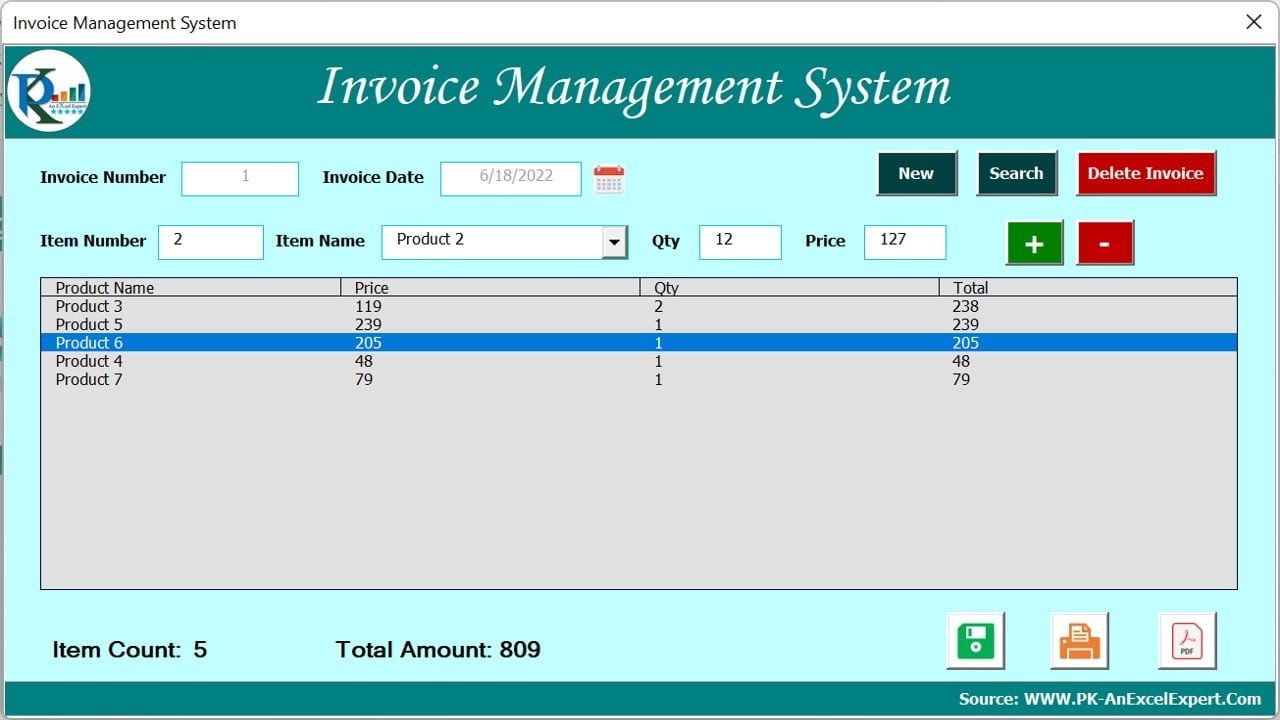
The direct fix for “one invoice at a time”. Everything happens in one Excel VBA form. Click New and the invoice number and date fill in. Pick items from a drop-down, enter quantity and price, and add or remove lines with plus and minus buttons. The form keeps a running item count and total. Search brings back any earlier invoice so you can update it, Delete Invoice removes one, and the buttons along the bottom save, print or export the invoice as a PDF. Item and sales data sit on their own worksheets, so the history stays in the file instead of in dozens of copies.
What it adds over free: numbered, searchable invoices and PDF export from one file.
Best for: small shops and freelancers who sell a fixed list of items. $6.99 – view the Invoice Management System.
2. Professional Invoice Template in Google Sheets
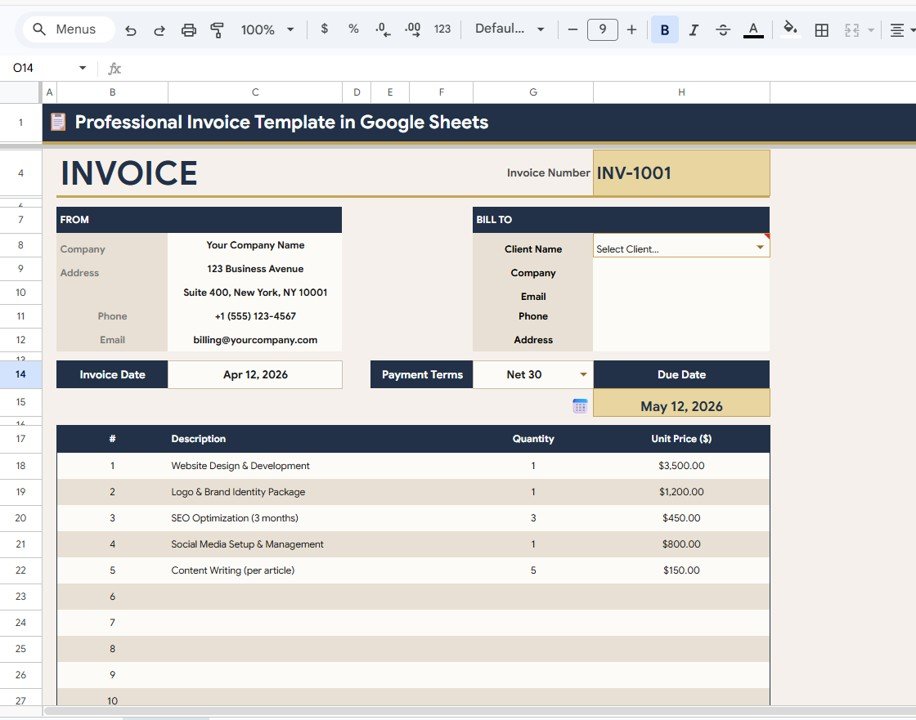
The fix for “no client list”, in Google Sheets. Four linked sheets: an invoice sheet, a client database, an invoice log and settings. Pick a client from the drop-down and their company, email, phone and address fill in. Add line items and the totals calculate. The invoice log tracks every invoice with summary cards for total billed, paid, outstanding and overdue, and statuses of Paid, Sent, Draft or Overdue. In settings you set tax, currency, invoice prefix and payment terms once.
What it adds over free: a client database and an invoice log joined to the invoice itself.
Best for: freelancers and small teams on Google Workspace. $6.99 – view the Professional Invoice Template in Google Sheets.
3. Automatic Invoice Creator V1.0 in Excel VBA

For when you want invoices out fast. You set the tax rate and a folder path once, enter the customer, items and amounts, and the tool builds the invoice with dates, due date and tax worked out. It supports multiple currencies and payment terms, lets you add your logo and company details, and keeps a record of issued invoices and their payment status.
What it adds over free: tax, dates and file output handled for you.
Best for: owners who invoice often and want fewer clicks. $6.99 – view the Automatic Invoice Creator.
4. Client Invoice Tracker Data Entry System in Excel – best value
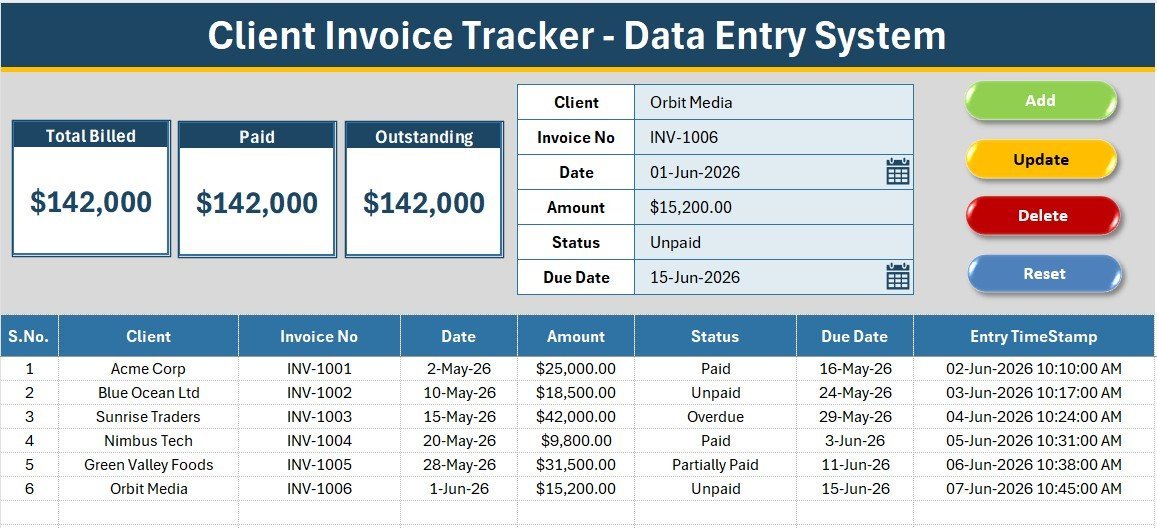
The fix for “no record of who has paid”. A form at the top of the sheet takes six fields: client, invoice number, date, amount, status and due date. Press Add and the row drops into the table with a serial number and an entry timestamp. Three KPI cards show Total Billed, Paid and Outstanding, and Paid plus Outstanding always adds back to Total Billed. Double-click a row to load it back into the form and Update it. The status list (Paid, Unpaid, Overdue, Partially Paid) is edited on the Setting sheet. Setup takes under five minutes: you import one VBA module.
What it adds over free: a paid-versus-owed view of every invoice you send, for $5.99.
Best for: anyone already making invoices in a free template. $5.99 – view the Client Invoice Tracker.
5. Client Billing & Invoice Management Dashboard in Google Sheets
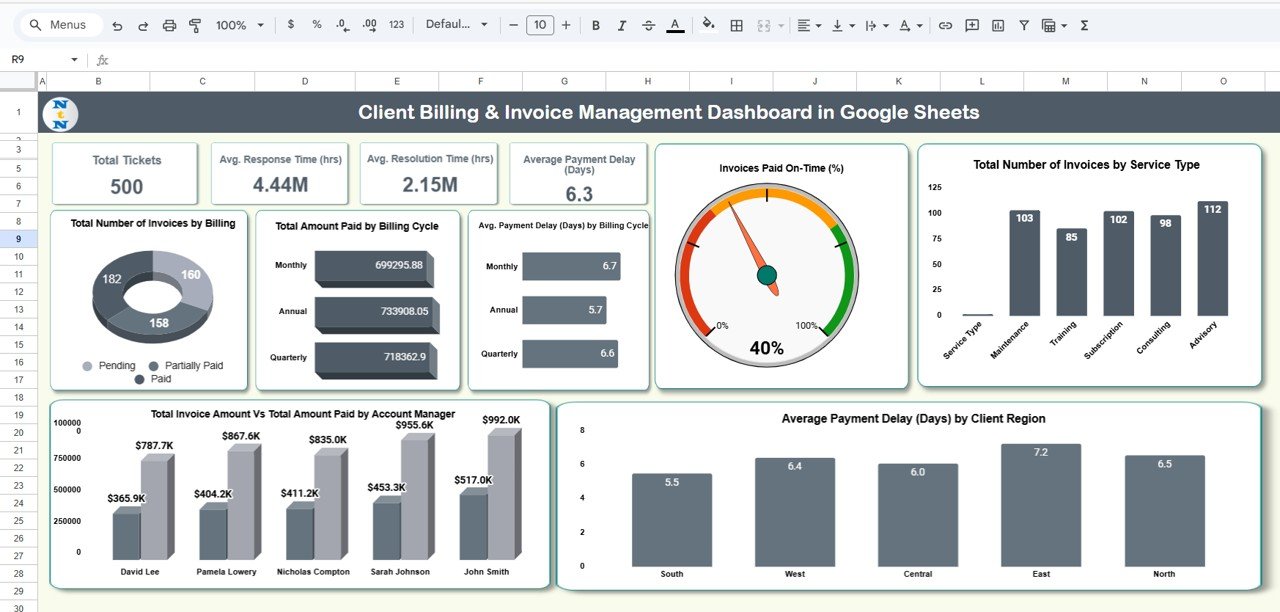
For when you need to see payment behaviour, not just a list. Cards show the number of invoices, total invoice amount, total paid and average payment delay in days. Seven charts cover invoices by billing status (paid, pending, partially paid, overdue), amount paid and average delay by billing cycle, the share paid on time, invoices by service type, delay by client region, and invoiced versus paid by account manager.
What it adds over free: evidence of which clients and services pay late.
Best for: agencies and service firms on Google Sheets. $6.99 – view the Google Sheets billing dashboard.
6. Client Billing Dashboard in Excel
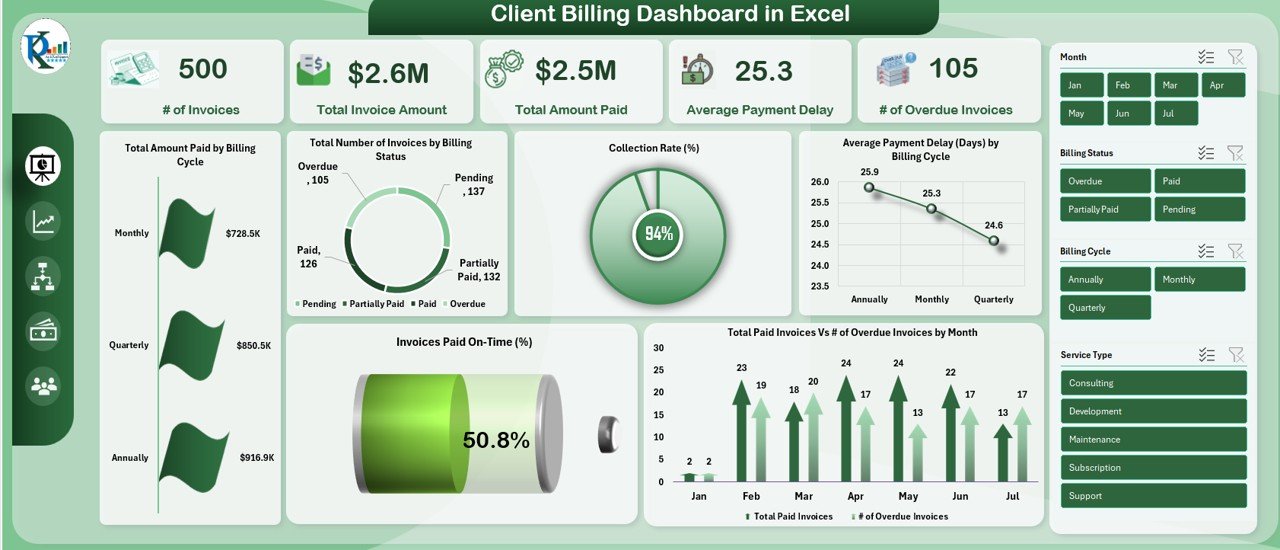
The Excel step up for a finance team. The overview shows number of invoices, total invoiced, total paid, average payment delay and number of overdue invoices, with charts for collection rate, paid on time, and overdue versus paid by month. Separate tabs break billing down by service type, account manager and region, and an aging tab lists the clients who pay slowest. You paste invoice rows into the data tab and every chart updates.
What it adds over free: a collections report you can take into a monthly review.
Best for: finance teams chasing receivables. $17.99 – view the Client Billing Dashboard in Excel.
7. GST Billing Software V1.0
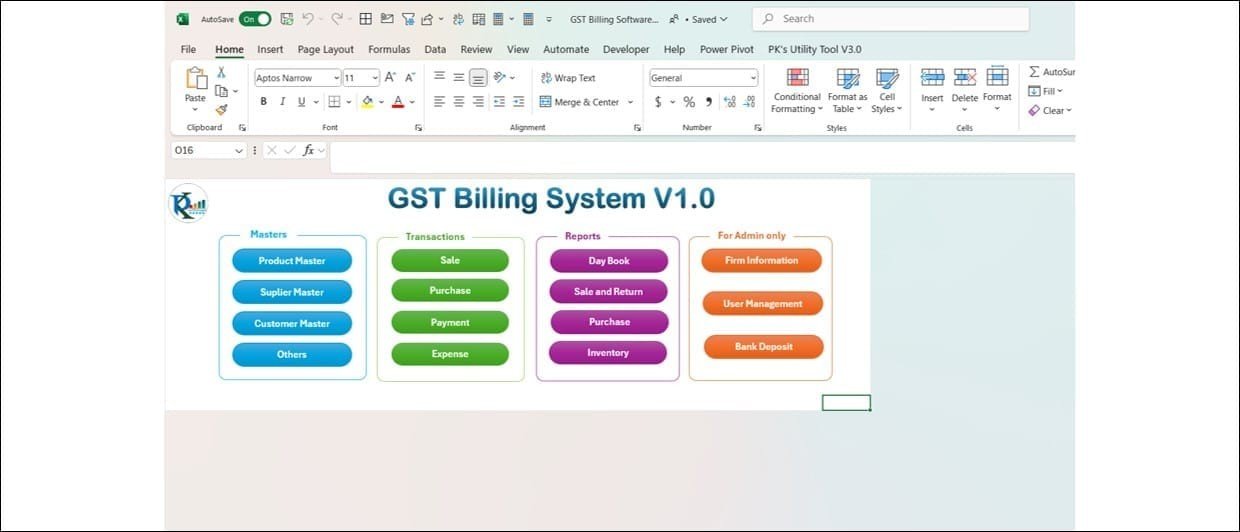
The fix for “no tax logic” in India. It opens with a login (admin and standard users), then a menu in four groups: Masters (product, supplier, customer), Transactions (sale, purchase, payment, expense), Reports (day book, sale and return, purchase, inventory) and an admin area for firm details and users. The sales form works out CGST, SGST and IGST from each product’s GST rate. It accepts cash, UPI, card, cheque and bank transfer, can add products with a barcode scanner, and warns when stock falls below the reorder level.
What it adds over free: GST-correct invoices tied to stock and purchases.
Best for: Indian shops and traders who want desktop billing. $19.99 – view GST Billing Software V1.0.
8. GST Billing System Web App
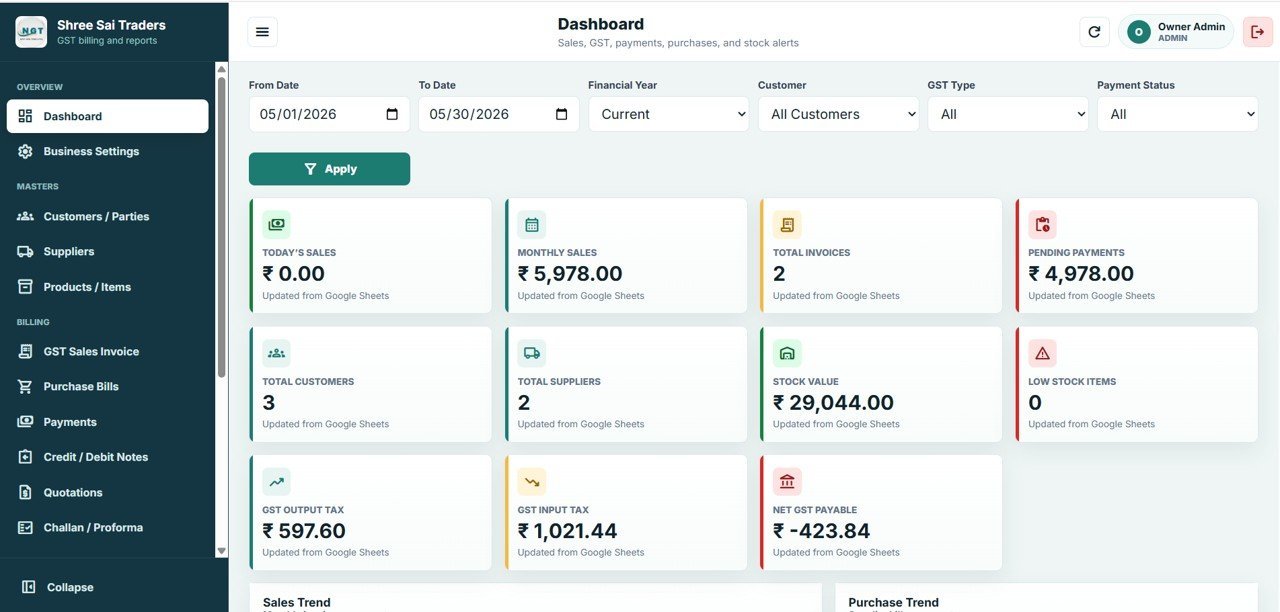
The biggest jump on this list: 11 connected screens running on Google Sheets and Apps Script in your own Google account, deployed in under 15 minutes. Each user signs in with a username and password. The dashboard shows 11 live KPI cards, including today’s and monthly sales, pending payments, stock value, low-stock items, GST output tax, input tax and net GST payable. CGST and SGST apply to sales within the state and IGST to sales outside it, automatically. Customer and supplier masters hold GSTIN, state, B2B or B2C type, credit limit and payment terms, and products carry HSN/SAC codes.
What it adds over free: multi-user GST billing with logins, for a one-time price.
Best for: growing Indian businesses where several people raise bills. $39.99 – view the GST Billing System Web App.
Also worth a look: the Client Billing Dashboard in Power BI ($17.99) is the Power BI twin of upgrade #6. The Client Billing and Payment Tracker in Google Sheets ($6.99) tracks due dates and balances by client. The Invoice Payment Checklist in Excel ($3.49) ticks off incoming and outgoing invoices. If you pay suppliers’ invoices too, the Vendor Payment Dashboard in Excel ($17.99) tracks what you owe.
How to choose between a free and a paid invoice template
| Your situation | Pick | Cost |
|---|---|---|
| A few invoices a month, goods and services mixed | Vertex42 Free Invoice Template (free #1) | Free |
| Hourly billing as a freelancer | Vertex42 Invoice with Hours and Rate (free #3) | Free |
| Client wants Word or Google Docs | Wave or FreshBooks (free #5, #6) | Free |
| Know who has paid and who has not | Client Invoice Tracker Data Entry System in Excel | $5.99 |
| Numbered invoices, search and PDF export in Excel | Invoice Management System V1.0 | $6.99 |
| Client list and invoice log in Google Sheets | Professional Invoice Template in Google Sheets | $6.99 |
| Indian GST with several users | GST Billing System Web App | $39.99 |
A simple rule: if you send fewer than ten invoices a month to a few regular clients, stay free. Once you need to know who owes you, find old invoices fast or split tax correctly, a template built for that job pays for itself the first time it catches a late payment.
Invoice template formulas that matter in Excel
Most invoice errors come from small formula slips. If you build or edit a free invoice template in Excel or Google Sheets, these six formulas cover almost every case:
- Line amount: =ROUND(Qty*UnitPrice,2) rounds each line to cents, so the total matches what the client’s calculator says.
- Taxable subtotal: =SUMIFS(Amount,Taxed,”T”) adds only the lines marked as taxed, the same idea as Vertex42’s Taxed column.
- Tax: =ROUND(TaxableSubtotal*TaxRate,2). Keep the rate in a settings cell, not inside the formula.
- Due date: =InvoiceDate+30 for net 30 terms, or =WORKDAY(InvoiceDate,30) to skip weekends.
- Next invoice number: =”INV-“&TEXT(MAX(Log[No])+1,”0000”) gives INV-0042 style numbers from your invoice log.
- Days overdue: =IF(Status=”Paid”,0,MAX(0,TODAY()-DueDate)) shows how late each unpaid invoice is.
Want to see formulas like these in action? Our YouTube channel has Excel and Google Sheets walk-throughs: youtube.com/@NextGenTemplates. For the wider finance picture, see the finance KPIs to track in 2026.
When a free invoice template is NOT the right answer
- You need your accounts done for you. An invoice template records a sale. It does not post it to a ledger, reconcile the bank or file tax returns. If you need that, use accounting software. Our QuickBooks alternatives guide compares the spreadsheet route with the software route.
- Your country sets what an invoice must show. In the UK, GOV.UK says an invoice must include a unique number, your company name, address and contact details, the customer’s name and address, a description of what you charge for, the supply date, the invoice date, the amounts, VAT if it applies, and the total owed. VAT and GST invoices have more rules. Check yours before trusting any template.
- You must keep records for years. The IRS says most US businesses should keep records for 3 years, and longer in some cases, such as 7 years for a bad debt deduction. A folder of loose invoice files is hard to search later; a log or a system is not.
- You bill hundreds of invoices a month or need card payments built in. At that volume, invoicing software with payment links and automatic reminders is worth the subscription.
Frequently asked questions
Where can I download a free invoice template?
Vertex42’s Free Invoice Template for Excel is the best-built free file, with more than 1.8 million downloads and a Google Sheets version. Vertex42 also offers simple, hourly and tracker templates. Wave, FreshBooks, Zoho Invoice and TemplateLab give away free invoice templates in Excel, Word and PDF. None of them needs a card.
Is there a free invoice template for Google Sheets?
Yes. Vertex42’s free invoice, simple invoice, hourly invoice and invoice tracker all have Google Sheets versions. Wave and FreshBooks offer Google Sheets downloads too. For an invoice with a client database and invoice log built in, the NextGenTemplates Professional Invoice Template in Google Sheets costs $6.99.
Is there a free invoice template for Word?
Yes. Wave, FreshBooks, TemplateLab and Invoice Simple all offer free invoice templates for Word, and Vertex42 has a separate invoice template for Word. Word is fine for a one-off invoice, but it cannot add up line items reliably, so most businesses switch to Excel or Google Sheets once they invoice regularly.
How do I make an invoice template in Excel?
Put your business details and logo at the top, then the client’s details, invoice number, invoice date and due date. Below that, add a table of description, quantity, unit price and amount. Total it with SUM, add a tax line from a rate cell, and save the file as a template so each new invoice starts clean.
What should an invoice include?
Most invoices show a unique invoice number, your name and contact details, the customer’s name and address, the invoice date and due date, a description of each item or service, quantities and prices, any tax, the total due and how to pay. Some countries require more, such as a VAT or GST number.
Are Vertex42 invoice templates free for business use?
Vertex42 offers its invoice templates free under a private-use licence. You can use and edit them in your own business to bill your own clients, but you may not distribute or resell the files. Check the licence line on each download page before sharing a template outside your organisation.
How do I number invoices in a free template?
Free templates leave the number for you to type. Use a simple sequence such as INV-0001, INV-0002, and keep a log of every number so none are skipped or reused. In Excel, a formula such as MAX of the log plus one gives the next number. Paid tools like the Invoice Management System number invoices automatically.
Can a free invoice template track payments?
Not on its own. An invoice template creates the bill; it does not know when the client pays. Vertex42’s free Invoice Tracker adds statuses and an aging summary. For one-click entry with billed, paid and outstanding totals, the NextGenTemplates Client Invoice Tracker in Excel costs $5.99.
When should I upgrade from a free invoice template?
Upgrade when you send more than about twenty invoices a month, when you retype client details every time, when you cannot tell who still owes you, or when tax has to be split by state. NextGenTemplates invoice and billing tools cost $5.99 to $39.99, paid once with no subscription.
Get your free invoice template
Start free with Vertex42’s Free Invoice Template for Excel or Wave’s free invoice templates. When invoices need numbering, searching and PDF export, the Invoice Management System V1.0 is our top upgrade at $6.99. The Client Invoice Tracker Data Entry System is the best value at $5.99, and the GST Billing System Web App runs multi-user GST billing for $39.99.
Need to price a job before you bill it? Start with our list of free quotation templates, then turn the accepted quote into an invoice.
Setting up a small business toolkit? See our small business template bundle guide, the expense tracker Excel templates, and our list of free timesheet templates for billing hours. Paying staff as well? Try our free payslip templates. Buying from suppliers? Send them a proper PO with our free purchase order templates.