

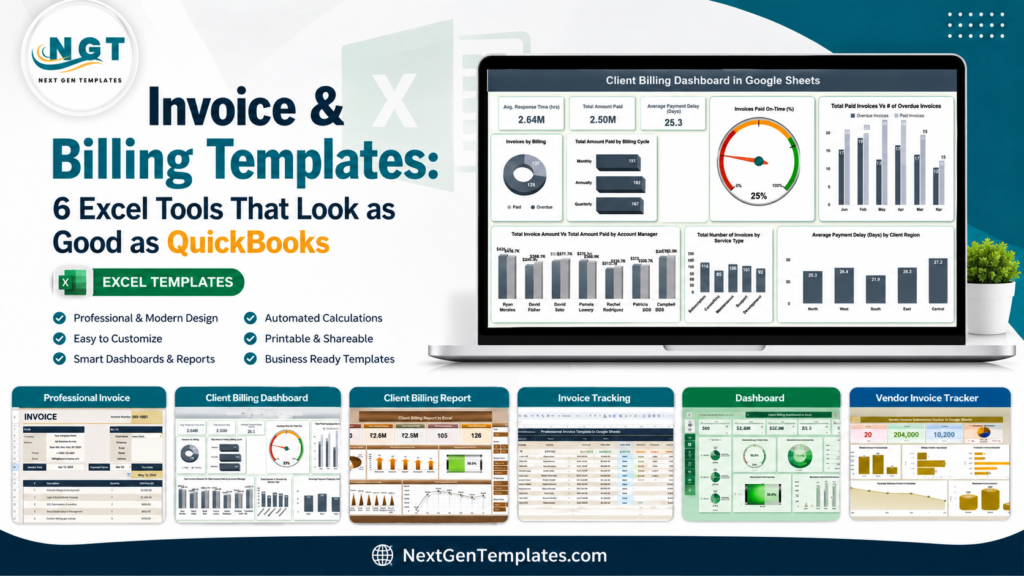
Invoice & Billing Templates Direct answer: an invoice template Excel or Google Sheets billing template is the fastest way for a freelancer, consultant, or small business to create polished invoices, track payments, and monitor overdue balances without committing to a monthly accounting platform.Invoice & Billing Templates
Invoices should do two jobs at once: look professional enough to reassure a client, and give the business owner enough tracking detail to know what has been billed, paid, delayed, or still outstanding. That is where a strong billing template beats a plain PDF or a blank spreadsheet. You get the polished layout buyers expect, plus a working payment log behind it.Invoice & Billing Templates
QuickBooks is excellent accounting software, but its cost can be more than a small team needs when the immediate problem is invoicing and billing visibility. At the time of writing, QuickBooks Online lists Simple Start at $38/month before promotions, Essentials at $75/month, Plus at $115/month, and Advanced at $275/month on the official QuickBooks Online pricing page. The highest-priced template in this roundup is a one-time $17.99 purchase. This guide compares 6 invoice and billing templates that help you create better invoices, track payment status, manage GST/VAT-style tax fields where relevant, and see billing performance without paying for a full SaaS stack.Invoice & Billing Templates
Why Invoice Design and Billing Tracking Matter Invoice & Billing Templates
Clean invoices are not cosmetic. For small businesses, payment speed, client confidence, tax clarity, and collection follow-up all connect back to how billing is organized.
- 36.2 million small businesses compete for attention. The U.S. Small Business Administration reported that the United States has 36.2 million small businesses, accounting for almost 46 percent of private-sector employment. A professional billing workflow helps small firms look organized from the first invoice. Source: SBA Office of Advocacy.Invoice & Billing Templates
- Freelancers need client-ready billing. Upwork reported that 64 million Americans, or 38 percent of the U.S. workforce, performed freelance work in 2023. That means invoice design is not just an accounting task; it is part of the client experience. Source: Upwork Freelance Forward.Invoice & Billing Templates
- Unpaid invoices are a cash-flow risk. The 2025 Intuit QuickBooks Small Business Late Payments Report found that 56 percent of surveyed small businesses were owed money from unpaid invoices, averaging $17.5K per business.Invoice & Billing Templates
- Late payments need a tracking system. The same QuickBooks report found that 47 percent of businesses had some invoices overdue by more than 30 days, with nearly 1 in 10 invoices falling into that overdue category.Invoice & Billing Templates
- Billing delays affect operating decisions. Businesses with higher overdue-invoice volume were more likely to report cash-flow issues, which is why dashboards, payment-delay fields, and overdue alerts matter even in a simple invoice generator. Source: QuickBooks Late Payments Report 2025.
Compare the 6 Invoice and Billing Templates
Use this table as the quick filter. If you want the most QuickBooks-like experience in Excel, start with the Excel dashboard. If you want simple cloud invoicing, start with the Google Sheets invoice template.
| Template | Format | Best For | Price |
|---|---|---|---|
| Professional Invoice Template in Google Sheets | Google Sheets | Freelancers and small businesses that need a professional invoice generator with client records, tax, currency, and payment status settings | $6.99 |
| Client Billing & Invoice Management Dashboard in Google Sheets | Google Sheets | Teams that want cloud billing analytics, invoice status, payment delay, account manager, and client-region reporting | $6.99 |
| Client Billing Dashboard in Google Sheets | Google Sheets | Finance teams and startups that need a lighter collaborative dashboard for invoices, payment delays, and overdue follow-up | $6.99 |
| Client Billing Report in Excel | Excel | Accountants, consultants, and finance managers who prefer Excel reports, pivot-table analysis, and monthly billing summaries | $6.99 |
| Client Billing Dashboard in Excel | Excel | Small businesses that want a more complete Excel billing dashboard with service, region, account manager, aging, and delay views | $17.99 |
| Vendor Invoice Submission Tracker in Google Sheets | Google Sheets | Accounts payable, procurement, vendor approvals, multi-currency invoice submission, and department-level vendor tracking | $6.99 |
The 6 Best Invoice Template Excel and Billing Template Options
1. Professional Invoice Template in Google Sheets
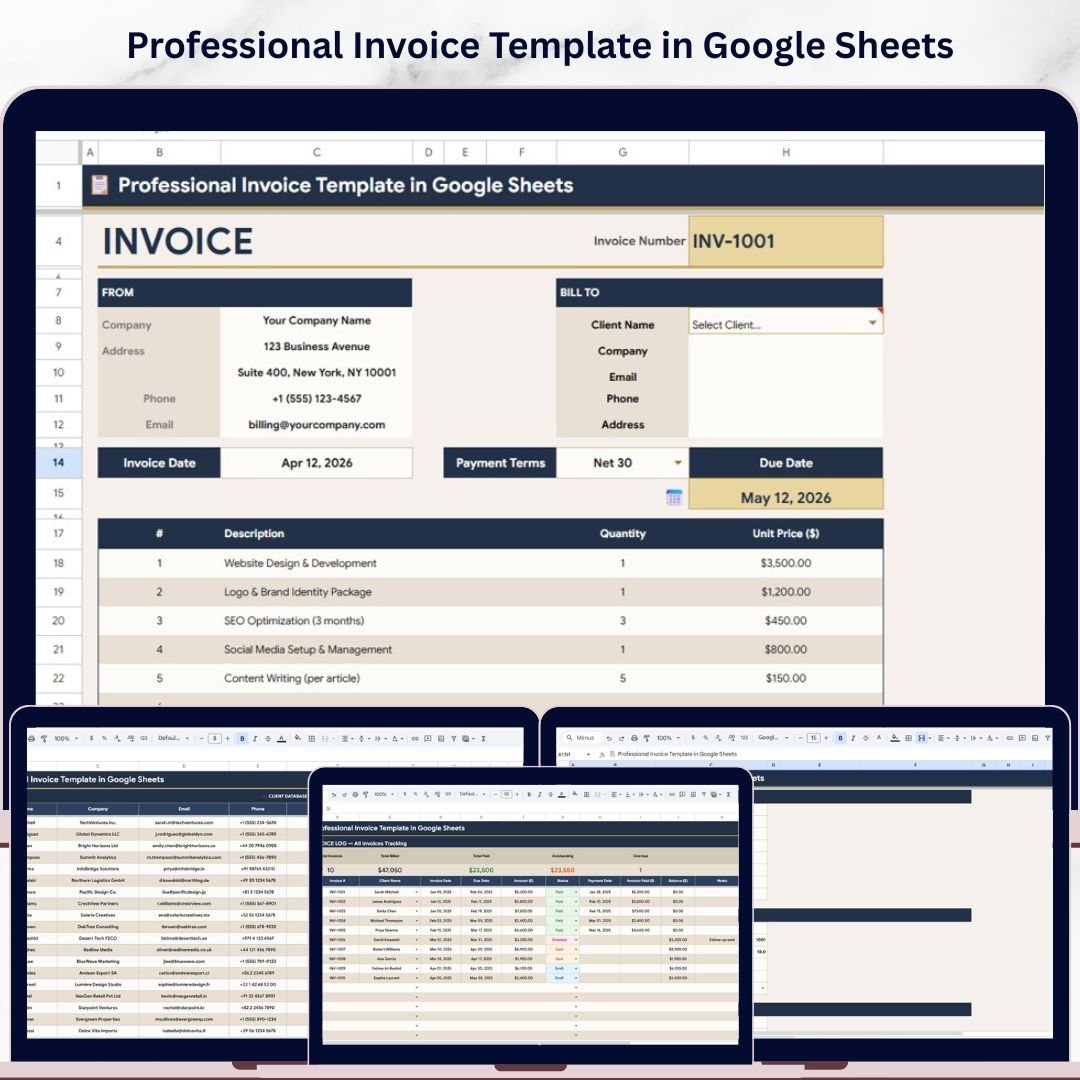
The Professional Invoice Template in Google Sheets is the best fit when your first priority is a clean, client-facing invoice design. It is a true invoice generator, not just a billing report. You select a client, fill line items, and use the built-in structure to manage invoice details, payment status, tax, currency, invoice prefix, terms, and client data.
Screenshot: what you see inside. The product preview shows a professional invoice sheet, client database, invoice log, and settings page. The invoice log tracks total invoices, billed amounts, paid amounts, outstanding amounts, and overdue amounts, which makes it useful for solo operators who want a simple accounts receivable view without opening a separate accounting app.Invoice & Billing Templates
Best use cases:
- Freelancers sending polished invoices to U.S. or international clients.
- Small service businesses that need custom tax, GST/VAT-style labels, currency, and payment terms.Invoice & Billing Templates
- Consultants managing recurring client invoices and due dates.
- Finance assistants who need one shared billing file in Google Drive.Invoice & Billing Templates
Price: $6.99. Get the Professional Invoice Template in Google Sheets.
2. Client Billing & Invoice Management Dashboard in Google Sheets
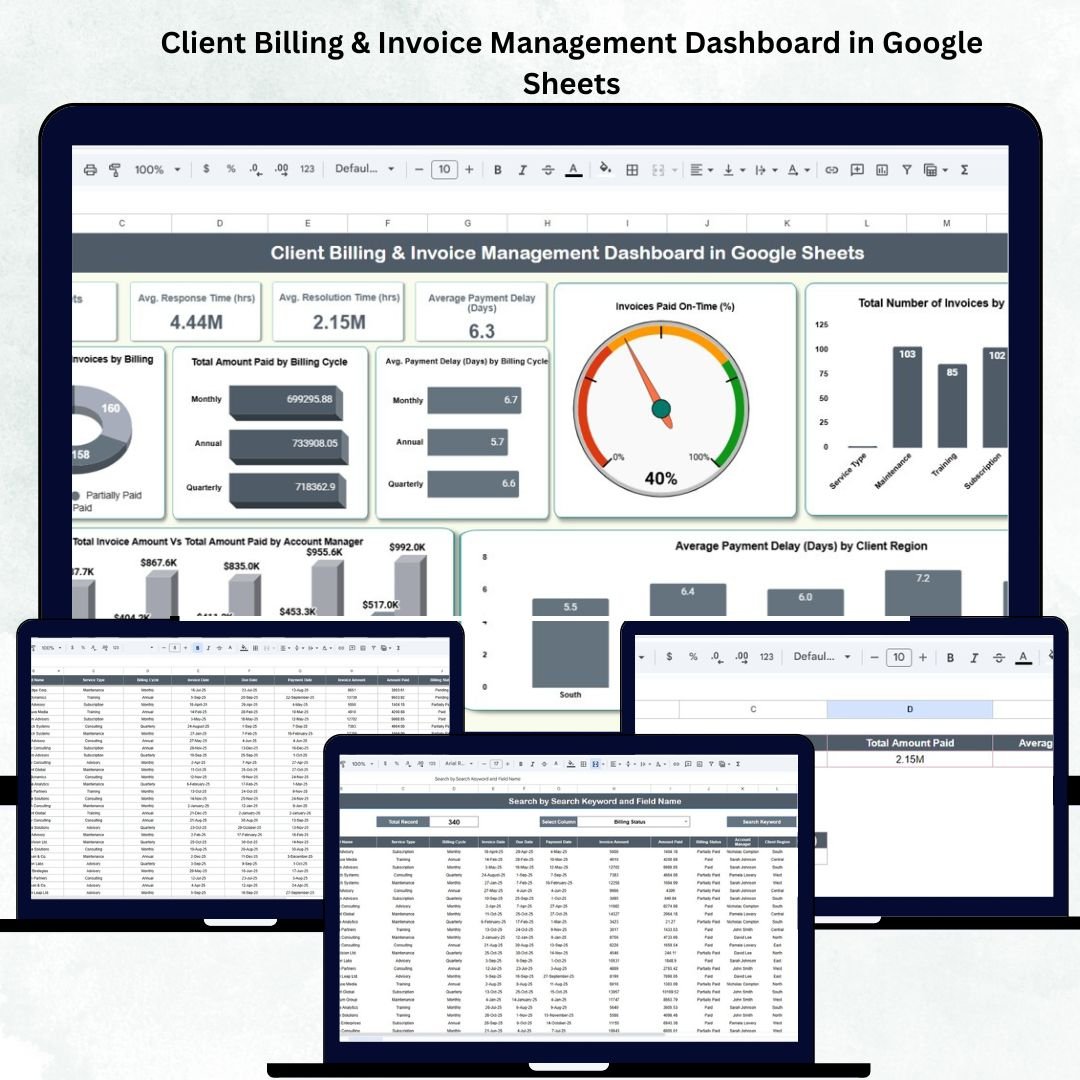
The Client Billing & Invoice Management Dashboard in Google Sheets is for teams that already create invoices but lack visibility into payment performance. It turns billing records into KPI cards, charts, and searchable invoice data so a manager can see how many invoices were issued, how much was paid, and where delays are happening.Invoice & Billing Templates
Screenshot: what you see inside. The dashboard view includes cards for number of invoices, total invoice amount, total amount paid, and average payment delay. The chart set breaks performance down by billing status, billing cycle, service type, client region, account manager, and on-time payment percentage. A search sheet helps locate invoices by invoice ID, client, billing status, service type, account manager, or region.Invoice & Billing Templates
Best use cases:
- Finance teams that want real-time collaborative billing analytics.
- Account managers who need to compare billed versus paid amounts.
- Agencies tracking monthly, quarterly, or annual billing cycles.
- Small businesses that want payment-delay insights without SaaS reporting costs.
Price: $6.99. View the Client Billing & Invoice Management Dashboard in Google Sheets.
3. Client Billing Dashboard in Google Sheets
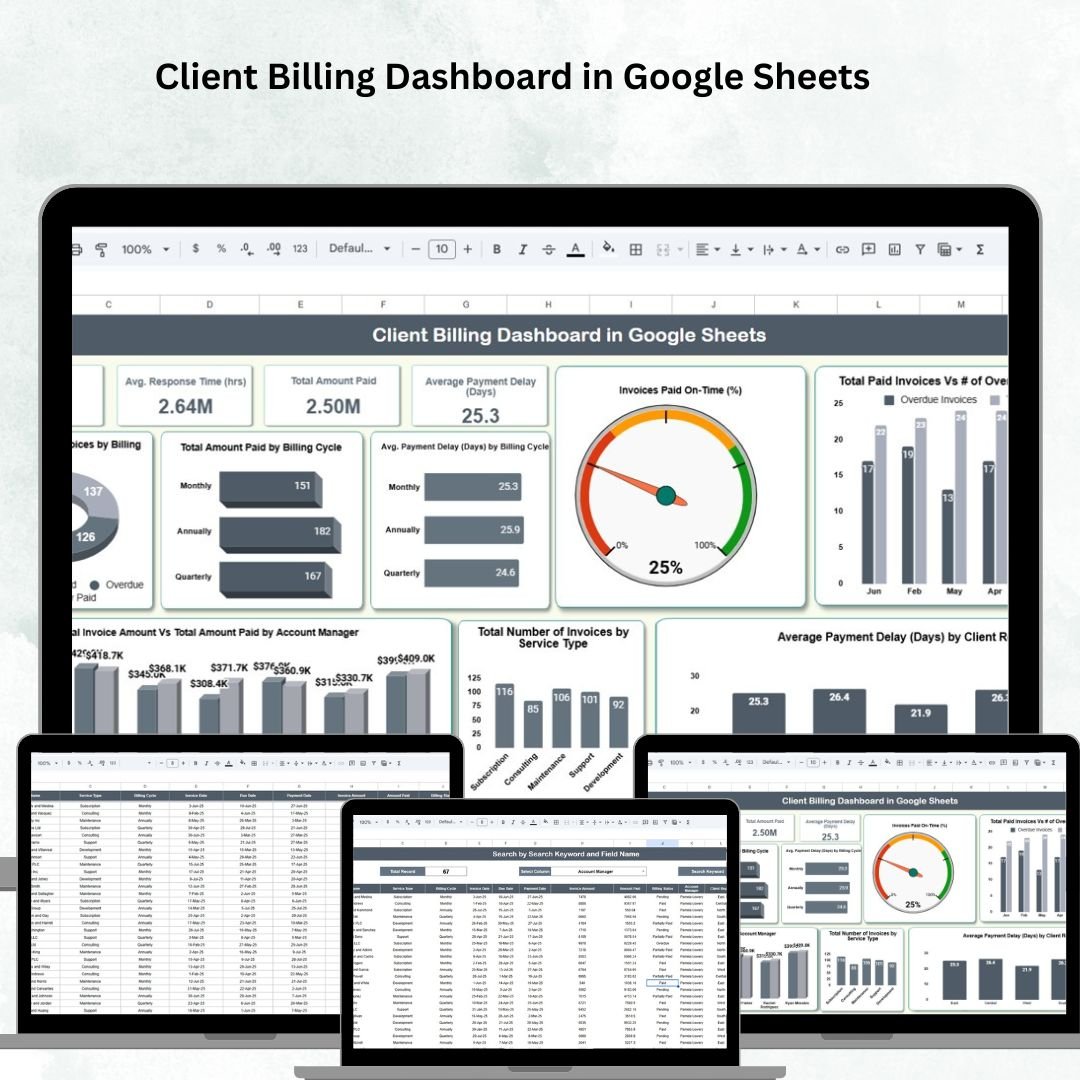
The Client Billing Dashboard in Google Sheets is a lighter dashboard option for users who want billing visibility but do not need a larger management system. It tracks invoices, payment amounts, billing cycles, payment delays, client regions, account managers, and on-time payment performance in a collaborative Google Sheets format.Invoice & Billing Templates
Screenshot: what you see inside. The template includes a dashboard sheet with KPI cards for invoice count, total invoice amount, total amount paid, and average payment delay. It also includes charts for billing status, paid amount by cycle, payment delay by cycle, paid vs overdue invoices by month, payment delay by region, and invoice amount versus amount collected by account manager. A search sheet and data sheet make the file practical for daily use.Invoice & Billing Templates
Best use cases:
- Startups that need a simple shared billing dashboard.
- Finance teams tracking overdue invoices and payment delays.
- Service firms that want account manager billing accountability.
- Remote teams that need Google Sheets access from anywhere.
Price: $6.99. Explore the Client Billing Dashboard in Google Sheets.
4. Client Billing Report in Excel
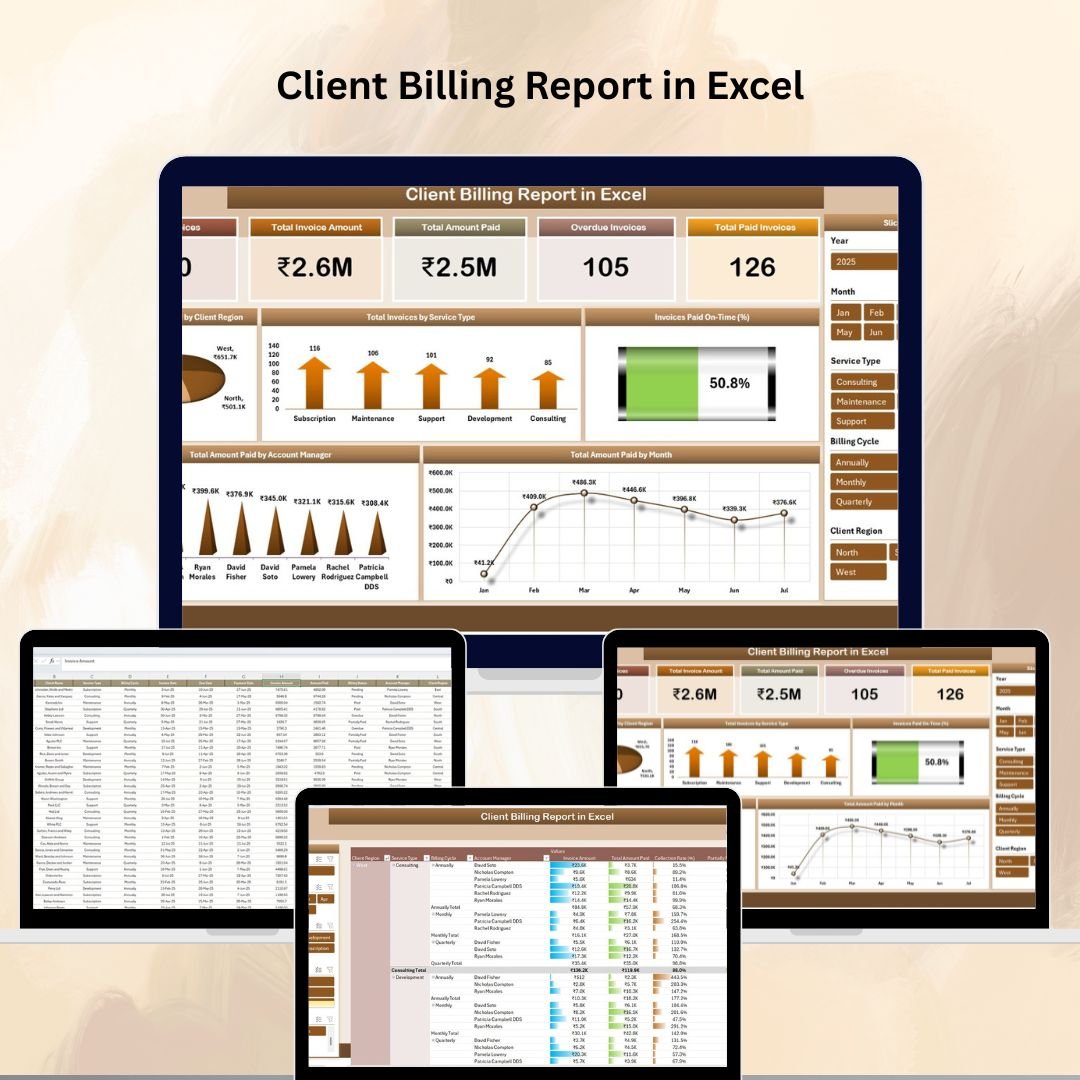
The Client Billing Report in Excel is best for users who prefer Excel reporting over cloud dashboards. It is a strong option for accountants, finance managers, and consultants who want structured invoice data, pivot-table analysis, and summary charts without rebuilding a workbook from scratch.Invoice & Billing Templates
Screenshot: what you see inside. The preview shows a summary sheet with cards for total invoices, total invoice amount, total amount paid, overdue invoices, and paid invoices. Charts show amount paid by client region, invoices by service type, on-time payment percentage, paid amount by account manager, and paid amount by month. A data sheet acts as the billing database, while the pivot table report sheet gives you flexible filtering.Invoice & Billing Templates
Best use cases:
- Excel users who need a billing report for management meetings.
- Accountants comparing overdue versus paid invoices.
- Consultants tracking payment patterns by month, client, service, or region.
- Small businesses that want billing insights but not full accounting software.
Price: $6.99. Download the Client Billing Report in Excel.
5. Client Billing Dashboard in Excel
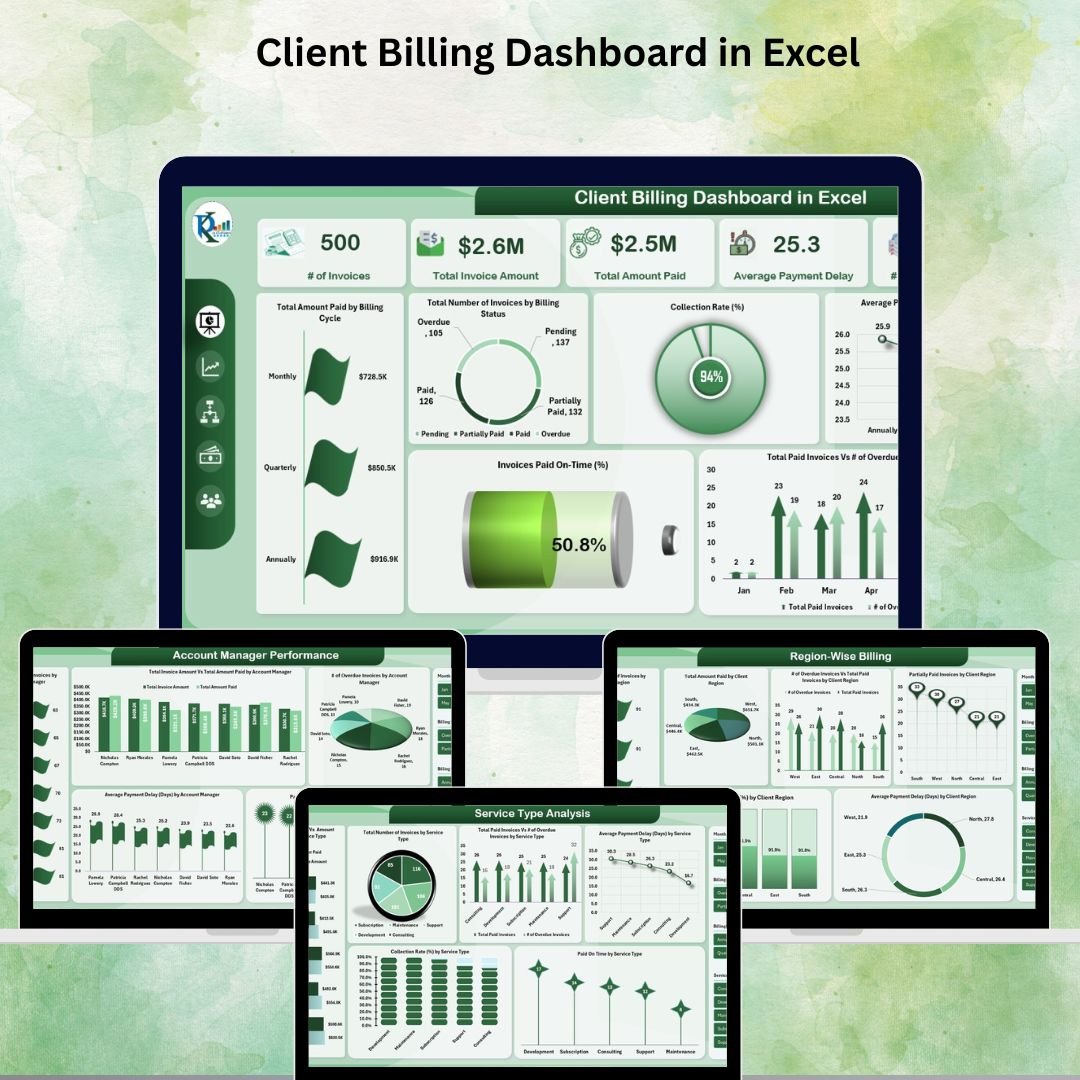
The Client Billing Dashboard in Excel is the strongest pick in this roundup if you want the closest spreadsheet-based alternative to a dedicated billing dashboard. It is more expensive than the other templates at $17.99, but it also gives the deepest Excel dashboard experience: overview metrics, service-type analysis, region-wise billing, account manager performance, aging, delay insights, and raw billing data entry.
Screenshot: what you see inside. The overview sheet shows invoice count, total invoice amount, total amount paid, average payment delay, and overdue invoices. The chart set includes amount paid by billing cycle, invoices by billing status, average delay by cycle, collection rate, paid on-time percentage, and overdue versus paid trend by month. Additional tabs support service, region, account manager, and delayed-client analysis.Invoice & Billing Templates
Best use cases:
- Small businesses that want a one-time Excel billing command center.
- Finance teams measuring collection rate and paid-on-time percentage.
- Agencies comparing billing performance by account manager or region.
- Owners replacing ad hoc invoice trackers with a structured dashboard.
Price: $17.99. Get the Client Billing Dashboard in Excel.
6. Vendor Invoice Submission Tracker in Google Sheets

The Vendor Invoice Submission Tracker in Google Sheets handles the other side of billing: vendor invoices, approvals, departments, currencies, and payment status. If client invoicing is accounts receivable, this template is built for accounts payable and procurement workflows.
Screenshot: what you see inside. The tracker sheet includes cards for total invoice count, total invoice amount, and average invoice amount. Visual charts break invoices down by payment status, invoice status, invoice category, department, payment method, currency, and approver. The search sheet lets you find vendor invoices by field and keyword, while the data sheet stores vendor name, invoice date, amount, due date, payment status, late fees, category, department, PO number, approval details, payment method, currency, notes, and remarks.
Best use cases:
- Procurement teams collecting vendor invoice submissions.
- Finance teams monitoring approvals, late fees, and payment status.
- International businesses tracking invoice currency and department spend.
- Owners who need vendor records organized for audits and reconciliation.
Price: $6.99. Use the Vendor Invoice Submission Tracker in Google Sheets.
How to Choose Between These Billing Templates
The best invoice template is the one that matches your workflow. Do not start with the most complex file if your current problem is simply creating a good-looking invoice. Do not start with a plain invoice generator if your real pain is payment follow-up and overdue balances.
Choose a professional invoice generator if you send invoices manually. The Professional Invoice Template in Google Sheets is the best first choice for freelancers, consultants, coaches, agencies, and service businesses that need clean client-facing invoices with editable settings for tax, currency, prefix, terms, and client details.
Choose a Google Sheets dashboard if your team collaborates online. The Client Billing & Invoice Management Dashboard in Google Sheets gives the broadest collaborative reporting view, while the Client Billing Dashboard in Google Sheets is a simpler option when you mainly need invoice status, delay, region, and account manager charts.
Choose Excel if you want offline control and deeper workbook reporting. The Client Billing Report in Excel is ideal for pivot-table users and management reports. The Client Billing Dashboard in Excel is better if you want a more complete dashboard that can sit next to your invoice files and give a QuickBooks-style overview for a one-time price.
Choose vendor tracking if your pain is accounts payable. The Vendor Invoice Submission Tracker in Google Sheets is not a client invoice generator. It is for incoming vendor invoices, approval control, PO references, currencies, departments, and payment status.
For GST, VAT, or international clients, choose templates with editable tax and currency fields. The Professional Invoice Template is the clearest fit for client-facing tax labels and currency setup. The vendor tracker is useful when you need currency visibility across vendor submissions. For tax reporting, always confirm local compliance rules with your accountant before sending final invoices.
Frequently Asked Questions
What is the best invoice template Excel option for small businesses?
The best Excel option is the Client Billing Dashboard in Excel if you want a full billing dashboard, and the Client Billing Report in Excel if you want a lighter report. Both help track invoice amount, payment status, overdue balances, and billing performance.
Can an invoice template replace QuickBooks?
An invoice template can replace QuickBooks for simple invoice creation, billing tracking, and payment follow-up. It does not replace full bookkeeping, bank feeds, payroll, tax filing, or accounting reconciliation. If you only need a professional billing template or invoice generator, a spreadsheet template may be enough.
Which template is best for freelancers?
The Professional Invoice Template in Google Sheets is the best fit for freelancers because it combines invoice design, client database, invoice log, payment status, tax settings, currency settings, and payment terms in one cloud-based file.
Which billing template works best for team collaboration?
The Google Sheets options work best for team collaboration. Choose the Client Billing & Invoice Management Dashboard in Google Sheets when multiple team members need to update billing records and review dashboard metrics in the same shared file.
Do these templates support GST or VAT?
The Professional Invoice Template in Google Sheets includes customizable tax, currency, invoice prefix, and payment term settings, making it the best fit for GST/VAT-style invoice labels. Because tax rules vary by country, review your final invoice wording and rates with your accountant.
What is the difference between an invoice template and a billing dashboard?
An invoice template creates the client-facing invoice. A billing dashboard tracks performance after invoices are sent: total invoiced, total paid, overdue balances, payment delays, client regions, service types, account managers, and collection trends.
Can I track overdue invoices with these templates?
Yes. The billing dashboards and reports in this roundup include fields or charts for overdue invoices, billing status, payment delay, on-time payment percentage, or paid versus overdue trends. That makes them useful for weekly collection follow-up.
Are these templates one-time purchases?
Yes. Each featured NextGenTemplates product in this roundup is listed as a one-time template purchase, with prices ranging from $6.99 to $17.99 at the time of lookup. That is different from monthly accounting SaaS pricing.
Which template is best for vendor invoices?
The Vendor Invoice Submission Tracker in Google Sheets is the best choice for vendor invoices because it tracks invoice submission, payment status, invoice status, category, department, PO number, approver, payment method, currency, late fees, and remarks.
How often should I update billing records?
Update billing records whenever an invoice is created, sent, partially paid, fully paid, or overdue. For most freelancers and small businesses, a weekly review is enough. For higher-volume teams, daily updates keep cash-flow and collection dashboards more accurate.
Final Recommendation
If you want the cleanest client-facing invoice generator, start with the Professional Invoice Template in Google Sheets. If you want the most complete one-time Excel alternative to a monthly billing dashboard, choose the Client Billing Dashboard in Excel. If your team collaborates in the cloud, the Client Billing & Invoice Management Dashboard in Google Sheets gives a practical mix of invoice analytics and shared access.
Related: Invoicing is one job; the reporting above it is another. If QuickBooks’ August 2026 price rise pushed you to look elsewhere, see our QuickBooks alternatives — 8 accounting templates in Excel & Sheets — one-time dashboards for cash flow, receivables and financial KPIs from $8.99.
Built by PK – Microsoft Certified Professional with 15+ years of Excel, Google Sheets, and Power BI experience. Founder of NextGenTemplates, reaching 300K+ subscribers across YouTube channels. Every template is hand-built and tested before release.
For walkthroughs and template tutorials, visit the NextGenTemplates YouTube channel.