



Managing refinery projects is never simple. Tight timelines, massive capital investments, engineering milestones, safety targets, and cost controls must all stay perfectly aligned. However, when project data lives in scattered Excel files or static reports, teams lose visibility and control. That is exactly why the Refinery Project KPI Dashboard in Power BI is a game-changing solution for modern refinery project management.
This ready-to-use Power BI dashboard transforms raw project data into clear KPIs, performance indicators, trend analysis, and target comparisons. As a result, project managers and leadership teams can monitor progress, detect risks early, and make confident, data-driven decisions—without manual reporting chaos.
Built using Excel as the data source and Power BI as the analytics layer, this dashboard delivers enterprise-level insights while keeping implementation simple and flexible.
🚀 Key Features of Refinery Project KPI Dashboard in Power BI
📊 Centralized Project KPI Monitoring
Track all refinery project KPIs in one interactive Power BI report instead of juggling multiple spreadsheets.
📅 Dynamic Month & KPI Group Slicers
Filter performance instantly by reporting month or project category for focused analysis.
🎯 MTD & YTD Target vs Actual Tracking
Monitor Month-to-Date and Year-to-Date performance with automatic calculations.
🚦 LTB & UTB KPI Logic Support
Built-in logic for Lower the Better and Upper the Better KPIs ensures accurate status indicators.
📈 Interactive KPI Trend Analysis
Analyze KPI performance over time using MTD and YTD trend charts.
📋 Detailed KPI Performance Table
View Actual, Target, Previous Year, and variance metrics in one structured table.
🔍 Drill-Through KPI Definition Page
Access KPI formulas, definitions, units, and logic instantly for complete clarity.
⚡ Excel-Based Data Entry
Update KPI data easily without advanced Power BI or database skills.

📦 What’s Inside the Refinery Project KPI Dashboard in Power BI
🧾 Summary Page
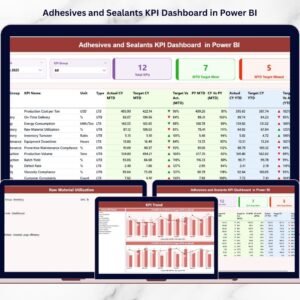
A high-level overview showing total KPIs, MTD target met, and MTD target missed counts, along with a detailed KPI performance table.
📈 KPI Trend Page
Two combo charts displaying Current Year Actual, Previous Year Actual, and Target values for both MTD and YTD trends.
📘 KPI Definition Page
A drill-through page that explains KPI formulas, definitions, units, and LTB/UTB logic for better understanding and governance.
📊 Excel Data Model
Predefined Excel templates for Actuals, Targets, and KPI Definitions to ensure structured and consistent data entry.
🛠️ How to Use the Refinery Project KPI Dashboard in Power BI
1️⃣ Enter actual KPI values in the Excel Input_Actual sheet
2️⃣ Update target values in the Excel Input_Target sheet
3️⃣ Define KPIs clearly in the KPI Definition sheet
4️⃣ Refresh the Power BI report
5️⃣ Use slicers, tables, and charts to analyze performance instantly
Because of this simple workflow, teams reduce manual effort and improve reporting accuracy from day one.
👥 Who Can Benefit from This Refinery Project KPI Dashboard
🏗️ Project Managers – Track milestones, schedules, and performance gaps
⚙️ Engineering Teams – Monitor technical KPIs and execution trends
🏭 Refinery Operations Leaders – Gain full project visibility
📊 PMO Offices – Standardize KPI reporting across projects
💰 Finance & Cost Control Teams – Monitor budget-related KPIs
👔 Executive Leadership – Make faster, confident strategic decisions
This dashboard supports better governance, transparency, and accountability across the entire refinery project lifecycle.
Click here to read the Detailed Blog Post
Watch the step-by-step video tutorial:
Visit our YouTube channel to learn step-by-step video tutorials
Compatibility and Requirements
- Works in Power BI Desktop, which is free to download. Microsoft explains the install in Get Power BI Desktop.
- Your KPI data is entered in Excel workbook sheets (Input_Actual, Input_Target and KPI Definition), then you refresh the Power BI report.
Frequently Asked Questions
Which pages are included?
Three pages: Summary, KPI Trend and KPI Definition. The Summary page shows total KPIs, MTD target met and MTD target missed counts, and a KPI performance table.
Where do I enter my data?
Enter actual values in the Excel Input_Actual sheet and target values in the Input_Target sheet. Describe each KPI in the KPI Definition sheet, then refresh the Power BI report.
Does it handle both lower-the-better and upper-the-better KPIs?
Yes. The dashboard has built-in LTB (Lower the Better) and UTB (Upper the Better) logic, so the status indicators match the type of each KPI.
Can I compare this year with last year?
Yes. The KPI Trend page has two combo charts showing Current Year Actual, Previous Year Actual and Target for both MTD and YTD. The KPI table also shows Previous Year figures.
Is there an Excel version?
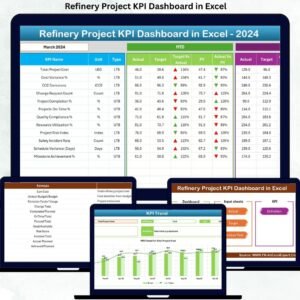
Yes. See the Refinery Project KPI Dashboard in Excel.
Related Refinery and Project Templates
- Refinery Project KPI Dashboard in Excel: the same KPI dashboard in Excel
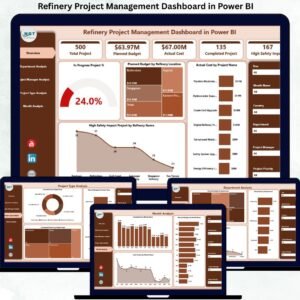
- Refinery Project Management Dashboard in Power BI: a project management view in Power BI
- Refinery Project Management Dashboard in Excel: the project management dashboard in Excel
- Project Management Dashboard in Excel: a general project dashboard
- Power BI Dashboard Mega Collection: 15 Power BI templates in one download
Browse all Power BI KPI dashboards.





























Reviews
There are no reviews yet.