



The Hotel Booking Checklist Template in Excel is a must-have tool for travelers looking to stay organized when booking and managing hotel reservations. Whether you’re planning a solo trip, family vacation, or business stay, this customizable checklist helps you keep track of hotel details, amenities, costs, and more to ensure a smooth and stress-free booking experience.
This easy-to-use Excel template allows you to input and track important hotel information, from booking dates and payment details to cancellation policies and special requests. With built-in features for tracking and organizing all aspects of your hotel bookings, you can ensure that everything is confirmed and well-planned before your trip.
Key Features of the Hotel Booking Checklist Template in Excel
🏨 Comprehensive Hotel Booking Management
Track all your hotel reservations, including booking dates, check-in and check-out times, room types, and special requests. Keep everything in one place and avoid booking confusion.
⚡ Real-Time Booking Updates
Monitor and update your hotel bookings as needed. Track payment status, cancellation policies, and additional services for each reservation to avoid any surprises.
📊 Detailed Information Breakdown
Organize your hotel information into categories such as room rates, amenities, payment details, and contact information for easy access.
📅 Customizable for Your Travel Needs
Adapt the checklist to suit your travel style. Whether you’re booking a luxury resort or a budget hotel, customize the sections to meet your specific hotel booking requirements.
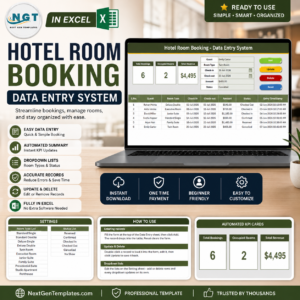
📈 Booking Status Dashboard
Visualize your booking progress with an interactive dashboard that summarizes your reservations, payment status, and check-in/check-out dates.
🖥️ User-Friendly Interface
The simple design makes it easy to input, update, and track your hotel booking details, ensuring that you are always prepared for your stay.
Why You’ll Love the Hotel Booking Checklist Template

✅ Stay Organized and On-Track
Track and manage your hotel bookings in one place, making it easier to stay organized and avoid confusion.
✅ Track Payment & Reservation Details
Monitor your payments, cancellation policies, and special requests for each reservation, ensuring that everything is confirmed.
✅ Customizable for Any Type of Stay
Whether you’re booking a business hotel, a family resort, or a luxury vacation stay, the checklist can be tailored to fit your specific needs.
✅ Visualize Your Booking Progress
Use the dashboard to get an overview of your hotel bookings, payment statuses, and special requests in one place.
✅ Make Your Stay Stress-Free
By staying organized with this checklist, you can focus on enjoying your trip rather than worrying about booking details.
What’s Inside the Hotel Booking Checklist Template?
- Hotel Reservation Overview: Track essential details like booking dates, room types, and special requests.
- Payment & Billing Information: Monitor payment statuses and ensure all charges are tracked.
- Cancellation & Policies: Keep track of cancellation policies, deposit information, and booking terms.
- Booking Status Dashboard: A visual summary showing your reservations, payments, and check-in/check-out dates.
- Customizable Sections: Modify the checklist to suit your specific hotel booking needs and travel style.
How to Use the Hotel Booking Checklist Template
1️⃣ Download the Template: Instantly access your hotel booking checklist.
2️⃣ Input Hotel Reservation Details: Enter your booking information, including dates, room type, and special requests.
3️⃣ Track Payments & Policies: Monitor payment statuses and keep track of cancellation policies.
4️⃣ Review Your Booking Details: Use the dashboard to visualize your bookings and ensure everything is organized before your trip.
Who Can Benefit from the Hotel Booking Checklist Template?
🔹 Travelers Planning a Vacation or Business Trip
🔹 Individuals Booking Multiple Hotel Stays
🔹 Travel Planners Organizing Group Bookings
🔹 Families, Solo Travelers, and Couples
🔹 Anyone Looking to Stay Organized While Booking Hotels
Ensure your hotel reservations are fully organized and trackable with this customizable, easy-to-use hotel booking checklist.
Click here to read the Detailed blog post
Visit our YouTube channel to learn step-by-step video tutorials
Youtube.com/@PKAnExcelExpert
Compatibility and Requirements
- Works in Microsoft Excel desktop (Excel 2016 or later, or Microsoft 365).
- The booking status dashboard uses standard Excel charts. Microsoft explains them in Create a chart from start to finish.
Frequently Asked Questions
What can I record for each booking?
Booking dates, check-in and check-out times, room types, room rates, amenities, contact details and special requests.
Can I track payments and cancellation terms?
Yes. Each reservation has fields for payment status, cancellation policy, deposit information and booking terms.
What does the dashboard show?
A summary of your reservations, payment status and check-in and check-out dates.
Can I track more than one hotel stay?
Yes. You can list several reservations, which suits trips with multiple stays or group bookings.
Can I change the sections?
Yes. You can add or change sections to match your trip, from a budget hotel to a resort.
Related Hotel and Travel Templates
- Hotel Booking Checklist in Google Sheets: the same checklist in Google Sheets
- Hotel Room Booking Data Entry System in Excel: records room bookings for a hotel
- Travel Expense Report Tracker in Excel: tracks what each trip costs
- Business Travel Plan Tracker and Dashboard: plans business trips with a dashboard
- Checklist & SOP Pack: 12 premium Excel and Google Sheets checklists in one bundle
Browse all Excel checklists or the Excel planners.






























Reviews
There are no reviews yet.