

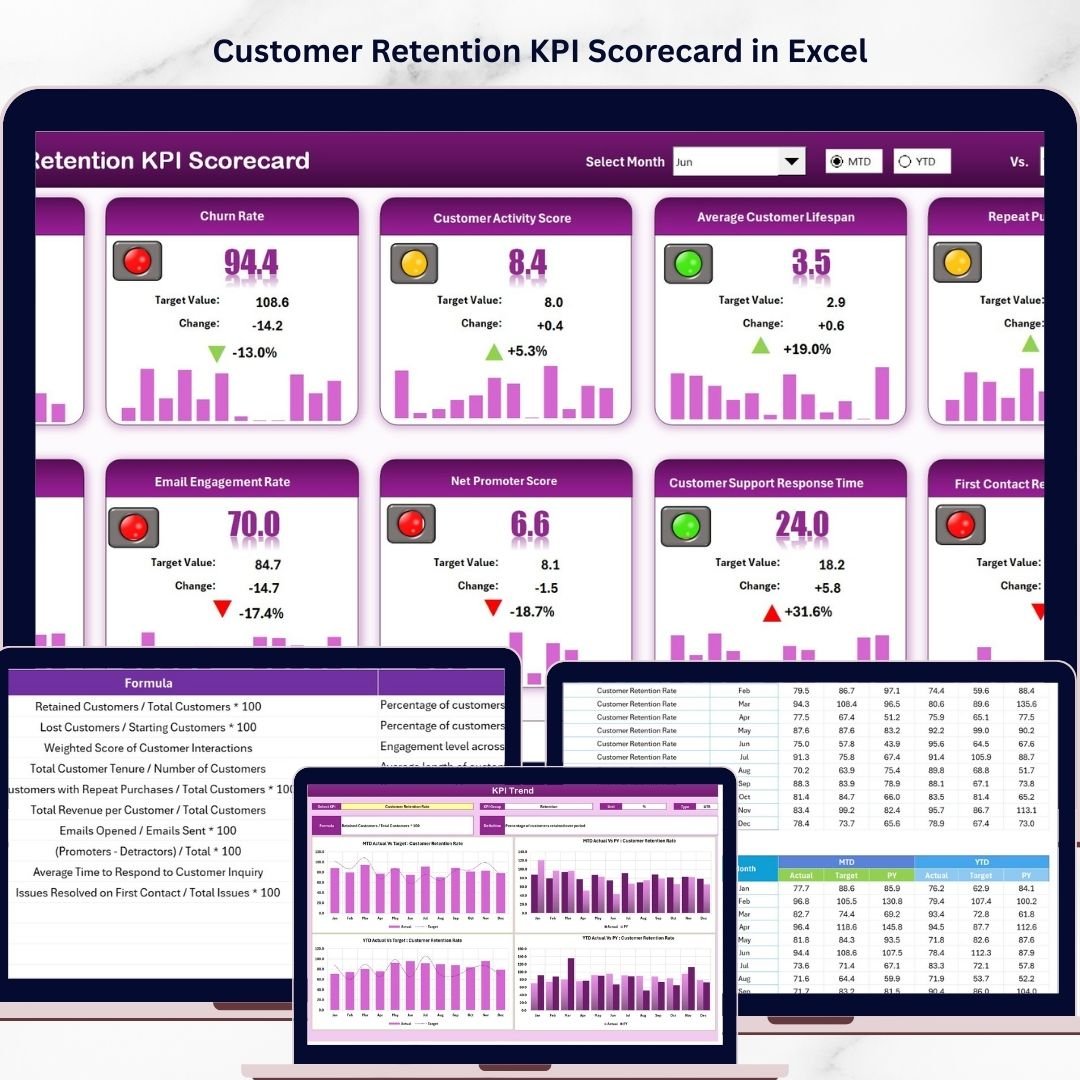



Key Features of Customer Retention KPI Scorecard
Unlock the power of data-driven decision-making with the Customer Retention KPI Scorecard, a ready-to-use digital template designed to help you track, analyze, and improve your customer retention metrics effortlessly. This scorecard is crafted to provide clarity on your retention performance with a clean, intuitive interface and powerful analytical tools.
With four comprehensive worksheets, this scorecard covers every essential aspect of customer retention KPIs, allowing you to visualize trends, compare actual results against targets, and input data with ease. Whether you’re tracking Month-to-Date (MTD), Year-to-Date (YTD), or specific monthly performance, this tool provides actionable insights that help you optimize customer loyalty strategies.
Key features include:
- 🗓️ Dropdown Menus: Quickly select the month, MTD, or YTD to analyze performance over different timeframes, ensuring you stay up-to-date with the latest data.
- 🎯 Actual vs Target Values: Compare your actual KPIs against set targets to identify areas exceeding expectations or needing improvement.
- 🌈 Visual Indicators: Benefit from color-coded visuals and conditional formatting that instantly highlight performance status, making data interpretation faster and easier.
- 📊 Comprehensive KPI Overview: Get a full snapshot of all relevant KPIs in one place, including MTD and YTD comparisons for deeper insights.
- 📈 KPI Trend Analysis: Dive into trends with dynamic charts showcasing Actual, Target, and Previous Year (PY) values, helping you spot patterns and forecast outcomes.
- ✍️ Flexible Data Entry: The Input Data sheet allows seamless updating of KPI values, targets, and metrics, keeping your scorecard current and relevant.
- 📚 KPI Definitions: Understand every KPI with clear definitions, units, formulas, and grouping to ensure accurate data tracking and reporting.
What’s Inside the Customer Retention KPI Scorecard
The Customer Retention KPI Scorecard is organized into four powerful worksheets designed for maximum usability and efficiency:
1. Scorecard Sheet

Customer Retention KPI Scorecard
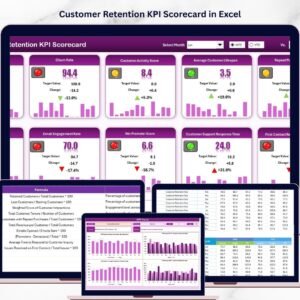
This is the main dashboard where you can view all your KPI performance metrics. The dropdown menus let you filter data by month, MTD, or YTD. It compares actual values against targets and uses vibrant color codes to indicate how well each KPI is performing.
2. KPI Trend Sheet

KPI Trend Sheet
Analyze performance trends over time by selecting any KPI from the dropdown. This sheet displays KPI groups, units, types (whether lower or upper values are better), formulas, and definitions. It features trend charts comparing Actual, Target, and Previous Year data for both MTD and YTD.
3. Input Data Sheet

Input Data Sheet
Record and update your KPI data effortlessly. This sheet ensures that your scorecard reflects the latest performance metrics by allowing you to input actual values, targets, and other necessary data points quickly.
4. KPI Definition Sheet

KPI Definition sheet tab
Maintain clarity and consistency by defining each KPI’s name, group, unit, formula, and description. This sheet helps ensure that everyone on your team understands what each metric means and how it’s calculated.
How to Use the Customer Retention KPI Scorecard
Getting started with the Customer Retention KPI Scorecard is simple and intuitive. Here’s how to maximize its benefits:
- 📝 Step 1: Enter your KPI data in the Input Data Sheet, including actual values and targets for each period.
- 📊 Step 2: Navigate to the Scorecard Sheet to view your performance summary with clear visual cues and comparisons.
- 📈 Step 3: Explore the KPI Trend Sheet to identify patterns and trends over time using dynamic charts.
- 📚 Step 4: Use the KPI Definition Sheet to verify definitions and formulas, ensuring accuracy and understanding.
- 🔄 Step 5: Update regularly for ongoing insights and track progress towards your customer retention goals.
Who Can Benefit from This Customer Retention KPI Scorecard
This scorecard is designed for a wide range of professionals and teams looking to improve customer retention performance:
- 👩💼 Customer Success Managers: Monitor retention KPIs and identify areas to enhance customer loyalty.
- 📈 Marketing Teams: Measure the effectiveness of retention campaigns and optimize strategies.
- 💼 Sales Managers: Track client retention and align sales efforts to long-term growth.
- 📊 Business Analysts: Analyze data trends and generate actionable insights for leadership.
- 🏢 Small to Medium Businesses: Use an affordable, easy-to-implement tool to boost customer retention without complex software.
- 🧑💻 Consultants: Provide clients with a professional and customizable KPI tracking solution.
Click here to read the Detailed blog post.
Visit our YouTube channel to learn step-by-step video tutorials.
Watch the step-by-step video tutorial:
Compatibility and Requirements
- Works in Microsoft Excel desktop (Excel 2016 or later, or Microsoft 365).
- You pick the month, MTD or YTD from dropdown menus, and conditional formatting colors each KPI by status. Microsoft explains the feature in Use conditional formatting to highlight information in Excel.
Frequently Asked Questions
How many worksheets are included?
Four: Scorecard, KPI Trend, Input Data and KPI Definition.
Can I view month-to-date and year-to-date results?
Yes. Dropdown menus on the Scorecard sheet let you choose a month, MTD or YTD, and the scorecard compares actual values against targets.
How do I see the trend for one KPI?
Open the KPI Trend sheet and select the KPI from the dropdown. It shows charts of Actual, Target and Previous Year values for MTD and YTD, along with the KPI group, unit, type, formula and definition.
Where do I enter my numbers?
Use the Input Data sheet to enter actual values, targets and other KPI data. The Scorecard and KPI Trend sheets update from it.
Is there a dashboard or Google Sheets version for customer retention?
Yes. See the Customer Retention KPI Dashboard in Excel, the Customer Retention KPI Dashboard in Power BI and the Customer Retention KPI Dashboard in Google Sheets.
Related Customer Retention Templates
- Customer Retention KPI Dashboard in Excel: a dashboard view of the same topic
- Customer Retention KPI Dashboard in Power BI: the Power BI edition
- Customer Retention KPI Dashboard in Google Sheets: the Google Sheets edition
- Customer Retention Checklist Template in Excel: a checklist for retention tasks
- Customer Loyalty KPI Dashboard in Excel: loyalty metrics in Excel
Browse all Excel KPI dashboards.









Reviews
There are no reviews yet.