
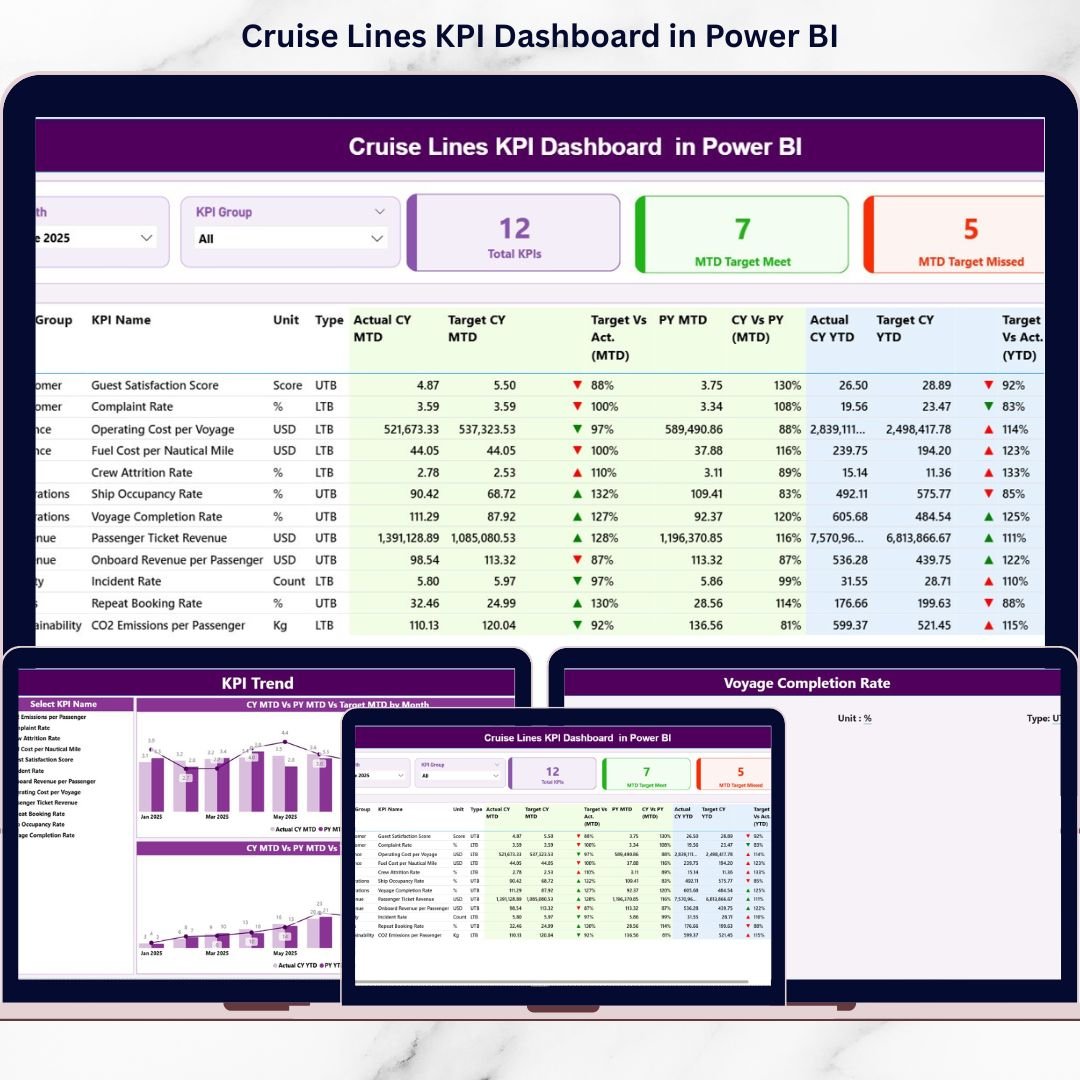
The cruise industry operates in a highly dynamic and performance-driven environment 🚢. Passenger demand fluctuates by season, fuel and operational costs remain high, and service quality directly impacts customer satisfaction and brand reputation. Therefore, cruise line executives and operations teams must monitor performance continuously. Cruise Lines KPI Dashboard in Power BI However, when teams rely on static Excel reports and manual reviews, insights arrive late and decision-making becomes reactive.
That is exactly where a Cruise Lines KPI Dashboard in Power BI delivers immense value.
Cruise Lines KPI Dashboard in Power BI The Cruise Lines KPI Dashboard in Power BI is a ready-to-use, interactive analytics solution designed specifically to track and analyze key performance indicators for cruise line operations. Instead of reviewing multiple disconnected reports, cruise companies can monitor Month-to-Date (MTD) and Year-to-Date (YTD) performance, compare Actual vs Target vs Previous Year values, and analyze trends using dynamic visuals 📊.
Because the dashboard runs in Microsoft Power BI, it transforms Excel-based data into real-time, executive-ready insights with minimal effort. As a result, cruise organizations move from delayed reporting to proactive, data-driven decision-making.
✅ Key Features of Cruise Lines KPI Dashboard in Power BI
The Cruise Lines KPI Dashboard in Power BI is built to provide instant clarity across operational, financial, and service KPIs 🔍.
It combines structured Excel data with Power BI visuals, slicers, and drill-through capabilities to deliver a complete performance view.
Key highlights include:
-
MTD and YTD KPI tracking
-
Actual vs Target vs Previous Year comparison
-
Target Met and Target Missed indicators
-
Interactive month and KPI group slicers
-
KPI-level trend analysis using combo charts
-
Drill-through to KPI definitions
Because all visuals update dynamically, leadership teams save time and focus on insights instead of manual reporting.
📦 What’s Inside the Cruise Lines KPI Dashboard in Power BI
This Power BI solution includes three professionally designed pages, supported by a structured Excel data source
1️⃣ Summary Page
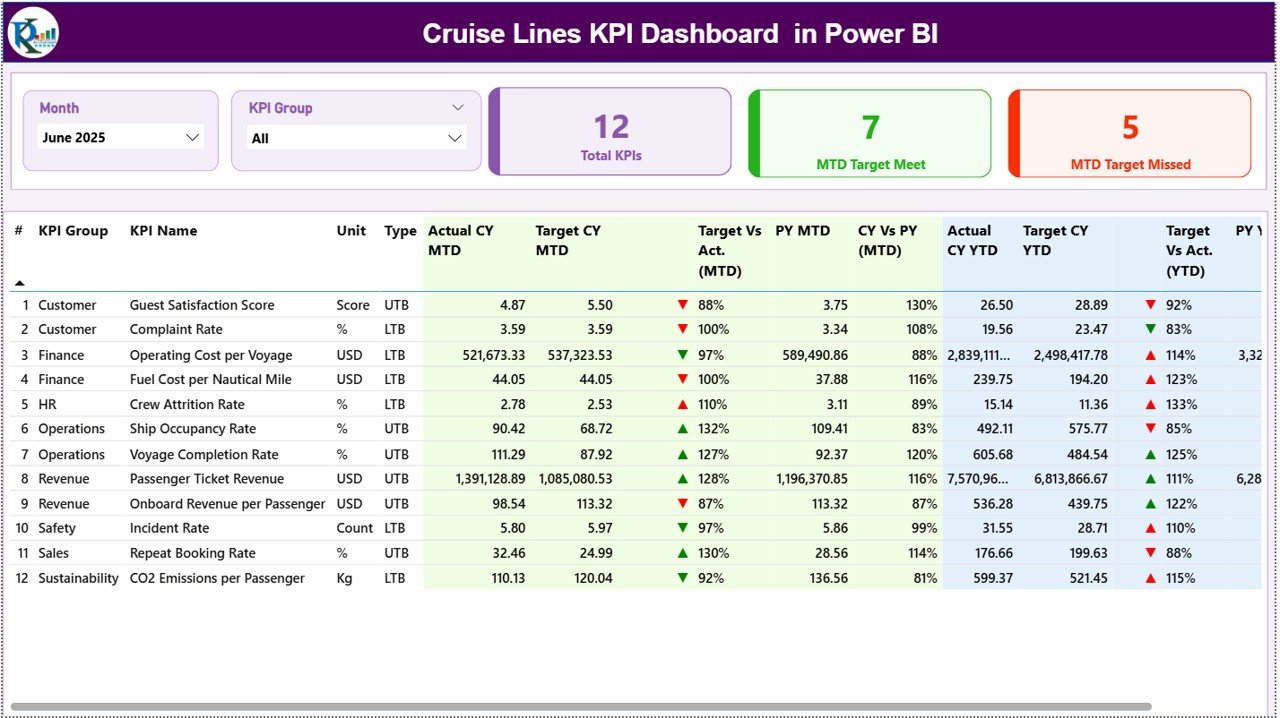
The Summary Page acts as the main landing page 🧭.
Filters Available
-
Month slicer
-
KPI Group slicer
Once selected, the entire dashboard updates instantly.
KPI Cards Displayed
-
Total KPIs Count
-
MTD Target Met Count
-
MTD Target Missed Count
These cards provide an immediate performance snapshot.
Detailed KPI Table
The table displays:
-
KPI Number
-
KPI Group
-
KPI Name
-
Unit
-
KPI Type (LTB / UTB)
MTD Performance Columns
-
Actual CY MTD
-
Target CY MTD
-
MTD Icon (▲ / ▼ with green or red color)
-
Target vs Actual (MTD %)
-
PY MTD
-
CY vs PY (MTD %)
YTD Performance Columns
-
Actual CY YTD
-
Target CY YTD
-
YTD Icon (▲ / ▼)
-
Target vs Actual (YTD %)
-
PY YTD
-
CY vs PY (YTD %)
This structure allows users to analyze short-term and long-term performance in one view.
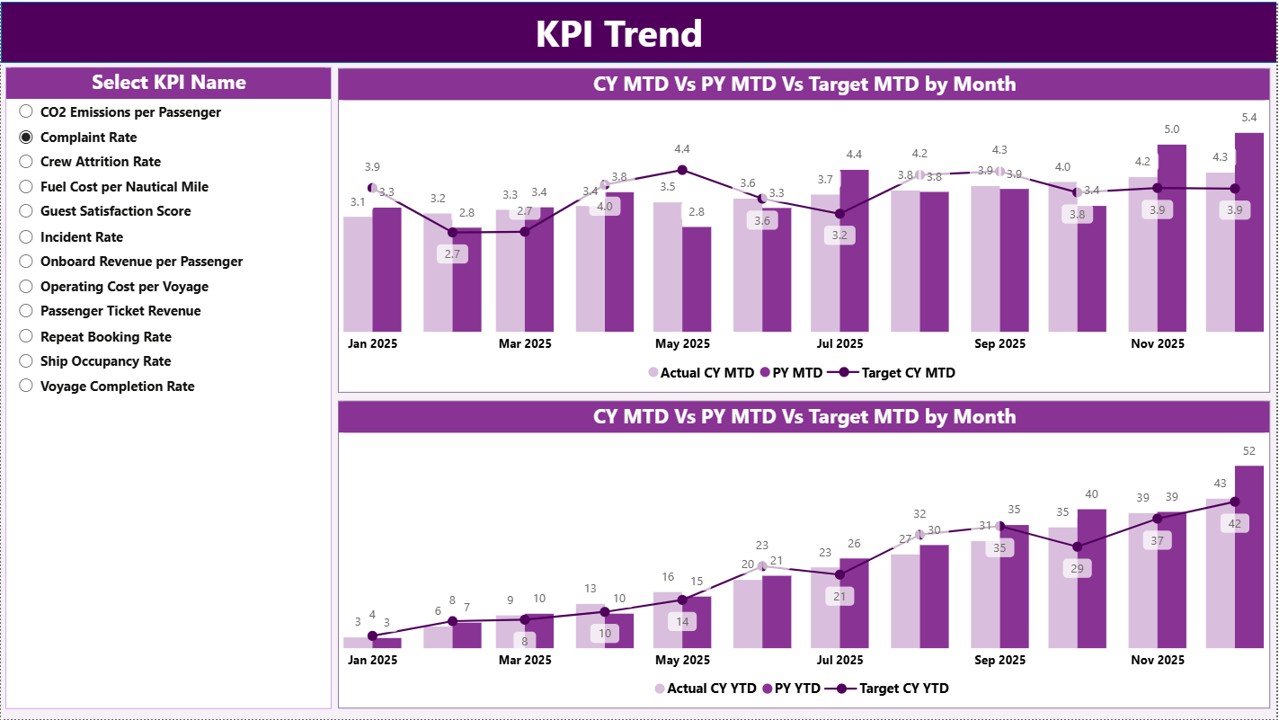
2️⃣ KPI Trend Page
The KPI Trend Page focuses on deep trend analysis 📈.
How It Works
-
KPI Name slicer on the left
-
Selection instantly updates all visuals
Charts Included
-
MTD Trend Chart (Actual, Target, Previous Year)
-
YTD Trend Chart (Actual, Target, Previous Year)
These charts help cruise teams identify seasonality, improvement patterns, and performance gaps early.
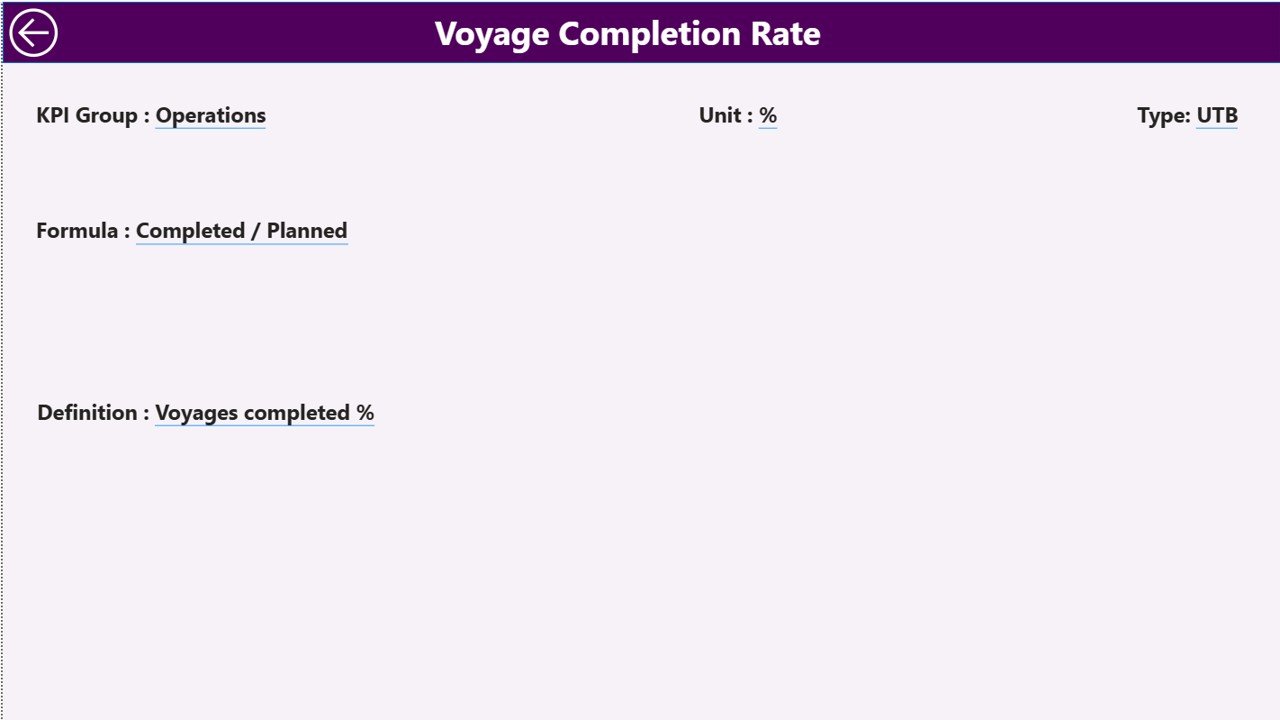
3️⃣ KPI Definition Page (Drill-Through)
The KPI Definition Page is a hidden drill-through page.
Information Displayed
-
KPI Formula
-
KPI Definition
-
KPI Unit
-
KPI Type
How to Access
-
Right-click any KPI on the Summary Page
-
Select Drill Through
-
View detailed KPI logic
-
Use the Back button to return
This feature keeps the dashboard self-explanatory and audit ready.
🛠️ How to Use the Cruise Lines KPI Dashboard in Power BI
Using the dashboard is simple and intuitive 👍.
First, update actuals, targets, and previous year data in the connected Excel file.
Next, refresh the Power BI dashboard.
Then, select the required month and KPI group using slicers.
Finally, review KPI status, trends, and drill into definitions when needed.
Because Power BI handles all calculations and visuals, insights remain accurate and up to date.
👥 Who Can Benefit from This Cruise Lines KPI Dashboard
This dashboard is ideal for:
-
Cruise Line Executives
-
Operations Managers
-
Finance and Revenue Teams
-
Fleet and Operations Analysts
-
Strategy and Planning Teams
It supports both small cruise operators and large cruise enterprises.
🔗 Click here to read the Detailed blog post
🎥 Visit our YouTube channel to learn step-by-step video tutorials
👉 https://www.youtube.com/@PKAnExcelExpert






























