


Every organization depends on internal policies to maintain structure, security, compliance, and operational stability. However, real-world situations often require flexibility. Employees may request exceptions for HR policies, IT rules, procurement approvals, security guidelines, financial controls, or operational processes. When these exceptions are tracked through emails, chats, or scattered sheets, approvals get delayed, compliance gaps increase, and leadership loses visibility. This is where the Corporate Policy Exception Request Tracker in Google Sheets becomes an essential solution.Corporate Policy Exception Request Tracker in Google Sheets
This ready-to-use tracker gives companies a centralized, transparent, and highly organized system to record, monitor, and analyze all policy exception requests. It streamlines approval workflows, supports faster decision-making, and provides real-time insights through automated charts. Because it is built in Google Sheets, your team can access it from anywhere, collaborate without versioning issues, and customize it easily based on company needs.Corporate Policy Exception Request Tracker in Google Sheets
✨ Key Features of the Corporate Policy Exception Request Tracker in Google Sheets
📥 1. Full Exception Request Logging
Record every policy exception with fields such as request ID, requester name, department, policy type, priority level, status, request date, review date, and final decision date. This ensures all requests are documented clearly and completely.Corporate Policy Exception Request Tracker in Google Sheets
📊 2. Automated Visual Dashboard
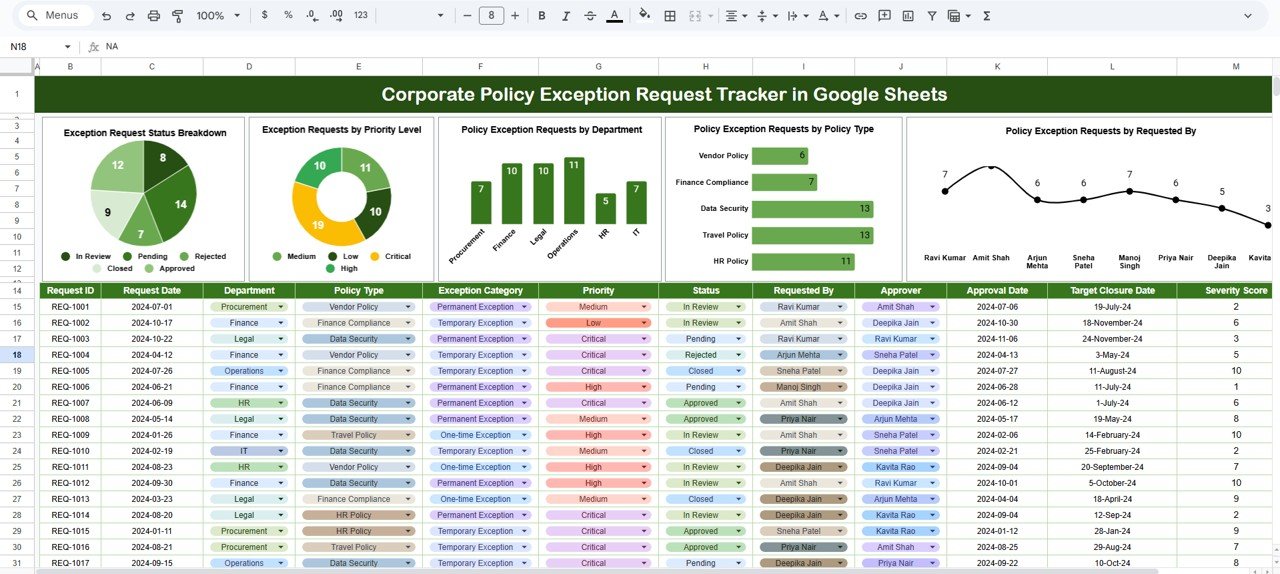
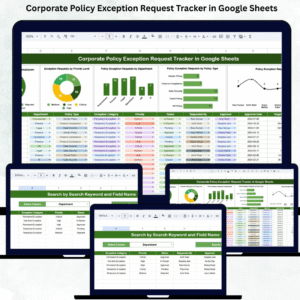
The dashboard instantly updates charts that show exception status, priority distribution, department trends, and policy categories. Managers can understand exception patterns at a glance.
⚡ 3. Real-Time Tracking
Since the tracker runs in Google Sheets, all updates appear instantly for every team. No need to send updated versions—everyone always sees the latest data.
🔍 4. Smart Search Feature
Search by keyword and field name to quickly find any exception record. This eliminates manual scrolling and speeds up investigations, reviews, and audits.
📑 5. Easy Customization
Add new policy types, status values, priority levels, or custom fields anytime. The structure supports simple modifications without breaking formulas.
📦 What’s Inside the Corporate Policy Exception Request Tracker in Google Sheets
🗂️ 1. Tracker Sheet (Main Data Source)
This sheet stores all exception records. You can enter:
-
Request ID
-
Requested By
-
Department
-
Policy Type
-
Exception Description
-
Reason for Exception
-
Priority Level
-
Status (Pending / Approved / Rejected / Closed)
-
Request Date
-
Review Date
-
Final Decision Date
Every entry in this sheet powers the dashboard, search tool, and analytics charts.
📊 Charts in the Tracker Dashboard
📌 1. Exception Request Status Breakdown
Displays counts of pending, approved, rejected, closed, and escalated requests. This shows overall progress and bottlenecks.
🚨 2. Requests by Priority Level
Breaks down low, medium, high, and critical priority requests. Leadership can quickly identify urgent exceptions that need attention.
🏢 3. Requests by Department
Shows which departments file the most exceptions—HR, IT, Finance, Procurement, Sales, Marketing, Operations, Legal, etc.
📁 4. Requests by Policy Type
Identifies which policy categories receive more requests—IT security, data privacy, procurement rules, HR policies, finance approvals, etc.
These charts help leadership identify trends, review policy effectiveness, and determine whether any policy needs revision or training.
🔍 Search Sheet: Fast & Accurate Lookup
The search tab enhances productivity by allowing you to:
-
Search by keyword (e.g., “IT”, “Pending”, “High Priority”)
-
Search by selected field name (Department, Status, Policy Type, etc.)
It instantly displays matching results—perfect for audits, urgent reviews, or leadership reporting.
🎯 Who Can Benefit from This Corporate Policy Exception Request Tracker in Google Sheets
🏢 HR Teams
Track exceptions for leave rules, behavior policies, or employee guidelines.
💻 IT & Security Teams
Monitor requests for software access, security bypasses, firewall exclusions, etc.
💰 Finance Teams
Manage exceptions related to spending limits, budget approvals, or financial controls.
📦 Procurement Teams
Track requests for vendor exceptions, purchase limits, or sourcing rules.
🧑💼 Leadership & Governance Teams
Gain visibility over the entire exception landscape across the organization.
Click here to read the Detailed blog post
Watch the step-by-step video tutorial:





























Reviews
There are no reviews yet.