

Brand consistency is one of the strongest assets any organization can protect. Logos, brand names, marketing creatives, templates, taglines, and visual elements represent your identity in the market. However, as organizations grow, brand usage requests start arriving through emails, chats, spreadsheets, and informal conversations. Over time, approvals get delayed, brand misuse increases, and marketing teams lose visibility and control.
That is exactly why the Corporate Brand Usage Request Tracker in Google Sheets becomes a powerful and essential solution.
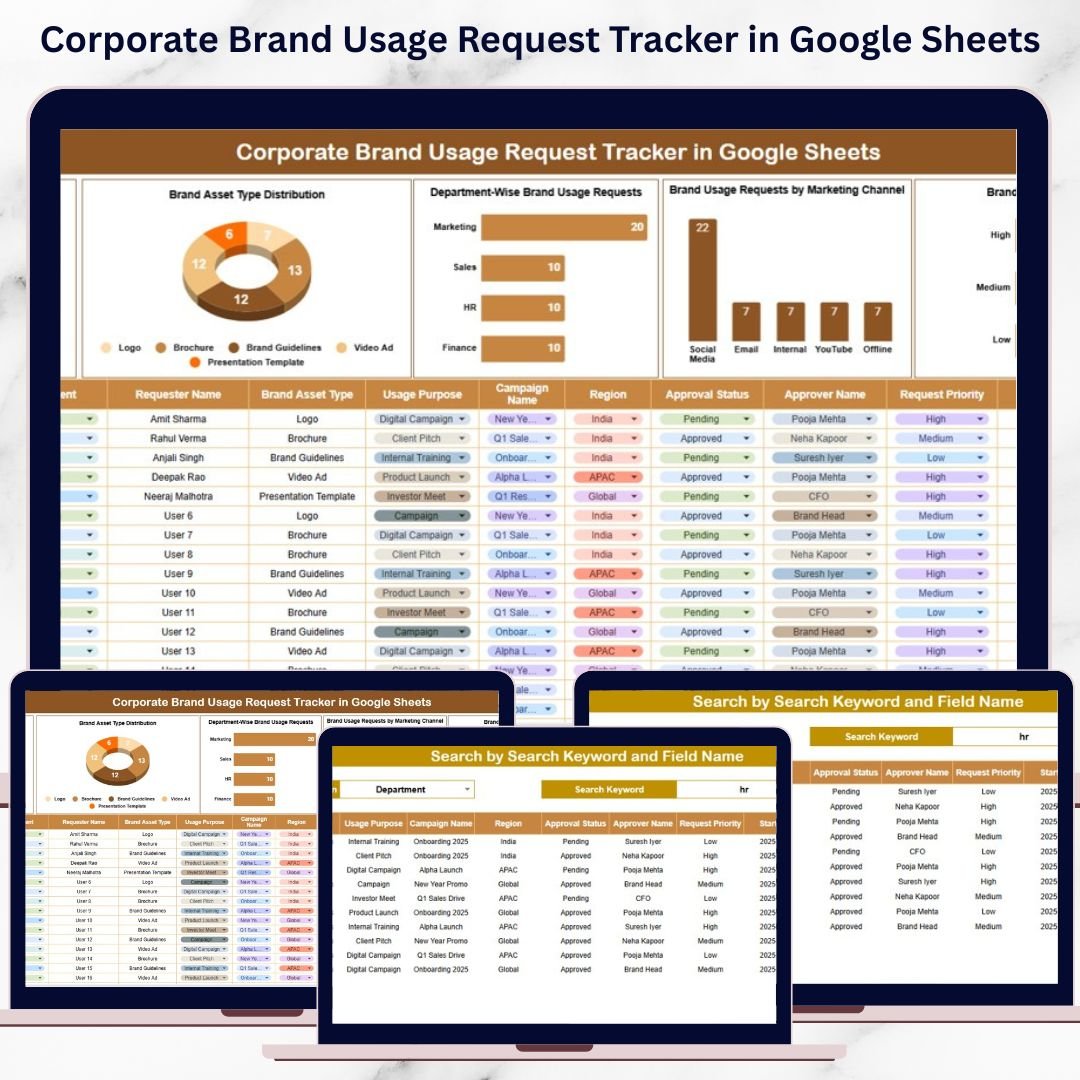
This ready-to-use tracker provides a structured, centralized system to log, review, approve, and monitor all brand usage requests. It helps marketing, branding, compliance, and communications teams maintain control over brand governance while improving speed, transparency, and accountability. Instead of chasing approvals or searching through scattered files, teams gain instant visibility through dashboards, charts, and a smart search feature—all inside Google Sheets.
Because it is cloud-based, the tracker supports real-time collaboration, instant updates, and zero software cost.
✨ Key Features of the Corporate Brand Usage Request Tracker in Google Sheets
📋 1. Centralized Brand Request Management
All brand usage requests are captured in one structured tracker. No more lost emails or unclear approval histories.
📊 2. Automated Dashboard Charts
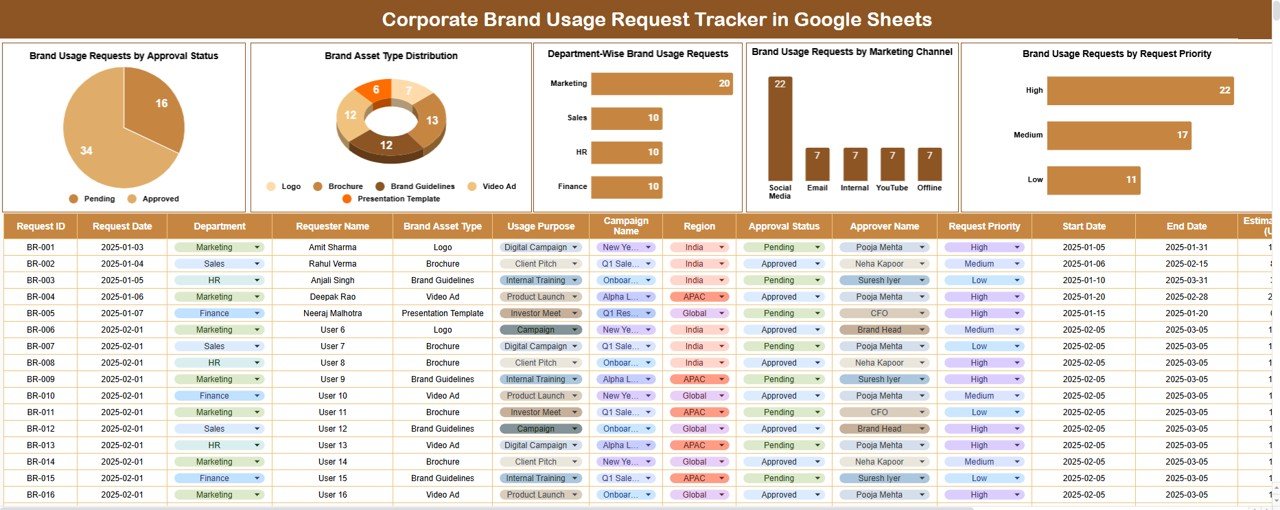
Built-in charts provide instant insights into approval status, asset demand, department usage, channels, and priorities.
🔍 3. Smart Search Functionality
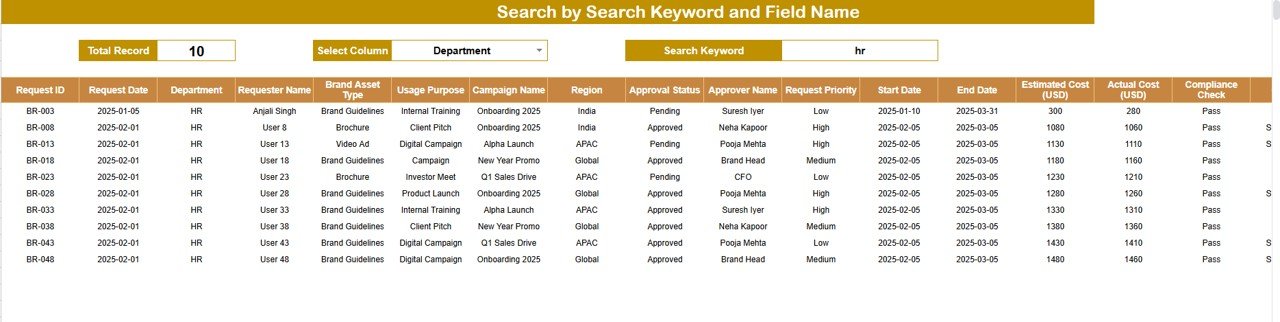
Find any request instantly by keyword and field name—ideal for audits, reviews, and leadership queries.
🤝 4. Real-Time Collaboration
Marketing teams, approvers, and stakeholders work on the same file without version conflicts.
🛡️ 5. Strong Brand Governance
Clear tracking and approval history reduce misuse and improve compliance with brand guidelines.
📦 What’s Inside the Corporate Brand Usage Request Tracker in Google Sheets
🗂️ Tracker Sheet Tab (Core Data Sheet)
This is the backbone of the tracker. Every brand usage request is logged here with a clean and consistent structure, including:
-
Request ID
-
Request Date
-
Requested By
-
Department
-
Brand Asset Type (Logo, Banner, Template, Video, etc.)
-
Marketing Channel (Digital, Print, Event, Social Media, Website)
-
Request Priority (Low, Medium, High, Urgent)
-
Approval Status (Pending, Approved, Rejected, On Hold)
-
Approver Name
-
Comments / Notes
Whenever data is added or updated, all charts refresh automatically.
📈 Dashboard Charts Included
📌 Brand Usage Requests by Approval Status
See how many requests are Pending, Approved, Rejected, or On Hold. This helps identify approval bottlenecks quickly.
📌 Brand Asset Type Distribution
Understand which assets are requested most—logos, banners, presentations, videos, or social creatives. This insight helps plan reusable templates and assets.
📌 Department-Wise Brand Usage Requests
Track which departments request brand assets most frequently. This helps identify training needs or guideline gaps.
📌 Brand Usage Requests by Marketing Channel
Analyze brand usage across digital, social media, print, events, and websites. This supports channel-specific branding strategies.
📌 Brand Usage Requests by Priority
Ensure urgent brand requests get immediate attention while managing overall workload efficiently.
🔍 Smart Search Feature – Find Anything Instantly
The tracker includes a powerful search panel that allows users to filter requests by:
-
Search Keyword (employee name, department, asset type, etc.)
-
Field Name (Requested By, Department, Status, Channel, Priority, etc.)
This feature helps teams:
-
Respond to stakeholder queries instantly
-
Track approval history efficiently
-
Prepare audit and compliance reports quickly
-
Avoid manual filtering or scrolling
🎯 Who Can Benefit from This Corporate Brand Usage Request Tracker
🎨 Branding & Marketing Teams
Maintain control over brand usage and approvals across campaigns.
🏢 Corporate Communications Teams
Ensure consistent messaging across departments and channels.
⚖️ Compliance & Governance Teams
Maintain an audit-ready approval trail for brand usage.
📊 Leadership & Management
Gain visibility into brand demand, approvals, and risk areas.
🤝 Cross-Functional Teams
Collaborate smoothly while respecting brand guidelines.
🛠️ How to Use the Corporate Brand Usage Request Tracker Effectively
1️⃣ Log Every Brand Request
Ensure all requests are entered before asset usage.
2️⃣ Assign Clear Approvers
Define ownership to avoid approval delays.
3️⃣ Update Status Regularly
Maintain transparency by keeping approval status current.
4️⃣ Review Dashboard Charts Weekly
Identify trends, bottlenecks, and recurring issues early.
5️⃣ Use Search for Fast Reporting
Locate requests instantly during reviews or audits.
### Click here to read the Detailed blog post
Watch the step-by-step video tutorial:































Reviews
There are no reviews yet.