

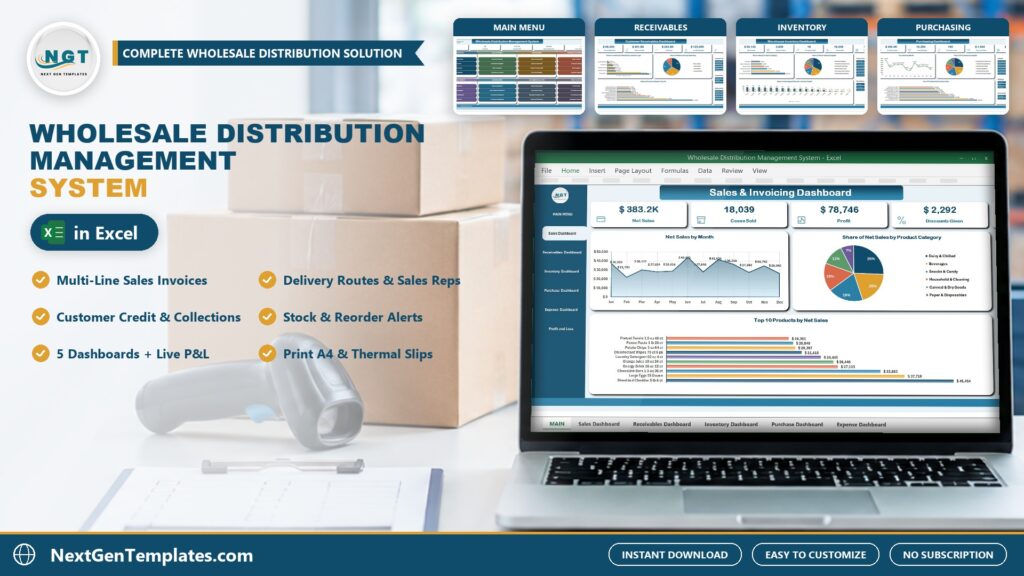
If you sell cases to stores, restaurants and offices, you already know the problem: invoices live in one file, stock in another, and nobody can say quickly who owes what. The Wholesale Distribution Management System V1.0 in Excel VBA puts invoicing, delivery routes, customer credit, collections, stock, purchasing and profit in one macro-enabled Excel workbook for Windows. This post walks through what is inside, who it suits and where it stops.
🌍 Join 10,000+ customers in 180+ countries using NextGenTemplates to replace paid SaaS tools with one-time-purchase Excel, Google Sheets, Power BI and HTML templates.
Watch the Wholesale Distribution Management System in Excel VBA: Invoicing, Credit, Stock and Profit in One File walkthrough
 Launch offer
SUMIFS, XLOOKUP, FILTER, LAMBDA and checking AI-written formulas, with real business projects. 11h 47m of video by PK, with practice files, quizzes and a capstone.
What the Wholesale Distribution Management System does
- Sales invoices with a basket: pick the customer, add products by the case, and the customer type, delivery route, sales rep, rate and due date fill in from the masters.
- Customer credit: a credit limit, what was paid on delivery, what was sold on credit, payments received and the balance due with a credit status.
- Collections: a Receive Payment form that numbers each receipt for check, ACH transfer, cash or card.
- Stock and purchasing: purchase bills bring stock in, invoices take it out, and every product shows a reorder level and a stock status.
- Five dashboards and a Profit & Loss: sales, receivables, inventory, purchasing and expenses, plus twelve months of live profit and loss.
- Printing: sales invoice, delivery note, payment receipt and purchase order at A4, 4 inch and 3 inch.
Sample data for a demo distributor is included: 352 invoices (1,500 lines), 30 customers, 18 products, 6 suppliers, 170 payments, 62 purchase bills and 198 expenses.
A look at the pages
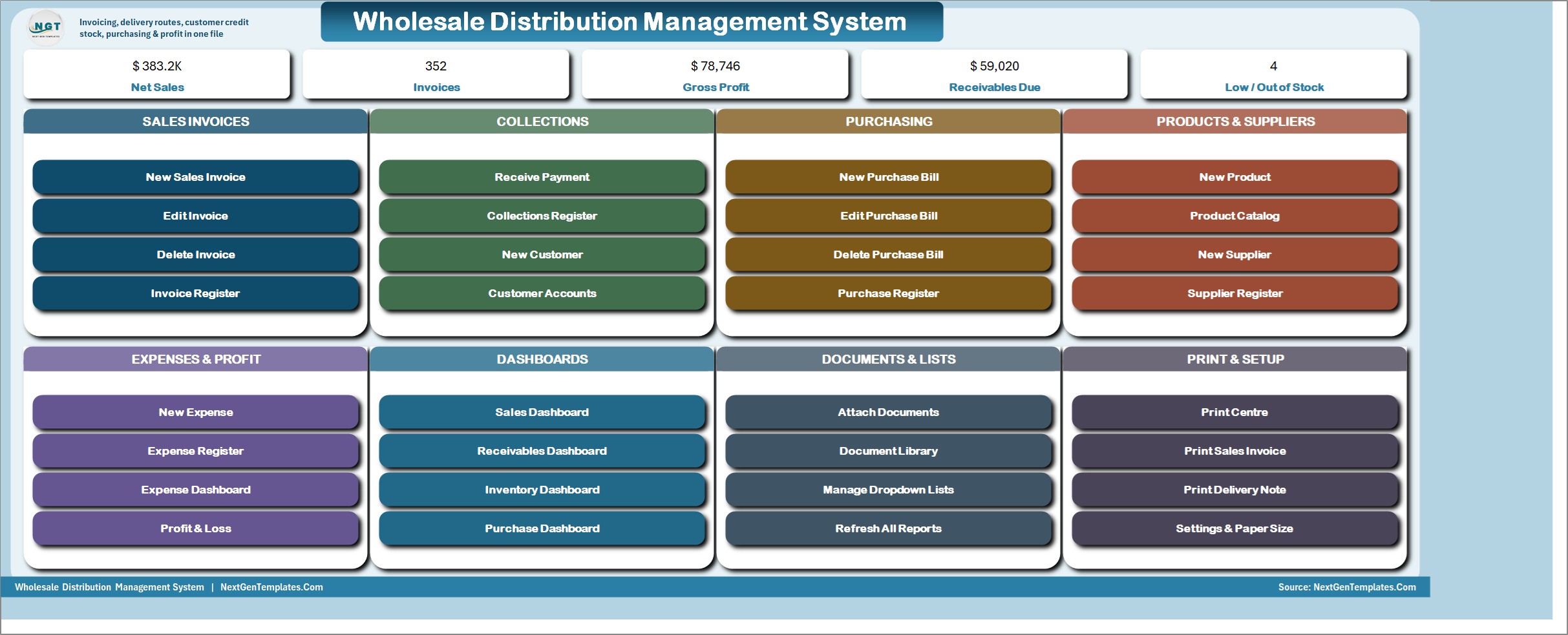
MAIN menu
The file opens here every time. Five live KPI chips – Net Sales, Invoices, Gross Profit, Receivables Due and Low / Out of Stock – then eight color-coded cards: Sales Invoices, Collections, Purchasing, Products & Suppliers, Expenses & Profit, Dashboards, Documents & Lists and Print & Setup. Every job starts from one of its buttons.
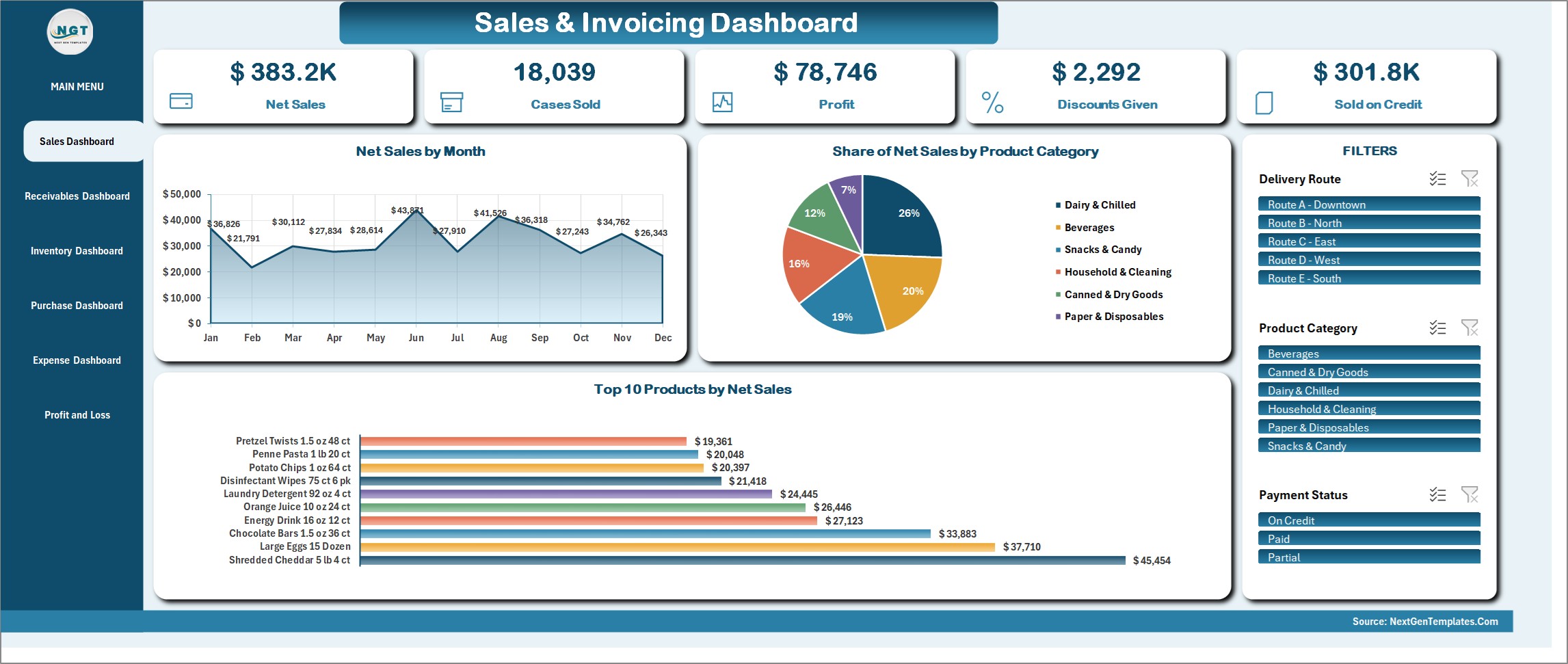
Sales & Invoicing Dashboard
Net Sales, Cases Sold, Profit, Discounts Given and Sold on Credit, with Net Sales by Month, Share of Net Sales by Product Category and Top 10 Products by Net Sales. Slicers for Delivery Route, Product Category and Payment Status drive every figure and chart on the page.
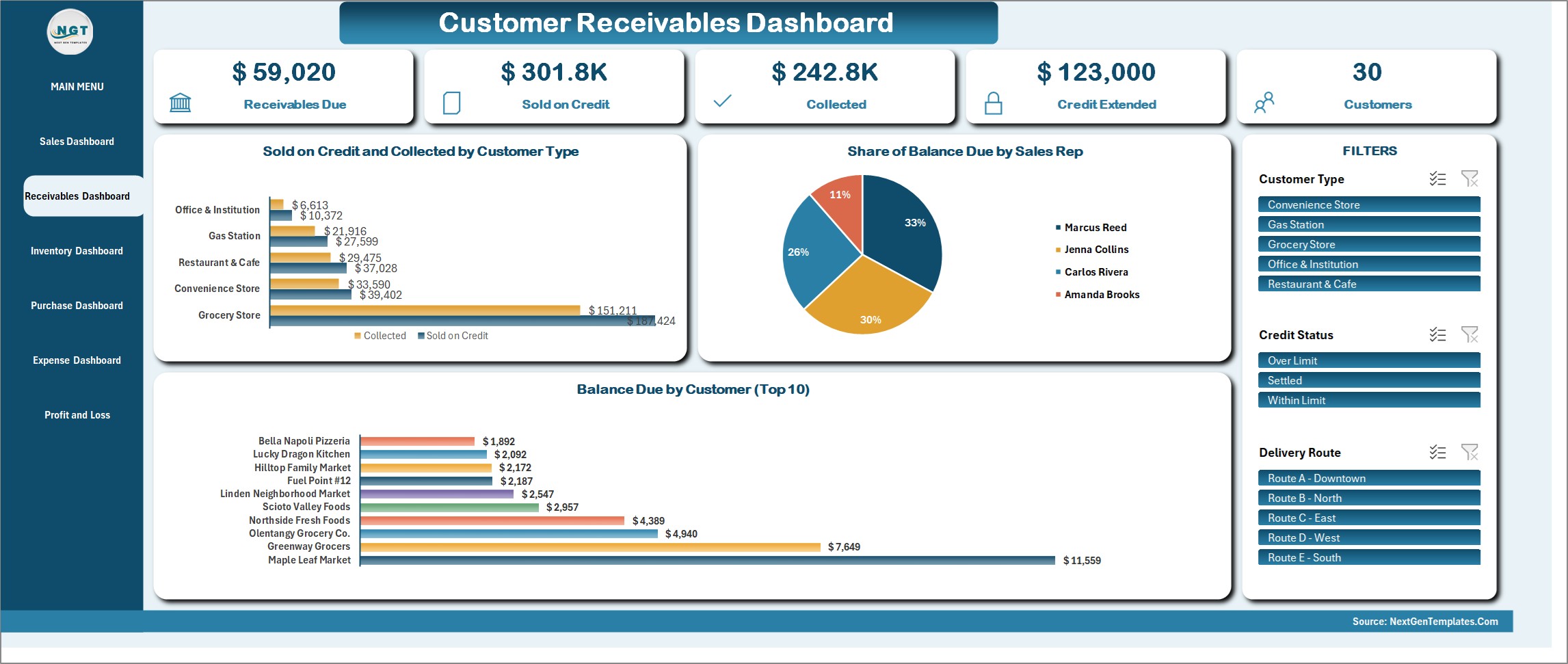
Customer Receivables Dashboard
Receivables Due, Sold on Credit, Collected, Credit Extended and the customer count, with Sold on Credit and Collected by Customer Type, Share of Balance Due by Sales Rep and Balance Due by Customer (Top 10). Filter by Customer Type, Credit Status or Delivery Route.
Warehouse Inventory Dashboard
Stock Value, Cases in Hand, Products Listed, Cases Sold and Cases Purchased, with Stock Value by Product Category, Share of Stock Value by Supplier and Stock in Hand against Reorder Level by Product. Slicers for Product Category and Stock Status.
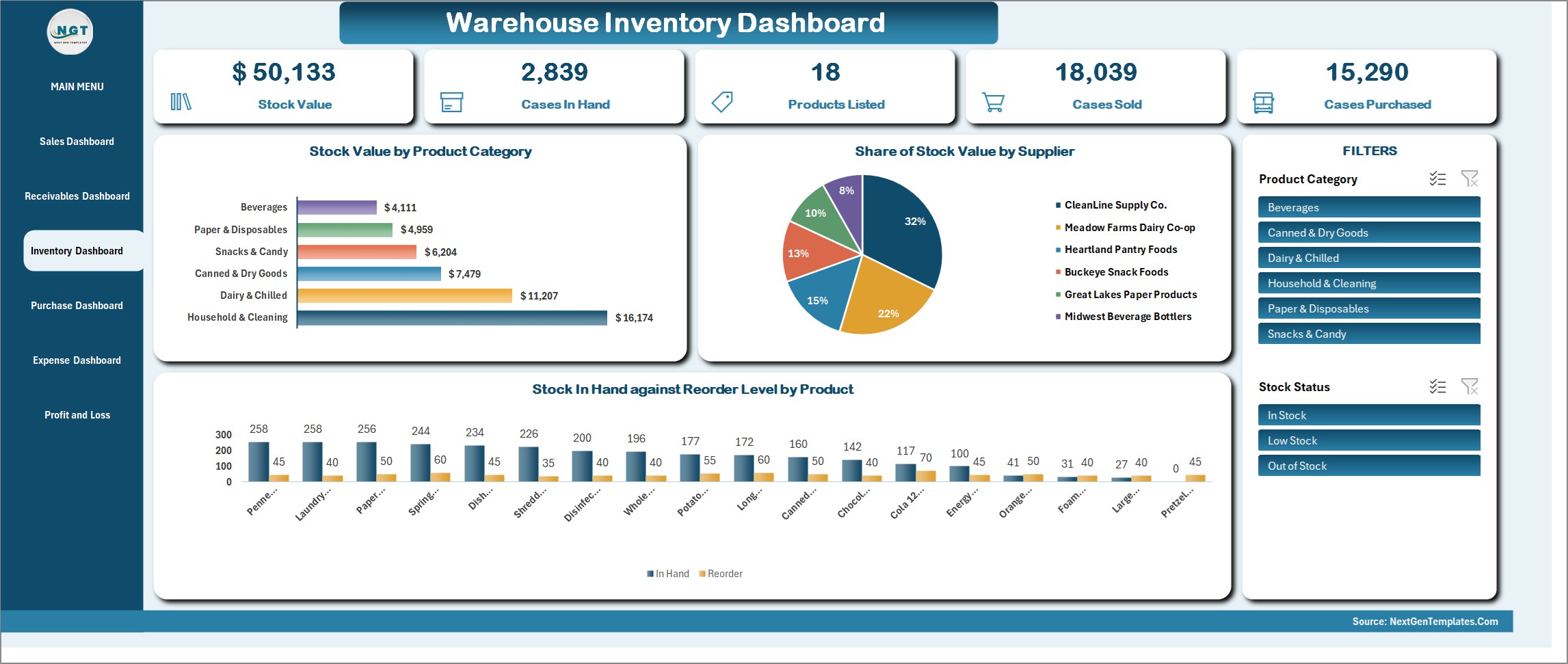
Purchasing Dashboard
Purchase Value, Cases Bought, Purchase Lines, Average Line Value and Average Case Cost, with Purchases by Month, Share of Purchases by Supplier and Top 10 Products by Purchase Value. You can filter by Supplier, Bill Status or Received Status, which makes it easy to see what is still on order from each supplier.
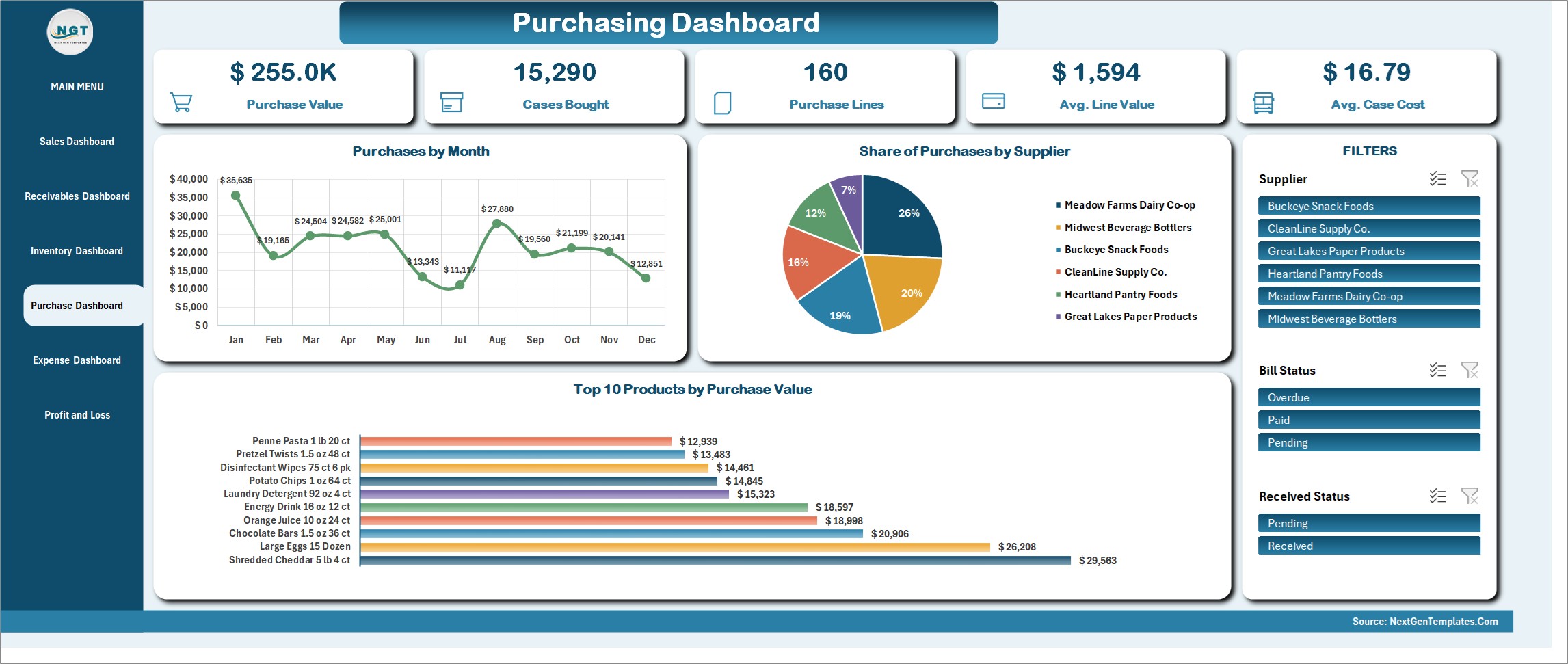
Operating Expense Dashboard
Total Expenses, Net of Tax, Vouchers, Average Voucher and Sales Tax Paid, with Expenses by Month, Share of Expenses by Payment Mode and Expenses by Category. Slicers for Payment Mode and Bill Status. Fuel, warehouse rent, wages and the other running costs of a distributor are logged here as expense vouchers, and the same numbers feed the Profit & Loss below.
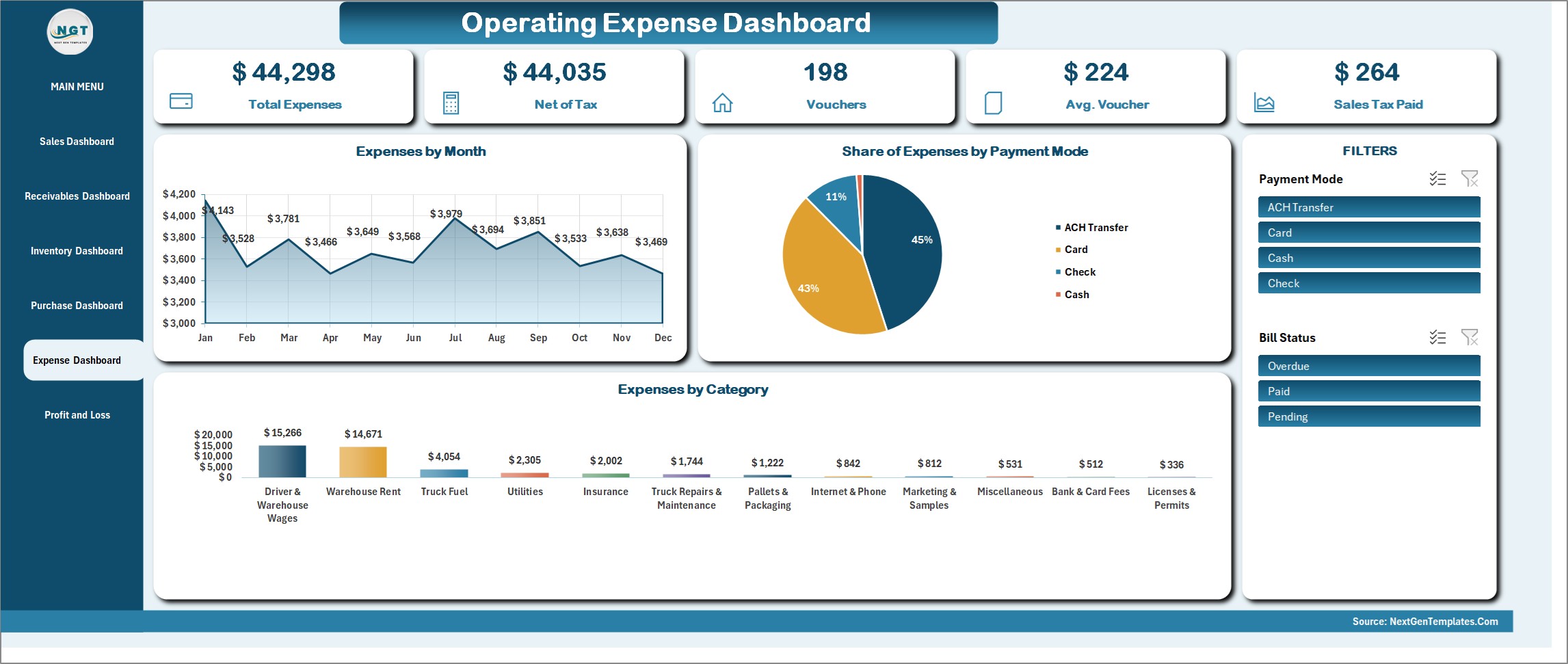
Profit & Loss statement
A live formula statement: twelve months and a year total, from gross sales and discounts through cost of goods sold and gross profit, every operating expense category, down to net profit and net margin – plus a tax summary memo showing tax collected on sales, tax paid on purchases and net tax payable. The Financial Year box picks the year and every figure follows the registers. Press Refresh All Reports after a batch of entries.
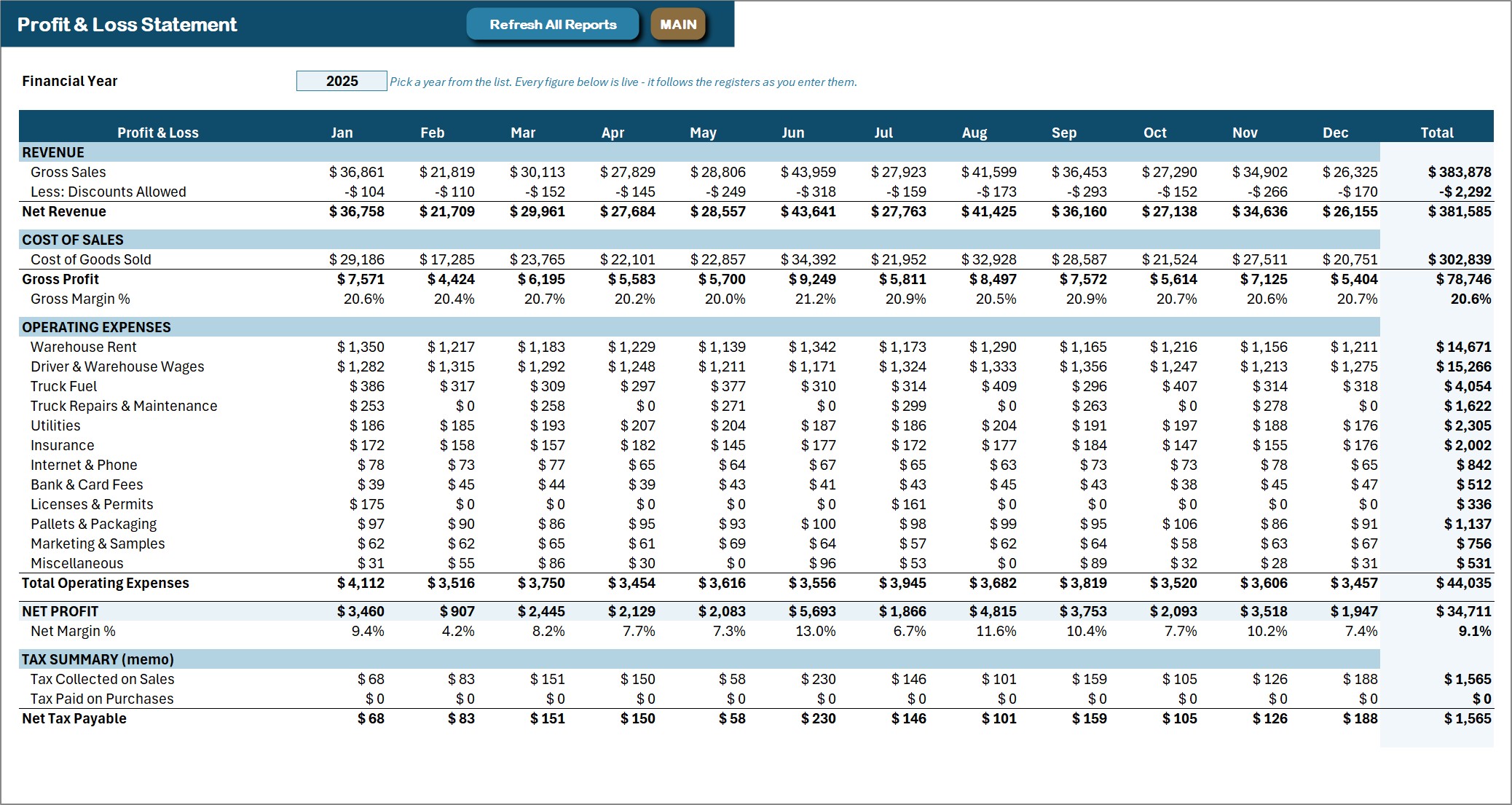
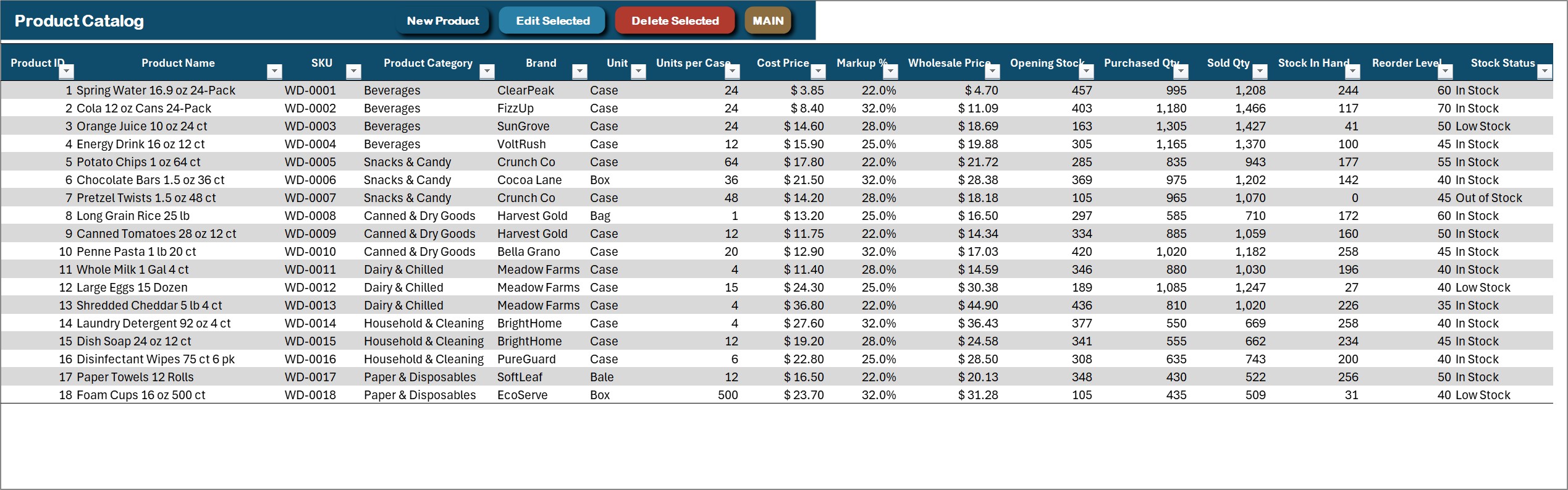
Product Catalog
Every product with its SKU, category, brand, unit, units per case, cost price, markup, wholesale price, opening stock, purchased and sold cases, stock in hand, reorder level and stock status. The stock columns are formulas fed by the purchase and invoice registers.
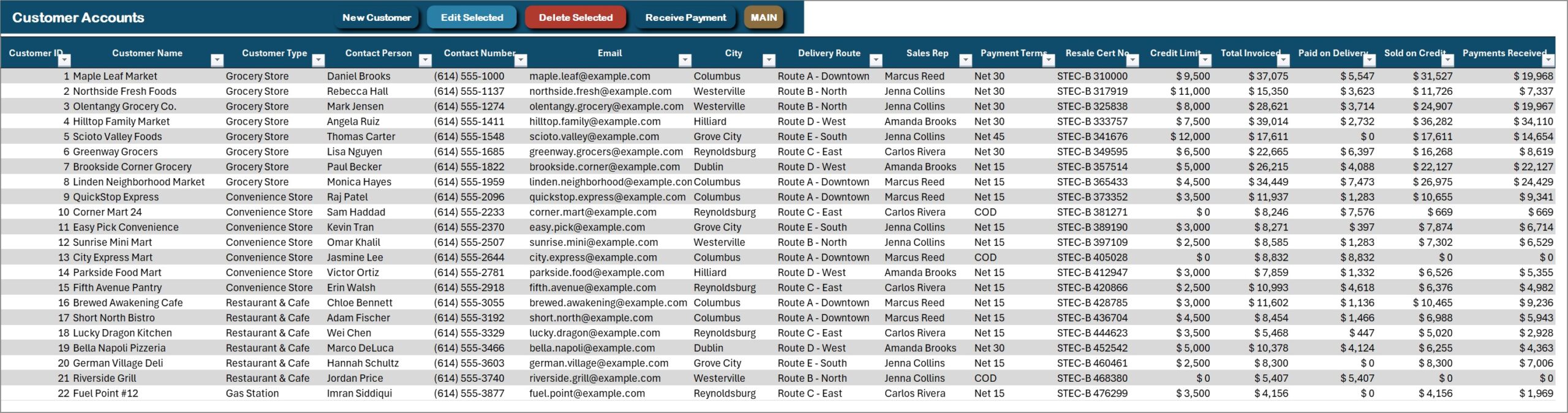
Customer Accounts
Customers with type, contact, delivery route, sales rep and payment terms, plus resale certificate number, credit limit, total invoiced, paid on delivery, sold on credit, payments received and the balance due with a credit status.
How a working week runs in the file
Most distributors follow the same loop, and the workbook is laid out in that order.
Taking orders and invoicing. Open New Invoice from the MAIN menu and pick the customer. The customer type, delivery route, sales rep and payment terms fill in from the customer record, and the due date is worked out from the terms (COD, Net 15, Net 30 or Net 45). Choose a product, type the number of cases and press Add Item. The rate comes from the product master, the line drops into the basket and the invoice total updates. Saving writes one row per line under a single invoice number, so a 12-line order to a grocery store is still one invoice.
Loading the truck. Print the Delivery Note for each invoice on the route. The same print button can make a full A4 page for the office copy or a 4 inch or 3 inch slip for a thermal printer. Paper size and whether the button previews, prints or saves a PDF are dropdowns on the Settings sheet.
Collecting money. When a driver comes back with a check, or an ACH transfer shows up in the bank, record it on the Receive Payment form. The receipt gets its own number, the Collections Register keeps it, and the customer’s balance due and credit status change straight away. A customer close to their credit limit shows up on the Customer Accounts sheet before you load the next order.
Buying stock. Enter a supplier’s bill with the same basket method, mark it received when the pallets arrive, and print a Purchase Order if the supplier needs one. Purchase bills add cases to stock and invoices take them back out. The MAIN menu counts how many products are low or out of stock against their reorder level.
Closing the week. Log expenses as vouchers, press Refresh All Reports, and the five dashboards and the Profit & Loss pick up every entry. Pick a year in the Financial Year box to look back at an earlier one.
Setting it up with your own data
The sample distributor is there so every chart has something in it on day one. To start your own books, replace the sample records with your customers, products and suppliers. Delivery routes, sales reps, product categories, brands, cities, units, payment terms, expense categories and document types are all master lists. You add to them from the Manage Dropdown Lists form, so nobody has to edit a sheet by hand or fix a broken dropdown.
Long lists such as customers and products filter as you type, and they match the start, middle or end of a name. Date boxes are locked and open a calendar picker, which stops 03/04 meaning March on one PC and April on another. Signed delivery proofs, resale certificates, credit applications and supplier invoices can be attached to their records and opened later from the Document Library.
Editing and deleting can be switched off on the Settings sheet. That helps when one person enters invoices and someone else checks them, although it is still one file on one PC, not a shared system with logins.
Wholesale Distribution Management System vs. a spreadsheet vs. cloud software
| Feature | This Excel VBA system | Plain invoice and stock spreadsheet | Cloud distribution software |
|---|---|---|---|
| Cost | $29 one-time ✅ | Free to $20 one-time | Monthly subscription |
| Customer credit limit and balance due | Yes ✅ | Manual formulas | Yes ✅ |
| Stock that updates itself | Yes ✅ | Manual | Yes ✅ |
| Print at A4 + 4 inch + 3 inch | Yes ✅ | No | A4 / PDF |
| Barcode scanning and route optimization | No | No | Often ✅ |
| Works offline, data stays on your PC | Yes ✅ | Yes | No |
Who it is for, and who it is not for
It suits small and mid-size distributors who sell on credit and want invoices, stock and profit in one file. It does not suit teams that need several people editing at once, Mac or Excel-for-web users, or anyone who needs barcode scanning, GPS routing, e-invoicing or an accounting connection. It is a single-user desktop workbook, and it needs Excel 2016 or later for Windows with macros enabled (Microsoft explains how to enable macros).
Related templates for wholesalers and distributors
If the full system is more than you need, or you want something to sit beside it, these are the closest matches in the store:
- Wholesale Order Book Data Entry System in Excel: a simple register for retailer orders with a 7-field form and order status from Pending to Delivered. It does not do invoicing, stock or receivables.
- General Store Billing Management System V1.0 in Excel VBA: the retail counter version, with multi-item billing, customer charge accounts, stock and a Profit & Loss.
- Advanced Inventory Management System V1.0: if stock control is the main job, this covers stock levels, purchase orders, sales orders and reorder levels.
- Wholesale KPI Dashboard in Excel: a reporting dashboard for sales, inventory turnover and order fulfillment KPIs.
- Wholesale KPI Scorecard in Excel: actual against target for your wholesale KPIs, month to date and year to date.
- Distribution KPI Scorecard in Excel: for the logistics side, with warehouse and delivery KPIs against targets.
Frequently asked questions
Can I try it before I buy?
Yes. A 7-day free trial with every form, dashboard and printout working is available on the product page.
Does it track customer credit?
Yes. Each customer has a credit limit, and the workbook works out sold on credit, payments received and the balance due, with a credit status beside it.
Does it scan barcodes or optimize delivery routes?
No. A delivery route is a label on the invoice and a filter on the dashboards, and products are picked by typing and searching.
Can several people use it at once?
No. It is a single-user desktop workbook. Editing and deleting can be switched off on the Settings sheet, but there are no separate logins.
Which payment terms does it handle?
COD, Net 15, Net 30 and Net 45 come set up, and the due date on each invoice is worked out from the customer’s terms. You can add more terms from the Manage Dropdown Lists form.
Can I print on a thermal receipt printer?
Yes. The Sales Invoice, Delivery Note, Payment Receipt and Purchase Order print at A4, 4 inch (104 mm) and 3 inch (80 mm). Pick the size on the Settings sheet.
Does it handle sales tax?
Invoice lines carry a tax amount, and the Profit & Loss has a tax summary memo with tax collected on sales, tax paid on purchases and net tax payable. It does not file returns or connect to accounting software.
Get the Wholesale Distribution Management System
One-time payment, no subscription, instant download, illustrated PDF manual included. See the Wholesale Distribution Management System V1.0 in Excel VBA and try the 7-day free trial. More Excel VBA systems are in the Excel VBA Tools category.