


The best free meeting minutes template is the one your team fills in after every meeting. Microsoft Create and Vertex42 are reputable free sources. When you need action-item tracking, dashboards or multi-user access, the Team Meeting Minutes Tracker in Excel ($6.99) is the cheapest step up.
Looking for a starting point? See our free marketing calendar templates for 2026.
Last updated: November 2026
Key takeaways
- A free meeting minutes template handles one meeting well, but it cannot count open action items across 20 or 50 meetings.
- Microsoft Create and Vertex42 are reputable free sources; check their current libraries for the exact files on offer.
- The Team Meeting Minutes Tracker in Excel costs $6.99 and includes a secure login, 5 slicers and 5 charts.
- The Meeting Minutes Data Entry System in Excel ($6.99) gives you a 7-field form and automatic Record IDs from MM-0001.
- Room problems are a different job: the Meeting Room Utilization Dashboard costs $17.99 in Excel or Power BI.
 Launch offer
SUMIFS, XLOOKUP, FILTER, LAMBDA and checking AI-written formulas, with real business projects. 11h 47m of video by PK, with practice files, quizzes and a capstone.
Free meeting minutes template options compared with paid upgrades
| Template | Format | Best For | Price |
|---|---|---|---|
| Microsoft Create meeting minutes templates | Word / Excel (check the library) | One-off minutes for a single meeting | Free |
| Vertex42 meeting minutes templates | Word / Excel (check the site) | Simple printable minutes | Free |
| Team Meeting Minutes Tracker in Excel (Best overall) | Excel + VBA | Teams that need dashboards and user logins | $6.99 |
| Meeting Minutes Data Entry System in Excel (Best value) | Excel (.xlsm) | A clean register with a simple form | $6.99 |
| Team Meeting Minutes Tracker in Google Sheets | Google Sheets | Remote teams editing together | $6.99 |
| Meeting Room Booking Tracker in Excel | Excel + VBA | Booking rooms and avoiding clashes | $6.99 |
| Meeting Room Utilization Dashboard in Excel | Excel | Analysing how rooms are used | $17.99 |
| Meeting Room Utilization Dashboard in Power BI | Power BI | Multi-office room analytics | $17.99 |
How we picked these
We started with the question a reader actually has: where do I get a free meeting minutes template, and when is it worth paying? For the free side we only name established sources, Microsoft Create and Vertex42, and we do not describe individual files we have not verified. We did not list any free download from our own store.
For the paid side we searched the NextGenTemplates catalog for meeting-related tools and kept the six that are clearly about meeting records or meeting spaces. We excluded generic project trackers. Prices are the current listed USD prices. There is no meeting-minutes bundle in the catalog at the moment, so each product is priced on its own.
What should a free meeting minutes template include?
Whatever file you use, the record should answer the same questions a week later, when nobody remembers the discussion. Good minutes are short, factual and written in the same order every time.
- Meeting title, date, start and end time, and organizer.
- Attendees, plus anyone who sent apologies.
- Agenda items, each with a one or two line summary of the discussion.
- Decisions, written as statements, for example ‘Approved the Q3 marketing budget’.
- Action items, each with one named owner and a due date.
- Status of each follow-up: open, in progress, done or postponed.
- Date and place of the next meeting.
The last three lines are where free documents fall short. A Word page can list action items, but it cannot tell you how many are still open across the quarter, or which department generates the most follow-ups.
How long should meeting minutes be?
A useful rule is one page per hour of meeting, and no more than a third of the page for discussion summary. Minutes record outcomes, not conversation. If a decision took ten minutes to reach, one sentence is enough: what was decided, who owns it, and by when.
Short minutes get read. Long minutes get filed and forgotten, which defeats the purpose. If you find yourself writing paragraphs, move the detail into an attachment and keep the minutes themselves to decisions and actions.
Where can you download a free meeting minutes template?
Two reputable places are worth checking first. Both change their libraries over time, so open the site and search for ‘meeting minutes’ rather than relying on a file name from a blog post.
Microsoft Create
Microsoft Create is Microsoft’s own template library for Word, Excel and PowerPoint. It is a sensible first stop if your team already works in Microsoft 365, because files open natively and match your existing styles.
Vertex42
Vertex42 has long been a source of spreadsheet and document templates. Its meeting-related files suit printed minutes and basic logs. Read the licence terms on the page before using a file commercially.
A do-it-yourself free table
You can also build your own in five minutes. Create a table in Excel or Google Sheets with these columns: Date, Meeting Title, Organizer, Attendees, Decision, Action Item, Owner, Due Date, Status. Add a dropdown to the Status column with values such as Open, In Progress, Done.
For a team that holds a handful of meetings a month, that is enough, and it costs nothing. Free tools have a real limit, though. A plain table has no login, no entry form, no dashboard and no protection against someone overwriting a row. Those are the things the paid templates below add.
What does a free minutes template cost you in practice?
Free files cost nothing to download, but they cost time to maintain. Here is a simple way to see where the break-even sits. Suppose your team holds 8 meetings a month and each produces 4 action items. That is 32 new items a month and 96 a quarter.
If a manager spends 10 minutes per meeting hunting through old documents to check what is still open, that is 80 minutes a month. At a modest hourly cost, a $6.99 one-time template pays for itself well within the first month. The sums change if you only meet twice a month, in which case a free table is the better choice.
| Situation | Meetings per month | Recommended route |
|---|---|---|
| Occasional meetings, one organizer | 1 to 3 | Free Word or Excel file |
| Regular team meetings, shared follow-ups | 4 to 12 | Paid tracker with dashboard |
| Many departments, many owners | 12+ | Tracker with user logins and role-based access |
The 6 best paid meeting minutes and meeting templates for 2026
The six products below are paid upgrades, ranked by how directly they solve the minutes problem. Numbers one to three handle the notes and follow-ups. Numbers four to six handle the physical meeting space.
1. Team Meeting Minutes Tracker in Excel: best overall
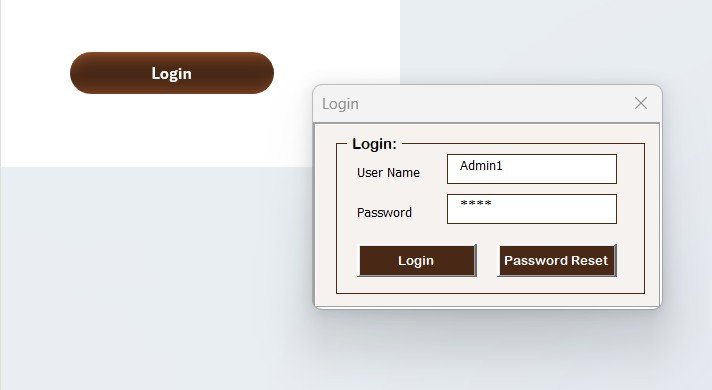
This is an Excel and VBA tool that centralises meeting records, assigns responsibilities and tracks follow-ups. It ranks first because it covers the full loop: capture, assign, visualise and export.
Who it is for: corporate teams, school faculty, healthcare organisations and small businesses that run recurring meetings with several owners.
What is inside:
- Secure login with User ID and password. A default admin login is provided and you can add new users.
- A main form that links to Data Entry, Dashboard, User Management and Settings.
- An interactive dashboard with 5 slicers and 5 charts: meetings by status, attendees, chairperson, department and responsible person.
- A form-based data entry screen to add, update and delete records.
- Role-based user management and a central list sheet for dropdowns.
Use cases: a department head filters by responsible person to see who owns the most open items. A school groups meetings by department to see which committees meet most. A chairperson compares how many meetings each manager leads. A manager exports a report to share with people outside the team.
Price: $6.99. Get the Team Meeting Minutes Tracker in Excel.
Best for: teams that want a shared, secured minutes register with charts.
2. Meeting Minutes Data Entry System in Excel: best value
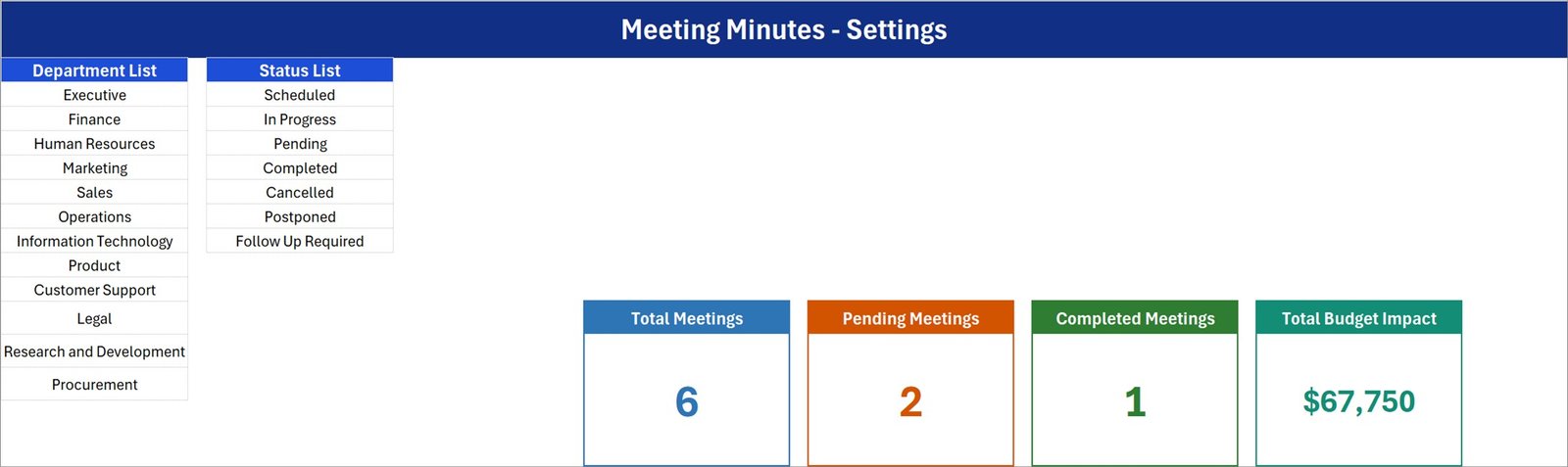
A single macro-enabled workbook (.xlsm) that turns scattered notes into one register. It is four sheets and 54 KB, with no add-ins and no login screen. It is the best value because it is the simplest route from a loose document to a structured record at $6.99.
Who it is for: an office administrator, project coordinator or small business owner who wants one clean log without a complex setup.
What is inside:
- A 7-field entry form: Meeting Title, Meeting Date, Organizer, Department, Status, Action Items and Budget Impact.
- Add, Update, Delete and Reset buttons. Double-click a row to load it back into the form.
- Automatic Record IDs from MM-0001 and an entry timestamp on every save.
- Four live stat cards: Total, Pending and Completed Meetings, plus Total Budget Impact.
- A 12-entry Department list and a 7-entry Status list (Scheduled, In Progress, Pending, Completed, Cancelled, Postponed, Follow Up Required) that you can edit.
Use cases: count how many meetings are still Pending at month end. Total the budget impact of decisions across departments. Spot which meeting created the biggest follow-up backlog through the Action Items count. Start from the 6 worked sample records, delete them and type your own.
Price: $6.99. Get the Meeting Minutes Data Entry System in Excel.
Best for: a simple, single-user register with a form and automatic IDs.
3. Team Meeting Minutes Tracker in Google Sheets
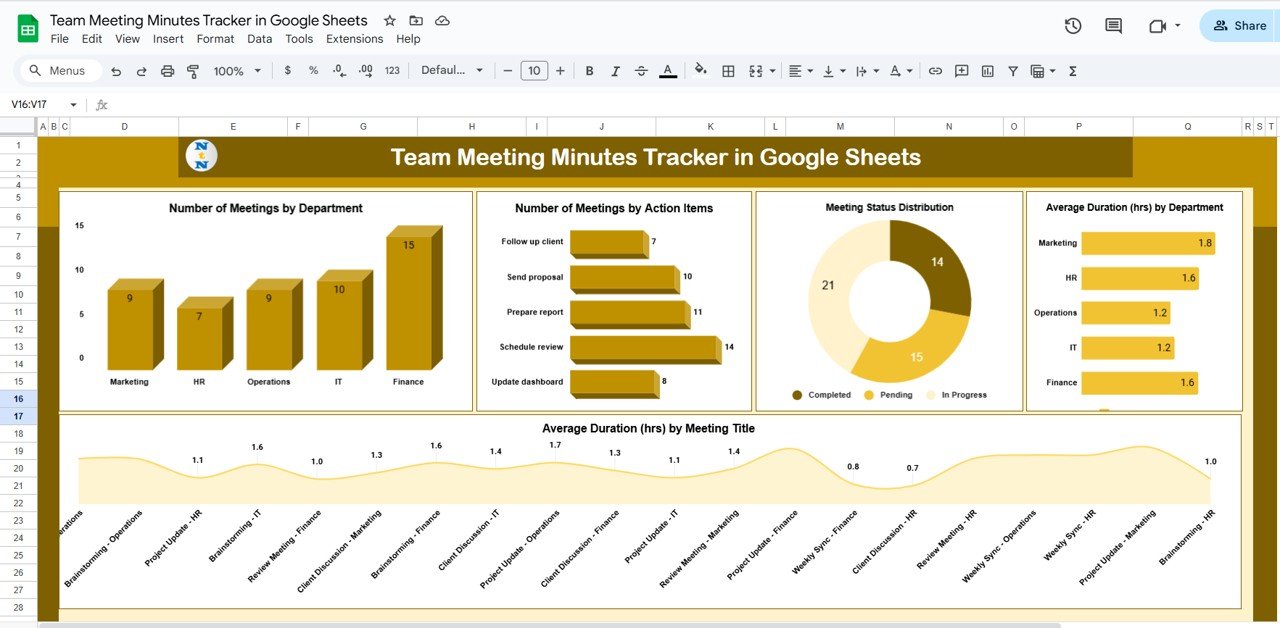
The cloud version of the minutes tracker. It records discussions, assigns follow-ups and shows progress visually, and several people can update it at the same time.
Who it is for: managers, project leads and team coordinators on remote or hybrid teams that already live in Google Workspace.
What is inside:
- A tracker tab with charts for meetings by department, by action items, by status, average duration by department and average duration by meeting type.
- A Search sheet where you type a keyword, such as a meeting title or action item, to find matching records.
- Task tracking with status indicators for each responsibility.
- Collaborative access and a centralised meeting history.
- A customisable layout where you can add columns or fields.
Use cases: compare how long planning, review and strategy sessions run. See the ratio of Completed, Pending and In-Progress meetings. Find an old decision by searching a keyword instead of scrolling hundreds of rows.
Price: $6.99. Get the Team Meeting Minutes Tracker in Google Sheets.
Best for: distributed teams that want live shared editing.
4. Meeting Room Booking Tracker in Excel

This is a VBA-powered booking system for conference rooms. It is not a minutes template, but it belongs in the same workflow: book the room, hold the meeting, record the minutes.
Who it is for: office managers and facility teams handling one or several rooms across departments.
What is inside:
- Login form with role-based access for admins and users.
- A main control form to add, edit and delete bookings and manage users.
- A dashboard with 8 charts driven by pivot tables, plus slicers for month, department and room.
- A data entry form covering room, date, time, attendees, setup type, A/V needs, parking, status and approval.
- A Manage List sheet for room names, departments, booking status and setup types.
Use cases: avoid double bookings, see bookings by department, and track which bookings need approval or parking.
Price: $6.99. Get the Meeting Room Booking Tracker in Excel.
Best for: scheduling rooms offline in Excel.
5. Meeting Room Utilization Dashboard in Excel
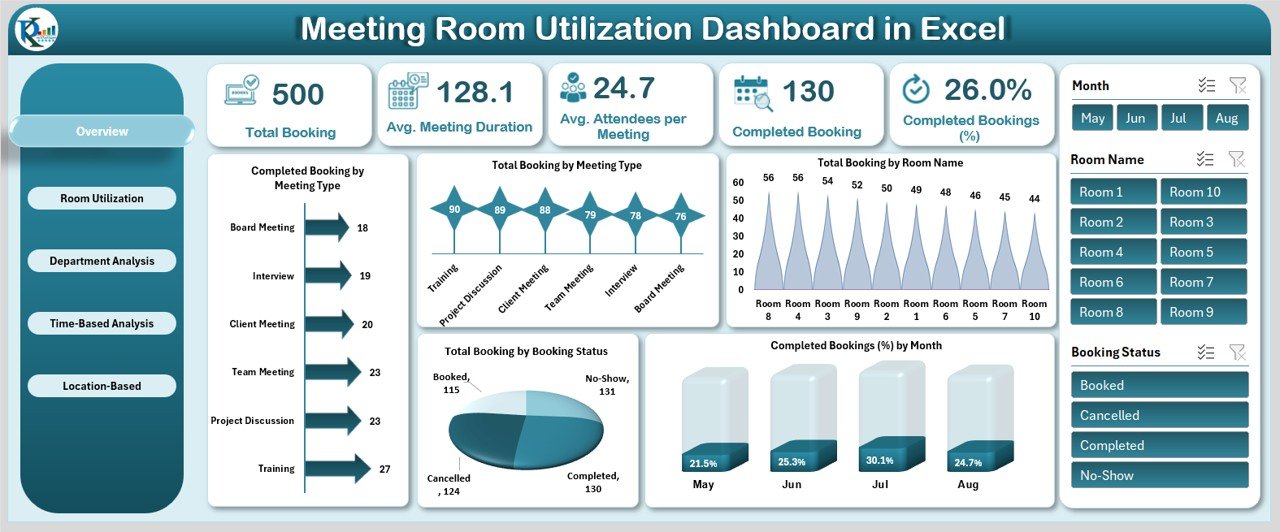
An analysis dashboard for room usage. It shows total bookings, average duration, average attendees and completion rates, then breaks them down by room, department, time and location.
Who it is for: managers, administrators and facility teams who want evidence of which rooms are overused or idle.
What is inside:
- An Overview sheet with total bookings, average meeting duration, average attendees and completion percentage.
- Room analysis: completed bookings, duration, attendees and completion percentage per room.
- Department analysis and time-based analysis by month and organizer.
- Location insights for comparing offices, and a dynamic data sheet.
Use cases: decide whether a rarely used room can be repurposed, or which department needs more capacity.
Price: $17.99. Get the Meeting Room Utilization Dashboard in Excel.
Best for: space planning in Excel.
6. Meeting Room Utilization Dashboard in Power BI
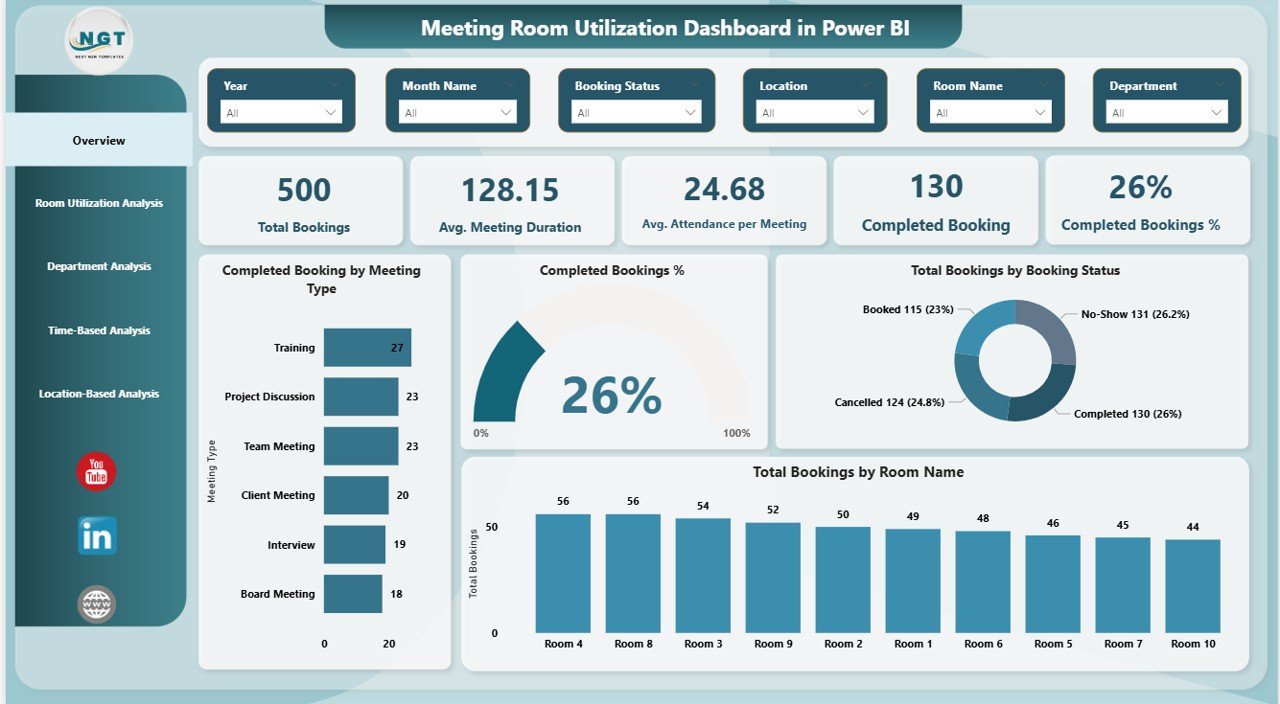
The Power BI version of the same analysis, with 5 analysis pages covering overview, room usage, department behaviour, time trends and locations. It connects to an Excel data file, so you update the data and refresh.
Who it is for: organisations with several offices that already use Power BI and want interactive slicers and filters.
What is inside:
- 5 analysis pages with bookings, attendance, duration, cancellations and completion rates.
- Room-wise performance to spot overused and underused rooms.
- Department and organizer analysis, and location comparison.
- Slicers for room, department, location, meeting type and time period.
Use cases: compare room usage across offices to support space planning decisions.
Price: $17.99. Get the Meeting Room Utilization Dashboard in Power BI.
Best for: multi-office room analytics in Power BI.
Ready to move beyond a free file?
The Team Meeting Minutes Tracker in Excel is $6.99 and the Meeting Minutes Data Entry System in Excel is $6.99. See the Team Meeting Minutes Tracker in Excel or watch walkthroughs on the NextGenTemplates YouTube channel.
How to choose between them
| If you need… | Choose | Price |
|---|---|---|
| Dashboards, logins and several owners | Team Meeting Minutes Tracker in Excel | $6.99 |
| A simple form and automatic IDs | Meeting Minutes Data Entry System in Excel | $6.99 |
| Live shared editing online | Team Meeting Minutes Tracker in Google Sheets | $6.99 |
| To book rooms | Meeting Room Booking Tracker in Excel | $6.99 |
| To analyse room usage | Meeting Room Utilization Dashboard (Excel or Power BI) | $17.99 |
If you only need one page per meeting, stay with a free file. If you need a searchable history, pick one of the first three. Buy the room tools only if room scheduling is a real problem.
When a template is NOT the right answer
A template is not the right answer if you hold fewer than two meetings a month. A free Word page is enough, and paying anything is wasted money.
If you need audio transcription, automatic summaries or calendar integration, buy software. Tools such as Otter.ai, Fireflies.ai and Microsoft Teams recap features record and summarise calls, which no spreadsheet does. Note that those services have their own subscription pricing, so check their pricing pages.
Also skip the macro-enabled Excel files if your IT policy blocks macros. In that case use the Google Sheets version, or a plain table. Finally, if your company needs formal board minutes with legal wording, a template will not supply the legal language, so ask your company secretary.
Frequently asked questions
Is there a free meeting minutes template for Word or Excel?
Yes. Microsoft Create and Vertex42 are reputable places to look for free Word and Excel meeting minutes files. Libraries change, so search for meeting minutes on the site. You can also build a free table with columns for date, decision, action item, owner, due date and status.
What should be included in meeting minutes?
Meeting minutes should include the title, date, time, organizer, attendees, agenda items with short summaries, decisions made, action items with an owner and due date, and the date of the next meeting. Keep the wording factual and brief.
How do I take meeting minutes quickly?
Prepare the agenda in the template before the meeting and fill in decisions and action items as they are agreed. Write outcomes, not conversation. Send the minutes within 24 hours while memory is fresh, and ask owners to confirm their action items.
What is the difference between meeting minutes and meeting notes?
Minutes are a formal, shared record of decisions and actions. Notes are personal and informal, and may include ideas or questions. Minutes are meant to be distributed and filed. Notes are for the writer. Many teams use both.
Can I track action items from meetings in Excel?
Yes. A simple table with Owner, Due Date and Status columns tracks actions. For a form, charts and user logins, the Team Meeting Minutes Tracker in Excel ($6.99) adds a dashboard with 5 slicers and 5 charts.
Is there a meeting minutes template for Google Sheets?
Yes. The Team Meeting Minutes Tracker in Google Sheets costs $6.99. It has a dashboard, a search sheet, task tracking with status indicators and shared access so several people can update it together.
Do the paid templates need macros?
The Team Meeting Minutes Tracker in Excel is described as Excel plus VBA, and the Meeting Minutes Data Entry System in Excel is a macro-enabled .xlsm workbook. If you cannot enable macros, the Google Sheets tracker is the alternative.
How much do the meeting minutes templates cost?
The Team Meeting Minutes Tracker in Excel, the Google Sheets version and the Meeting Minutes Data Entry System in Excel each cost $6.99 as a one-time payment. The room dashboards cost $17.99 each in Excel or Power BI.
Do I need a room booking tool for meeting minutes?
No. Minutes and room booking are separate jobs. Use the minutes trackers to record decisions, and add the Meeting Room Booking Tracker in Excel ($6.99) only if double bookings are a problem for your office.
How long should I keep meeting minutes?
It depends on your organisation and local rules. Many teams keep routine minutes for a few years, while formal or board minutes may need longer retention. Check your company policy or ask your legal adviser.
Get more meeting and tracking templates
Start with the Team Meeting Minutes Tracker in Excel for $6.99. If you plan to build on it, see our guides to the free Excel dashboard templates, free Google Sheets dashboard templates, free Power BI dashboard templates, free project plan templates, free Gantt chart templates and free timesheet templates. Watch tutorials on the NextGenTemplates YouTube channel.