

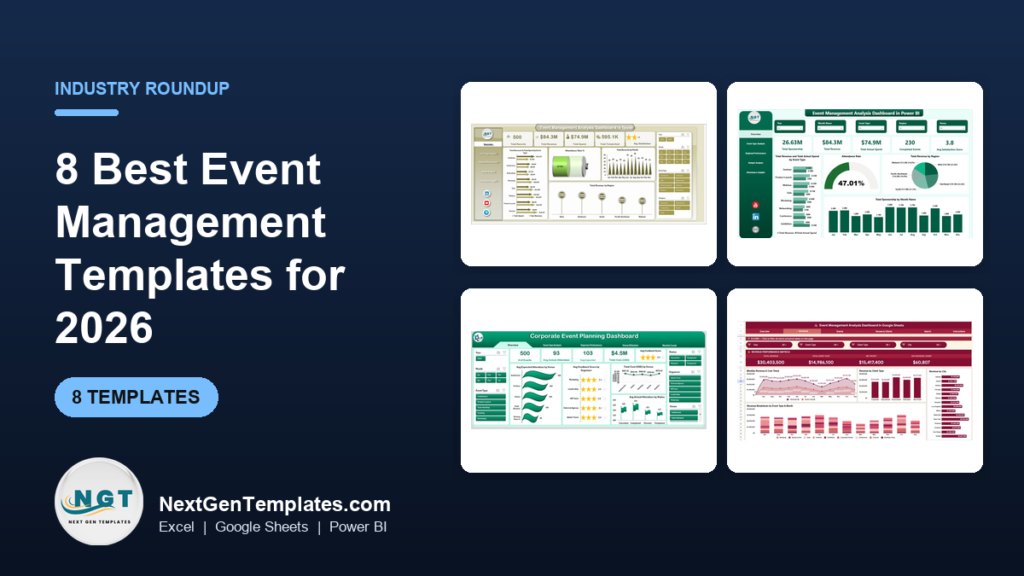
The best event management Excel template is the Event Management Analysis Dashboard in Excel ($17.99). It has 5 report pages, 5 KPI cards and slicers for event type, region, venue and marketing channel. Power BI users should take the matching $17.99 version, and Google Sheets users the $9.99 analysis dashboard.
Last updated: October 2026
Key takeaways
- The Event Management Analysis Dashboard in Excel costs $17.99 and covers 5 pages: Overview, Event Type, Regional Performance, Budget Analysis and Attendance Insights.
- The same analysis dashboard exists in Power BI ($17.99) and Google Sheets ($9.99), so you can pick the tool your team already opens every day.
- The Event Management KPI Dashboard ($14.99) and the Event Management Dashboard in Excel ($13.99) are the cheaper Excel options if you do not need 5 KPI cards and 6 slicer filters.
- The Corporate Event Planning Dashboards (Excel and Power BI, $17.99 each) are built around organizers, venues and monthly trends rather than revenue and ticket sales.
- All 8 templates are priced between $9.99 and $17.99, so you can compare them against the recurring fees of event software.
 Launch offer
From your first Pivot Table to the Data Model, DAX, Power Query and a one-page KPI dashboard. 11h 51m of video by PK, with practice files, quizzes and a capstone.
Event management Excel templates compared
| Template | Format | Best For | Price |
|---|---|---|---|
| Event Management Analysis Dashboard in Excel (Best overall) | Excel | Revenue, spend, tickets and satisfaction reporting | $17.99 |
| Event Management Analysis Dashboard in Power BI | Power BI | Teams that already report in Power BI | $17.99 |
| Corporate Event Planning Dashboard in Excel | Excel | Internal and corporate events, organizer and venue tracking | $17.99 |
| Corporate Event Planning Dashboard in Power BI | Power BI | Corporate event teams with Excel data feeding Power BI | $17.99 |
| Event Management KPI Dashboard | Excel | Target versus actual KPI tracking with alerts | $14.99 |
| Event Management Dashboard in Excel | Excel | Planners who want venue, region and monthly views | $13.99 |
| Event Management Dashboard in Power BI | Power BI | Budget vs revenue and client satisfaction by venue and region | $17.99 |
| Event Management Analysis Dashboard in Google Sheets (Best value) | Google Sheets | Shared, browser-based reporting on a small budget | $9.99 |
How we picked these event management templates
We searched the NextGenTemplates catalog of roughly 6,900 products for anything built specifically for event reporting and corporate event planning. We kept only paid dashboards that name event metrics such as revenue, spend, attendance, venue and satisfaction.
We ranked by breadth of reporting first, then by format coverage, then by price. Off-topic products from an earlier shortlist, including a manufacturing revenue dashboard, were removed, as were free and loosely related files.
Every price and feature below comes from the product pages. Where a page does not state something, we do not claim it.
Which event management Excel template is best in 2026?
1. Event Management Analysis Dashboard in Excel: best overall
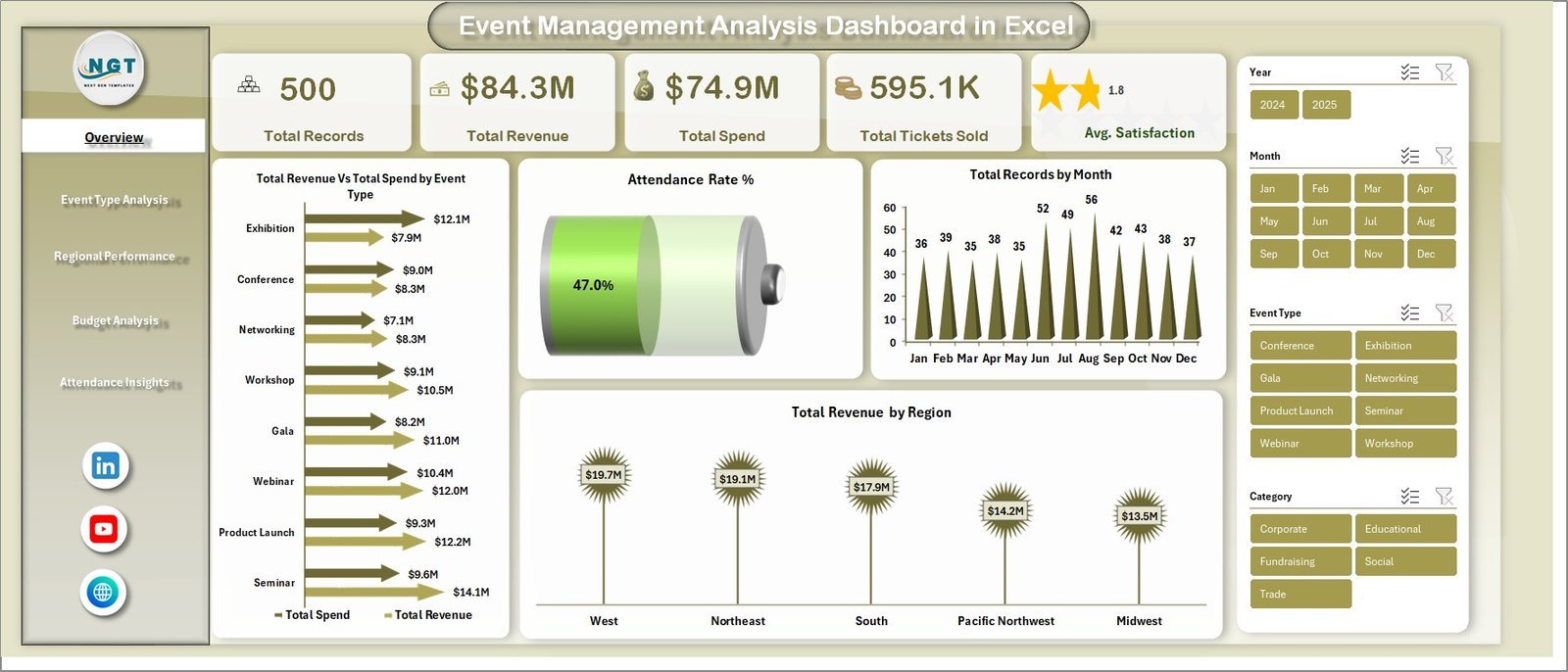
This is the most complete Excel option here. It ranks first because it reports on money, people and place in one file. It is built on Excel pivot tables that refresh when you update your data, and the product page says no VBA or advanced skills are needed.
Who it is for: event planners, coordinators and marketing teams running conferences, workshops, trade shows, fundraisers or corporate retreats.
- 5 dashboard pages: Overview, Event Type Analysis, Regional Performance, Budget Analysis, Attendance Insights
- 5 KPI cards: Total Records, Total Revenue, Total Spend, Total Tickets Sold, Avg. Satisfaction
- Slicers for event type, region, category, venue, status and marketing channel
- Revenue vs Spend comparison across event types
- A searchable data view
Use cases: compare revenue and spend for each event type to see which category earns the most. Check which city drives revenue before you book next year's venues. Filter by marketing channel to see where your best-attended events came from. Replace the sample data with your own log and the cards recalculate.
Price: $17.99. Get the Event Management Analysis Dashboard in Excel.
Best for: anyone who needs one Excel file that answers which events make money.
2. Event Management Analysis Dashboard in Power BI
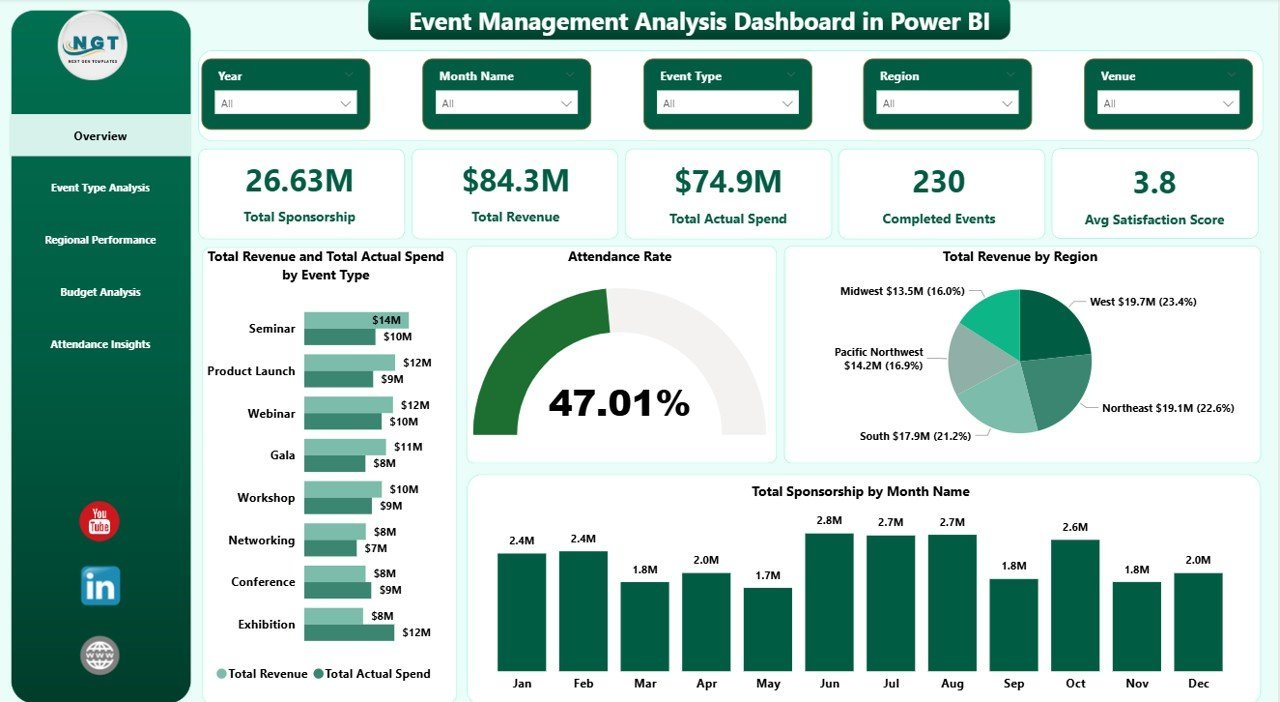
This is the Power BI twin of the Excel analysis dashboard, delivered as one .pbix file. The product page says setup takes under 10 minutes: replace the sample event log with your own data, click Refresh, and every visual updates.
Who it is for: analysts and event managers whose reporting already lives in Power BI, or who present to executives from it.
- 5 pages: Overview, Event Type, Regional, Budget and Attendance analysis
- 5 headline KPIs: Total Sponsorship, Total Revenue, Total Actual Spend, Completed Events, Avg Satisfaction Score
- 15+ pre-built charts
- Slicers for Event Type, Region, City, Category, Marketing Channel and Month
- Budget utilization tracking: Total Budget vs Actual Spend per event type
Use cases: spot a budget overrun by event type before the quarter closes. See completed versus cancelled events by region. Find cities where actual spend is outrunning revenue. Give a director a filtered snapshot, because each KPI card recalculates when a slicer is applied.
Price: $17.99. See the Event Management Analysis Dashboard in Power BI.
Best for: Power BI teams that want sponsorship, spend and satisfaction on one report.
3. Corporate Event Planning Dashboard in Excel
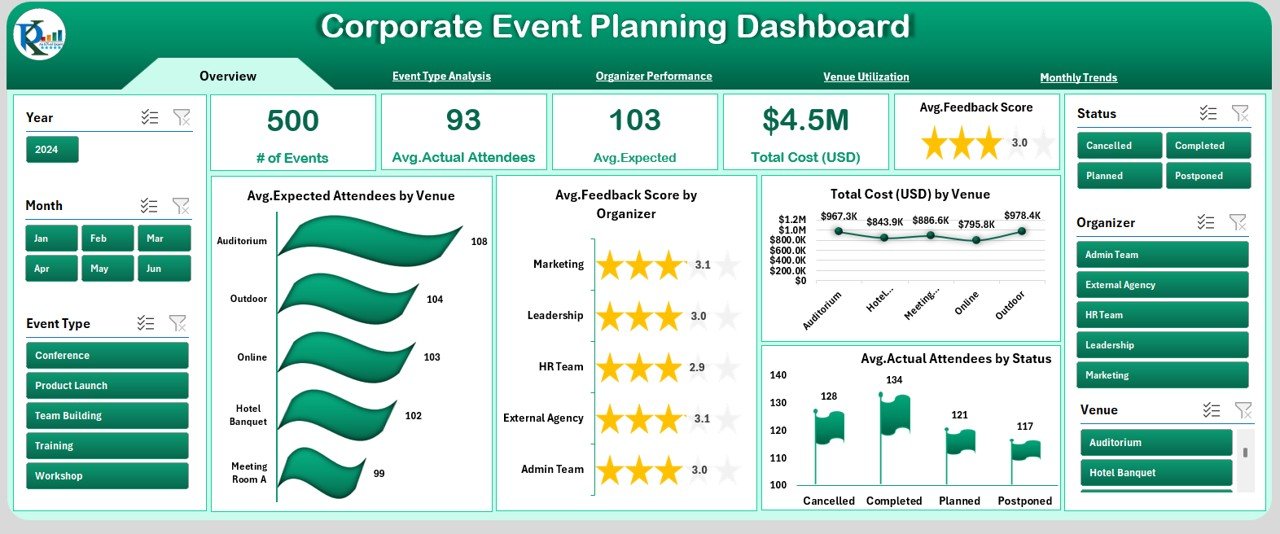
This one looks at events from the planner's side. It tracks who ran the event, where it was held and what it cost per attendee, rather than ticket revenue. It is the closest match for the corporate event planning template searches.
Who it is for: internal communications, HR and operations teams that run workshops, leadership summits and company conferences.
- 6 pages: Overview, Event Type, Organizer, Venue, Trends and Raw Data
- Data entry on one sheet; everything else updates automatically
- Fields include Event ID, Date, Type, Organizer, Venue, Attendees, Cost, Status and Feedback
- Slicers, drop-downs and a Support Sheet
Use cases: compare expected and actual attendees by organizer. Work out cost per attendee for each venue. Watch monthly budget allocation against feedback scores. See actual attendees by event status.
Price: $17.99. Get the Corporate Event Planning Dashboard in Excel.
Best for: corporate planners who judge events by cost and feedback, not ticket sales.
4. Corporate Event Planning Dashboard in Power BI
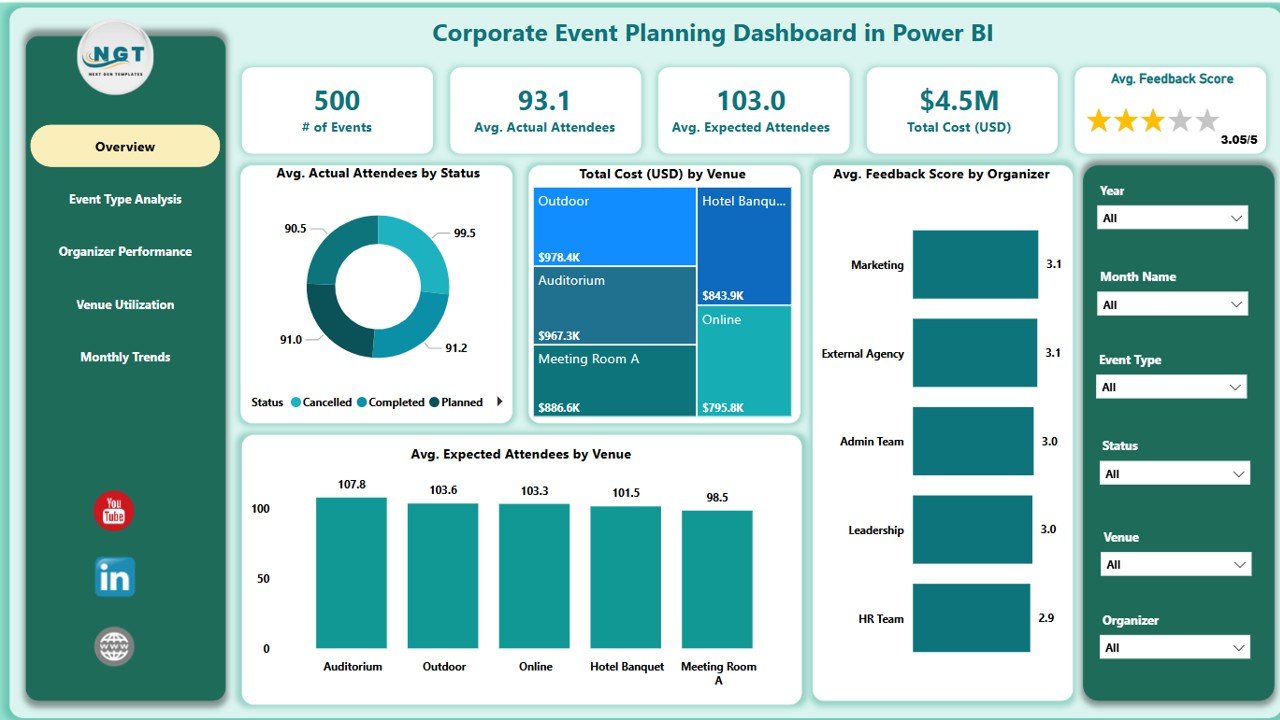
The Power BI version of the corporate planner covers the same ground in a .pbix file. It plugs into an Excel data source, so your team can keep logging events in a spreadsheet while reporting happens in Power BI.
Who it is for: corporate event teams that want live KPI cards and cross-filtering.
- 5 pages: Overview, Organizer, Venue, Event Type and Trends
- KPI cards for Total Events, Expected and Actual Attendees, Avg. Feedback and cost
- 6 interactive slicers per page, including Event Status, Date Range, Organizer, Venue and Event Type
- Monthly trend charts and organizer performance comparison
Use cases: rank organizers by feedback score. Find which venue delivers the best feedback for its cost. Spot seasonal attendance patterns across months. Match satisfaction against spending.
Price: $17.99. View the Corporate Event Planning Dashboard in Power BI.
Best for: planners who want Excel data entry with Power BI visuals.
Still deciding? The Event Management Analysis Dashboard in Excel is $17.99 and covers revenue, spend, tickets and satisfaction on 5 pages. The Google Sheets version is $9.99 if you want the lowest price.
5. Event Management KPI Dashboard
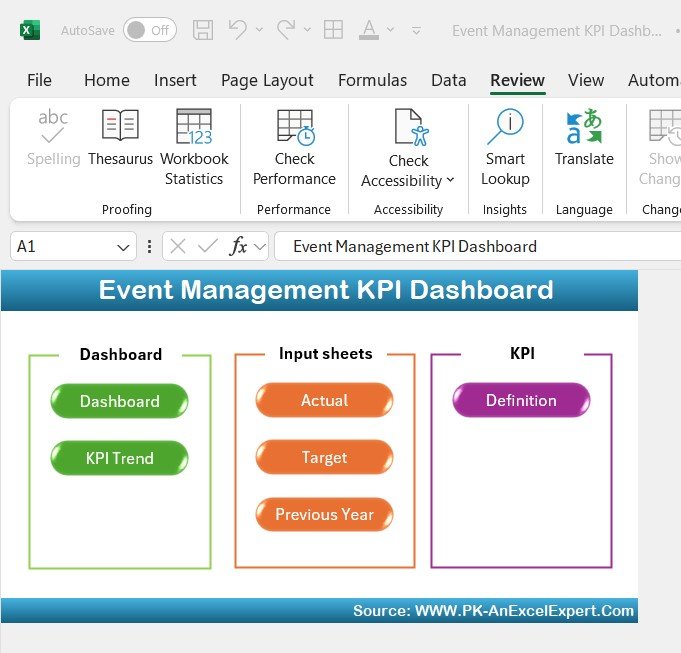
This Excel file is organized around targets. You set a goal for each KPI and compare it with the actual result, which suits a single high-stakes event more than a portfolio.
Who it is for: planners of conferences, weddings, concerts and corporate events who report against a plan.
- Tracking of attendee registration, attendance, budget vs actual expenses, vendor performance and guest satisfaction
- Month-to-Date and Year-to-Date analysis
- Goal setting and performance comparison
- Conditional formatting alerts for overspending or low attendance
- Customizable inputs
Use cases: set a registration target and watch actual sign-ups against it. Compare budget with actual expenses by line. Flag a vendor whose performance is below target. Compare this year with earlier events using the YTD view.
Price: $14.99. Get the Event Management KPI Dashboard.
Best for: target-driven planners who want alerts when an event drifts off plan.
6. Event Management Dashboard in Excel
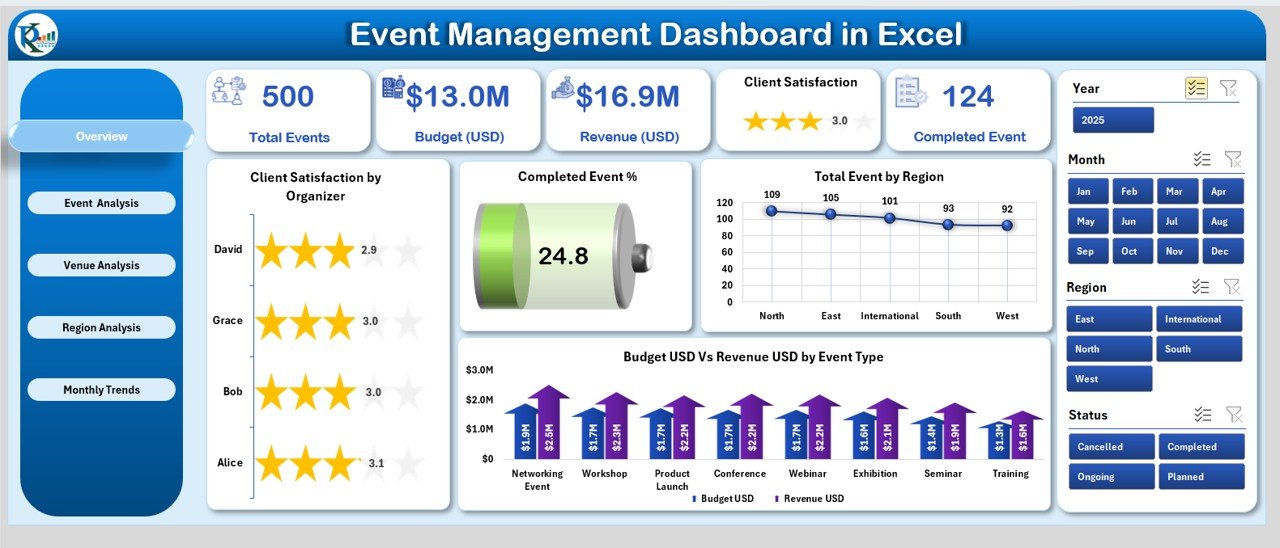
The lowest-priced Excel dashboard in this list puts the whole event book into 5 analytical pages and a support sheet. It is the right size for a team that wants venue, region and monthly views without more.
Who it is for: startups, nonprofits, institutions and corporates running events of any size.
- Overview, Event Analysis, Venue Analysis, Region Analysis and Monthly Trends pages
- Budget vs Revenue across event type, venue, region and month
- Page Navigator for moving between sections
- Pre-built charts, KPIs and pivot tables
- Support Sheet for backend data
Use cases: see total events and completed percentage in one glance. Compare satisfaction and budget vs revenue by venue. Check ongoing events by region. Track seasonal patterns by month.
Price: $13.99. Get the Event Management Dashboard in Excel.
Best for: a low-cost Excel dashboard with venue and region comparison.
7. Event Management Dashboard in Power BI
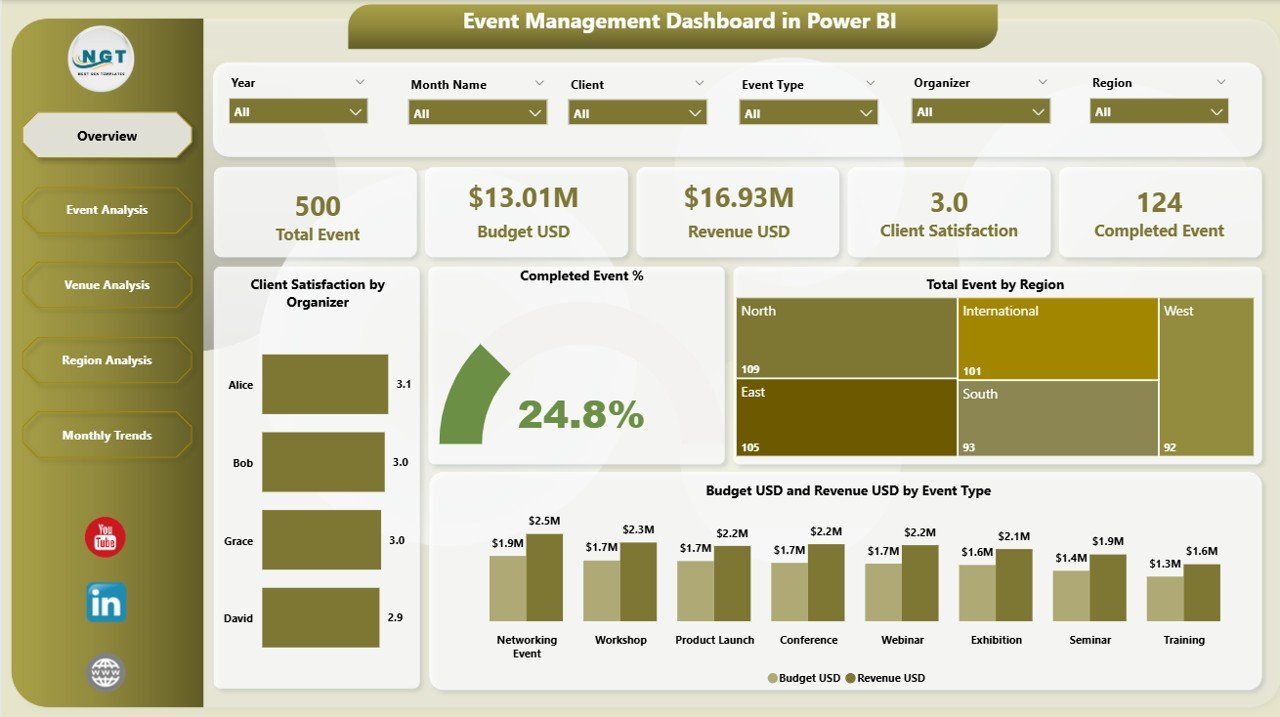
This Power BI dashboard has 5 interactive pages with slicers and drill-downs. It connects to event data in Excel or databases and refreshes from those sources.
Who it is for: managers of conferences, exhibitions, concerts and workshops who report on budget, venue, region and client satisfaction.
- Overview page with Client Satisfaction by Organizer, Completed Event % and Budget vs Revenue by Event Type
- Event Analysis page: satisfaction by type, ongoing vs completed events
- Venue Analysis: satisfaction, completed event % and budget vs revenue by venue
- Region and monthly trend views
Use cases: prepare a board-level summary from the Overview page. Compare locations by budget vs revenue. Find event types with low satisfaction before they hurt results. Drill from region down to venue.
Price: $17.99. See the Event Management Dashboard in Power BI.
Best for: Power BI users who care most about client satisfaction and budget vs revenue.
8. Event Management Analysis Dashboard in Google Sheets: best value
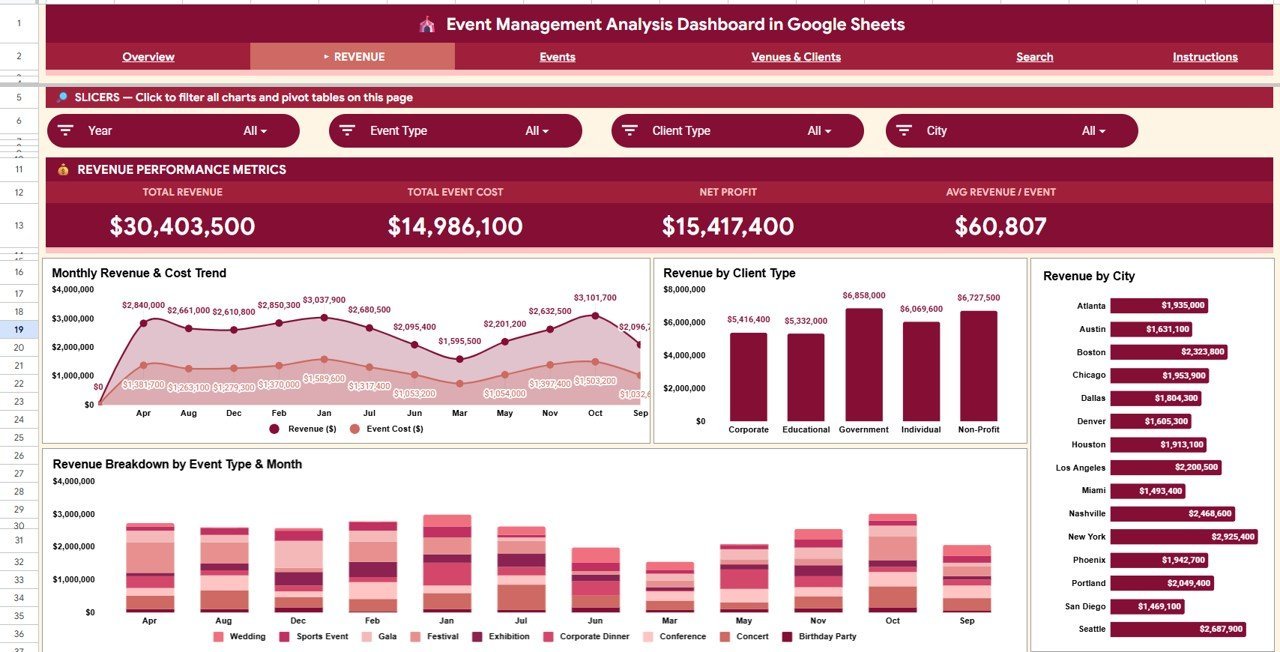
At $9.99 this is the cheapest option and the only one that runs entirely in a browser. The product page says it needs no add-ins, no Power BI license and no macros.
Who it is for: small teams, nonprofits and schools that share event data in Google Workspace.
- 6 pages: Overview, Revenue, Events, Venues & Clients, Search Sheet and Data Sheet
- 4 KPI cards: Total Revenue, Total Events, Total Profit, Tickets Sold
- 14 interactive charts and slicers for event type, client, city and month
- Tickets Sold vs Capacity and Venue Revenue Ranking
- Event ID lookup from a dropdown on the Search Sheet
Use cases: compare monthly revenue against event costs. Rank venues by revenue before negotiating. See which event types fill seats and which do not. Pull up one event's date, venue, city and revenue by its ID.
Price: $9.99. Get the Event Management Analysis Dashboard in Google Sheets.
Best for: shared, low-cost event reporting without desktop software.
How do I choose between these event management templates?
Start with the tool your team opens daily, then decide what you are measuring. The table below maps the common situations.
| Your situation | Pick | Price |
|---|---|---|
| You sell tickets and need revenue vs spend | Analysis Dashboard (Excel, Power BI or Sheets) | $17.99 / $17.99 / $9.99 |
| You run internal company events and judge by cost per attendee | Corporate Event Planning Dashboard (Excel or Power BI) | $17.99 |
| You report against targets with alerts | Event Management KPI Dashboard | $14.99 |
| You want the cheapest Excel option | Event Management Dashboard in Excel | $13.99 |
| Your team works only in the browser | Google Sheets Analysis Dashboard | $9.99 |
If your data already sits in Excel and you want a quick start, take #1. If you present to executives in Power BI, take #2 or #7. If the question is cost per head for internal events, take #3 or #4.
Excel, Power BI or Google Sheets: which format fits?
Excel is the default for planners who work offline, email files around and want to edit charts themselves. The pivot-table dashboards refresh when you update the data, and the Corporate Event Planning and Event Management dashboards add a support sheet for backend data.
Power BI suits teams that already have a license and present to leadership. Slicers cross-filter every visual, and the data can come from Excel or databases. Google Sheets suits a distributed team that edits one live file in a browser and does not want to install anything.
Because the analysis dashboard exists in all three formats, you can trial the workflow in the $9.99 Sheets version and move to a $17.99 version later if your reporting outgrows it. The page layouts differ slightly between formats, so check the page lists above before you commit.
Which metrics should an event dashboard track?
Four formulas cover most decisions. Budget utilization is actual spend divided by budget. Cost per attendee is total cost divided by actual attendees. Fill rate is tickets sold divided by capacity. Event ROI is revenue minus spend, divided by spend.
Worked example: a conference has a $40,000 budget and $46,000 actual spend, so utilization is 115%. With 400 attendees, cost per attendee is $115. If it earned $58,000, ROI is (58,000 minus 46,000) divided by 46,000, about 26%. These figures are illustrative, not benchmarks. Your own history is the benchmark that matters.
The analysis dashboards chart spend, revenue and attendance by event type, so you see these ratios across the portfolio. The Corporate Event Planning dashboards expose cost and attendees by venue and organizer. A plain spreadsheet is enough for a one-off planning checklist. The dashboards are for reporting after you have data.
How should I set up my event data log?
Every template in this guide works from one flat log with one row per event. Columns should be consistent, because slicers and pivot tables group on exact text. Most dashboard problems come from the log, not the template.
| Common data error | What goes wrong | Fix |
|---|---|---|
| Event types spelled several ways (Workshop, workshop, Work shop) | Slicers show three categories and charts split the total | Use a drop-down list for every category column |
| Budget and actual spend in one cell | Budget utilization cannot be calculated | Keep budget and actual spend in separate numeric columns |
| Dates typed as text | Monthly trend charts skip or misorder months | Format the column as a date and re-enter bad rows |
| Cancelled events deleted from the log | Completion rate and regional comparisons look better than reality | Keep the row and set the status to Cancelled |
| Attendance logged as a percent instead of a count | Cost per attendee comes out wrong | Store expected and actual attendee counts, then calculate the rate |
Before you load the real log, keep the sample rows for a day and compare how each chart reacts when you change one value. It is the fastest way to learn which column feeds which visual. If you manage projects around the events as well, our task and to-do management templates pair well with an event log.
What does an event cost compared with event software?
Event platforms such as Eventbrite and Cvent handle registration, payments and check-in, and their pricing depends on ticket volume or a custom quote. Check their current pricing pages for exact figures. They also report on events, but you pay for that capability through the platform.
A template covers only the reporting layer. At $9.99 to $17.99 you can analyze budget, attendance and venue results from data you already hold. If you already own an Excel or Power BI license, the template adds no ongoing cost. For Power BI product background, see the official Microsoft Power BI documentation.
Single template or several: what is the maths?
Buying the Excel and Power BI analysis dashboards together costs $35.98 ($17.99 plus $17.99). Adding the Google Sheets version brings it to $45.97. Most teams need only one, so choose a format first.
A sensible two-template combination is an analysis dashboard for the portfolio plus the $14.99 KPI Dashboard for a single flagship event with targets and alerts. That is $32.98 for Excel and covers both the portfolio and one event view.
When is a template NOT the right answer for event management?
A dashboard reports on events. It does not run them. If any of the following describes you, buy or keep software instead.
- You need to sell tickets online. Checkout, payment processing and QR check-in need a ticketing platform such as Eventbrite.
- You manage large enterprise programs with approvals. If dozens of people need role-based access, audit trails and vendor contracts in one system, an enterprise platform such as Cvent fits better than a spreadsheet.
- You have fewer than a handful of events a year. A basic budget sheet and a checklist will do. A 5-page dashboard needs rows of data to be useful.
- Your data is not logged. If revenue, spend and attendance are not recorded per event, no template can chart them. Start by building the log.
- You need real-time registration counts. These templates refresh when you update the data or click Refresh. They are not live feeds from a registration form.
If your problem is wider project work around events, an Asana alternative in Excel or a ClickUp alternative in a spreadsheet may fit the task side better. For venue or supplier stock, look at our inventory management templates and warehouse management templates. For equipment you own and move between events, see the asset management templates for fixed asset tracking. If you truck staging or equipment, the fleet management dashboard roundup is relevant too.
Frequently asked questions
What is the best event management Excel template?
The Event Management Analysis Dashboard in Excel ($17.99) is the most complete pick. It has 5 report pages, 5 KPI cards and slicers for event type, region, category, venue, status and marketing channel. It works on pivot tables that refresh when you replace the sample data, with no VBA.
Can I manage events in Excel instead of paid software?
Yes, for reporting and tracking. Excel handles budgets, attendance, venue costs and satisfaction well when each event is logged on one row. It does not sell tickets, send invitations or process payments, so pair it with a ticketing platform if you need registration and checkout.
Is there a free event planning Excel template?
Free event planning templates exist, but they are usually simple checklists or budget sheets without reporting. The templates here are paid, from $9.99 to $17.99, and add dashboards with KPI cards, slicers and charts. Choose free if you only need a to-do list, paid if you need to analyze results.
Which format is better: Excel, Power BI or Google Sheets?
Pick the tool your team already uses. Excel suits desktop users and offline work, Power BI suits executive reporting with cross-filtering, and Google Sheets suits shared browser-based teams. The analysis dashboard exists in all three: $17.99 for Excel, $17.99 for Power BI and $9.99 for Google Sheets.
What KPIs should an event dashboard track?
Track revenue, total spend, budget utilization, tickets sold, attendance rate, cost per attendee and satisfaction score. The analysis dashboards chart most of these by event type, region and venue. Add event ROI, which is revenue minus spend divided by spend, once you log both figures for every event.
Do these templates need VBA or macros?
The Excel analysis dashboard is described as needing no VBA or advanced skills, and it runs on pivot tables. The Google Sheets version needs no add-ins or macros. The Power BI versions are .pbix files that you open in Power BI and refresh after replacing the sample data.
Can I use my own event data in these dashboards?
Yes. Each dashboard ships with sample data that you replace with your own event log. The Power BI analysis dashboard page says setup takes under 10 minutes: replace the sample, click Refresh and the visuals update. Keep one row per event and consistent spelling so slicers group correctly.
How much do event management templates cost?
Prices are in USD. Five of the eight cost $17.99: the Excel and Power BI analysis dashboards, both Corporate Event Planning dashboards and the Power BI Event Management Dashboard. The KPI Dashboard is $14.99, the Excel Event Management Dashboard is $13.99 and the Google Sheets version is $9.99.
Is a corporate event planning template different from an event management template?
Yes. Corporate Event Planning dashboards focus on organizers, venues, cost per attendee, monthly trends and feedback for internal events. Analysis dashboards focus on revenue, spend, tickets sold and regional performance, which suits events that sell tickets or bring in sponsorship.
When should I buy event software instead of a template?
Buy software when you need online registration, ticket payments, attendee check-in or email invitations. Tools such as Eventbrite and Cvent handle those jobs. A template is the better fit when your goal is reporting on budget, attendance and venue performance from data you already have.
Get more event management templates
Start with the Event Management Analysis Dashboard in Excel for $17.99, or the Google Sheets version for $9.99. Power BI teams can take the analysis dashboard in Power BI at $17.99.
Watch walkthroughs of our dashboards on the NextGenTemplates YouTube channel.