

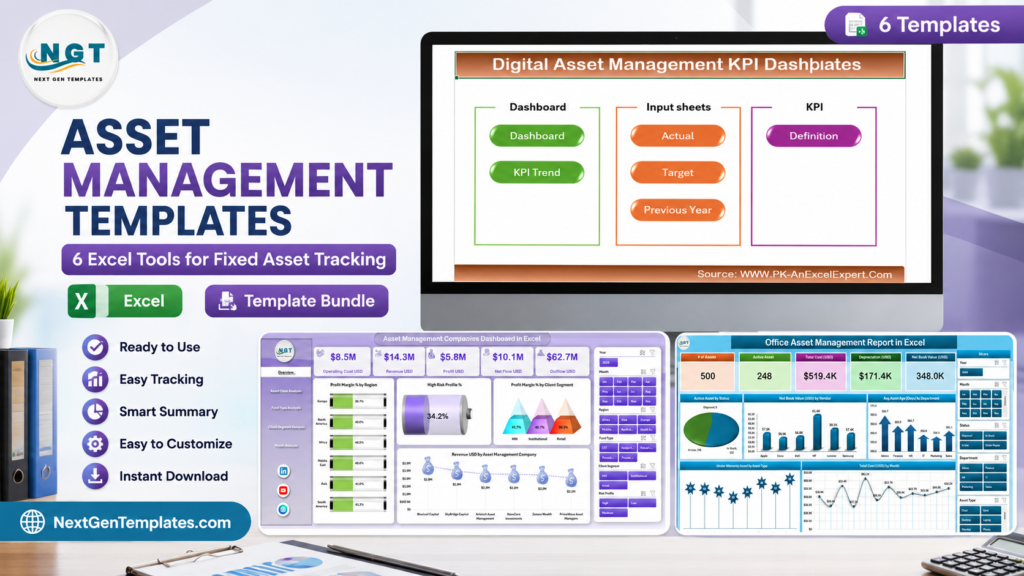
Asset management templates help teams replace scattered spreadsheets with structured dashboards, trackers, and KPI reports for financial assets, office equipment, digital files, disposals, and employee-issued resources. This Excel-first roundup compares six paid NextGenTemplates tools for fixed asset tracking and asset management reporting, with one Google Sheets tracker included because it is especially useful for live employee asset assignment workflows.
The need is practical, not theoretical. BCG reported that the global asset management industry reached $128 trillion in assets under management in 2024, while Grand View Research estimates the enterprise asset management market will grow from $7.65 billion in 2024 to $19.68 billion by 2030. Whether you manage portfolios, laptops, furniture, creative files, software licenses, or disposal approvals, reliable asset data is now a management requirement.
Quick recommendation: choose the Office Asset Management Report in Excel for fixed office assets, the Employee Asset Management Tracker in Google Sheets for employee handoffs, and the Asset Management Companies Dashboard in Excel for portfolio and finance performance reporting.
Key Features of Asset Management Templates
A useful asset management template should do more than store a list of items. Look for clean input sheets, defined asset categories, unique asset IDs, status fields, owner or department assignment, cost and value tracking, warranty or lifecycle fields, and reporting pages that convert raw records into decisions. For dashboard templates, slicers, charts, KPI cards, trend views, and target comparisons make the workbook easier to use in meetings. For trackers, search fields, drop-down lists, and standardized disposal or return fields reduce messy data entry.
Excel remains a strong choice for structured asset reports because teams can maintain source tables, PivotTables, charts, formulas, and exports in one familiar file. If your workbook relies on PivotTables, Microsoft’s PivotTable source data guidance is a useful reference when your source range changes.
 Launch offer
SUMIFS, XLOOKUP, FILTER, LAMBDA and checking AI-written formulas, with real business projects. 11h 47m of video by PK, with practice files, quizzes and a capstone.
Dashboard Pages and Tracker Pages Explanation
The six templates in this guide cover different asset management workflows. The two asset management company dashboards focus on portfolio and investment performance. The digital asset management dashboard focuses on creative and media asset KPIs. The employee tracker focuses on who has which company asset. The disposal tracker focuses on end-of-life asset records. The office asset management report is the closest match for traditional fixed asset tracking.
This matters because fixed asset tracking is not one single process. A finance team may care about asset value and disposal records, while an IT team may care about employee assignment and return status. A marketing team may care about digital file usage, while an investment firm may care about fund type, client segment, and net flow. The best asset management template is the one that matches the asset lifecycle you actually manage.
6 Asset Management Templates Compared
| Template | Platform | Best For | Main Tracking Focus | Sale Price |
|---|---|---|---|---|
| Asset Management Companies Dashboard in Excel | Excel | Asset management companies and finance teams | Revenue, profit margin, net flows, asset class, fund type, client segment | $13.99 |
| Digital Asset Management KPI Dashboard in Excel | Excel | Marketing, content, creative, and IT teams | Digital asset usage, storage, lifecycle, downloads, and performance KPIs | $14.99 |
| Asset Management Companies KPI Dashboard in Excel | Excel | Investment reporting and KPI reviews | MTD, YTD, target, previous year, KPI definitions, and trends | $14.99 |
| Employee Asset Management Tracker in Google Sheets | Google Sheets | HR, admin, IT, and operations teams | Employee-issued equipment, return status, condition, department, and asset IDs | $6.99 |
| Office Asset Disposal Tracker in Excel | Excel VBA | Office asset disposal and approval workflows | Disposal method, disposal value, approval owner, reason, and asset category | $6.99 |
| Office Asset Management Report in Excel | Excel | Fixed office asset tracking | Laptops, printers, furniture, software, warranty, status, age, and cost | $4.99 |
Asset Management Templates vs Blank Spreadsheets vs Paid SaaS – Feature Comparison
| Feature | NextGenTemplates Asset Management Templates | Blank Spreadsheet | Paid Asset Management SaaS |
|---|---|---|---|
| Setup time | Fast, because fields, charts, and layouts are already built | Slow, because structure must be designed from scratch | Medium to long, depending on configuration and onboarding |
| Cost | One-time template purchase | No template cost, but high setup time | Recurring monthly or annual subscription |
| Customization | Editable in Excel or Google Sheets | Fully editable, but no starting structure | Depends on vendor plan and permissions |
| Reporting | Built-in dashboards, KPI views, and summary reports | Must be built manually | Usually strong, but may require setup |
| Best fit | Small teams, consultants, departments, and template-first reporting | Very simple lists or one-off tracking | Larger teams needing role permissions, integrations, and audit trails |
Related guide: Tracking laptops, phones and licences rather than plant and machinery? Our Rippling alternatives — 6 HR & IT asset templates in Excel & Sheets covers the IT asset side and what a register cannot do that MDM software can.
1. Asset Management Companies Dashboard in Excel
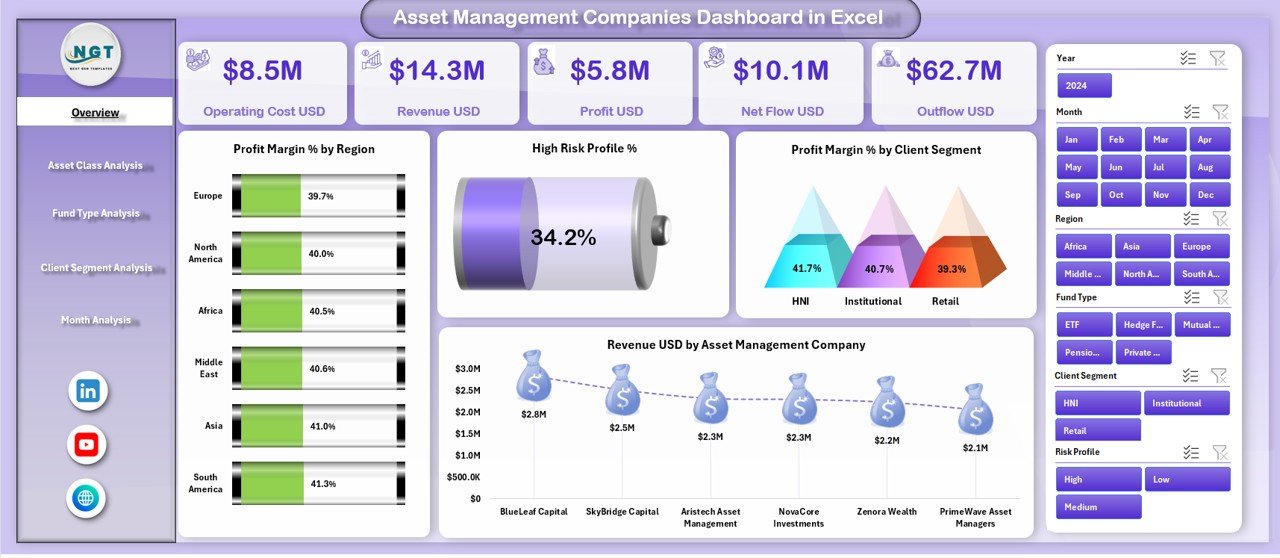
The Asset Management Companies Dashboard in Excel is built for portfolio managers, finance teams, and asset management firms that need a clean operating view. It includes pages for overview reporting, asset class performance, fund type analysis, client segment analysis, and monthly performance. Use it to compare revenue, profit margin, average investment, operating cost, net flow, and high-risk profit percentage without digging through raw tables.
2. Digital Asset Management KPI Dashboard in Excel
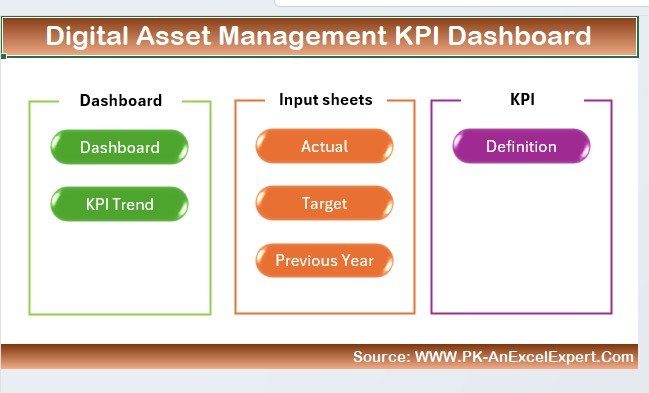
The Digital Asset Management KPI Dashboard in Excel is designed for teams that manage creative files, media libraries, campaign assets, product content, and internal digital resources. Instead of focusing on physical asset IDs, it tracks KPIs such as asset usage, downloads, storage utilization, lifecycle status, and content performance.
3. Asset Management Companies KPI Dashboard in Excel
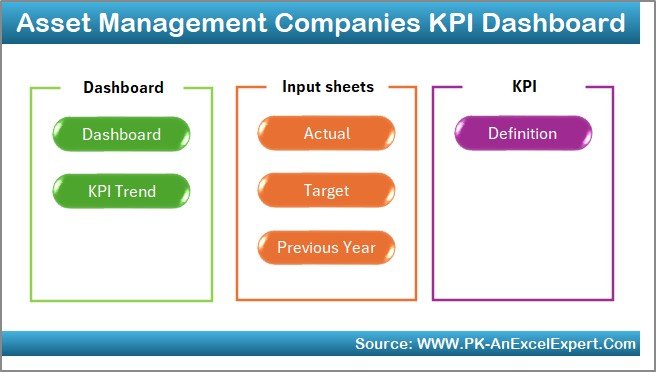
The Asset Management Companies KPI Dashboard in Excel is a KPI-focused workbook for asset management companies that want target tracking, trend analysis, and executive scorecards. It supports MTD, YTD, target, and previous-year comparisons, with dedicated sheets for actual data, targets, prior-year values, and KPI definitions.
4. Employee Asset Management Tracker in Google Sheets
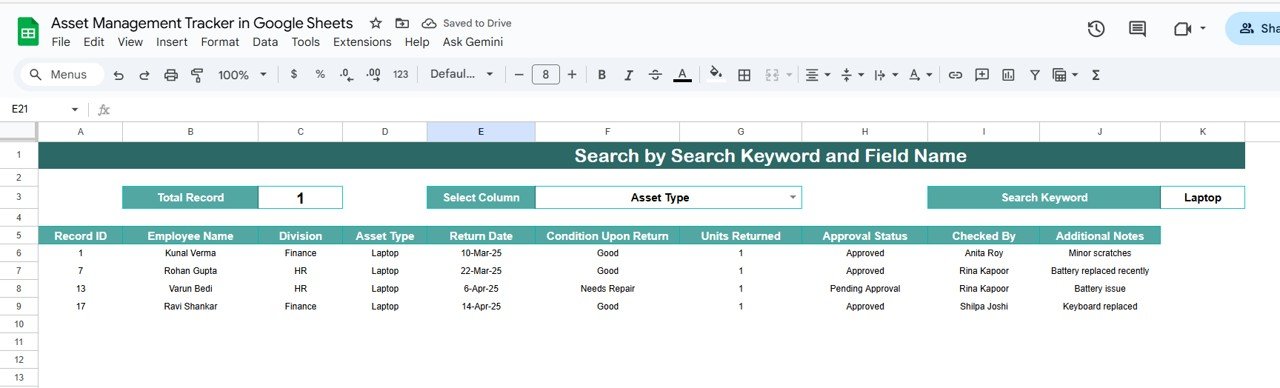
The Employee Asset Management Tracker in Google Sheets is the collaboration-friendly option for teams that issue laptops, phones, monitors, access cards, tools, or other equipment to employees. It tracks asset ID, employee name, department, asset type, issue details, return status, condition on return, and received-by information.
5. Office Asset Disposal Tracker in Excel

The Office Asset Disposal Tracker in Excel is built for the final stage of the asset lifecycle. It helps teams record disposal events with fields such as asset ID, asset name, category, department, disposal date, disposal method, disposal value, approval owner, and disposal reason. Because it is a VBA-enabled workbook, it can support a more guided data entry experience than a flat worksheet.
6. Office Asset Management Report in Excel
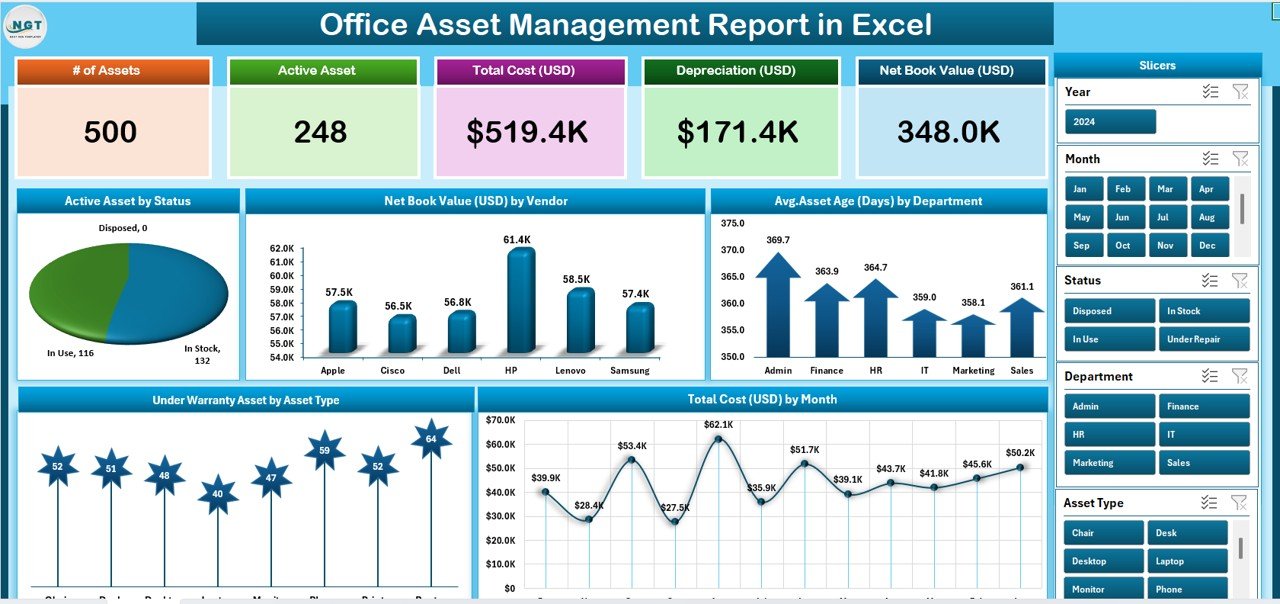
The Office Asset Management Report in Excel is the most direct fixed asset tracking option in this list. It is built for laptops, printers, furniture, software, and other office assets, with summary reporting for asset status, warranty tracking, age, cost, and detailed records.
Who Should Use This Template Collection
These templates are useful for asset management companies, finance teams, small business owners, HR managers, office administrators, IT teams, marketing operations teams, and consultants who prepare recurring asset reports for clients. They are especially helpful when a full enterprise asset management system would be too heavy, too expensive, or too slow to implement.
If your problem is fixed asset control, start with the office asset report, employee tracker, and disposal tracker. If your problem is portfolio or investment performance, start with the two asset management company dashboards. If your problem is creative file oversight, start with the digital asset management KPI dashboard.
Real-World Use Cases
- Quarterly asset reviews: summarize active assets, retired assets, warranty exposure, and disposal activity before finance meetings.
- Employee onboarding and offboarding: track equipment issued to each employee and confirm returns when someone changes role or leaves.
- Portfolio performance reviews: compare revenue, net flow, profit margin, asset class, and client segment performance in one dashboard.
- Digital asset audits: monitor asset usage, storage, downloads, and lifecycle status for content teams.
- Disposal compliance: record who approved each disposal, why the asset was retired, and what value was recovered.
Advantages of Asset Management Templates
The biggest advantage of these asset management templates is speed. A prebuilt Excel or Google Sheets workbook gives teams a working structure immediately, including fields, formulas, charts, and reporting pages. That reduces the time spent designing the system and increases the time spent improving the data.
They also make asset conversations easier. Instead of debating whose spreadsheet is current, teams can review a shared structure with visible KPIs, filters, charts, and status fields. This is especially useful for monthly reviews, handover meetings, and small business audits.
Opportunities for Improvement
Spreadsheet templates are strongest when the team agrees on data ownership. If no one updates asset status, location, disposal records, or employee assignment fields, the dashboard will eventually become stale. Larger companies may also need role-based permissions, barcode scanning, automated depreciation, ERP integration, and formal audit trails.
For those cases, a template can still be useful as a prototype. It helps teams define fields, KPIs, workflows, and reporting needs before committing to larger software.
Best Practices
- Use a unique asset ID for every item, even low-cost equipment.
- Separate active, returned, disposed, damaged, and missing asset statuses.
- Record employee, department, location, purchase date, cost, warranty date, and current condition.
- Schedule a monthly review for high-value assets and a quarterly review for the full register.
- Keep raw data in structured tables so charts, formulas, and PivotTables stay easier to refresh.
- Protect formula and dashboard sheets when multiple people enter data.
Explore Relevant Templates
- Asset Management Companies Dashboard in Excel
- Digital Asset Management KPI Dashboard in Excel
- Asset Management Companies KPI Dashboard in Excel
- Employee Asset Management Tracker in Google Sheets
- Office Asset Disposal Tracker in Excel
- Office Asset Management Report in Excel
For walkthroughs, dashboard ideas, and template inspiration, visit the NextGenTemplates YouTube channel.
Frequently Asked Questions
What is an asset management template?
An asset management template is a structured spreadsheet or dashboard used to record, monitor, and report on assets. It can track physical assets such as laptops and furniture, digital assets such as content files, or financial assets such as portfolios and funds.
Is Excel good for fixed asset tracking?
Yes, Excel is a practical option for small and mid-sized teams that need a clear asset register, reporting dashboard, and repeatable review process. It works best when the workbook uses consistent asset IDs, structured tables, status fields, and protected formulas.
Which template is best for office fixed assets?
The Office Asset Management Report in Excel is the best fit for office fixed assets because it focuses on laptops, printers, furniture, software, warranty status, asset age, cost, and asset condition.
Which template should I use for employee equipment?
The Employee Asset Management Tracker in Google Sheets is best for employee equipment because it supports shared tracking of issued assets, departments, return status, condition on return, and received-by details.
Do these templates replace enterprise asset management software?
They can replace a manual tracking process for many small teams, but they are not a full ERP or enterprise asset management platform. They are best used as a fast, affordable reporting layer or as a prototype before investing in a larger system.
About the Author
Built by PK – Microsoft Certified Professional with 15+ years of Excel, Google Sheets, and Power BI experience. Founder of NextGenTemplates, reaching 300K+ subscribers across YouTube channels. Every template is hand-built and tested before release.
Conclusion
The best asset management template depends on the type of assets you manage. For fixed office assets, start with the Office Asset Management Report in Excel. For employee-issued equipment, use the Employee Asset Management Tracker in Google Sheets. For disposal workflows, use the Office Asset Disposal Tracker in Excel. For investment and portfolio reporting, the two asset management company dashboards give leadership a polished view of performance. Together, these six templates give teams a practical asset tracking toolkit without starting from a blank workbook.
Last updated: July 3, 2026.