

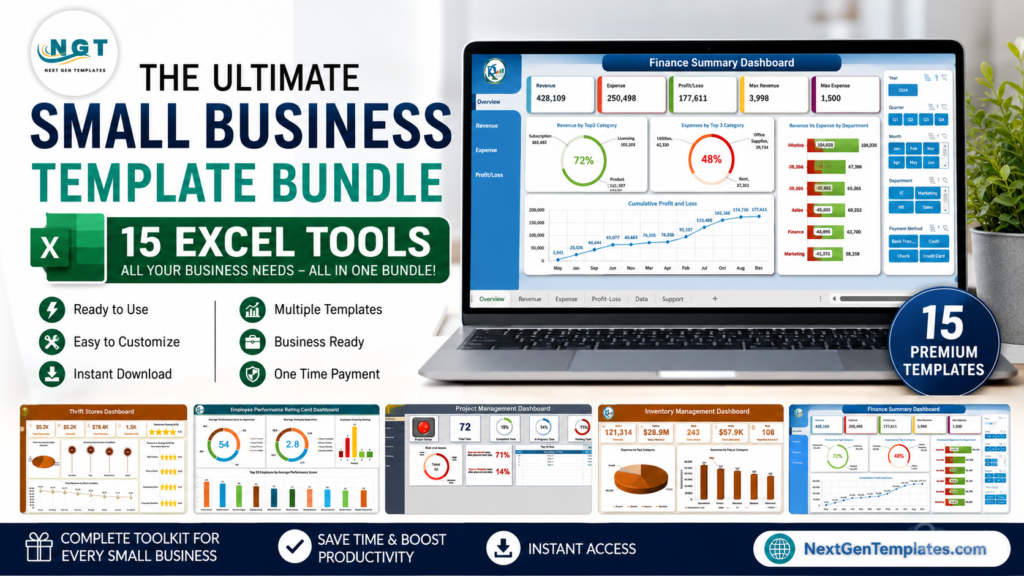
A complete small business Excel starter stack does not need to cost thousands. These 15 paid templates cover HR, sales, CRM, finance, inventory, retail, events, and project delivery for a combined current price of $186.85. Even at their combined regular prices, the total is $284.85—still below $300.
That breadth matters. The U.S. Small Business Administration reports 36.2 million U.S. small businesses, accounting for almost 46% of private-sector employment. Most owners need practical reporting without committing to a different subscription for every department. This curated small business template bundle is an all-you-need starter stack for teams that already work in Excel.
Price snapshot: July 14, 2026. Prices can change; confirm each product page before purchasing. The products are purchased separately and are not a single download.
Key Features of This Small Business Excel Starter Stack
- 15 focused tools: buy operational depth across five core business functions instead of forcing every process into one generic workbook.
- One familiar platform: keep teams in Excel for data entry, analysis, dashboards, trackers, and management reporting.
- Balanced coverage: combine executive dashboards with practical tools for onboarding, cash flow, stock updates, attendance, and task progress.
- Lower starting cost: the current $186.85 total leaves room in a $300 budget for training, customization, or Microsoft 365 licensing.
- Upgradeable workflows: start with spreadsheets, standardize processes, and move selected functions to specialist software when scale justifies it.
 Launch offer
SUMIFS, XLOOKUP, FILTER, LAMBDA and checking AI-written formulas, with real business projects. 11h 47m of video by PK, with practice files, quizzes and a capstone.
What’s Inside: 15 Excel Tools for a Small Business
Each product below solves a distinct operational problem. The table shows the current catalog price and the clearest buyer outcome.
| Function | Excel tool | Best for and key benefit | Price |
|---|---|---|---|
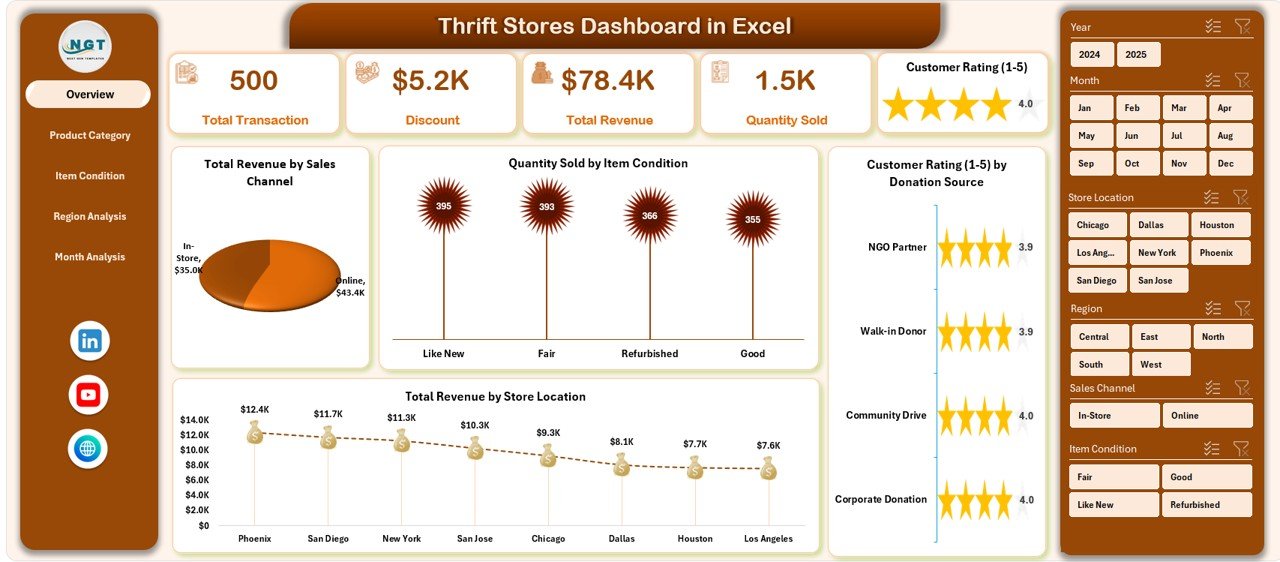
| Retail | Thrift Stores Dashboard in Excel | Owners who need revenue, category, discount, donation-source, location, and customer-rating analysis. | $13.99 |
| Events | Attendance Tracking System for Events and Meetings | Event, training, and meeting teams that want structured entry, attendance percentages, and monthly trends. | $6.99 |
| Retail KPI | Thrift Stores KPI Dashboard in Excel | Managers comparing MTD and YTD actuals, targets, prior-year results, and KPI trends. | $14.99 |
| CRM | CRM Development KPI Dashboard in Excel | CRM leaders who need a seven-sheet framework for targets, actuals, prior-year results, and trend reporting. | $14.99 |
| HR | Employee Performance Rating Card and Dashboard | Managers evaluating staff across 10 performance parameters and identifying coaching needs. | $17.99 |
| HR | Employee Onboarding Tracker in Excel | HR teams coordinating checklists, task ownership, reminders, training, and new-hire progress. | $6.99 |
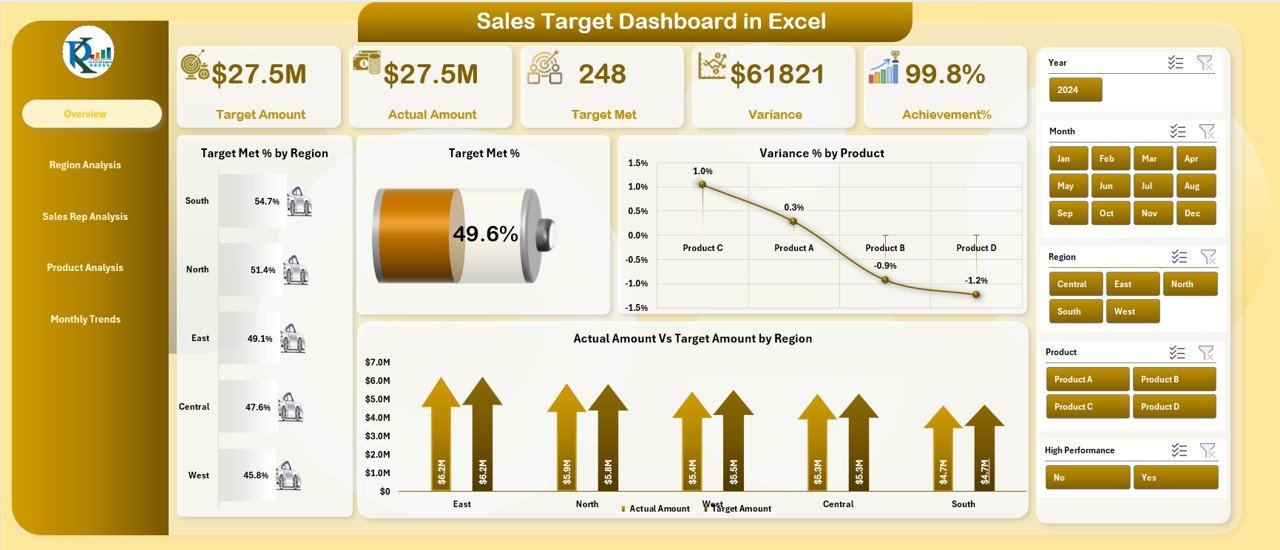
| Sales | Sales Target Dashboard in Excel | Sales managers comparing target attainment by region, representative, product, month, and year. | $17.99 |
| Sales | Sales KPI Dashboard in Excel | Teams monitoring sales growth, conversion, average deal size, goals, and individual performance. | $12.99 |
| Finance | Finance Summary Dashboard in Excel | Owners who want a high-level view of income, expenses, margins, cash flow, and profitability. | $17.99 |
| Finance | Cash Flow Template in Excel | Businesses tracking monthly inflows, outflows, net cash, closing balance, and liquidity trends. | $6.99 |
| Finance | Profit and Loss (P&L) Template in Excel | Founders who need monthly and YTD revenue, COGS, expenses, tax, EBIT, and net-profit reporting. | $6.99 |
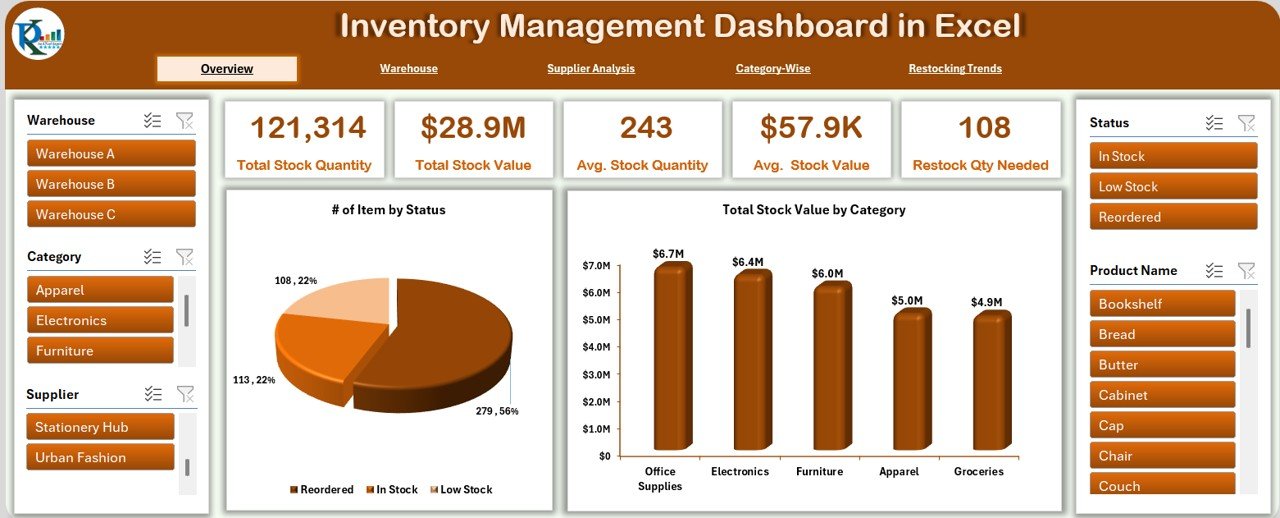
| Inventory | Inventory Management Dashboard in Excel | Retailers and wholesalers monitoring stock value, low-stock items, warehouses, suppliers, and restocking. | $17.99 |
| Inventory | Office Supply Inventory Update Tracker | Offices needing VBA-assisted entry, secure login, user roles, location tracking, and dashboard updates. | $6.99 |
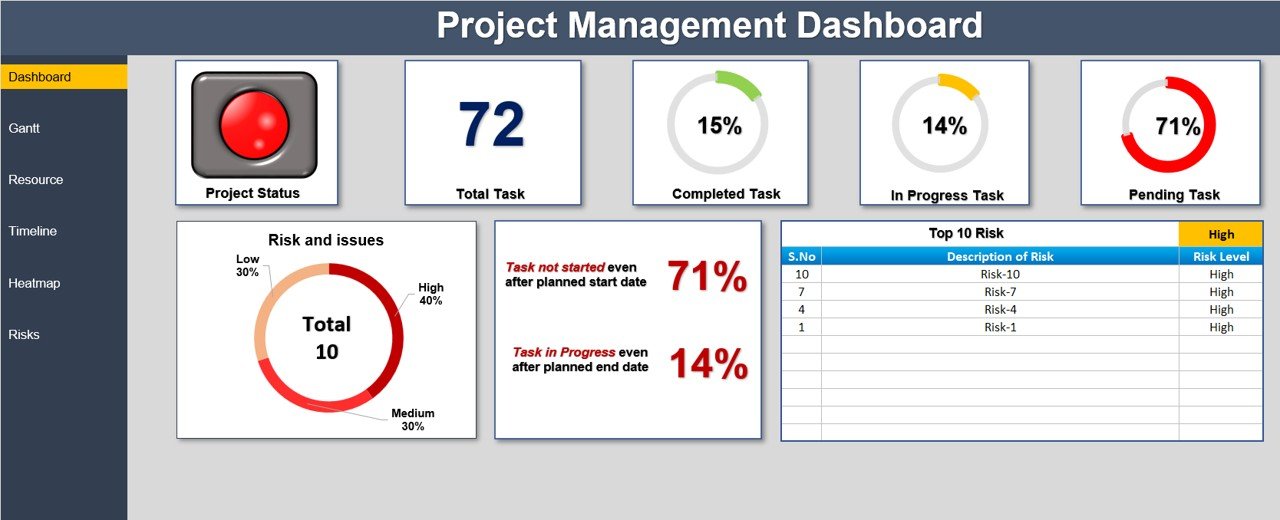
| Projects | Project Management Dashboard in Excel | Project leads managing tasks, Gantt schedules, resources, risks, workload, and executive reporting. | $17.99 |
| Projects | Project Progress Tracker in Excel | Small teams wanting seven customizable stages, automatic progress calculations, and color-coded status. | $4.99 |


Excel Starter Stack vs. Google Sheets vs. Paid SaaS
| Decision factor | This Excel stack | DIY Google Sheets | Paid SaaS mix |
|---|---|---|---|
| Template cost | $186.85 current; $284.85 regular | Potentially $0 if built internally | Recurring by product, module, or seat |
| Setup time | Replace sample data and configure fields | Build and test every workflow | Configure, integrate, and train users |
| Collaboration | Version-dependent; best with OneDrive or SharePoint | Native browser collaboration | Usually native and role-based |
| Customization | High; formulas, tables, fields, and charts are editable | High, but must be built or converted | Controlled by plan and vendor |
| Mobile and link sharing | Available with a compatible cloud setup; VBA requires desktop Excel | Strong browser and mobile access | Usually included |
| Year-one cost at 5 users | $186.85 for templates, plus Excel and any required template licenses | Workspace licensing plus build time | Vendor-dependent recurring total |
Excel remains a practical middle ground because tables, PivotTables, and PivotCharts can turn structured data into refreshable summaries and visual reports. See Microsoft’s official PivotTable and PivotChart overview for the underlying workflow.
Who Should Use This Template Stack
This stack fits owner-led firms, retail and service businesses, nonprofits, agencies, and small operations teams that already use Excel and want better structure quickly. It is especially useful when one person covers several functions and needs consistent management views without a large software rollout.
Real-World Use Cases
A thrift retailer building management discipline
Use the thrift dashboard for sales and customer analysis, the thrift KPI dashboard for target reviews, the inventory dashboard for replenishment, and the cash-flow and P&L tools for monthly financial control.
A growing service company hiring and selling
Coordinate new hires with the onboarding tracker, review staff with the performance dashboard, track pipeline health with the CRM KPI dashboard, and manage sales goals with the target and KPI dashboards.
An agency managing client work
Combine the project dashboard with the progress tracker, use the attendance system for workshops, and review revenue, expenses, and profitability with the three finance tools.
Advantages of the Small Business Template Bundle
The main advantage is modularity: each workbook has a defined job, so you can introduce tools in the order your business needs them. You retain control over fields and formulas, avoid immediate dependence on a single SaaS vendor, and create visible operating routines at a modest starting cost.
Opportunities for Improvement
This is a starter stack, not a unified ERP. Data will not automatically flow between all 15 files, permissions are less granular than dedicated systems, and macro-enabled tools require desktop Excel with macros allowed. Multi-user teams also need file naming, access, backup, and version-control rules. As transaction volume grows, consider moving the highest-risk function—often accounting, CRM, payroll, or inventory—to specialist software while retaining Excel for analysis.
Best Practices for Implementing the Stack
- Start with three workbooks: choose one finance tool, one revenue or inventory tool, and one people or project tool.
- Assign an owner: every file needs a named person responsible for data quality and refresh timing.
- Standardize identifiers: use consistent employee, customer, product, project, and date formats across files.
- Protect formulas: separate input areas from calculations, keep a clean master copy, and test changes before rollout.
- Review monthly: use the dashboards in a regular meeting and retire reports that do not change decisions.
Explore Relevant Templates
Start with the Finance Summary Dashboard, Sales Target Dashboard, Inventory Management Dashboard, or Project Management Dashboard. For tutorials and practical walkthroughs, visit the NextGenTemplates YouTube channel.
Frequently Asked Questions
Is this a single downloadable bundle?
No. It is a curated starter stack of 15 separately purchased NextGenTemplates products. That lets you buy the highest-priority tools first or assemble the complete stack.
How much do all 15 Excel tools cost?
As checked on July 14, 2026, the combined current price is $186.85. Their combined regular price is $284.85, so both totals remain below $300 before tax or licensing costs.
Do I need Microsoft 365?
You need a compatible version of Excel. Compatibility varies by product, and VBA tools require desktop Excel with macros enabled. Check each product page before purchasing.
Can a five-person team use the files?
Cloud-hosted Excel files can support collaboration in eligible Microsoft 365 setups, but macro features generally require desktop use. Confirm Microsoft licensing and the template license terms for your team.
Will data sync across all 15 workbooks?
Not automatically. Treat each workbook as a focused module. You can standardize IDs and reporting periods, then build controlled links or imports only where they add value.
Which templates should I implement first?
Begin with the bottleneck that affects cash or customer delivery. For most firms, that means a finance dashboard plus either sales, inventory, HR, or project tracking. Add the remaining tools after the first workflow is stable.
About the Author
Built by PK – Microsoft Certified Professional with 15+ years of Excel, Google Sheets, and Power BI experience. Founder of NextGenTemplates, reaching 300K+ subscribers across YouTube channels. Every template is hand-built and tested before release.
Conclusion
The best small business system is one the team will actually maintain. This 15-tool Excel stack gives an owner practical coverage across people, customers, money, stock, and projects for less than $300—even at regular catalog prices. Choose the first three modules, define ownership, and build a disciplined monthly reporting rhythm before adding more complexity.
Build Your Excel Starter Stack
Last updated: July 14, 2026.
Weighing whether one big bundle is worth it? See our guide to Template Bundles vs Single Templates: the real math for small teams.
Building your whole toolset? See our money-page guide to The 2026 Small Business Software Stack: What to Buy and What to Template.