

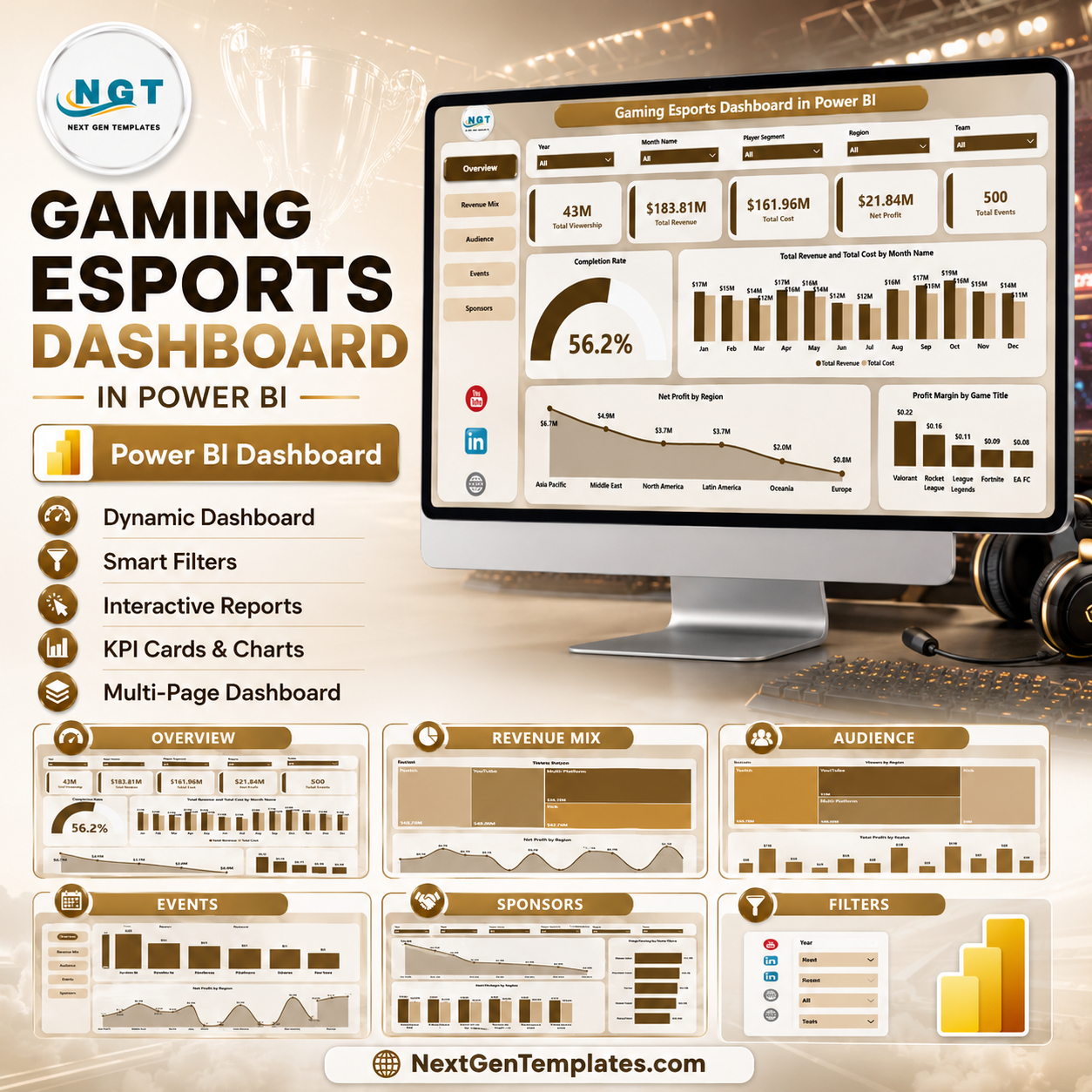
Esports teams now track revenue, cost, viewership, sponsors, regions, platforms, match types, and tournament progress across fast-moving campaigns. The Gaming Esports Dashboard in Power BI gives you a ready-to-use PBIX report with 5 report pages, 5 executive KPI cards, multiple slicers, and 16 focused analysis visuals. Built by a Microsoft Certified Professional and backed by NextGenTemplates’ 300K+ YouTube audience, this template helps teams avoid slow manual reporting while keeping full control in Power BI Desktop. One-time purchase, instant download, and no recurring SaaS fee.
Key Features of Gaming Esports Dashboard in Power BI
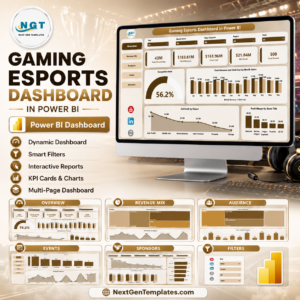
- 5 Power BI pages: Overview Page, Revenue Mix, Audience, Events, and Sponsors.
- 5 KPI cards: Total Viewership, Total Revenue, Total Cost, Net Profit, and Total Events.
- Interactive slicers: Filter the report quickly by available fields such as platform, region, game title, sponsor tier, team, match type, status, month, and event dimensions.
- Revenue and cost analysis: Compare revenue, cost, net profit, and profit margin across months, regions, platforms, sponsors, and game titles.
- Audience reporting: Review viewership by platform and region, plus event status distribution.
- Editable PBIX file: Customize visuals, measures, fields, pages, slicers, and branding in Power BI Desktop.
What’s Inside the Gaming Esports Dashboard in Power BI
1. Overview Page
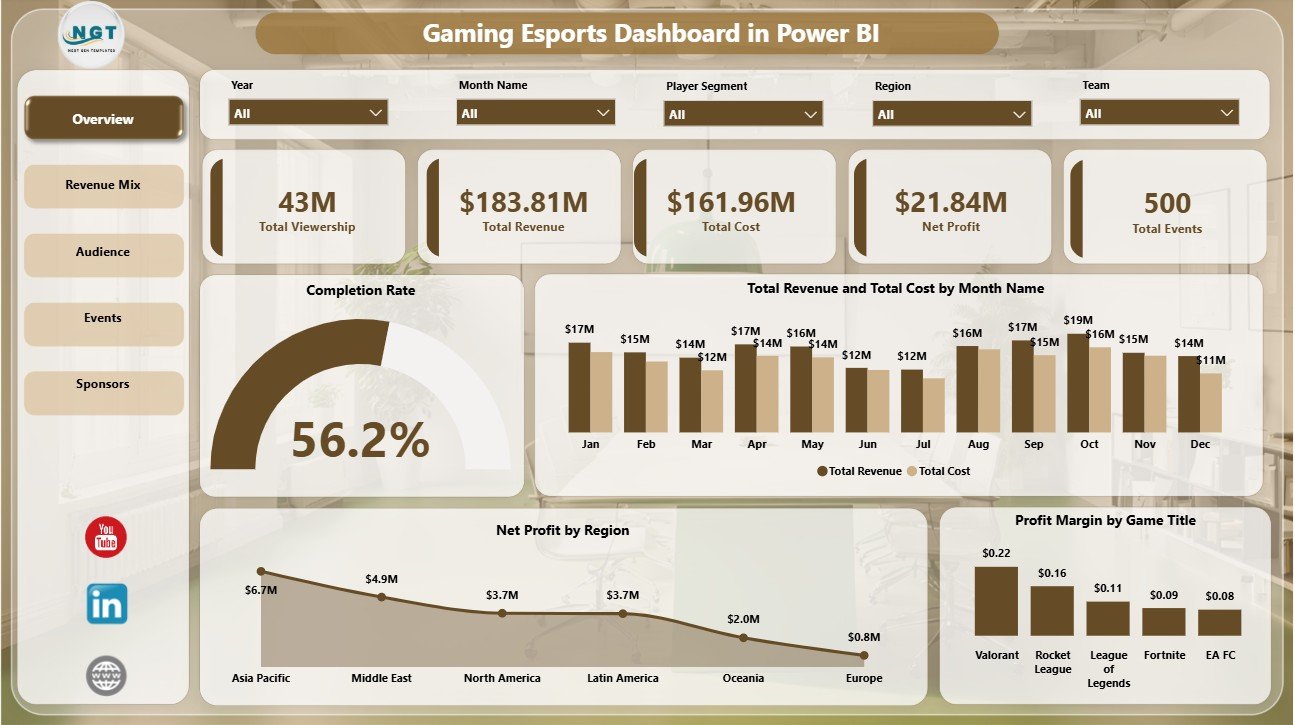
The Overview Page gives managers a high-level performance view. KPI cards show Total Viewership, Total Revenue, Total Cost, Net Profit, and Total Events so users can quickly understand audience reach, commercial activity, spending, profitability, and event volume.
Completion Rate: This visual shows how much event or tournament activity has been completed. It helps operations teams monitor execution progress and identify schedules that may need follow-up.
Total Revenue and Total Cost by Month Name: This chart compares revenue and spending across months. It helps identify seasonal revenue patterns and months where costs are growing faster than income.
Net Profit by Region: This chart compares profitability by geography. It helps sponsorship and event teams see which regions deliver stronger financial returns.
Profit Margin by Game Title: This visual highlights margin by game title. It helps teams understand which titles are not only popular, but commercially efficient.
2. Revenue Mix
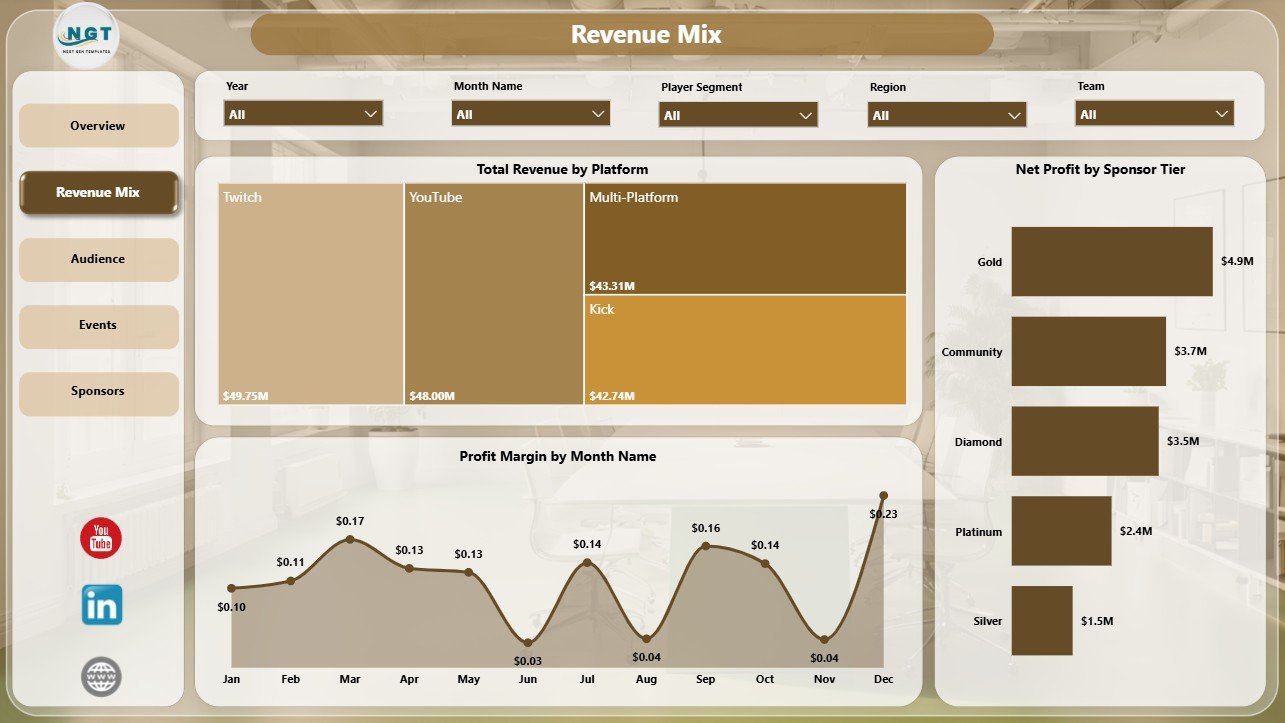
The Revenue Mix page focuses on how esports income and profit are distributed. Total Revenue by Platform shows which platforms contribute the most revenue. Profit Margin by Month Name reveals margin movement over time. Net Profit by Sponsor Tier helps compare sponsor package profitability.
3. Audience
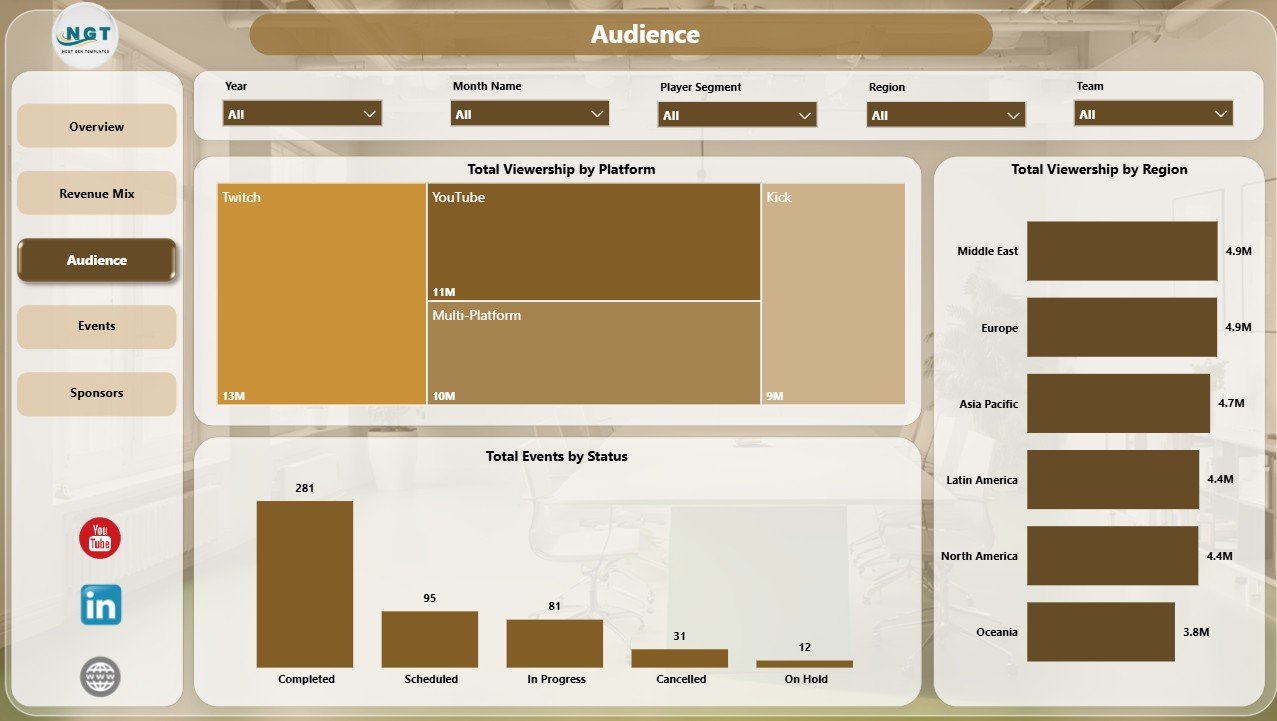
The Audience page helps teams understand where viewer attention is coming from. Total Viewership by Platform compares audience size by viewing channel. Total Viewership by Region highlights geographic demand. Total Events by Status shows how events are distributed across available operational statuses.
4. Events
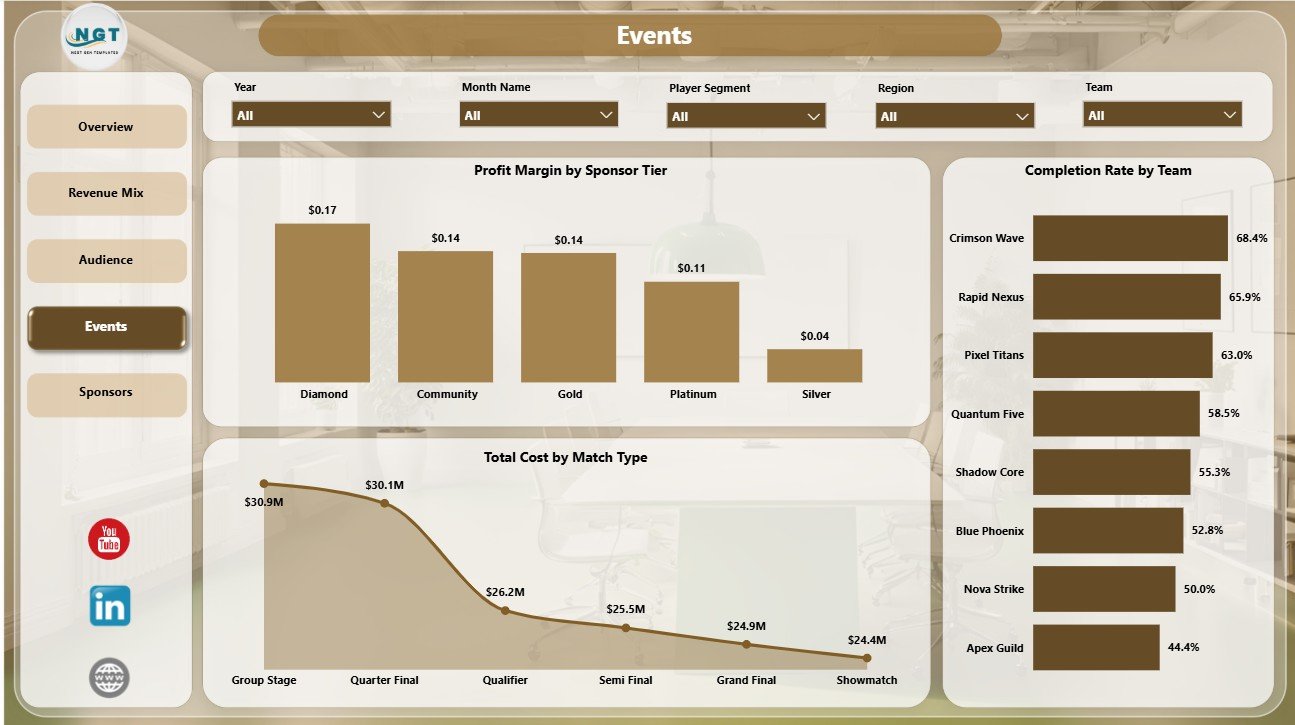
The Events page supports tournament and operations review. Profit Margin by Sponsor Tier compares sponsor profitability. Total Cost by Match Type shows which match formats drive cost. Completion Rate by Team helps compare execution or performance completion across teams.
5. Sponsors
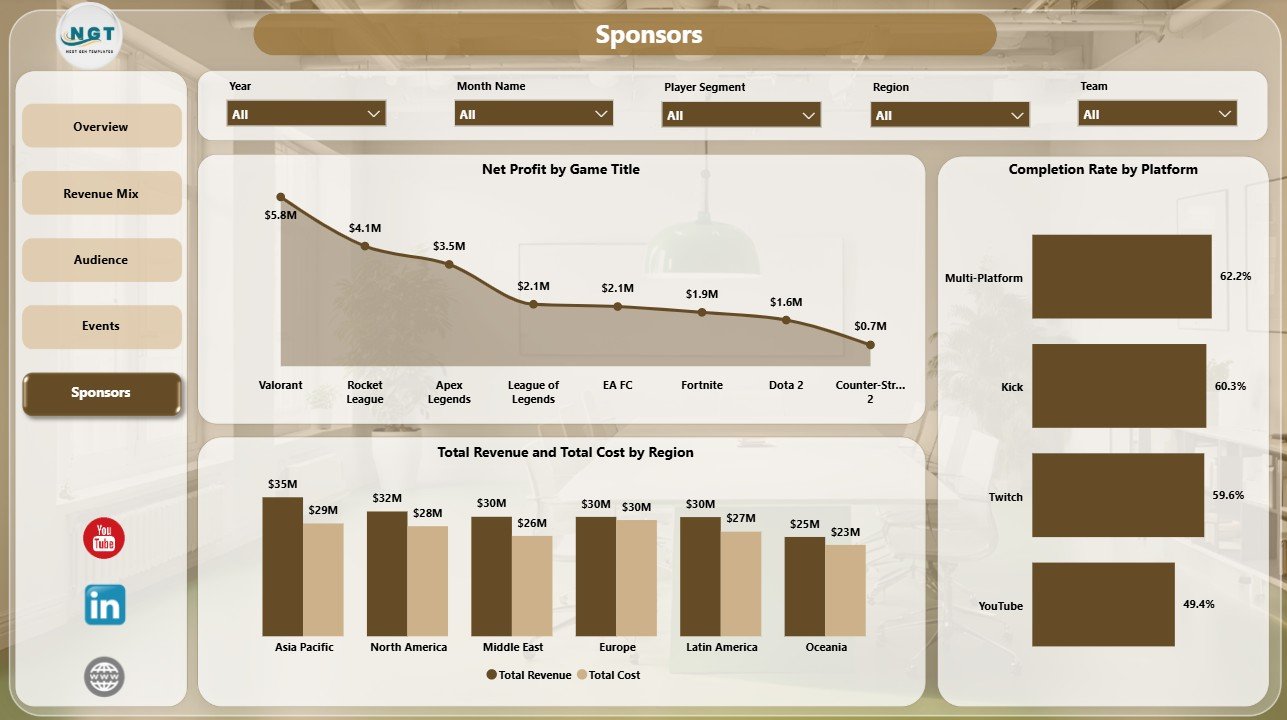
The Sponsors page is designed for partnership and commercial reporting. Net Profit by Game Title identifies profitable titles. Total Revenue and Total Cost by Region compares regional economics. Completion Rate by Platform helps review platform-level execution and campaign delivery.
Gaming Esports Dashboard in Power BI vs. Tableau vs. Paid CRM/SaaS – Where This Fits
| Feature | This Power BI Dashboard | Tableau Alternative | Paid Esports SaaS |
|---|---|---|---|
| Cost | $17.99 one-time template purchase | License plus build time | Monthly or annual subscription |
| Platform | Power BI Desktop / Power BI Service | Tableau Desktop / Cloud | Vendor cloud platform |
| Setup time | Open PBIX, connect or replace data, refresh | Build model and visuals manually | Vendor onboarding |
| Mobile access | Available after publishing to Power BI Service | Available after publishing | Usually included |
| Customizable fields | Edit visuals, measures, fields, and pages | Editable if you own the workbook | Limited by vendor settings |
| Year-1 cost at 5 users | $17.99 plus any Microsoft licensing | Usually higher with licenses and build work | Often hundreds or thousands per year |
| Esports reporting structure | Built in across 5 pages | Requires custom setup | Depends on module and plan |
Who This Template Is For – and Who It’s Not For
This template is for esports teams, tournament organizers, gaming agencies, sponsor managers, streaming analysts, event planners, and Power BI users who need structured reporting for revenue, cost, profit, viewership, events, platforms, regions, teams, sponsor tiers, and game titles.
It is not a live match telemetry tool, anti-cheat system, betting analytics platform, broadcast control system, or automated API product. It works best when your esports data is already collected and you want a clear Power BI reporting layer.
How to Use the Gaming Esports Dashboard in Power BI
- Download and unzip the dashboard package.
- Open the PBIX file in Power BI Desktop, which is free from Microsoft.
- Review the sample data structure and map your own esports records to the same fields.
- Refresh the report after replacing or connecting your data source.
- Use slicers to filter by platform, region, game title, sponsor tier, team, status, month, and other available fields.
- Customize visuals, labels, measures, relationships, and colors if needed.
Real-World Use Cases
Rohan, Tournament Operations Manager: reviews completion rate, total events, match type cost, and team-level progress before weekly event planning meetings.
Maya, Sponsorship Lead: compares net profit by sponsor tier, profit margin by game title, and revenue by platform before preparing sponsor renewal packages.
Alex, Streaming Analyst: checks viewership by platform and region to decide where the next campaign or content push should be focused.
Frequently Asked Questions
Does this dashboard work in Power BI Desktop?
Yes. The template is built as a PBIX file for Power BI Desktop.
What pages are included?
The report includes Overview Page, Revenue Mix, Audience, Events, and Sponsors.
Can I use my own esports data?
Yes. Replace or connect the source data using the same field structure, then refresh the Power BI report.
Does it include slicers?
Yes. The report includes slicers for quick filtering across available esports dimensions.
Can I customize the dashboard?
Yes. Power BI users can edit visuals, measures, fields, formatting, and pages in Power BI Desktop.
Is this a full esports management system?
No. It is an analytics dashboard, not a live operations, broadcast, or tournament management platform.
About the Author
Built by PK – Microsoft Certified Professional with 15+ years of Excel, Google Sheets, and Power BI experience. Founder of NextGenTemplates, reaching 300K+ subscribers across YouTube channels. Every template is hand-built and tested before release.
Explore Related Templates
You may also like Esports Streaming Dashboard in Power BI and Gaming Esports Dashboard in Excel. Browse more Power BI Dashboard templates and Power BI templates.
Download the Gaming Esports Dashboard in Power BI today and turn esports revenue, viewership, event, sponsor, and platform data into clear Power BI insights.
Last updated: June 16, 2026.




























Reviews
There are no reviews yet.