

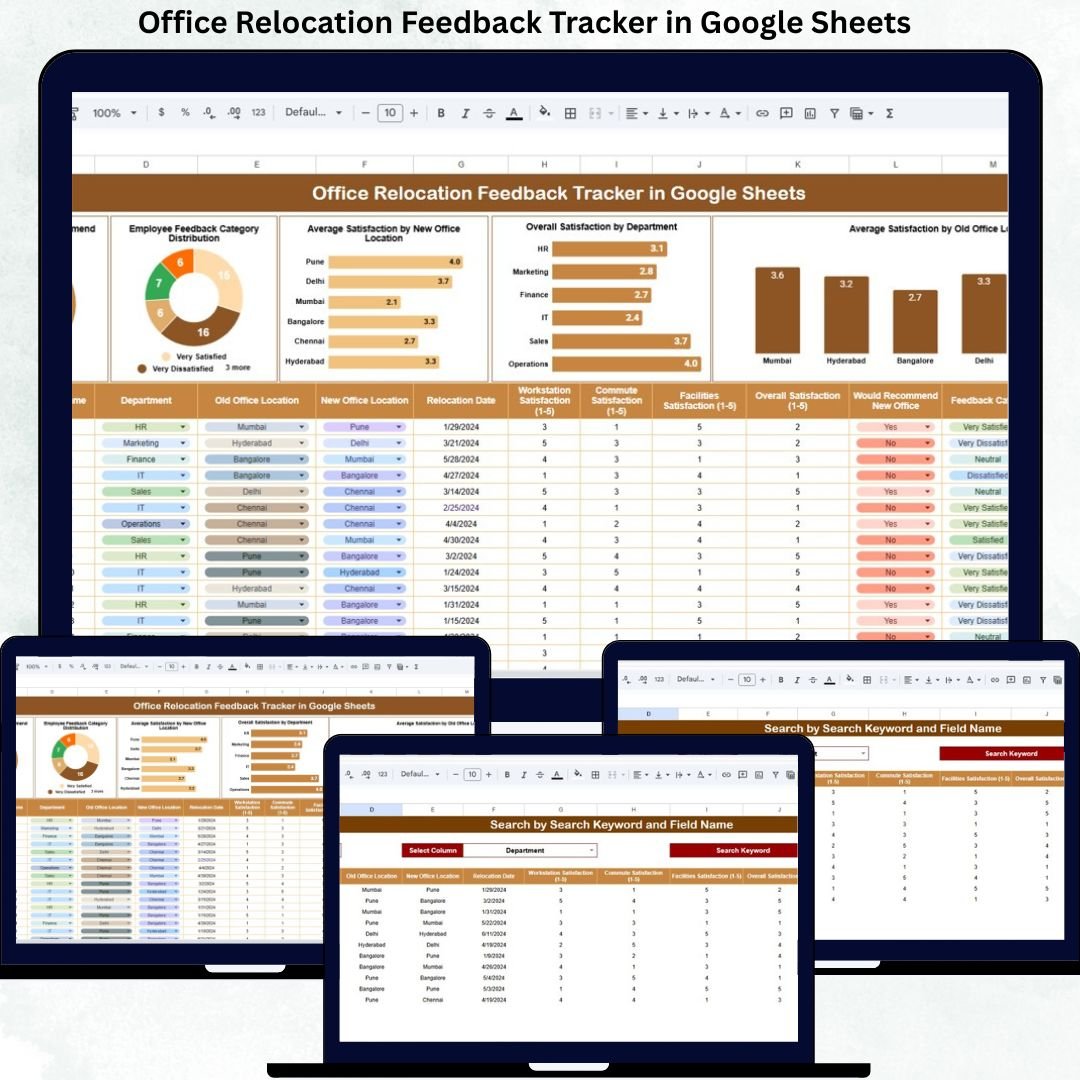

Office Relocation Feedback Tracker in Google Sheets is more than a physical move—it directly impacts employee comfort, commute time, collaboration, productivity, and morale. When employees shift to a new office environment, their experience determines how quickly they adapt and how satisfied they remain. However, many organizations fail to collect feedback in a structured way. As a result, important issues remain hidden, and improvement opportunities are missed.Office Relocation Feedback Tracker in Google Sheets
That is exactly why the Office Relocation Feedback Tracker in Google Sheets becomes a powerful and practical solution.
This ready-to-use tracker helps HR teams, facility managers, and leadership collect, organize, and analyze employee feedback after an office relocation. Instead of relying on scattered emails or informal conversations, this tracker converts feedback into structured data, clear charts, and actionable insights. With real-time updates, visual analysis, and a smart search feature, organizations gain a complete view of employee sentiment toward the new office setup.Office Relocation Feedback Tracker in Google Sheets
Because it is built entirely in Google Sheets, the tracker remains flexible, collaborative, cloud-based, and cost-effective—without requiring any specialized software.Office Relocation Feedback Tracker in Google Sheets
✨ Key Features of the Office Relocation Feedback Tracker in Google Sheets
📋 1. Centralized Employee Feedback Database
Capture all relocation-related feedback in one structured tracker instead of multiple files or surveys.
📊 2. Interactive Satisfaction Charts
Visual charts transform raw feedback into clear insights about satisfaction, acceptance, and problem areas.
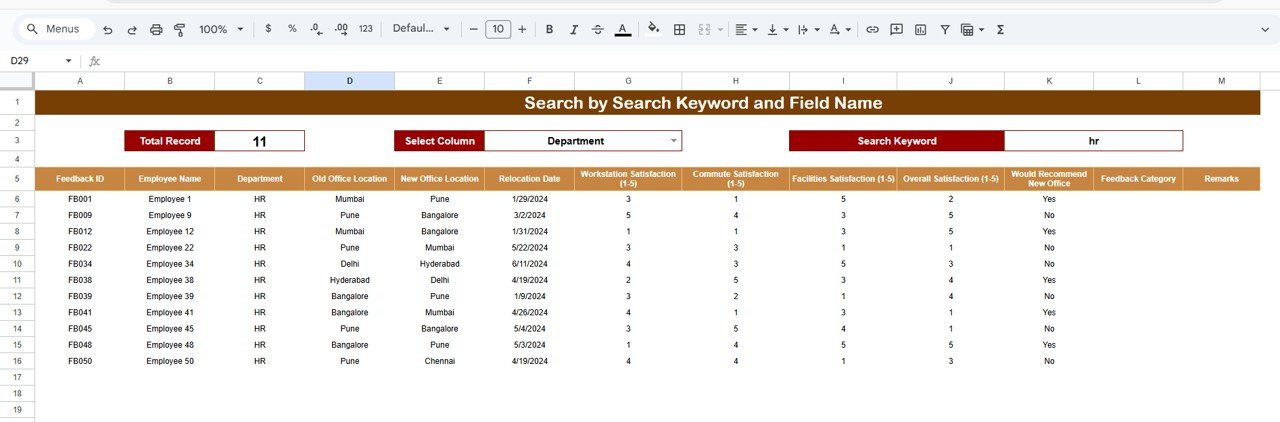
🔍 3. Smart Search Feature
Instantly locate employee feedback by department, location, category, or employee name.
🤝 4. Real-Time Collaboration
HR, admin, and leadership teams can review and update feedback together in real time.
📈 5. Data-Driven Improvement Planning
Identify improvement areas quickly and prioritize actions based on real employee input.
📦 What’s Inside the Office Relocation Feedback Tracker in Google Sheets
🗂️ Tracker Sheet Tab – Core Feedback System
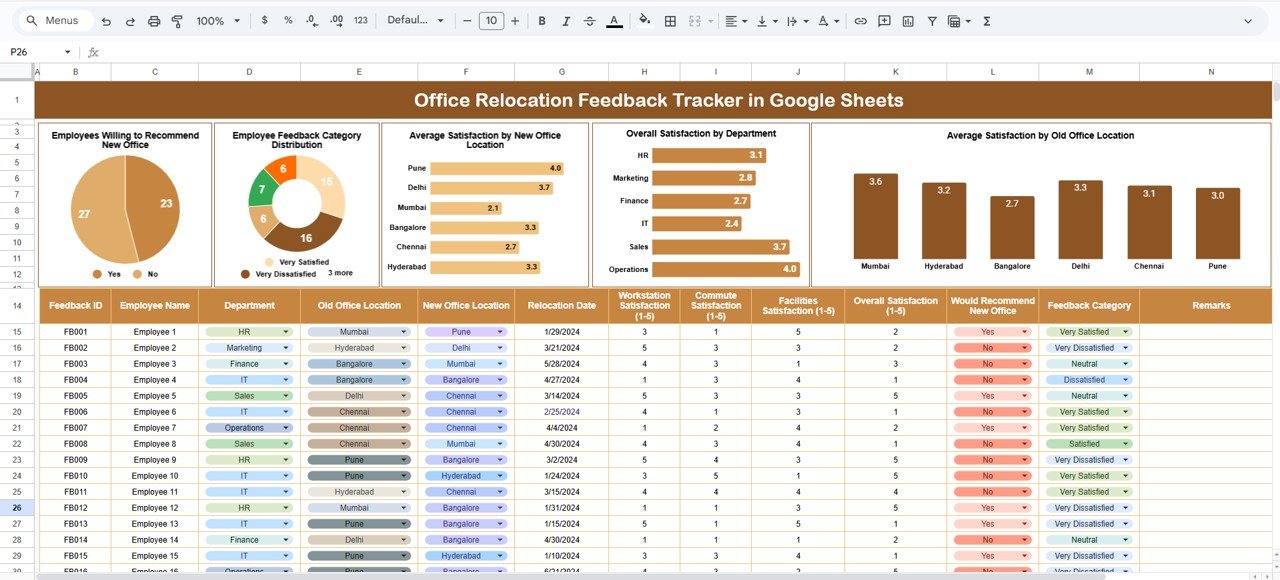
This is the heart of the tracker where all employee feedback is recorded in a clean, consistent format. Typical fields include:
Employee Name / ID
Department
Old Office Location
New Office Location
Satisfaction Score (e.g., 1–5)
Willingness to Recommend (Yes/No)
Feedback Category (Facilities, Commute, Amenities, Workspace, etc.)
Comments
As soon as data is entered, all charts update automatically, ensuring real-time insights.
📊 Charts Included in the Office Relocation Feedback Tracker
👍 Employees Willing to Recommend New Office
This chart shows how many employees are willing to recommend the new office location. It acts as a strong indicator of overall acceptance and satisfaction.
📂 Employee Feedback Category Distribution
This chart highlights which areas receive the most feedback—such as commute, facilities, workspace, amenities, or location—helping teams focus on priority issues.
📍 Average Satisfaction by New Office Location
If employees move to multiple locations or floors, this chart compares satisfaction scores across locations, helping identify underperforming areas.
🏢 Overall Satisfaction by Department
This chart displays department-wise satisfaction levels, helping managers understand if specific teams face unique challenges.
🔁 Average Satisfaction by Old Office Location
This analysis shows how previous office conditions influence perception and adjustment to the new location.
🔍 Search Feature – Find Feedback Instantly
The tracker includes a smart search option that allows users to quickly filter feedback by:
Employee Name
Department
Old Office Location
New Office Location
Feedback Category
This feature saves time during reviews, one-on-one discussions, and management meetings.
🎯 Who Can Benefit from This Office Relocation Feedback Tracker
👥 HR Teams
Measure employee satisfaction and engagement after relocation.
🏢 Facility & Admin Teams
Identify infrastructure and workspace improvement areas quickly.
📊 Leadership Teams
Make informed decisions using real employee feedback.
🔄 Change Management Teams
Ensure smoother transitions during office moves.
🚀 Growing Organizations
Build a repeatable feedback system for future relocations.
### Click here to read the Detailed blog post
Watch the step-by-step video tutorial:


























Reviews
There are no reviews yet.