

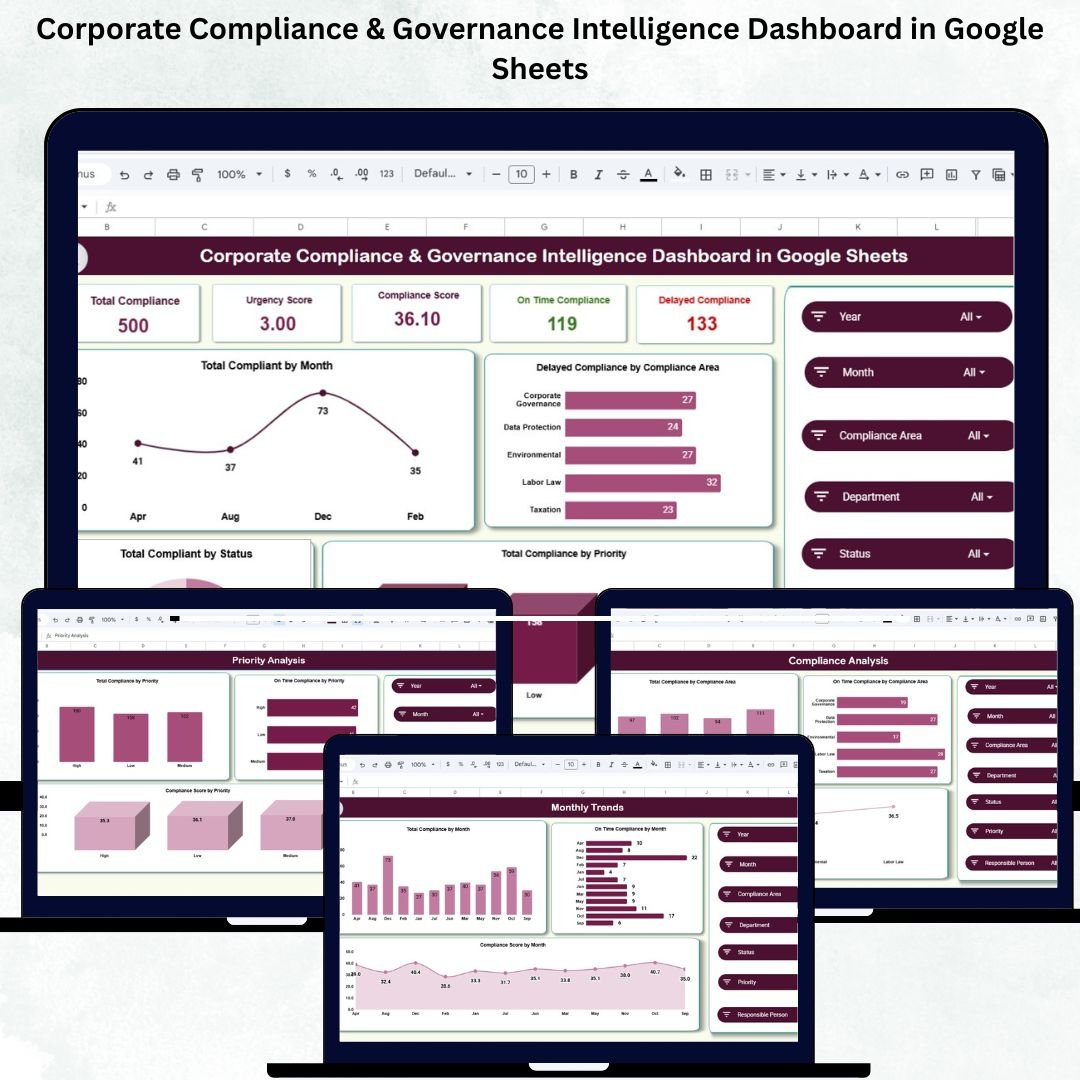
Maintaining strong compliance and governance frameworks is critical to an organization’s credibility, risk management, and operational excellence. The Corporate Compliance & Governance Intelligence Dashboard in Google Sheets is a ready-to-use, data-driven, and automated solution designed to help compliance officers, internal auditors, and business leaders monitor, track, and analyze all compliance metrics in one centralized platform. ⚖️📊
This interactive dashboard transforms complex compliance data into actionable insights — helping organizations identify high-risk areas, track on-time completion, and ensure adherence to regulations and governance standards — all within the simplicity of Google Sheets. ☁️💼
🔑 Key Features of the Corporate Compliance & Governance Intelligence Dashboard in Google Sheets
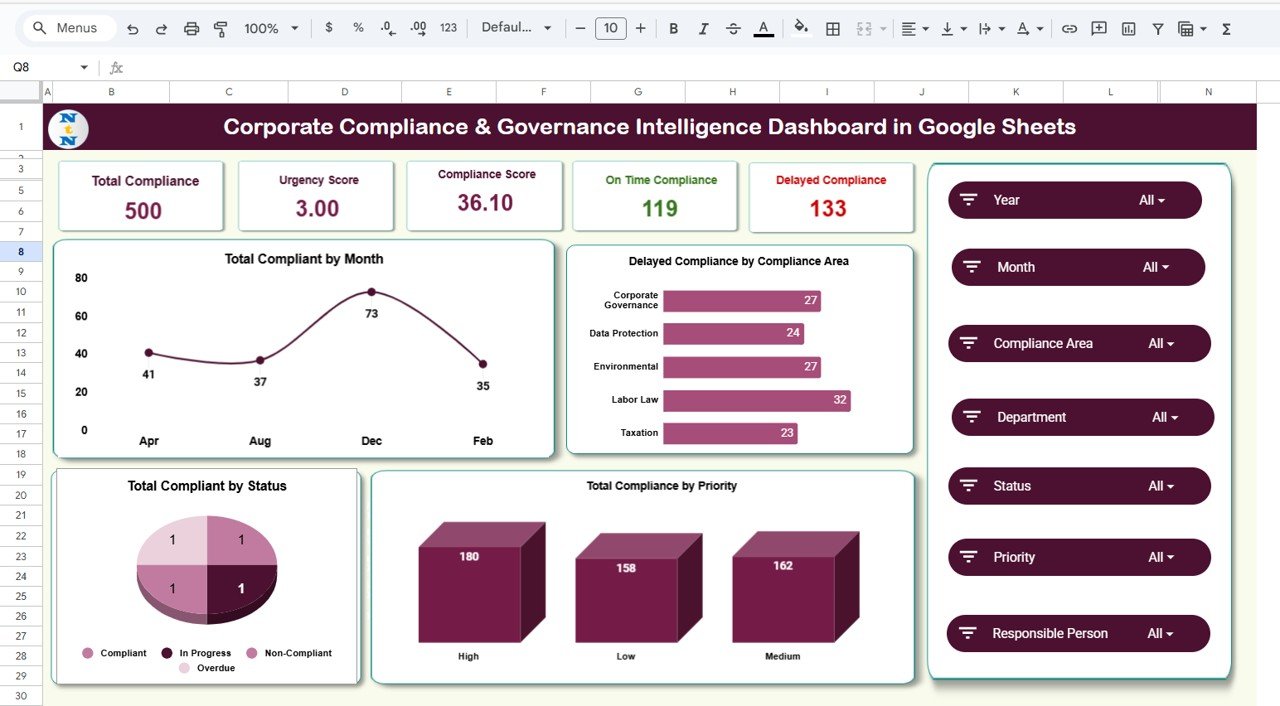
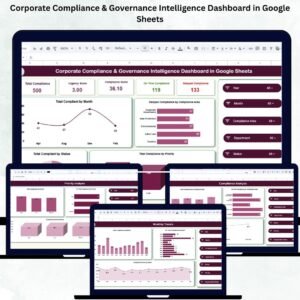
📋 Overview Sheet Tab (Main Dashboard)
Get a 360° snapshot of compliance health and performance with automatically updated KPIs and visual charts.
KPI Cards Displayed:
✅ Total Compliance – Number of compliance tasks tracked across all areas.
⚠️ Urgency Score – Weighted metric indicating task criticality.
📈 Compliance Score – Overall performance score across departments and areas.
⏰ On-Time Compliance – Percentage of tasks completed before deadline.
🚨 Delayed Compliance – Number of overdue or high-risk compliance tasks.
Charts Included:
📅 Total Compliance by Month – Track monthly compliance workload and completion.
🏢 Delayed Compliance by Compliance Area – Identify focus areas that need immediate attention.
🎯 Total Compliance by Priority – Visualize distribution by urgency level (High, Medium, Low).
🧾 Total Compliance by Status – Monitor task progression across Completed, In Progress, and Delayed categories.
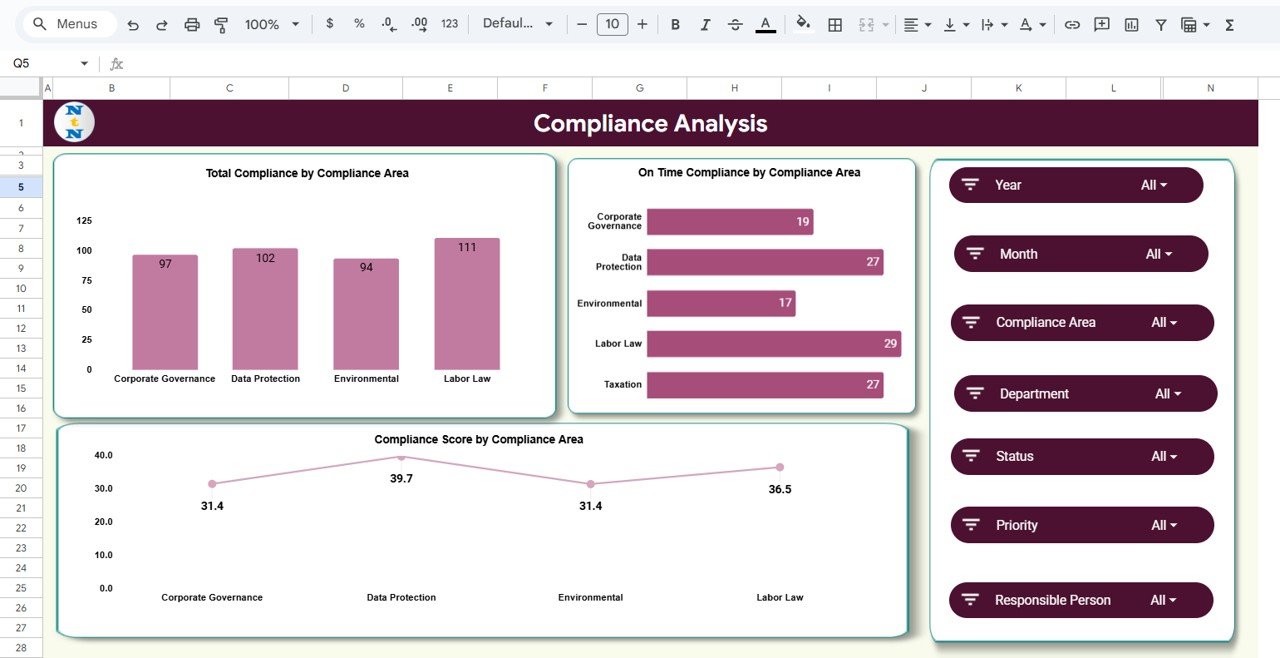
📊 Compliance Analysis Sheet
Dive deeper into category-level insights with visual analytics by compliance area.
Charts Included:
-
📑 Total Compliance by Compliance Area
-
🟩 On-Time Compliance by Area
-
📊 Compliance Score by Area
This helps teams pinpoint underperforming compliance segments and improve accountability.
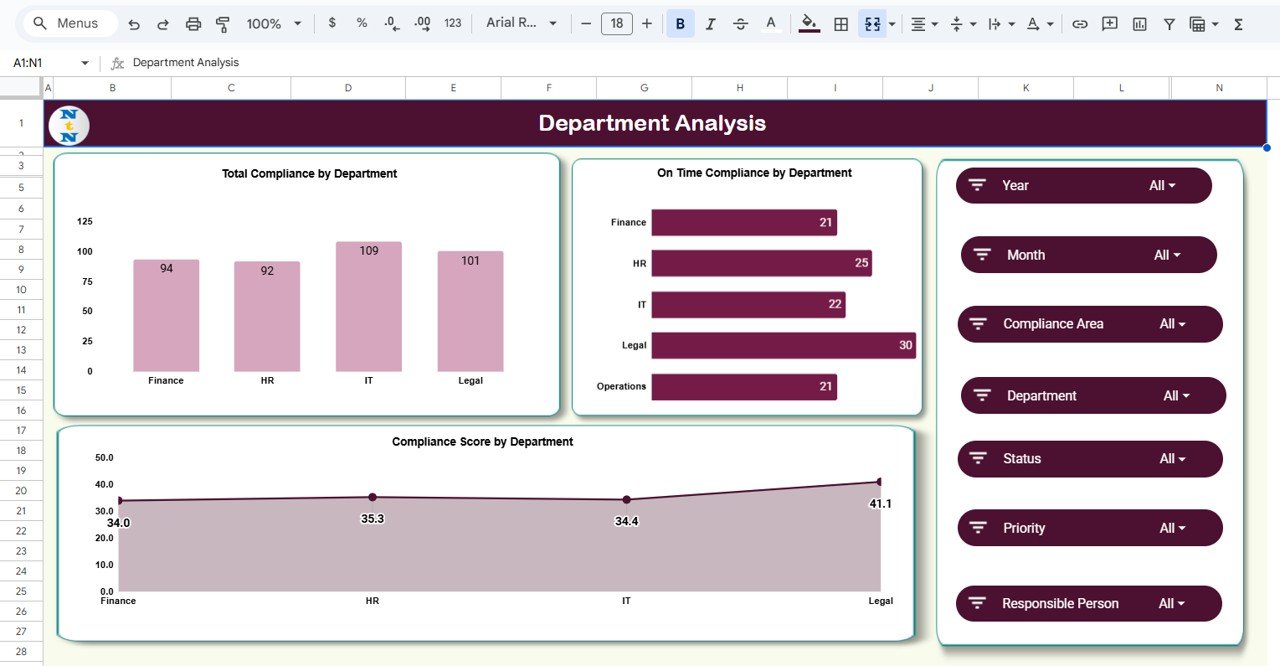
🏢 Department Analysis Sheet
Evaluate compliance performance department-wise to promote transparency and ownership.
Charts Included:
-
Total Compliance by Department
-
On-Time Compliance by Department
-
Compliance Score by Department
Perfect for departmental reviews and governance meetings.
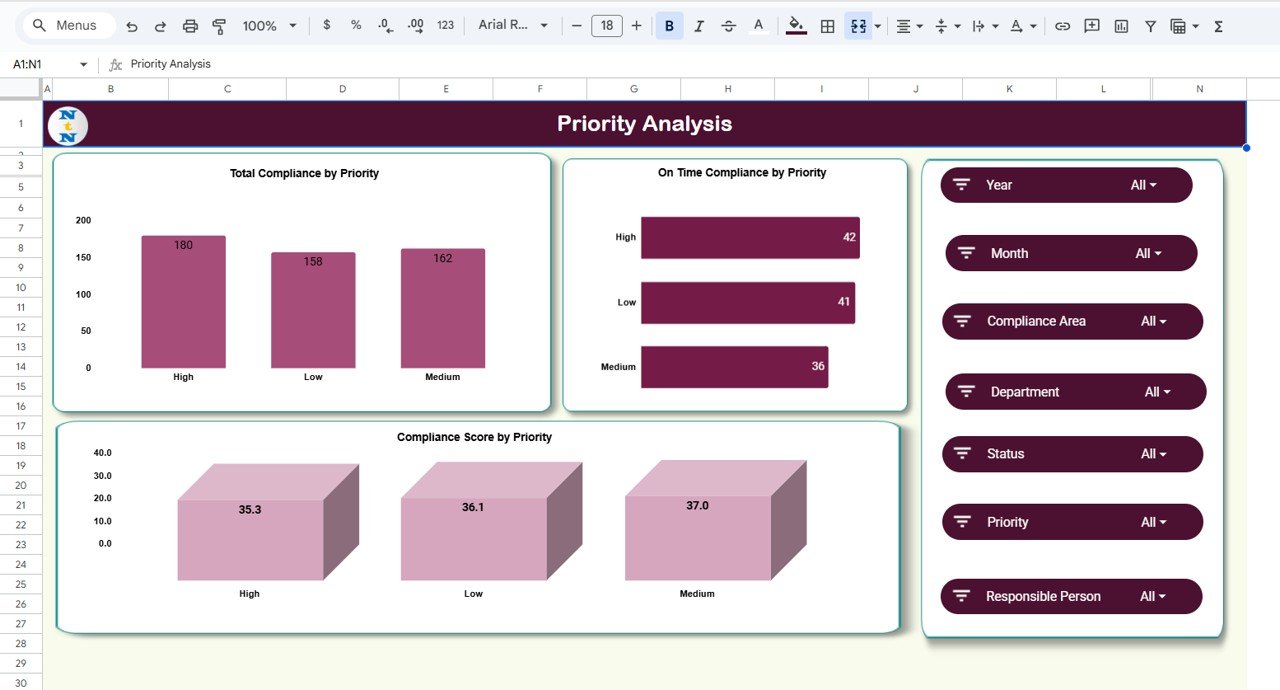
🚦 Priority Analysis Sheet
Understand compliance distribution and efficiency by urgency level.
Charts Included:
-
Total Compliance by Priority
-
On-Time Compliance by Priority
-
Compliance Score by Priority
This ensures that high-priority compliance activities are completed on time and tracked accurately.
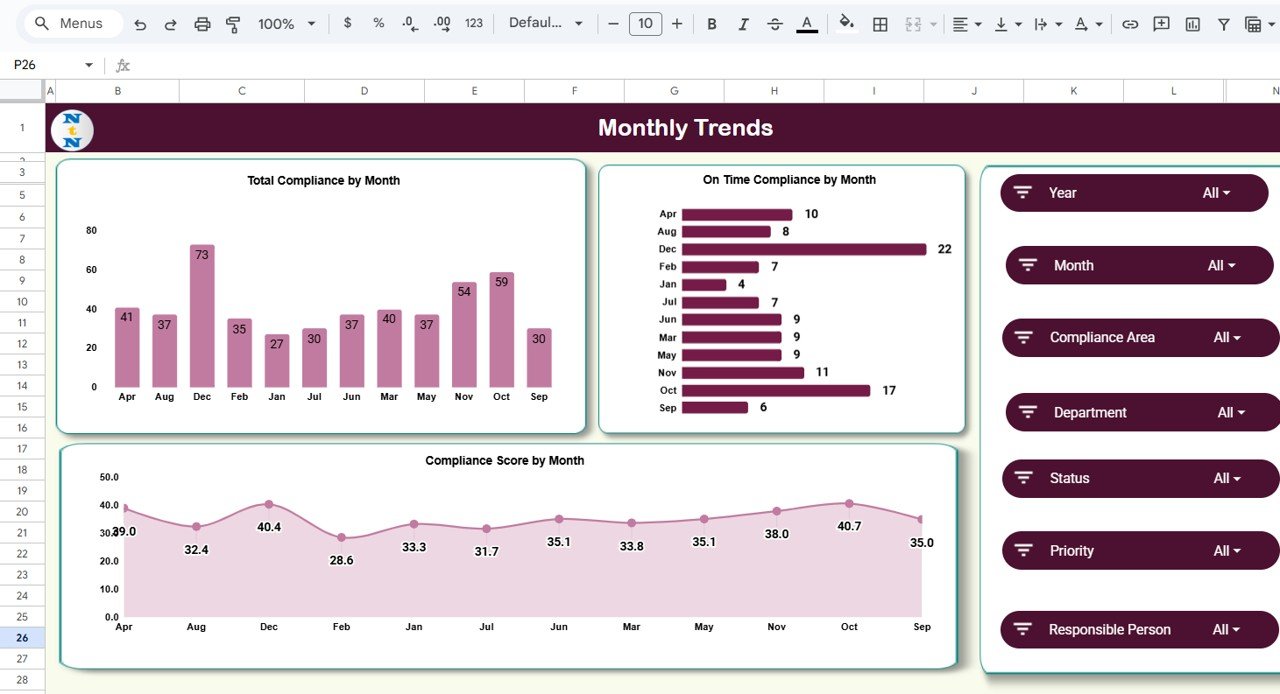
📆 Monthly Trends Sheet
Monitor progress, delays, and overall performance trends across months.
Charts Included:
📈 Total Compliance by Month
⏱️ On-Time Compliance by Month
⭐ Compliance Score by Month
This time-based view helps leadership identify recurring risks and evaluate long-term compliance improvement.
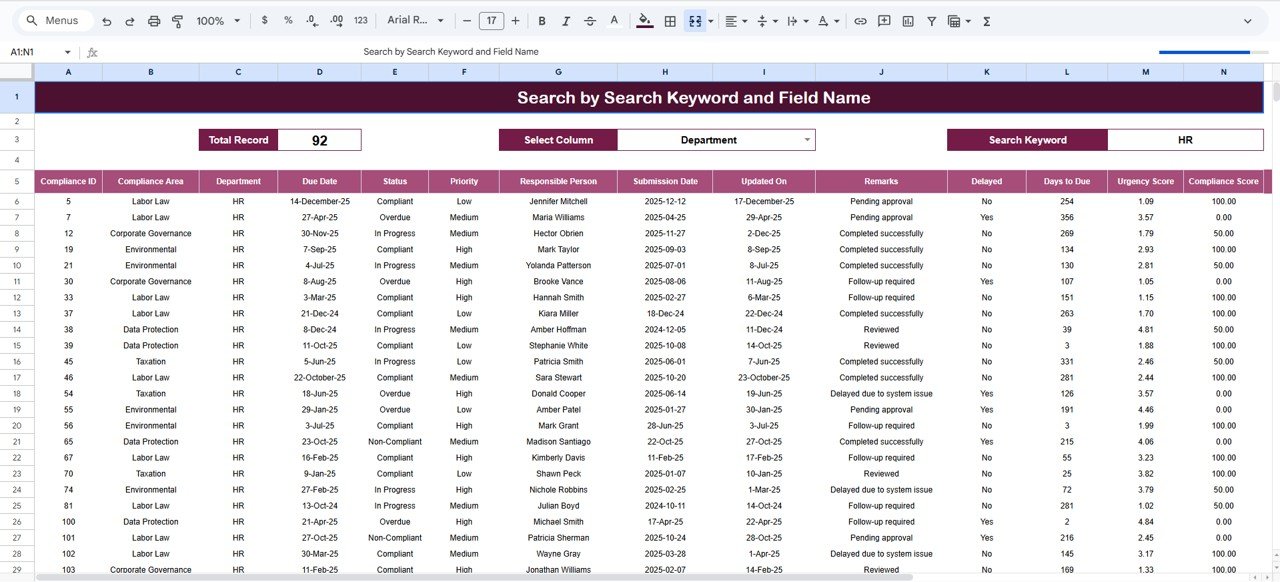
🔎 Search Sheet Tab
Find any compliance record instantly with a built-in search feature.
Search by:
-
Keyword (e.g., “Finance” or “High Priority”)
-
Field Name (e.g., Department, Status, Compliance Area)
Examples:
-
Type “Delayed” → shows all pending or overdue tasks.
-
Type “Safety” → filters all safety-related compliance activities.
📂 Data Sheet Tab
The main input sheet where compliance records are maintained. Simply enter details like compliance area, department, status, and score — and the dashboard updates automatically.
⚙️ Support Sheet Tab
Houses dropdown options, formulas, and reference tables that drive all automated calculations and visuals.
🧩 What’s Inside the Dashboard
✅ Fully functional Google Sheets file
✅ Automated KPIs and charts for compliance monitoring
✅ Interactive departmental, priority, and monthly analysis
✅ Smart search tab for quick lookups
✅ Editable dropdowns for full flexibility
✅ 100% customizable structure — adapt to any organization or industry
🧑💼 Who Can Benefit from This Dashboard
⚖️ Compliance Officers: Monitor completion, delays, and high-priority areas.
📋 Internal Auditors: Analyze risk-prone zones for preventive action.
🏢 Corporate Executives: Get real-time compliance visibility.
🧠 Governance Teams: Strengthen internal accountability and policy enforcement.
📈 Risk Managers: Evaluate performance and mitigate compliance risks proactively.
🧪 How to Use the Corporate Compliance & Governance Intelligence Dashboard
1️⃣ Input compliance data (area, department, priority, score) in the Data Sheet.
2️⃣ Monitor KPIs and visual charts that update automatically.
3️⃣ Use filters or search to identify specific tasks or departments.
4️⃣ Review delayed compliance and initiate corrective actions.
5️⃣ Track monthly and departmental performance for continuous improvement.
🌟 Why Choose This Dashboard
-
⚙️ 100% Google Sheets-based — no expensive software needed
-
📈 Real-time, auto-refreshing analytics
-
💡 Helps identify high-risk areas instantly
-
👥 Enables team-wide collaboration
-
🧩 Customizable and scalable for any organization
-
🚀 Boosts compliance visibility and governance control
The Corporate Compliance & Governance Intelligence Dashboard in Google Sheets is the ultimate digital solution for modern compliance management — empowering your organization to stay compliant, accountable, and audit-ready at all times. 🌟
🔗 Click here to read the Detailed blog post
Watch the step-by-step video Demo:




Reviews
There are no reviews yet.