

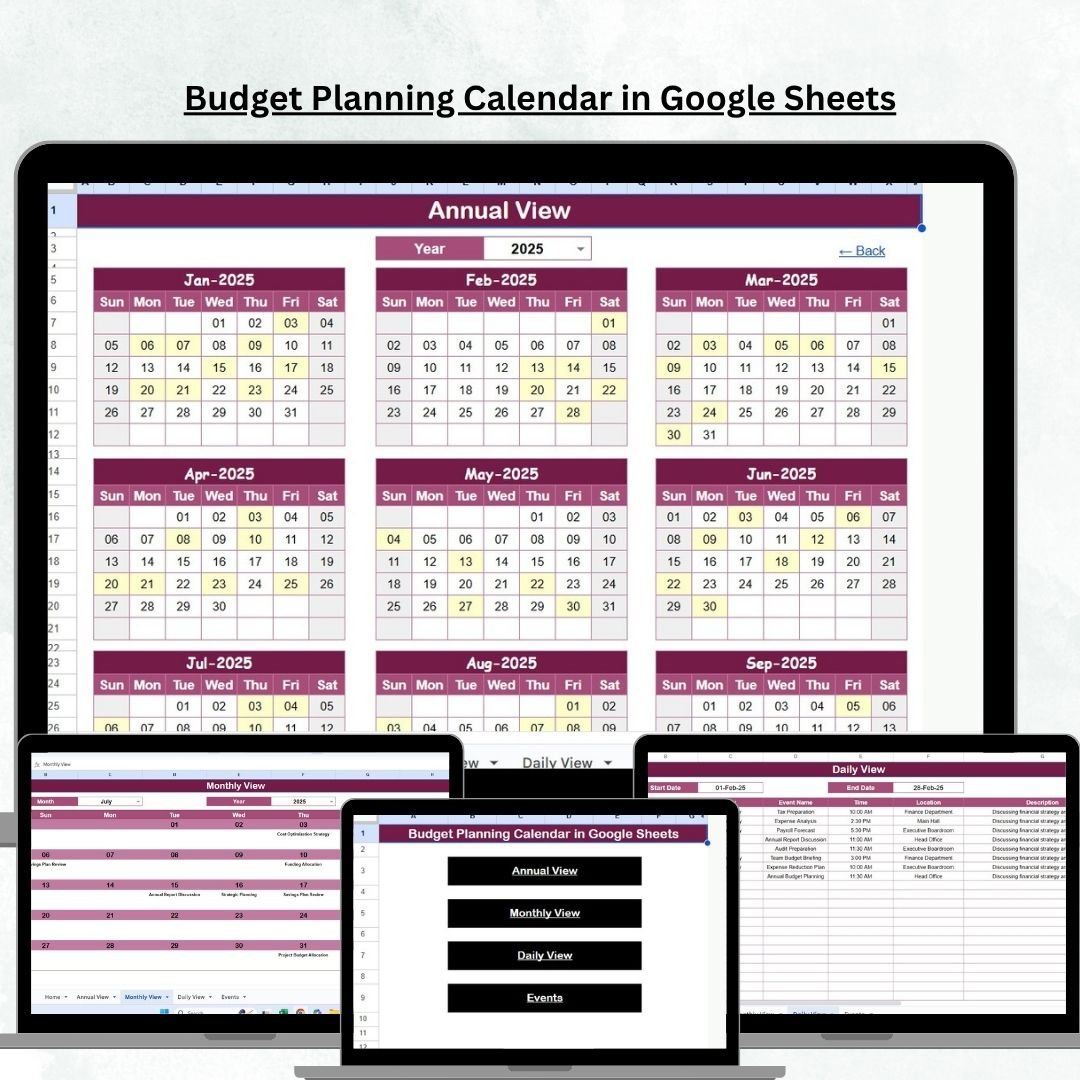


Managing money effectively is one of the most important steps toward financial stability. Whether you’re handling personal expenses, planning household budgets, or managing business finances, staying organized is key. Traditional budgeting often feels overwhelming—scattered spreadsheets, sticky notes, and disconnected reminders only create confusion. That’s why we created the Budget Planning Calendar in Google Sheets 💰📅—a powerful, ready-to-use template that combines financial planning with calendar-based scheduling.
This tool is not just another spreadsheet—it’s an interactive budgeting system. With annual, monthly, and daily views, it allows you to plan ahead, track events, and keep your income and expenses under control—all in one place. Built in Google Sheets, it offers real-time collaboration, cloud-based access, and flexibility to fit both personal and professional needs.
⚡ Key Features of Budget Planning Calendar in Google Sheets
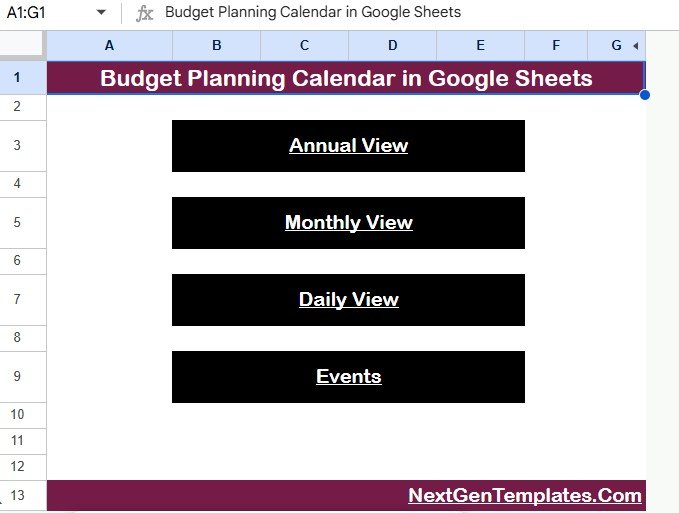
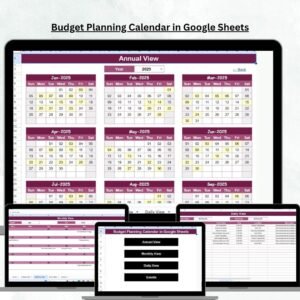
✅ Central Dashboard (Home Tab) – Navigate instantly between Annual, Monthly, Daily, and Events tabs with one-click buttons.
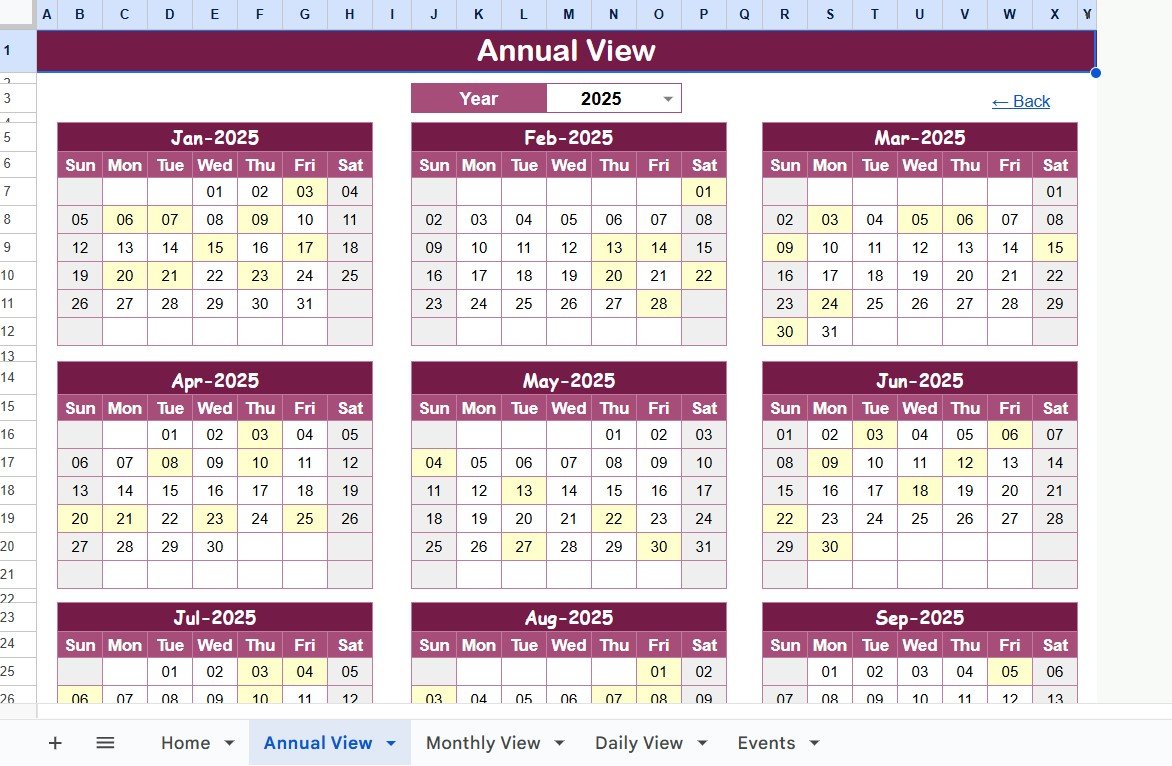
✅ Annual View – See all 12 months in one place, customize your fiscal year, and set your preferred start day of the week.
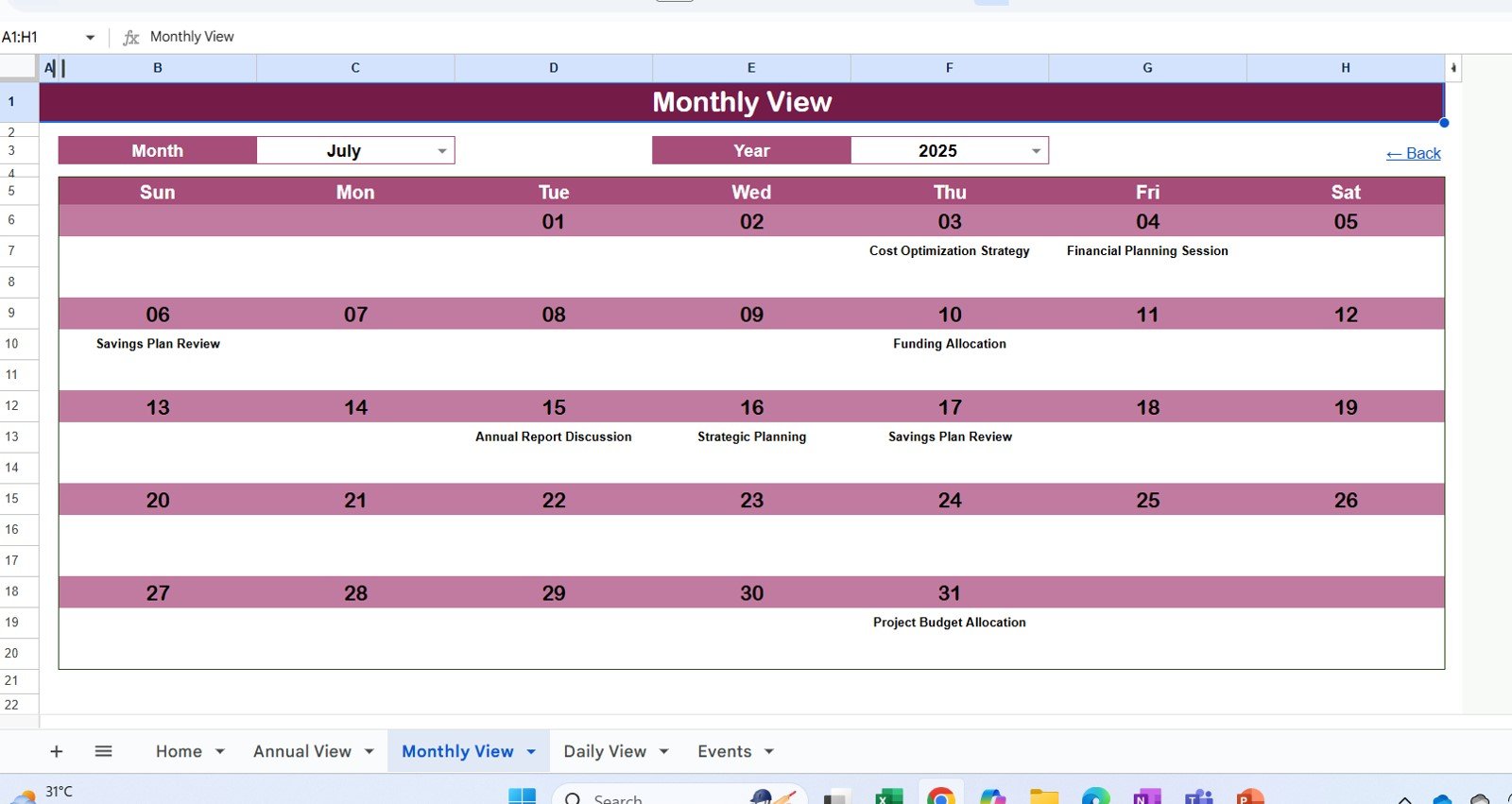
✅ Monthly View – Focus on one month at a time, track recurring bills like rent or subscriptions, and spot overlapping events.
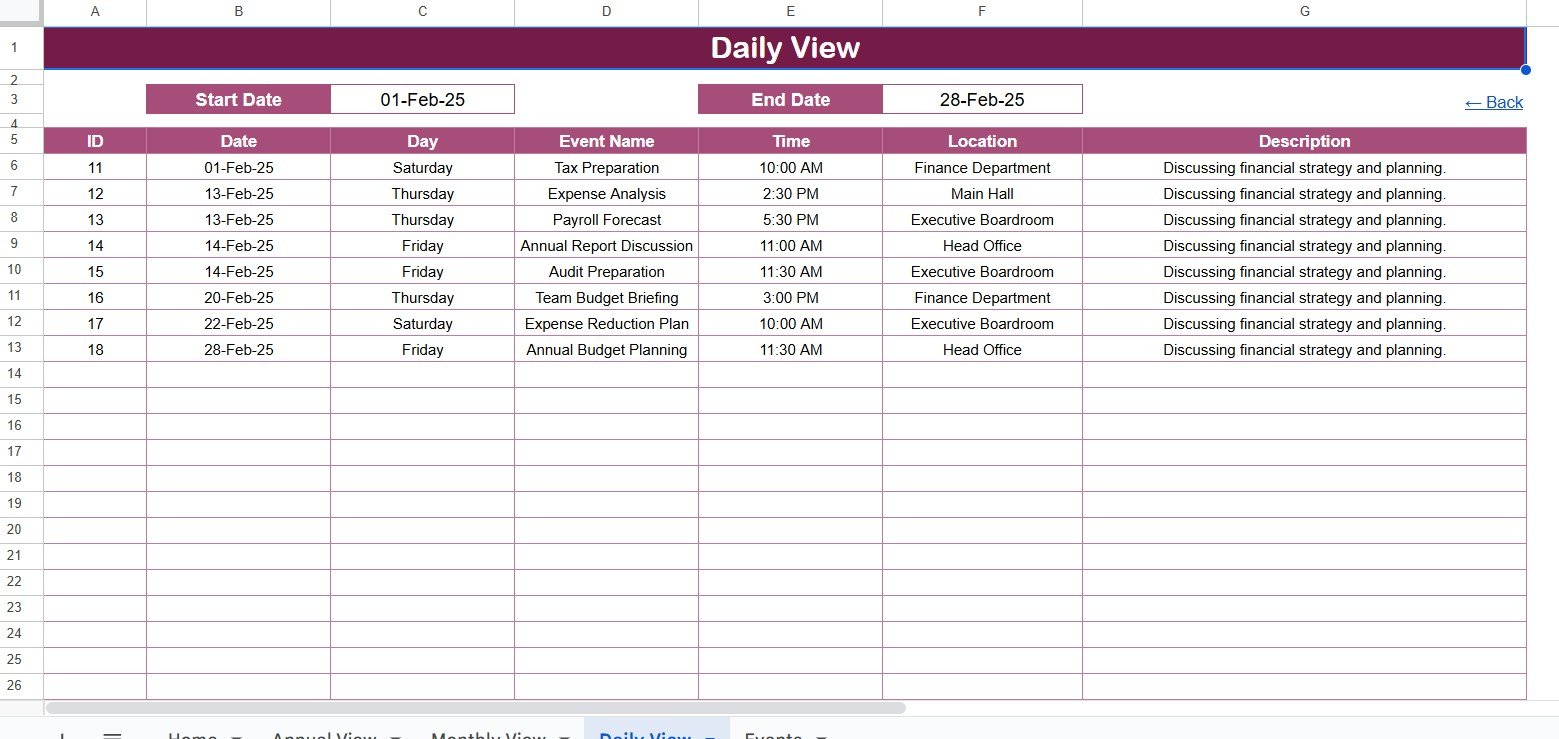
✅ Daily View – Plan day-to-day financial activities with start and end date filters for detailed budgeting.
✅ Events Database – Store every financial record—ID, date, day, name, time, location, and description—in one place.
✅ Automation – Events entered in the database update across all views instantly.
✅ Collaboration Ready – Share with family, colleagues, or finance teams for transparent money management.
✅ Cloud-Based Access – Open and update your budget anytime, anywhere.
📂 What’s Inside the Budget Planning Calendar
The template comes with five powerful worksheets designed for easy financial planning:
Home Sheet – Your main hub with quick navigation buttons.
Annual View – Displays all 12 months with options to set year, start month, and start weekday.
Monthly View – Focuses on one month; shows multiple events per day with smart indicators.
Daily View – Displays detailed financial events for a chosen date range.
Events Sheet – The central database where all financial events are stored, powering every other view.
🛠️ How to Use the Budget Planning Calendar
Start at the Home Tab – Jump quickly to Annual, Monthly, or Daily planning.
Enter Data in Events Sheet – Add financial events such as income, bills, or project expenses.
Check Annual View – Get a complete overview of financial goals and schedules.
Switch to Monthly View – Focus on recurring expenses and key financial milestones.
Review Daily View – Track cash flow and project costs day by day.
Collaborate in Real Time – Share the calendar with stakeholders for transparency.
👥 Who Can Benefit from This Calendar?
This versatile calendar is designed for a wide range of users:
Individuals 👤 – Manage income, bills, and personal savings goals.
Families 🏡 – Coordinate household expenses, school fees, and utilities.
Small Businesses 💼 – Plan monthly expenses, payroll, and project costs.
Corporate Teams 🏢 – Align department budgets with financial planning cycles.
Nonprofits ❤️ – Track donor funding, grants, and spending events.
🔗 Click here to read the Detailed blog post
Visit our YouTube channel to learn step-by-step video tutorials
Youtube.com/@NeotechNavigators
Watch the step-by-step video tutorial:
Compatibility and Requirements
- Works in Google Sheets. You need a free Google account and a web browser.
- Because the template is cloud-based, you can open it from any device with a browser and share it with family members, colleagues or a finance team.
- New to Sheets? Google has a guide on getting started with Google Sheets.
Frequently Asked Questions
Which sheets are included?
Five sheets: Home, Annual View, Monthly View, Daily View and Events. The Home sheet has buttons that take you to each of the other views.
Where do I enter income, bills and other financial events?
Enter them in the Events sheet. Each record has an ID, date, day, name, time, location and description. Events you add there appear in the Annual, Monthly and Daily views.
Can I choose which month and weekday the year starts on?
Yes. The Annual View lets you set the year, the start month and the start day of the week.
Can I see my budget for a specific range of days?
Yes. The Daily View has start and end date filters, so you can look at the financial events for any date range you pick.
Is there an Excel version?
Yes. See the Budget Planning Calendar in Excel.
Related Budget and Calendar Templates
- Budget Planning Calendar in Excel: the same budget calendar for Excel
- Budget Calculator in Google Sheets: a free calculator for your budget numbers
- Dynamic Holiday and Event Calendar in Google Sheets: another event calendar in Sheets
- Home Renovation Budget Tracker in Google Sheets: track project costs in Sheets
- Google Sheets Business Pack (Pro): 14 business templates in one download
Browse all Google Sheets calendars.








Reviews
There are no reviews yet.