



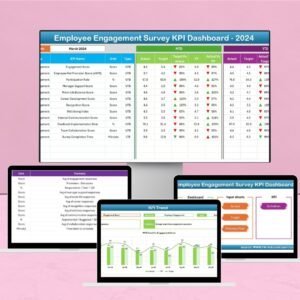
The Employee Engagement Survey KPI Dashboard in Excel is a powerful and customizable tool designed to help HR professionals and organizational leaders effectively monitor, analyze, and optimize employee engagement within their organizations. This dashboard visualizes the key performance indicators (KPIs) derived from employee surveys, providing clear insights into areas that need attention and improving overall workforce engagement.

Key Features of the Employee Engagement Survey KPI Dashboard in Excel
📊 Comprehensive KPI Tracking
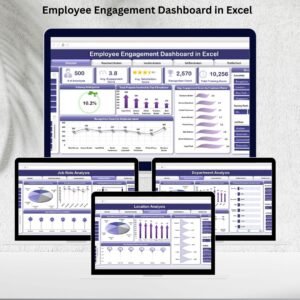
Monitor Key Engagement Metrics: Track various employee engagement KPIs such as satisfaction, sentiment, survey participation, and specific feedback from employees.
Survey Results Integration: Seamlessly input survey data into the dashboard for real-time tracking of employee engagement.
📈 Dynamic Visualizations
Interactive Charts and Graphs: Visualize trends, employee satisfaction scores, and sentiment patterns to quickly identify strengths and areas needing improvement.
Actionable Insights: Use visual data to drive action and improve organizational practices, boosting overall engagement.
🔧 Customizable Dashboard
Tailored to Your Needs: Adjust the template to suit your organization’s unique survey questions, KPIs, and objectives.
Easy to Use: Designed for ease of use, with intuitive navigation and simple setup steps.
📅 Performance Monitoring & Reporting
Track Engagement Over Time: View employee engagement levels on a weekly, monthly, or yearly basis to assess the success of initiatives and policies.
Target vs. Actual Comparison: Measure performance against predefined engagement targets to evaluate effectiveness.
Benefits of Using the Employee Engagement Survey KPI Dashboard in Excel
✅ Informed Decision-Making
Provides real-time, data-driven insights, allowing HR leaders to make quick and informed decisions to enhance employee engagement.
✅ Improved Employee Retention
Identify patterns of disengagement early and take proactive measures to improve satisfaction and reduce turnover.
✅ Optimized Organizational Culture
Leverage insights to build a more positive, aligned, and productive work environment by responding to employee feedback.
✅ Increased Productivity
By improving engagement, organizations see a direct increase in employee motivation, job satisfaction, and overall productivity.
Getting Started with Your Employee Engagement Survey KPI Dashboard in Excel
Download the Template: Download the Employee Engagement Survey KPI Dashboard template to get started.
Input Your Survey Data: Add your employee survey results into the dashboard.
Customize KPIs: Tailor the dashboard to reflect the KPIs that are most important for your organization’s engagement strategy.
Analyze Trends: Use the built-in charts to visualize employee sentiment and engagement trends.
Implement Improvement Strategies: Leverage the insights from the dashboard to take action, improve engagement, and increase employee satisfaction.
By using the Employee Engagement Survey KPI Dashboard in Excel, you can transform survey data into actionable insights, improving employee engagement and fostering a more positive work culture.
Click here to read the Detailed blog post
Employee Engagement Survey KPI Dashboard in Excel
Visit our YouTube channel to learn step-by-step video tutorials
YouTube.com/@PKAnExcelExpert
Watch the step-by-step video Demo:
Who Uses This Dashboard
HR professionals, people managers and leadership teams who run employee surveys and want to see engagement results and trends in one place.
Compatibility and Requirements
- Works in Microsoft Excel desktop (Excel 2016 or later, or Microsoft 365).
- Results are shown with interactive charts and graphs. Microsoft’s chart basics are in Create a chart from start to finish.
Frequently Asked Questions
Which engagement KPIs does it track?
It tracks employee satisfaction, sentiment, survey participation and specific feedback taken from your employee surveys.
How do I add my survey results?
You enter your survey data into the dashboard, and the charts show satisfaction scores and sentiment patterns.
Can I see engagement over time?
Yes. You can view engagement weekly, monthly or yearly and compare results with your engagement targets.
Can I use my own survey questions?
Yes. You can adjust the template to your own survey questions, KPIs and objectives.
Related Employee Engagement Templates
- Employee Engagement Survey KPI Dashboard in Google Sheets: the same dashboard for Google Sheets
- Employee Engagement Dashboard in Excel: a full engagement dashboard in Excel
- Employee Engagement Dashboard in Google Sheets: engagement reporting in Sheets
- Human Resources Employee Retention KPI Dashboard in Excel: link engagement to retention
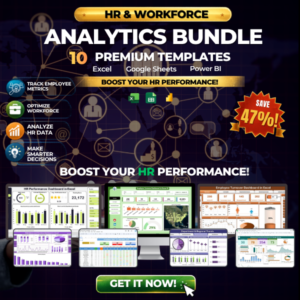
- HR & Workforce Analytics Bundle: 10 HR templates in Excel, Google Sheets and Power BI
Browse all Excel KPI dashboards or the Excel HR and payroll templates.






Reviews
There are no reviews yet.