

The best IT security audit checklist for most teams is the IT Security Review Checklist in Excel ($3.49). It gives you an assignable task table, deadlines and a progress bar in one file. Add rows for access reviews and backup tests, then move to a KPI dashboard ($11.99 to $14.99) once you need to report trends.
Last updated: November 2026
Key takeaways
- The IT Security Review Checklist in Excel costs $3.49 and tracks tasks, owners, deadlines and completion percentage.
- Six of the eight templates are checklists at $3.49 each; the two KPI dashboards cost $14.99 (Excel) and $11.99 (Power BI).
- A checklist proves a control was done; a KPI dashboard shows whether the control is improving month on month.
- Start with access reviews and backup restore tests: they are the two items auditors most often ask you to evidence.
- If you need automated evidence collection or continuous monitoring, buy compliance software instead of a spreadsheet.
 Launch offer
SUMIFS, XLOOKUP, FILTER, LAMBDA and checking AI-written formulas, with real business projects. 11h 47m of video by PK, with practice files, quizzes and a capstone.
IT security audit checklist templates compared
| Template | Format | Best For | Price |
|---|---|---|---|
| IT Security Review Checklist (Best overall) | Excel | Running a formal internal audit | $3.49 |
| IT Security Monitoring Checklist | Excel | Recurring checks and evidence for ISO, GDPR, HIPAA, PCI DSS | $3.49 |
| IT Security Policy Checklist | Google Sheets | Policy-by-policy compliance checks | $3.49 |
| Cybersecurity Checklist | Google Sheets | Remote teams working in real time | $3.49 |
| IT Security Planner Checklist | Excel | Planning the year’s security work | $3.49 |
| IT Security To-Do List Checklist | Excel | Small teams clearing a task backlog | $3.49 |
| IT Security Auditing KPI Dashboard | Excel | Reporting audit KPIs to leadership | $14.99 |
| IT Security Auditing KPI Dashboard (Best value dashboard) | Power BI | Interactive KPI reporting at the lowest dashboard price | $11.99 |
How we picked these
We searched the NextGenTemplates catalog of roughly 6,900 products for IT security, cybersecurity and security audit items. We kept paid templates that track tasks, owners, deadlines or audit KPIs, and checked each against its listed worksheets and features.
We left out general business checklists and physical security items, because they do not cover access reviews or backups. No product is claimed to contain features its listing does not mention. Where a template does not ship with a backup or access-review row, we say so and show how to add one.
What does it cost when an IT security audit goes wrong?
The expensive failures are rarely exotic. They are an ex-employee account that stayed active, a backup nobody had restored since it was set up, or a patch review that slipped two quarters. Each one is a missed checklist line, and each one turns into an audit finding, a delayed sale to a customer who asks for a SOC 2 or ISO 27001 report, or an incident.
IBM’s annual Cost of a Data Breach report put the global average breach at about $4.44 million in its 2025 edition. You will not prevent every breach with a spreadsheet, but a dated, owned checklist is the cheapest way to show a control existed and was checked. The NIST Cybersecurity Framework is a sensible source of checklist categories if you are building one from scratch.
The operational cost is also time. If an auditor asks for evidence and you rebuild it from email threads, expect days of work per control. A checklist with an owner, a deadline and a status per row cuts that to minutes.
The 8 best IT security audit checklist templates for 2026
1. IT Security Review Checklist in Excel: best overall

We rank this first because it matches how an internal audit actually runs: a list of items, a named owner, a due date and a status. It is the closest fit to a plain IT security audit checklist among the eight, and it costs $3.49.
Who it is for: IT teams, compliance officers and managers running a first or repeat internal review.
- Dashboard showing total, completed and pending tasks plus progress percentage
- Checklist table with Serial No., Checklist Item, Description, Responsible Person, Deadline, Remarks and Status
- Drop-down owner assignment driven by a List Sheet
- Automatic progress bar and tick or cross status
Use cases: add 10 rows for access reviews (one per system, such as email, VPN, finance app); add 5 rows for backup tests with a restore date in Remarks; add a severity column and sort by it before the audit; set deadlines 14 days before the auditor arrives.
Price: $3.49. Get the IT Security Review Checklist in Excel.
Best for: a formal internal audit on a small budget.
2. IT Security Monitoring Checklist in Excel
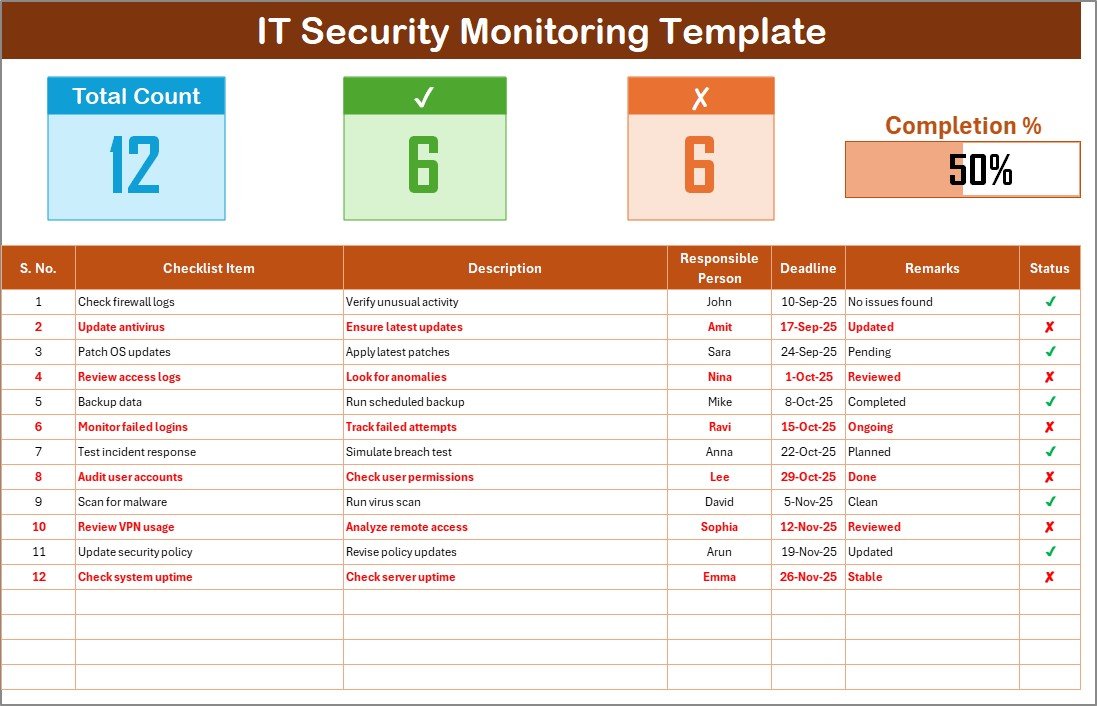
This one is built for checks that repeat. Its listing says the output works as documentation for ISO, GDPR, HIPAA or PCI DSS evidence, which makes it useful between audits as well as during them.
Who it is for: IT managers who need a standing monthly or weekly security routine.
- Task counts and progress bar at the top of the sheet
- Checklist table with owner, deadline, remarks and status
- Drop-down assignment for accountability
- Customizable fields such as risk level, priority or notes
Use cases: a weekly log review row, a monthly privileged-account review row, a monthly backup job failure check, and a quarterly test-restore row. Save a copy per month and you have 12 dated files to hand an auditor.
Price: $3.49. See the IT Security Monitoring Checklist in Excel.
Best for: recurring security checks that produce audit evidence.
3. IT Security Policy Checklist in Google Sheets
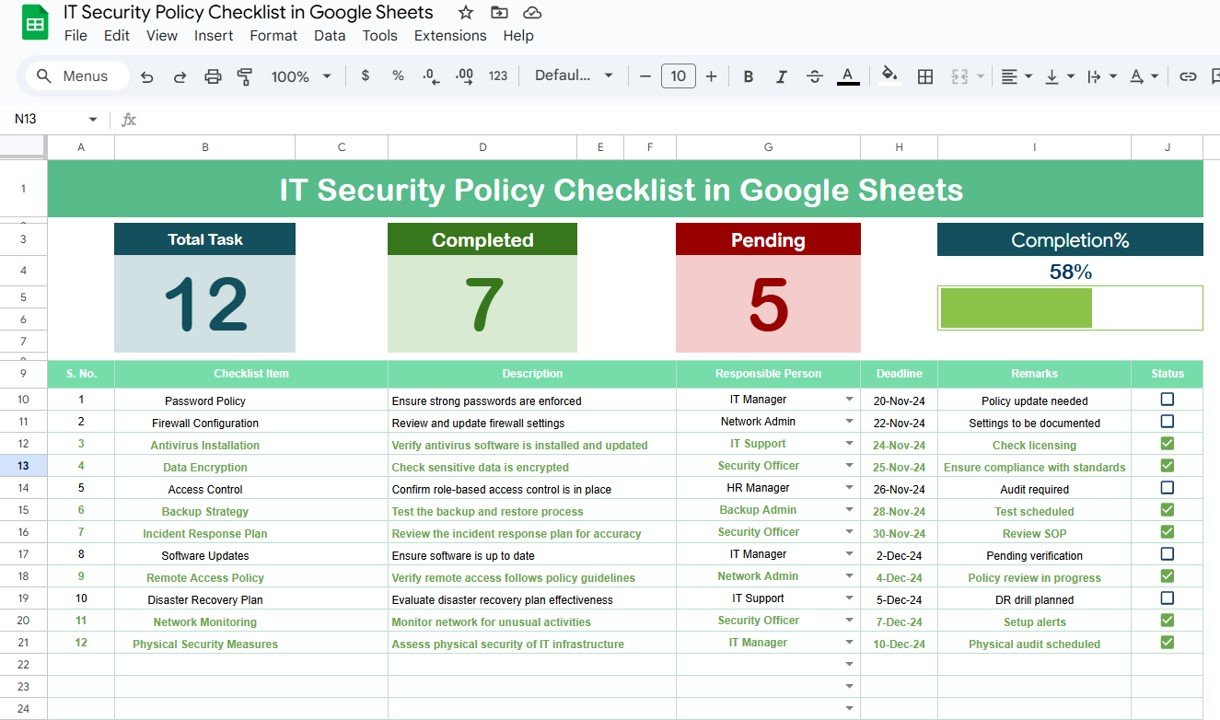
Use this when the audit question is ‘do we follow our own policies?’ Its listing describes sections covering data protection, network security and user access controls, with task descriptions and guidelines inside.
Who it is for: teams that keep policies in Google Workspace and want the compliance check in the same place.
- Tasks grouped into categorized sections
- Task assignment, deadlines and status indicators
- Descriptions and embedded guidelines per task
- Editable to match your own policy wording
Use cases: map each policy clause to one row; assign the user access section to your systems administrator; review the data protection section every quarter; share one live link with the auditor instead of sending attachments.
Price: $3.49. Open the IT Security Policy Checklist in Google Sheets.
Best for: checking behaviour against written policy.
4. Cybersecurity Checklist in Google Sheets

This is the cybersecurity checklist template for distributed teams. The listing mentions customizable categories such as data protection, network security, access control and incident response, real-time collaboration and automated reminders.
Who it is for: remote or hybrid IT teams where several people update the list at once.
- Adjustable priorities so critical items come first
- Checkboxes and conditional formatting for progress
- Email or in-app reminders for upcoming and overdue tasks
- Optional links to Google Docs or Forms
Use cases: put access control and incident response in separate tabs; set the highest priority on offboarding checks; link a Google Form for staff to report phishing; let three people work on the audit prep in one afternoon.
Price: $3.49. Try the Cybersecurity Checklist in Google Sheets.
Best for: collaborative audit prep across locations.
5. IT Security Planner Checklist in Excel
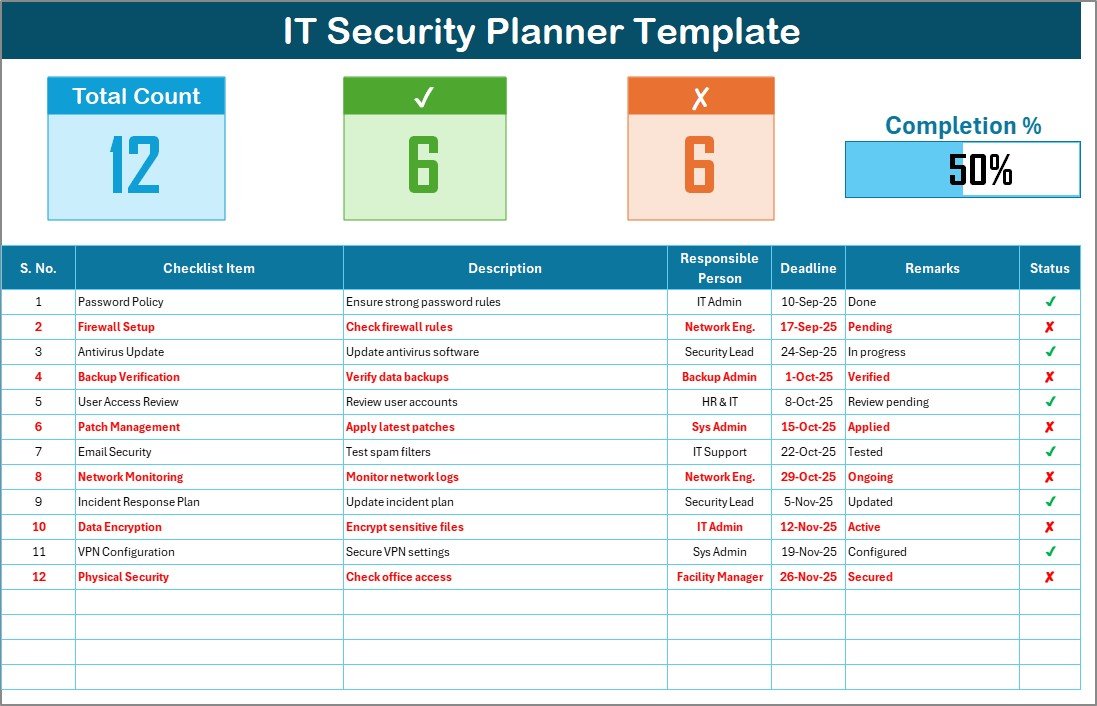
The planner suits the stage before an audit, when you decide what to do and by when. It has the same two-sheet layout as the others: a checklist sheet and a List Sheet of responsible persons.
Who it is for: IT leads building an annual security plan.
- Auto-updated counters for total, completed and pending items
- Task table with deadlines, remarks and status
- Drop-down responsibility assignment
- Progress bar with auto-calculated percentage
Use cases: list the 12 months of recurring tasks; assign each to an owner; mark the audit date as a deadline and work backwards; keep the file as proof that the plan existed before the audit.
Price: $3.49. Download the IT Security Planner Checklist in Excel.
Best for: planning the security year ahead.
6. IT Security To-Do List Checklist in Excel
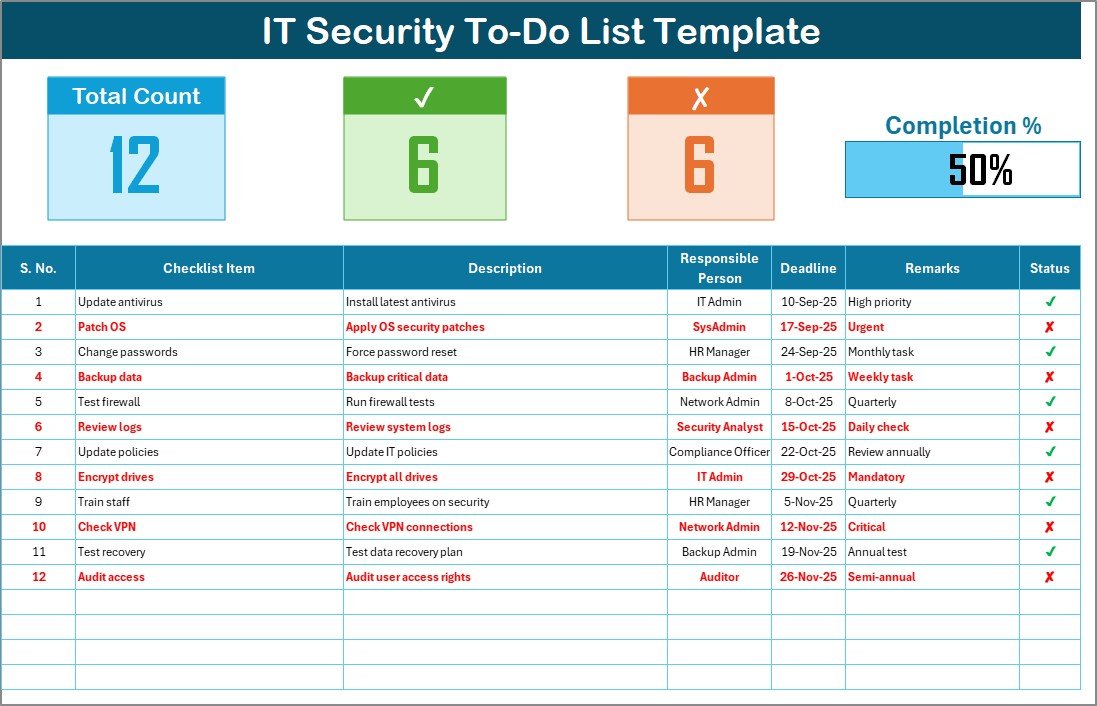
The simplest of the set. It tracks Total Count, Checked Count and Crossed Count, so you see the state of a backlog at a glance. The listing mentions firewall rule updates, employee training and compliance deadlines as typical entries.
Who it is for: small IT teams or a single administrator.
- Checklist sheet and List sheet for assignments
- Progress bar of completed versus pending tasks
- Tick or cross status per task
- Add, edit or remove tasks freely
Use cases: clear audit findings from last year; log a firewall rule review; track security awareness training completion; keep one short list the whole team can read in a minute.
Price: $3.49. Get the IT Security To-Do List Checklist in Excel.
Best for: working through a short remediation list.
7. IT Security Auditing KPI Dashboard in Excel
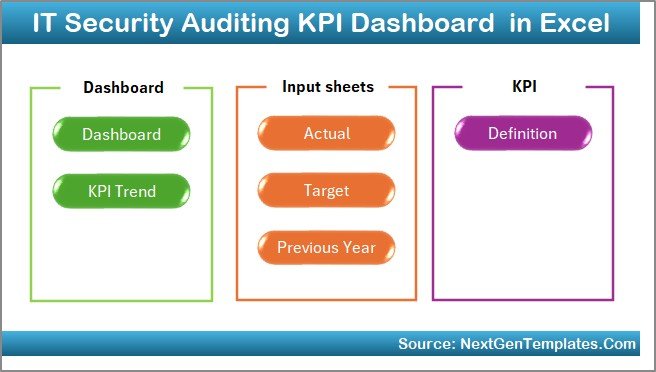
A checklist tells you what was done. This dashboard tells you whether your audit results are getting better. It has 7 worksheets and a month selector in cell D3 that refreshes every KPI, comparison and chart.
Who it is for: security managers who report to leadership and need MTD, YTD and year-over-year views.
- MTD and YTD actual versus target, and versus previous year
- Trend sheet with KPI group, unit, type (LTB or UTB), formula and definition
- Previous Year sheet for year-over-year benchmarking
- KPI Definition sheet with standard names, groups and formulas
Use cases: track backup restore success rate against a 100% target; track access reviews completed against accounts in scope; watch overdue remediation items trend down; show the board one page instead of ten.
Price: $14.99. Buy the IT Security Auditing KPI Dashboard in Excel.
Best for: monthly audit KPI reporting in Excel.
8. IT Security Auditing KPI Dashboard in Power BI: best value dashboard
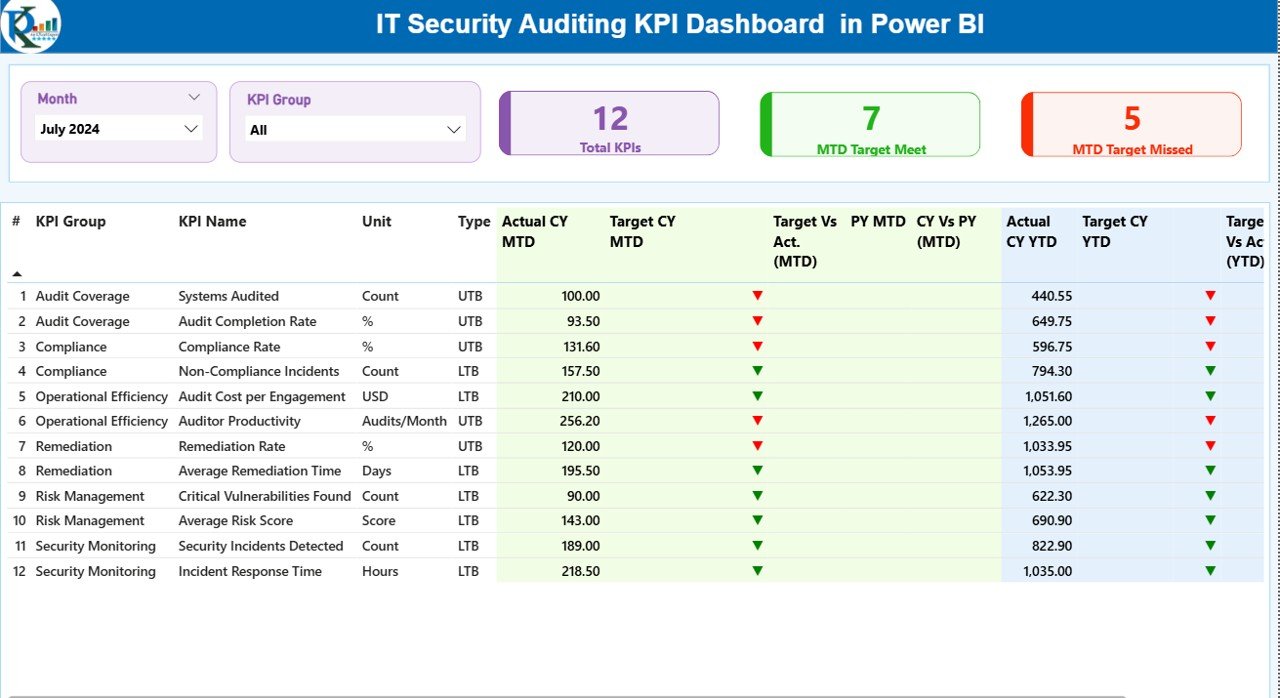
The same idea in Power BI, at $3.00 less than the Excel version. It has 3 interactive pages (Summary, Trend and KPI Definition), green and red status icons, and KPI Group and Month slicers.
Who it is for: teams already using Power BI who want interactive filtering and drill-through.
- MTD and YTD tracking with current versus previous year
- Target versus actual with visual status indicators
- Drill-through to KPI formulas, logic and type (LTB or UTB)
- Delivered as a .pbix file
Use cases: filter by KPI group in a security review meeting; click a red icon to read the KPI definition; compare this year with last for each audit KPI; keep one report open on the screen during the audit close-out.
Price: $11.99. Get the IT Security Auditing KPI Dashboard in Power BI.
Best for: interactive audit reporting in Power BI.
Which IT security checklist template should you use first?
Follow this decision tree from the top and stop at the first yes.
- Do you have no list of security checks at all? Start with the IT Security Review Checklist at $3.49.
- Do you work in Google Workspace and have written policies? Use the IT Security Policy Checklist or the Cybersecurity Checklist.
- Do you need the same checks repeated every month with dated evidence? Use the IT Security Monitoring Checklist.
- Are you planning the year or clearing a short backlog? Use the Planner or To-Do List checklist.
- Does leadership ask for trends, targets and year-over-year numbers? Add a KPI dashboard: $14.99 in Excel or $11.99 in Power BI.
Whatever you pick, fill in two sections first: access reviews and backups. Auditors ask for these most, and both are easy to test.
Starter rows for access reviews and backups
These rows are suggestions you add yourself; none of the templates is listed as shipping with them.
| Checklist row | Evidence to record | Metric formula |
|---|---|---|
| Quarterly user access review per system | Reviewer name, date, accounts removed | Accounts reviewed / accounts in scope x 100 |
| Leaver accounts disabled | HR leave date, disable date | Leaver accounts disabled within 1 day / total leavers x 100 |
| Privileged account review | List of admin accounts, justification | Admin accounts with a documented need / total admin accounts x 100 |
| Backup job success check | Job log reference | Successful backup jobs / scheduled jobs x 100 |
| Test restore | Restore date, file or system, time taken | Successful test restores / test restores attempted x 100 |
Worked example: you have 40 accounts in scope for a finance application and the reviewer confirms 34. Completion is 34 / 40 x 100 = 85%. Put 100% as the target, record the 6 outstanding accounts as rows with owners and deadlines, and the dashboard or progress bar shows the gap. For deeper metric definitions, see our guide to cybersecurity KPIs to track.
When is a spreadsheet the wrong answer for a security audit?
A spreadsheet is a record, not a control. It will not detect anything. Be honest about these limits before you buy.
- You need continuous evidence collection. Tools such as Vanta or Drata pull evidence from your systems automatically. If you are pursuing SOC 2 or ISO 27001 certification with many controls, that automation can be worth the subscription.
- You need live detection. Checklists do not replace a SIEM, endpoint protection or vulnerability scanner. They record that you looked at the output.
- You have hundreds of systems. Row-by-row tracking in Excel stops scaling once dozens of people need to update it daily.
- Your auditor demands a specific tool or format. Ask before you build, so you do not redo the work.
- Nobody owns the list. A checklist with no owner and no review date is just a file. The template is $3.49; the discipline is the actual cost.
For broader compliance documents, our compliance checklist templates cover the paperwork side, and the cybersecurity dashboard templates cover reporting. If you run other inspection routines, see business checklist templates and quality inspection checklists for the same owner-and-deadline approach. Physical site security teams may prefer these security guard templates.
Frequently asked questions
What should an IT security audit checklist include?
It should include access reviews, patching, backups and restore tests, firewall and network checks, incident response, employee training and policy compliance. Each row needs an owner, a deadline, a status and a remark for evidence. Those fields are what an auditor reads first.
How often should you run an IT security audit?
Run a full internal audit at least once a year, and repeat high-risk checks more often. Access reviews and backup restore tests are commonly quarterly. Your framework or customer contracts may set a stricter schedule, so check them before deciding.
Is there an IT security checklist template for Excel?
Yes. The IT Security Review Checklist in Excel costs $3.49. It has a progress dashboard, a checklist table with owner, deadline and status, and drop-down assignment. The Monitoring, Planner and To-Do List checklists use the same layout for other jobs.
Is there a cybersecurity checklist template for Google Sheets?
Yes. The Cybersecurity Checklist in Google Sheets costs $3.49. It supports customizable categories, priorities, real-time collaboration, progress tracking and reminders. The IT Security Policy Checklist in Google Sheets, also $3.49, suits teams checking compliance against written policy.
How do I audit user access with a checklist?
List every system, assign a reviewer per system, and record the review date. Compare the account list to current staff, remove or justify each mismatch, and note the result in Remarks. Measure completion as accounts reviewed divided by accounts in scope.
How do I prove backups work during an audit?
Record a test restore, not just a successful backup job. Note the date, what you restored, how long it took and who checked it. Calculate restore success as successful test restores divided by attempts. Auditors trust a logged restore more than a green status light.
What is the difference between an audit checklist and an audit KPI dashboard?
A checklist records whether each control was completed, by whom and when. A KPI dashboard measures results over time against targets, with month-to-date, year-to-date and year-over-year views. Most teams need the checklist first, then add the dashboard for reporting.
Can an Excel checklist satisfy ISO 27001 or SOC 2 auditors?
It can serve as supporting evidence if it is dated, owned and kept under version control. The Monitoring Checklist listing describes documentation for ISO, GDPR, HIPAA and PCI DSS. A spreadsheet does not certify you; the auditor decides what evidence is enough.
Which is cheaper, the Excel or Power BI audit dashboard?
The IT Security Auditing KPI Dashboard in Power BI costs $11.99 and the Excel version costs $14.99. Both track MTD and YTD results against target and previous year. Choose Power BI for slicers and drill-through, or Excel if your team works only in spreadsheets.
Get more IT security audit checklist templates
Start with the IT Security Review Checklist in Excel for $3.49, then add the IT Security Auditing KPI Dashboard in Power BI for $11.99 or the Excel version for $14.99 when you need trend reporting. Watch walkthroughs on the NextGenTemplates YouTube channel. Not ready to buy? Browse our safety inspection checklist guide for a free starting point on the same method.