

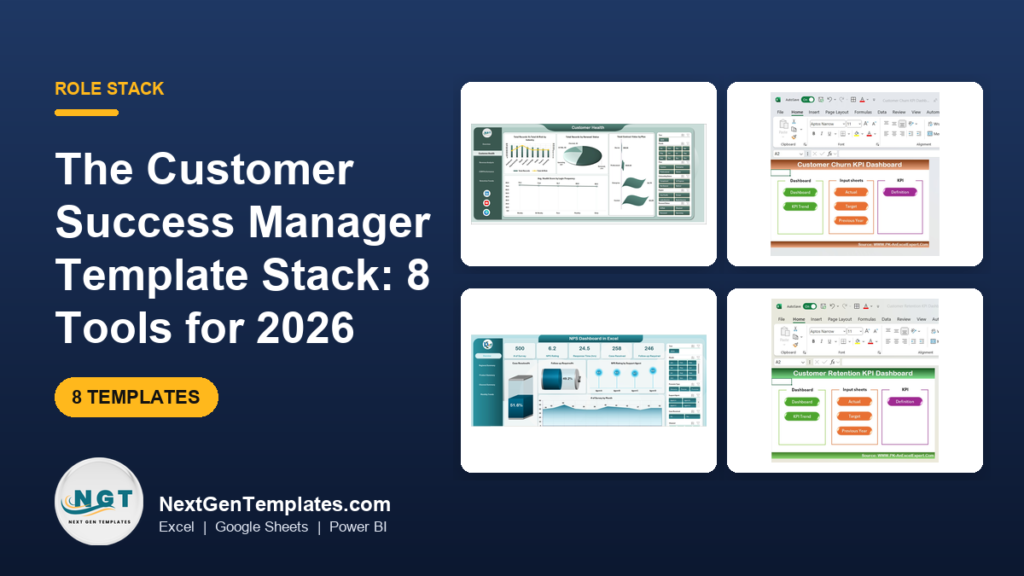
The best customer success dashboard template for a CSM is the SaaS Customer Success Dashboard in Excel ($17.99). It tracks MRR, contract value, tickets, health score and renewals on 5 pages with 5 KPI cards. Add the Customer Churn KPI Dashboard ($14.99) and the NPS Dashboard in Excel ($17.99) and you cover most of a CSM’s reporting.
Last updated: October 2026
Key takeaways
- The SaaS Customer Success Dashboard in Excel costs $17.99 and gives you 5 executive KPI cards and 5 report pages from one Data sheet.
- The whole 8-template stack costs $127.92 in total; a three-template core (SaaS Excel, Churn, NPS Excel) costs $50.97.
- The stack is grouped into four jobs: plan, track, report and present, so each template has a clear place in a CSM’s week.
- Seven of the eight templates are Excel or Power BI; the Customer Satisfaction Improvement KPI Dashboard in Google Sheets ($12.99) covers teams that live in Sheets.
- A four-week rollout is realistic: one tool per week, with the first leadership review in week four.
 Launch offer
From your first Pivot Table to the Data Model, DAX, Power Query and a one-page KPI dashboard. 11h 51m of video by PK, with practice files, quizzes and a capstone.
Customer success dashboard templates compared
| Template | Format | Best For | Price |
|---|---|---|---|
| SaaS Customer Success Dashboard (Best overall) | Excel | Weekly CS standups, renewals, account health | $17.99 |
| SaaS Customer Success Dashboard | Power BI | Shared leadership reporting | $17.99 |
| NPS Dashboard | Excel | Loyalty by agent, product, region, channel | $17.99 |
| Customer Churn KPI Dashboard | Excel | Churn rate and at-risk customers | $14.99 |
| NPS Dashboard | Power BI | Interactive survey analysis | $17.99 |
| Customer Retention KPI Dashboard (Best value) | Excel | Retention, CLV and repeat purchase | $12.99 |
| Customer Satisfaction Improvement KPI Dashboard | Excel | Targets and trends for satisfaction KPIs | $14.99 |
| Customer Satisfaction Improvement KPI Dashboard | Google Sheets | Teams working in Google Workspace | $12.99 |
How we picked these
We searched the NextGenTemplates catalog for customer success, churn, retention, NPS and satisfaction dashboards, then kept paid templates that a CSM would use in a normal week. Each one had to cover a distinct job, so we dropped near-duplicates. Where the same tool exists in more than one format, we included both so you can match your own software.
We excluded free and loosely related templates, such as general sales or support-desk trackers. For the wider KPI list behind these dashboards, see our guide to customer service KPIs to track.
How is a customer success dashboard stack organised?
A CSM does four things on repeat: plan targets, track accounts, report to leadership and present in reviews. The stack follows that order, with a column showing which paid SaaS tool each template can replace. Check current vendor pricing yourself before cancelling anything.
| Job | Template | What this replaces |
|---|---|---|
| Plan | Customer Retention KPI Dashboard (Excel), Customer Satisfaction Improvement KPI Dashboard (Google Sheets) | Target-setting modules in Gainsight or Totango |
| Track | Customer Churn KPI Dashboard (Excel), NPS Dashboard (Excel) | ChurnZero risk reports, SurveyMonkey or Delighted NPS reporting add-ons |
| Report | SaaS Customer Success Dashboard (Excel), Customer Satisfaction Improvement KPI Dashboard (Excel) | Gainsight or ChurnZero executive reporting tiers |
| Present | SaaS Customer Success Dashboard (Power BI), NPS Dashboard (Power BI) | Extra BI seats bought only for CS reporting |
The 8 best customer success dashboard templates for 2026
1. SaaS Customer Success Dashboard in Excel: best overall
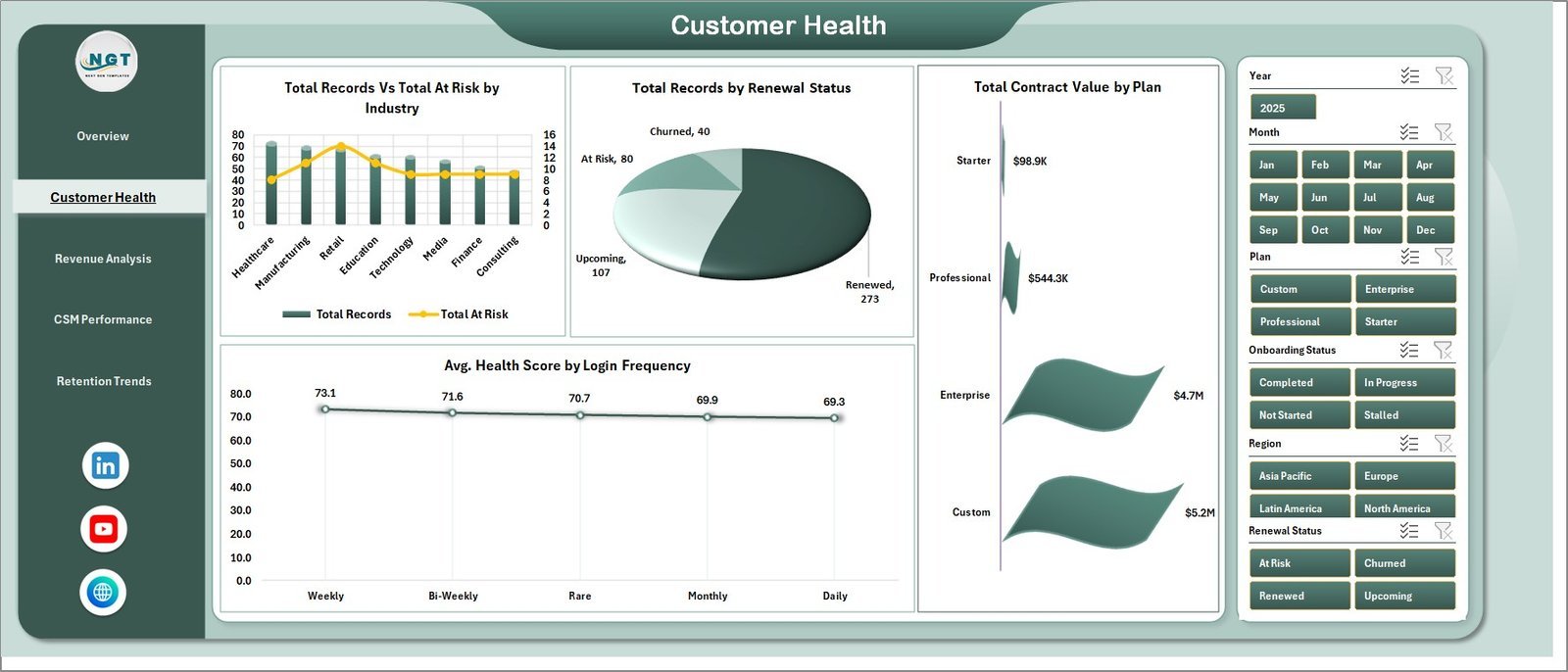
This is the template to start with because it covers the whole account book on one workbook. It is our #1 pick since it combines revenue, health, support load and renewals, which are the four things a CSM gets asked about most.
Who it is for: SaaS founders, CSM leaders and RevOps teams who currently stitch together CRM exports, billing files and support reports by hand.
- 5 KPI cards: Total MRR, Total Contract Value, Total Records, Total Tickets and Avg. Health Score
- 5 pages: Overview, Customer Health, Revenue Analysis, CSM Performance and Retention Trends
- Pivot-powered charts that refresh after you update the Data sheet
- Slicers for plan, industry, region, CSM, renewal status and month
Use cases: run the weekly CS standup from the Overview page; filter Customer Health to at-risk accounts on one plan before a renewal review; compare ticket load by CSM name before reassigning accounts; show Total MRR by Region in a quarterly review.
Price: $17.99. Get the SaaS customer success dashboard in Excel.
Best for: a CSM who needs one workbook for MRR, health and renewals.
2. SaaS Customer Success Dashboard in Power BI
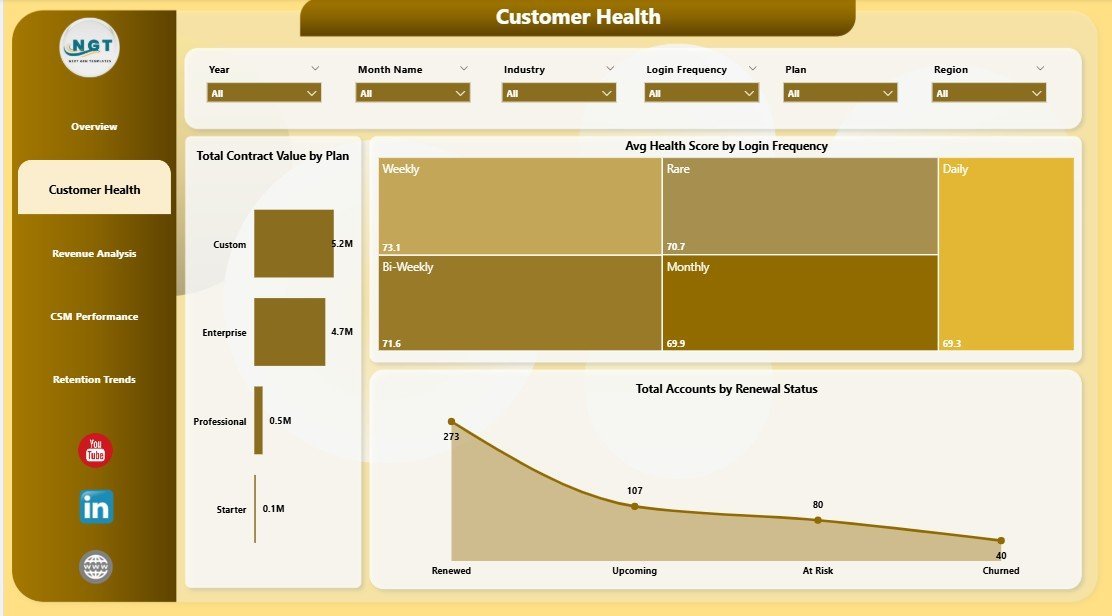
The same five-page structure as the Excel version, built as a Power BI report you customise in Power BI Desktop. It ranks second only because many CSMs still keep their raw data in spreadsheets.
Who it is for: customer success leaders, RevOps analysts and CSM managers who present to leadership and want a shared, interactive report.
- 5 executive KPI cards, including Total MRR and Avg. Health Score
- 5 report pages: Overview, Customer Health, Revenue Analysis, CSM Performance and Retention Trends
- Slicers for plan, industry, region, CSM, renewal status, login frequency, onboarding status and month
- Charts such as Total At Risk by Plan and Total Records by Renewal Status
Use cases: filter by onboarding status to see which new accounts are slipping; review login frequency against at-risk counts; show Total Renewed by Month in a board update. The product description cites 6 to 10 hours a month spent combining CRM, billing, support and usage exports, which is the time this report is meant to cut.
Price: $17.99. See the customer success dashboard in Power BI.
Best for: leadership reviews where people want to click and filter.
3. NPS Dashboard in Excel
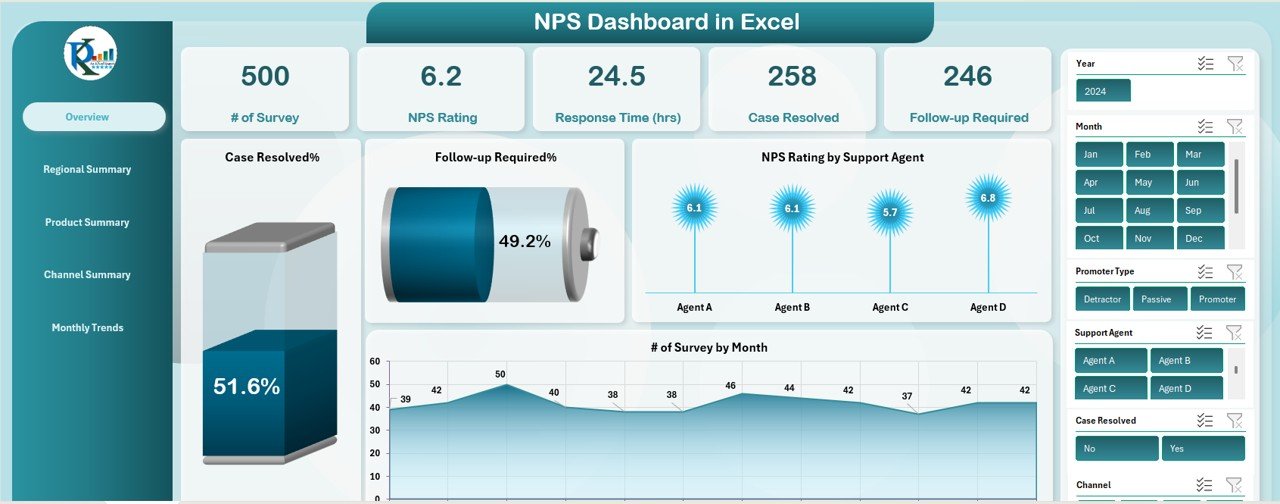
Health scores tell you what an account looks like from the inside. NPS tells you what the customer says. This 6-tab workbook turns survey rows into scores you can slice by dimension.
Who it is for: CSMs and support leads who run NPS surveys and need the results broken down.
- Overview tab with number of surveys, overall NPS, average response time, case resolved % and follow-up required %
- Regional, Product and Channel summary tabs (phone, email, chat)
- Monthly Trends tab and a Data sheet where everything updates from your entries
- Monthly filter drop-down to view one month or the full year
Use cases: find the support agent with the lowest NPS rating; compare one region against the rest; check whether chat resolves cases faster than email; chart NPS by month before a renewal push.
Price: $17.99. Open the NPS dashboard in Excel.
Best for: CSMs who want loyalty data by agent, product and channel.
4. Customer Churn KPI Dashboard in Excel

Where the SaaS dashboard shows retention trends across your book, this one focuses on churn itself: the rate, the periods and the customers most likely to leave.
Who it is for: CSMs, subscription businesses and e-commerce teams that need a churn view they can explain to finance.
- Churn rate calculation and monitoring against past data
- At-risk customer identification from engagement, purchase and interaction patterns
- Monthly, quarterly or yearly trend analysis
- Segmentation by demographics, subscription type or purchasing behaviour, plus retention KPIs such as customer lifetime value
Use cases: compare churn by subscription type to see which plan leaks most; list at-risk customers for a save campaign; chart quarterly churn for a forecast; check whether satisfaction scores move before churn does.
Price: $14.99. Get the customer churn KPI dashboard.
Best for: a focused churn view alongside your main dashboard.
5. NPS Dashboard in Power BI
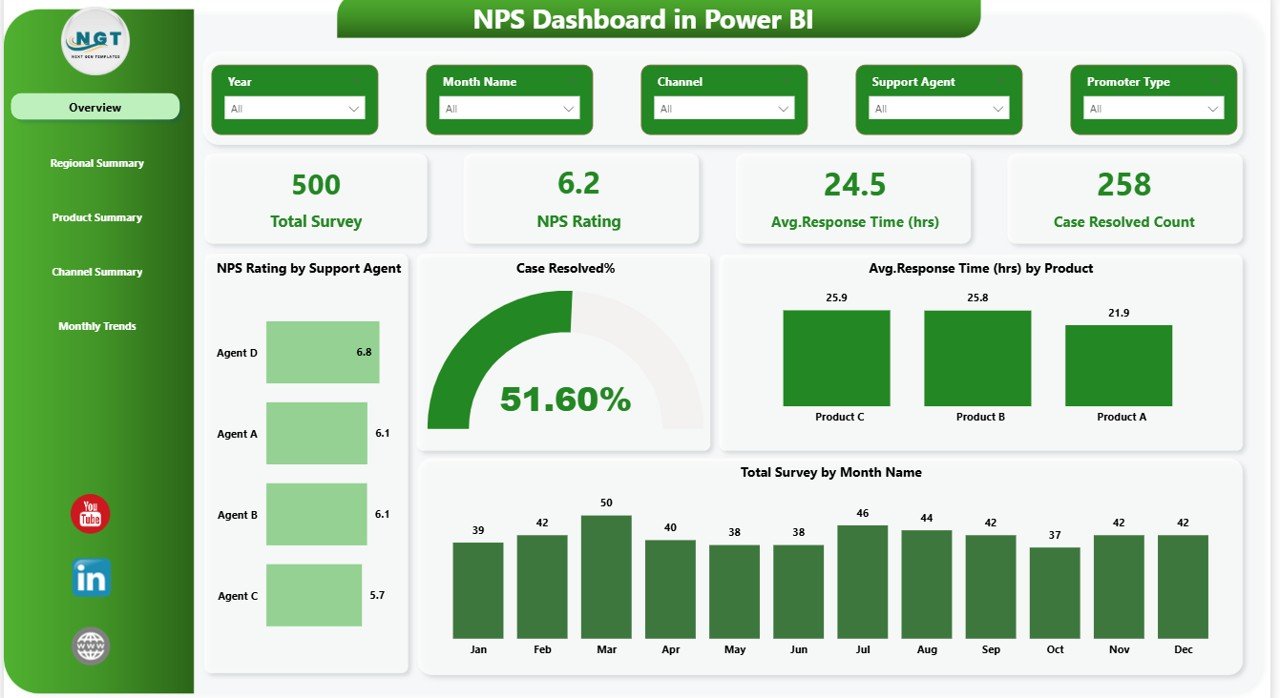
The Power BI version of the NPS tool calculates the score for you using % Promoters minus % Detractors, then lets viewers filter across five interactive pages.
Who it is for: CS and support managers who present loyalty data to people outside the team.
- Automatic NPS calculation with promoters, passives and detractors
- KPI cards for Total Surveys, NPS Score, Response Time (Hours) and Case Resolution Count
- Regional, product and channel views (email, phone, chat, social media)
- Monthly trend analysis and slicers for date, region, product or channel
Use cases: spot the product producing the most detractors; compare social media against email response time; drill into one region during a QBR; watch monthly NPS before a renewal cycle.
Price: $17.99. Try the NPS dashboard in Power BI.
Best for: interactive NPS presentations.
6. Customer Retention KPI Dashboard in Excel: best value
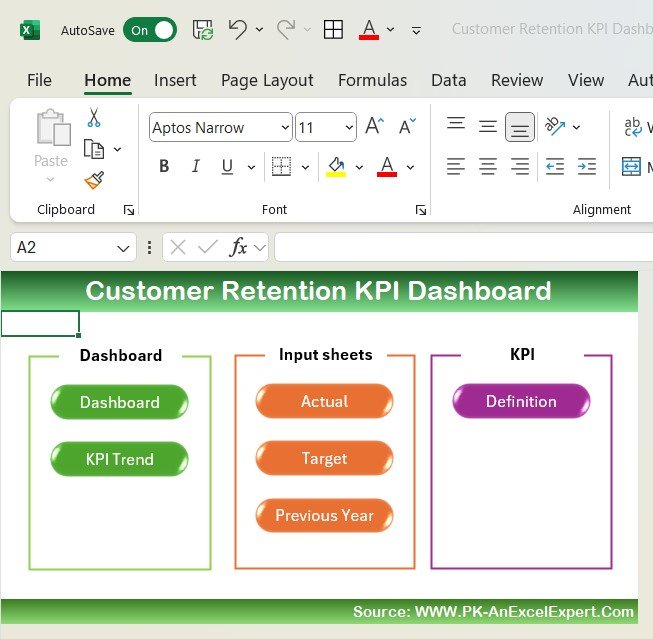
At $12.99 this is the cheapest way into retention reporting, which is why it carries the best-value label. It suits the planning stage, when you decide what to measure.
Who it is for: retail, e-commerce and service teams that need churn, repeat purchase rate and customer lifetime value in one view.
- Churn rate, repeat purchase rate and CLV tracking
- Customer segmentation by behaviour, purchase history and engagement
- Satisfaction tracking with ratings, surveys and NPS
- Customisable KPIs and charts
Use cases: define retention targets for the year; identify your most loyal segment; compare repeat purchase rate across segments; pair satisfaction ratings with churn to find the cause of attrition.
Price: $12.99. Start with the customer retention KPI dashboard.
Best for: the lowest-cost entry to retention tracking.
7. Customer Satisfaction Improvement KPI Dashboard in Excel

This template tracks the operational KPIs behind satisfaction: response times, resolution times and customer feedback. It fills the gap between a health score and an NPS number.
Who it is for: CSMs in retail, service or any customer-facing team who report against targets.
- KPI tracking for response time, issue resolution time and feedback
- Customisable fields, KPIs and targets
- Charts and colour-coded visuals that highlight gaps
- Trend analysis and easy sharing with management
Use cases: set a target for resolution time and see the gap each month; show management a trend of feedback scores; adjust the KPI list when your team changes focus; share the file in a monthly review.
Price: $14.99. Get the customer satisfaction improvement dashboard in Excel.
Best for: target-based satisfaction reporting in Excel.
8. Customer Satisfaction Improvement KPI Dashboard in Google Sheets
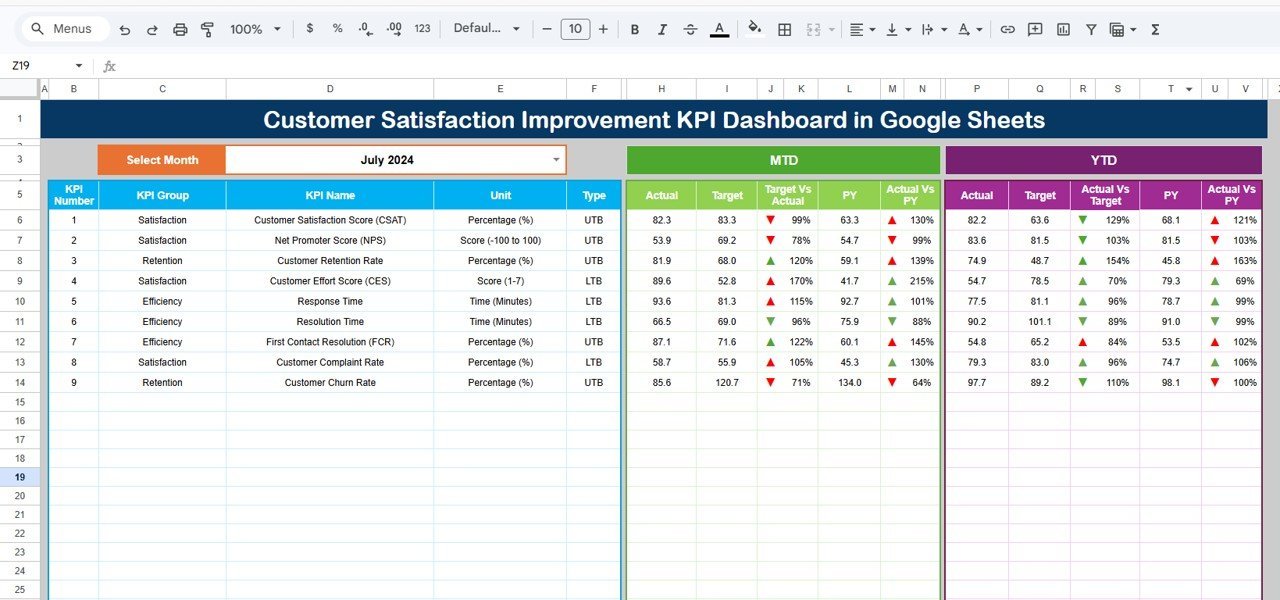
The Sheets edition has six worksheets and a month drop-down that updates every KPI for the selected period. It is the pick for teams that never leave Google Workspace.
Who it is for: managers, analysts and business owners who share KPIs live with colleagues in Google Sheets.
- Dashboard sheet with MTD and YTD actual, target and previous-year figures
- KPI Trend sheet where you choose a KPI to see its group, unit, type, formula and definition
- Input sheets for actual numbers, targets and previous-year numbers
- Conditional formatting with up and down arrows
Use cases: compare month-to-date actuals against target; check year-to-date against the previous year; define whether a lower or higher value is better for each KPI; let several people update inputs at once.
Price: $12.99. Open the customer satisfaction dashboard in Google Sheets.
Best for: Google Sheets teams who need targets and trends.
Which template should you buy first?
Mid-stack decision: if you only buy one thing today, make it the SaaS dashboard. Everything else adds depth to a single area.
Buy the SaaS Customer Success Dashboard in Excel for $17.99, or pick the Power BI version for $17.99. Watch walkthroughs on the NextGenTemplates YouTube channel.
How do you roll out the stack in 30 days?
One tool per week keeps the project small enough to finish. Each week ends with something you can show.
| Week | Job | Template | Output |
|---|---|---|---|
| Week 1 | Report | SaaS Customer Success Dashboard (Excel) | Export CRM, billing and support data into the Data sheet; Refresh All; first standup run from the Overview page |
| Week 2 | Track | Customer Churn KPI Dashboard and NPS Dashboard (Excel) | Churn rate by period and a first NPS score by region and channel |
| Week 3 | Plan | Customer Retention KPI Dashboard and Customer Satisfaction Improvement dashboard (Excel or Sheets) | Targets set for churn, retention and response or resolution time |
| Week 4 | Present | SaaS and NPS dashboards in Power BI | Shared report for the first leadership review; list of SaaS tools to cancel at renewal |
Do not cancel a subscription until you have run one full month in parallel and the numbers match.
What formulas sit behind these dashboards?
Know the maths so you can check the templates against your own data. Churn rate is customers lost in a period divided by customers at the start, times 100. Start March with 200 customers, lose 6, and churn is 3 percent.
NPS is % Promoters minus % Detractors, on a scale from -100 to +100. With 50 percent promoters and 20 percent detractors, NPS is 30. The official definition sits on the Net Promoter System site.
Net revenue figures work the same way: MRR is the sum of monthly recurring charges. If 40 accounts pay $250 a month, Total MRR is $10,000. The SaaS dashboard reports these totals by plan, industry, region and CSM.
How do you choose between them?
| If you… | Choose |
|---|---|
| need one workbook for MRR, health and renewals | SaaS Customer Success Dashboard in Excel ($17.99) |
| present to leaders who want filters | SaaS Customer Success Dashboard in Power BI ($17.99) |
| run NPS surveys by agent, product or channel | NPS Dashboard in Excel or Power BI ($17.99) |
| need churn rate and at-risk lists | Customer Churn KPI Dashboard ($14.99) |
| sell to consumers and track repeat purchase | Customer Retention KPI Dashboard ($12.99) |
| work in Google Sheets | Customer Satisfaction Improvement dashboard in Google Sheets ($12.99) |
Buying all eight costs $127.92. That is more than most teams need. The three-template core of SaaS Excel, Churn and NPS Excel costs $50.97 and covers account health, churn and loyalty.
When is a template NOT the right answer?
Buy software instead if you need automated playbooks, in-app messaging, or health scores computed live from product usage events. A spreadsheet reads the data you load into it. It does not pull from your product on its own.
Software also wins when dozens of CSMs edit one account book at once, or when your company requires audit trails and role-based access. Tools like Gainsight, ChurnZero and Totango are built for that, and a workbook is not.
A template also will not fix bad inputs. If your CRM has no consistent renewal status or health score, the dashboard will show that mess faster. Clean the Data sheet first.
If your problem is lead and opportunity tracking rather than post-sale accounts, read how to run a CRM in Excel without Salesforce instead.
Where do these templates fit with other manager stacks?
This stack covers post-sale accounts. For the metrics side, see our guide to CRM metrics to track. For service-desk tools, see customer management and service templates.
Other roles have their own stacks: the marketing manager dashboard template stack, the operations manager Excel template stack and the payroll manager Excel templates stack.
Frequently asked questions
What is a customer success dashboard template?
A customer success dashboard template is a prebuilt workbook or report that tracks account health, MRR, renewals, tickets and churn in one place. The SaaS Customer Success Dashboard in Excel ($17.99) has 5 KPI cards and 5 pages, and refreshes from a single Data sheet after Refresh All.
Which customer success dashboard should I start with?
Start with the SaaS Customer Success Dashboard in Excel at $17.99 if your data lives in CRM, billing and support exports. It covers MRR, contract value, tickets, health score and renewals in 5 pages. Add the churn and NPS dashboards later when you need deeper views.
Excel or Power BI for customer success reporting?
Pick Excel if your CSMs update data weekly and want pivot-powered charts with slicers. Pick Power BI if leadership wants a shared report in Power BI Desktop. The SaaS Customer Success Dashboard has the same 5 pages and 5 KPI cards in both formats, each $17.99.
How do you calculate customer churn rate?
Churn rate is customers lost during a period divided by customers at the start of that period, multiplied by 100. If you start March with 200 customers and lose 6, churn is 3 percent. The Customer Churn KPI Dashboard in Excel ($14.99) tracks this by period and segment.
How is NPS calculated?
NPS is the percentage of promoters minus the percentage of detractors, giving a score from -100 to +100. With 50 percent promoters and 20 percent detractors, NPS is 30. The NPS Dashboard in Power BI ($17.99) calculates it automatically from your survey rows.
Can a spreadsheet replace Gainsight or ChurnZero?
For teams focused on reporting, often yes. Spreadsheets cover health, revenue and renewal reporting, but not in-app playbooks or automated outreach. Compare your current Gainsight, ChurnZero or Totango invoice against $127.92, the total for all eight templates in this stack, before deciding.
How long does it take to set up a customer success dashboard?
Plan on four weeks for the full stack: week one for the SaaS dashboard and data, week two for churn and NPS, week three for targets and satisfaction tracking, week four for the Power BI views and a first leadership review. The Excel SaaS dashboard alone can run within days.
What data do I need for a customer success dashboard?
You need account rows with plan, industry, region, CSM, renewal status, MRR, contract value, tickets and a health score, plus survey scores for NPS. Most of this sits in CRM, billing and support exports. The SaaS dashboard reads it from one Data sheet.
Is there a customer satisfaction dashboard for Google Sheets?
Yes. The Customer Satisfaction Improvement KPI Dashboard in Google Sheets costs $12.99 and has a month drop-down, actual, target and previous-year input sheets, and MTD and YTD trend charts. The other seven templates in this stack are Excel or Power BI.
Get more customer success templates
Start with the SaaS Customer Success Dashboard in Excel for $17.99, then add the Customer Retention KPI Dashboard for $12.99, the best-value pick. The full eight-template stack comes to $127.92.
Video walkthroughs are on the NextGenTemplates YouTube channel.