

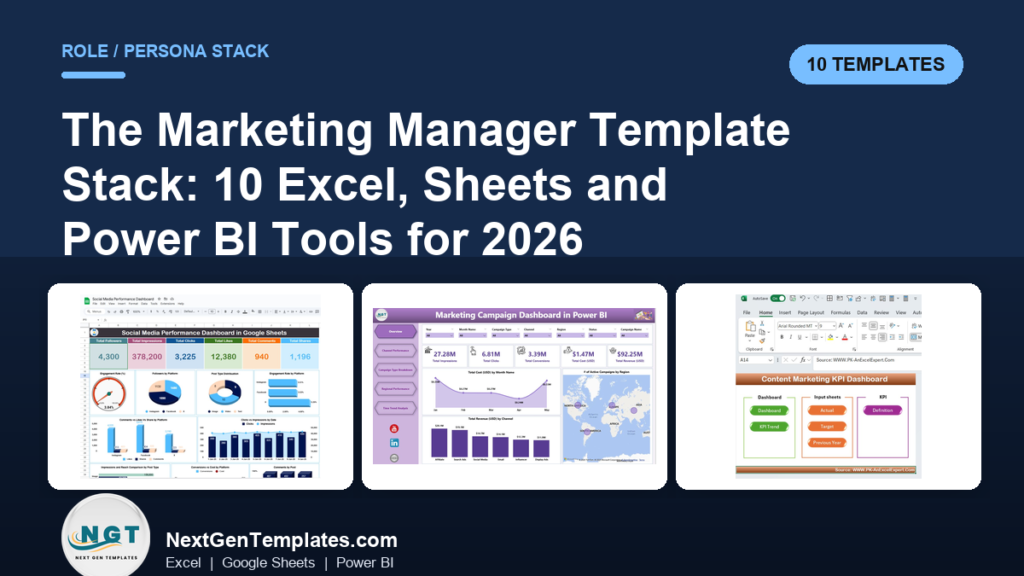
The best marketing manager dashboard template stack starts with the Marketing Manager Toolkit ($92.99, 9 templates in Excel and Google Sheets), then adds a campaign dashboard ($9.99 to $17.99), a content KPI dashboard and a Power BI reporting layer. Together they cover planning, tracking, reporting and presenting without a reporting SaaS subscription.
Last updated: October 2026
Key takeaways
- The Marketing Manager Toolkit costs $92.99 for 9 templates in Excel and Google Sheets, against a stated $154.91 value if bought one by one.
- A single campaign dashboard such as the Digital Marketing Campaign Dashboard in Google Sheets costs $9.99 and tracks Spend, Revenue, Conversions and Avg ROAS.
- The 10 templates are grouped by four jobs: plan, track, report and present, so you buy for the job you do this month.
- Power BI versions of the Marketing Campaign Dashboard and the Marketing Dashboard cost $17.99 each and refresh from Excel data.
- A 30-day rollout (table below) gets one dashboard live in week 1 and a client-ready report by day 30.
 Launch offer
From your first Pivot Table to the Data Model, DAX, Power Query and a one-page KPI dashboard. 11h 51m of video by PK, with practice files, quizzes and a capstone.
Marketing manager dashboard templates compared
| Template | Format | Best For | Price |
|---|---|---|---|
| Marketing Manager Toolkit (Best value) | Excel + Google Sheets | Planning, tracking and proving performance across every channel | $92.99 |
| Marketing Campaign Dashboard in Excel (Best overall single dashboard) | Excel | Channel, campaign type and regional ROI | $17.99 |
| Digital Marketing Campaign Dashboard in Excel | Excel | Platform, lead and ROI analysis | $17.99 |
| Marketing Dashboard in Power BI | Power BI | Budget vs spend and drillthrough reporting | $17.99 |
| Marketing Campaign Dashboard in Power BI | Power BI | Creative type and channel comparison | $17.99 |
| Digital Marketing Campaign Dashboard in Google Sheets | Google Sheets | Shared, browser-based campaign tracking | $9.99 |
| Content Marketing KPI Dashboard in Excel | Excel | Content metrics plus a publishing calendar | $14.99 |
| Content Marketing KPI Dashboard in Power BI | Power BI | MTD and YTD content KPIs against targets | $11.99 |
| Content Marketing Agencies Dashboard in Excel | Excel | Agency, account manager and profit reporting | $13.99 |
| Digital Marketing Campaign Dashboard in HTML | HTML (browser) | Presenting campaign results in a browser | $12.99 |
How we picked these
We searched the NGT catalog for paid marketing dashboards, KPI dashboards and bundles aimed at marketing managers. We kept templates that cover a distinct job in the marketing workflow and removed near-duplicates in the same format.
Free templates and loosely related sales or CRM dashboards were left out. Where the same tool exists in Excel, Google Sheets, Power BI or HTML, we included more than one format so you can pick the one your team already uses.
Every price and feature below comes from the product pages. We did not rank anything on features the pages do not state.
What does a marketing manager actually need in a dashboard stack?
A marketing manager does four recurring jobs: plan the quarter, track live campaigns, report to leadership and present results to clients or other teams. One mega-dashboard rarely does all four well.
A stack gives each job its own file. The plan layer holds calendars and budgets. The track layer holds campaign data by channel. The report layer shows month-to-date and year-to-date against targets. The present layer is something you can open in a meeting without a login.
For the metrics behind each layer, see our guide to marketing KPIs to track in 2026.
Which SaaS tool can each template replace?
The table below names the subscription tool each template can stand in for. It is a judgement on workflow overlap, not a like-for-like feature claim. Check your own contract before cancelling anything.
| Job | Template | What this replaces |
|---|---|---|
| Plan | Marketing Manager Toolkit | Planning calendars in CoSchedule or Monday.com |
| Track | Marketing Campaign Dashboard in Excel | A Databox or Klipfolio campaign board |
| Track | Digital Marketing Campaign Dashboard in Excel | Manual exports from ad platforms into slides |
| Track | Digital Marketing Campaign Dashboard in Google Sheets | A Looker Studio board you maintain by hand |
| Report | Marketing Dashboard in Power BI | A Tableau Creator seat used only for marketing |
| Report | Marketing Campaign Dashboard in Power BI | Channel reports built in HubSpot reporting add-ons |
| Plan and report | Content Marketing KPI Dashboard in Excel | A content calendar plus analytics add-on |
| Report | Content Marketing KPI Dashboard in Power BI | A KPI scorecard tool such as Klipfolio |
| Present | Content Marketing Agencies Dashboard in Excel | Agency reporting platforms such as AgencyAnalytics |
| Present | Digital Marketing Campaign Dashboard in HTML | Shared slide decks rebuilt every month |
The 10 best marketing manager dashboard templates for 2026
1. Marketing Manager Toolkit: best value and best overall stack
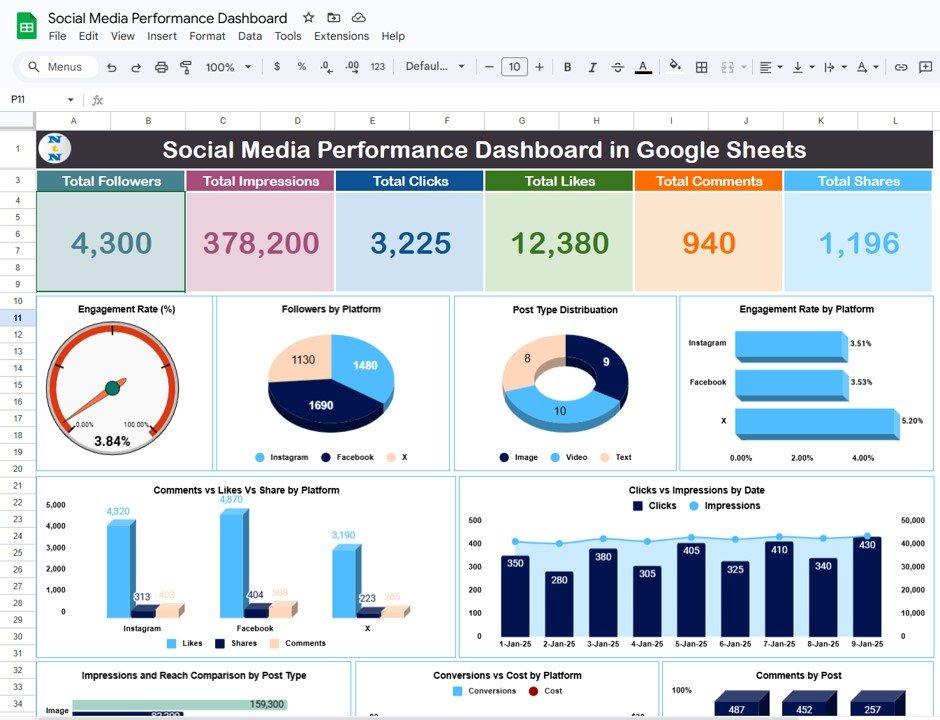
Job: plan, with track and report included. This is #1 because it is the only listing that covers the whole workflow in one download: 9 templates in Excel and Google Sheets, so you start with a full stack rather than a single screen.
Who it is for: marketing managers and growth leads who own planning, tracking and proof of performance.
- 9 ready-to-use dashboards, calendars and KPI trackers
- Campaign and ROI analytics: budget vs actual, conversions, return
- Social media performance dashboards and posting and campaign calendars
- Community engagement and employee engagement trackers
- Bonus 7-template Marketing and Social Media Analytics Kit (Excel, Google Sheets and Power BI)
Use cases: build the quarterly campaign calendar in week 1; compare budget vs actual per campaign in month 1; report social reach and engagement in one view; hand the Power BI bonus kit to an analyst.
Price: $92.99 one-time, against a stated $154.91 individual value (a saving of $61.92, or 40%). Get the Marketing Manager Toolkit.
Best for: a manager who wants the entire stack in one purchase.
2. Marketing Campaign Dashboard in Excel: best single campaign dashboard
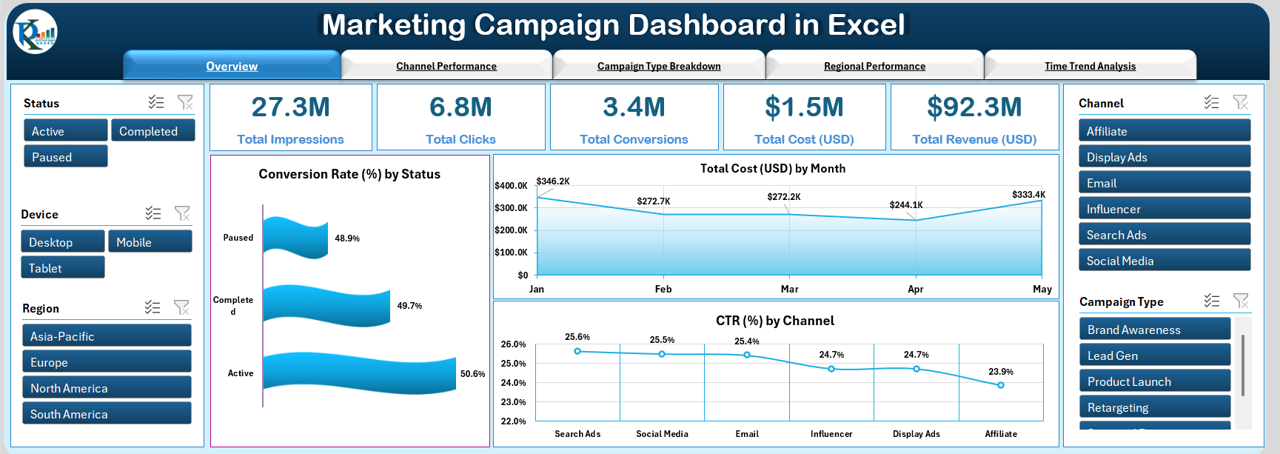
Job: track. It brings impressions, clicks, conversions, cost and revenue into one filterable workbook. You paste campaign data into a data sheet and no formulas are needed.
Who it is for: managers running paid, email and social campaigns who need ROI by channel.
- Overview with CTR%, Campaign Rate% and ROI
- Channel Performance: revenue, conversion rate and ROI by channel
- Campaign Type and Regional Performance pages
- Time Trend page for CTR, ROI and conversions by month
- Slicers by channel, campaign type, region and time
Use cases: 5 report pages cover the weekly channel review; the regional page shows where to shift spend; the time page shows seasonal dips before the monthly meeting; slicers let you answer a director’s question live.
Price: $17.99. See the Marketing Campaign Dashboard in Excel.
Best for: the first single dashboard if you do not buy the toolkit.
3. Digital Marketing Campaign Dashboard in Excel: best for platform and lead analysis
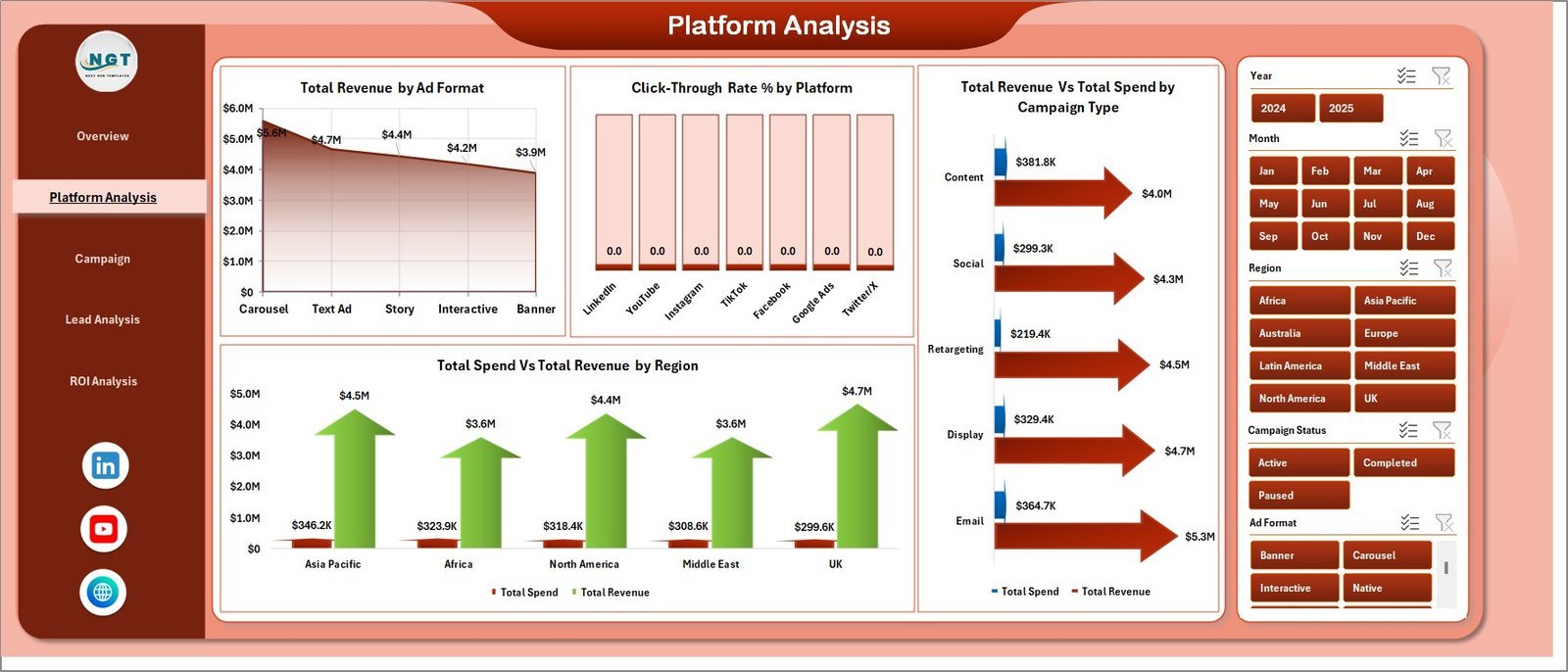
Job: track. It has 5 dashboard pages (Overview, Platform Analysis, Campaign Performance, Lead Analysis and ROI Analysis), a data sheet and a support sheet with pivot tables that refresh when you update the data.
Who it is for: digital marketing managers and campaign strategists running multi-platform spend.
- 5 KPI cards: Total Spend, Revenue, Impressions, Clicks, Conversions
- Revenue by ad format and CTR% by platform
- Revenue by manager and conversions by target audience
- Leads vs conversions by campaign type and ROAS by platform
Use cases: compare ROAS across platforms before approving next month’s budget; check which campaign manager drives the most revenue; see where leads drop before converting; replace a slide deck rebuilt each month.
Price: $17.99. Open the Digital Marketing Campaign Dashboard in Excel.
Best for: managers who care about leads and ROAS by platform.
4. Marketing Dashboard in Power BI: best for budget vs spend reporting

Job: report. It shows Total Budget, Spend, Revenue and ROI, with MTD, YTD and YOY trends and up and down arrows. Click any chart to drill through to campaign level.
Who it is for: managers who report to a CFO or director and need to explain variance.
- 5 pages: Overview, Budget vs Spend, Conversion and Revenue, ROI Analysis, Details
- Drillthrough to budget, spend, revenue, clicks and campaign owner
- Filters by month, channel, type and campaign owner
- Ready-to-use .pbix file with conditional formatting
Use cases: show budget vs spend by manager in the monthly review; flag red-arrow campaigns before they overspend; drill from a channel total to one campaign in a single click; compare this year to last year.
Price: $17.99. View the Marketing Dashboard in Power BI.
Best for: leadership reporting in Power BI.
5. Marketing Campaign Dashboard in Power BI: best for creative and channel comparison
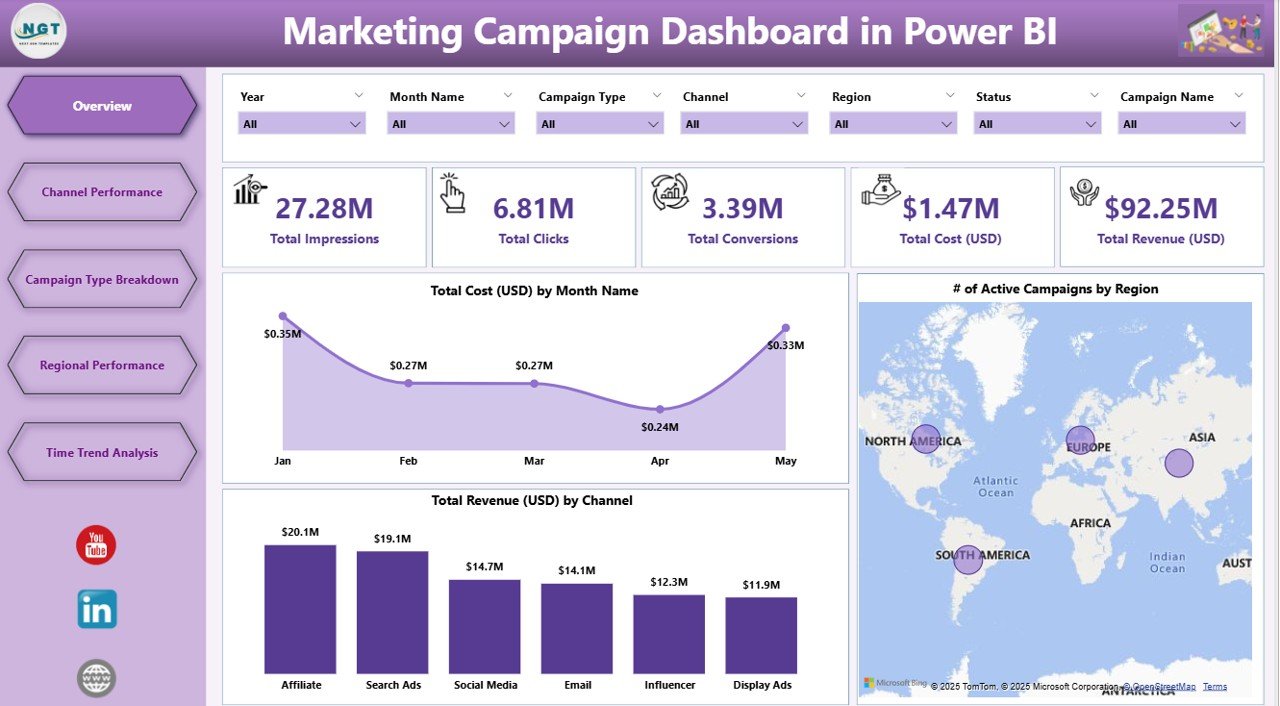
Job: track and report. The workbook has 5 interactive pages: Overview, Channel, Campaign Type, Region and Time Trend. It refreshes from Excel data.
Who it is for: marketers comparing video, banner, email and influencer creative.
- Overview with Total Campaigns, Cost and Revenue plus 7 slicers
- Conversions, cost and active campaigns by channel
- Creative type charts for revenue, impressions and conversions
- Regional and monthly trend pages
Use cases: decide whether video or email gets next quarter’s budget; spot seasonal spikes and fatigue on the trend page; localise spend with the regional page; use 7 slicers to build a view for one region only.
Price: $17.99. Check the Marketing Campaign Dashboard in Power BI.
Best for: Power BI teams that need creative-level comparison.
6. Digital Marketing Campaign Dashboard in Google Sheets: cheapest way to start
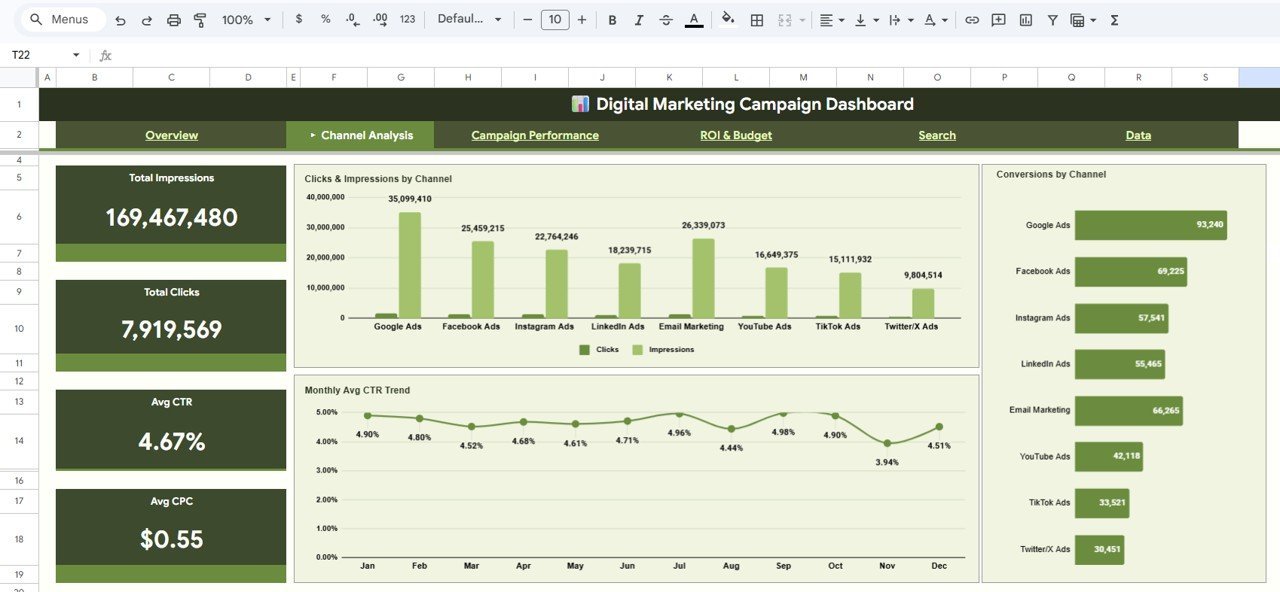
Job: track. At $9.99 it is the lowest priced template in the stack. It has 6 pages, 5 KPI cards and 12+ dynamic charts, and works in the browser so a whole team can view the same file.
Who it is for: small marketing teams and business owners who live in Google Workspace.
- KPI cards: Total Campaigns, Spend, Revenue, Conversions, Avg ROAS
- Channel Analysis and Campaign Performance pages
- ROI and Budget page plus a campaign search tool
- Tracks Google Ads, Facebook, Instagram, LinkedIn, Email and SEO
Use cases: share one live link with the CEO instead of a PDF; look up a single campaign with the search tool; compare Monthly Spend vs Revenue; filter by channel, region, type or status with slicers.
Price: $9.99. Get the Google Sheets campaign dashboard.
Best for: teams that want a shared, low-cost tracker.
7. Content Marketing KPI Dashboard in Excel: best for content plan and ROI
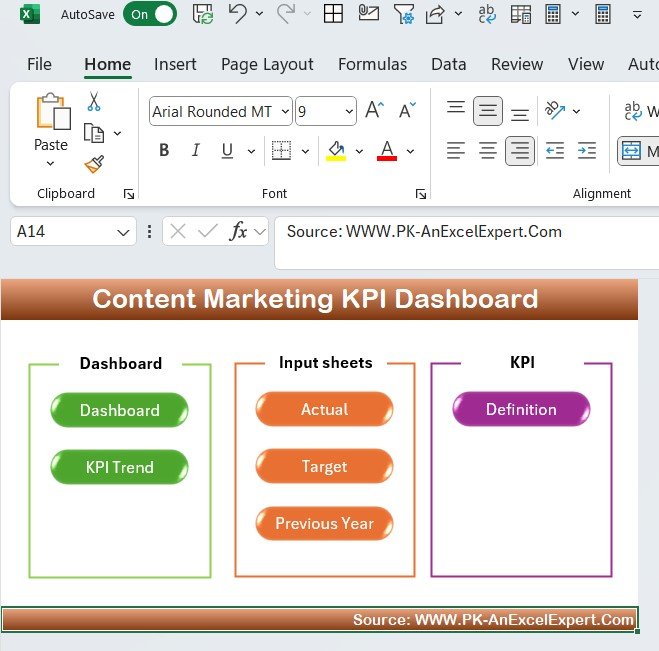
Job: plan and track. It pairs content performance metrics with a built-in content calendar, so the plan and the result sit in the same workbook.
Who it is for: content marketers, agencies and managers who oversee blogs and social.
- Page views, bounce rate and average time on page
- Social shares, comments and user interactions
- Content ROI: revenue from content-driven channels vs cost of creation and promotion
- Content calendar for planning, scheduling and tracking publishing
Use cases: spot which posts drive traffic; compare content cost with revenue; keep the editorial calendar and results together; review engagement before planning next month’s topics.
Price: $14.99. Open the Content Marketing KPI Dashboard in Excel.
Best for: managers who own a content programme.
8. Content Marketing KPI Dashboard in Power BI: best for targets and KPI status
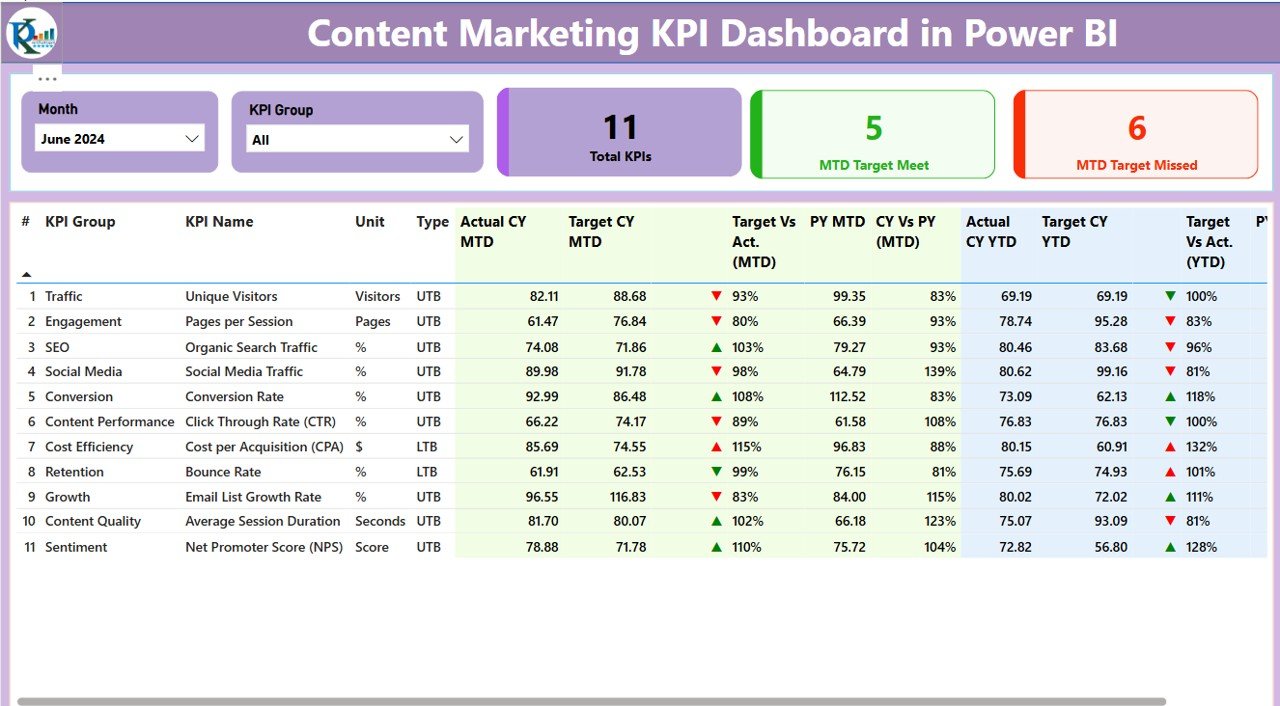
Job: report. It tracks actuals against targets with MTD and YTD views, status icons for met or missed KPIs and a KPI definition page that spells out formulas and units.
Who it is for: managers who set content targets and need a scorecard for the team.
- Summary page: Total KPIs, MTD Target Met and MTD Target Missed
- Month and KPI Group slicers
- KPI Trend page with a KPI selector
- Excel-driven inputs, including an Input_Actual sheet
Use cases: show the team which KPIs missed target this month; compare YTD against the previous year; use the definition page so everyone calculates a KPI the same way; update actuals in Excel and refresh.
Price: $11.99. See the Content Marketing KPI Dashboard in Power BI.
Best for: target-driven content reporting.
9. Content Marketing Agencies Dashboard in Excel: best for client and profit reporting
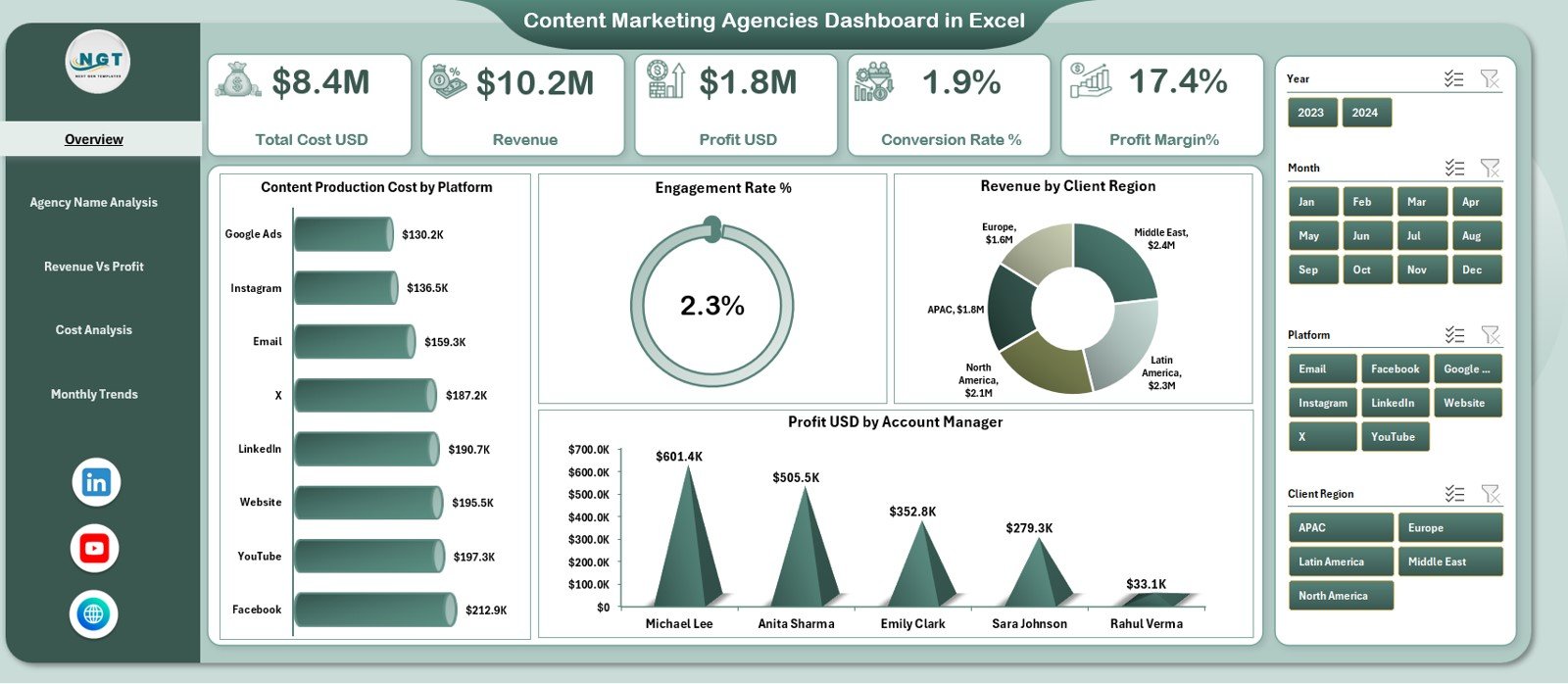
Job: present. It adds profit to the picture: cost, revenue, profit, conversion and engagement by agency, platform, account manager and region.
Who it is for: agency leads and in-house managers who brief outside agencies.
- 5 pages: Overview, Agency Analysis, Revenue vs Profit, Cost Analysis, Monthly Trends
- KPI cards for revenue, profit, cost, conversion and margin
- Slicers by Agency, Platform, Client Region and Campaign Objective
- Account manager performance and platform-wise profitability
Use cases: compare two agencies on profit rather than clicks; find the platform with the best margin; show an account manager’s contribution; review cost control by month. For a wider view, see our advertising and creative agency dashboard templates.
Price: $13.99. Get the Content Marketing Agencies Dashboard in Excel.
Best for: agency vendor reviews and client reporting.
10. Digital Marketing Campaign Dashboard in HTML: best for presenting in a browser
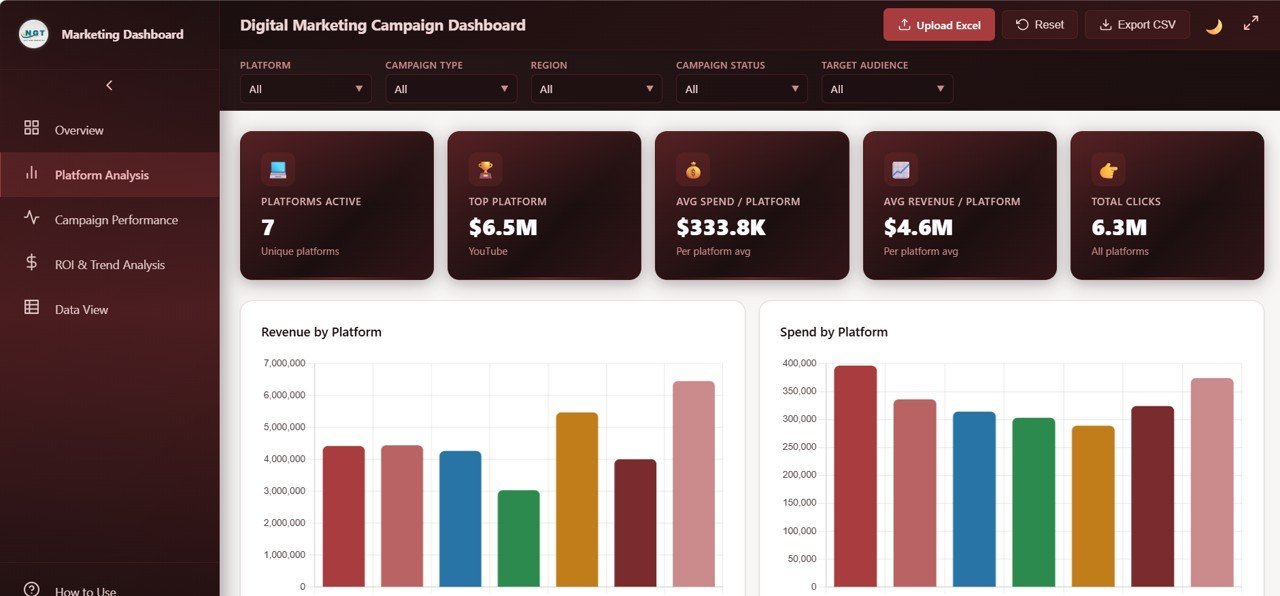
Job: present. It is built in HTML, CSS and JavaScript, so it opens in a browser with slicers and cross-highlighting and needs no spreadsheet software.
Who it is for: managers who present results to people without Excel or Power BI licences.
- 5 pages: Overview, Platform Analysis, Campaign Performance, ROI and Trend Analysis, Data View
- 6 KPI cards: Spend, Revenue, Profit, Clicks, Leads, Avg Bounce Rate
- Platform comparison of revenue, spend, clicks, conversions and profit
- Monthly Revenue vs Spend trend and Budget vs Spend
Use cases: open it in a browser in a client meeting; compare platforms side by side; use the Data View page for a full table; show the monthly trend of revenue against spend.
Price: $12.99. View the HTML campaign dashboard.
Best for: browser-based presenting.
How do I roll out the stack in 30 days?
Do not install all ten at once. Start with one tracker, feed it real data and add a layer each week.
| Days | Job | Action | Template |
|---|---|---|---|
| 1-7 | Track | Export last quarter’s campaign data and paste it into one dashboard | Marketing Campaign Dashboard in Excel or Google Sheets version |
| 8-14 | Plan | Build next month’s calendar and budget lines | Marketing Manager Toolkit or Content Marketing KPI Dashboard in Excel |
| 15-21 | Report | Set targets and connect the data to Power BI | Marketing Dashboard in Power BI |
| 22-30 | Present | Prepare the first monthly review for leadership or clients | HTML or Agencies dashboard |
How do I calculate the numbers these dashboards show?
Know the formulas, so you can check the dashboard against your ad platform.
- CTR% = clicks / impressions x 100
- ROI% = (revenue – cost) / cost x 100
- ROAS = revenue / ad spend
- Cost per conversion = cost / conversions
Worked example (illustrative numbers): a campaign spends $2,000 and earns $5,000 in revenue. ROAS is 2.5 and ROI is (5,000 – 2,000) / 2,000 = 150%. If it produced 100 conversions, cost per conversion is $20.
Platform reports often use different attribution windows, so expect small gaps. For more metric definitions, see our posts on sales KPIs and CRM metrics. For attribution settings, Google documents its own model in Google Analytics.
How do I choose between them?
| If you… | Start with |
|---|---|
| Want the whole stack once | Marketing Manager Toolkit, $92.99 |
| Live in Google Sheets | Digital Marketing Campaign Dashboard in Google Sheets, $9.99 |
| Live in Excel | Marketing Campaign Dashboard in Excel, $17.99 |
| Report in Power BI | Marketing Dashboard in Power BI, $17.99 |
| Run mostly content | Content Marketing KPI Dashboard in Excel, $14.99 |
| Manage agencies | Content Marketing Agencies Dashboard in Excel, $13.99 |
Bundle versus single maths: the nine single templates in #2 to #10 add up to $135.91. The toolkit is a different set of nine at $92.99, so buy it first and add a single only for a format or job it does not cover.
Managers in other functions can use the same approach. See the Plant Manager Template Stack and the Payroll Manager Template Stack, plus manufacturing dashboard templates and payroll KPIs.
When a template is not the right answer
Templates are the wrong tool in several cases. If you need live, automatic connections to Google Ads, Meta and LinkedIn with no pasting, buy a connector tool such as Supermetrics or Funnel. These dashboards use data you paste or load from Excel.
If your team needs multi-user permissions, audit logs or automated attribution modelling, you want a marketing platform. HubSpot is one; our HubSpot alternatives guide covers where a spreadsheet is enough.
Very large datasets can slow Excel and Sheets. If you run millions of rows of ad impressions, use Power BI with a proper data source. Finally, a dashboard shows what happened. It will not fix a campaign that is badly targeted.
Frequently asked questions
What is a marketing manager dashboard template?
A marketing manager dashboard template is a pre-built spreadsheet or Power BI file that shows campaign spend, revenue, conversions and ROI in one place. You paste in your data and the charts update. The Marketing Manager Toolkit covers 9 such templates for $92.99.
What is the best marketing KPI dashboard to start with?
For one dashboard, the Marketing Campaign Dashboard in Excel at $17.99 is a strong start, with channel, campaign type, regional and time trend pages. If you want planning, tracking and reporting together, the Marketing Manager Toolkit at $92.99 gives 9 templates in one download.
Is there a marketing analytics dashboard in Google Sheets?
Yes. The Digital Marketing Campaign Dashboard in Google Sheets costs $9.99. It has 6 pages, 5 KPI cards, 12+ charts and a campaign search tool, and it tracks Google Ads, Facebook, Instagram, LinkedIn, Email and SEO. It works in the browser and can be shared.
Do these templates connect automatically to ad platforms?
The listings describe pasting your data into a data sheet, or in Power BI refreshing from Excel data. They do not describe live connections to ad platforms. If you need automatic pulls from Google Ads or Meta, add a connector tool or use a paid reporting platform.
Can I use Power BI instead of Excel for marketing reporting?
Yes. The Marketing Dashboard in Power BI and the Marketing Campaign Dashboard in Power BI are $17.99 each. Both are driven by Excel data, so you can keep your inputs in a spreadsheet and use Power BI for drillthrough, slicers and MTD or YTD views.
How much does the Marketing Manager Toolkit save?
The listing states a $154.91 value for the 9 templates, sold for $92.99. That is a saving of $61.92, or 40%. It is a one-time price, with no subscription, and it includes Excel and Google Sheets versions of the templates.
Which template is best for content marketing?
Use the Content Marketing KPI Dashboard in Excel ($14.99) if you want metrics plus a content calendar. Use the Power BI version ($11.99) if you track MTD and YTD KPIs against targets. Both track engagement and content ROI.
Can I present a dashboard without Excel or Power BI?
Yes. The Digital Marketing Campaign Dashboard in HTML costs $12.99 and runs in a browser. It has 5 pages, 6 KPI cards and dynamic slicers, so the audience does not need a spreadsheet application to view it.
Can a marketing dashboard template replace a SaaS reporting tool?
It can replace the reporting part for many teams, such as monthly campaign reviews, but not live data connectors or multi-user workflows. Check what you use your current tool for. If it is mainly charts from data you already export, a template usually covers it.
How long does it take to set up a marketing dashboard?
Plan for a week to get one dashboard live with real data: export the data, paste it into the data sheet and check the totals against your ad platform. The 30-day rollout in this post adds planning, reporting and presenting layers after that.
Get more marketing manager dashboard templates
Best value: the Marketing Manager Toolkit gives you 9 templates in Excel and Google Sheets for $92.99, with the 7-template Marketing and Social Media Analytics Kit included as a bonus. Watch walkthroughs on the NextGenTemplates YouTube channel.