

The best interior design templates for a design studio are the Interior Design KPI Dashboard in Excel ($14.99) for project, budget and client satisfaction tracking, plus matching Scorecard, Power BI and Google Sheets versions from $9.99. Studios that need fee, timesheet and invoicing control should add the Architecture Firm Project Management System Web App ($39.99).
Last updated: October 2026
Key takeaways
- The Interior Design KPI Dashboard in Excel costs $14.99 and is the best overall pick for tracking project progress, budgets, timelines and client satisfaction.
- The Interior Design KPI Dashboard in Google Sheets is the best-value pick at $9.99, with month-to-date, year-to-date and previous-year comparisons.
- The Interior Design KPI Dashboard in Power BI costs $11.99 and suits studios that already report in Power BI.
- The Architecture Firm Project Management System Web App ($39.99) has 20 modules and 6 sign-in roles, and keeps fees and margins hidden from design staff.
- Buying all four exact-match interior design KPI templates costs $51.96, so most studios only need one format plus the scorecard.
 Launch offer
SUMIFS, XLOOKUP, FILTER, LAMBDA and checking AI-written formulas, with real business projects. 11h 47m of video by PK, with practice files, quizzes and a capstone.
Interior design templates compared
| Template | Format | Best For | Price |
|---|---|---|---|
| Interior Design KPI Dashboard in Excel (Best overall) | Excel | Project, budget and client satisfaction tracking | $14.99 |
| Interior Design KPI Scorecard in Excel | Excel | Actual vs target reviews in management meetings | $14.99 |
| Interior Design KPI Dashboard in Power BI | Power BI | Studios already reporting in Power BI | $11.99 |
| Interior Design KPI Dashboard in Google Sheets (Best value) | Google Sheets | Small studios sharing one live file | $9.99 |
| Architecture Firm Project Management System Web App | Web app (Google Apps Script) | Fees, timesheets, invoicing and role-based access | $39.99 |
| Graphic Design Studio Dashboard in Google Sheets | Google Sheets | Studios with a branding or graphics side | $9.99 |
How we picked these interior design templates
We searched the NextGenTemplates catalog of roughly 6,900 products for anything built for interior design studios. Only four exact interior design SKUs exist: the Excel dashboard, the Excel scorecard, the Power BI dashboard and the Google Sheets dashboard.
To give studios a higher-tier option and a budget alternative, we added two adjacent design-firm products: an architecture practice web app and a graphic design studio dashboard. We excluded generic survey trackers and UX/UI dashboards because they do not match how an interior studio works. Every price and feature below comes from the product pages.
What are the best interior design templates for a design studio?
The ranked list below starts with the template that covers the most studio questions for the least money, then moves to format alternatives and finally to the two adjacent tools. Each entry names who it suits, what is inside and what it costs.
1. Interior Design KPI Dashboard in Excel: best overall
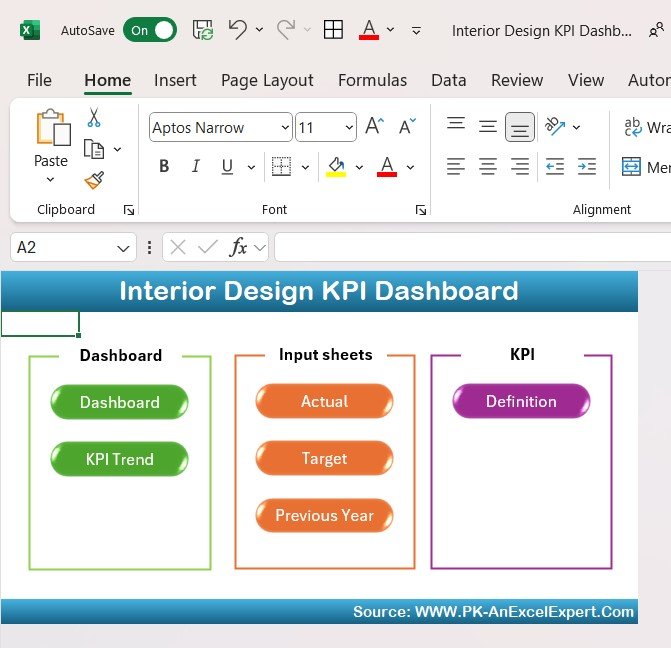
This is an Excel dashboard for interior designers, design agencies and studio owners who want one overview of their design projects. It is ranked first because it covers the four things a studio lead asks about every week (progress, budget, timeline and client satisfaction) at $14.99, and it is the template people find when they search for Excel templates for interior designers.
Who it is for: studio owners and project leads running residential or commercial jobs who already work in Excel.
- Project progress, design budgets, material costs, timelines and resource usage
- Real-time monitoring from concept to final installation, including milestones and client approvals
- Client ratings and feedback for each project
- Customizable KPIs, so you can add the measures your studio uses
Use cases: compare planned and actual spend on a $20,000 fit-out before the next client call; spot the project whose milestones have slipped; check which projects earned the lowest client ratings before you plan your next quarter.
Price: $14.99. Get the Interior Design KPI Dashboard in Excel.
Best for: a studio that wants one Excel file to run project reviews.
2. Interior Design KPI Scorecard in Excel: best for target tracking
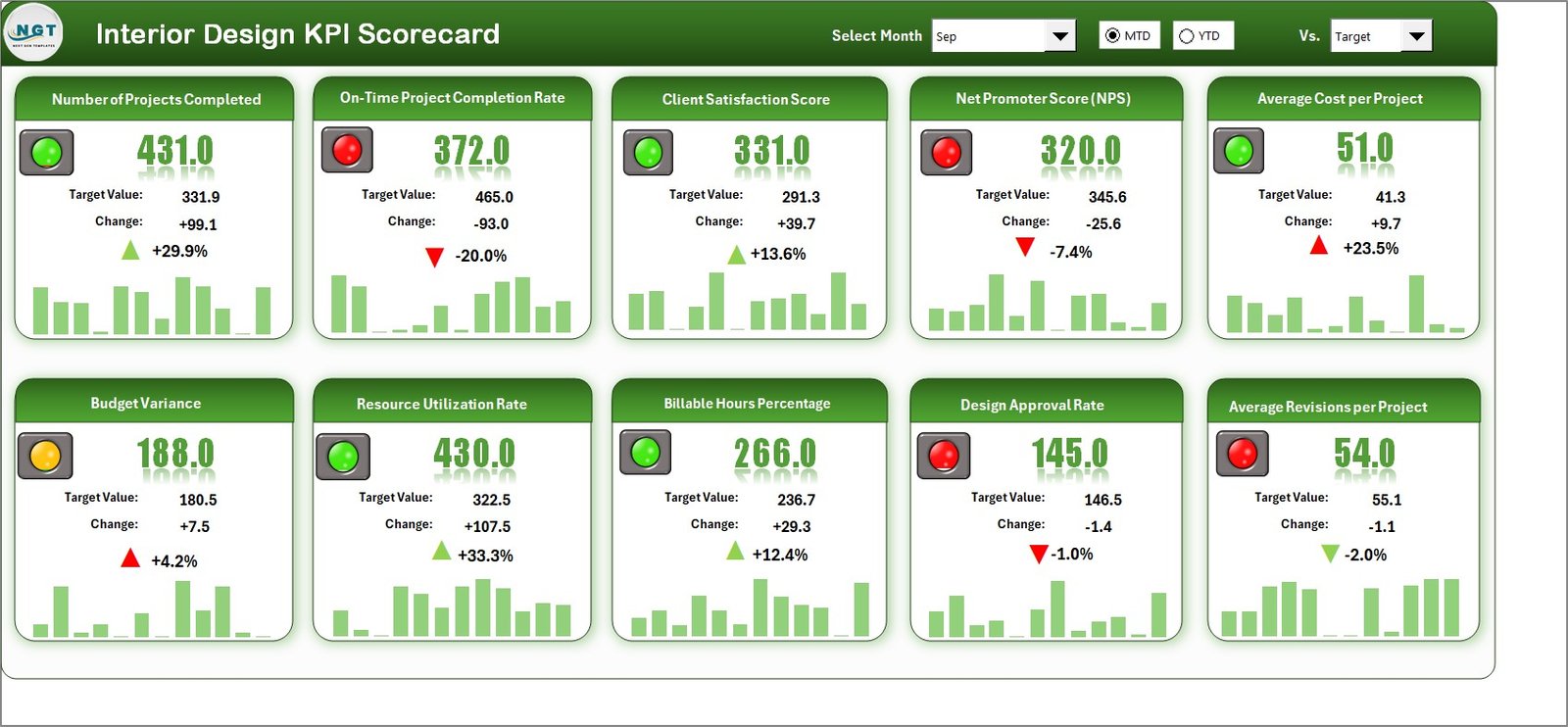
The scorecard answers a narrower question than the dashboard: are we hitting our targets this month and this year? It tracks projects, finances, operations and client experience from a single file, and it suits studios that run formal management reviews.
Who it is for: principals and operations managers who set targets and want gaps flagged quickly.
- Actual vs target comparison to show underperformance or overachievement
- MTD and YTD analysis
- Colors, icons, arrows and charts as visual indicators
- Dropdown KPI selection, so you analyze one KPI without manual filtering
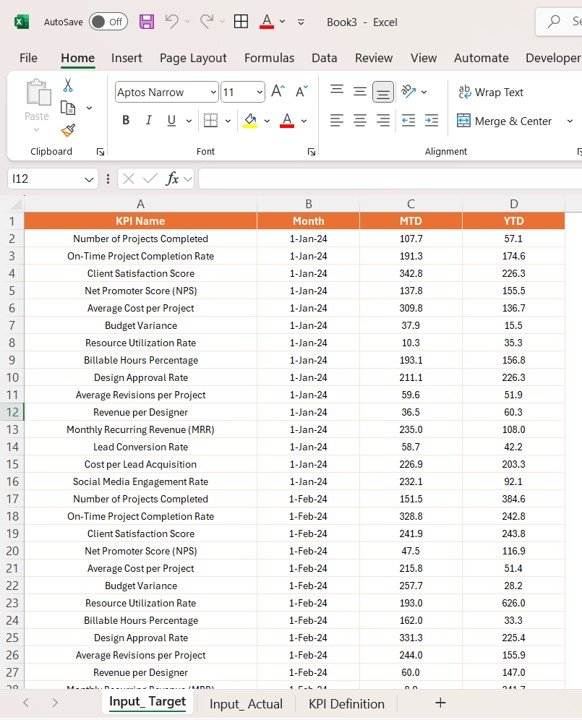
- Trend charts comparing Actual, Target and Previous Year, plus built-in KPI definitions
Use cases: a monthly team meeting where everyone reads the same definitions; a year-end review that compares this year with the previous year; a quick check on one KPI by picking it from the dropdown.
Price: $14.99. Get the Interior Design KPI Scorecard in Excel.
Best for: studios that manage by targets and want the definitions written into the file.
3. Interior Design KPI Dashboard in Power BI: best for Power BI teams
This version covers the same ground as the Excel dashboard for studios that already use Power BI for reporting. It is built for interior designers, project managers and design firms who want to compare planned and actual performance across several projects.
Who it is for: design firms with a reporting person or a head office that standardizes on Power BI.
- Milestones, progress and timelines for each project
- Project budgets and expense tracking, with planned costs against actual spending
- Deadline and task tracking to find bottlenecks
- Resource allocation for team and materials
- Client satisfaction scores and feedback
Use cases: a firm with one residential job and several commercial jobs that wants the status of all of them in one view; a budget check that flags potential cost overruns early; a review of which resources are stretched.
Price: $11.99. Get the Interior Design KPI Dashboard in Power BI.
Best for: studios that already live in Power BI and want interior design KPIs there.
4. Interior Design KPI Dashboard in Google Sheets: best value
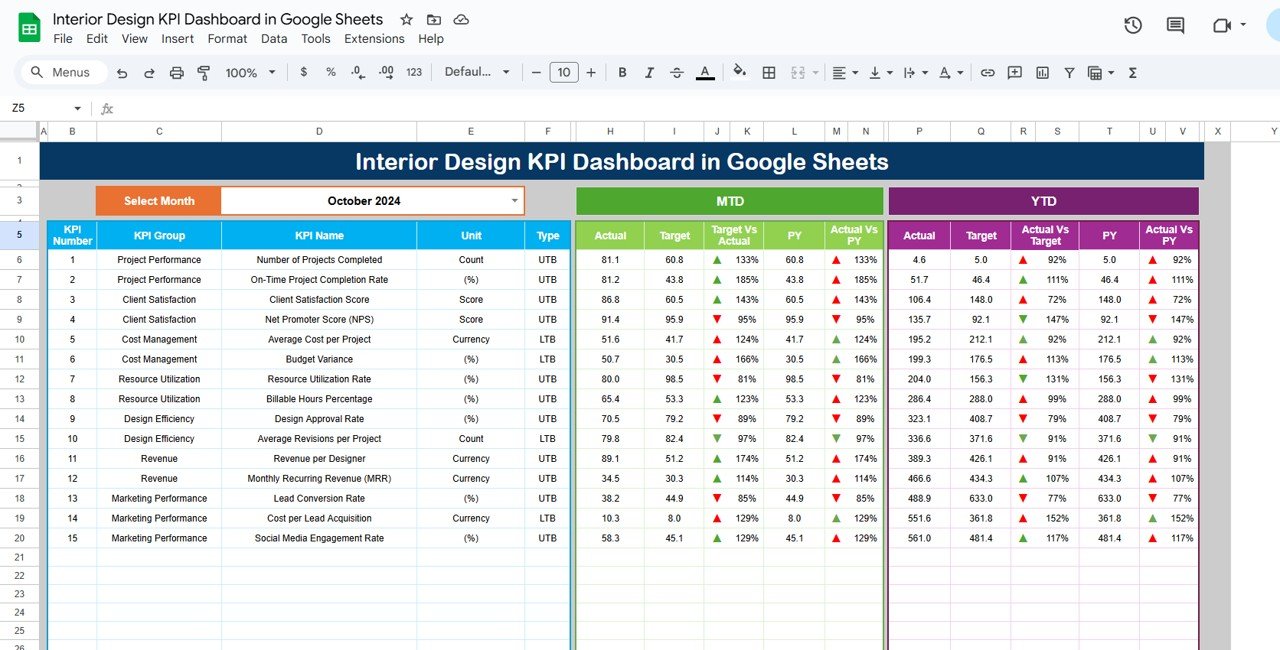
At $9.99 this is the cheapest exact-match interior design template, and it works in a browser. It is aimed at small design firms and large studios alike and updates automatically as you enter new data.
Who it is for: small studios and freelancers whose team needs to open the same file from different places.
- Six worksheets covering different aspects of project tracking
- Budget, project completion and client feedback metrics
- MTD, YTD and Previous Year comparisons
- Customizable KPIs and an interface that needs little technical skill
- Shared access so the whole team sees the latest data
Use cases: a designer on site updates a number from a phone and the studio lead sees it straight away; a small team compares this year with last year without building charts; client feedback is logged per project.
Price: $9.99. Get the Interior Design KPI Dashboard in Google Sheets.
Best for: the lowest-cost way to start tracking interior design KPIs as a team.
Start with the right format. The Excel dashboard is $14.99, the Power BI dashboard is $11.99 and the Google Sheets dashboard is $9.99. Pick the tool your team already opens every day: Interior Design KPI Dashboard in Excel.
5. Architecture Firm Project Management System Web App: best for fees and timesheets
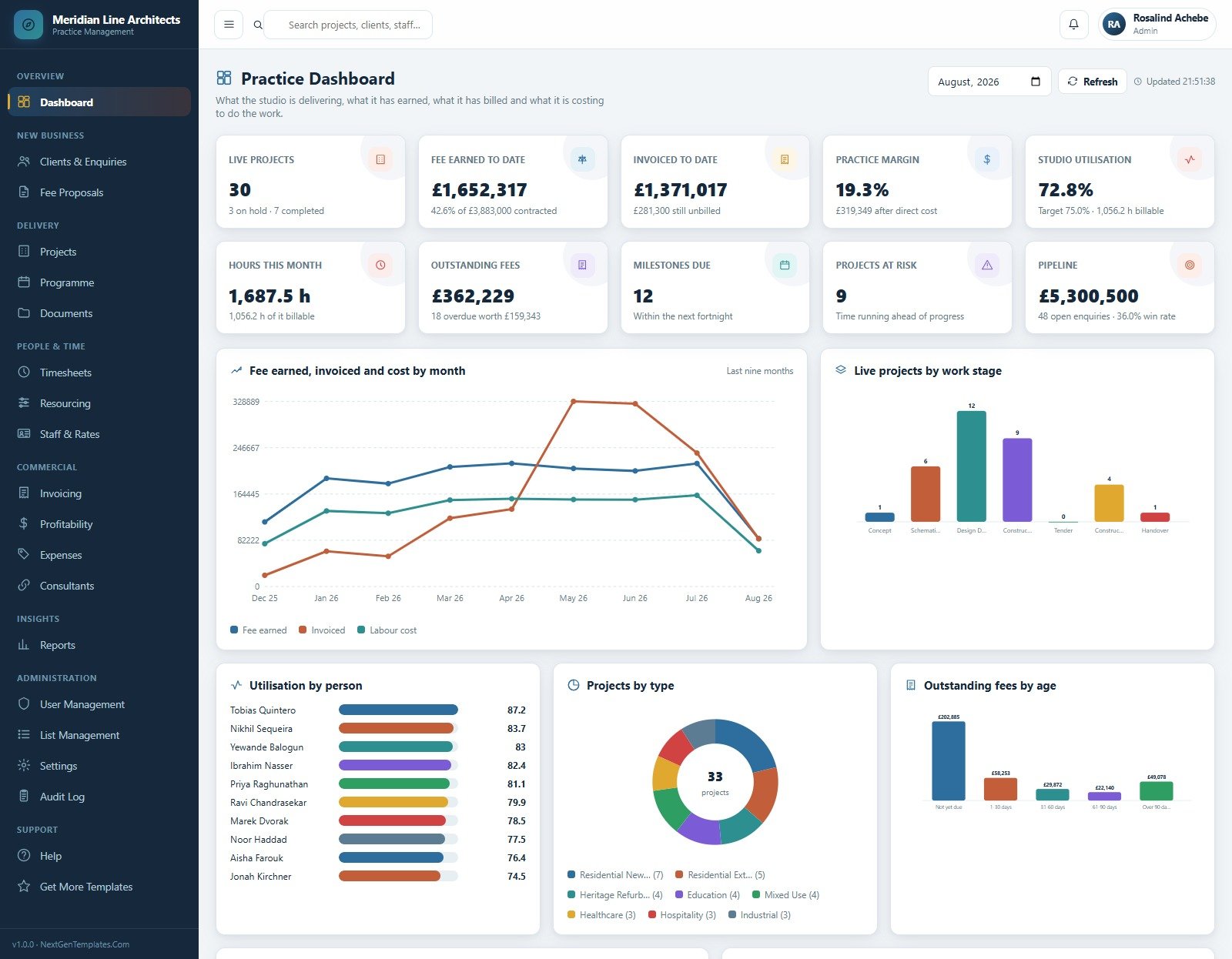
This is the higher-tier option. It is a working Google Apps Script web app that runs the commercial side of an architecture practice, and a design studio that bills by stage can adapt it. It is an architecture product, not an interior design one, so treat it as an adjacent choice.
Who it is for: practice principals and managers who need fee proposals, timesheets, resourcing and invoicing in one workspace.
- 20 modules, including clients, enquiries, fee proposals, projects, programme, documents, timesheets, resourcing, invoicing, profitability, expenses, consultants and reports
- 6 sign-in roles with server-side permissions, from Admin to Accounts Officer; Design Staff never sees a fee, a rate or a margin
- A 7-stage fee schedule from Concept through Handover, with 308 stage rows across 44 demo projects
- 10,811 seeded records across 22 sheets, so every screen is populated on day one
- Full source code (Code.gs and Index.html) and a Word user manual
Use cases: the demo practice carries 44 projects worth GBP 3,883,000 of contracted fee, 7,414 timesheet lines, 173 fee notes and 106 consultant appointments, so you can see how a busy practice looks before you load your own data. It runs in your own Google account with no subscription and no per-seat fee, and the listing says you can deploy it in about 15 minutes.
Price: $39.99. Get the Architecture Firm Project Management System Web App.
Best for: a studio whose problem is fees, hours and margins rather than KPI reporting.
6. Graphic Design Studio Dashboard in Google Sheets: best budget alternative
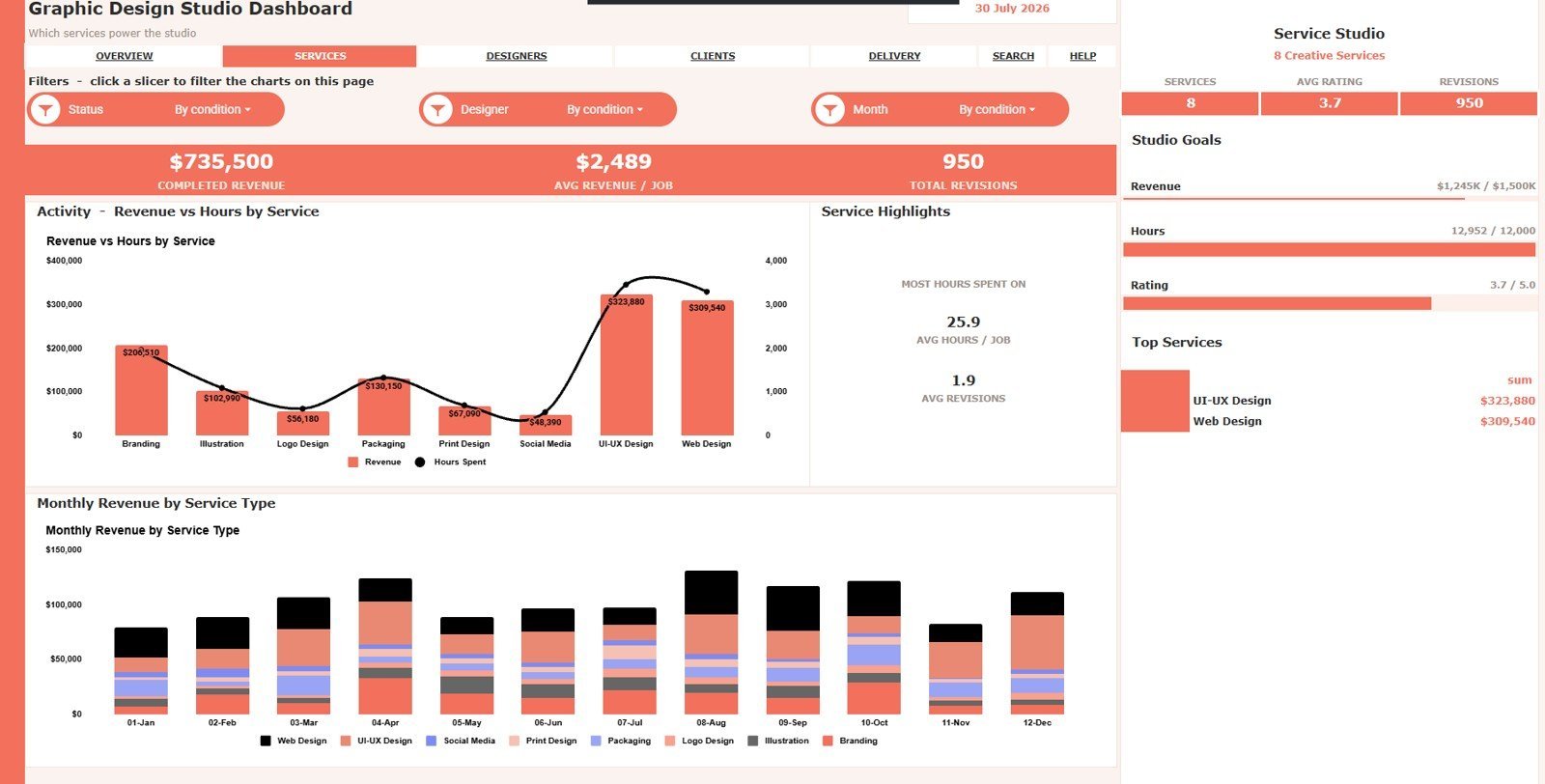
This is a creative-studio dashboard for studios that sell design services by the project. It suits interior studios with a branding, visualization or graphics arm, and it costs $9.99 one time.
Who it is for: studio owners, creative directors and project managers who want revenue, hours and client ratings in one Google Sheets workbook.
- 7 sheet tabs: Overview, Service Studio, Creative Team, Client Portfolio, Delivery Desk, Search Sheet and Data Sheet
- 8 KPI cards, including Total Revenue, Projects, Hours Logged, Avg Rating and Avg Deal Size
- 24 chart views covering revenue, cost, hours, services, designers, clients, revisions, ratings and profit
- Interactive slicers for filtering during weekly production meetings
Use cases: compare revenue and hours by service to see which work earns the most per hour; review designer workload and revision patterns; check which clients bring the most profit and margin.
Price: $9.99. Get the Graphic Design Studio Dashboard in Google Sheets.
Best for: a creative studio that wants revenue and workload analysis rather than interior project tracking.
How do I choose between these interior design templates?
Start with the question you cannot answer today, then match the format your team already uses.
| Your situation | Choose | Price |
|---|---|---|
| Need project, budget and client satisfaction overview in Excel | Interior Design KPI Dashboard in Excel | $14.99 |
| Need actual vs target with MTD and YTD | Interior Design KPI Scorecard in Excel | $14.99 |
| Reporting already runs in Power BI | Interior Design KPI Dashboard in Power BI | $11.99 |
| Small team, shared online file, tight budget | Interior Design KPI Dashboard in Google Sheets | $9.99 |
| Need fees, timesheets, invoicing and role permissions | Architecture Firm Project Management System Web App | $39.99 |
| Revenue and workload by service or client | Graphic Design Studio Dashboard in Google Sheets | $9.99 |
A simple decision path: if your problem is visibility, pick a KPI dashboard. If your problem is targets, add the scorecard. If your problem is billing and hours, look at the web app. Buying the four exact-match KPI templates together costs $51.96 ($14.99 + $14.99 + $11.99 + $9.99), which is less than the $39.99 web app plus one dashboard and the graphic dashboard combined only if you want all of them. Most studios need one dashboard and, optionally, the scorecard, for $14.99 to $29.98.
Which KPIs should an interior design studio track?
The templates ship with their own KPI sets, but you should know the formulas behind the numbers so you can set targets. These are general formulas, not features of a specific file. The examples are illustrative.
| KPI | Formula | Example |
|---|---|---|
| Budget variance % | (Actual cost – Budget) / Budget x 100 | Budget $20,000, actual $22,400 gives 12% over |
| Utilization % | Billable hours / Available hours x 100 | 26 billable of 40 available gives 65% |
| Project margin % | (Fee earned – Cost) / Fee earned x 100 | Fee $10,000, cost $7,500 gives 25% |
| Average client rating | Sum of ratings / Number of ratings | Ratings of 5, 4, 4, 5 give 4.5 |
Pick targets from your own last twelve months, not from a generic benchmark. The scorecard and the Google Sheets dashboard both compare this year with the previous year, which is the fairest baseline for a studio.
Do I need a spreadsheet or software for an interior design studio?
A spreadsheet template works well up to the point where several people edit the same data and need different access. If you are comparing tools, our guides to Asana alternatives in Excel and Sheets and ClickUp alternatives as project management templates show how templates compare with subscription tools. For task-level tracking, the project management dashboard templates roundup is a useful companion, and if your reporting lives in a BI tool, see the Looker Studio alternatives guide.
Other studio types have their own guides, such as photography and video studio templates, gym and fitness studio templates and law firm and legal operations templates. The structure of those posts is similar, so you can borrow ideas for how a professional-services firm reports.
When is a template NOT the right answer?
Templates are the wrong choice in several situations, and it is better to know them before you buy.
- You need client-facing proposals, mood boards or product sourcing. The KPI templates here measure performance. They do not draw floor plans or manage a vendor catalog. Interior design software such as Houzz Pro or a CAD tool covers that, and you can still use a dashboard alongside it.
- You have many staff editing at once and need audit trails. A spreadsheet has limits. The web app has role permissions and an audit log, but if you need a hosted service with support, buy software.
- Your data is not entered anywhere yet. A dashboard only reports what you type in. If you do not record budgets, hours and ratings, no template fixes that.
- You want accounting. The web app includes invoicing and profitability, but it is not a replacement for your accounting package or tax filing.
The interior design KPI templates are for measuring performance, not for designing rooms, and the architecture web app is built for architecture practices, so expect to adapt its stage names to your own process.
Frequently asked questions
What are interior design templates?
Interior design templates are ready-made spreadsheet or app files that help a studio track projects, budgets, timelines and client satisfaction. NextGenTemplates offers Excel, Power BI and Google Sheets versions starting at $9.99, so a studio can replace scattered sheets with one structured file.
Which interior design template is best for a small studio?
For a small studio, the Interior Design KPI Dashboard in Google Sheets at $9.99 is the best-value choice because it is shared online and compares month-to-date, year-to-date and previous-year data. Studios that prefer Excel can pay $14.99 for the Excel dashboard instead.
Can I track interior design projects in Excel?
Yes. The Interior Design KPI Dashboard in Excel ($14.99) tracks project progress, design budgets, material costs, timelines, resource usage and client ratings. You can customize the KPIs to match your studio, so it works for both residential and commercial projects.
Is there an interior design KPI dashboard for Google Sheets?
Yes. The Interior Design KPI Dashboard in Google Sheets costs $9.99 and includes six worksheets. It tracks budget, project completion and client feedback, and compares month-to-date, year-to-date and previous-year figures. Your team can open the same file online.
What KPIs should an interior design studio track?
Track project progress, budget against actual cost, timelines, resource use and client satisfaction. These are the measures the NextGenTemplates interior design dashboards cover. Add utilization and project margin if you bill by the hour or by stage, and set targets from your own last twelve months.
Should I choose Excel or Power BI for interior design reporting?
Choose Excel ($14.99) if your team edits data in spreadsheets and wants a simple file. Choose Power BI ($11.99) if your studio already reports in Power BI. Both cover project performance, budgets, timelines, resources and client satisfaction, so the format matters more than the features.
Do I need project management software as well as a dashboard?
Not always. A KPI dashboard shows how projects are performing, but it does not assign tasks or manage fees. If you need timesheets, fee proposals and invoicing, the Architecture Firm Project Management System Web App ($39.99) covers 20 modules in one workspace.
How much do interior design templates cost?
The four interior design KPI templates cost $9.99 to $14.99 each, and buying all four costs $51.96. The two adjacent options are the Graphic Design Studio Dashboard at $9.99 and the Architecture Firm web app at $39.99. Each is a one-time price.
What is the difference between a KPI dashboard and a KPI scorecard?
A dashboard shows live project data such as progress, budgets and client ratings. A scorecard compares actual results with targets, month-to-date and year-to-date, and flags gaps with colors and icons. Both cost $14.99 in Excel, and many studios use them together.
Get more interior design templates
Ready to track your studio? Start with the Interior Design KPI Dashboard in Excel for $14.99, or add the Architecture Firm Project Management System Web App for $39.99 when you need fees and timesheets. For the lowest cost, the Google Sheets dashboard is $9.99.
Watch walkthroughs on the NextGenTemplates YouTube channel. For background on the profession, see the U.S. Bureau of Labor Statistics Interior Designers Occupational Outlook Handbook.