

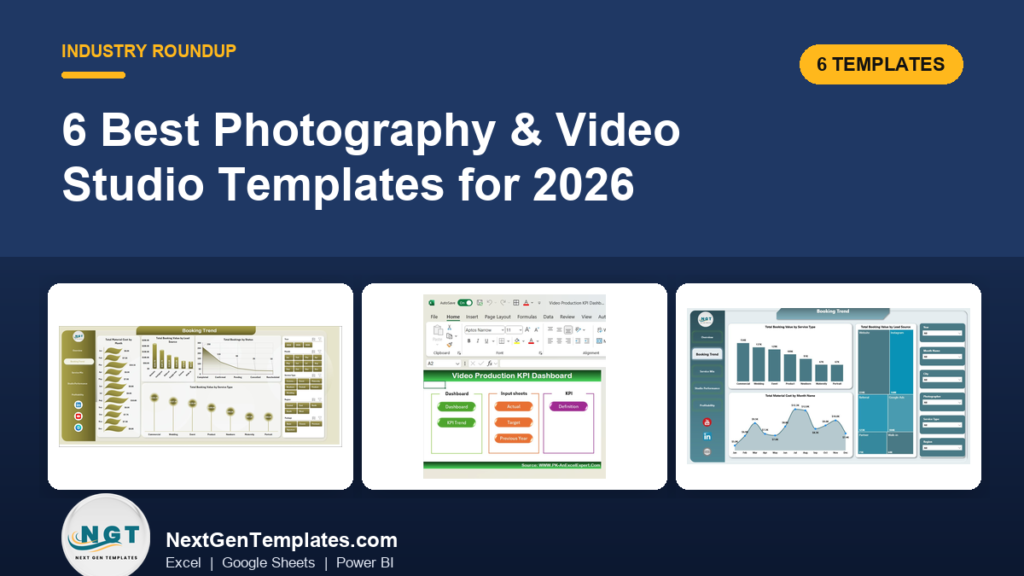
The best photography business Excel template is the Photography Studios Dashboard in Excel ($17.99). It turns booking records into 5 KPI cards, 16 charts and slicers for profit, ratings, payment status and photographer performance. If you shoot video, the Video Production KPI Dashboard in Excel ($14.99) covers production stages, engagement and ROI.
Last updated: October 2026
Key takeaways
- The Photography Studios Dashboard in Excel costs $17.99 and includes 5 KPI cards, 5 analysis pages and 16 charts.
- The Photography Studios Dashboard in Power BI costs $17.99 and has 5 pages, 4 KPI cards and 15 chart views.
- The Photography KPI Dashboard in Excel ($14.99) is the target-vs-actual option, with MTD and YTD tracking across 7 worksheets.
- The Video Production KPI Dashboard in Power BI is the cheapest at $11.99; the Excel version and the Video Marketing KPI Dashboard in Excel are $14.99 each.
- All six are one-time purchases, so a studio avoids a monthly subscription for reporting.
 Launch offer
SUMIFS, XLOOKUP, FILTER, LAMBDA and checking AI-written formulas, with real business projects. 11h 47m of video by PK, with practice files, quizzes and a capstone.
Photography and video studio templates compared
| Template | Format | Best For | Price |
|---|---|---|---|
| Photography Studios Dashboard in Excel (Best overall) | Excel | Studios tracking bookings, profit and ratings | $17.99 |
| Photography Studios Dashboard in Power BI | Power BI | Studios already using Power BI Desktop | $17.99 |
| Photography KPI Dashboard in Excel | Excel | Freelancers and wedding studios with monthly targets | $14.99 |
| Video Production KPI Dashboard in Excel | Excel | Video teams tracking stages, views and revenue | $14.99 |
| Video Production KPI Dashboard in Power BI (Best value) | Power BI | Production managers watching budgets and timelines | $11.99 |
| Video Marketing KPI Dashboard in Excel | Excel | Marketers measuring CTR and conversions | $14.99 |
How we picked these
We searched the NextGenTemplates catalog of roughly 6,900 products for photography, studio and video items. We kept only paid dashboards that match what a studio owner or video producer actually reports on: bookings, cost, profit, production progress and video performance.
We excluded free downloads, general business dashboards and anything where the photography or video link was only a loose fit. Where the same tool exists in Excel and Power BI, we included both so you can pick the format you already own. Everything below comes from the product listings, not from guesses about features.
What is the best photography business Excel template in 2026?
It depends on what you need to see. Studios that care about profit per booking, payment status and photographer performance should start with the Studios Dashboard. Solo photographers who work to monthly targets will like the KPI Dashboard better. Video teams have their own two production dashboards and a marketing one.
A photography business excel template makes sense because the data is simple. A studio with only 25 bookings per month creates 300 records a year. That is too much to read as raw rows, yet far too small to justify a CRM setup or a monthly fee. A structured workbook sits in the middle.
The 6 best photography and video studio templates for 2026
1. Photography Studios Dashboard in Excel: best overall
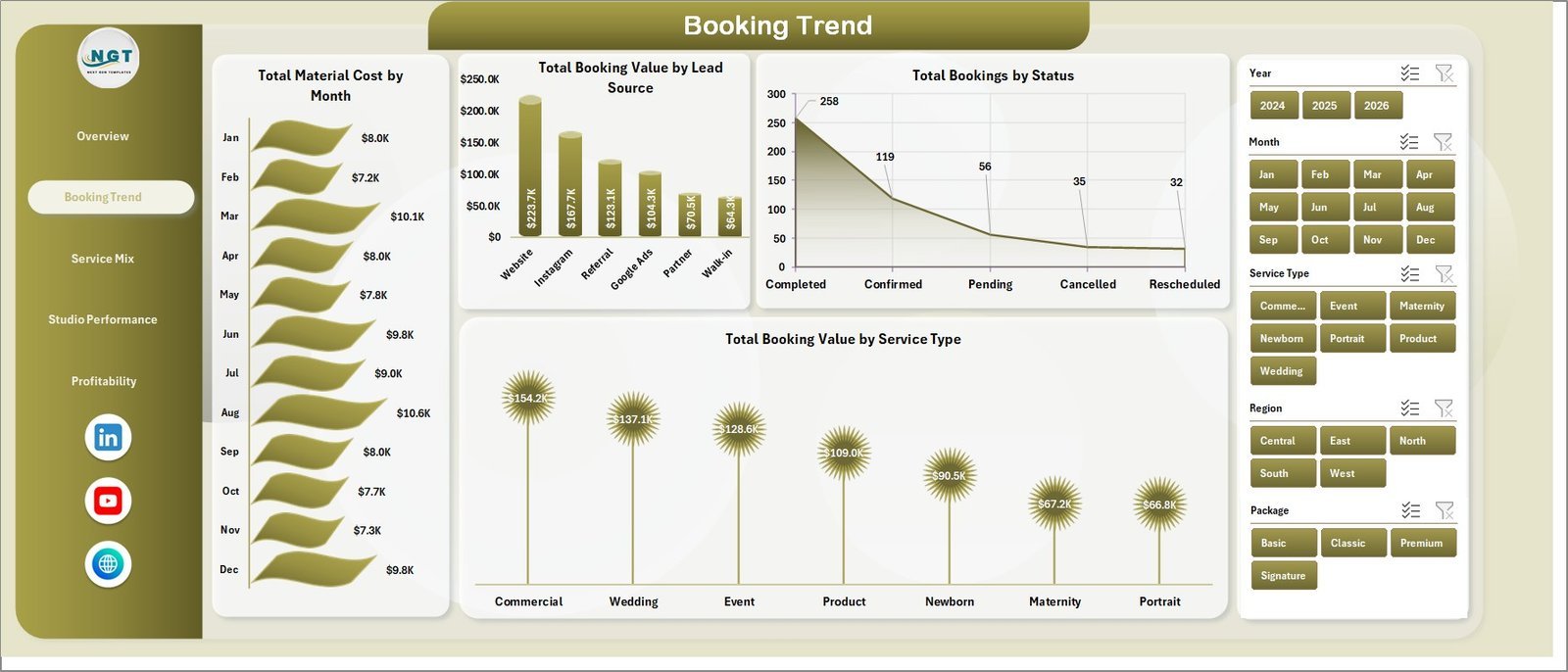
This is a 7-sheet reporting workbook for studio owners. It ranks first because it covers the full chain from booking to profit, it runs on pivot tables you refresh in one click, and it is built around photography terms such as service type, package, lead source and photographer.
Who it is for: studio owners and managers who want practical Excel reporting without CRM setup time.
- 5 KPI cards: Total Booking Value, Net Gross Profit, Total Bookings, Completed Bookings and Avg. Rating.
- 5 analysis pages: Overview, Booking Trend, Service Mix, Studio Performance and Profitability.
- 16 ready-made charts covering revenue, cost, ratings, payment status, studio, region and photographer performance.
- Slicers to filter by fields such as month, year, studio, photographer, service type, package, city or lead source, depending on your dataset.
- A Data sheet for your booking rows and a Support sheet with the pivot tables. After pasting data, use Refresh All on the Excel Data ribbon.
Use cases:
- Compare profit margin across service types to see which packages deserve more marketing.
- Check payment status across your 300 yearly records (at 25 bookings a month) to spot unpaid jobs.
- Review ratings by photographer before you assign the next wedding season.
- Look at lead source against booking value to decide where ad spend goes.
Price: $17.99. Get the Photography Studios Dashboard in Excel.
Best for: a studio that wants one workbook for bookings, cost and profit.
2. Photography Studios Dashboard in Power BI
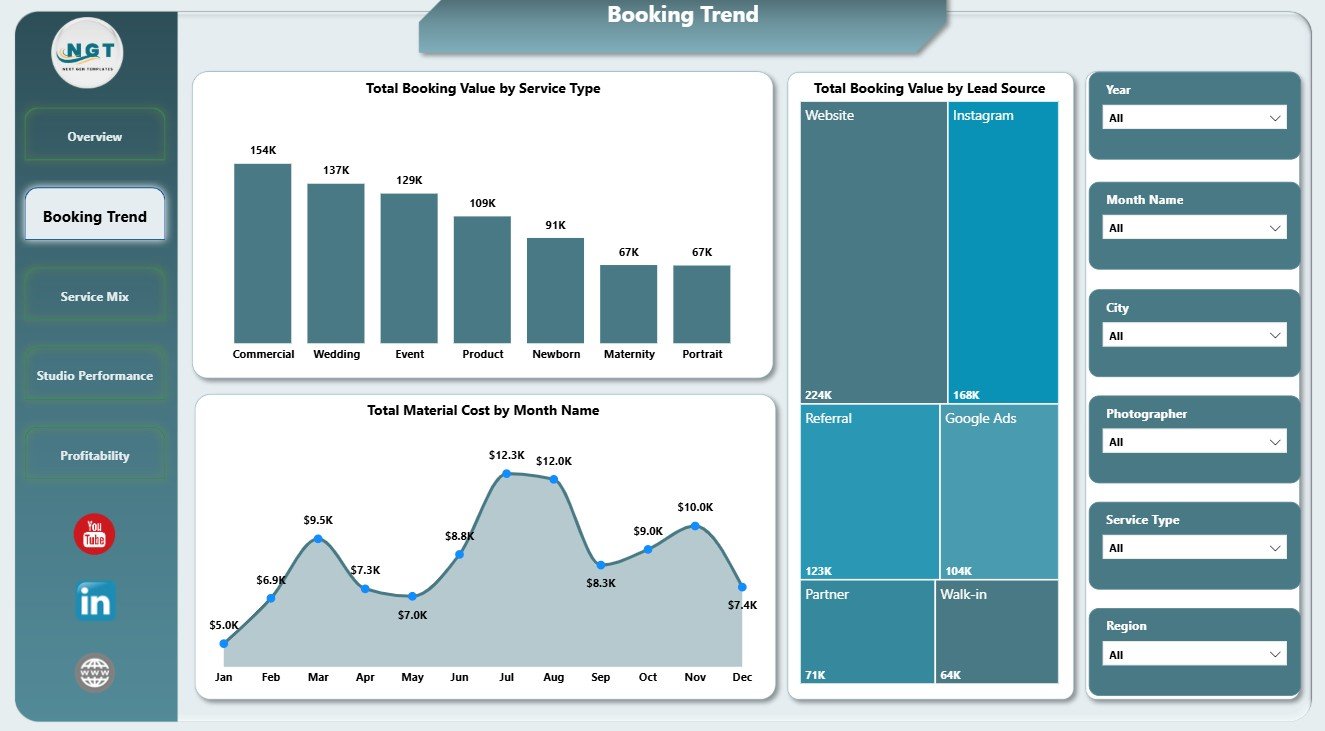
The same studio logic in a Power BI file. It uses the same five page names as the Excel version, but the headline cards differ: Total Material Cost, Total Labor Cost, Total Booking Value and Paid Bookings. That makes it slightly more cost-focused on the first screen.
Who it is for: studios or agencies that already use Power BI Desktop and want interactive filtering across a booking dataset.
- 5 pages: Overview, Booking Trend, Service Mix, Studio Performance and Profitability.
- 4 KPI cards and 15 chart views across bookings, margin, ratings, costs, lead sources, service types, packages, studios, cities and regions.
- Interactive slicers for focused studio analysis.
- A .pbix workflow: open the file, replace the sample data source, refresh and review.
Use cases:
- Compare profit margin by client type and by studio.
- Review booking value by service type and lead source on the Booking Trend page.
- Track bookings by city when you run more than one location.
- Check Total Bookings by Year to see whether demand is growing.
Price: $17.99. See the Photography Studios Dashboard in Power BI.
Best for: Power BI users who want an all-in-one dashboard for photography studio management.
3. Photography KPI Dashboard in Excel
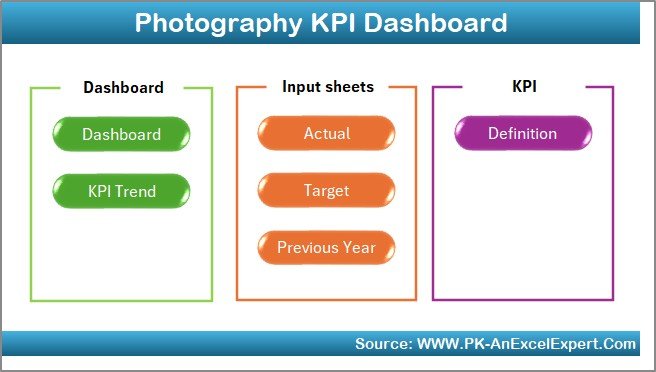
This one works from targets rather than raw booking rows. You type monthly actuals into an input sheet, set targets, and the dashboard shows month-to-date and year-to-date results with up and down arrows. It suits people who think in goals, not pivots.
Who it is for: freelance photographers, wedding studios and corporate photography services.
- 7 worksheets: Home, Dashboard, KPI Trend, Actual Numbers Input, Target, Previous Year Numbers and KPI Definition.
- MTD and YTD performance with conditional formatting.
- A dropdown on the KPI Trend sheet to view any KPI over time.
- Target vs actual and previous-year comparisons.
- Customizable KPIs, so you can add or remove measures.
Use cases:
- Set a yearly revenue target and watch YTD against it.
- Compare this March with last March using the Previous Year sheet.
- Assign KPIs to staff so each person owns a number.
- Use the KPI Definition sheet to keep everyone calculating metrics the same way.
Price: $14.99. Buy the Photography KPI Dashboard in Excel.
Best for: a photographer who runs the business against monthly targets.
4. Video Production KPI Dashboard in Excel

Built for video production teams, content creators and digital marketing managers. It follows a video from pre-production through filming and post-production, then continues into views, engagement and revenue. One workbook covers both the making and the performance of the video.
Who it is for: video producers who need to see bottlenecks early and prove ROI.
- Production tracking: video completion time, script approval status, filming progress and post-production stages.
- Content scheduling for release dates, deadlines and promotional activity.
- Engagement metrics: views, likes, shares, comments and click-through rate.
- Revenue and ROI from ads, sponsorships and product sales.
Use cases:
- Find which stage of the pipeline delays delivery.
- Compare sponsorship income against ad income per video.
- Plan a release calendar so uploads stay consistent.
- Check ROI for each project before you accept the next similar brief.
Price: $14.99. Get the Video Production KPI Dashboard in Excel.
Best for: a small video team that works in Excel.
5. Video Production KPI Dashboard in Power BI: best value

At $11.99 this is the lowest-priced template in the roundup. It tracks production KPIs, resource allocation, budgets and timelines with interactive charts, and the report updates as new data is entered. It is the right pick when the question is whether a production is on budget and on schedule.
Who it is for: production managers running one project or several at the same time.
- Video completion rates, production costs, time spent in each phase and resource utilization.
- Customizable KPIs, charts and visuals.
- Dynamic, interactive charts for spotting trends.
- Budget adherence tracking alongside timelines.
Use cases:
- Compare time spent per production phase across projects.
- Watch cost against budget for a multi-video campaign.
- See where resources are over-allocated.
- Report progress to a client in a visual format.
Price: $11.99. Buy the Video Production KPI Dashboard in Power BI.
Best for: the lowest-cost way to monitor video budgets and timelines.
6. Video Marketing KPI Dashboard in Excel

This template starts after the video is published. It tracks total views, engagement rates, watch time, subscriber growth, CTR and conversions, with daily, weekly and monthly reporting. It is for the person who has to say which videos actually bring in leads.
Who it is for: marketers, content creators and businesses running video campaigns.
- Views, engagement rate, watch time and subscriber growth per video.
- CTR monitoring to judge how well your call to action works.
- Conversion rate analysis for sign-ups, downloads or purchases.
- Time-based reporting and a customizable layout.
Use cases:
- Compare CTR between two promo videos.
- See the weekly trend after a new upload strategy.
- Measure which video drove newsletter sign-ups.
- Report video results to a client monthly.
Price: $14.99. Get the Video Marketing KPI Dashboard in Excel.
Best for: studios that sell video and need to prove marketing results.
How do I choose between these templates?
| If you… | Choose |
|---|---|
| Log every booking and want profit by service, studio and photographer | Photography Studios Dashboard in Excel ($17.99) |
| Use Power BI Desktop already | Photography Studios Dashboard in Power BI ($17.99) |
| Work to monthly targets and want MTD and YTD | Photography KPI Dashboard in Excel ($14.99) |
| Manage production stages and ROI in Excel | Video Production KPI Dashboard in Excel ($14.99) |
| Need budget and timeline control on a tight budget | Video Production KPI Dashboard in Power BI ($11.99) |
| Measure video CTR and conversions | Video Marketing KPI Dashboard in Excel ($14.99) |
Short version: pick the data shape first. Booking rows point to the Studios Dashboards. Targets and monthly totals point to the KPI Dashboard. Video work points to the three video templates. Then pick Excel or Power BI by the software you already open every day.
Which format is better for a photography studio: Excel or Power BI?
Excel suits most small studios. You already own it, the pivot tables are visible, and refreshing means one click on Refresh All. Power BI is better when you want more interactive visuals and plan to connect a data source later. The Studios Dashboard exists in both formats at the same price, so the choice costs nothing extra.
If you want to check software before buying, the Microsoft Excel and Power BI product pages list current plans and system requirements.
A worked example: what 25 bookings a month looks like
Take a studio with 25 bookings per month. That is 300 booking records a year. Say the average booking value is $400 and the average material plus labor cost is $260 (illustrative numbers, not from any template). Profit per booking is $140, and the margin is 140 / 400 = 35%.
Over 300 bookings, that is $120,000 in booking value and $42,000 in gross profit. Now suppose one service type has a 20% margin and another has 45%. A single average hides that gap. The Service Mix and Profitability pages exist to show it by service, package, studio and client type.
The same logic applies to video. If a video earned $2,000 in sponsorship and cost $1,200 to make, ROI is (2,000 – 1,200) / 1,200 = 67%. Click-through rate is clicks divided by impressions, so 300 clicks on 10,000 impressions is 3%. Those are the formulas behind the engagement and revenue sections of the video dashboards.
What should a photography studio track every month?
- Total bookings and completed bookings, to see delivery against demand.
- Booking value and net gross profit, to see real earnings.
- Material and labor cost, since these decide margin.
- Payment status, so unpaid jobs do not slip by.
- Average client rating, by photographer and by studio.
- Lead source, to see which channel produces profitable clients.
Each of these appears in at least one of the dashboards above. For shot planning on the day itself, you can also look at the photography session checklist in Excel, and the photography dashboard in Excel is another lighter-weight option in the same family.
Photography studio management software vs a template
Photography studio management software such as Studio Ninja, HoneyBook, Dubsado or Pixieset handles client galleries, contracts, invoices and online booking forms. Their prices are monthly or annual subscriptions, so check each vendor’s pricing page for current figures. A template does none of the client-facing work. It reports on the numbers you already collect.
The two are not rivals. Many studios keep a booking tool for contracts and galleries, then export bookings into a reporting workbook. The dashboards here give you the analysis layer once, for a one-time $11.99 to $17.99.
How do these compare with other NextGenTemplates tools?
If your studio also manages stock such as props, backdrops and lighting kit, the inventory management Excel templates guide covers that side. For freelancers and subcontractors, the supplier management Excel templates roundup shows how to score vendors. If you need wider back-office coverage beyond reporting, the small business template bundle rounds out 15 Excel tools for under $300 total.
Larger operations that want a custom booking or scheduling tool inside a workbook should read about Excel VBA systems built entirely in Excel. And if your video work looks like a production line, the production planning dashboard in Power BI post shows how the same reporting ideas apply in manufacturing. Service businesses can see a comparable approach in the Excel physiotherapy clinic management system article, and equipment-heavy studios may find the IT asset management dashboards useful for tracking cameras and laptops.
Get started in four steps
- Export or copy your last 12 months of bookings or video data into a sheet.
- Match the column layout of the template’s Data sheet (or the .pbix source in Power BI).
- Paste your rows over the sample data and use Refresh All in Excel, or Refresh in Power BI Desktop.
- Review the Overview page first, then open Profitability or Service Mix to find the biggest gap.
Common errors when you load your own data
| Problem | Likely cause | Fix |
|---|---|---|
| Charts do not change after pasting data | Pivots were not refreshed | Use Refresh All on the Excel Data ribbon |
| A slicer shows blank items | Empty or misspelled values in a column | Clean the column and refresh |
| Totals look too low | Rows pasted in a different column order | Match the Data sheet column structure |
| Dates group oddly | Dates stored as text | Convert the column to real dates |
When a template is NOT the right answer
Buy software instead if you need online booking, client galleries, e-signed contracts or automatic invoicing. None of these six templates takes payments or sends contracts. They report on data you enter or paste in.
A template is also the wrong tool if several people must edit live records at the same time, or if you have thousands of bookings a month, where a database-backed system will be steadier. And if you do not track cost or rating data at all, the profit pages will be thin until you start. For a studio of one that only wants a shot list, a checklist is enough and a dashboard is more than you need.
Frequently asked questions
What is the best photography business Excel template?
The Photography Studios Dashboard in Excel ($17.99) is the strongest all-round option. It has 5 KPI cards, 16 charts, slicers and a pivot-driven support sheet, covering booking value, profit, ratings and payment status. If you work to monthly targets, the Photography KPI Dashboard in Excel ($14.99) is the alternative.
Can I use Excel to run a photography business?
Excel can handle reporting for a photography business well. It can track bookings, cost, profit and ratings, and a studio with 25 bookings a month has only 300 records a year. It cannot take online payments, host galleries or send contracts, so many studios pair it with booking software.
How much do photography dashboard templates cost?
In this roundup, prices run from $11.99 to $17.99. The Photography Studios Dashboards in Excel and Power BI are $17.99 each, the Photography KPI Dashboard and the Video Production and Video Marketing Excel dashboards are $14.99, and the Video Production Power BI dashboard is $11.99. All are one-time purchases.
Is there a Power BI template for photography studios?
Yes. The Photography Studios Dashboard in Power BI costs $17.99. It has 5 pages (Overview, Booking Trend, Service Mix, Studio Performance and Profitability), 4 KPI cards, 15 chart views and slicers. You open the .pbix file in Power BI Desktop, replace the sample data and refresh.
What KPIs should a photography studio track?
Track total bookings, completed bookings, booking value, net gross profit, material and labor cost, payment status and average rating. Add lead source to see which marketing channel pays off. The Photography Studios Dashboard in Excel includes these views, and the Photography KPI Dashboard lets you customize the list.
How do I update the Photography Studios Dashboard in Excel?
Replace the sample rows on the Data sheet with your booking records in the same column format. Then go to the Data ribbon in Excel and select Refresh All. The pivot tables on the Support sheet update, and the charts and KPI cards follow.
Do I need a subscription to use these templates?
No. Each template is a one-time purchase with an instant download, and you open it in Excel or Power BI Desktop. You still need your own copy of that software. There is no monthly fee for the template itself.
Is there a video production KPI dashboard for Excel?
Yes. The Video Production KPI Dashboard in Excel costs $14.99. It tracks production stages, video views, likes, shares and comments, ad and sponsorship revenue, ROI and release schedules. A Power BI version at $11.99 focuses on completion rates, costs, resource use and timelines.
Can I track video marketing results in Excel?
Yes. The Video Marketing KPI Dashboard in Excel ($14.99) tracks views, engagement rate, watch time, subscriber growth, click-through rate and conversions. It also reports daily, weekly and monthly trends, so you can see which videos bring in sign-ups or sales.
Should I choose Excel or Power BI for my studio dashboard?
Choose Excel if you want to stay in a familiar tool and refresh with one click. Choose Power BI if you already use Power BI Desktop and prefer interactive report pages. The Photography Studios Dashboard costs $17.99 in both formats, so the decision is about software, not price.
Get more photography and video templates
Start with the best-rounded pick: the Photography Studios Dashboard in Excel for $17.99, or the Video Production KPI Dashboard in Power BI at $11.99 if you want the lowest price. Watch walkthroughs on the NextGenTemplates YouTube channel.