

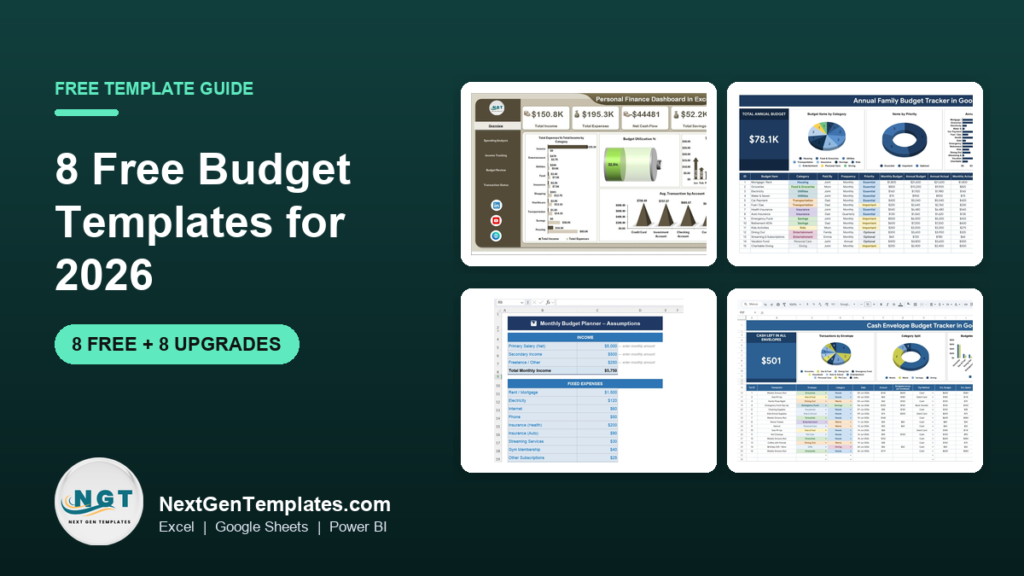
The best free budget template in 2026 is Vertex42’s Personal Budget Spreadsheet. It has been downloaded more than 1.3 million times, works in Excel, Google Sheets and OpenOffice, needs no sign-up, and plans a full year of income and expenses month by month. For a single month on one page, use Microsoft’s free Excel budget templates instead.
Last updated: October 2026
This guide is for individuals, couples and families who want to plan their money in a spreadsheet without paying for a budgeting app, and for small teams that need a simple budget sheet. First come the 8 free budget templates worth your time. We opened every page in October 2026 and downloaded the Excel files where a direct link was offered, to check they really are free. Then comes an honest section on when a free budget planner stops being enough, with 8 paid upgrades from NextGenTemplates. If you already know you want a paid tool, our budget template comparison for Excel and Google Sheets ranks 10 of them by use case.
Key takeaways
- All 8 free budget templates in this list cost nothing: three from Vertex42, plus Microsoft, Google Sheets, Smartsheet, NerdWallet and our own free weekly expense tracker. We checked each page in October 2026.
- Best overall free budget template: Vertex42’s Personal Budget Spreadsheet, a yearly planner for Excel and Google Sheets with more than 1.3 million downloads.
- Pick the budgeting method first, then the file: a simple monthly budget, the 50/30/20 rule, or a zero-based budget where every dollar gets a job. There is a free template for each.
- A free budget template shows a plan. It rarely shows where your money actually went, how this month compares with last month, or what the whole household spent. Those gaps are why people upgrade.
- The 8 paid NextGenTemplates upgrades below cost $6.99 to $17.99, paid once with no subscription. The Monthly Budget Planner Template in Excel costs $6.99.
 Launch offer
SUMIFS, XLOOKUP, FILTER, LAMBDA and checking AI-written formulas, with real business projects. 11h 47m of video by PK, with practice files, quizzes and a capstone.
Free budget templates compared
Every free source in this guide, side by side. One row is flagged best overall. All eight are free to download.
| # | Template | Source | Format | Best For | Price |
|---|---|---|---|---|---|
| 1 | Personal Budget Spreadsheet (Best overall) | Vertex42 | Excel, Google Sheets, OpenOffice | A yearly personal budget, month by month | Free |
| 2 | Budget templates for Excel (about 30) | Microsoft | Excel, Excel for the web | A monthly, family or college budget in a few clicks | Free |
| 3 | Monthly budget and Annual budget | Google Sheets template gallery | Google Sheets | Couples who share one budget online | Free |
| 4 | Free Excel Budget Templates (17 files) | Smartsheet | Excel | 50/30/20, zero-based, household and holiday budgets | Free |
| 5 | Zero-Based Budget Worksheet | Vertex42 | Excel, Google Sheets, PDF | Giving every dollar a job | Free |
| 6 | Household Budget Worksheet (monthly) | Vertex42 | Excel, Google Sheets, OpenOffice | Families with children, pets and many categories | Free |
| 7 | Budget Worksheet (50/30/20) | NerdWallet | Excel, Apple Numbers | Checking your spending against the 50/30/20 rule | Free |
| 8 | Weekly Expense Tracker | NextGenTemplates | Excel, Google Sheets | Seeing where this week’s money went | Free |
Here are the paid upgrades we recommend once a free budget template runs out of road. One row is best overall and one is best value.
| Upgrade | Format | Best For | Price |
|---|---|---|---|
| Personal Finance Dashboard in Excel (Best overall) | Excel | Income, spending, savings and budget on 5 dashboard pages | $17.99 |
| Monthly Budget Planner Template in Excel (Best value) | Excel | A monthly plan with budget vs actual and variance | $6.99 |
| Annual Family Budget Tracker in Google Sheets | Google Sheets | A shared yearly family budget with over-budget alerts | $6.99 |
| Personal Finance Dashboard in Google Sheets | Google Sheets | Budget, transactions and investments in one cloud file | $9.99 |
| Cash Envelope Budget Tracker in Google Sheets | Google Sheets | Envelope budgeting without paper envelopes | $6.99 |
| Baby Budget & Expense Tracker in Google Sheets | Google Sheets | New parents planning first-year costs | $6.99 |
| Budget Forecasting Dashboard in Excel | Excel (also Power BI, Google Sheets) | Department budgets, forecasts and variance | $17.99 |
| Budget Adherence KPI Dashboard in Excel | Excel | Monthly and year-to-date budget KPIs for managers | $12.99 |
How we picked these free budget templates
We started where people actually look for a free budget template: the big template libraries (Vertex42 and Smartsheet), the template galleries built into Excel and Google Sheets, personal finance sites that give away worksheets (NerdWallet, Tiller and others), and our own catalogue. We loaded every page in October 2026. Smartsheet’s personal budget workbook came down as a 315 KB Excel file and its 50/30/20 template as a 325 KB file, and NerdWallet’s budget worksheet as a 58 KB Excel file, all without an email address.
A source made the list only if the template downloads at no cost and does the job: it totals income and expenses, compares a plan with what you really spent, or follows a named budgeting method. Several older budget pages from Smartsheet, TemplateLab and Ramsey now return “page not found”, so they are out. We also left out Tiller’s Foundation Template from the main list: Tiller’s community templates are free, but the automatic bank feed behind them needs a paid Tiller subscription after the trial.
Search data shaped the list. In the US, “free budget template” is searched about 9,900 times a month, “budget template google sheets” about 27,100 times and “excel budget template” about 18,100 times. “Free budget template excel” gets about 2,900 searches, “free monthly budget template” about 2,400, “free budget template google sheets” about 1,900, “50 30 20 budget template” about 1,000 and “zero based budget template” about 720. So the list covers Excel and Google Sheets, monthly and yearly budgets, and the two most popular methods. We took the paid upgrades from the NextGenTemplates personal finance and budgeting range and matched each one to a gap that free files leave open.
The 8 best free budget templates for 2026
1. Personal Budget Spreadsheet (Vertex42) – best overall free budget template
This is one of Vertex42’s original budget templates and its most downloaded: the page counts more than 1.3 million downloads. It is a yearly budget. You list your income and expenses under a common set of categories, then enter amounts in the month you expect them. Planning many months ahead lets you allow for bills that do not arrive every month, and see how a move, a new job or a home purchase would change your finances. You can rename the categories to fit your life.
It downloads as an Excel file or opens as a Google Sheets copy, and there is an OpenOffice version. The licence is personal use, and the page was last updated on 18 August 2021. If you would rather budget one month at a time, the same page links to Vertex42’s Personal Monthly Budget, which prints on a single portrait page.
Best for: a first full-year budget. Free – get the Vertex42 personal budget spreadsheet.
2. Budget templates for Excel (Microsoft)
Microsoft’s own template site now lists about 30 free budget templates for Excel, including Basic personal budget, Personal monthly budget, Household monthly budget, Family budget, Simple annual budget, Monthly college budget, Event budget, a Budget calculator and several business budgets. Each one opens in Excel for the web, and you can download a copy to Excel on your computer. The formulas are already in place, so you replace the sample values with your own and save or print the budget as a PDF.
The same templates appear inside Excel itself under File > New if you search for “budget”. The designs are clean but basic: they total a month well, but most do not compare months or show trends.
Best for: a quick monthly or family budget in the Excel you already own. Free – browse Microsoft’s free budget templates.
3. Monthly budget and Annual budget (Google Sheets template gallery)
If you use Google Sheets, you already have two free budget templates. Open Google Sheets, click Template gallery at the top of the home screen, and choose “Monthly budget” or “Annual budget”. The monthly template has a Summary tab, which compares planned and actual income and expenses with charts, and a Transactions tab, where you log each payment. The annual template spreads the same idea across twelve months.
The big advantage is sharing. You can give your partner edit access, and both of you can add spending from a phone. You only need a free Google account. The limit is that the categories are short, and there is no envelope, debt or savings-goal tracking.
Best for: couples who want one shared budget online. Free – open Google Sheets and pick “Monthly budget” from the template gallery.
4. Free Excel Budget Templates (Smartsheet)
Smartsheet’s page, published by Andy Marker on 30 July 2025, is the widest free collection we found. It offers 17 Excel files: personal, simple, household, monthly, weekly, 50/30/20, zero-based, college student, debt payoff, expense tracker, holiday shopping, moving and wedding budgets, plus business, department, marketing and project budgets. The personal template covers income, savings and expenses for a full year with charts; the 50/30/20 template splits needs, wants and savings and charts planned against actual.
The download links go straight to the .xlsx files, with no form. The page promotes Smartsheet’s paid software in places, but the files work on their own in Excel.
Best for: trying a budgeting method, such as 50/30/20 or zero-based, before you commit. Free – get Smartsheet’s free Excel budget templates.
5. Zero-Based Budget Worksheet (Vertex42)
A zero-based budget assigns every dollar of income to a purpose, so the plan ends at exactly zero. Vertex42’s worksheet walks you through it in five steps: enter your income, enter planned saving and spending, adjust until the final budget equals zero, then record actual income and expenses. The categories are deliberately ordered to support “pay yourself first”, the debt snowball, sinking funds and the envelope system. Vertex42’s author, Jon Wittwer, also includes a giving category first, which you can remove.
It comes as an Excel file, a Google Sheets copy and a printable PDF, under a personal-use licence. The page was updated on 18 August 2021 and includes practical advice for people paid weekly, biweekly or with a variable income.
Best for: people who want every dollar planned before the month starts. Free – get the Vertex42 zero-based budget worksheet.
6. Household Budget Worksheet (Vertex42)
This is the most detailed free monthly budget in the list. It has a long list of categories, including main groups for children, pets, business expenses and vacation. You fill in the light-blue Budget and Actual columns; the Difference column turns red when you spend more than planned or earn less than expected, and a Monthly Budget Summary totals income, expenses and the net.
It works in Excel 2007 or later, Excel for iPad, Google Sheets and OpenOffice, under a private-use licence, and the page was updated on 13 January 2020. For a whole year with the same categories, Vertex42’s free Family Budget Planner does the job, with graphs of spending and savings over time.
Best for: families that want every category on one sheet. Free – get the Vertex42 household budget worksheet.
7. Budget Worksheet (NerdWallet)
NerdWallet’s spreadsheet is built around the 50/30/20 rule: 50% of take-home pay for needs, 30% for wants and 20% for savings and debt repayment. You enter your monthly income and expenses, and it shows how your real split compares with that target. It prompts you for costs that people often forget, from life insurance premiums to travel and credit card payments.
The file downloads directly as an Excel workbook that also opens in Apple Numbers. NerdWallet’s article, updated on 1 January 2026, sensibly notes that the split is a guide: in a high-cost area or with large student loans, a 60/30/10 split may fit better.
Best for: checking whether your spending is balanced. Free – get NerdWallet’s free budget worksheet.
8. Weekly Expense Tracker (NextGenTemplates)
A budget only works if you know what you actually spend, and that is what our free tracker is for. You log each payment on one entry sheet (date, description, category, payment method, amount and notes), and the dashboard does the rest: 5 KPI cards for total weekly expenses, average daily spend, highest single expense, number of transactions and budget remaining; a table of 8 categories with a % share and an On Track or Over Budget status; a spending pie chart; a 7-day trend line; and your top 5 expenses.
It is 100% free, with no login and no subscription, in Excel and in Google Sheets.
Best for: pairing with any budget above to track real spending. Free – get the free Weekly Expense Tracker in Excel or the Google Sheets version.
Also free: Vertex42’s Family Budget Planner for a full-year family budget and its Simple Budget Worksheet for first-time budgeters. Tiller’s template gallery collects free community templates for Google Sheets and Excel, though its automatic bank feeds are a paid service.
Want the free expense tracker by email?
Any budget is only as good as the spending you log against it. We will send you our free Weekly Expense Tracker for Google Sheets: 5 KPI cards, budget tracking by category with traffic-light status, a spending pie chart, a 7-day trend line and a top-5 expenses table, all fed from one simple entry sheet. No payment, no card, and you can unsubscribe at any time.
When does it pay to upgrade from a free budget template?
A free budget template is fine for a first budget and for a simple monthly plan. Once you have kept it going for two or three months, or more than one person spends from the same money, the same five problems push people towards a paid tool:
- The plan and the spending live apart. Most free templates hold one Actual number per category. The individual payments sit in your banking app, so you can’t see what made a category go over.
- No view across months. A monthly sheet starts again every month. You can’t see whether groceries are creeping up, or which month the car insurance lands.
- No warning before you overspend. A red number at the end of the month is too late. A useful budget warns you at 80 or 90% of a category.
- One person’s file. A spreadsheet on one laptop doesn’t help a partner who spends from the same account, and emailing copies creates two versions of the truth.
- No savings or net-worth picture. Budgets show this month’s money, not whether your savings, investments and debts are moving in the right direction. In the Federal Reserve’s 2025 survey of household economics, 63% of US adults said they could cover a $400 emergency expense with cash or its equivalent, so the rest could not.
If two or more of these apply, the time spent reconciling by hand costs more than a one-time template. The 8 upgrades below map onto those gaps.
8 paid budget template upgrades for when free stops working
1. Personal Finance Dashboard in Excel – best overall upgrade
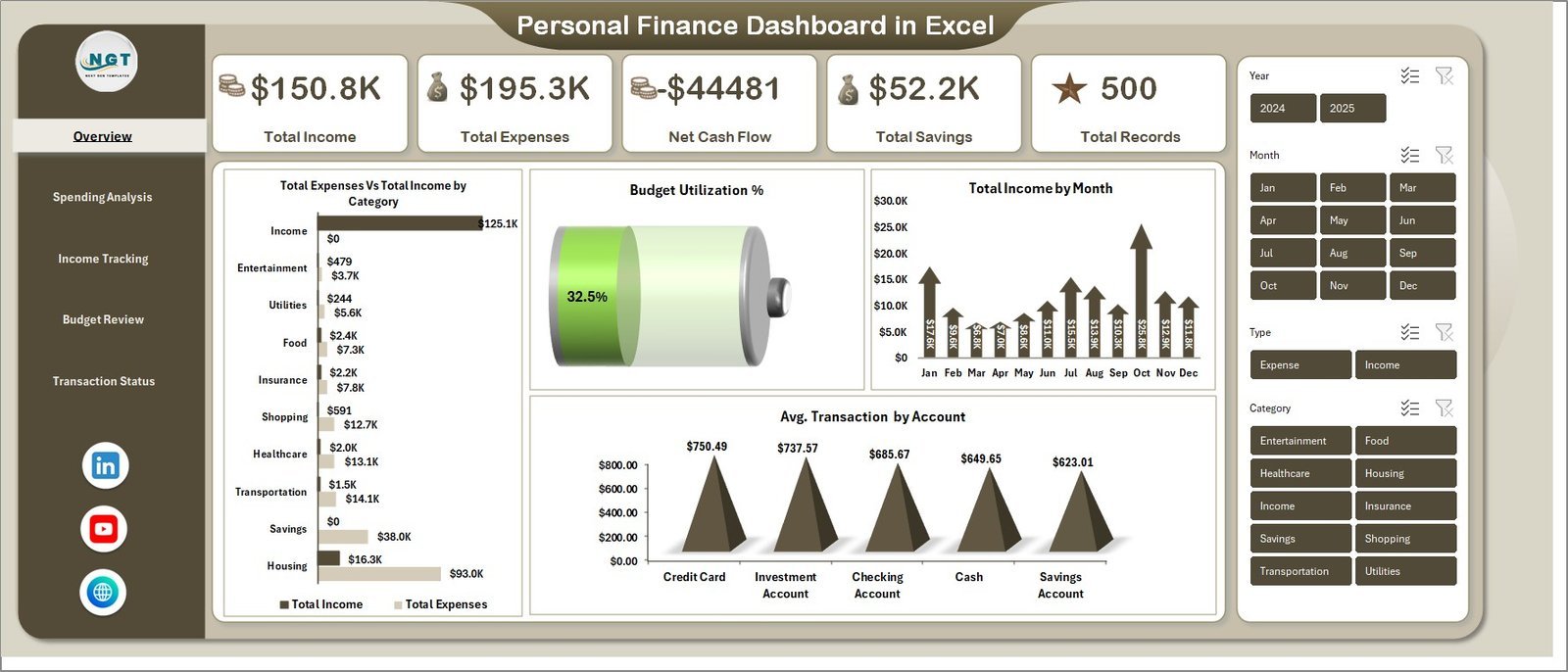
The fix for “the plan and the spending live apart” and “no view across months”. You record each transaction once on a structured data sheet, and five dashboard pages update: Overview, Spending Analysis, Income Tracking, Budget Review and Transaction Status. The Overview shows Total Income, Total Expenses, Net Cash Flow, Total Savings and Total Records. The Budget Review page shows budget by category, by month, by recurring versus one-off spending and by priority, and slicers filter everything by category, account, payment method and period.
What it adds over free: one place for every transaction, with budget against actual by category and by month.
Best for: anyone who wants their whole financial picture in Excel. $17.99 – view the Personal Finance Dashboard in Excel.
2. Monthly Budget Planner Template in Excel – best value
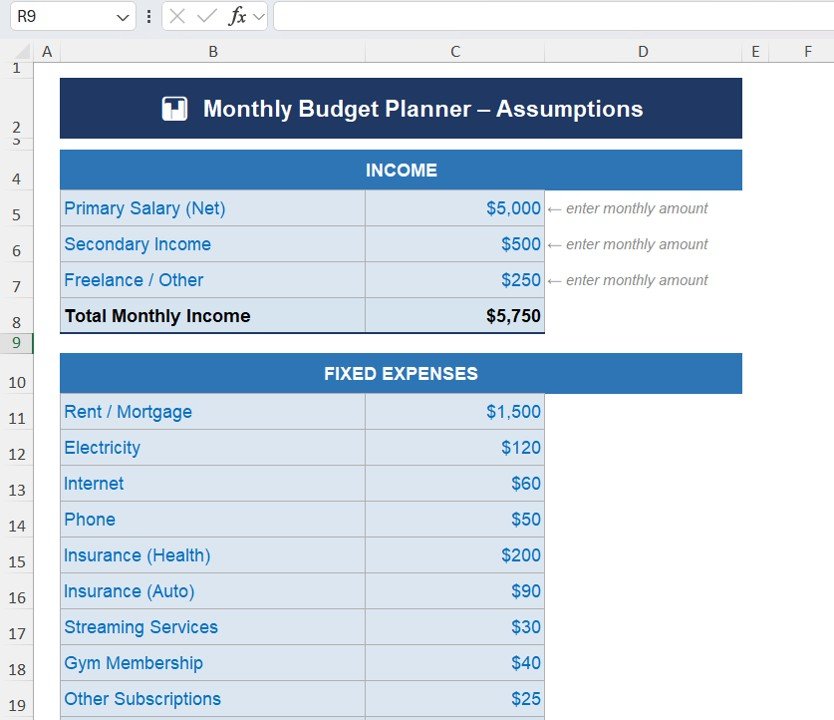
The simplest step up from a free monthly budget. Four worksheets guide you through it: you set your income sources and base budget on an Assumptions sheet, plan fixed, variable, lifestyle and miscellaneous expenses, then record actual spending. Built-in formulas calculate totals and the variance for every line, so overspending shows up straight away, and a chart compares budget with actual.
What it adds over free: a guided monthly workflow with automatic variance, without the clutter of a full dashboard.
Best for: people who want a tidy monthly budget in Excel. $6.99 – view the Monthly Budget Planner Template in Excel.
3. Annual Family Budget Tracker in Google Sheets
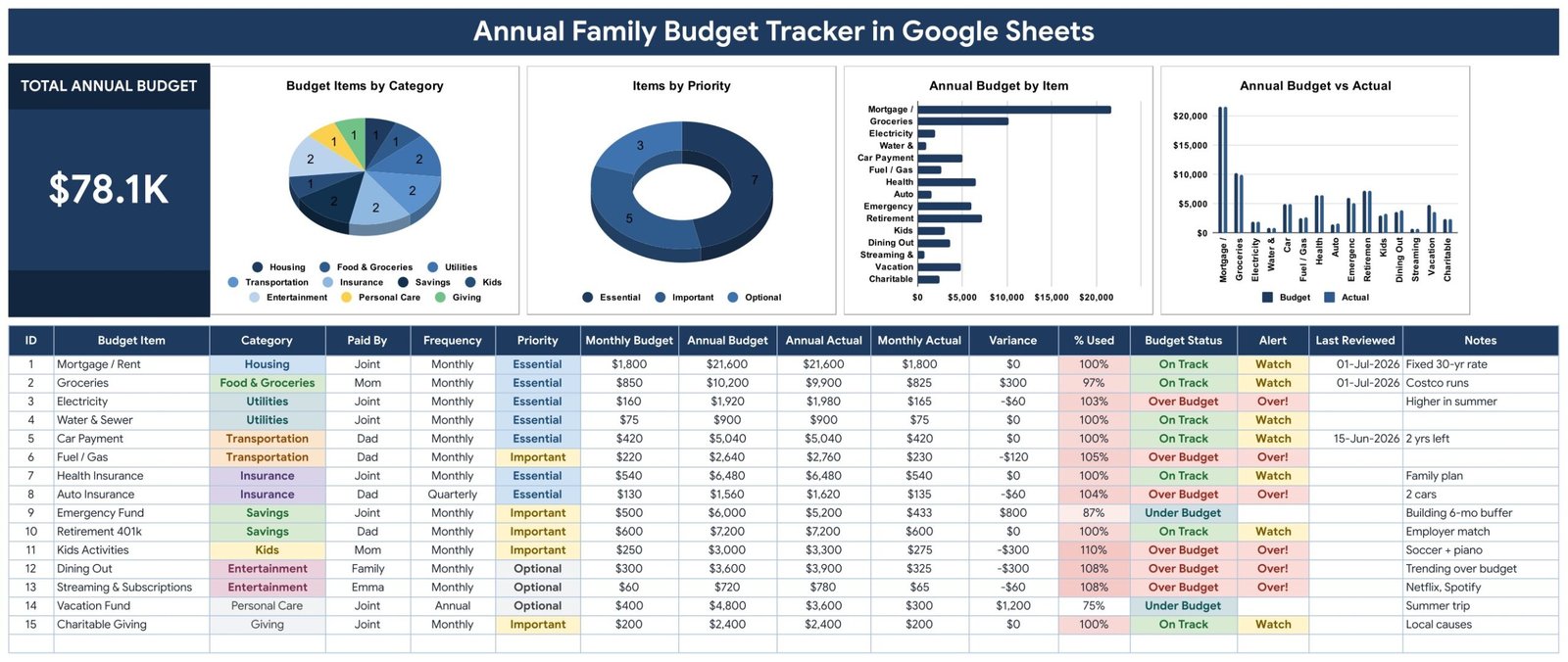
The fix for “no warning before you overspend” and “one person’s file”. Each budget line has 16 columns, 7 of them calculated: enter a monthly budget and the annual figure appears; enter what you spent and the sheet works out the variance, percent used, an On Track or Over Budget status and a Watch alert at 90%. Ten categories cover housing, food, utilities, transport, insurance, savings, kids, entertainment, personal care and giving, and every line is marked Essential, Important or Optional. Four charts and a Total Annual Budget card sit on top.
What it adds over free: a shared yearly family budget that warns you before a line runs out.
Best for: families who plan the year together. $6.99 – view the Annual Family Budget Tracker in Google Sheets.
4. Personal Finance Dashboard in Google Sheets
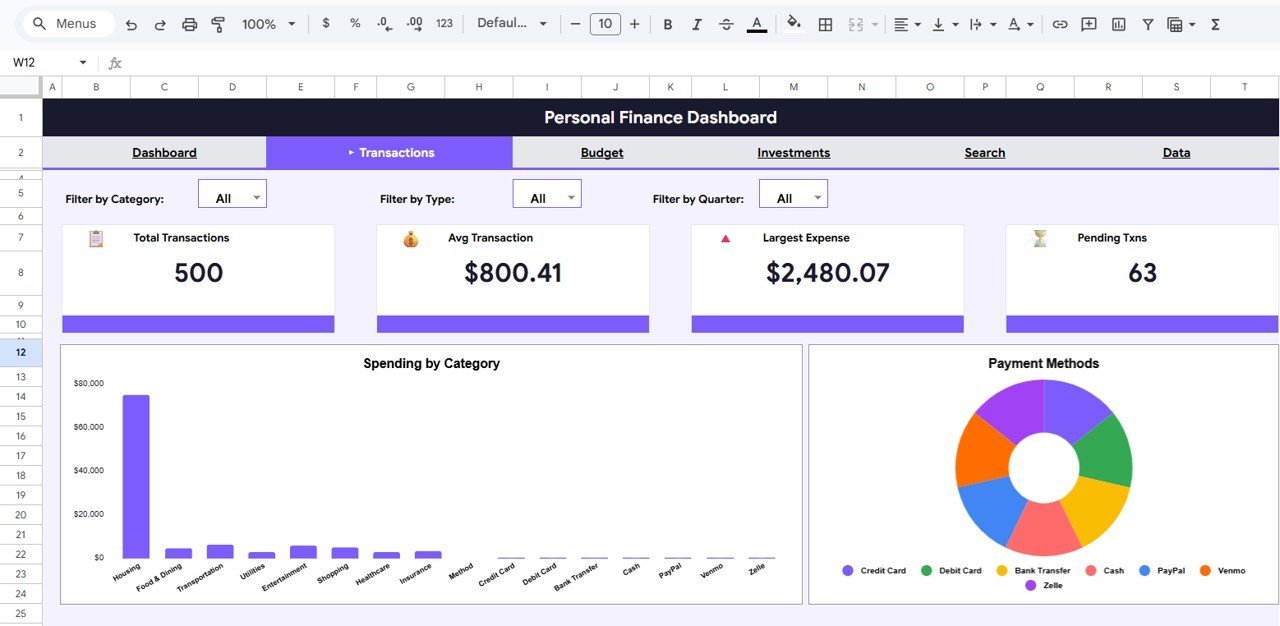
The fix for “no savings or net-worth picture”. Six pages cover an Overview, Transactions Analysis, Budget Analysis, Investments Analysis, a Search Transactions page and the data sheet. KPI cards show this month’s income, total expenses, net savings and investments; the budget page compares plan with actual by category and by quarter; and the investments page shows portfolio allocation by asset class.
What it adds over free: budget, transactions and investments together, in a cloud file you can open on any device.
Best for: freelancers and salaried professionals managing money in Google Drive. $9.99 – view the Personal Finance Dashboard in Google Sheets.
5. Cash Envelope Budget Tracker in Google Sheets
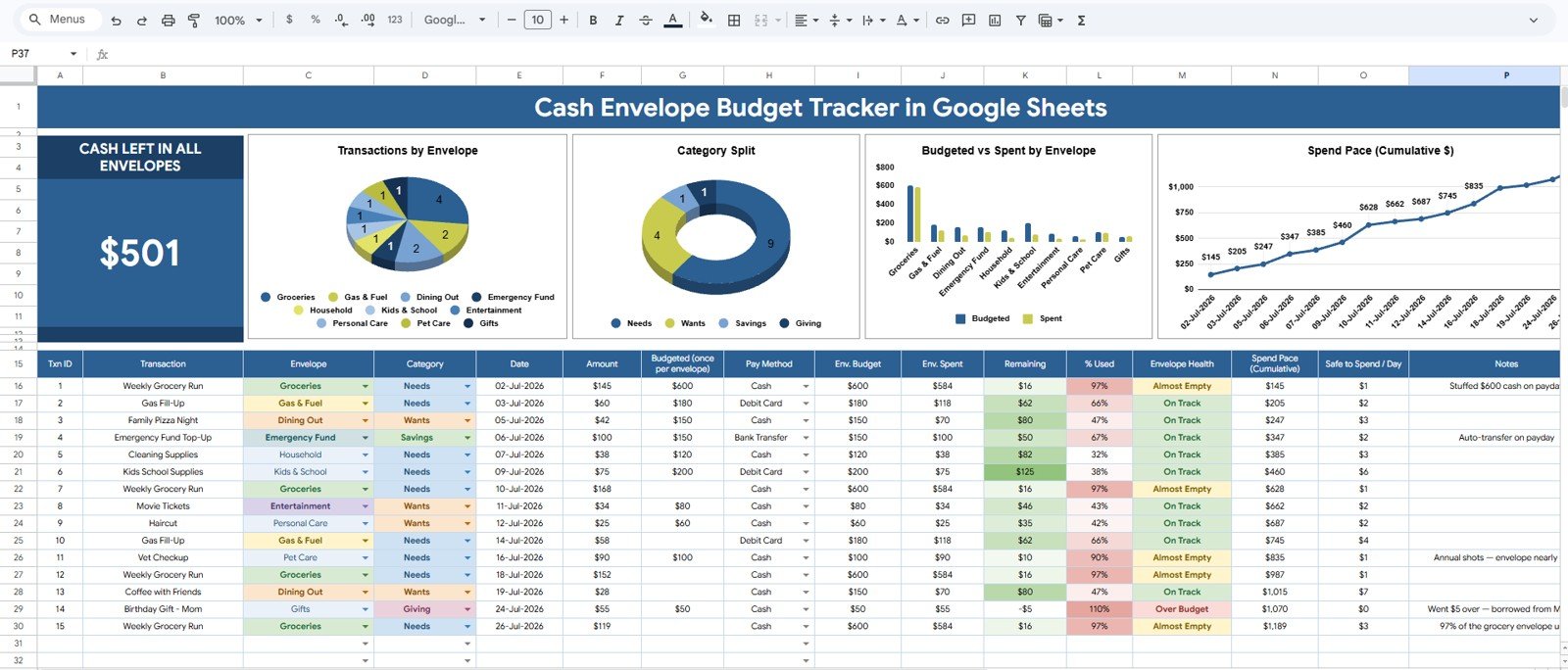
For people who like the envelope method but not the paper. You give each envelope (groceries, bills, entertainment, debt payoff, savings or your own) a planned amount and log spending against it. A Cash Left card shows what remains across all envelopes, charts compare budgeted with spent for each envelope, and a cumulative spend line shows your pace through the month. Envelopes, categories and payment methods are edited on one Setup Lists tab, and slicers filter the overview. No bank login is needed.
What it adds over free: envelope budgeting with a live balance per envelope, shareable with a partner.
Best for: anyone paying off debt with a strict envelope plan. $6.99 – view the Cash Envelope Budget Tracker in Google Sheets.
6. Baby Budget & Expense Tracker in Google Sheets
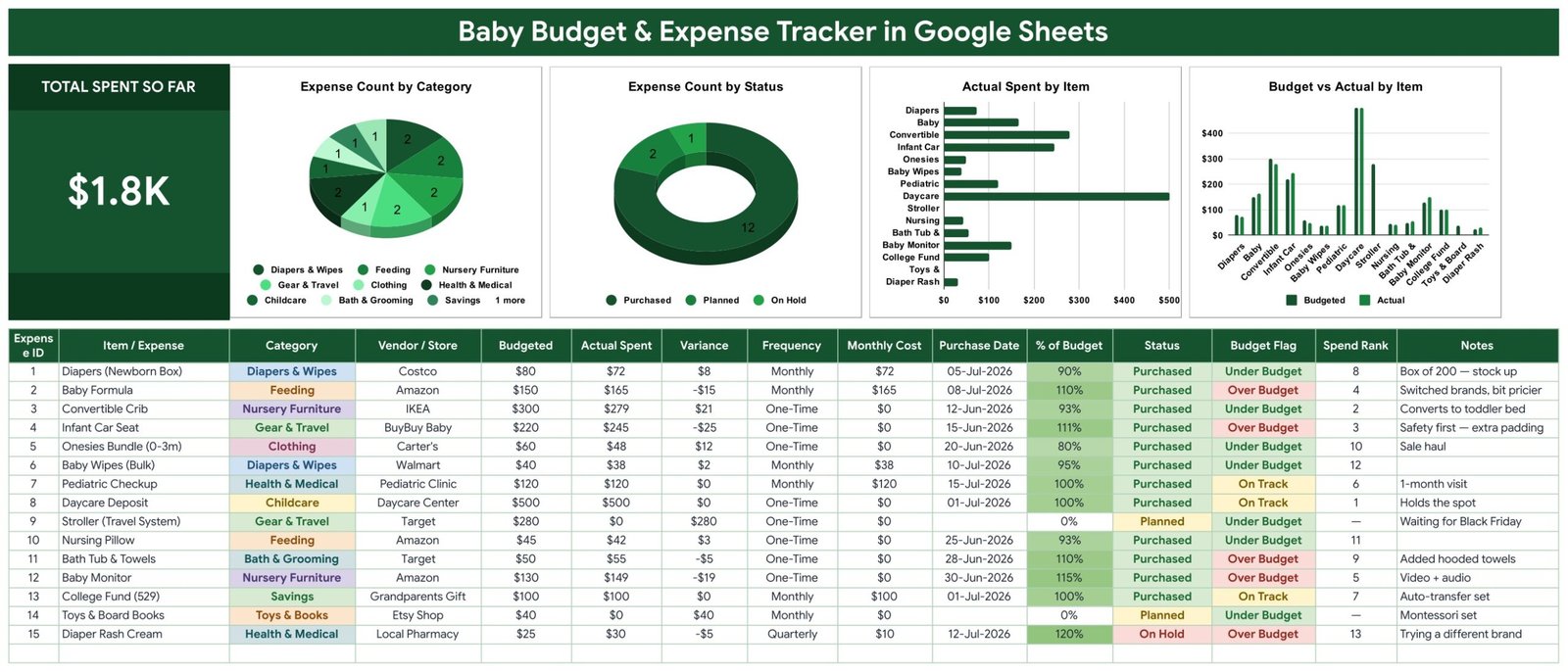
A budget for one of life’s most expensive years. Every newborn cost gets a row in a 15-column table, with 6 calculated columns: variance, % of budget, an Under Budget, On Track or Over Budget flag, and a Monthly Cost column that puts recurring costs on the same footing (weekly costs times 4.33, quarterly costs divided by 3). A Spend Rank puts the biggest item first; in the sample, a $500 daycare deposit beats a $279 crib. Ten baby categories and three purchase states (Purchased, Planned, On Hold) come ready.
What it adds over free: categories and maths built for baby costs, so recurring diapers and a one-off crib compare fairly.
Best for: expecting and new parents. $6.99 – view the Baby Budget & Expense Tracker in Google Sheets.
7. Budget Forecasting Dashboard in Excel
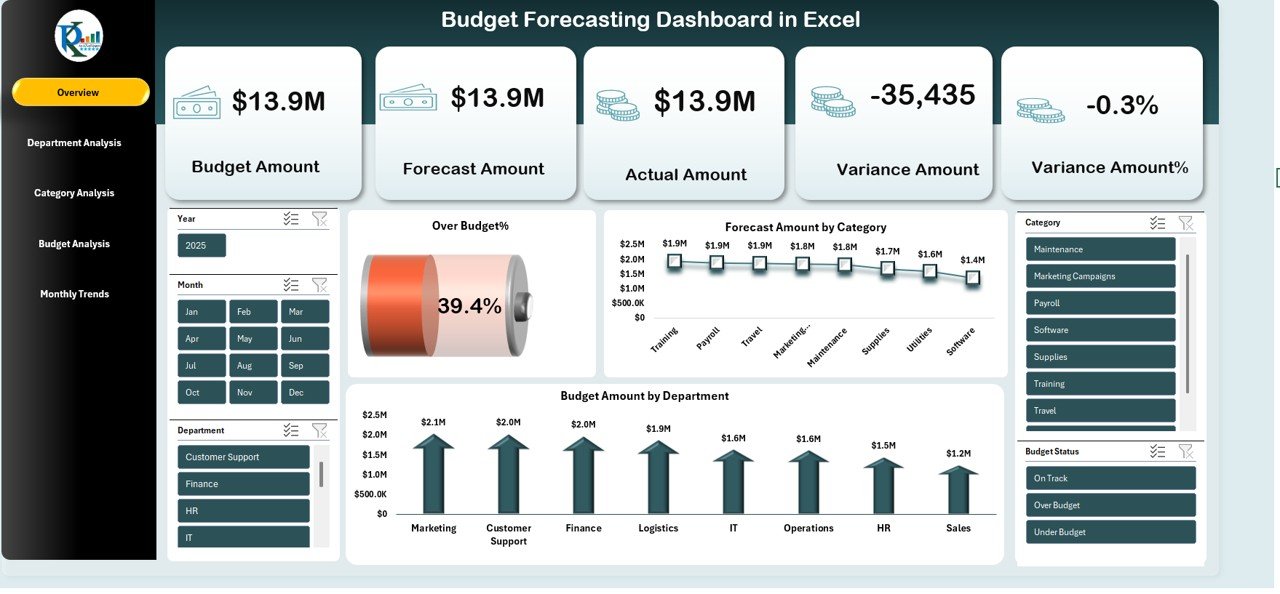
For when the budget belongs to a business or a department, not a household. The Overview shows total cost, budget amount, forecast amount, actual amount, variance % and over-budget %. Further pages break spending down by department, by category (travel, payroll, marketing, utilities, equipment and more) and by month, with slicers for month, category, department and budget status. Formulas such as SUMIFS and Excel’s forecast functions refresh everything when the data changes.
What it adds over free: forecast against budget against actual, by department, in one dashboard.
Best for: small-business owners and finance teams. $17.99 – view the Budget Forecasting Dashboard in Excel. It is also available as a Budget Forecasting Dashboard in Power BI ($17.99) and in Google Sheets ($9.99).
8. Budget Adherence KPI Dashboard in Excel

For managers who report on a budget every month. The KPI dashboard lists 11 budget KPIs, including budget variance, cost overrun, cost performance index, forecasted cost at completion, percentage of budget spent and budget utilization rate, with month-to-date and year-to-date actual, target, previous year and arrows showing direction. You pick the month from a drop-down; separate input sheets hold actuals, targets and previous-year figures, and a Trends sheet and a KPI Definition sheet complete it.
What it adds over free: a monthly budget scorecard against target and last year, ready for a management meeting.
Best for: project and department managers. $12.99 – view the Budget Adherence KPI Dashboard in Excel.
Also worth a look: with the holidays coming, the Holiday & Christmas Budget Tracker in Google Sheets ($6.99) keeps gift and party spending in check. The Monthly Budgeting Calendar in Excel ($4.99) puts bills on the day they are due, and the Expense Budget Submission Tracker in Excel ($6.99) handles budget requests inside a company.
How to choose between a free and a paid budget template
| Your situation | Pick | Cost |
|---|---|---|
| Your first budget, planned for a year | Vertex42 Personal Budget Spreadsheet (free #1) | Free |
| A quick monthly budget in Excel | Microsoft’s Personal monthly budget (free #2) | Free |
| Trying 50/30/20 or zero-based budgeting | NerdWallet worksheet (free #7) or Vertex42 zero-based (free #5) | Free |
| A tidy monthly budget with automatic variance | Monthly Budget Planner Template in Excel | $6.99 |
| A family budget shared in Google Sheets | Annual Family Budget Tracker in Google Sheets | $6.99 |
| Every transaction, budget and saving in one dashboard | Personal Finance Dashboard in Excel | $17.99 |
| A business or department budget with forecasts | Budget Forecasting Dashboard in Excel | $17.99 |
A simple rule: if you are budgeting for the first time, stay free for three months and prove the habit. Once you want to see why a category went over, compare months, or share the budget with a partner, a tracker pays for itself the first month it stops one overspend.
Which budgeting method should your free budget template use?
The template matters less than the method behind it. These are the four methods the free files above support:
- Traditional monthly budget. Set a planned amount per category, record the actual, and look at the difference. Vertex42’s Household Budget Worksheet and Microsoft’s monthly templates work this way. Best for most people starting out.
- 50/30/20 budget. Split take-home pay into 50% needs, 30% wants and 20% savings and debt repayment. It is fast because you track three buckets, not thirty. NerdWallet’s worksheet and Smartsheet’s 50/30/20 template follow it.
- Zero-based budget. Assign every dollar until income minus the plan equals zero. It takes more effort each month but leaves no money unaccounted for. Use Vertex42’s or Smartsheet’s zero-based template.
- Envelope budget. Give each spending category a fixed amount of cash, and stop when the envelope is empty. A spreadsheet version, such as our Cash Envelope Budget Tracker, keeps the discipline without carrying cash.
Budget template formulas that matter in Excel
Most budget mistakes come from small formula slips. If you build or edit a free budget template in Excel or Google Sheets, these six formulas cover almost every case:
- Variance: =Budget-Actual shows money left in a category; format negatives in red, as Vertex42 does.
- Percent used: =IFERROR(Actual/Budget,0) shows how far through a category you are; flag anything at 90% or more.
- Spending by category: =SUMIFS(Amount,Category,”Groceries”,Month,”Oct”) totals one category for one month from a transaction list.
- 50/30/20 targets: =Income*0.5, =Income*0.3 and =Income*0.2 give the three targets; compare each with the SUMIFS total for that bucket.
- Zero-based check: =Income-SUM(Planned) should be 0 when the budget is finished; anything else is money without a job.
- Monthly cost of a recurring bill: =IF(Freq=”Weekly”,Cost*52/12,IF(Freq=”Quarterly”,Cost/3,IF(Freq=”Annual”,Cost/12,Cost))) puts every bill on the same monthly basis.
Want to see formulas like these in action? Our YouTube channel has Excel and Google Sheets walk-throughs: youtube.com/@NextGenTemplates. If you prefer charts to tables, our list of free Excel dashboard templates and the free Google Sheets dashboard templates include several finance dashboards.
When a free budget template is NOT the right answer
- You want bank transactions to import themselves. A spreadsheet template doesn’t connect to your bank. If you will never type or paste transactions, an app with bank feeds suits you better, even at a monthly fee.
- You run a business’s books. A budget is a plan, not an accounting system. For invoices, bills and tax, see our QuickBooks alternatives and Xero alternatives guides, and our free invoice templates.
- You need to know when cash runs short. A budget shows what you plan to spend; it doesn’t show which month the bank balance dips. For that, use a free cash flow statement template with a 12-month or 13-week forecast.
- You need advice, not a spreadsheet. If debt is overwhelming or you are planning retirement, talk to a qualified, independent adviser. A budget template organises your numbers; it doesn’t tell you what to do with them.
- Several people edit the same Excel file. Emailing a workbook back and forth breaks it. Use a Google Sheets budget, or Excel stored in OneDrive, so everyone works on one copy.
Frequently asked questions
Where can I download a free budget template?
Vertex42’s Personal Budget Spreadsheet is the best-built free file, for Excel, Google Sheets and OpenOffice. Microsoft offers about 30 free Excel budget templates, Google Sheets has Monthly and Annual budget templates in its gallery, and Smartsheet and NerdWallet give away free Excel budget files. None of them asks for a card.
Is there a free budget template in Excel?
Yes. Vertex42’s personal, household and zero-based budgets, Microsoft’s budget templates, Smartsheet’s 17 budget files and NerdWallet’s 50/30/20 worksheet are all free Excel downloads. Inside Excel, go to File > New and search for “budget” to open Microsoft’s templates directly.
Does Google Sheets have a free budget template?
Yes. Open Google Sheets, click Template gallery and choose “Monthly budget” or “Annual budget”. Vertex42’s budget templates also open as Google Sheets copies. For a shared family budget with over-budget alerts, the NextGenTemplates Annual Family Budget Tracker in Google Sheets costs $6.99.
What is the easiest free budget template for beginners?
Vertex42’s Simple Budget Worksheet or Microsoft’s Simple personal budget. Both ask only for income and a short list of bills, then show what is left for savings. Once that feels easy, move to a monthly budget with planned and actual columns.
What is the 50/30/20 budget rule?
It splits take-home pay into three parts: 50% for needs such as housing, food and utilities, 30% for wants such as dining out and hobbies, and 20% for savings and extra debt payments. NerdWallet’s free worksheet and Smartsheet’s 50/30/20 template calculate the split for you.
What is a zero-based budget?
A zero-based budget gives every dollar of income a job, whether spending, saving or paying debt, until income minus the plan equals zero. It doesn’t mean spending everything; savings count as a job. Vertex42 and Smartsheet both offer free zero-based budget templates.
What categories should a budget template include?
At minimum: income, housing, utilities, food, transportation, insurance, debt payments, savings, health, personal spending and entertainment. Families usually add children, pets, education and giving. Keep the list short enough that you will actually record against it every week.
Are Vertex42 budget templates free to use?
Yes, for personal or private use. Vertex42 offers its budget templates free under a personal-use licence: you can use and edit them for your own budget, but you may not redistribute or resell the files. Check the licence line on each download page before sharing a template.
Should I use a monthly or yearly budget template?
Use a monthly template to control everyday spending and a yearly one to plan for irregular costs such as insurance, holidays and car repairs. Many people keep both: a yearly plan to set monthly targets, and a monthly sheet to track against them.
When should I upgrade from a free budget template?
Upgrade when you want to see why a category went over, compare months, share the budget with a partner, or track savings and investments too. NextGenTemplates budget and personal finance templates cost $6.99 to $17.99, paid once with no subscription.
Get your free budget template
Start free with Vertex42’s Personal Budget Spreadsheet or Microsoft’s free Excel budget templates, and track your real spending with our free Weekly Expense Tracker. When you want every transaction, budget and saving in one place, the Personal Finance Dashboard in Excel is our top upgrade at $17.99. The Monthly Budget Planner Template in Excel is the best value at $6.99, and the Annual Family Budget Tracker in Google Sheets covers a shared family budget for $6.99.
Comparing paid budget tools? See our budget template comparison. Tracking time off or hours too? Try our lists of free leave tracker templates and free timesheet templates. Claiming work costs back from an employer? See our free expense report templates.