

A Support and Helpdesk Manager needs four jobs covered: plan SLA targets, track tickets, report on performance and present results. The stack below covers all four with eight templates from $9.99 to $19.99, led by the Customer Support SLA KPI Dashboard in Excel at $12.99. Buying all eight costs $113.92 once.
Last updated: October 2026
Key takeaways
- The stack has 8 templates in Excel, Google Sheets, Power BI, VBA and HTML, priced from $9.99 to $19.99, or $113.92 for all eight.
- The Customer Support SLA KPI Dashboard in Excel ($12.99) is the best starting point because every other report depends on SLA targets.
- The IT Helpdesk Ticket Management System V1.0 ($19.99) is the only template here with role-based login and a full ticket history.
- Most managers need 3 or 4 of the 8, which puts a realistic stack at roughly $40 to $60 in one-time payments.
- These templates replace the tracking and reporting layer of Zendesk, Freshdesk or Jira Service Management, not their email inbox or customer portal.
 Launch offer
From your first Pivot Table to the Data Model, DAX, Power Query and a one-page KPI dashboard. 11h 51m of video by PK, with practice files, quizzes and a capstone.
Helpdesk manager Excel templates compared
| Template | Format | Job | Best For | What it replaces | Price |
|---|---|---|---|---|---|
| Customer Support SLA KPI Dashboard (Best overall) | Excel | Plan | SLA targets and compliance | SLA reporting add-ons in Zendesk or Freshdesk | $12.99 |
| Customer Support SLA KPI Dashboard | Power BI | Plan | MTD and YTD vs target | BI add-ons for SLA reports | $11.99 |
| IT Helpdesk Ticket Management System V1.0 | Excel VBA | Track | Ticket log with audit history | Small-team Freshdesk or Jira Service Management plans | $19.99 |
| IT Support Ticket Dashboard (Best value) | Google Sheets | Track | Shared team ticket log | Light ITSM tools | $9.99 |
| IT Support Ticket Dashboard | Excel | Report | Weekly performance review | Zendesk Explore-style reporting | $17.99 |
| IT SLA Compliance and Ticket Monitoring Dashboard | Google Sheets | Report | SLA met rate by agent and department | Jira Service Management SLA reports | $9.99 |
| IT Support Ticket Dashboard | Power BI | Present | Leadership reviews | Separate BI licences for helpdesk data | $17.99 |
| IT Support Ticket Dashboard | HTML | Present | Sharing without installing software | Hosted dashboard subscriptions | $12.99 |
How we picked these helpdesk manager templates
We searched the NextGenTemplates catalog for support, helpdesk, ticket and SLA products that cost money and cover a manager’s weekly work. We kept templates that map to one of four jobs: plan, track, report and present. We took the same tool in more than one format where it exists, so you can pick the file type your team already uses.
We left out free templates, generic project trackers and anything not tied to tickets or SLAs. Where a product description was cut off, we only used what the listing states. We have not measured search demand for this topic, so the ranking reflects the order a manager would use the tools, not keyword volume.
What are the best helpdesk manager Excel templates in 2026?
The ranking follows the manager’s workflow. Plan comes first because SLA targets decide what every later report measures. Track comes next, then report, then present. The Customer Support SLA KPI Dashboard in Excel is number one because it sets the targets the rest of the stack is judged against, and it costs $12.99.
1. Customer Support SLA KPI Dashboard in Excel: best overall (Plan)

This is the planning template. It tracks first response time, resolution time and SLA compliance in one Excel dashboard, and you set your own SLA targets. It is number one because a helpdesk with no agreed targets cannot say whether a month went well.
Who it is for: customer support managers, operations teams and business owners who need to see whether service goals are being met.
- First response time, average resolution time and SLA compliance in one view
- Visual indicators that update as the data changes
- Editable KPIs and SLA targets
- A layout that works for every Excel skill level
Use cases: set a first-response target and check it weekly; compare resolution time with the target you agreed with a key customer; show leadership the share of cases handled inside the agreed timeline; and spot a month where compliance dipped, for example from 90% to 82%, before customers complain.
Price: $12.99. Get the Customer Support SLA KPI Dashboard in Excel.
Best for: managers who need one SLA dashboard before anything else.
2. Customer Support SLA KPI Dashboard in Power BI: best for MTD and YTD targets (Plan)
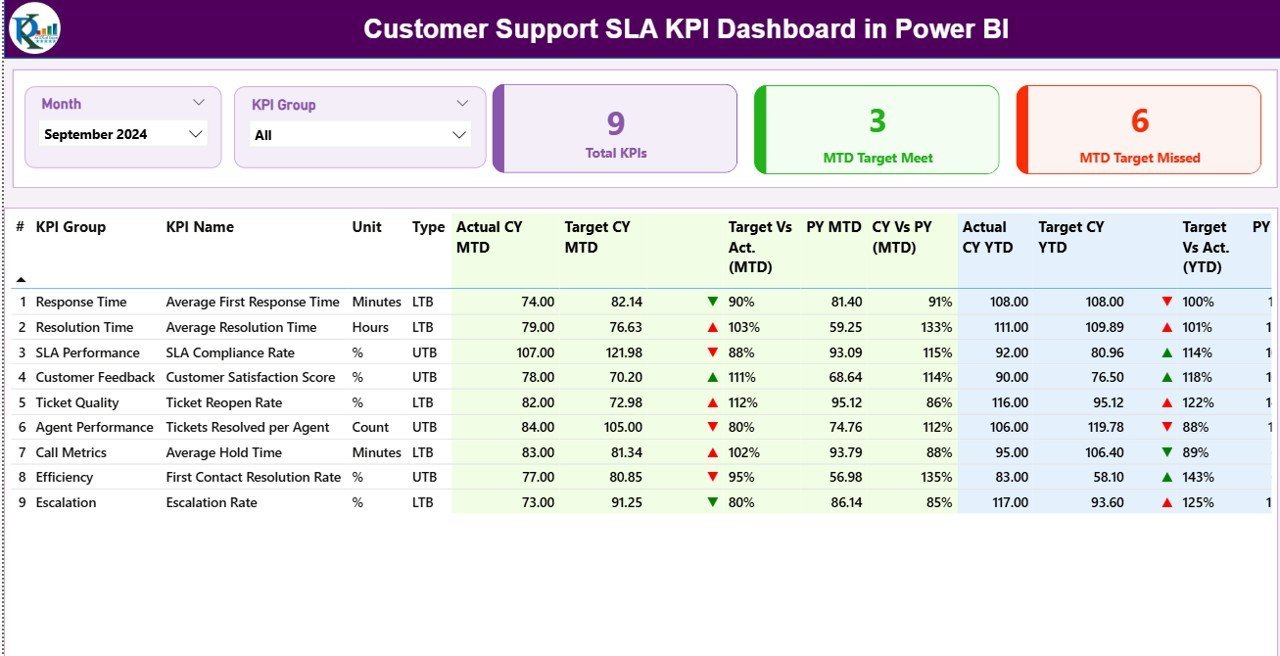
The Power BI version of the same planning job adds period comparison. It has 3 pages: a Summary page with a KPI table, a Trend page with combo charts, and a hidden drill-through KPI Definition page. Each SLA KPI shows actual against target for the current month and year to date, plus the previous year.
Who it is for: support leaders who already use Power BI and want target tracking without writing DAX.
- MTD and YTD actual vs target, with current year vs previous year columns
- Red and green status icons that apply lower-the-better or upper-the-better logic per KPI
- Slicers for Month and KPI Group
- 3 KPI cards: total KPIs, MTD target met and MTD target missed
- Data from 3 Excel tabs: Input_Actual, Input_Target and KPI Definition
Use cases: see at a glance how many SLA KPIs missed target this month; compare this year’s year-to-date with last year’s; isolate one metric on the Trend page; and hand the KPI Definition page to new team leads so everyone reads the numbers the same way. The listing says setup takes under 10 minutes.
Price: $11.99. Get the Customer Support SLA KPI Dashboard in Power BI.
Best for: teams that want year-on-year SLA comparison in Power BI.
3. IT Helpdesk Ticket Management System V1.0: best for ticket tracking with history (Track)

This is an Excel and VBA tool that puts every IT ticket in one secure file. It has a login form with Admin and User roles, a ticket list, filters, sorting and one-click add, update and delete buttons. It is built for Windows Excel desktop.
Who it is for: helpdesk supervisors in organizations that want an offline ticket system without installing a database or paying a subscription.
- Role-based login for admins and users
- Ticket list with filters by date range and selected columns
- Record history that shows every modification, for audit and transparency
- Export of filtered ticket data to Excel
- Customizable lists and users
Use cases: replace an inbox full of forwarded requests with one ticket list; filter last week’s tickets before a team meeting; check who changed a ticket and when; and export a filtered list for a monthly report.
Price: $19.99. Get the IT Helpdesk Ticket Management System.
Best for: small internal IT teams that need an audit trail without a SaaS contract.
4. IT Support Ticket Dashboard in Google Sheets: best value (Track)

At $9.99 this is the cheapest way to get a shared ticket log with a dashboard. It has 3 core sheets: Dashboard, Search and Data. The Data sheet holds the ticket log and feeds the dashboard automatically.
Who it is for: IT managers and helpdesks where several agents edit one file at the same time.
- KPI cards for total, open and urgent tickets, average resolution time in hours and satisfaction score
- Charts by status, priority, department and assigned agent
- A Search tab to filter by any column and keyword
- Fields for ticket ID, issue type, department, priority, status, location and dates
Use cases: search “Email” under Issue Type to find every email-related ticket before a follow-up; see open versus urgent tickets by month; compare ticket load per agent; and review open tickets by location.
Price: $9.99. Get the IT Support Ticket Dashboard in Google Sheets.
Best for: collaborative teams on a tight budget.
5. IT Support Ticket Dashboard in Excel: best for weekly performance reporting (Report)
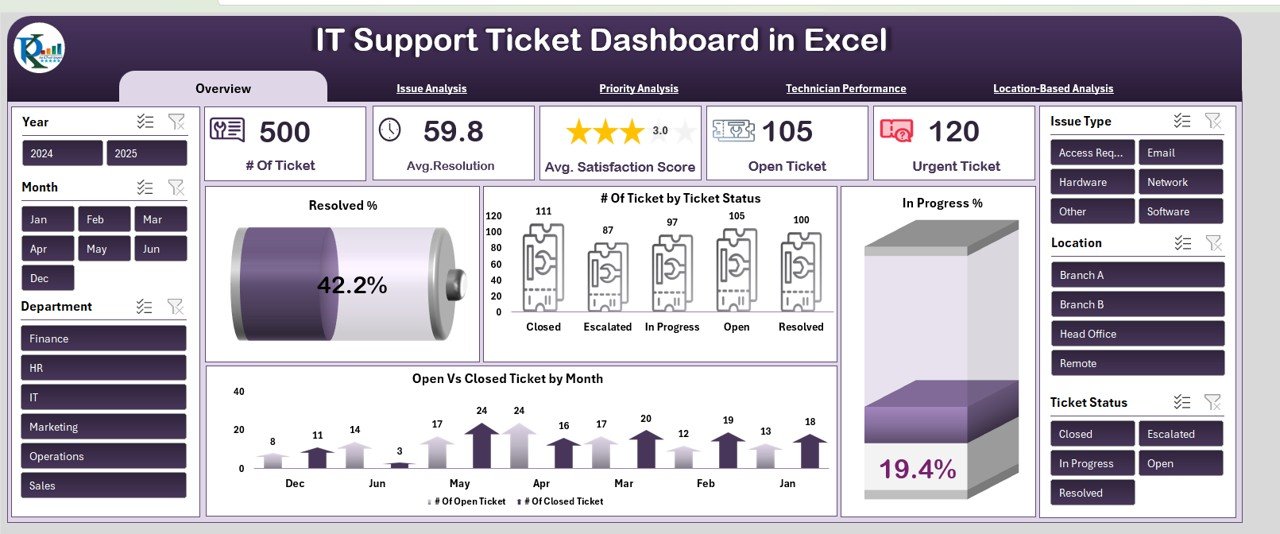
This is the reporting template for a manager who wants to explain why numbers moved. It has 6 auto-updating worksheets: an overview with KPI cards, Issue Analysis, Priority Analysis, Technician Performance, Location Analysis and a data entry sheet.
Who it is for: IT teams, support managers and service departments that review performance every week.
- KPI cards for total tickets, average resolution time and average satisfaction score
- Open versus closed trends by month
- Satisfaction and resolved percentage by issue type and priority
- Resolved and in-progress percentage by technician, plus ticket load
- Open and total tickets by location
Use cases: find the recurring issue type that drags satisfaction down; check whether urgent tickets are cleared faster than low ones; rebalance work when one technician carries far more tickets; and compare sites.
Price: $17.99. Get the IT Support Ticket Dashboard in Excel.
Best for: the weekly review with your technicians.
6. IT SLA Compliance and Ticket Monitoring Dashboard in Google Sheets: best for SLA by agent (Report)
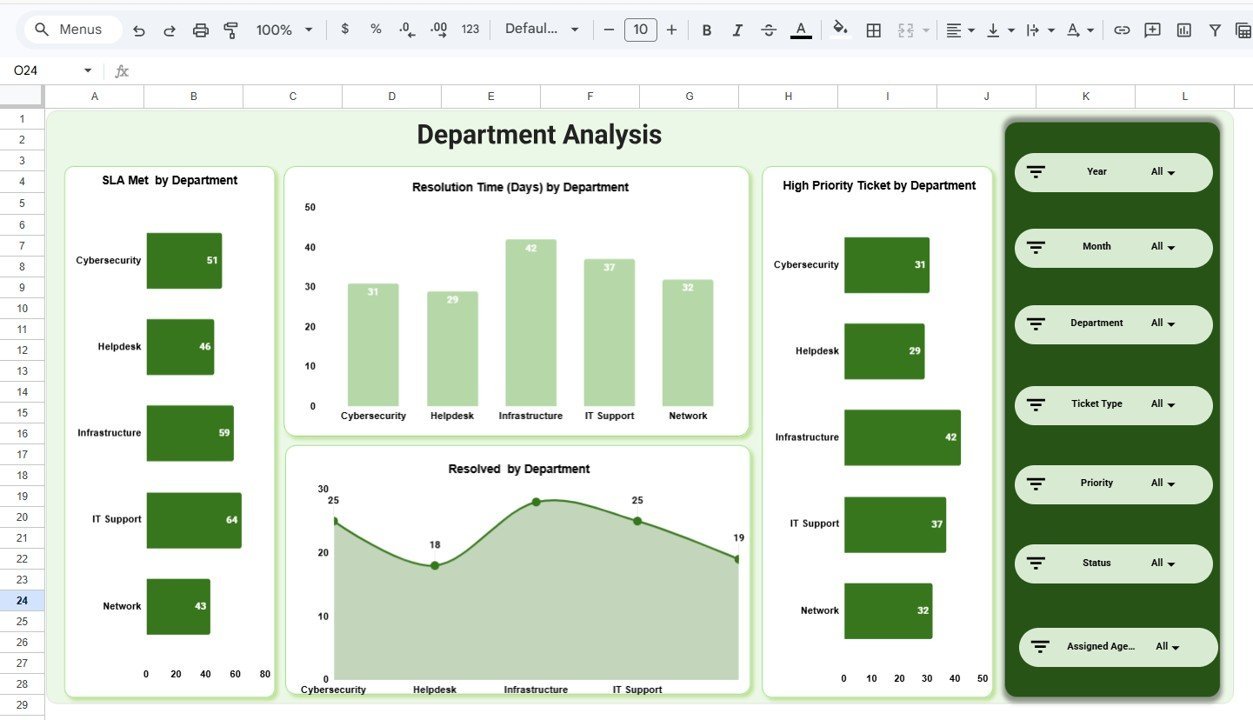
This one answers a narrow question: who is meeting SLA and who is not. It has 5 dashboard pages plus a Data Sheet: Overview, Department Analysis, Ticket Analysis, Assigned Agent Analysis and Monthly Trends.
Who it is for: IT service managers, help desk supervisors, IT operations leads and managed service providers.
- 5 KPI cards: total tickets, resolution time in days, customer rating, open tickets and high priority tickets
- SLA Met rates by department, ticket type, assigned agent and month
- Multiple slicers for quick filtering
Use cases: compare SLA Met rate across departments before a service review; see which ticket type has the longest resolution time; check each agent’s results ahead of one-to-ones; and watch monthly trends after a staffing change.
Price: $9.99. Get the IT SLA Compliance and Ticket Monitoring Dashboard.
Best for: managers who report SLA performance by team or agent.
7. IT Support Ticket Dashboard in Power BI: best for leadership reviews (Present)
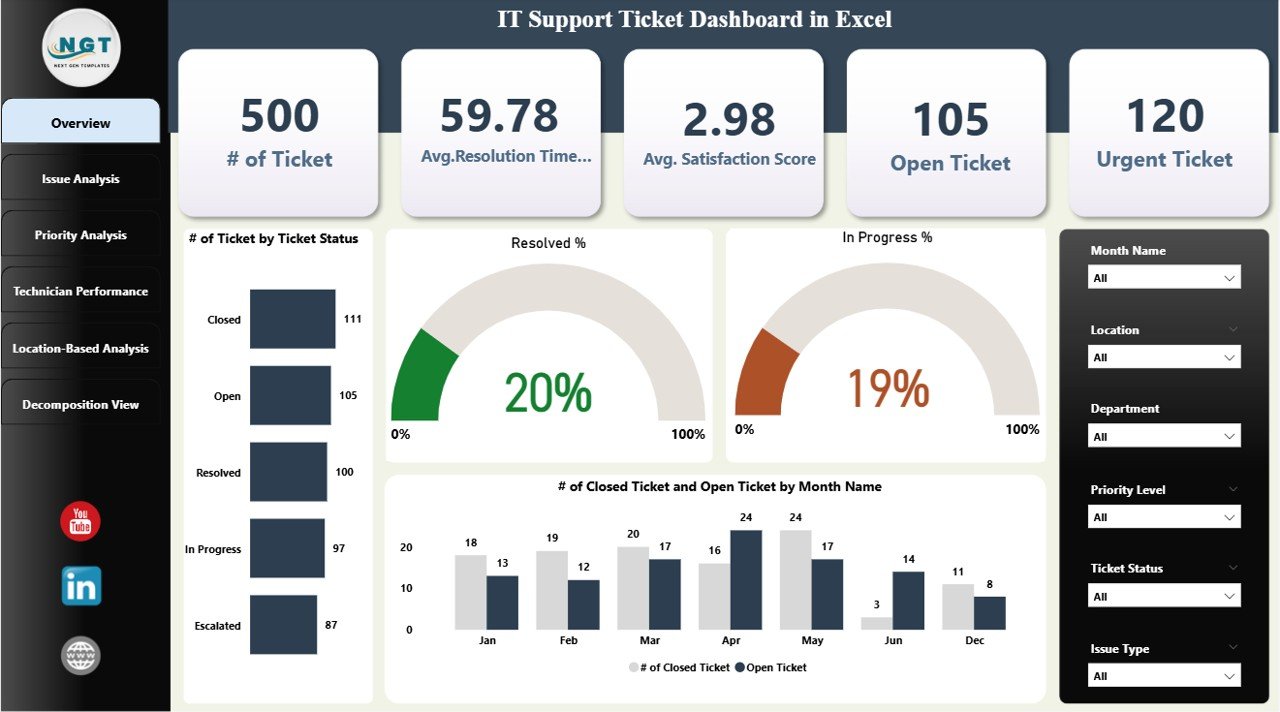
The Power BI version suits the monthly meeting where you present to directors. The Overview page has cards for number of tickets, average resolution time, average satisfaction score, open tickets and urgent tickets, plus charts for ticket status, resolved percentage and monthly trends.
Who it is for: IT managers who present support results to non-technical stakeholders.
- Issue Analysis page with satisfaction and resolution rate by issue type
- Priority Analysis page for High, Medium and Low tickets
- Technician Performance page for resolution rates and ticket volume
- Interactive charts that respond to clicks during a meeting
Use cases: answer a director’s question about urgent tickets live; show the open versus closed trend; explain a drop in satisfaction by issue category; and justify headcount with technician workload.
Price: $17.99. Get the IT Support Ticket Dashboard in Power BI.
Best for: monthly reviews with leadership.
8. IT Support Ticket Dashboard in HTML: best for sharing without software (Present)
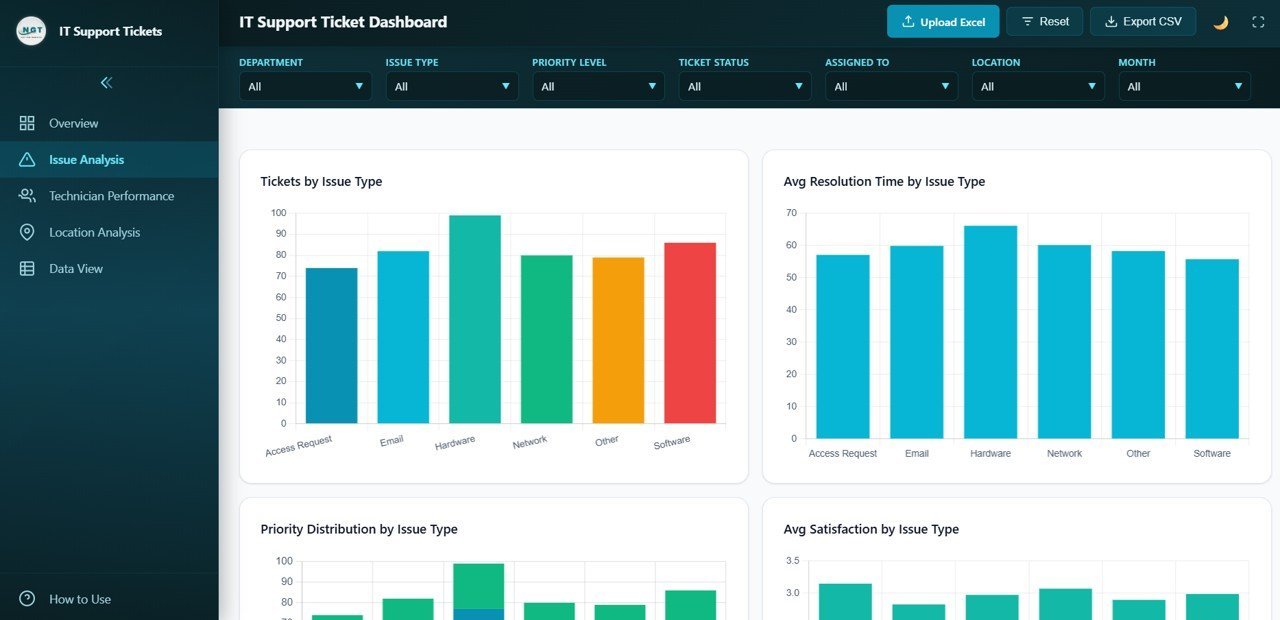
This is a browser-based dashboard. You open the HTML file in Chrome, Firefox or Edge and explore the data with nothing to install. It has 5 pages: Overview, Issue Analysis, Technician Performance, Location Analysis and Data View.
Who it is for: IT managers, help desk supervisors and service desk analysts who want a quick, installation-free view.
- 6 KPI cards: total tickets, open or in progress, average resolution time, average satisfaction, resolution rate and escalated tickets
- Filters by issue type, priority, status, department, technician and location
- Technician tracking for tickets resolved, resolution time and satisfaction
Use cases: open the file on a meeting-room PC without Excel; filter to one department for a service review; watch escalated tickets; and compare locations.
Price: $12.99. Get the IT Support Ticket Dashboard in HTML.
Best for: managers who present on machines without Office or Power BI.
How do you roll out a helpdesk template stack in 30 days?
Do one job per week. This table assumes you start with the Excel SLA dashboard, the ticket system and one reporting template.
| Days | Job | Template | Output |
|---|---|---|---|
| 1 to 7 | Plan | Customer Support SLA KPI Dashboard in Excel ($12.99) | Agreed first response and resolution targets |
| 8 to 14 | Track | IT Helpdesk Ticket Management System V1.0 ($19.99) or the Google Sheets dashboard ($9.99) | All new tickets logged in one place |
| 15 to 21 | Report | IT Support Ticket Dashboard in Excel ($17.99) | First weekly review by issue, priority and technician |
| 22 to 30 | Present | Power BI ($17.99) or HTML ($12.99) dashboard | First monthly review with leadership |
Worked example: suppose 400 tickets close in a month and 340 meet the resolution target. SLA compliance is 340 / 400 x 100 = 85%. If your target is 90%, the dashboard flags the gap, and the Issue Analysis tab shows which category causes most of the 60 misses. Those numbers are illustrative, so use your own.
Which helpdesk template format should you choose?
| If your team… | Choose |
|---|---|
| Works in desktop Excel on Windows and wants an audit trail | IT Helpdesk Ticket Management System V1.0 ($19.99) |
| Edits one shared file at the same time | Google Sheets dashboards ($9.99 each) |
| Presents with filters and drill-through | Power BI dashboards ($11.99 and $17.99) |
| Has no Office or Power BI on the presenting machine | HTML dashboard ($12.99) |
| Needs only SLA targets and compliance | Customer Support SLA KPI Dashboard in Excel ($12.99) |
If you are deciding between a template and a subscription, read our guides to Zendesk alternatives in Excel and Sheets and Freshdesk alternatives as service desk templates. For an IT-only view, see IT helpdesk and incident management templates.
When is a template NOT the right answer?
Keep Zendesk, Freshdesk or Jira Service Management if agents answer customers by email, chat and phone from one inbox. None of these templates describe email-to-ticket conversion, live chat or a customer portal. A spreadsheet logs and reports on tickets, it does not receive them.
Software also wins when you need approval workflows, automated routing or asset management, or when dozens of agents write to the log at once. The VBA tool is built for Windows Excel desktop, so Mac teams should choose the Sheets or Power BI formats instead.
A sensible middle path is to keep your helpdesk for the inbox and use these templates for SLA reporting. Check current plan prices on the Jira Service Management pricing page, the Zendesk pricing page and the Freshdesk pricing page, then compare with a one-time $9.99 to $19.99 per template.
Frequently asked questions
What templates does a helpdesk manager need?
A helpdesk manager needs one template for each job: SLA targets, ticket logging, performance reporting and stakeholder presentation. In this stack that means the Customer Support SLA KPI Dashboard in Excel ($12.99), the IT Helpdesk Ticket Management System V1.0 ($19.99), the IT Support Ticket Dashboard in Excel ($17.99) and a Power BI or HTML view for presenting.
Can Excel replace Zendesk?
For reporting and ticket tracking, yes. Excel templates cover SLA dashboards, ticket logs and technician workload for a one-time $9.99 to $19.99 each. They do not replace Zendesk’s omnichannel inbox, email routing or customer-facing portal. If your team needs those, keep the helpdesk and use the templates for reporting alongside it.
Can a spreadsheet replace Freshdesk?
A spreadsheet can replace the tracking and reporting side of Freshdesk for small internal teams. The IT Helpdesk Ticket Management System V1.0 at $19.99 logs tickets with history and exports to Excel. Its listed features do not include email-to-ticket automation, so teams that depend on that should keep Freshdesk.
Is there a Jira Service Management alternative in Excel?
Partly. The IT SLA Compliance and Ticket Monitoring Dashboard in Google Sheets ($9.99) tracks SLA met rates by department, ticket type and agent. Jira Service Management also handles queues, workflows and approvals, which these templates do not. Use them where you mainly need SLA visibility rather than workflow automation.
How do you calculate SLA compliance?
SLA compliance is tickets resolved within the agreed target divided by total tickets, multiplied by 100. If 340 of 400 tickets meet target in a month, compliance is 85%. The Customer Support SLA KPI Dashboard in Excel tracks this alongside first response time and average resolution time, with targets you can set yourself.
Which format should I pick: Excel, Google Sheets or Power BI?
Pick Excel if the team lives in desktop Excel, Google Sheets if several agents edit the same file, and Power BI if you present to leadership with filters and drill-through. Prices run $9.99 for Sheets, $11.99 for the Power BI SLA dashboard and $12.99 to $19.99 for Excel and VBA tools.
How long does rollout take?
A 30-day plan works for most teams: set SLA targets and import data in week one, start logging tickets in week two, build weekly reports in week three, and present the first monthly review in week four. The Power BI SLA dashboard states setup takes under 10 minutes once its three Excel tabs are filled.
Do these templates need macros or coding?
Most do not. The Power BI SLA dashboard needs no DAX coding, just three Excel tabs. The HTML dashboard opens in Chrome, Firefox or Edge. The IT Helpdesk Ticket Management System V1.0 is built with Excel VBA, so it runs on Windows Excel desktop rather than Mac or the browser.
How much does the whole stack cost?
Buying all eight costs $113.92 once: $12.99, $11.99, $17.99, $17.99, $12.99, $19.99, $9.99 and $9.99. Most teams need three or four, so a realistic stack is $40 to $60. Each template is a one-time purchase, unlike subscription helpdesk software.
Get more helpdesk and support templates
Start with the planning layer: the Customer Support SLA KPI Dashboard in Excel is $12.99, and pairing it with the IT Helpdesk Ticket Management System V1.0 at $19.99 and the IT Support Ticket Dashboard in Excel at $17.99 covers plan, track and report for $50.97. Watch walkthroughs on the NextGenTemplates YouTube channel.