
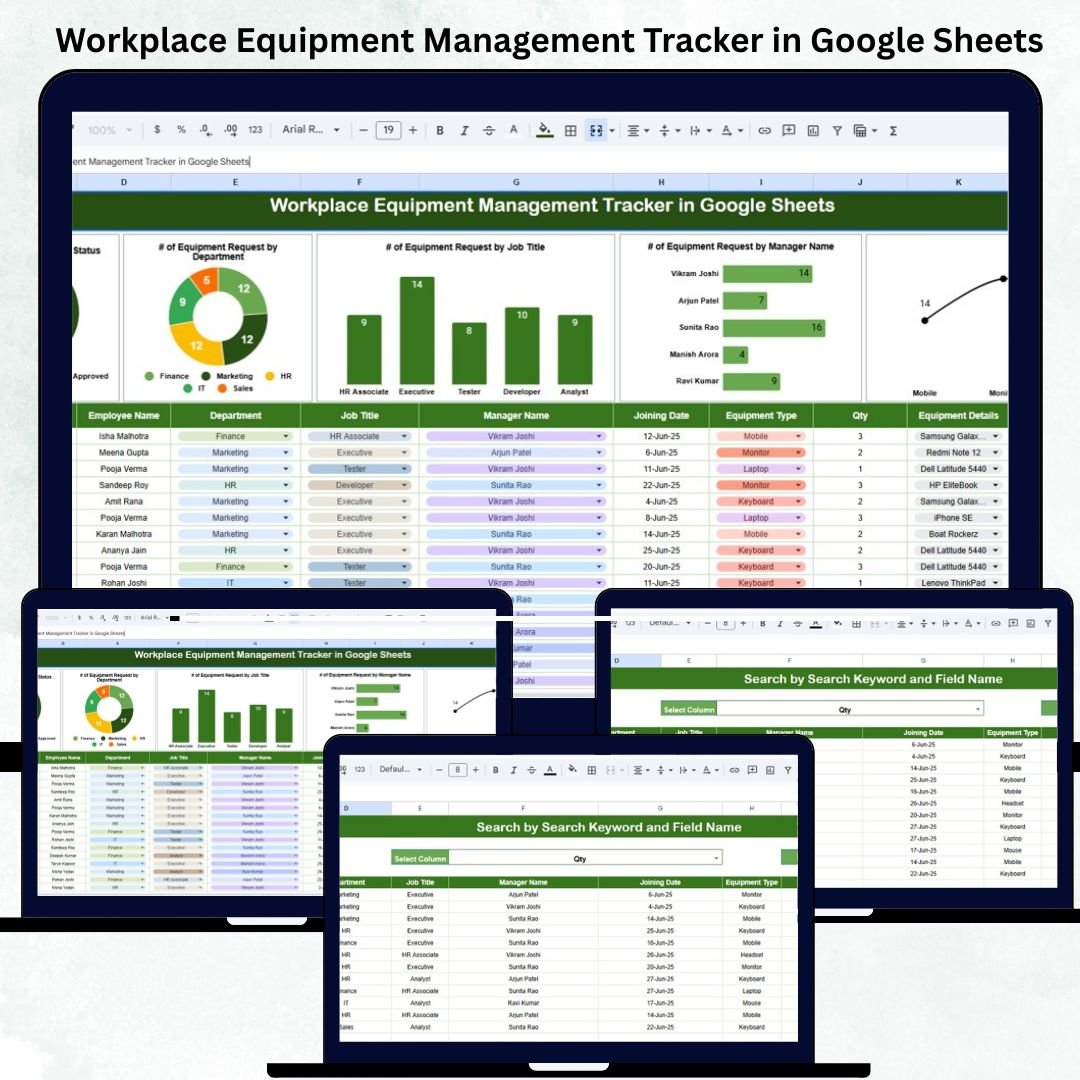
Managing office and workplace equipment efficiently is essential for smooth operations, cost control, and accountability. The Workplace Equipment Management Tracker in Google Sheets is a ready-to-use, cloud-based solution designed to help HR, admin, and IT teams centralize all equipment-related data — from requests and approvals to status tracking and quantity analysis. 🧾⚙️Workplace Equipment Management Tracker in Google Sheets
This tracker streamlines the entire process of equipment allocation and management by automating calculations, visualizing department-wise analytics, and simplifying search and reporting. Whether you’re managing laptops, tools, or safety gear, this system ensures transparency, traceability, and efficiency — all inside Google Sheets. ☁️📊Workplace Equipment Management Tracker in Google Sheets
🔑 Key Features of the Workplace Equipment Management Tracker in Google Sheets
📋 Tracker Sheet Tab (Main Dashboard)Workplace Equipment Management Tracker in Google Sheets
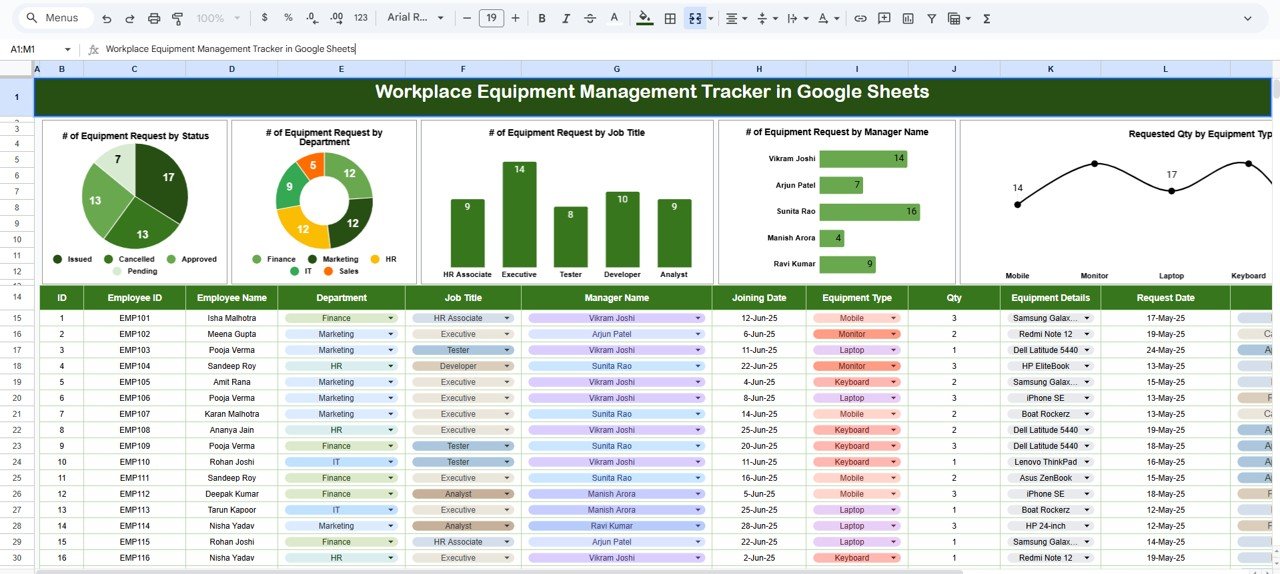
The central hub of your equipment data — visualize all key performance metrics at a glance.
Charts Included:
📈 # of Equipment Requests by Status: Shows the breakdown of requests as Approved, Pending, or Rejected.
🏢 # of Equipment Requests by Department: Highlights which departments are generating the highest number of requests.
👔 # of Equipment Requests by Job Title: Tracks how equipment demand varies by employee role or designation.
👨💼 # of Equipment Requests by Manager Name: Monitors approval trends and responsibility levels by manager.
💻 Requested Quantity by Equipment Type: Displays the total requested units by category (e.g., Laptops, Monitors, Safety Kits, etc.).
Each chart refreshes automatically as data is updated, providing instant visibility into organizational equipment trends.
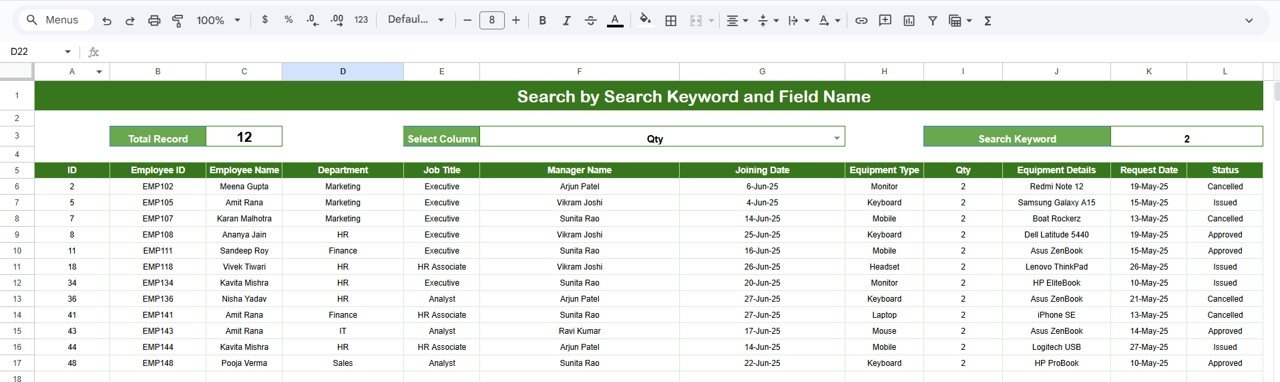
🔍 Search Sheet Tab (Smart Lookup)
Easily locate any record using built-in keyword and field-based search.
-
Search by Keyword: e.g., type “Laptop” to view all laptop requests.
-
Search by Field Name: e.g., type “Finance” or “Pending” to see department- or status-specific data.
-
Enables quick filtering for audits, reporting, or approval reviews.
📦 What’s Inside the Tracker
✅ Google Sheets file with automated dashboards and visuals
✅ Predefined columns for equipment details, departments, and managers
✅ Auto-calculating summaries and pivot-based charts
✅ Search tab for keyword-based filtering
✅ Cloud collaboration for team access
✅ Fully editable structure to match any organization’s workflow
✅ Plug-and-play functionality — no add-ons or coding required
This tool transforms how teams manage their assets — offering real-time analytics, accountability, and complete visibility across all equipment movements.
🧑💼 Who Can Benefit from This Tracker
👩💼 HR Departments: Track office equipment issued to employees and pending requests.
🧰 IT Teams: Manage devices, accessories, and maintenance allocations efficiently.
🏢 Administrative Teams: Oversee general equipment distribution across departments.
👨💻 Procurement Managers: Monitor demand and plan future purchases.
💼 Finance Teams: Get instant cost and usage summaries for budgeting.
Whether you’re handling 50 or 500 employees, this tracker scales effortlessly with your operations.
🧪 How to Use the Workplace Equipment Management Tracker
1️⃣ Add Equipment Requests: Input new requests with department, manager, type, and status details.
2️⃣ Monitor Dashboard: The main tab instantly updates visuals for real-time analysis.
3️⃣ Search Records: Use the Search Tab to filter results by equipment, department, or approval status.
4️⃣ Review Monthly: Identify usage patterns and approval delays for continuous improvement.
5️⃣ Collaborate Live: Allow multiple team members to update data simultaneously via Google Sheets.
💡 Pro Tip: Connect this tracker to a Google Form for automatic equipment request submission and approval workflow automation.
🌟 Why Choose This Tracker
-
🧾 Centralized and automated equipment tracking
-
📊 Ready-made dashboards and visuals — no setup required
-
👥 Improves accountability and transparency
-
☁️ 100% Google Sheets-based — easy collaboration and access
-
⚙️ Fully customizable for any business environment
-
🚀 Saves time by automating manual reports and approvals
With the Workplace Equipment Management Tracker in Google Sheets, you can bring structure, visibility, and data intelligence into your equipment management process — ensuring no request is missed and every asset is tracked efficiently. 🌟






























Reviews
There are no reviews yet.