
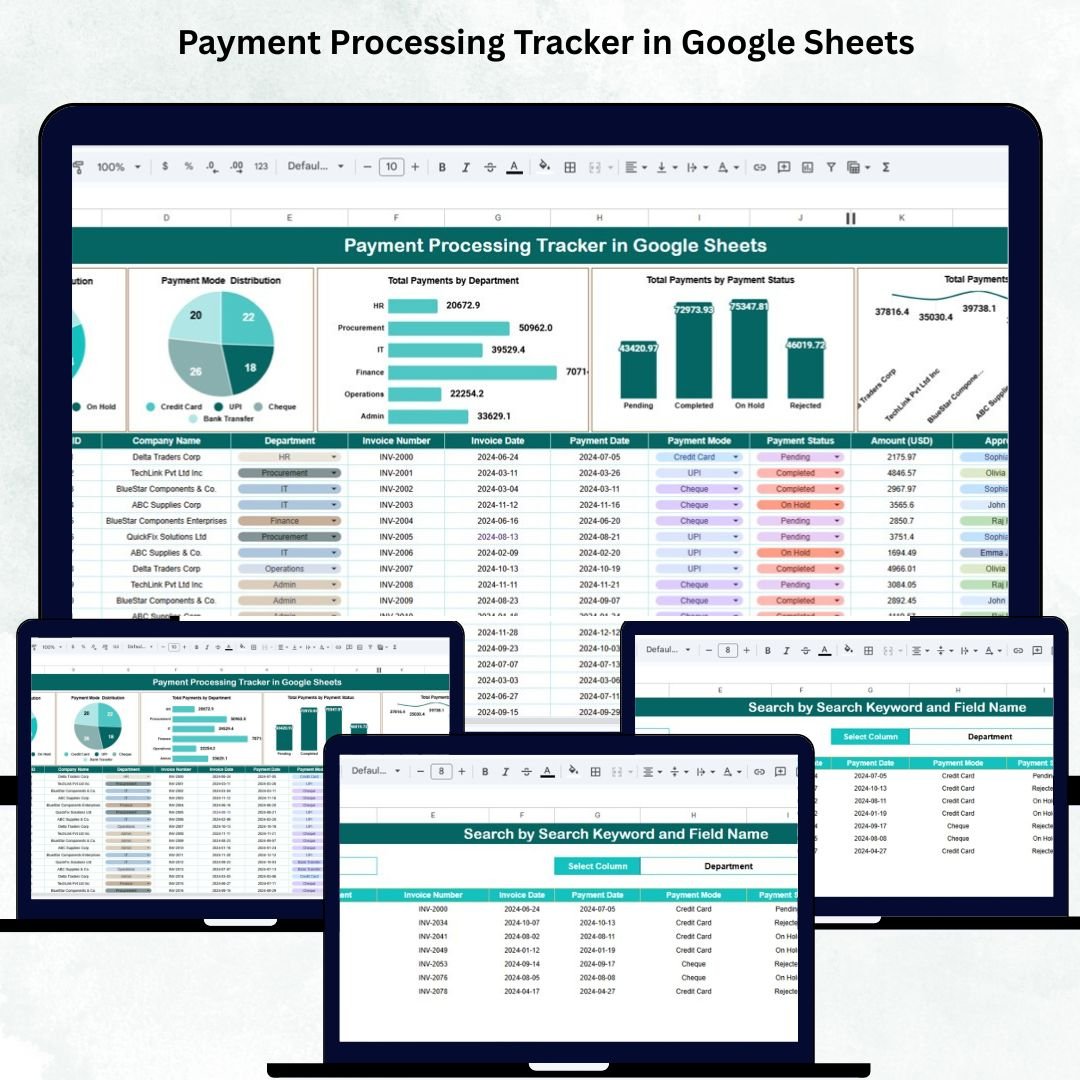
In today’s fast-moving business world, keeping track of payments efficiently is vital for financial accuracy, transparency, and smooth operations. The Payment Processing Tracker in Google Sheets is a ready-to-use financial tracking tool designed to help organizations manage payments across multiple departments, clients, and modes — all from one central dashboard. 💰📊
Built for finance teams, accountants, and business owners, this cloud-based solution offers real-time visibility into payment flows, pending transactions, and departmental trends — without the need for complex accounting software.
🔑 Key Features of the Payment Processing Tracker in Google Sheets
📊 Dashboard Sheet Tab (Main Visualization Page)
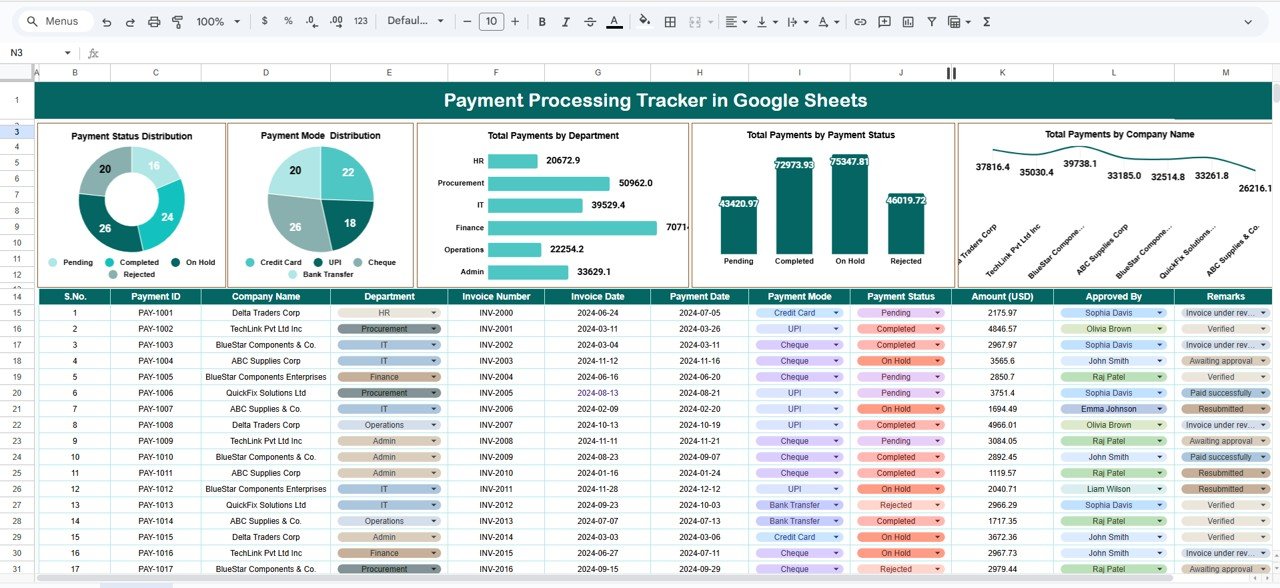
This is the core of the tracker — a powerful and interactive dashboard that provides a snapshot of payment performance and trends.
Charts Included:
-
💸 Payment Status Distribution – View payments by their current status (Pending, Completed, Failed, or Processing) to track workflow health.
-
💳 Payment Mode Distribution – Analyze how payments are made (Cash, Credit Card, Bank Transfer, UPI, Cheque) and identify usage trends.
-
🏢 Total Payments by Department – Compare departmental payment activity (Sales, HR, Procurement, Marketing, etc.) for better accountability.
-
💰 Total Payments by Payment Status (Value) – Monitor financial value of payments categorized by their completion status to highlight pending vs. received amounts.
-
🤝 Total Payments by Company Name – Track top clients or vendors based on transaction totals for relationship and performance analysis.
All charts update automatically as new payment data is entered in the Data Sheet Tab, ensuring real-time monitoring and accuracy.
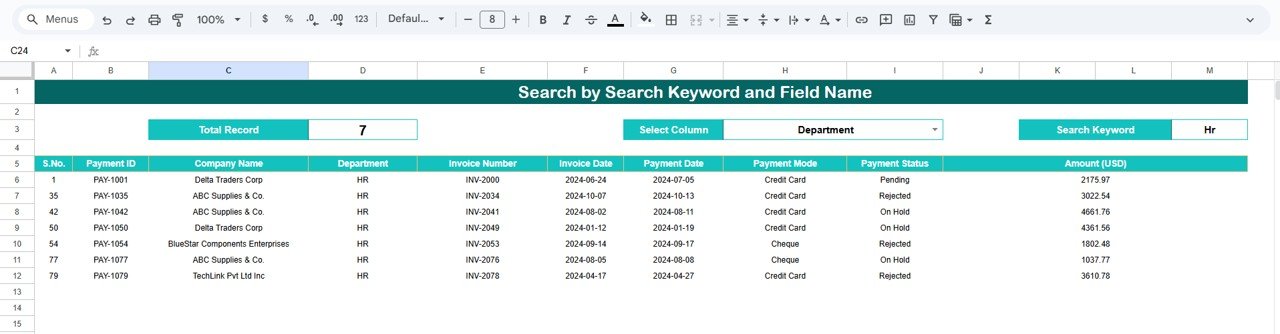
🔍 Search Sheet Tab (Quick Record Finder)
Instantly search and filter payment details by multiple fields — no scrolling needed!
You can search by:
-
Company Name
-
Department
-
Payment Mode
-
Payment Status
-
Processed By (Staff Name)
-
Payment Date
Example: Type “Pending” to instantly view all outstanding payments awaiting completion.
🧾 Data Sheet Tab (Master Data Input)
The Data Sheet is where all transactions are recorded. Each entry automatically flows into the dashboard for analysis.
Typical fields include:
-
Payment ID
-
Company / Department
-
Amount
-
Payment Mode
-
Payment Date
-
Payment Status
-
Processed By
-
Remarks
This structured layout ensures standardized, error-free data entry across teams.
⚙️ Support Sheet Tab (Dropdown Controls)
To maintain consistency, all dropdown lists (Payment Modes, Departments, and Status options) are stored here. This prevents manual typing errors and ensures uniform reporting.
📦 What’s Inside the Payment Processing Tracker
✅ Pre-built Google Sheets file with dashboard & charts
✅ Search tab for instant record retrieval
✅ Predefined dropdowns for error-free data entry
✅ Color-coded visuals for clear financial insights
✅ Fully editable & customizable design
✅ Real-time collaboration for multi-user access
✅ Exportable PDF reporting capability
Everything you need for seamless, transparent, and organized payment management — no coding required! 🚀
🧑💼 Who Can Benefit from This Tracker
💼 Finance & Accounts Teams – Streamline payment verification and reconciliation.
🏢 Business Owners – Get real-time visibility into payment inflows and delays.
📈 Department Heads – Track financial activity by department for budgeting.
👥 Procurement & Operations – Monitor vendor payments and identify bottlenecks.
🌍 Multi-location Companies – Manage multiple sites in one centralized tracker.
Whether you’re managing 50 or 5,000 transactions, this tracker provides structure, speed, and transparency across your financial ecosystem.
🧪 How to Use the Payment Processing Tracker
1️⃣ Enter Payment Data – Record each payment in the Data Sheet Tab.
2️⃣ View Dashboard Insights – Check real-time visual summaries.
3️⃣ Search Records – Use filters to locate transactions instantly.
4️⃣ Analyze Trends – Evaluate payment status, mode, and department activity.
5️⃣ Collaborate & Share – Share live dashboards with finance teams securely.
💡 Pro Tip: Integrate this tracker with Google Forms to automatically collect payment details from teams or departments!
🌟 Why Choose This Tracker
-
Real-time payment monitoring
-
Error-free reconciliation and reporting
-
Fully cloud-based and collaboration-friendly
-
Simple interface — no technical setup needed
-
100% customizable to suit any organization
-
Saves hours of manual work every month
The Payment Processing Tracker in Google Sheets empowers businesses with the financial clarity they need — helping them stay organized, proactive, and data-driven. 🌟
🔗 Click here to read the Detailed blog post
Watch the step-by-step video Demo:























Reviews
There are no reviews yet.