

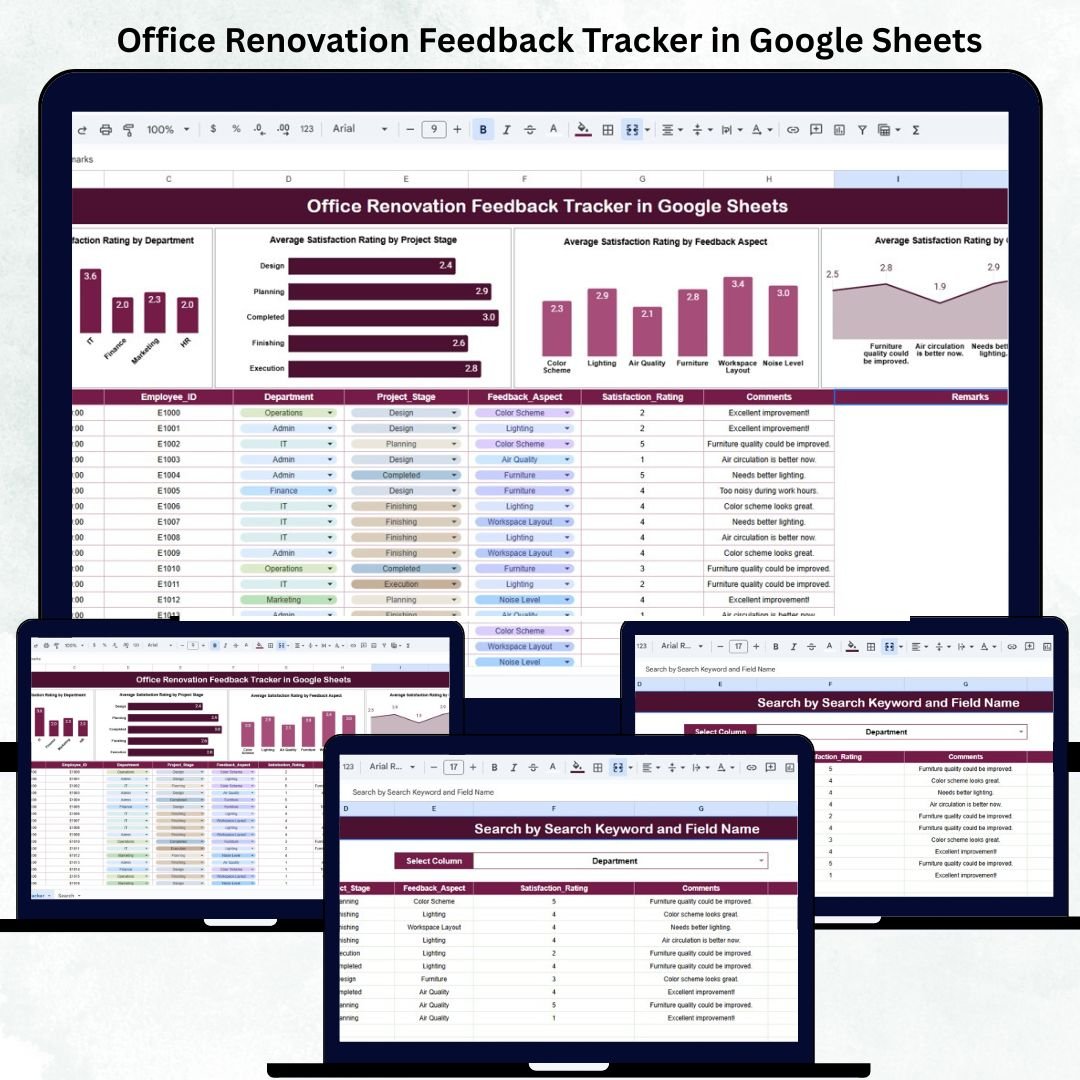
Renovating an office is more than just improving the workspace — it’s about ensuring employees feel comfortable, heard, and satisfied during the transformation. The Office Renovation Feedback Tracker in Google Sheets is a ready-to-use and data-driven tool designed to collect, analyze, and visualize employee feedback throughout the renovation process. 🏢📊
With automated charts, satisfaction averages, and smart search capabilities, this tracker helps HR teams, facility managers, and project leads measure employee sentiment and evaluate project success — directly in Google Sheets, without needing any specialized software.
Whether you’re in the planning, design, or post-renovation phase, this tool ensures every voice is heard, helping organizations make informed decisions that improve workspace efficiency and morale. 💬✅
🔑 Key Features of the Office Renovation Feedback Tracker in Google Sheets
📋 Tracker Sheet Tab (Main Dashboard)
-
Acts as the analytical hub where all feedback data is summarized.
-
Automatically updates visuals when new data is added.
-
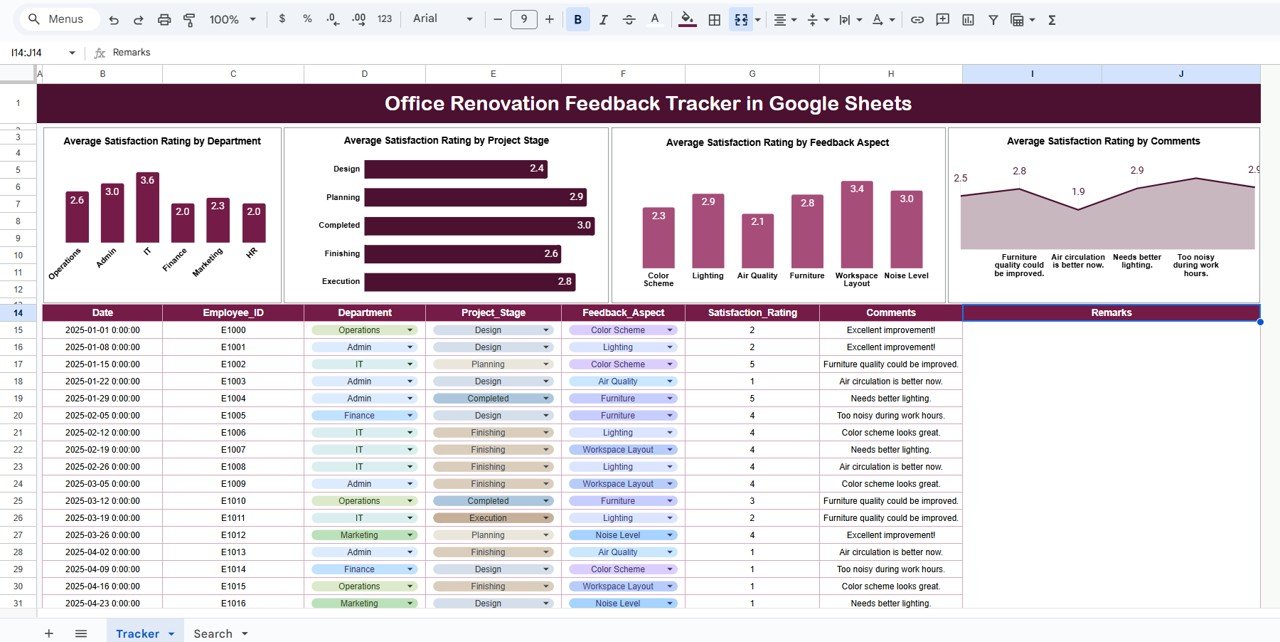
Displays average satisfaction ratings across multiple categories:
-
🏢 By Department: Identify which departments are most or least satisfied.
-
🛠️ By Project Stage: Compare feedback across planning, design, execution, and handover phases.
-
💡 By Feedback Aspect: Analyze satisfaction on comfort, lighting, layout, materials, and noise levels.
-
💬 By Comments Sentiment: Understand whether overall sentiment is positive, neutral, or negative.
-
-
Provides quick visual cues for decision-making using color-coded charts and averages.
🔎 Search Sheet Tab
-
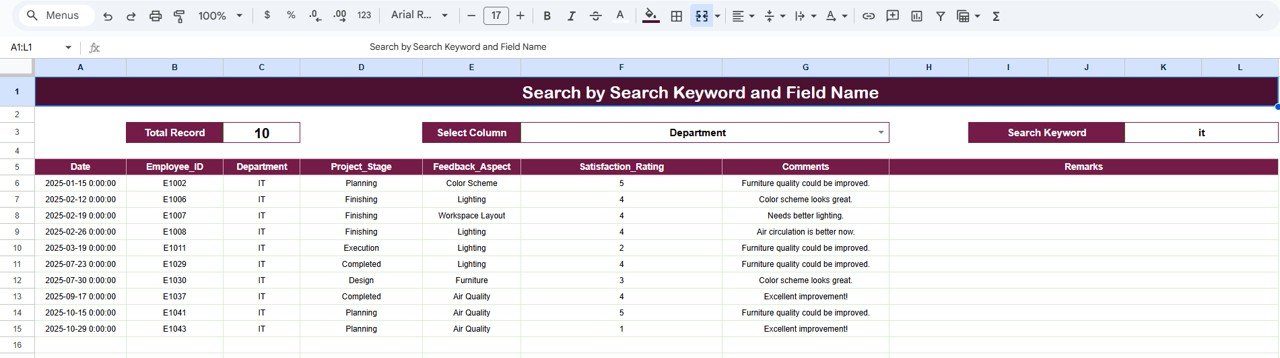
Enables easy lookup of specific feedback records.
-
Search using keywords or field names (e.g., Department, Project Stage, Comment).
-
Helps managers and HR teams find specific insights quickly without scrolling through data manually.
📦 What’s Inside the Feedback Tracker
✅ Google Sheets file with prebuilt automation and chart templates
✅ Dashboard visuals showing satisfaction trends
✅ Smart search system for quick record lookup
✅ Auto-calculated averages and pivot summaries
✅ Editable data structure to match your organization’s setup
✅ Cloud collaboration — accessible by multiple users in real time
✅ No coding or add-ons required
All calculations and visuals are powered by built-in formulas, so you can focus on insights instead of manual analysis. 🧠✨
🧑💼 Who Can Benefit from This Tracker
👩💼 HR Teams: Measure employee sentiment and comfort during renovation.
🏗️ Facility & Project Managers: Evaluate feedback at every project stage.
📈 Operations Leaders: Identify satisfaction gaps and address recurring issues.
💬 Executives & Decision Makers: Gain data-driven insights to improve design and project strategy.
This tracker is perfect for organizations undertaking renovation projects — whether it’s a new office setup, workspace redesign, or expansion.
🧪 How to Use the Office Renovation Feedback Tracker
1️⃣ Collect Feedback: Gather employee feedback manually or via a Google Form and paste it into the data section.
2️⃣ View Analytics: The Tracker Sheet automatically updates averages and visual charts.
3️⃣ Search Efficiently: Use the Search Tab to find specific records using names, departments, or keywords.
4️⃣ Interpret Insights: Identify areas needing attention (e.g., low ratings in design or comfort).
5️⃣ Act and Communicate: Share findings with stakeholders to improve project outcomes.
💡 Pro Tip: Integrate Google Forms for automated feedback collection and set up sentiment analysis using Google Apps Script for deeper insights.
🌟 Why Choose This Tracker
-
Centralized feedback system for complete transparency
-
Automated visuals for effortless reporting
-
Real-time collaboration in Google Sheets
-
Helps identify issues before they escalate
-
Improves decision-making with accurate satisfaction data
-
Fully customizable and reusable for future projects
With the Office Renovation Feedback Tracker in Google Sheets, you can transform employee opinions into actionable insights that drive smarter renovation decisions and enhance workspace satisfaction. 🌟






























Reviews
There are no reviews yet.